<!DOCTYPE html>
    <html lang="vi" xmlns="http://www.w3.org/1999/xhtml" prefix="og: http://ogp.me/ns#">
    <head>
<title>Lỗ hổng mới trong Windows 10 cho phép chiếm quyền admin</title>
<meta name="description" content="Lỗ hổng mới trong Windows 10 cho phép chiếm quyền admin - Savefile - Tin Tức -...">
<meta name="author" content=".: Nguoicodonvn2008.info - Cõi lòng người cô đơn :.">
<meta name="copyright" content=".: Nguoicodonvn2008.info - Cõi lòng người cô đơn :. [admin@nguoicodonvn2008.info]">
<meta name="robots" content="index, archive, follow, noodp">
<meta name="googlebot" content="index,archive,follow,noodp">
<meta name="msnbot" content="all,index,follow">
<meta name="generator" content="NukeViet v4.5">
<meta http-equiv="Content-Type" content="text/html; charset=utf-8">
<meta property="og:title" content="Lỗ hổng mới trong Windows 10 cho phép chiếm quyền admin">
<meta property="og:type" content="website">
<meta property="og:description" content="Savefile - Tin Tức - https&#x3A;&#x002F;&#x002F;www.nguoicodonvn2008.info&#x002F;vi&#x002F;news&#x002F;savefile&#x002F;kien-thuc-may-tinh&#x002F;lo-hong-moi-trong-windows-10-cho-phep-chiem-quyen-admin-4477.html">
<meta property="og:site_name" content=".&#x3A; Nguoicodonvn2008.info - Cõi lòng người cô đơn &#x3A;.">
<meta property="og:url" content="https://www.nguoicodonvn2008.info/vi/news/savefile/kien-thuc-may-tinh/lo-hong-moi-trong-windows-10-cho-phep-chiem-quyen-admin-4477.html">
<link rel="shortcut icon" href="https://nguoicodonvn2008.info/favicon.ico">
<link rel="canonical" href="https://www.nguoicodonvn2008.info/vi/news/savefile/kien-thuc-may-tinh/lo-hong-moi-trong-windows-10-cho-phep-chiem-quyen-admin-4477.html">
<link rel="alternate" href="https://nguoicodonvn2008.info/vi/news/rss/" title="Tin Tức" type="application/rss+xml">
<link rel="alternate" href="https://nguoicodonvn2008.info/vi/news/rss/karaoke-dual/" title="Tin Tức - Karaoke Dual" type="application/rss+xml">
<link rel="alternate" href="https://nguoicodonvn2008.info/vi/news/rss/nhac-tre/" title="Tin Tức - Nhạc trẻ" type="application/rss+xml">
<link rel="alternate" href="https://nguoicodonvn2008.info/vi/news/rss/tru-tinh/" title="Tin Tức - Trữ tình" type="application/rss+xml">
<link rel="alternate" href="https://nguoicodonvn2008.info/vi/news/rss/nuoc-ngoai/" title="Tin Tức - Nước ngoài" type="application/rss+xml">
<link rel="alternate" href="https://nguoicodonvn2008.info/vi/news/rss/remix/" title="Tin Tức - Remix" type="application/rss+xml">
<link rel="alternate" href="https://nguoicodonvn2008.info/vi/news/rss/tam-su-tinh-yeu/" title="Tin Tức - Tâm sự tình yêu" type="application/rss+xml">
<link rel="alternate" href="https://nguoicodonvn2008.info/vi/news/rss/tho-suu-tam/" title="Tin Tức - Thơ sưu tầm" type="application/rss+xml">
<link rel="alternate" href="https://nguoicodonvn2008.info/vi/news/rss/cuoc-song/" title="Tin Tức - Cuộc sống" type="application/rss+xml">
<link rel="alternate" href="https://nguoicodonvn2008.info/vi/news/rss/phan-mem/" title="Tin Tức - Phần mềm" type="application/rss+xml">
<link rel="alternate" href="https://nguoicodonvn2008.info/vi/news/rss/kien-thuc-may-tinh/" title="Tin Tức - Kiến thức máy tính" type="application/rss+xml">
<link rel="alternate" href="https://nguoicodonvn2008.info/vi/news/rss/hoc-tap/" title="Tin Tức - Học tập" type="application/rss+xml">
<link rel="alternate" href="https://nguoicodonvn2008.info/vi/news/rss/tai-lieu/" title="Tin Tức - Tài liệu" type="application/rss+xml">
<link rel="alternate" href="https://nguoicodonvn2008.info/vi/news/rss/de-thi/" title="Tin Tức - Đề thi" type="application/rss+xml">
<link rel="preload" as="style" href="https://nguoicodonvn2008.info/assets/css/font-awesome.min.css" type="text/css">
<link rel="preload" as="style" href="https://nguoicodonvn2008.info/themes/default/css/bootstrap.non-responsive.css" type="text/css">
<link rel="preload" as="style" href="https://nguoicodonvn2008.info/themes/default/css/style.css" type="text/css">
<link rel="preload" as="style" href="https://nguoicodonvn2008.info/themes/default/css/style.non-responsive.css" type="text/css">
<link rel="preload" as="style" href="https://nguoicodonvn2008.info/themes/default/css/news.css" type="text/css">
<link rel="preload" as="style" href="https://nguoicodonvn2008.info/themes/default/css/custom.css" type="text/css">
<link rel="preload" as="script" href="https://nguoicodonvn2008.info/assets/js/jquery/jquery.min.js" type="text/javascript">
<link rel="preload" as="script" href="https://nguoicodonvn2008.info/assets/js/language/vi.js" type="text/javascript">
<link rel="preload" as="script" href="https://nguoicodonvn2008.info/assets/js/DOMPurify/purify3.js" type="text/javascript">
<link rel="preload" as="script" href="https://nguoicodonvn2008.info/assets/js/global.js" type="text/javascript">
<link rel="preload" as="script" href="https://nguoicodonvn2008.info/assets/js/site.js" type="text/javascript">
<link rel="preload" as="script" href="https://nguoicodonvn2008.info/themes/default/js/news.js" type="text/javascript">
<link rel="preload" as="script" href="https://nguoicodonvn2008.info/themes/default/js/main.js" type="text/javascript">
<link rel="preload" as="script" href="https://nguoicodonvn2008.info/themes/default/js/custom.js" type="text/javascript">
<link rel="preload" as="script" href="https://nguoicodonvn2008.info/themes/default/js/bootstrap.min.js" type="text/javascript">
<link rel="stylesheet" href="https://nguoicodonvn2008.info/assets/css/font-awesome.min.css">
<link rel="stylesheet" href="https://nguoicodonvn2008.info/themes/default/css/bootstrap.non-responsive.css">
<link rel="stylesheet" href="https://nguoicodonvn2008.info/themes/default/css/style.css">
<link rel="stylesheet" href="https://nguoicodonvn2008.info/themes/default/css/style.non-responsive.css">
<link rel="StyleSheet" href="https://nguoicodonvn2008.info/themes/default/css/news.css">
<link rel="stylesheet" href="https://nguoicodonvn2008.info/themes/default/css/custom.css">
<style type="text/css">
	body{background: #fff;}
</style>
    </head>
    <body>
<div id="print">
	<div id="hd_print">
		<h2 class="pull-left">.&#x3A; Nguoicodonvn2008.info - Cõi lòng người cô đơn &#x3A;.</h2>
		<p class="pull-right"><a title=".&#x3A; Nguoicodonvn2008.info - Cõi lòng người cô đơn &#x3A;." href="https://nguoicodonvn2008.info/">https://nguoicodonvn2008.info</a></p>
	</div>
	<div class="clear"></div>
	<hr />
	<div id="content">
		<h1>Lỗ hổng mới trong Windows 10 cho phép chiếm quyền admin</h1>
		<ul class="list-inline">
			<li>Thứ năm - 22/07/2021 00:41</li>
			<li class="hidden-print txtrequired"><em class="fa fa-print">&nbsp;</em><a title="In ra" href="javascript:;" onclick="window.print()">In ra</a></li>
			<li class="hidden-print txtrequired"><em class="fa fa-power-off">&nbsp;</em><a title="Đóng cửa sổ này" href="javascript:;" onclick="window.close()">Đóng cửa sổ này</a></li>
		</ul>
		<div class="clear"></div>
		<div id="hometext">
		</div>
				<div class="imghome">
			<img alt="Lỗ hổng mới trong Windows 10 cho phép chiếm quyền admin" src="https://st.quantrimang.com/photos/image/2021/07/21/sam-privileges.jpg" width="460" class="img-thumbnail" />
		</div>
		<div class="clear"></div>
		<div id="bodytext" class="clearfix">
			<p>Windows 10 và&nbsp;Windows 11&nbsp;dễ bị tấn công bởi lỗ hổng leo thang đặc quyền (EoP) cục bộ sau khi phát hiện ra rằng, người dùng đặc quyền thấp có thể truy cập các tệp cơ sở dữ liệu Registry nhạy cảm.</p>

<p>Windows Registry&nbsp;đóng vai trò là kho lưu trữ cấu hình cho hệ điều hành Windows và chứa mật khẩu đã băm (hashed password), tùy chỉnh của người dùng, tùy chọn cấu hình cho ứng dụng, khóa giải mã hệ thống,…</p>
&nbsp;

<p>Các tệp cơ sở dữ liệu được liên kết với Windows Registry lưu trữ trong thư mục&nbsp;<strong>C:\Windows\system32\config</strong>&nbsp;và được chia thành các tệp khác nhau như SYSTEM, SECURITY, SAM, DEFAULT, và SOFTWARE.</p>

<p>Vì những tệp này chứa thông tin nhạy cảm về tất cả tài khoản người dùng trên thiết bị và các token bảo mật được sử dụng bởi những tính năng của Windows, nên người dùng không có đặc quyền nâng cao sẽ không thể tiếp cận chúng.</p>

<p>Điều này đặc biệt đúng đối với Security Account Manager (SAM) vì nó chứa các mật khẩu đã băm cho tất cả người dùng trên một hệ thống, mà các tác nhân đe dọa có thể sử dụng để giả định danh tính của họ.</p>

<p>Ngày 21 tháng 7, Bleeping Computer dẫn lời nhà nghiên cứu bảo mật Jonas Lykkegaard cho hay, ông phát hiện ra rằng các tệp Registry&nbsp;Windows 10&nbsp;và Windows 11 được liên kết với SAM và tất cả các cơ sở dữ liệu Registry, đều có thể truy cập được vào nhóm User có đặc quyền thấp trên thiết bị .</p>
&nbsp;

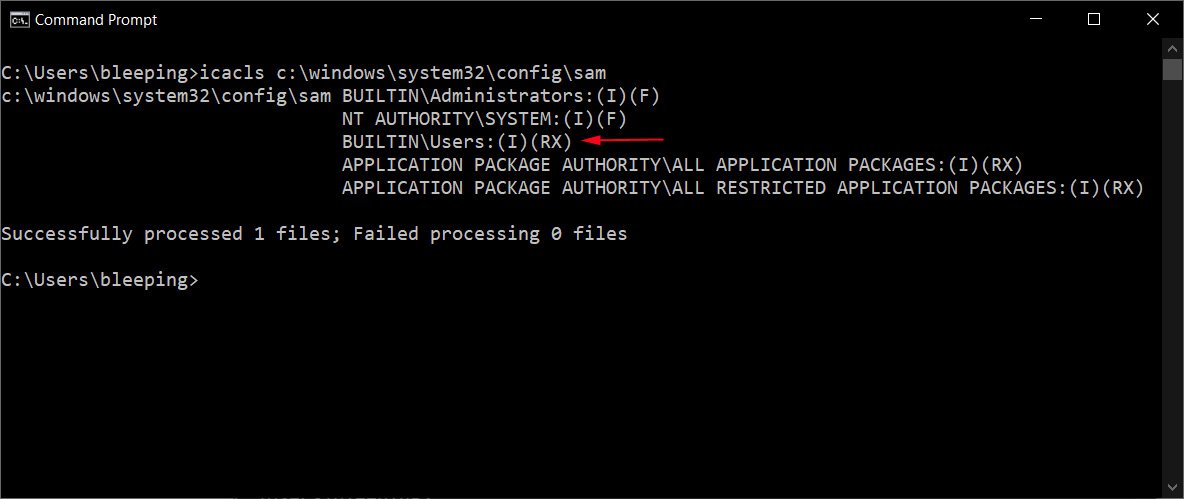
<p>Các quyền thấp này đã được BleepingComputer xác nhận trên máy tính chạy Windows 10 20H2 được vá đầy đủ, như hình dưới đây.</p>

<figure><img alt="Quyền đối với tệp SAM." data-i="0" data-src="https://st.quantrimang.com/photos/image/2021/07/21/sam-privileges.jpg" data-was-processed="true" height="499" src="https://st.quantrimang.com/photos/image/2021/07/21/sam-privileges.jpg" width="1184" />
<figcaption>Quyền đối với tệp SAM.</figcaption>
</figure>

<p>Với các quyền truy cập file ở cấp thấp, tác nhân đe dọa có đặc quyền hạn chế trên thiết bị có thể trích xuất mật khẩu được băm&nbsp;<a href="https://quantrimang.com/mat-khau-windows-co-the-bi-crack-nhu-the-nao-%E2%80%93-phan-1-66625" title="Mật khẩu Windows có thể bị crack như thế nào – Phần 1">NTLM</a>&nbsp;cho tất cả các tài khoản trên thiết bị và sử dụng các hash đó trong các cuộc tấn công pass-the-hash để đạt được các đặc quyền nâng cao.</p>

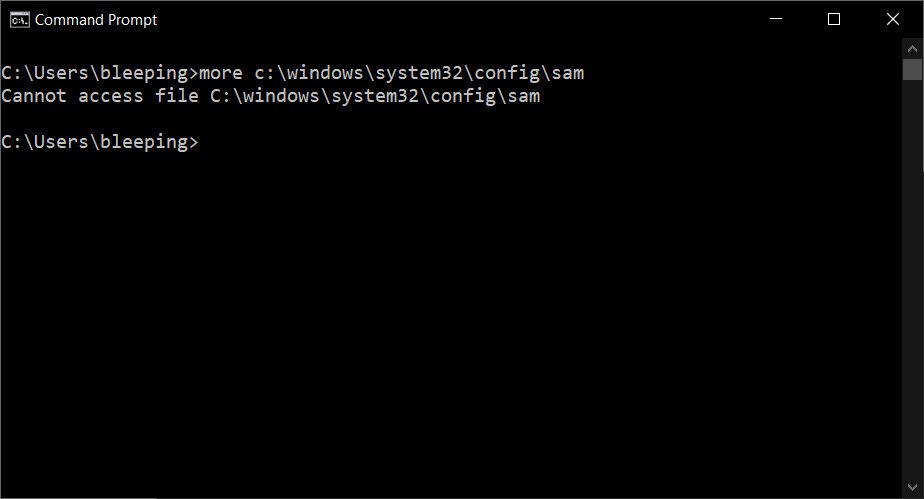
<p>Vì các tệp Registry, chẳng hạn như tệp SAM, luôn được sử dụng bởi hệ điều hành, nên khi bạn cố gắng truy cập tệp, bạn sẽ gặp lỗi vi phạm quyền truy cập vì tệp đang mở và bị khóa bởi chương trình khác.</p>

<figure><img alt="Không thể truy cập vào tệp SAM mở." data-i="1" data-src="https://st.quantrimang.com/photos/image/2021/07/21/sam-access-violation.jpg" data-was-processed="true" height="499" src="https://st.quantrimang.com/photos/image/2021/07/21/sam-access-violation.jpg" width="924" />
<figcaption>Không thể truy cập vào tệp SAM mở.</figcaption>
</figure>

<p>Tuy nhiên, theo Lykkegaard, vì các tệp Registry, bao gồm SAM, thường được sao lưu bằng Shadows Copy, nên bạn có thể truy cập tệp thông qua Shadow Volume mà không vi phạm quyền truy cập.</p>

<p>Ví dụ, các tác nhân đe dọa có thể sử dụng đường dẫn sau đây cho Shadow Volume để truy cập tệp SAM từ bất kỳ người dùng nào trên máy tính.</p>

<pre id="pre0">
<code>\\?\GLOBALROOT\Device\HarddiskVolumeShadowCopy1\Windows\System32\config\SAM</code></pre>

<p>Theo nhà nghiên cứu bảo mật Benjamin Delpy, bạn có thể dễ dàng đánh cắp mật khẩu băm NTLM của tài khoản admin để có được các đặc quyền cao hơn.</p>

<p>Ngoài việc đánh cắp các hàm băm NTLM và nâng cấp đặc quyền, Delpy cho biết quyền truy cập đặc quyền thấp này có thể cho phép các cuộc tấn công tiếp theo, chẳng hạn như các cuộc tấn công Silver Ticket.</p>

<p>Không rõ tại sao Microsoft lại thay đổi quyền trên Registry để cho phép người dùng thông thường đọc các tệp. Tuy nhiên, Will Dormann, nhà phân tích lỗ hổng của CERT/CC và Jeff McJunkin, tác giả của SANS, cho biết Microsoft đã giới thiệu những thay đổi về quyền này trong Windows 10 1809.</p>

<p>Trong một tư vấn bảo mật được công bố ngày hôm nay, Microsoft đã xác nhận lỗ hổng bảo mật và gắn mã theo dõi CVE-2021-36934.</p>

<p>&quot;Chúng tôi đang điều tra và sẽ có hành động thích hợp để bảo vệ khách hàng”, Microsoft chia sẻ.</p>
		</div>
				<div id="author">
						<p>
				<strong>Nguồn tin:</strong>
				Quantrimang.com
			</p>
		</div>
	</div>
	<div id="footer" class="clearfix">
		<div id="url">
			<strong>URL của bản tin này: </strong><a href="https://www.nguoicodonvn2008.info/vi/news/savefile/kien-thuc-may-tinh/lo-hong-moi-trong-windows-10-cho-phep-chiem-quyen-admin-4477.html" title="Lỗ hổng mới trong Windows 10 cho phép chiếm quyền admin">https://www.nguoicodonvn2008.info/vi/news/savefile/kien-thuc-may-tinh/lo-hong-moi-trong-windows-10-cho-phep-chiem-quyen-admin-4477.html</a>

		</div>
		<div class="clear"></div>
		<div class="copyright">
			&copy; .&#x3A; Nguoicodonvn2008.info - Cõi lòng người cô đơn &#x3A;.
		</div>
		<div id="contact">
			<a href="mailto:admin@nguoicodonvn2008.info">admin@nguoicodonvn2008.info</a>
		</div>
	</div>
</div>
        <div id="timeoutsess" class="chromeframe">
            Bạn đã không sử dụng Site, <a onclick="timeoutsesscancel();" href="https://nguoicodonvn2008.info/#">Bấm vào đây để duy trì trạng thái đăng nhập</a>. Thời gian chờ: <span id="secField"> 60 </span> giây
        </div>
        <div id="openidResult" class="nv-alert" style="display:none"></div>
        <div id="openidBt" data-result="" data-redirect=""></div>
		</script>
		<div class="car-top">
  <span><img src="https://nguoicodonvn2008.info/themes/default/images/car.png" alt=""></span>
</div>
<script src="https://nguoicodonvn2008.info/assets/js/jquery/jquery.min.js"></script>
<script>var nv_base_siteurl="/",nv_lang_data="vi",nv_lang_interface="vi",nv_name_variable="nv",nv_fc_variable="op",nv_lang_variable="language",nv_module_name="news",nv_func_name="savefile",nv_is_user=0, nv_my_ofs=-4,nv_my_abbr="EDT",nv_cookie_prefix="nv4c_e856T",nv_check_pass_mstime=1738000,nv_area_admin=0,nv_safemode=0,theme_responsive=0,nv_recaptcha_ver=2,nv_recaptcha_sitekey="",nv_recaptcha_type="image",XSSsanitize=1;</script>
<script src="https://nguoicodonvn2008.info/assets/js/language/vi.js"></script>
<script src="https://nguoicodonvn2008.info/assets/js/DOMPurify/purify3.js"></script>
<script src="https://nguoicodonvn2008.info/assets/js/global.js"></script>
<script src="https://nguoicodonvn2008.info/assets/js/site.js"></script>
<script src="https://nguoicodonvn2008.info/themes/default/js/news.js"></script>
<script src="https://nguoicodonvn2008.info/themes/default/js/main.js"></script>
<script src="https://nguoicodonvn2008.info/themes/default/js/custom.js"></script>
<script type="application/ld+json">
        {
            "@context": "https://schema.org",
            "@type": "Organization",
            "url": "https://nguoicodonvn2008.info",
            "logo": "https://nguoicodonvn2008.info/uploads/angel.gif"
        }
        </script>
<script src="https://nguoicodonvn2008.info/themes/default/js/bootstrap.min.js"></script>
<script type="text/javascript">
var $scrolltop = $('.car-top');
$scrolltop.on('click', function () {
    $('html,body').animate({
        scrollTop: 0
    }, 800);
    $(this).addClass("car-run");
    setTimeout(function(){ $scrolltop.removeClass('car-run');}, 1000);
    return false;
});
$(window).on('scroll', function ()
{ 
    if($(window).scrollTop() >= 200)
    {
        $scrolltop.addClass("show");
        $scrolltop.addClass("car-down");
    }
    else
    {
       $scrolltop.removeClass("show");
       setTimeout(function(){ $scrolltop.removeClass('car-down');}, 300);
    }
});
</script>
</body>
</html>