<!DOCTYPE html>
    <html lang="vi" xmlns="http://www.w3.org/1999/xhtml" prefix="og: http://ogp.me/ns#">
    <head>
<title>Lệnh INSERT trong SQL Server</title>
<meta name="description" content="Lệnh INSERT trong SQL Server - Savefile - Tin Tức - https&#x3A;&#x002F;&#x002F;www.nguoicodonvn2008.info&#x002F;vi&#x002F;news&#x002F;savefile&#x002F;kien-thuc-may-tinh&#x002F;lenh-insert-trong-sql-server-7719.html">
<meta name="author" content=".: Nguoicodonvn2008.info - Cõi lòng người cô đơn :.">
<meta name="copyright" content=".: Nguoicodonvn2008.info - Cõi lòng người cô đơn :. [admin@nguoicodonvn2008.info]">
<meta name="robots" content="index, archive, follow, noodp">
<meta name="googlebot" content="index,archive,follow,noodp">
<meta name="msnbot" content="all,index,follow">
<meta name="generator" content="NukeViet v4.5">
<meta http-equiv="Content-Type" content="text/html; charset=utf-8">
<meta property="og:title" content="Lệnh INSERT trong SQL Server">
<meta property="og:type" content="website">
<meta property="og:description" content="Savefile - Tin Tức - https&#x3A;&#x002F;&#x002F;www.nguoicodonvn2008.info&#x002F;vi&#x002F;news&#x002F;savefile&#x002F;kien-thuc-may-tinh&#x002F;lenh-insert-trong-sql-server-7719.html">
<meta property="og:site_name" content=".&#x3A; Nguoicodonvn2008.info - Cõi lòng người cô đơn &#x3A;.">
<meta property="og:url" content="https://www.nguoicodonvn2008.info/vi/news/savefile/kien-thuc-may-tinh/lenh-insert-trong-sql-server-7719.html">
<link rel="shortcut icon" href="https://nguoicodonvn2008.info/favicon.ico">
<link rel="canonical" href="https://www.nguoicodonvn2008.info/vi/news/savefile/kien-thuc-may-tinh/lenh-insert-trong-sql-server-7719.html">
<link rel="alternate" href="https://nguoicodonvn2008.info/vi/news/rss/" title="Tin Tức" type="application/rss+xml">
<link rel="alternate" href="https://nguoicodonvn2008.info/vi/news/rss/karaoke-dual/" title="Tin Tức - Karaoke Dual" type="application/rss+xml">
<link rel="alternate" href="https://nguoicodonvn2008.info/vi/news/rss/nhac-tre/" title="Tin Tức - Nhạc trẻ" type="application/rss+xml">
<link rel="alternate" href="https://nguoicodonvn2008.info/vi/news/rss/tru-tinh/" title="Tin Tức - Trữ tình" type="application/rss+xml">
<link rel="alternate" href="https://nguoicodonvn2008.info/vi/news/rss/nuoc-ngoai/" title="Tin Tức - Nước ngoài" type="application/rss+xml">
<link rel="alternate" href="https://nguoicodonvn2008.info/vi/news/rss/remix/" title="Tin Tức - Remix" type="application/rss+xml">
<link rel="alternate" href="https://nguoicodonvn2008.info/vi/news/rss/tam-su-tinh-yeu/" title="Tin Tức - Tâm sự tình yêu" type="application/rss+xml">
<link rel="alternate" href="https://nguoicodonvn2008.info/vi/news/rss/tho-suu-tam/" title="Tin Tức - Thơ sưu tầm" type="application/rss+xml">
<link rel="alternate" href="https://nguoicodonvn2008.info/vi/news/rss/cuoc-song/" title="Tin Tức - Cuộc sống" type="application/rss+xml">
<link rel="alternate" href="https://nguoicodonvn2008.info/vi/news/rss/phan-mem/" title="Tin Tức - Phần mềm" type="application/rss+xml">
<link rel="alternate" href="https://nguoicodonvn2008.info/vi/news/rss/kien-thuc-may-tinh/" title="Tin Tức - Kiến thức máy tính" type="application/rss+xml">
<link rel="alternate" href="https://nguoicodonvn2008.info/vi/news/rss/hoc-tap/" title="Tin Tức - Học tập" type="application/rss+xml">
<link rel="alternate" href="https://nguoicodonvn2008.info/vi/news/rss/tai-lieu/" title="Tin Tức - Tài liệu" type="application/rss+xml">
<link rel="alternate" href="https://nguoicodonvn2008.info/vi/news/rss/de-thi/" title="Tin Tức - Đề thi" type="application/rss+xml">
<link rel="preload" as="style" href="https://nguoicodonvn2008.info/assets/css/font-awesome.min.css" type="text/css">
<link rel="preload" as="style" href="https://nguoicodonvn2008.info/themes/default/css/bootstrap.non-responsive.css" type="text/css">
<link rel="preload" as="style" href="https://nguoicodonvn2008.info/themes/default/css/style.css" type="text/css">
<link rel="preload" as="style" href="https://nguoicodonvn2008.info/themes/default/css/style.non-responsive.css" type="text/css">
<link rel="preload" as="style" href="https://nguoicodonvn2008.info/themes/default/css/news.css" type="text/css">
<link rel="preload" as="style" href="https://nguoicodonvn2008.info/themes/default/css/custom.css" type="text/css">
<link rel="preload" as="script" href="https://nguoicodonvn2008.info/assets/js/jquery/jquery.min.js" type="text/javascript">
<link rel="preload" as="script" href="https://nguoicodonvn2008.info/assets/js/language/vi.js" type="text/javascript">
<link rel="preload" as="script" href="https://nguoicodonvn2008.info/assets/js/DOMPurify/purify3.js" type="text/javascript">
<link rel="preload" as="script" href="https://nguoicodonvn2008.info/assets/js/global.js" type="text/javascript">
<link rel="preload" as="script" href="https://nguoicodonvn2008.info/assets/js/site.js" type="text/javascript">
<link rel="preload" as="script" href="https://nguoicodonvn2008.info/themes/default/js/news.js" type="text/javascript">
<link rel="preload" as="script" href="https://nguoicodonvn2008.info/themes/default/js/main.js" type="text/javascript">
<link rel="preload" as="script" href="https://nguoicodonvn2008.info/themes/default/js/custom.js" type="text/javascript">
<link rel="preload" as="script" href="https://nguoicodonvn2008.info/themes/default/js/bootstrap.min.js" type="text/javascript">
<link rel="stylesheet" href="https://nguoicodonvn2008.info/assets/css/font-awesome.min.css">
<link rel="stylesheet" href="https://nguoicodonvn2008.info/themes/default/css/bootstrap.non-responsive.css">
<link rel="stylesheet" href="https://nguoicodonvn2008.info/themes/default/css/style.css">
<link rel="stylesheet" href="https://nguoicodonvn2008.info/themes/default/css/style.non-responsive.css">
<link rel="StyleSheet" href="https://nguoicodonvn2008.info/themes/default/css/news.css">
<link rel="stylesheet" href="https://nguoicodonvn2008.info/themes/default/css/custom.css">
<style type="text/css">
	body{background: #fff;}
</style>
    </head>
    <body>
<div id="print">
	<div id="hd_print">
		<h2 class="pull-left">.&#x3A; Nguoicodonvn2008.info - Cõi lòng người cô đơn &#x3A;.</h2>
		<p class="pull-right"><a title=".&#x3A; Nguoicodonvn2008.info - Cõi lòng người cô đơn &#x3A;." href="https://nguoicodonvn2008.info/">https://nguoicodonvn2008.info</a></p>
	</div>
	<div class="clear"></div>
	<hr />
	<div id="content">
		<h1>Lệnh INSERT trong SQL Server</h1>
		<ul class="list-inline">
			<li>Thứ sáu - 03/11/2023 09:50</li>
			<li class="hidden-print txtrequired"><em class="fa fa-print">&nbsp;</em><a title="In ra" href="javascript:;" onclick="window.print()">In ra</a></li>
			<li class="hidden-print txtrequired"><em class="fa fa-power-off">&nbsp;</em><a title="Đóng cửa sổ này" href="javascript:;" onclick="window.close()">Đóng cửa sổ này</a></li>
		</ul>
		<div class="clear"></div>
		<div id="hometext">
		</div>
				<div class="imghome">
			<img alt="Lệnh INSERT trong SQL Server" src="https://st.quantrimang.com/photos/image/2018/03/31/ms-sql-server-alter-table-size-80x80-znd.jpg" width="460" class="img-thumbnail" />
		</div>
		<div class="clear"></div>
		<div id="bodytext" class="clearfix">
			<p style="text-align: justify;"><strong>INSERT INTO SQL Server</strong>&nbsp;là một lệnh được dùng khá phổ biến. Bài viết sẽ cung cấp cho bạn mọi kiến thức cần biết về&nbsp;<strong>cách dùng INSERT trong SQL Server</strong>.</p>

<p style="text-align: justify;">Lập trình là một môn học khó, đòi hỏi tư duy logic và sáng tạo tốt để có thể tạo ra những phần mềm, chương trình hữu ích cho người dùng. Thế giới lập trình vô cùng đa dạng và phong phú với nhiều kiểu ngôn ngữ khác nhau, từ Python, CSS, JavaScript... SQL Server cũng là một phần của lập trình mà bạn không thể bỏ qua nếu muốn phát triển sự nghiệp trong lĩnh vực này.</p>

<p style="text-align: justify;">SQL Server giống như các ngôn ngữ lập trình, nó cũng bao gồm nhiều lệnh mà bạn cần phải nắm được nếu muốn sử dụng nó thành thạo. Ở bài viết này, chúng ta hãy cùng nhau tìm hiểu về lệnh INSERT trong SQL Server.</p>

<p style="text-align: justify;">Lệnh INSERT SQL Server được dùng để thêm các hàng dữ liệu mới vào bảng trong database. Lệnh INSERT sẽ chỉ chấp nhận dữ liệu theo sau tất cả thuộc tính của cột trong một bảng. Dữ liệu được chèn vào bảng phải có cùng kiểu dữ liệu, đáp ứng các điều kiện (nếu có). Nếu dữ liệu được chèn không đáp ứng thuộc tính nào đó, lệnh INSERT sẽ báo lỗi.</p>

<p style="text-align: justify;">Cách dùng lệnh INSERT trong&nbsp;SQL Server&nbsp;không khó. Dưới đây là những điều bạn cần biết về INSERT.</p>

<h3 style="text-align: justify;">Cú pháp lệnh INSERT</h3>

<p style="text-align: justify;"><strong>Chèn một bản ghi</strong></p>

<p style="text-align: justify;">Ở dạng đơn giản nhất, cú pháp lệnh INSERT chèn một bản ghi bằng từ khóa VALUES</p>

<pre id="pre0" style="text-align: justify;">
INSERT INTO bang
(cot1, cot2, …)
VALUES
(bieuthuc1, bieuthuc2, …),
... ;</pre>

<p style="text-align: justify;">Cú pháp đầy đủ của lệnh INSERT chèn một bản ghi dùng từ khóa VALUES</p>

<pre id="pre1" style="text-align: justify;">
INSERT INTO bang
(cot1, cot2, …)
VALUES
( DEFAULT | NULL | bieuthuc1,
DEFAULT | NULL | bieuthuc2,
…
);</pre>

<div style="text-align: justify;"><iframe allowtransparency="true" data-google-container-id="a!2" data-google-query-id="CJGw89L8p4IDFV_CFgUdfJQEew" data-load-complete="true" frameborder="0" height="0" hspace="0" id="aswift_1" marginheight="0" marginwidth="0" name="aswift_1" sandbox="" scrolling="no" vspace="0" width="694"></iframe></div>

<p style="text-align: justify;">Hoặc cú pháp chèn một bản ghi dùng từ khóa DEFAULT VALUES</p>

<pre id="pre2" style="text-align: justify;">
INSERT INTO bang
(cot1, cot2, …)
DEFAULT VALUES;</pre>

<p style="text-align: justify;"><strong>Chèn nhiều bản ghi</strong></p>

<p style="text-align: justify;">Ở dạng đơn giản nhất, cú pháp chèn nhiều bản ghi bằng sub-select</p>

<pre id="pre3" style="text-align: justify;">
INSERT INTO bang(cot1, cot2, …)SELECT bieuthuc1, bieuthuc2, …FROM bang_nguon&#91;WHERE dieukien&#93;;</pre>

<p style="text-align: justify;">Cú pháp đầy đủ để chèn nhiều bàn ghi bằng sub-select</p>

<pre id="pre4" style="text-align: justify;">
INSERT &#91; TOP (giatri_dau) &#91;PERCENT&#93; &#93;INTO bang (cot1, cot2, …)SELECT bieuthuc1, bieuthuc2, …FROM bang_nguon&#91;WHERE dieukien&#93;;</pre>

<h3 style="text-align: justify;">Tên biến hoặc giá trị biến</h3>

<p style="text-align: justify;"><strong>bang</strong></p>

<p style="text-align: justify;">Bảng để chèn bản ghi vào.</p>

<p style="text-align: justify;"><strong>cot1, cot2</strong></p>

<p style="text-align: justify;">Các cột trong bảng để chèn giá trị</p>

<p style="text-align: justify;"><strong>bieuthuc1, bieuthuc2</strong></p>

<p style="text-align: justify;">Giá trị để chỉ định vào cột trong bảng. cot1 sẽ được chỉ định giá trị của bieuthuc1, cot2 sẽ được chỉ định giá trị của bieuthuc2…</p>

<p style="text-align: justify;"><strong>TOP (giatri_dau)</strong></p>

<p style="text-align: justify;">Tùy chọn. Nếu được nêu ra cụ thể sẽ chèn giá trị đầu của hàng dựa trên giatri_dau. Ví dụ TOP(10) sẽ chèn 10 hàng đầu tiên từ bộ kết quả.</p>

<p style="text-align: justify;"><strong>PERCENT</strong></p>

<p style="text-align: justify;">Tùy chọn. Nếu được nêu ra cụ thể thì các hàng đầu tiên dựa trên số phần trăm giatri_dau của bộ kết quả. Ví dụ như TOP(10) PERCENT sẽ chèn 10% giá trị đầu trong bộ kết quả.</p>

<p style="text-align: justify;"><strong>bang_nguon</strong></p>

<p style="text-align: justify;">Bảng nguồn (bảng gốc) để chèn dữ liệu vào từ bảng khác.</p>

<p style="text-align: justify;"><strong>WHERE dieukien</strong></p>

<p style="text-align: justify;">Tùy chọn. Các điều kiện phái được đáp ứng để bản ghi được chèn vào.</p>

<p style="text-align: justify;"><strong>Lưu ý</strong></p>

<ul>
	<li style="text-align: justify;">Khi chèn bản ghi vào bảng bằng lệnh INSERT, bạn phải cung cấp giá trị cho các cột&nbsp;NOT NULL.</li>
	<li style="text-align: justify;">Bạn có thể bỏ cột từ lệnh INSERT nếu cột cho phép giá trị&nbsp;NULL.</li>
</ul>

<p style="text-align: justify;"><strong>Ví dụ - dùng từ khóa VALUES</strong></p>

<pre id="pre5" style="text-align: justify;">
INSERT INTO nhanvien(nhanvien_id, ten, ho) VALUE (10, ‘Anderson’, ‘Sarah’);</pre>

<p style="text-align: justify;">Lệnh INSERT này sẽ cho kết quả là 1 bản ghi được chèn vào bảng nhanvien. Bản ghi này phải có nhanvien_id là 10, họ là Anderson và tên là Sarah.</p>

<p style="text-align: justify;">Cú pháp này có thể được dùng để chèn nhiều hơn 1 bản ghi 1 lúc. Ví dụ như:</p>

<pre id="pre6" style="text-align: justify;">
INSERT INTO nhanvien(nhanvien_id, ho, ten)VALUES (19, ‘Anderson’, ‘Sarah’),(11, ‘Johnson’, ‘Dale’);</pre>

<p style="text-align: justify;">Ví dụ lệnh INSERT nói trên cho thấy có thể chèn nhiều hơn 1 bản ghi bằng từ khóa VALUES. Ở ví dụ này, 2 bản ghi được chèn vào bảng nhanvien. Bản ghi đầu tiên có nhanvien_id là 10, họ là Anderson và tên là Sarah. Bản ghi thứ 2 có nhanvien_id là 11, họ là Johnson và tên là Dale.</p>

<div style="text-align: justify;"><iframe allowtransparency="true" data-google-container-id="a!3" data-google-query-id="CNKrpdP8p4IDFW_DFgUdf90K-A" data-load-complete="true" frameborder="0" height="0" hspace="0" id="aswift_2" marginheight="0" marginwidth="0" name="aswift_2" sandbox="" scrolling="no" vspace="0" width="694"></iframe></div>

<p style="text-align: justify;">Lệnh trên tương đương với các lệnh INSERT dưới đây.</p>

<pre id="pre7" style="text-align: justify;">
INSERT INTO nhanvien(nhanvien_id, ho, ten)VALUES(10, ‘Anderson’, ‘Sarah’);</pre>

<pre id="pre8" style="text-align: justify;">
INSERT INTO nhanvien(nhanvien_id, ho, ten)VALUES (11, ‘Johnson’, ‘Dale’);</pre>

<p style="text-align: justify;"><strong>Ví dụ - dùng từ khóa DEFAULT VALUES</strong></p>

<pre id="pre9" style="text-align: justify;">
INSERT INTO nhanvien(nhanvien_id, ho, ten)DEFAULT VALUES;</pre>

<p style="text-align: justify;">Lệnh INSERT này sẽ chèn 1 bản ghi vào bảng nhanvien. Bản ghi mới được tạo bằng giá trị mặc định cho các trường thông tin ID, họ và tên của nhân viên.</p>

<p style="text-align: justify;"><strong>Ví dụ - dùng lệnh SELECT</strong></p>

<p style="text-align: justify;">Có thể tạo lệnh INSERT phức tạp hơn bằng lệnh&nbsp;SELECT&nbsp;như dưới đây.</p>

<pre id="pre10" style="text-align: justify;">
INSERT INTO danhba(danhba_id, ho, ten)SELECT nhanvien_id, ho, tenFROM nhanvienWHERE nhanvien_id &lt;= 100;</pre>

<p style="text-align: justify;">Bằng cách đặt lệnh SELECT vào trong lệnh INSERT, bạn có thể thực hiện nhiều lần chèn nhanh hơn.</p>

<p style="text-align: justify;">Với kiểu chèn này, bạn có thể sẽ muốn kiểm tra số hàng được chèn, xác định số hàng được chèn bằng cách chạy lệnh SELECT trước khi chèn.</p>

<pre id="pre11" style="text-align: justify;">
SELECT count (*)FROM nhanvienWHERE nhanvien_id &lt;= 100;</pre>

<h2 style="text-align: justify;">Cách chèn và trả về những giá trị được chèn</h2>

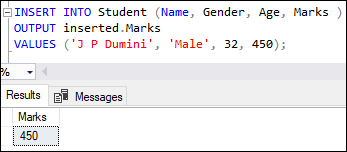
<p style="text-align: justify;">SQL Server cung cấp lệnh OUTPUT để ghi lại các giá trị được chèn vào một bảng nhất định. Bạn có thể hiểu sâu hơn khái niệm này bằng cách dùng lệnh dưới đây để chèn một bản ghi mới vào bảng Student và trả về giá trị đã chèn của cột Marks:</p>

<pre id="pre12" style="text-align: justify;">
INSERT INTO Student (Name, Gender, Age, Marks )
OUTPUT inserted.Marks
VALUES (&#039;J P Dumini&#039;, &#039;Male&#039;, 32, 450);</pre>

<p style="text-align: justify;">Đây là kết quả:</p>

<p style="text-align: justify;"><img alt="" data-i="0" data-src="https://st.quantrimang.com/photos/image/2023/11/03/sql-server-insert-data5.png" data-was-processed="true" height="152" src="https://st.quantrimang.com/photos/image/2023/11/03/sql-server-insert-data5.png" width="347" /></p>

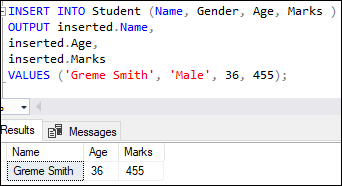
<p style="text-align: justify;">Nếu muốn ghi lại những giá trị đã chèn từ nhiều cột, bạn cần xác định các cột đó trong kết quả như sau:</p>

<pre id="pre13" style="text-align: justify;">
INSERT INTO Student (Name, Gender, Age, Marks )
OUTPUT inserted.Name,
inserted.Age,
inserted.Marks
VALUES (&#039;Greme Smith&#039;, &#039;Male&#039;, 36, 455);</pre>

<p style="text-align: justify;">Kết quả:</p>

<p style="text-align: justify;">&nbsp;</p>

<div style="text-align: justify;"><img alt="" data-adbro-processed="true" data-i="1" data-src="https://st.quantrimang.com/photos/image/2023/11/03/sql-server-insert-data6.png" data-was-processed="true" height="186" src="https://st.quantrimang.com/photos/image/2023/11/03/sql-server-insert-data6.png" width="342" /></div>

<p style="text-align: justify;">Về cơ bản, cách dùng lệnh INSERT trong SQL Server không khó. Bạn chỉ cần nắm được những kiến thức cơ bản trên là có thể sử dụng nó dễ dàng. Nhớ rằng việc chèn dữ liệu chính xác trong lập trình rất quan trọng. Vì thế, đừng bỏ qua lệnh INSERT của SQL Server nhé!</p>
		</div>
				<div id="author">
						<p>
				<strong>Nguồn tin:</strong>
				Quantrimang.com
			</p>
		</div>
	</div>
	<div id="footer" class="clearfix">
		<div id="url">
			<strong>URL của bản tin này: </strong><a href="https://www.nguoicodonvn2008.info/vi/news/savefile/kien-thuc-may-tinh/lenh-insert-trong-sql-server-7719.html" title="Lệnh INSERT trong SQL Server">https://www.nguoicodonvn2008.info/vi/news/savefile/kien-thuc-may-tinh/lenh-insert-trong-sql-server-7719.html</a>

		</div>
		<div class="clear"></div>
		<div class="copyright">
			&copy; .&#x3A; Nguoicodonvn2008.info - Cõi lòng người cô đơn &#x3A;.
		</div>
		<div id="contact">
			<a href="mailto:admin@nguoicodonvn2008.info">admin@nguoicodonvn2008.info</a>
		</div>
	</div>
</div>
        <div id="timeoutsess" class="chromeframe">
            Bạn đã không sử dụng Site, <a onclick="timeoutsesscancel();" href="https://nguoicodonvn2008.info/#">Bấm vào đây để duy trì trạng thái đăng nhập</a>. Thời gian chờ: <span id="secField"> 60 </span> giây
        </div>
        <div id="openidResult" class="nv-alert" style="display:none"></div>
        <div id="openidBt" data-result="" data-redirect=""></div>
		</script>
		<div class="car-top">
  <span><img src="https://nguoicodonvn2008.info/themes/default/images/car.png" alt=""></span>
</div>
<script src="https://nguoicodonvn2008.info/assets/js/jquery/jquery.min.js"></script>
<script>var nv_base_siteurl="/",nv_lang_data="vi",nv_lang_interface="vi",nv_name_variable="nv",nv_fc_variable="op",nv_lang_variable="language",nv_module_name="news",nv_func_name="savefile",nv_is_user=0, nv_my_ofs=-4,nv_my_abbr="EDT",nv_cookie_prefix="nv4c_e856T",nv_check_pass_mstime=1738000,nv_area_admin=0,nv_safemode=0,theme_responsive=0,nv_recaptcha_ver=2,nv_recaptcha_sitekey="",nv_recaptcha_type="image",XSSsanitize=1;</script>
<script src="https://nguoicodonvn2008.info/assets/js/language/vi.js"></script>
<script src="https://nguoicodonvn2008.info/assets/js/DOMPurify/purify3.js"></script>
<script src="https://nguoicodonvn2008.info/assets/js/global.js"></script>
<script src="https://nguoicodonvn2008.info/assets/js/site.js"></script>
<script src="https://nguoicodonvn2008.info/themes/default/js/news.js"></script>
<script src="https://nguoicodonvn2008.info/themes/default/js/main.js"></script>
<script src="https://nguoicodonvn2008.info/themes/default/js/custom.js"></script>
<script type="application/ld+json">
        {
            "@context": "https://schema.org",
            "@type": "Organization",
            "url": "https://nguoicodonvn2008.info",
            "logo": "https://nguoicodonvn2008.info/uploads/angel.gif"
        }
        </script>
<script src="https://nguoicodonvn2008.info/themes/default/js/bootstrap.min.js"></script>
<script type="text/javascript">
var $scrolltop = $('.car-top');
$scrolltop.on('click', function () {
    $('html,body').animate({
        scrollTop: 0
    }, 800);
    $(this).addClass("car-run");
    setTimeout(function(){ $scrolltop.removeClass('car-run');}, 1000);
    return false;
});
$(window).on('scroll', function ()
{ 
    if($(window).scrollTop() >= 200)
    {
        $scrolltop.addClass("show");
        $scrolltop.addClass("car-down");
    }
    else
    {
       $scrolltop.removeClass("show");
       setTimeout(function(){ $scrolltop.removeClass('car-down');}, 300);
    }
});
</script>
</body>
</html>