<!DOCTYPE html>
    <html lang="vi" xmlns="http://www.w3.org/1999/xhtml" prefix="og: http://ogp.me/ns#">
    <head>
<title>Khởi động System Restore từ Command Prompt</title>
<meta name="description" content="Khởi động System Restore từ Command Prompt - Savefile - Tin Tức -...">
<meta name="author" content=".: Nguoicodonvn2008.info - Cõi lòng người cô đơn :.">
<meta name="copyright" content=".: Nguoicodonvn2008.info - Cõi lòng người cô đơn :. [admin@nguoicodonvn2008.info]">
<meta name="robots" content="index, archive, follow, noodp">
<meta name="googlebot" content="index,archive,follow,noodp">
<meta name="msnbot" content="all,index,follow">
<meta name="generator" content="NukeViet v4.5">
<meta http-equiv="Content-Type" content="text/html; charset=utf-8">
<meta property="og:title" content="Khởi động System Restore từ Command Prompt">
<meta property="og:type" content="website">
<meta property="og:description" content="Savefile - Tin Tức - https&#x3A;&#x002F;&#x002F;www.nguoicodonvn2008.info&#x002F;vi&#x002F;news&#x002F;savefile&#x002F;kien-thuc-may-tinh&#x002F;khoi-dong-system-restore-tu-command-prompt-1707.html">
<meta property="og:site_name" content=".&#x3A; Nguoicodonvn2008.info - Cõi lòng người cô đơn &#x3A;.">
<meta property="og:url" content="https://www.nguoicodonvn2008.info/vi/news/savefile/kien-thuc-may-tinh/khoi-dong-system-restore-tu-command-prompt-1707.html">
<link rel="shortcut icon" href="https://nguoicodonvn2008.info/favicon.ico">
<link rel="canonical" href="https://www.nguoicodonvn2008.info/vi/news/savefile/kien-thuc-may-tinh/khoi-dong-system-restore-tu-command-prompt-1707.html">
<link rel="alternate" href="https://nguoicodonvn2008.info/vi/news/rss/" title="Tin Tức" type="application/rss+xml">
<link rel="alternate" href="https://nguoicodonvn2008.info/vi/news/rss/karaoke-dual/" title="Tin Tức - Karaoke Dual" type="application/rss+xml">
<link rel="alternate" href="https://nguoicodonvn2008.info/vi/news/rss/nhac-tre/" title="Tin Tức - Nhạc trẻ" type="application/rss+xml">
<link rel="alternate" href="https://nguoicodonvn2008.info/vi/news/rss/tru-tinh/" title="Tin Tức - Trữ tình" type="application/rss+xml">
<link rel="alternate" href="https://nguoicodonvn2008.info/vi/news/rss/nuoc-ngoai/" title="Tin Tức - Nước ngoài" type="application/rss+xml">
<link rel="alternate" href="https://nguoicodonvn2008.info/vi/news/rss/remix/" title="Tin Tức - Remix" type="application/rss+xml">
<link rel="alternate" href="https://nguoicodonvn2008.info/vi/news/rss/tam-su-tinh-yeu/" title="Tin Tức - Tâm sự tình yêu" type="application/rss+xml">
<link rel="alternate" href="https://nguoicodonvn2008.info/vi/news/rss/tho-suu-tam/" title="Tin Tức - Thơ sưu tầm" type="application/rss+xml">
<link rel="alternate" href="https://nguoicodonvn2008.info/vi/news/rss/cuoc-song/" title="Tin Tức - Cuộc sống" type="application/rss+xml">
<link rel="alternate" href="https://nguoicodonvn2008.info/vi/news/rss/phan-mem/" title="Tin Tức - Phần mềm" type="application/rss+xml">
<link rel="alternate" href="https://nguoicodonvn2008.info/vi/news/rss/kien-thuc-may-tinh/" title="Tin Tức - Kiến thức máy tính" type="application/rss+xml">
<link rel="alternate" href="https://nguoicodonvn2008.info/vi/news/rss/hoc-tap/" title="Tin Tức - Học tập" type="application/rss+xml">
<link rel="alternate" href="https://nguoicodonvn2008.info/vi/news/rss/tai-lieu/" title="Tin Tức - Tài liệu" type="application/rss+xml">
<link rel="alternate" href="https://nguoicodonvn2008.info/vi/news/rss/de-thi/" title="Tin Tức - Đề thi" type="application/rss+xml">
<link rel="preload" as="style" href="https://nguoicodonvn2008.info/assets/css/font-awesome.min.css" type="text/css">
<link rel="preload" as="style" href="https://nguoicodonvn2008.info/themes/default/css/bootstrap.non-responsive.css" type="text/css">
<link rel="preload" as="style" href="https://nguoicodonvn2008.info/themes/default/css/style.css" type="text/css">
<link rel="preload" as="style" href="https://nguoicodonvn2008.info/themes/default/css/style.non-responsive.css" type="text/css">
<link rel="preload" as="style" href="https://nguoicodonvn2008.info/themes/default/css/news.css" type="text/css">
<link rel="preload" as="style" href="https://nguoicodonvn2008.info/themes/default/css/custom.css" type="text/css">
<link rel="preload" as="script" href="https://nguoicodonvn2008.info/assets/js/jquery/jquery.min.js" type="text/javascript">
<link rel="preload" as="script" href="https://nguoicodonvn2008.info/assets/js/language/vi.js" type="text/javascript">
<link rel="preload" as="script" href="https://nguoicodonvn2008.info/assets/js/DOMPurify/purify3.js" type="text/javascript">
<link rel="preload" as="script" href="https://nguoicodonvn2008.info/assets/js/global.js" type="text/javascript">
<link rel="preload" as="script" href="https://nguoicodonvn2008.info/assets/js/site.js" type="text/javascript">
<link rel="preload" as="script" href="https://nguoicodonvn2008.info/themes/default/js/news.js" type="text/javascript">
<link rel="preload" as="script" href="https://nguoicodonvn2008.info/themes/default/js/main.js" type="text/javascript">
<link rel="preload" as="script" href="https://nguoicodonvn2008.info/themes/default/js/custom.js" type="text/javascript">
<link rel="preload" as="script" href="https://nguoicodonvn2008.info/themes/default/js/bootstrap.min.js" type="text/javascript">
<link rel="stylesheet" href="https://nguoicodonvn2008.info/assets/css/font-awesome.min.css">
<link rel="stylesheet" href="https://nguoicodonvn2008.info/themes/default/css/bootstrap.non-responsive.css">
<link rel="stylesheet" href="https://nguoicodonvn2008.info/themes/default/css/style.css">
<link rel="stylesheet" href="https://nguoicodonvn2008.info/themes/default/css/style.non-responsive.css">
<link rel="StyleSheet" href="https://nguoicodonvn2008.info/themes/default/css/news.css">
<link rel="stylesheet" href="https://nguoicodonvn2008.info/themes/default/css/custom.css">
<style type="text/css">
	body{background: #fff;}
</style>
    </head>
    <body>
<div id="print">
	<div id="hd_print">
		<h2 class="pull-left">.&#x3A; Nguoicodonvn2008.info - Cõi lòng người cô đơn &#x3A;.</h2>
		<p class="pull-right"><a title=".&#x3A; Nguoicodonvn2008.info - Cõi lòng người cô đơn &#x3A;." href="https://nguoicodonvn2008.info/">https://nguoicodonvn2008.info</a></p>
	</div>
	<div class="clear"></div>
	<hr />
	<div id="content">
		<h1>Khởi động System Restore từ Command Prompt</h1>
		<ul class="list-inline">
			<li>Thứ sáu - 21/02/2020 23:56</li>
			<li class="hidden-print txtrequired"><em class="fa fa-print">&nbsp;</em><a title="In ra" href="javascript:;" onclick="window.print()">In ra</a></li>
			<li class="hidden-print txtrequired"><em class="fa fa-power-off">&nbsp;</em><a title="Đóng cửa sổ này" href="javascript:;" onclick="window.close()">Đóng cửa sổ này</a></li>
		</ul>
		<div class="clear"></div>
		<div id="hometext">
		</div>
				<div class="imghome">
			<img alt="Khởi động System Restore từ Command Prompt" src="https://st.quantrimang.com/photos/image/2020/02/21/khoi-dong-system-restore-tu-command-prompt-2.jpg" width="460" class="img-thumbnail" />
		</div>
		<div class="clear"></div>
		<div id="bodytext" class="clearfix">
			<p style="text-align: justify;">System Restore là một tiện ích tuyệt vời giúp &quot;khôi phục&quot; Windows về trạng thái trước đó, hoàn tác mọi thay đổi hệ thống có thể gây ra sự cố.</p>

<p style="text-align: justify;">Tuy nhiên, đôi khi, một sự cố nghiêm trọng khiến máy tính không khởi động bình thường, có nghĩa là bạn không thể chạy System Restore từ bên trong Windows. Vì System Restore là một công cụ tuyệt vời để để khắc phục các sự cố như thế này, nên có vẻ như bạn đang gặp khó khăn.</p>

<p style="text-align: justify;">May mắn thay, ngay cả khi tất cả những gì bạn có thể làm là&nbsp;khởi động ở Safe Mode&nbsp;và truy cập&nbsp;Command Prompt, bạn có thể khởi động tiện ích System Restore bằng cách thực hiện một lệnh đơn giản. Ngay cả khi bạn chỉ đang tìm kiếm một cách nhanh chóng để khởi động System Restore từ hộp thoại&nbsp;<strong>Run</strong>, bài viết này cũng có thể hữu ích.</p>

<p style="text-align: justify;"><strong>Lưu ý</strong>: Lệnh System Restore giống nhau trong tất cả các phiên bản Windows, vì vậy những hướng dẫn dễ dàng này áp dụng tương tự cho Windows 10, Windows 8, Windows 7, Windows Vista và Windows XP:</p>

<h2 style="text-align: justify;">Cách khởi động System Restore từ Command Prompt</h2>

<p style="text-align: justify;">Bạn sẽ mất chưa đến 1 phút để thực thi lệnh System Restore và tổng cộng chưa đến 30 phút để toàn bộ quá trình hoàn tất.</p>

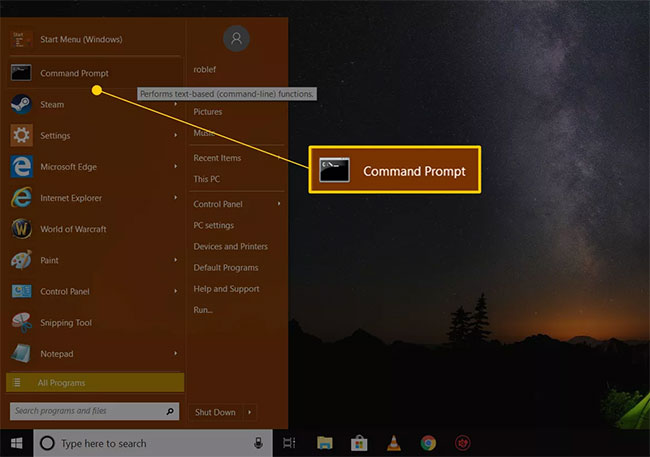
<p style="text-align: justify;">1.&nbsp;Mở Command Prompt, nếu nó chưa mở.</p>

<figure>
<div style="text-align: justify;"><img alt="Mở Command Prompt" data-i="0" data-src="https://st.quantrimang.com/photos/image/2020/02/21/khoi-dong-system-restore-tu-command-prompt-1.jpg" data-was-processed="true" height="457" src="https://st.quantrimang.com/photos/image/2020/02/21/khoi-dong-system-restore-tu-command-prompt-1.jpg" width="650" /></div>

<figcaption>
<div style="text-align: justify;">Mở Command Prompt</div>
</figcaption>
</figure>

<p style="text-align: justify;"><strong>Lưu ý</strong>: Như đã nói ở trên, bạn phải sẵn sàng sử dụng một công cụ dòng lệnh khác, như hộp Run, để thực thi lệnh System Restore. Trong Windows 10 và Windows 8, mở&nbsp;<strong>Run</strong>&nbsp;từ menu Start hoặc Power User Menu. Trong Windows 7 và Windows Vista, chọn nút&nbsp;<strong>Start.</strong>&nbsp;Trong Windows XP trở về trước, chọn&nbsp;<strong>Run</strong>&nbsp;từ menu Start.</p>

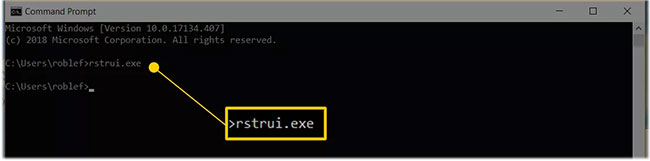
<p style="text-align: justify;">2. Nhập lệnh sau vào hộp văn bản hoặc cửa sổ Command Prompt:</p>

<pre id="pre0">
<code>rstrui.exe</code></pre>

<p style="text-align: justify;">... sau đó nhấn&nbsp;<code>Enter</code>&nbsp;hoặc chọn nút&nbsp;<strong>OK</strong>, tùy thuộc vào nơi bạn thực hiện lệnh System Restore.</p>

<figure>
<div style="text-align: justify;"><img alt="Nhập lệnh rstrui.exe" data-i="1" data-src="https://st.quantrimang.com/photos/image/2020/02/21/khoi-dong-system-restore-tu-command-prompt-2.jpg" data-was-processed="true" height="161" src="https://st.quantrimang.com/photos/image/2020/02/21/khoi-dong-system-restore-tu-command-prompt-2.jpg" width="650" /></div>

<figcaption>
<div style="text-align: justify;">Nhập lệnh rstrui.exe</div>
</figcaption>
</figure>

<p style="text-align: justify;"><strong>Lưu ý:</strong>&nbsp;Ít nhất trong một số phiên bản Windows, bạn không cần thêm hậu tố&nbsp;<strong>.EXE</strong>&nbsp;vào cuối lệnh.</p>

<p style="text-align: justify;">3. Trình hướng dẫn System Restore sẽ mở ngay lập tức. Làm theo các hướng dẫn trên màn hình để hoàn thành quá trình System Restore.</p>
		</div>
				<div id="author">
						<p>
				<strong>Nguồn tin:</strong>
				Quantrimang.com
			</p>
		</div>
	</div>
	<div id="footer" class="clearfix">
		<div id="url">
			<strong>URL của bản tin này: </strong><a href="https://www.nguoicodonvn2008.info/vi/news/savefile/kien-thuc-may-tinh/khoi-dong-system-restore-tu-command-prompt-1707.html" title="Khởi động System Restore từ Command Prompt">https://www.nguoicodonvn2008.info/vi/news/savefile/kien-thuc-may-tinh/khoi-dong-system-restore-tu-command-prompt-1707.html</a>

		</div>
		<div class="clear"></div>
		<div class="copyright">
			&copy; .&#x3A; Nguoicodonvn2008.info - Cõi lòng người cô đơn &#x3A;.
		</div>
		<div id="contact">
			<a href="mailto:admin@nguoicodonvn2008.info">admin@nguoicodonvn2008.info</a>
		</div>
	</div>
</div>
        <div id="timeoutsess" class="chromeframe">
            Bạn đã không sử dụng Site, <a onclick="timeoutsesscancel();" href="https://nguoicodonvn2008.info/#">Bấm vào đây để duy trì trạng thái đăng nhập</a>. Thời gian chờ: <span id="secField"> 60 </span> giây
        </div>
        <div id="openidResult" class="nv-alert" style="display:none"></div>
        <div id="openidBt" data-result="" data-redirect=""></div>
		</script>
		<div class="car-top">
  <span><img src="https://nguoicodonvn2008.info/themes/default/images/car.png" alt=""></span>
</div>
<div id="run_cronjobs" style="visibility:hidden;display:none;"><img alt="cron" src="/index.php?second=cronjobs&amp;p=i5Sc3Kw1" width="1" height="1" /></div>
<script src="https://nguoicodonvn2008.info/assets/js/jquery/jquery.min.js"></script>
<script>var nv_base_siteurl="/",nv_lang_data="vi",nv_lang_interface="vi",nv_name_variable="nv",nv_fc_variable="op",nv_lang_variable="language",nv_module_name="news",nv_func_name="savefile",nv_is_user=0, nv_my_ofs=-4,nv_my_abbr="EDT",nv_cookie_prefix="nv4c_e856T",nv_check_pass_mstime=1738000,nv_area_admin=0,nv_safemode=0,theme_responsive=0,nv_recaptcha_ver=2,nv_recaptcha_sitekey="",nv_recaptcha_type="image",XSSsanitize=1;</script>
<script src="https://nguoicodonvn2008.info/assets/js/language/vi.js"></script>
<script src="https://nguoicodonvn2008.info/assets/js/DOMPurify/purify3.js"></script>
<script src="https://nguoicodonvn2008.info/assets/js/global.js"></script>
<script src="https://nguoicodonvn2008.info/assets/js/site.js"></script>
<script src="https://nguoicodonvn2008.info/themes/default/js/news.js"></script>
<script src="https://nguoicodonvn2008.info/themes/default/js/main.js"></script>
<script src="https://nguoicodonvn2008.info/themes/default/js/custom.js"></script>
<script type="application/ld+json">
        {
            "@context": "https://schema.org",
            "@type": "Organization",
            "url": "https://nguoicodonvn2008.info",
            "logo": "https://nguoicodonvn2008.info/uploads/angel.gif"
        }
        </script>
<script src="https://nguoicodonvn2008.info/themes/default/js/bootstrap.min.js"></script>
<script type="text/javascript">
var $scrolltop = $('.car-top');
$scrolltop.on('click', function () {
    $('html,body').animate({
        scrollTop: 0
    }, 800);
    $(this).addClass("car-run");
    setTimeout(function(){ $scrolltop.removeClass('car-run');}, 1000);
    return false;
});
$(window).on('scroll', function ()
{ 
    if($(window).scrollTop() >= 200)
    {
        $scrolltop.addClass("show");
        $scrolltop.addClass("car-down");
    }
    else
    {
       $scrolltop.removeClass("show");
       setTimeout(function(){ $scrolltop.removeClass('car-down');}, 300);
    }
});
</script>
</body>
</html>