<!DOCTYPE html>
    <html lang="vi" xmlns="http://www.w3.org/1999/xhtml" prefix="og: http://ogp.me/ns#">
    <head>
<title>Khắc phục lỗi tùy chọn Hibernate bị thiếu trong Control Panel trên Windows 10</title>
<meta name="description" content="Khắc phục lỗi tùy chọn Hibernate bị thiếu trong Control Panel trên Windows 10 - Savefile - Tin Tức -...">
<meta name="author" content=".: Nguoicodonvn2008.info - Cõi lòng người cô đơn :.">
<meta name="copyright" content=".: Nguoicodonvn2008.info - Cõi lòng người cô đơn :. [admin@nguoicodonvn2008.info]">
<meta name="robots" content="index, archive, follow, noodp">
<meta name="googlebot" content="index,archive,follow,noodp">
<meta name="msnbot" content="all,index,follow">
<meta name="generator" content="NukeViet v4.5">
<meta http-equiv="Content-Type" content="text/html; charset=utf-8">
<meta property="og:title" content="Khắc phục lỗi tùy chọn Hibernate bị thiếu trong Control Panel trên Windows 10">
<meta property="og:type" content="website">
<meta property="og:description" content="Savefile - Tin Tức -...">
<meta property="og:site_name" content=".&#x3A; Nguoicodonvn2008.info - Cõi lòng người cô đơn &#x3A;.">
<meta property="og:url" content="https://www.nguoicodonvn2008.info/vi/news/savefile/kien-thuc-may-tinh/khac-phuc-loi-tuy-chon-hibernate-bi-thieu-trong-control-panel-tren-windows-10-2037.html">
<link rel="shortcut icon" href="https://nguoicodonvn2008.info/favicon.ico">
<link rel="canonical" href="https://www.nguoicodonvn2008.info/vi/news/savefile/kien-thuc-may-tinh/khac-phuc-loi-tuy-chon-hibernate-bi-thieu-trong-control-panel-tren-windows-10-2037.html">
<link rel="alternate" href="https://nguoicodonvn2008.info/vi/news/rss/" title="Tin Tức" type="application/rss+xml">
<link rel="alternate" href="https://nguoicodonvn2008.info/vi/news/rss/karaoke-dual/" title="Tin Tức - Karaoke Dual" type="application/rss+xml">
<link rel="alternate" href="https://nguoicodonvn2008.info/vi/news/rss/nhac-tre/" title="Tin Tức - Nhạc trẻ" type="application/rss+xml">
<link rel="alternate" href="https://nguoicodonvn2008.info/vi/news/rss/tru-tinh/" title="Tin Tức - Trữ tình" type="application/rss+xml">
<link rel="alternate" href="https://nguoicodonvn2008.info/vi/news/rss/nuoc-ngoai/" title="Tin Tức - Nước ngoài" type="application/rss+xml">
<link rel="alternate" href="https://nguoicodonvn2008.info/vi/news/rss/remix/" title="Tin Tức - Remix" type="application/rss+xml">
<link rel="alternate" href="https://nguoicodonvn2008.info/vi/news/rss/tam-su-tinh-yeu/" title="Tin Tức - Tâm sự tình yêu" type="application/rss+xml">
<link rel="alternate" href="https://nguoicodonvn2008.info/vi/news/rss/tho-suu-tam/" title="Tin Tức - Thơ sưu tầm" type="application/rss+xml">
<link rel="alternate" href="https://nguoicodonvn2008.info/vi/news/rss/cuoc-song/" title="Tin Tức - Cuộc sống" type="application/rss+xml">
<link rel="alternate" href="https://nguoicodonvn2008.info/vi/news/rss/phan-mem/" title="Tin Tức - Phần mềm" type="application/rss+xml">
<link rel="alternate" href="https://nguoicodonvn2008.info/vi/news/rss/kien-thuc-may-tinh/" title="Tin Tức - Kiến thức máy tính" type="application/rss+xml">
<link rel="alternate" href="https://nguoicodonvn2008.info/vi/news/rss/hoc-tap/" title="Tin Tức - Học tập" type="application/rss+xml">
<link rel="alternate" href="https://nguoicodonvn2008.info/vi/news/rss/tai-lieu/" title="Tin Tức - Tài liệu" type="application/rss+xml">
<link rel="alternate" href="https://nguoicodonvn2008.info/vi/news/rss/de-thi/" title="Tin Tức - Đề thi" type="application/rss+xml">
<link rel="preload" as="style" href="https://nguoicodonvn2008.info/assets/css/font-awesome.min.css" type="text/css">
<link rel="preload" as="style" href="https://nguoicodonvn2008.info/themes/default/css/bootstrap.non-responsive.css" type="text/css">
<link rel="preload" as="style" href="https://nguoicodonvn2008.info/themes/default/css/style.css" type="text/css">
<link rel="preload" as="style" href="https://nguoicodonvn2008.info/themes/default/css/style.non-responsive.css" type="text/css">
<link rel="preload" as="style" href="https://nguoicodonvn2008.info/themes/default/css/news.css" type="text/css">
<link rel="preload" as="style" href="https://nguoicodonvn2008.info/themes/default/css/custom.css" type="text/css">
<link rel="preload" as="script" href="https://nguoicodonvn2008.info/assets/js/jquery/jquery.min.js" type="text/javascript">
<link rel="preload" as="script" href="https://nguoicodonvn2008.info/assets/js/language/vi.js" type="text/javascript">
<link rel="preload" as="script" href="https://nguoicodonvn2008.info/assets/js/DOMPurify/purify3.js" type="text/javascript">
<link rel="preload" as="script" href="https://nguoicodonvn2008.info/assets/js/global.js" type="text/javascript">
<link rel="preload" as="script" href="https://nguoicodonvn2008.info/assets/js/site.js" type="text/javascript">
<link rel="preload" as="script" href="https://nguoicodonvn2008.info/themes/default/js/news.js" type="text/javascript">
<link rel="preload" as="script" href="https://nguoicodonvn2008.info/themes/default/js/main.js" type="text/javascript">
<link rel="preload" as="script" href="https://nguoicodonvn2008.info/themes/default/js/custom.js" type="text/javascript">
<link rel="preload" as="script" href="https://nguoicodonvn2008.info/themes/default/js/bootstrap.min.js" type="text/javascript">
<link rel="stylesheet" href="https://nguoicodonvn2008.info/assets/css/font-awesome.min.css">
<link rel="stylesheet" href="https://nguoicodonvn2008.info/themes/default/css/bootstrap.non-responsive.css">
<link rel="stylesheet" href="https://nguoicodonvn2008.info/themes/default/css/style.css">
<link rel="stylesheet" href="https://nguoicodonvn2008.info/themes/default/css/style.non-responsive.css">
<link rel="StyleSheet" href="https://nguoicodonvn2008.info/themes/default/css/news.css">
<link rel="stylesheet" href="https://nguoicodonvn2008.info/themes/default/css/custom.css">
<style type="text/css">
	body{background: #fff;}
</style>
    </head>
    <body>
<div id="print">
	<div id="hd_print">
		<h2 class="pull-left">.&#x3A; Nguoicodonvn2008.info - Cõi lòng người cô đơn &#x3A;.</h2>
		<p class="pull-right"><a title=".&#x3A; Nguoicodonvn2008.info - Cõi lòng người cô đơn &#x3A;." href="https://nguoicodonvn2008.info/">https://nguoicodonvn2008.info</a></p>
	</div>
	<div class="clear"></div>
	<hr />
	<div id="content">
		<h1>Khắc phục lỗi tùy chọn Hibernate bị thiếu trong Control Panel trên Windows 10</h1>
		<ul class="list-inline">
			<li>Thứ sáu - 15/05/2020 00:55</li>
			<li class="hidden-print txtrequired"><em class="fa fa-print">&nbsp;</em><a title="In ra" href="javascript:;" onclick="window.print()">In ra</a></li>
			<li class="hidden-print txtrequired"><em class="fa fa-power-off">&nbsp;</em><a title="Đóng cửa sổ này" href="javascript:;" onclick="window.close()">Đóng cửa sổ này</a></li>
		</ul>
		<div class="clear"></div>
		<div id="hometext">
		</div>
				<div class="imghome">
			<img alt="Khắc phục lỗi tùy chọn Hibernate bị thiếu trong Control Panel trên Windows 10" src="https://st.quantrimang.com/photos/image/2020/05/14/hibernate-bi-thieu-trong-control-panel-2.jpg" width="460" class="img-thumbnail" />
		</div>
		<div class="clear"></div>
		<div id="bodytext" class="clearfix">
			<p style="text-align: justify;">Nhiều người sử dụng tùy chọn Hibernate để họ có thể tiếp tục tất cả công việc một cách nhanh chóng. Tuy nhiên, nếu tùy chọn Hibernate bị thiếu hoặc không có sẵn trong cửa sổ&nbsp;<strong>System Settings</strong>&nbsp;trên&nbsp;<strong>Control Panel</strong>, bạn có thể lấy lại nó với sự trợ giúp của hướng dẫn này.</p>

<p style="text-align: justify;"><strong>Lưu ý</strong>: Bạn sẽ phải&nbsp;sử dụng Command Prompt&nbsp;để hoàn thành nhiệm vụ này.</p>

<h2 style="text-align: justify;">Lỗi tùy chọn Hibernate bị thiếu trong Control Panel trên Windows 10</h2>

<p style="text-align: justify;">Tính năng Hibernate cho phép hệ điều hành Windows lưu và ghi trạng thái hiện tại vào ổ cứng, trước khi tắt nguồn máy tính. Trong tất cả các trạng thái tiết kiệm năng lượng trên Windows, Hibernate là lựa chọn tốt nhất, vì nó sử dụng ít điện năng nhất.</p>

<p style="text-align: justify;">Tính năng này sử dụng file&nbsp;<strong>Hiberfil.sys.</strong>&nbsp;File hệ thống Hiberfil.sys ẩn nằm trong&nbsp;thư mục root&nbsp;của ổ, nơi hệ điều hành được cài đặt. Windows Kernel Power Manager bảo lưu file này khi bạn cài đặt Windows.</p>

<p style="text-align: justify;">Dung lượng của file này xấp xỉ bằng lượng RAM được cài đặt trên máy tính. Máy tính sử dụng file Hiberfil.sys để lưu một bản sao của bộ nhớ hệ thống trên ổ cứng, khi cài đặt hybrid sleep được bật. Nếu không có file này, máy tính không thể ngủ đông.</p>

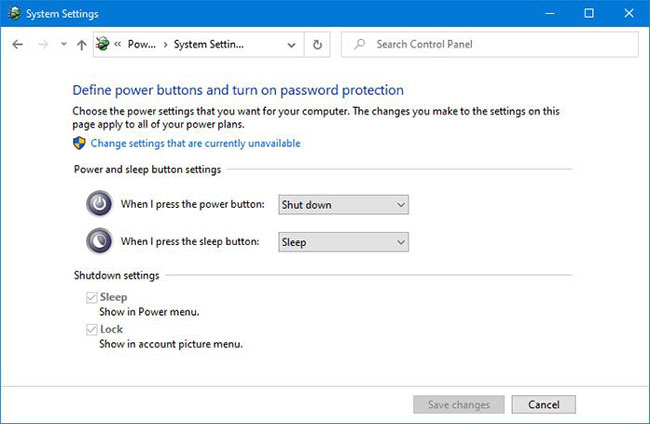
<p style="text-align: justify;">Theo mặc định, người dùng không thấy tùy chọn Hibernate trong&nbsp;<strong>Power Options</strong>&nbsp;trên menu Start. Nói cách khác, bạn có thể không thấy tùy chọn này nếu nhấp vào biểu tượng nguồn trong menu Start trên Windows 10. Đó là vì người dùng cần bật tùy chọn từ&nbsp;<strong>System Settings</strong>&nbsp;của Control Panel.</p>

<figure>
<div style="text-align: justify;"><img alt="Người dùng cần bật tùy chọn Hibernate từ System Settings của Control Panel" data-i="0" data-src="https://st.quantrimang.com/photos/image/2020/05/14/hibernate-bi-thieu-trong-control-panel-1.jpg" data-was-processed="true" height="424" src="https://st.quantrimang.com/photos/image/2020/05/14/hibernate-bi-thieu-trong-control-panel-1.jpg" width="650" /></div>

<figcaption>
<div style="text-align: justify;">Người dùng cần bật tùy chọn Hibernate từ System Settings của Control Panel</div>
</figcaption>
</figure>

<p style="text-align: justify;">Hãy làm theo các đề xuất được nêu trong bài viết này để khắc phục lỗi tùy chọn Hibernate bị thiếu trong Control Panel trên Windows 10.</p>

<div style="text-align: justify;">&nbsp;</div>

<h2 style="text-align: justify;">Cách khắc phục lỗi Hibernate bị thiếu trong Control Panel&nbsp;</h2>

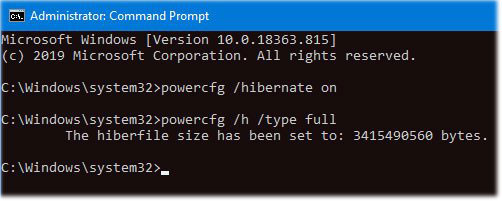
<p style="text-align: justify;">Nếu&nbsp;<strong>Control Panel &gt; System Settings</strong>&nbsp;không hiển thị tùy chọn Hibernate, thì hãy sử dụng hai lệnh CMD này để khắc phục sự cố thiếu tùy chọn Hibernate trong Windows 10:</p>

<figure>
<div style="text-align: justify;"><img alt="Khắc phục lỗi Hibernate bị thiếu trong Control Panel" data-i="1" data-src="https://st.quantrimang.com/photos/image/2020/05/14/hibernate-bi-thieu-trong-control-panel-2.jpg" data-was-processed="true" height="201" src="https://st.quantrimang.com/photos/image/2020/05/14/hibernate-bi-thieu-trong-control-panel-2.jpg" width="502" /></div>

<figcaption>
<div style="text-align: justify;">Khắc phục lỗi Hibernate bị thiếu trong Control Panel</div>
</figcaption>
</figure>

<p style="text-align: justify;">Bạn cần&nbsp;mở một cửa sổ Command Prompt với quyền admin. Sau đó, gõ lệnh sau đây và nhấn nút&nbsp;<code>Enter</code>:</p>

<pre id="pre0">
<code>powercfg /hibernate on</code></pre>

<p style="text-align: justify;">Lệnh sẽ kích hoạt tùy chọn Hibernate. Tuy nhiên, bạn phải đặt loại Hiberfile thành&nbsp;<strong>Full.</strong></p>

<p style="text-align: justify;">Sau đó, gõ lệnh này:</p>

<pre id="pre1">
<code>powercfg /h /type full</code></pre>

<p style="text-align: justify;">… và nhấn nút&nbsp;<code>Enter</code>&nbsp;để đặt thành&nbsp;<strong>Full.</strong></p>

<p style="text-align: justify;">Bây giờ, bạn nên khởi động lại máy tính của mình và mở cửa sổ&nbsp;<strong>System Settings</strong>&nbsp;trong&nbsp;<strong>Control Panel.&nbsp;</strong>Hy vọng rằng bạn đã thấy tùy chọn Hibernate ở đó.</p>

<p style="text-align: justify;">Chúc bạn thực hiện thành công!</p>
		</div>
				<div id="author">
						<p>
				<strong>Nguồn tin:</strong>
				Quantrimang.com
			</p>
		</div>
	</div>
	<div id="footer" class="clearfix">
		<div id="url">
			<strong>URL của bản tin này: </strong><a href="https://www.nguoicodonvn2008.info/vi/news/savefile/kien-thuc-may-tinh/khac-phuc-loi-tuy-chon-hibernate-bi-thieu-trong-control-panel-tren-windows-10-2037.html" title="Khắc phục lỗi tùy chọn Hibernate bị thiếu trong Control Panel trên Windows 10">https://www.nguoicodonvn2008.info/vi/news/savefile/kien-thuc-may-tinh/khac-phuc-loi-tuy-chon-hibernate-bi-thieu-trong-control-panel-tren-windows-10-2037.html</a>

		</div>
		<div class="clear"></div>
		<div class="copyright">
			&copy; .&#x3A; Nguoicodonvn2008.info - Cõi lòng người cô đơn &#x3A;.
		</div>
		<div id="contact">
			<a href="mailto:admin@nguoicodonvn2008.info">admin@nguoicodonvn2008.info</a>
		</div>
	</div>
</div>
        <div id="timeoutsess" class="chromeframe">
            Bạn đã không sử dụng Site, <a onclick="timeoutsesscancel();" href="https://nguoicodonvn2008.info/#">Bấm vào đây để duy trì trạng thái đăng nhập</a>. Thời gian chờ: <span id="secField"> 60 </span> giây
        </div>
        <div id="openidResult" class="nv-alert" style="display:none"></div>
        <div id="openidBt" data-result="" data-redirect=""></div>
		</script>
		<div class="car-top">
  <span><img src="https://nguoicodonvn2008.info/themes/default/images/car.png" alt=""></span>
</div>
<script src="https://nguoicodonvn2008.info/assets/js/jquery/jquery.min.js"></script>
<script>var nv_base_siteurl="/",nv_lang_data="vi",nv_lang_interface="vi",nv_name_variable="nv",nv_fc_variable="op",nv_lang_variable="language",nv_module_name="news",nv_func_name="savefile",nv_is_user=0, nv_my_ofs=-4,nv_my_abbr="EDT",nv_cookie_prefix="nv4c_e856T",nv_check_pass_mstime=1738000,nv_area_admin=0,nv_safemode=0,theme_responsive=0,nv_recaptcha_ver=2,nv_recaptcha_sitekey="",nv_recaptcha_type="image",XSSsanitize=1;</script>
<script src="https://nguoicodonvn2008.info/assets/js/language/vi.js"></script>
<script src="https://nguoicodonvn2008.info/assets/js/DOMPurify/purify3.js"></script>
<script src="https://nguoicodonvn2008.info/assets/js/global.js"></script>
<script src="https://nguoicodonvn2008.info/assets/js/site.js"></script>
<script src="https://nguoicodonvn2008.info/themes/default/js/news.js"></script>
<script src="https://nguoicodonvn2008.info/themes/default/js/main.js"></script>
<script src="https://nguoicodonvn2008.info/themes/default/js/custom.js"></script>
<script type="application/ld+json">
        {
            "@context": "https://schema.org",
            "@type": "Organization",
            "url": "https://nguoicodonvn2008.info",
            "logo": "https://nguoicodonvn2008.info/uploads/angel.gif"
        }
        </script>
<script src="https://nguoicodonvn2008.info/themes/default/js/bootstrap.min.js"></script>
<script type="text/javascript">
var $scrolltop = $('.car-top');
$scrolltop.on('click', function () {
    $('html,body').animate({
        scrollTop: 0
    }, 800);
    $(this).addClass("car-run");
    setTimeout(function(){ $scrolltop.removeClass('car-run');}, 1000);
    return false;
});
$(window).on('scroll', function ()
{ 
    if($(window).scrollTop() >= 200)
    {
        $scrolltop.addClass("show");
        $scrolltop.addClass("car-down");
    }
    else
    {
       $scrolltop.removeClass("show");
       setTimeout(function(){ $scrolltop.removeClass('car-down');}, 300);
    }
});
</script>
</body>
</html>