<!DOCTYPE html>
    <html lang="vi" xmlns="http://www.w3.org/1999/xhtml" prefix="og: http://ogp.me/ns#">
    <head>
<title>Khắc phục lỗi máy in không hiển thị trong phiên Windows Remote Desktop</title>
<meta name="description" content="Khắc phục lỗi máy in không hiển thị trong phiên Windows Remote Desktop - Savefile - Tin Tức -...">
<meta name="author" content=".: Nguoicodonvn2008.info - Cõi lòng người cô đơn :.">
<meta name="copyright" content=".: Nguoicodonvn2008.info - Cõi lòng người cô đơn :. [admin@nguoicodonvn2008.info]">
<meta name="robots" content="index, archive, follow, noodp">
<meta name="googlebot" content="index,archive,follow,noodp">
<meta name="msnbot" content="all,index,follow">
<meta name="generator" content="NukeViet v4.5">
<meta http-equiv="Content-Type" content="text/html; charset=utf-8">
<meta property="og:title" content="Khắc phục lỗi máy in không hiển thị trong phiên Windows Remote Desktop">
<meta property="og:type" content="website">
<meta property="og:description" content="Savefile - Tin Tức -...">
<meta property="og:site_name" content=".&#x3A; Nguoicodonvn2008.info - Cõi lòng người cô đơn &#x3A;.">
<meta property="og:url" content="https://www.nguoicodonvn2008.info/vi/news/savefile/kien-thuc-may-tinh/khac-phuc-loi-may-in-khong-hien-thi-trong-phien-windows-remote-desktop-4673.html">
<link rel="shortcut icon" href="https://nguoicodonvn2008.info/favicon.ico">
<link rel="canonical" href="https://www.nguoicodonvn2008.info/vi/news/savefile/kien-thuc-may-tinh/khac-phuc-loi-may-in-khong-hien-thi-trong-phien-windows-remote-desktop-4673.html">
<link rel="alternate" href="https://nguoicodonvn2008.info/vi/news/rss/" title="Tin Tức" type="application/rss+xml">
<link rel="alternate" href="https://nguoicodonvn2008.info/vi/news/rss/karaoke-dual/" title="Tin Tức - Karaoke Dual" type="application/rss+xml">
<link rel="alternate" href="https://nguoicodonvn2008.info/vi/news/rss/nhac-tre/" title="Tin Tức - Nhạc trẻ" type="application/rss+xml">
<link rel="alternate" href="https://nguoicodonvn2008.info/vi/news/rss/tru-tinh/" title="Tin Tức - Trữ tình" type="application/rss+xml">
<link rel="alternate" href="https://nguoicodonvn2008.info/vi/news/rss/nuoc-ngoai/" title="Tin Tức - Nước ngoài" type="application/rss+xml">
<link rel="alternate" href="https://nguoicodonvn2008.info/vi/news/rss/remix/" title="Tin Tức - Remix" type="application/rss+xml">
<link rel="alternate" href="https://nguoicodonvn2008.info/vi/news/rss/tam-su-tinh-yeu/" title="Tin Tức - Tâm sự tình yêu" type="application/rss+xml">
<link rel="alternate" href="https://nguoicodonvn2008.info/vi/news/rss/tho-suu-tam/" title="Tin Tức - Thơ sưu tầm" type="application/rss+xml">
<link rel="alternate" href="https://nguoicodonvn2008.info/vi/news/rss/cuoc-song/" title="Tin Tức - Cuộc sống" type="application/rss+xml">
<link rel="alternate" href="https://nguoicodonvn2008.info/vi/news/rss/phan-mem/" title="Tin Tức - Phần mềm" type="application/rss+xml">
<link rel="alternate" href="https://nguoicodonvn2008.info/vi/news/rss/kien-thuc-may-tinh/" title="Tin Tức - Kiến thức máy tính" type="application/rss+xml">
<link rel="alternate" href="https://nguoicodonvn2008.info/vi/news/rss/hoc-tap/" title="Tin Tức - Học tập" type="application/rss+xml">
<link rel="alternate" href="https://nguoicodonvn2008.info/vi/news/rss/tai-lieu/" title="Tin Tức - Tài liệu" type="application/rss+xml">
<link rel="alternate" href="https://nguoicodonvn2008.info/vi/news/rss/de-thi/" title="Tin Tức - Đề thi" type="application/rss+xml">
<link rel="preload" as="style" href="https://nguoicodonvn2008.info/assets/css/font-awesome.min.css" type="text/css">
<link rel="preload" as="style" href="https://nguoicodonvn2008.info/themes/default/css/bootstrap.non-responsive.css" type="text/css">
<link rel="preload" as="style" href="https://nguoicodonvn2008.info/themes/default/css/style.css" type="text/css">
<link rel="preload" as="style" href="https://nguoicodonvn2008.info/themes/default/css/style.non-responsive.css" type="text/css">
<link rel="preload" as="style" href="https://nguoicodonvn2008.info/themes/default/css/news.css" type="text/css">
<link rel="preload" as="style" href="https://nguoicodonvn2008.info/themes/default/css/custom.css" type="text/css">
<link rel="preload" as="script" href="https://nguoicodonvn2008.info/assets/js/jquery/jquery.min.js" type="text/javascript">
<link rel="preload" as="script" href="https://nguoicodonvn2008.info/assets/js/language/vi.js" type="text/javascript">
<link rel="preload" as="script" href="https://nguoicodonvn2008.info/assets/js/DOMPurify/purify3.js" type="text/javascript">
<link rel="preload" as="script" href="https://nguoicodonvn2008.info/assets/js/global.js" type="text/javascript">
<link rel="preload" as="script" href="https://nguoicodonvn2008.info/assets/js/site.js" type="text/javascript">
<link rel="preload" as="script" href="https://nguoicodonvn2008.info/themes/default/js/news.js" type="text/javascript">
<link rel="preload" as="script" href="https://nguoicodonvn2008.info/themes/default/js/main.js" type="text/javascript">
<link rel="preload" as="script" href="https://nguoicodonvn2008.info/themes/default/js/custom.js" type="text/javascript">
<link rel="preload" as="script" href="https://nguoicodonvn2008.info/themes/default/js/bootstrap.min.js" type="text/javascript">
<link rel="stylesheet" href="https://nguoicodonvn2008.info/assets/css/font-awesome.min.css">
<link rel="stylesheet" href="https://nguoicodonvn2008.info/themes/default/css/bootstrap.non-responsive.css">
<link rel="stylesheet" href="https://nguoicodonvn2008.info/themes/default/css/style.css">
<link rel="stylesheet" href="https://nguoicodonvn2008.info/themes/default/css/style.non-responsive.css">
<link rel="StyleSheet" href="https://nguoicodonvn2008.info/themes/default/css/news.css">
<link rel="stylesheet" href="https://nguoicodonvn2008.info/themes/default/css/custom.css">
<style type="text/css">
	body{background: #fff;}
</style>
    </head>
    <body>
<div id="print">
	<div id="hd_print">
		<h2 class="pull-left">.&#x3A; Nguoicodonvn2008.info - Cõi lòng người cô đơn &#x3A;.</h2>
		<p class="pull-right"><a title=".&#x3A; Nguoicodonvn2008.info - Cõi lòng người cô đơn &#x3A;." href="https://nguoicodonvn2008.info/">https://nguoicodonvn2008.info</a></p>
	</div>
	<div class="clear"></div>
	<hr />
	<div id="content">
		<h1>Khắc phục lỗi máy in không hiển thị trong phiên Windows Remote Desktop</h1>
		<ul class="list-inline">
			<li>Thứ hai - 01/11/2021 00:47</li>
			<li class="hidden-print txtrequired"><em class="fa fa-print">&nbsp;</em><a title="In ra" href="javascript:;" onclick="window.print()">In ra</a></li>
			<li class="hidden-print txtrequired"><em class="fa fa-power-off">&nbsp;</em><a title="Đóng cửa sổ này" href="javascript:;" onclick="window.close()">Đóng cửa sổ này</a></li>
		</ul>
		<div class="clear"></div>
		<div id="hometext">
		</div>
				<div class="imghome">
			<img alt="Khắc phục lỗi máy in không hiển thị trong phiên Windows Remote Desktop" src="https://st.quantrimang.com/photos/image/2021/10/28/may-in-khong-hien-thi-trong-windows-remote-desktop-1.jpg" width="460" class="img-thumbnail" />
		</div>
		<div class="clear"></div>
		<div id="bodytext" class="clearfix">
			<p style="text-align: justify;">Bạn đã cài đặt một máy in trên máy tính Microsoft Windows của mình, nhưng máy in không hiển thị trong phiên Remote Desktop? Có một số điều bạn cần kiểm tra khi gặp sự cố này.</p>

<h2 style="text-align: justify;">1. Kiểm tra xem máy in có được bật khi kết nối không</h2>

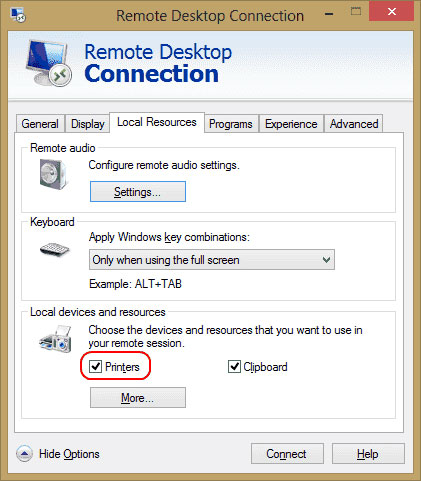
<p style="text-align: justify;">Đảm bảo rằng bạn đã chọn tùy chọn&nbsp;<strong>Printers</strong>&nbsp;trong cài đặt&nbsp;<strong>Remote Desktop.</strong>&nbsp;Bạn có thể kiểm tra điều này bằng cách hiển thị màn hình&nbsp;<strong>Remote Desktop Connection</strong>, chọn&nbsp;<strong>Local Resources</strong>&nbsp;và đảm bảo tùy chọn&nbsp;<strong>Printers</strong>&nbsp;được chọn.</p>

<figure>
<div style="text-align: justify;"><img alt="Cài đặt máy in trong RDP" data-i="0" data-src="https://st.quantrimang.com/photos/image/2021/10/28/may-in-khong-hien-thi-trong-windows-remote-desktop-1.jpg" data-was-processed="true" height="481" src="https://st.quantrimang.com/photos/image/2021/10/28/may-in-khong-hien-thi-trong-windows-remote-desktop-1.jpg" width="421" /></div>

<figcaption>
<div style="text-align: justify;">Cài đặt máy in trong RDP</div>
</figcaption>
</figure>

<h2 style="text-align: justify;">2. Kiểm tra cài đặt server</h2>

<p style="text-align: justify;">Nếu bạn đang kết nối với Windows Server box, hãy đảm bảo cài đặt trên server không tắt tính năng chia sẻ máy in. Đăng nhập vào server và thực hiện các bước này.</p>

<h3 style="text-align: justify;">Windows Server 2016&nbsp;&amp; 2019</h3>

<p style="text-align: justify;">Trong các phiên bản Windows Server này, cài đặt RDP được kiểm soát trong Group Policy.</p>

<p style="text-align: justify;"><strong>Bước 1</strong>:&nbsp;Khởi chạy&nbsp;<strong>gpedit.msc.</strong></p>

<p style="text-align: justify;"><strong>Bước 2</strong>: Điều hướng đến&nbsp;<strong>Computer Configuration &gt; Administrative Templates &gt; Windows Components &gt; Remote Desktop Services &gt; Remote Desktop Session Host</strong>.</p>

<p style="text-align: justify;"><strong>Bước 3</strong>: Mở rộng&nbsp;<strong>Printer Redirection.</strong></p>

<p style="text-align: justify;"><strong>Bước 4</strong>: Đảm bảo rằng cài đặt&nbsp;<strong>Do not allow client printer redirection&nbsp;</strong>được đặt thành&nbsp;<strong>Not configured</strong>&nbsp;hoặc&nbsp;<strong>Disabled</strong>. Một cài đặt khác mà bạn có thể muốn kiểm tra là&nbsp;<strong>Redirect only the default client printer</strong>. Policy này cũng nên được đặt thành&nbsp;<strong>Not configured</strong>&nbsp;hoặc&nbsp;<strong>Disabled</strong>, nếu bạn muốn nhiều hơn là chỉ máy in mặc định có sẵn để sử dụng.</p>

<h3 style="text-align: justify;">Windows Server 2012</h3>

<p style="text-align: justify;"><strong>Bước 1</strong>: Mở&nbsp;<strong>Server Manager.</strong></p>

<p style="text-align: justify;"><strong>Bước 2</strong>: Chọn&nbsp;<strong>Remote Desktop Services</strong>.</p>

<p style="text-align: justify;"><strong>Bước 3</strong>: Chọn&nbsp;<strong>Collections.</strong></p>

<p style="text-align: justify;"><strong>Bước 4</strong>: Chọn&nbsp;<strong>Tasks</strong>, sau đó chọn&nbsp;<strong>Edit Properties.</strong></p>

<p style="text-align: justify;"><strong>Bước 5</strong>: Trong tab&nbsp;<strong>Client Settings</strong>, hãy đảm bảo rằng&nbsp;<strong>Windows Printer</strong>&nbsp;được bật.</p>

<h3 style="text-align: justify;">Windows Server 2008</h3>

<p style="text-align: justify;"><strong>Bước 1</strong>: Đi tới&nbsp;<strong>Start &gt; Administrative Tools &gt; Remote Desktop Services &gt; Remote Desktop Session Host Configuration</strong>.</p>

<p style="text-align: justify;"><strong>Bước 2</strong>: Chọn&nbsp;<strong>Connections</strong>, nhấp chuột phải vào tên của kết nối, chọn&nbsp;<strong>Properties &gt; Client Settings &gt; Redirection</strong>. Đảm bảo rằng&nbsp;<strong>Windows Printer</strong>&nbsp;không được chọn.</p>

<h2 style="text-align: justify;">3. Đảm bảo các driver được cài đặt trên server</h2>

<p style="text-align: justify;">Kiểm tra xem driver cho máy in muốn sử dụng đã được cài đặt trên máy tính mà bạn đang kết nối chưa. Nếu driver chưa được cài đặt trên máy tính mà bạn đang kết nối, máy in sẽ hoàn toàn không xuất hiện.</p>

<p style="text-align: justify;">Trên đây là một số nguyên nhân và giải pháp để khắc phục lỗi máy in không xuất hiện trong phiên Remote Desktop. Hy vọng những thông tin này hữu ích với bạn!</p>
		</div>
				<div id="author">
						<p>
				<strong>Nguồn tin:</strong>
				Quantrimang.com
			</p>
		</div>
	</div>
	<div id="footer" class="clearfix">
		<div id="url">
			<strong>URL của bản tin này: </strong><a href="https://www.nguoicodonvn2008.info/vi/news/savefile/kien-thuc-may-tinh/khac-phuc-loi-may-in-khong-hien-thi-trong-phien-windows-remote-desktop-4673.html" title="Khắc phục lỗi máy in không hiển thị trong phiên Windows Remote Desktop">https://www.nguoicodonvn2008.info/vi/news/savefile/kien-thuc-may-tinh/khac-phuc-loi-may-in-khong-hien-thi-trong-phien-windows-remote-desktop-4673.html</a>

		</div>
		<div class="clear"></div>
		<div class="copyright">
			&copy; .&#x3A; Nguoicodonvn2008.info - Cõi lòng người cô đơn &#x3A;.
		</div>
		<div id="contact">
			<a href="mailto:admin@nguoicodonvn2008.info">admin@nguoicodonvn2008.info</a>
		</div>
	</div>
</div>
        <div id="timeoutsess" class="chromeframe">
            Bạn đã không sử dụng Site, <a onclick="timeoutsesscancel();" href="https://nguoicodonvn2008.info/#">Bấm vào đây để duy trì trạng thái đăng nhập</a>. Thời gian chờ: <span id="secField"> 60 </span> giây
        </div>
        <div id="openidResult" class="nv-alert" style="display:none"></div>
        <div id="openidBt" data-result="" data-redirect=""></div>
		</script>
		<div class="car-top">
  <span><img src="https://nguoicodonvn2008.info/themes/default/images/car.png" alt=""></span>
</div>
<script src="https://nguoicodonvn2008.info/assets/js/jquery/jquery.min.js"></script>
<script>var nv_base_siteurl="/",nv_lang_data="vi",nv_lang_interface="vi",nv_name_variable="nv",nv_fc_variable="op",nv_lang_variable="language",nv_module_name="news",nv_func_name="savefile",nv_is_user=0, nv_my_ofs=-4,nv_my_abbr="EDT",nv_cookie_prefix="nv4c_e856T",nv_check_pass_mstime=1738000,nv_area_admin=0,nv_safemode=0,theme_responsive=0,nv_recaptcha_ver=2,nv_recaptcha_sitekey="",nv_recaptcha_type="image",XSSsanitize=1;</script>
<script src="https://nguoicodonvn2008.info/assets/js/language/vi.js"></script>
<script src="https://nguoicodonvn2008.info/assets/js/DOMPurify/purify3.js"></script>
<script src="https://nguoicodonvn2008.info/assets/js/global.js"></script>
<script src="https://nguoicodonvn2008.info/assets/js/site.js"></script>
<script src="https://nguoicodonvn2008.info/themes/default/js/news.js"></script>
<script src="https://nguoicodonvn2008.info/themes/default/js/main.js"></script>
<script src="https://nguoicodonvn2008.info/themes/default/js/custom.js"></script>
<script type="application/ld+json">
        {
            "@context": "https://schema.org",
            "@type": "Organization",
            "url": "https://nguoicodonvn2008.info",
            "logo": "https://nguoicodonvn2008.info/uploads/angel.gif"
        }
        </script>
<script src="https://nguoicodonvn2008.info/themes/default/js/bootstrap.min.js"></script>
<script type="text/javascript">
var $scrolltop = $('.car-top');
$scrolltop.on('click', function () {
    $('html,body').animate({
        scrollTop: 0
    }, 800);
    $(this).addClass("car-run");
    setTimeout(function(){ $scrolltop.removeClass('car-run');}, 1000);
    return false;
});
$(window).on('scroll', function ()
{ 
    if($(window).scrollTop() >= 200)
    {
        $scrolltop.addClass("show");
        $scrolltop.addClass("car-down");
    }
    else
    {
       $scrolltop.removeClass("show");
       setTimeout(function(){ $scrolltop.removeClass('car-down');}, 300);
    }
});
</script>
</body>
</html>