<!DOCTYPE html>
    <html lang="vi" xmlns="http://www.w3.org/1999/xhtml" prefix="og: http://ogp.me/ns#">
    <head>
<title>igfxpers.exe là gì và làm sao để vô hiệu hóa igfxpers.exe?</title>
<meta name="description" content="igfxpers.exe là gì và làm sao để vô hiệu hóa igfxpers.exe? - Savefile - Tin Tức -...">
<meta name="author" content=".: Nguoicodonvn2008.info - Cõi lòng người cô đơn :.">
<meta name="copyright" content=".: Nguoicodonvn2008.info - Cõi lòng người cô đơn :. [admin@nguoicodonvn2008.info]">
<meta name="robots" content="index, archive, follow, noodp">
<meta name="googlebot" content="index,archive,follow,noodp">
<meta name="msnbot" content="all,index,follow">
<meta name="generator" content="NukeViet v4.5">
<meta http-equiv="Content-Type" content="text/html; charset=utf-8">
<meta property="og:title" content="igfxpers.exe là gì và làm sao để vô hiệu hóa igfxpers.exe?">
<meta property="og:type" content="website">
<meta property="og:description" content="Savefile - Tin Tức - https&#x3A;&#x002F;&#x002F;www.nguoicodonvn2008.info&#x002F;vi&#x002F;news&#x002F;savefile&#x002F;kien-thuc-may-tinh&#x002F;igfxpers-exe-la-gi-va-lam-sao-de-vo-hieu-hoa-igfxpers-exe-2716.html">
<meta property="og:site_name" content=".&#x3A; Nguoicodonvn2008.info - Cõi lòng người cô đơn &#x3A;.">
<meta property="og:url" content="https://www.nguoicodonvn2008.info/vi/news/savefile/kien-thuc-may-tinh/igfxpers-exe-la-gi-va-lam-sao-de-vo-hieu-hoa-igfxpers-exe-2716.html">
<link rel="shortcut icon" href="https://nguoicodonvn2008.info/favicon.ico">
<link rel="canonical" href="https://www.nguoicodonvn2008.info/vi/news/savefile/kien-thuc-may-tinh/igfxpers-exe-la-gi-va-lam-sao-de-vo-hieu-hoa-igfxpers-exe-2716.html">
<link rel="alternate" href="https://nguoicodonvn2008.info/vi/news/rss/" title="Tin Tức" type="application/rss+xml">
<link rel="alternate" href="https://nguoicodonvn2008.info/vi/news/rss/karaoke-dual/" title="Tin Tức - Karaoke Dual" type="application/rss+xml">
<link rel="alternate" href="https://nguoicodonvn2008.info/vi/news/rss/nhac-tre/" title="Tin Tức - Nhạc trẻ" type="application/rss+xml">
<link rel="alternate" href="https://nguoicodonvn2008.info/vi/news/rss/tru-tinh/" title="Tin Tức - Trữ tình" type="application/rss+xml">
<link rel="alternate" href="https://nguoicodonvn2008.info/vi/news/rss/nuoc-ngoai/" title="Tin Tức - Nước ngoài" type="application/rss+xml">
<link rel="alternate" href="https://nguoicodonvn2008.info/vi/news/rss/remix/" title="Tin Tức - Remix" type="application/rss+xml">
<link rel="alternate" href="https://nguoicodonvn2008.info/vi/news/rss/tam-su-tinh-yeu/" title="Tin Tức - Tâm sự tình yêu" type="application/rss+xml">
<link rel="alternate" href="https://nguoicodonvn2008.info/vi/news/rss/tho-suu-tam/" title="Tin Tức - Thơ sưu tầm" type="application/rss+xml">
<link rel="alternate" href="https://nguoicodonvn2008.info/vi/news/rss/cuoc-song/" title="Tin Tức - Cuộc sống" type="application/rss+xml">
<link rel="alternate" href="https://nguoicodonvn2008.info/vi/news/rss/phan-mem/" title="Tin Tức - Phần mềm" type="application/rss+xml">
<link rel="alternate" href="https://nguoicodonvn2008.info/vi/news/rss/kien-thuc-may-tinh/" title="Tin Tức - Kiến thức máy tính" type="application/rss+xml">
<link rel="alternate" href="https://nguoicodonvn2008.info/vi/news/rss/hoc-tap/" title="Tin Tức - Học tập" type="application/rss+xml">
<link rel="alternate" href="https://nguoicodonvn2008.info/vi/news/rss/tai-lieu/" title="Tin Tức - Tài liệu" type="application/rss+xml">
<link rel="alternate" href="https://nguoicodonvn2008.info/vi/news/rss/de-thi/" title="Tin Tức - Đề thi" type="application/rss+xml">
<link rel="preload" as="style" href="https://nguoicodonvn2008.info/assets/css/font-awesome.min.css" type="text/css">
<link rel="preload" as="style" href="https://nguoicodonvn2008.info/themes/default/css/bootstrap.non-responsive.css" type="text/css">
<link rel="preload" as="style" href="https://nguoicodonvn2008.info/themes/default/css/style.css" type="text/css">
<link rel="preload" as="style" href="https://nguoicodonvn2008.info/themes/default/css/style.non-responsive.css" type="text/css">
<link rel="preload" as="style" href="https://nguoicodonvn2008.info/themes/default/css/news.css" type="text/css">
<link rel="preload" as="style" href="https://nguoicodonvn2008.info/themes/default/css/custom.css" type="text/css">
<link rel="preload" as="script" href="https://nguoicodonvn2008.info/assets/js/jquery/jquery.min.js" type="text/javascript">
<link rel="preload" as="script" href="https://nguoicodonvn2008.info/assets/js/language/vi.js" type="text/javascript">
<link rel="preload" as="script" href="https://nguoicodonvn2008.info/assets/js/DOMPurify/purify3.js" type="text/javascript">
<link rel="preload" as="script" href="https://nguoicodonvn2008.info/assets/js/global.js" type="text/javascript">
<link rel="preload" as="script" href="https://nguoicodonvn2008.info/assets/js/site.js" type="text/javascript">
<link rel="preload" as="script" href="https://nguoicodonvn2008.info/themes/default/js/news.js" type="text/javascript">
<link rel="preload" as="script" href="https://nguoicodonvn2008.info/themes/default/js/main.js" type="text/javascript">
<link rel="preload" as="script" href="https://nguoicodonvn2008.info/themes/default/js/custom.js" type="text/javascript">
<link rel="preload" as="script" href="https://nguoicodonvn2008.info/themes/default/js/bootstrap.min.js" type="text/javascript">
<link rel="stylesheet" href="https://nguoicodonvn2008.info/assets/css/font-awesome.min.css">
<link rel="stylesheet" href="https://nguoicodonvn2008.info/themes/default/css/bootstrap.non-responsive.css">
<link rel="stylesheet" href="https://nguoicodonvn2008.info/themes/default/css/style.css">
<link rel="stylesheet" href="https://nguoicodonvn2008.info/themes/default/css/style.non-responsive.css">
<link rel="StyleSheet" href="https://nguoicodonvn2008.info/themes/default/css/news.css">
<link rel="stylesheet" href="https://nguoicodonvn2008.info/themes/default/css/custom.css">
<style type="text/css">
	body{background: #fff;}
</style>
    </head>
    <body>
<div id="print">
	<div id="hd_print">
		<h2 class="pull-left">.&#x3A; Nguoicodonvn2008.info - Cõi lòng người cô đơn &#x3A;.</h2>
		<p class="pull-right"><a title=".&#x3A; Nguoicodonvn2008.info - Cõi lòng người cô đơn &#x3A;." href="https://nguoicodonvn2008.info/">https://nguoicodonvn2008.info</a></p>
	</div>
	<div class="clear"></div>
	<hr />
	<div id="content">
		<h1>igfxpers.exe là gì và làm sao để vô hiệu hóa igfxpers.exe?</h1>
		<ul class="list-inline">
			<li>Thứ ba - 15/09/2020 00:46</li>
			<li class="hidden-print txtrequired"><em class="fa fa-print">&nbsp;</em><a title="In ra" href="javascript:;" onclick="window.print()">In ra</a></li>
			<li class="hidden-print txtrequired"><em class="fa fa-power-off">&nbsp;</em><a title="Đóng cửa sổ này" href="javascript:;" onclick="window.close()">Đóng cửa sổ này</a></li>
		</ul>
		<div class="clear"></div>
		<div id="hometext">
		</div>
				<div class="imghome">
			<img alt="igfxpers.exe là gì và làm sao để vô hiệu hóa igfxpers.exe?" src="https://st.quantrimang.com/photos/image/2016/03/23/card-do-hoa.jpg" width="460" class="img-thumbnail" />
		</div>
		<div class="clear"></div>
		<div id="bodytext" class="clearfix">
			<p style="text-align: justify;">Đôi khi trong quá trình mở Task Manager trên máy tính Windows nếu chú ý bạn sẽ nhìn thấy một chương trình có tên igfxpers.exe đang chạy.</p>

<h2 style="text-align: justify;">1. igfxpers.exe là gì?</h2>

<p style="text-align: justify;"><img alt="igfxpers.exe" data-i="0" data-src="https://st.quantrimang.com/photos/image/2016/03/23/card-do-hoa.jpg" data-was-processed="true" height="347" src="https://st.quantrimang.com/photos/image/2016/03/23/card-do-hoa.jpg" title="igfxpers.exe" width="650" /></p>

<p style="text-align: justify;">Đừng lo lắng quá, igfxpers.exe không phải là virus, malware hay các chương trình, phần mềm độc hại.</p>

<p style="text-align: justify;">Igfxtray.exe là một quá trình mà cho phép bạn truy cập vào cấu hình Intel Graphics. Quá trình igfxtray.exe được cài đặt trên máy tính của bạn khi bạn cài đặt driver card đồ họa. Igfxpers.exe sẽ được cài đặt trên máy tính của bạn cùng driver Windows trong quá trình bạn cài đặt card đồ họa Intel hoặc nVidia.</p>

<p style="text-align: justify;">Igfxpers.exe là một phần của Driver Graphics Media Accelerator. Theo Intel, chức năng của &quot;igfxpers.exe&quot; là để hỗ trợ kích hoạt thiết lập độ phân giải màn hình.</p>

<p style="text-align: justify;">Nếu bạn vô hiệu hóa igfxpers.exe, màn hình của bạn có thể bị mất thiết lập độ phân giải hiện tại.</p>

<p style="text-align: justify;">Igfxpers.exe không phải là virus, malware hay các chương trình, phần mềm độc hại.Quá trình igfxpers.exe không phải là một quá trình cần thiết trên Windows. Bạn có thể vô hiệu hóa quá trình này để tăng thời gian khởi động Windows cũng như ngăn chặn bất kỳ tin nhắn gây phiền nhiễu (nếu có).</p>

<div style="text-align: justify;">&nbsp;</div>

<h2 style="text-align: justify;">2. Làm thế nào để vô hiệu hóa igfxpers.exe trên máy tính Windows của bạn?</h2>

<p style="text-align: justify;"><strong>Lưu ý:</strong></p>

<p style="text-align: justify;">Khi bạn vô hiệu hóa igfxpers.exe bạn cần biết, một số tính năng trên card đồ họa sẽ không hoạt động nữa.</p>

<p style="text-align: justify;">Do đó bạn chỉ nên vô hiệu hóa igfxpers.exe trong trường hợp nó chiếm quá nhiều nguồn trên máy tính của bạn</p>

<p style="text-align: justify;">Để vô hiệu hóa quá trình igfxpers.exe, đầu tiên bạn nhấn tổ hợp phím<strong>&nbsp;Windows + R</strong>&nbsp;để mở hộp thoại Run, sau đó bạn nhập&nbsp;<strong>msconfig</strong>&nbsp;vào hộp thoại Run rồi nhấn&nbsp;<strong>Enter</strong>&nbsp;để mở System Configuration.</p>

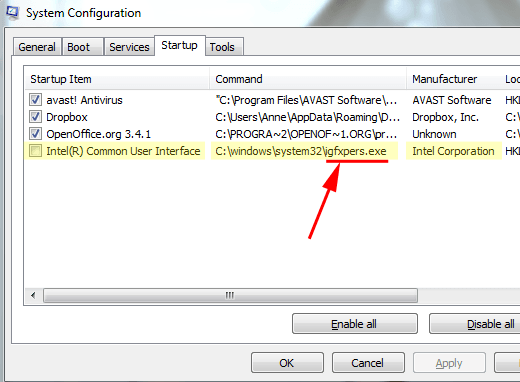
<p style="text-align: justify;">Trên giao diện System Configuration, bạn click chọn thẻ&nbsp;<strong>Startup,</strong>&nbsp;sau đó bỏ tích tùy chọn&nbsp;<strong>Intel(R) Common User Interface</strong>&nbsp;rồi chọn&nbsp;<strong>Apply =&gt; OK</strong>.</p>

<p style="text-align: justify;"><img alt="chọn Intel(R) Common User Interface" data-i="1" data-src="https://st.quantrimang.com/photos/image/2016/03/23/intel-r.png" data-was-processed="true" height="382" src="https://st.quantrimang.com/photos/image/2016/03/23/intel-r.png" title="chọn Intel(R) Common User Interface" width="520" /></p>

<p style="text-align: justify;">Cuối cùng tiến hành khởi động lại máy tính Windows của bạn. Bạn có thể kiểm tra bằng cách mở Task Manager, lúc này bạn sẽ không nhìn thấy quá trình igfxpers.exe trên Task Manager nữa.</p>

<p style="text-align: justify;">Trong trường hợp muốn kích hoạt lại quá trình igfxpers.exe, bạn thực hiện các bước tương tự và đánh tích tùy chọn&nbsp;<strong>Intel(R) Common User Interface</strong>&nbsp;là xong.</p>

<h2 style="text-align: justify;">Thông báo lỗi igfxpers.exe phổ biến</h2>

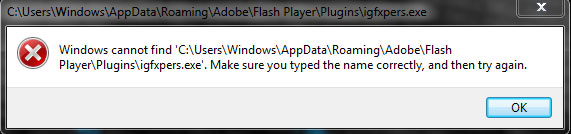
<p style="text-align: justify;">Bây giờ, bạn đã biết file igfxpers.exe là gì, hãy cùng tìm hiểu lỗi igfxpers.exe trông như thế nào. Khi đã biết về các loại lỗi igfxpers.exe, bạn có thể xem xét nguyên nhân và sau đó là tất cả các phương pháp có thể để giải quyết lỗi liên quan đến igfxpers.exe.</p>

<ul>
	<li style="text-align: justify;">Igfxpers.exe entry point not found</li>
	<li style="text-align: justify;">Igfxpers.exe unable to locate component</li>
	<li style="text-align: justify;">Igfxpers.exe runtime error</li>
	<li style="text-align: justify;">Igfxpers.exe application error</li>
	<li style="text-align: justify;">Igfxpers.exe system error</li>
	<li style="text-align: justify;">Igfxpers.exe is not a valid Win32 application</li>
	<li style="text-align: justify;">Cannot find igfxpers.exe</li>
	<li style="text-align: justify;">Igfxpers.exe not found</li>
	<li style="text-align: justify;">Igfxpers.exe has encountered a problem and needs to close. We are sorry for the inconvenience</li>
	<li style="text-align: justify;">Error starting program igfxpers.exe</li>
	<li style="text-align: justify;">Igfxpers.exe application error</li>
	<li style="text-align: justify;">Igfxpers.exe bad image</li>
</ul>

<p style="text-align: justify;">Hoặc hệ thống có thể xuất hiện bất kỳ lỗi nào khác khi file igfxpers.exe bị hỏng hoặc bị xóa khỏi máy tính. Bây giờ, hãy kiểm tra các nguyên nhân làm xuất hiện những thông báo lỗi như vậy trên máy tính.</p>

<h2 style="text-align: justify;">Nguyên nhân của lỗi igfxpers.exe</h2>

<figure data-inimage-loaded="true">
<div style="text-align: justify;"><br />
<img alt="Có một số lý do gây ra lỗi igfxpers.exe" data-i="3" data-src="https://st.quantrimang.com/photos/image/2020/08/15/igfxpers-exe.jpg" data-was-processed="true" height="134" src="https://st.quantrimang.com/photos/image/2020/08/15/igfxpers-exe.jpg" width="571" /></div>

<figcaption>
<div style="text-align: justify;">Có một số lý do gây ra lỗi igfxpers.exe</div>
</figcaption>
</figure>

<p style="text-align: justify;">Có thể có một số lý do gây ra lỗi igfxpers.exe. Dưới đây là một số lý do gây ra sự cố hệ thống igfxpers.exe.</p>

<p style="text-align: justify;">- Lỗi igfxpers.exe có thể đến do nhiễm virus hoặc phần mềm độc hại trên máy tính.</p>

<p style="text-align: justify;">- Lỗi igfxpers.exe cũng có thể xảy ra do tình cờ xóa các file igfxpers.exe trên máy tính.</p>

<p style="text-align: justify;">- Một lý do khác cho các lỗi như vậy có thể là những driver lỗi thời và việc chưa cài đặt các bản cập nhật hệ thống mới nhất.&nbsp;</p>

<p style="text-align: justify;">- Lỗi cũng có thể xảy ra do các mục registry bị hỏng.</p>

<p style="text-align: justify;">Bất kể lý do nào đang gây ra lỗi igfxpers.exe trên máy tính của bạn, bạn luôn có thể khắc phục chúng.</p>

<p style="text-align: justify;">Đến đây chắc hẳn bạn đã hiểu rằng các file igfxpers.exe không phải là virus và chúng không gây ra bất kỳ vấn đề nào.</p>

<p style="text-align: justify;">Nếu máy tính của bạn đã bị nhiễm virus hoặc các file igfxpers.exe đã bị xóa khỏi máy tính một cách vô tình, bạn sẽ bắt đầu gặp phải các lỗi igfxpers.exe không mong muốn trên máy tính và đó chắc chắn là một điều không mấy dễ chịu.</p>

<p style="text-align: justify;">Nhưng như mọi khi, có các giải pháp cho mọi vấn đề và lỗi với file igfxpers.exe cũng vậy.</p>

<h2 style="text-align: justify;">Làm thế nào để sửa lỗi Igfxpers.exe?</h2>

<p style="text-align: justify;">Đến đây, chắc hẳn bạn đã hiểu hầu hết mọi thứ về file igfxpers.exe. Bây giờ đã đến lúc xem qua tất cả các giải pháp có thể giúp bạn giải quyết lỗi igfxpers.exe trên máy tính của mình.</p>

<h3 style="text-align: justify;">Giải pháp 1: Quét máy tính để tìm virus và phần mềm độc hại</h3>

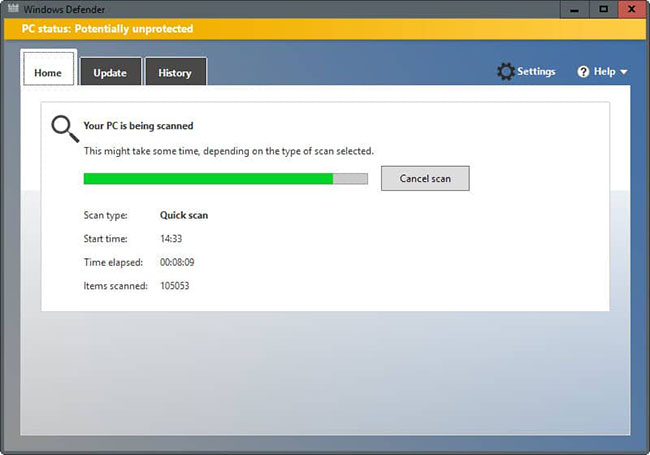
<p style="text-align: justify;">Virus, phần mềm độc hại và các chương trình xấu khác gây ra rất nhiều vấn đề cho người dùng máy tính. Nếu máy tính bị nhiễm các chương trình độc hại, bạn bắt đầu gặp phải các lỗi hệ thống không mong muốn trên máy tính, bao gồm cả lỗi file igfxpers.exe.</p>

<p style="text-align: justify;">Vì vậy, cách tốt nhất để tránh khỏi những lỗi như vậy là cài đặt và chạy một&nbsp;chương diệt virus tốt trên máy tính&nbsp;và loại bỏ các chương trình xấu như vậy khỏi hệ thống. Nếu việc chạy một chương trình diệt virus tốt giúp bạn thoát khỏi lỗi igfxpers.exe thì xin chúc mừng. Nếu không, hãy tiếp tục với bản sửa lỗi tiếp theo.</p>

<figure>
<div style="text-align: justify;"><img alt="Quét máy tính để tìm virus và phần mềm độc hại" data-i="4" data-src="https://st.quantrimang.com/photos/image/2020/09/14/igfxpersexe-1.jpg" data-was-processed="true" height="455" src="https://st.quantrimang.com/photos/image/2020/09/14/igfxpersexe-1.jpg" width="650" /></div>

<figcaption>
<div style="text-align: justify;">Quét máy tính để tìm virus và phần mềm độc hại</div>
</figcaption>
</figure>

<div style="text-align: justify;">&nbsp;</div>

<h3 style="text-align: justify;">Giải pháp 2: Đăng ký lại file igfxpers.exe</h3>

<p style="text-align: justify;">Vì bạn đang gặp phải lỗi igfxpers.exe trên máy tính, nên rất có thể các file igfxpers.exe đã bị hỏng. Vì vậy, trong tình huống đó, bạn nên đăng ký lại file igfxpers.exe trên máy tính của mình. Đây là cách thực hiện điều đó.</p>

<p style="text-align: justify;">1. Nhấp vào menu Start, nhập&nbsp;<strong>cmd</strong>&nbsp;vào thanh tìm kiếm, nhấp chuột phải vào nó và chọn&nbsp;<strong>Run as administrator</strong>&nbsp;để&nbsp;mở Command Prompt với quyền admin.</p>

<p style="text-align: justify;">2. Trong&nbsp;<strong>Command Prompt</strong>, nhập lệnh:</p>

<pre id="pre0">
<code>regsvr32 C:\Windows\system32\igfxpers.exe</code></pre>

<p style="text-align: justify;">… vì đường dẫn đầy đủ cho các file igfxpers.exe trên hầu hết mọi máy tính là&nbsp;<strong>C:\Windows\system32\igfxpers.exe</strong>&nbsp;và sau đó nhấn nút&nbsp;<strong>Enter.</strong></p>

<p style="text-align: justify;">Ngay khi chạy lệnh trên, bạn sẽ thấy một cửa sổ pop-up thông báo cho bạn về việc đăng ký lại thành công file igfxpers.exe.</p>

<p style="text-align: justify;">Nếu việc đăng ký lại file igfxpers.exe giải quyết được lỗi igfxpers.exe cho bạn, bạn không cần phải thực hiện thêm thao tác gì. Nếu không, hãy chuyển sang cách giải quyết tiếp theo.</p>

<h3 style="text-align: justify;">Giải pháp 3: Sửa chữa các file hệ thống thông qua lệnh SFC /scannow</h3>

<p style="text-align: justify;">Đây là một giải pháp khác mà bạn có thể thử trên máy tính của mình để loại bỏ lỗi igfxpers.exe. Giải pháp này hoạt động hiệu quả trong việc quét các file hệ thống Windows bị hỏng và sửa chữa chúng.</p>

<p style="text-align: justify;">&nbsp;</p>

<h3 style="text-align: justify;">Giải pháp 4: Sửa chữa registry</h3>

<p style="text-align: justify;">Đăng ký lại igfxpers.exe và chạy công cụ sửa lỗi giải quyết hầu hết các sự cố máy tính. Tuy nhiên, trong trường hợp lỗi igfxpers.exe vẫn còn, bạn có thể thử sửa chữa registry. Chắc chắn rằng cách này sẽ giải quyết được lỗi igfxpers.exe cho bạn.</p>

<p style="text-align: justify;">Để sửa chữa registry, bạn có thể làm thủ công hoặc dùng công cụ của bên thứ ba. Có một số công cụ sửa registry tự động có sẵn trên Internet, cho phép bạn sửa chữa tất cả các file registry chỉ với một cú nhấp chuột.</p>

<p style="text-align: justify;">Một trong những công cụ như vậy là&nbsp;Registry Repair. Hoặc nếu bạn muốn khám phá thêm các tùy chọn sửa chữa registry khác, bạn có thể tìm kiếm trên Internet.</p>

<div style="text-align: justify;">&nbsp;</div>

<h3 style="text-align: justify;">Giải pháp 5: Dọn dẹp các file rác khỏi máy tính</h3>

<figure>
<div style="text-align: justify;"><img alt="Dọn dẹp các file rác khỏi máy tính" data-i="5" data-src="https://st.quantrimang.com/photos/image/2020/09/14/igfxpersexe-2.png" data-was-processed="true" height="501" src="https://st.quantrimang.com/photos/image/2020/09/14/igfxpersexe-2.png" width="369" /></div>

<figcaption>
<div style="text-align: justify;">Dọn dẹp các file rác khỏi máy tính</div>
</figcaption>
</figure>

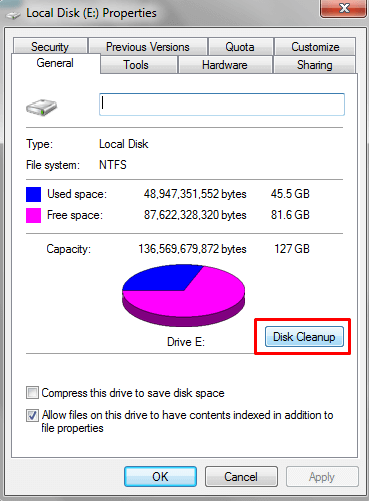
<p style="text-align: justify;">Dọn dẹp các file rác khỏi máy tính không chỉ giải quyết được nhiều sự cố máy tính mà còn giúp bạn tăng tốc cho máy tính. Vì vậy, nếu gặp phải lỗi file igfxpers.exe, bạn có thể thử giải quyết vấn đề này bằng cách dọn dẹp tất cả các file rác khỏi máy tính của mình.</p>

<p style="text-align: justify;">Dù không thể đảm bảo cách này chắc chắn có hiệu quả, nhưng ít ra bạn cũng có thể thử. Tham khảo bài viết:&nbsp;Xoá file rác, file tạm trong Windows&nbsp;để biết thêm chi tiết.</p>

<h3 style="text-align: justify;">Giải pháp 6: Cập nhật tất cả các driver Windows và cài đặt những bản cập nhật Windows mới nhất</h3>

<p style="text-align: justify;">Đôi khi, mọi người tránh cài đặt các bản cập nhật hệ thống, tiếp tục sử dụng các file và driver Windows đã lỗi thời trên máy tính của mình. Mọi thứ sẽ ổn cho đến khi các lỗi hệ thống không mong muốn bắt đầu xuất hiện.</p>

<p style="text-align: justify;">Việc không&nbsp;cài đặt các bản cập nhật Windows mới nhất&nbsp;và sử dụng những driver lỗi thời có thể gây ra lỗi igfxpers.exe. Ngay cả những ổ lỗi thời cũng có thể gây ra lỗi file igfxpers.exe cho bạn.</p>

<p style="text-align: justify;">Vì vậy, nếu không có phương pháp nào giúp bạn giải quyết được lỗi file igfxpers.exe, bạn nên kiểm tra các bản cập nhật Windows mới nhất và cài đặt chúng càng sớm càng tốt. Ngoài ra, hãy cố gắng&nbsp;cập nhật tất cả các driver máy tính lên phiên bản mới nhất&nbsp;để tránh các lỗi hệ thống không mong muốn.</p>

<h3 style="text-align: justify;">Giải pháp 7: Cài lại Win</h3>

<p style="text-align: justify;">Nếu sự cố vẫn tiếp diễn, bạn nên cài lại Win. Bạn có thể bắt đầu ngay nếu đã biết cách cài lại Windows, nếu không hãy tham khảo một số hướng dẫn trên Internet.</p>

<p style="text-align: justify;">Bạn cũng có thể nhờ ai đó giỏi về công nghệ giúp đỡ! Việc cài lại Win sẽ giải quyết mọi vấn đề trên máy tính, bao gồm cả lỗi igfxpers.exe.</p>

<p style="text-align: justify;">&nbsp;</p>

<p style="text-align: justify;">Chúc các bạn thành công!</p>
		</div>
				<div id="author">
						<p>
				<strong>Nguồn tin:</strong>
				Quantrimang.com
			</p>
		</div>
	</div>
	<div id="footer" class="clearfix">
		<div id="url">
			<strong>URL của bản tin này: </strong><a href="https://www.nguoicodonvn2008.info/vi/news/savefile/kien-thuc-may-tinh/igfxpers-exe-la-gi-va-lam-sao-de-vo-hieu-hoa-igfxpers-exe-2716.html" title="igfxpers.exe là gì và làm sao để vô hiệu hóa igfxpers.exe?">https://www.nguoicodonvn2008.info/vi/news/savefile/kien-thuc-may-tinh/igfxpers-exe-la-gi-va-lam-sao-de-vo-hieu-hoa-igfxpers-exe-2716.html</a>

		</div>
		<div class="clear"></div>
		<div class="copyright">
			&copy; .&#x3A; Nguoicodonvn2008.info - Cõi lòng người cô đơn &#x3A;.
		</div>
		<div id="contact">
			<a href="mailto:admin@nguoicodonvn2008.info">admin@nguoicodonvn2008.info</a>
		</div>
	</div>
</div>
        <div id="timeoutsess" class="chromeframe">
            Bạn đã không sử dụng Site, <a onclick="timeoutsesscancel();" href="https://nguoicodonvn2008.info/#">Bấm vào đây để duy trì trạng thái đăng nhập</a>. Thời gian chờ: <span id="secField"> 60 </span> giây
        </div>
        <div id="openidResult" class="nv-alert" style="display:none"></div>
        <div id="openidBt" data-result="" data-redirect=""></div>
		</script>
		<div class="car-top">
  <span><img src="https://nguoicodonvn2008.info/themes/default/images/car.png" alt=""></span>
</div>
<script src="https://nguoicodonvn2008.info/assets/js/jquery/jquery.min.js"></script>
<script>var nv_base_siteurl="/",nv_lang_data="vi",nv_lang_interface="vi",nv_name_variable="nv",nv_fc_variable="op",nv_lang_variable="language",nv_module_name="news",nv_func_name="savefile",nv_is_user=0, nv_my_ofs=-4,nv_my_abbr="EDT",nv_cookie_prefix="nv4c_e856T",nv_check_pass_mstime=1738000,nv_area_admin=0,nv_safemode=0,theme_responsive=0,nv_recaptcha_ver=2,nv_recaptcha_sitekey="",nv_recaptcha_type="image",XSSsanitize=1;</script>
<script src="https://nguoicodonvn2008.info/assets/js/language/vi.js"></script>
<script src="https://nguoicodonvn2008.info/assets/js/DOMPurify/purify3.js"></script>
<script src="https://nguoicodonvn2008.info/assets/js/global.js"></script>
<script src="https://nguoicodonvn2008.info/assets/js/site.js"></script>
<script src="https://nguoicodonvn2008.info/themes/default/js/news.js"></script>
<script src="https://nguoicodonvn2008.info/themes/default/js/main.js"></script>
<script src="https://nguoicodonvn2008.info/themes/default/js/custom.js"></script>
<script type="application/ld+json">
        {
            "@context": "https://schema.org",
            "@type": "Organization",
            "url": "https://nguoicodonvn2008.info",
            "logo": "https://nguoicodonvn2008.info/uploads/angel.gif"
        }
        </script>
<script src="https://nguoicodonvn2008.info/themes/default/js/bootstrap.min.js"></script>
<script type="text/javascript">
var $scrolltop = $('.car-top');
$scrolltop.on('click', function () {
    $('html,body').animate({
        scrollTop: 0
    }, 800);
    $(this).addClass("car-run");
    setTimeout(function(){ $scrolltop.removeClass('car-run');}, 1000);
    return false;
});
$(window).on('scroll', function ()
{ 
    if($(window).scrollTop() >= 200)
    {
        $scrolltop.addClass("show");
        $scrolltop.addClass("car-down");
    }
    else
    {
       $scrolltop.removeClass("show");
       setTimeout(function(){ $scrolltop.removeClass('car-down');}, 300);
    }
});
</script>
</body>
</html>