<!DOCTYPE html>
    <html lang="vi" xmlns="http://www.w3.org/1999/xhtml" prefix="og: http://ogp.me/ns#">
    <head>
<title>Hướng dẫn xóa drivers cũ và tập tin ẩn trên Windows</title>
<meta name="description" content="Hướng dẫn xóa drivers cũ và tập tin ẩn trên Windows - Savefile - Tin Tức -...">
<meta name="author" content=".: Nguoicodonvn2008.info - Cõi lòng người cô đơn :.">
<meta name="copyright" content=".: Nguoicodonvn2008.info - Cõi lòng người cô đơn :. [admin@nguoicodonvn2008.info]">
<meta name="robots" content="index, archive, follow, noodp">
<meta name="googlebot" content="index,archive,follow,noodp">
<meta name="msnbot" content="all,index,follow">
<meta name="generator" content="NukeViet v4.5">
<meta http-equiv="Content-Type" content="text/html; charset=utf-8">
<meta property="og:title" content="Hướng dẫn xóa drivers cũ và tập tin ẩn trên Windows">
<meta property="og:type" content="website">
<meta property="og:description" content="Savefile - Tin Tức - https&#x3A;&#x002F;&#x002F;www.nguoicodonvn2008.info&#x002F;vi&#x002F;news&#x002F;savefile&#x002F;kien-thuc-may-tinh&#x002F;huong-dan-xoa-drivers-cu-va-tap-tin-an-tren-windows-11774.html">
<meta property="og:site_name" content=".&#x3A; Nguoicodonvn2008.info - Cõi lòng người cô đơn &#x3A;.">
<meta property="og:url" content="https://www.nguoicodonvn2008.info/vi/news/savefile/kien-thuc-may-tinh/huong-dan-xoa-drivers-cu-va-tap-tin-an-tren-windows-11774.html">
<link rel="shortcut icon" href="https://nguoicodonvn2008.info/favicon.ico">
<link rel="canonical" href="https://www.nguoicodonvn2008.info/vi/news/savefile/kien-thuc-may-tinh/huong-dan-xoa-drivers-cu-va-tap-tin-an-tren-windows-11774.html">
<link rel="alternate" href="https://nguoicodonvn2008.info/vi/news/rss/" title="Tin Tức" type="application/rss+xml">
<link rel="alternate" href="https://nguoicodonvn2008.info/vi/news/rss/karaoke-dual/" title="Tin Tức - Karaoke Dual" type="application/rss+xml">
<link rel="alternate" href="https://nguoicodonvn2008.info/vi/news/rss/nhac-tre/" title="Tin Tức - Nhạc trẻ" type="application/rss+xml">
<link rel="alternate" href="https://nguoicodonvn2008.info/vi/news/rss/tru-tinh/" title="Tin Tức - Trữ tình" type="application/rss+xml">
<link rel="alternate" href="https://nguoicodonvn2008.info/vi/news/rss/nuoc-ngoai/" title="Tin Tức - Nước ngoài" type="application/rss+xml">
<link rel="alternate" href="https://nguoicodonvn2008.info/vi/news/rss/remix/" title="Tin Tức - Remix" type="application/rss+xml">
<link rel="alternate" href="https://nguoicodonvn2008.info/vi/news/rss/tam-su-tinh-yeu/" title="Tin Tức - Tâm sự tình yêu" type="application/rss+xml">
<link rel="alternate" href="https://nguoicodonvn2008.info/vi/news/rss/tho-suu-tam/" title="Tin Tức - Thơ sưu tầm" type="application/rss+xml">
<link rel="alternate" href="https://nguoicodonvn2008.info/vi/news/rss/cuoc-song/" title="Tin Tức - Cuộc sống" type="application/rss+xml">
<link rel="alternate" href="https://nguoicodonvn2008.info/vi/news/rss/phan-mem/" title="Tin Tức - Phần mềm" type="application/rss+xml">
<link rel="alternate" href="https://nguoicodonvn2008.info/vi/news/rss/kien-thuc-may-tinh/" title="Tin Tức - Kiến thức máy tính" type="application/rss+xml">
<link rel="alternate" href="https://nguoicodonvn2008.info/vi/news/rss/hoc-tap/" title="Tin Tức - Học tập" type="application/rss+xml">
<link rel="alternate" href="https://nguoicodonvn2008.info/vi/news/rss/tai-lieu/" title="Tin Tức - Tài liệu" type="application/rss+xml">
<link rel="alternate" href="https://nguoicodonvn2008.info/vi/news/rss/de-thi/" title="Tin Tức - Đề thi" type="application/rss+xml">
<link rel="preload" as="style" href="https://nguoicodonvn2008.info/assets/css/font-awesome.min.css" type="text/css">
<link rel="preload" as="style" href="https://nguoicodonvn2008.info/themes/default/css/bootstrap.non-responsive.css" type="text/css">
<link rel="preload" as="style" href="https://nguoicodonvn2008.info/themes/default/css/style.css" type="text/css">
<link rel="preload" as="style" href="https://nguoicodonvn2008.info/themes/default/css/style.non-responsive.css" type="text/css">
<link rel="preload" as="style" href="https://nguoicodonvn2008.info/themes/default/css/news.css" type="text/css">
<link rel="preload" as="style" href="https://nguoicodonvn2008.info/themes/default/css/custom.css" type="text/css">
<link rel="preload" as="script" href="https://nguoicodonvn2008.info/assets/js/jquery/jquery.min.js" type="text/javascript">
<link rel="preload" as="script" href="https://nguoicodonvn2008.info/assets/js/language/vi.js" type="text/javascript">
<link rel="preload" as="script" href="https://nguoicodonvn2008.info/assets/js/DOMPurify/purify3.js" type="text/javascript">
<link rel="preload" as="script" href="https://nguoicodonvn2008.info/assets/js/global.js" type="text/javascript">
<link rel="preload" as="script" href="https://nguoicodonvn2008.info/assets/js/site.js" type="text/javascript">
<link rel="preload" as="script" href="https://nguoicodonvn2008.info/themes/default/js/news.js" type="text/javascript">
<link rel="preload" as="script" href="https://nguoicodonvn2008.info/themes/default/js/main.js" type="text/javascript">
<link rel="preload" as="script" href="https://nguoicodonvn2008.info/themes/default/js/custom.js" type="text/javascript">
<link rel="preload" as="script" href="https://nguoicodonvn2008.info/themes/default/js/bootstrap.min.js" type="text/javascript">
<link rel="stylesheet" href="https://nguoicodonvn2008.info/assets/css/font-awesome.min.css">
<link rel="stylesheet" href="https://nguoicodonvn2008.info/themes/default/css/bootstrap.non-responsive.css">
<link rel="stylesheet" href="https://nguoicodonvn2008.info/themes/default/css/style.css">
<link rel="stylesheet" href="https://nguoicodonvn2008.info/themes/default/css/style.non-responsive.css">
<link rel="StyleSheet" href="https://nguoicodonvn2008.info/themes/default/css/news.css">
<link rel="stylesheet" href="https://nguoicodonvn2008.info/themes/default/css/custom.css">
<style type="text/css">
	body{background: #fff;}
</style>
    </head>
    <body>
<div id="print">
	<div id="hd_print">
		<h2 class="pull-left">.&#x3A; Nguoicodonvn2008.info - Cõi lòng người cô đơn &#x3A;.</h2>
		<p class="pull-right"><a title=".&#x3A; Nguoicodonvn2008.info - Cõi lòng người cô đơn &#x3A;." href="https://nguoicodonvn2008.info/">https://nguoicodonvn2008.info</a></p>
	</div>
	<div class="clear"></div>
	<hr />
	<div id="content">
		<h1>Hướng dẫn xóa drivers cũ và tập tin ẩn trên Windows</h1>
		<ul class="list-inline">
			<li>Thứ tư - 03/12/2025 00:58</li>
			<li class="hidden-print txtrequired"><em class="fa fa-print">&nbsp;</em><a title="In ra" href="javascript:;" onclick="window.print()">In ra</a></li>
			<li class="hidden-print txtrequired"><em class="fa fa-power-off">&nbsp;</em><a title="Đóng cửa sổ này" href="javascript:;" onclick="window.close()">Đóng cửa sổ này</a></li>
		</ul>
		<div class="clear"></div>
		<div id="hometext">
		</div>
				<div class="imghome">
			<img alt="Hướng dẫn xóa drivers cũ và tập tin ẩn trên Windows" src="https://st.quantrimang.com/photos/image/2025/12/01/xoa-drivers-cu-tren-windows-5.jpg" width="460" class="img-thumbnail" />
		</div>
		<div class="clear"></div>
		<div id="bodytext" class="clearfix">
			<p style="text-align: justify;">Theo thời gian, các tập tin rác ẩn và drivers cũ sẽ khiến hệ thống Windows hoạt động chậm, thậm chí gây ra các lỗ hổng bảo mật. Đó là lý do tại sao bạn nên thường xuyên&nbsp;dọn dẹp máy tính. Việc xóa các tập tin rác cũ sẽ giúp tăng tốc máy tính và đồng thời giải phóng dung lượng ổ đĩa. Dưới đây là hướng dẫn xóa drivers cũ và tập tin ẩn trên Windows.</p>

<div style="text-align: justify;">&nbsp;</div>

<h2 style="text-align: justify;">Hướng dẫn xóa drivers cũ trên Windows</h2>

<p style="text-align: justify;">Các trình điều khiển cũ không còn được sử dụng sẽ chiếm dung lượng lưu trữ trên máy tính. Nếu bạn gặp sự cố với trình điều khiển đồ họa, tốt nhất nên dọn dẹp cài đặt cũ và sau đó cài đặt lại trình điều khiển.</p>

<p style="text-align: justify;"><strong>Bước 1:</strong></p>

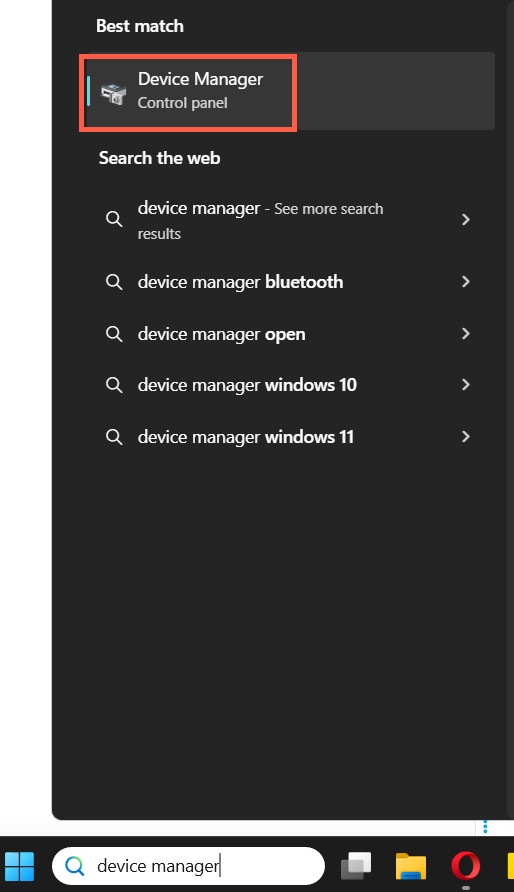
<p style="text-align: justify;">Đầu tiên bạn<strong>&nbsp;nhập device manager&nbsp;</strong>vào thanh tìm kiếm rồi tiến hành truy cập.</p>

<p style="text-align: justify;"><img alt="Device manager Windows" data-i="0" data-src="https://st.quantrimang.com/photos/image/2025/12/01/xoa-drivers-cu-tren-windows-4.jpg" data-was-processed="true" height="694" src="https://st.quantrimang.com/photos/image/2025/12/01/xoa-drivers-cu-tren-windows-4.jpg" width="400" /></p>

<p style="text-align: justify;"><strong>Bước 2:</strong></p>

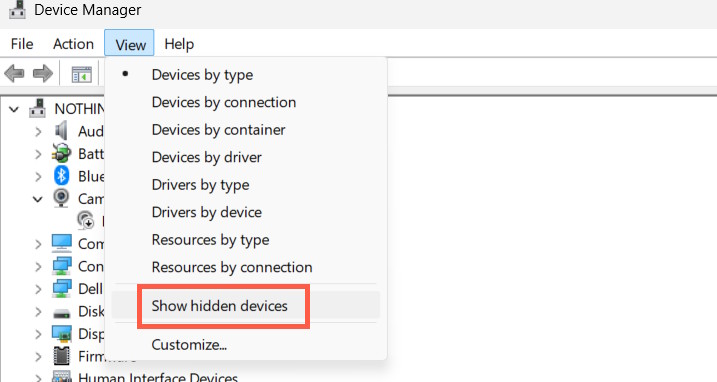
<p style="text-align: justify;">Trong giao diện quản lý drivers bạn<strong>&nbsp;nhấn vào View rồi chọn Show Hidden Devices&nbsp;</strong>để hiện những các trình điều khiển thiết bị cũ hoặc không hoạt động.</p>

<p style="text-align: justify;"><img alt="Show Hidden Devices" data-adbro-processed="true" data-i="1" data-src="https://st.quantrimang.com/photos/image/2025/12/01/xoa-drivers-cu-tren-windows-5.jpg" data-was-processed="true" height="320" src="https://st.quantrimang.com/photos/image/2025/12/01/xoa-drivers-cu-tren-windows-5.jpg" width="600" /></p>

<p style="text-align: justify;"><strong>Bước 3:</strong></p>

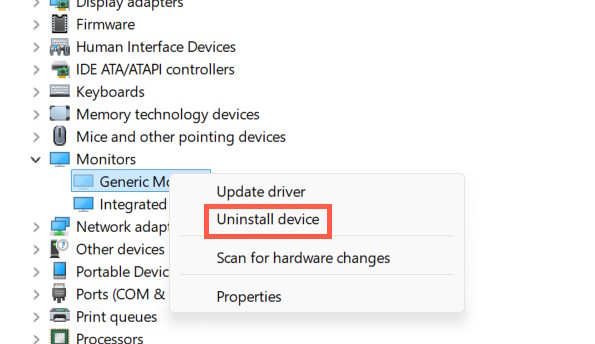
<p style="text-align: justify;">Sau đó mở rộng từng mục drivers để tiến hành kiểm tra. Khi thấy có trình điều khiển cũ, đã ẩn thì bạn&nbsp;<strong>nhấn chuột phải chọn Uninstall Device&nbsp;</strong>để tiến hành gỡ cài đặt.</p>

<p style="text-align: justify;">Lưu ý quá trình gỡ cài đặt drivers cũ bạn cần hết sức thận trọng.</p>

<p style="text-align: justify;"><img alt="Xóa drivers cũ trên Windows" data-i="2" data-src="https://st.quantrimang.com/photos/image/2025/12/01/xoa-drivers-cu-tren-windows-6.jpg" data-was-processed="true" height="344" src="https://st.quantrimang.com/photos/image/2025/12/01/xoa-drivers-cu-tren-windows-6.jpg" width="595" /></p>

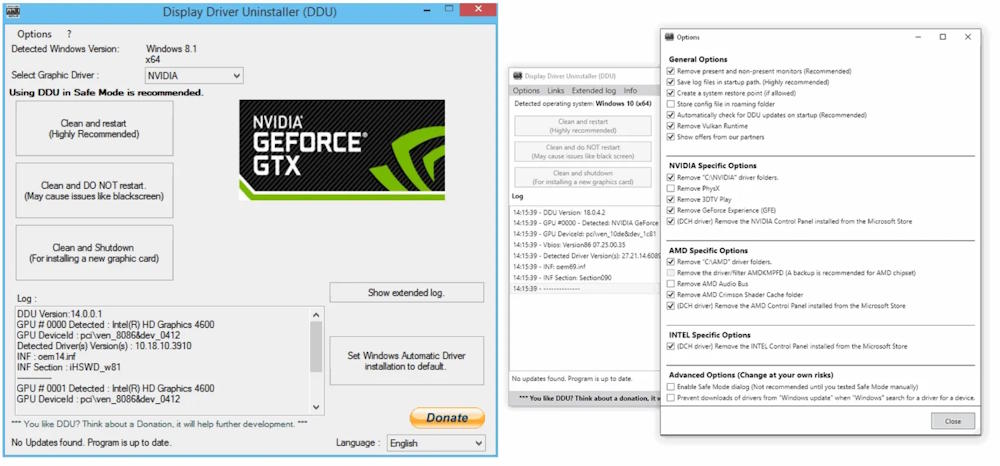
<p style="text-align: justify;">Ngoài ra đối với driver đồ họa và âm thanh bạn nên dùng DDU (Display Driver Uninstaller).</p>

<pre id="pre0">
<code>https://www.guru3d.com/download/display-driver-uninstaller-download/</code></pre>

<p style="text-align: justify;">Tiện ích dùng để xóa hoàn toàn trình điều khiển đồ họa và các tệp liên quan khi chuyển đổi giữa các GPU hoặc khắc phục sự cố trình điều khiển. Phiên bản mới tập trung vào việc cải thiện khả năng dọn dẹp trình điều khiển cũ, đặc biệt là cho phần cứng AMD.</p>

<p style="text-align: justify;"><img alt="Công cụ Display Driver Uninstaller (DDU) xóa drivers" data-i="3" data-src="https://st.quantrimang.com/photos/image/2025/12/01/xoa-drivers-cu-tren-windows-7.jpg" data-was-processed="true" height="280" src="https://st.quantrimang.com/photos/image/2025/12/01/xoa-drivers-cu-tren-windows-7.jpg" width="600" /></p>

<h2 style="text-align: justify;">Cách xóa tập tin rác ẩn trên Windows</h2>

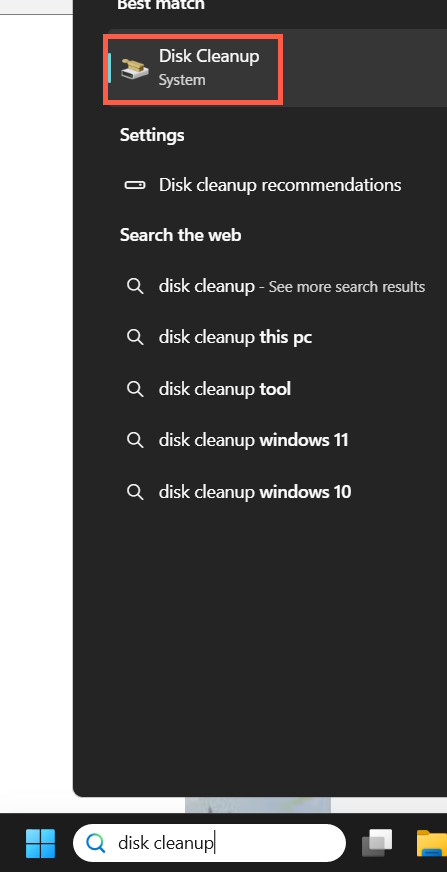
<p style="text-align: justify;">Windows có sẵn các công cụ để dọn dẹp các tập tin rác hệ thống. Trong thanh tìm kiếm của Windows, hãy tìm disk cleanup và khởi chạy&nbsp;<strong>công cụ Disk Cleanup</strong>.</p>

<p style="text-align: justify;"><img alt="Disk Cleanup Windows " data-i="4" data-src="https://st.quantrimang.com/photos/image/2025/12/01/xoa-drivers-cu-tren-windows-1.jpg" data-was-processed="true" height="644" src="https://st.quantrimang.com/photos/image/2025/12/01/xoa-drivers-cu-tren-windows-1.jpg" width="330" /></p>

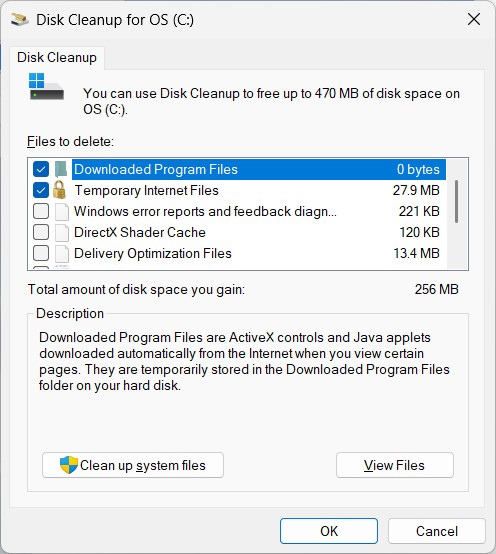
<p style="text-align: justify;">Chúng ta chọn lựa ổ đĩa cần dọn dẹp. Công cụ sẽ tự động quét ổ đĩa đó và hiển thị cho bạn bất kỳ tệp trình điều khiển cũ hoặc tệp rác tạm thời nào bạn có thể xóa để giải phóng dung lượng.</p>

<ul>
	<li style="text-align: justify;"><a href="https://quantrimang.com/cong-nghe/xoa-nhung-gi-trong-windows-disk-cleanup-198162" title="Có thể xóa những gì trong Windows Disk Cleanup?">Có thể xóa những gì trong Windows Disk Cleanup?</a></li>
</ul>

<p style="text-align: justify;"><img alt="Windows Disk Cleanup dọn dẹp máy tính" data-i="5" data-src="https://st.quantrimang.com/photos/image/2025/12/01/xoa-drivers-cu-tren-windows-2.jpg" data-was-processed="true" height="447" src="https://st.quantrimang.com/photos/image/2025/12/01/xoa-drivers-cu-tren-windows-2.jpg" width="400" /></p>

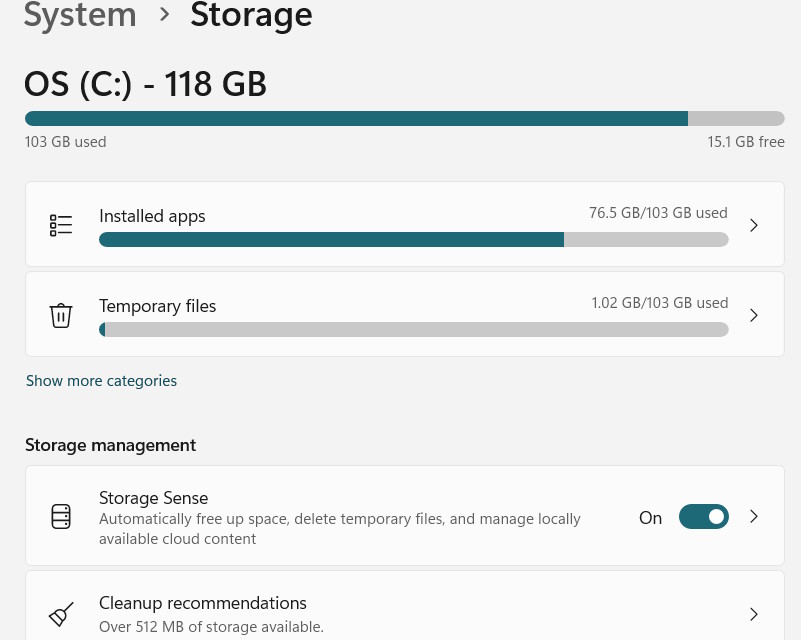
<p style="text-align: justify;">Ngoài công cụ Disk Cleanup thì bạn cũng có thể dùng thêm Storage Sense để xóa tập tin rác theo lịch trình. Bạn có thể lên lịch cho Storage Sense chạy hàng ngày, hàng tuần hoặc hàng tháng theo nhu cầu của bạn.</p>

<div style="text-align: justify;">&nbsp;</div>

<p style="text-align: justify;"><img alt="Storage sense Windows giải phóng dung lượng" data-i="6" data-src="https://st.quantrimang.com/photos/image/2025/12/01/xoa-drivers-cu-tren-windows-3.jpg" data-was-processed="true" height="400" src="https://st.quantrimang.com/photos/image/2025/12/01/xoa-drivers-cu-tren-windows-3.jpg" width="500" /></p>

<div style="text-align: justify;">&nbsp;</div>
		</div>
				<div id="author">
						<p>
				<strong>Nguồn tin:</strong>
				Quantrimang.com::
			</p>
		</div>
	</div>
	<div id="footer" class="clearfix">
		<div id="url">
			<strong>URL của bản tin này: </strong><a href="https://www.nguoicodonvn2008.info/vi/news/savefile/kien-thuc-may-tinh/huong-dan-xoa-drivers-cu-va-tap-tin-an-tren-windows-11774.html" title="Hướng dẫn xóa drivers cũ và tập tin ẩn trên Windows">https://www.nguoicodonvn2008.info/vi/news/savefile/kien-thuc-may-tinh/huong-dan-xoa-drivers-cu-va-tap-tin-an-tren-windows-11774.html</a>

		</div>
		<div class="clear"></div>
		<div class="copyright">
			&copy; .&#x3A; Nguoicodonvn2008.info - Cõi lòng người cô đơn &#x3A;.
		</div>
		<div id="contact">
			<a href="mailto:admin@nguoicodonvn2008.info">admin@nguoicodonvn2008.info</a>
		</div>
	</div>
</div>
        <div id="timeoutsess" class="chromeframe">
            Bạn đã không sử dụng Site, <a onclick="timeoutsesscancel();" href="https://nguoicodonvn2008.info/#">Bấm vào đây để duy trì trạng thái đăng nhập</a>. Thời gian chờ: <span id="secField"> 60 </span> giây
        </div>
        <div id="openidResult" class="nv-alert" style="display:none"></div>
        <div id="openidBt" data-result="" data-redirect=""></div>
		</script>
		<div class="car-top">
  <span><img src="https://nguoicodonvn2008.info/themes/default/images/car.png" alt=""></span>
</div>
<div id="run_cronjobs" style="visibility:hidden;display:none;"><img alt="cron" src="/index.php?second=cronjobs&amp;p=w809cA24" width="1" height="1" /></div>
<script src="https://nguoicodonvn2008.info/assets/js/jquery/jquery.min.js"></script>
<script>var nv_base_siteurl="/",nv_lang_data="vi",nv_lang_interface="vi",nv_name_variable="nv",nv_fc_variable="op",nv_lang_variable="language",nv_module_name="news",nv_func_name="savefile",nv_is_user=0, nv_my_ofs=-4,nv_my_abbr="EDT",nv_cookie_prefix="nv4c_e856T",nv_check_pass_mstime=1738000,nv_area_admin=0,nv_safemode=0,theme_responsive=0,nv_recaptcha_ver=2,nv_recaptcha_sitekey="",nv_recaptcha_type="image",XSSsanitize=1;</script>
<script src="https://nguoicodonvn2008.info/assets/js/language/vi.js"></script>
<script src="https://nguoicodonvn2008.info/assets/js/DOMPurify/purify3.js"></script>
<script src="https://nguoicodonvn2008.info/assets/js/global.js"></script>
<script src="https://nguoicodonvn2008.info/assets/js/site.js"></script>
<script src="https://nguoicodonvn2008.info/themes/default/js/news.js"></script>
<script src="https://nguoicodonvn2008.info/themes/default/js/main.js"></script>
<script src="https://nguoicodonvn2008.info/themes/default/js/custom.js"></script>
<script type="application/ld+json">
        {
            "@context": "https://schema.org",
            "@type": "Organization",
            "url": "https://nguoicodonvn2008.info",
            "logo": "https://nguoicodonvn2008.info/uploads/angel.gif"
        }
        </script>
<script src="https://nguoicodonvn2008.info/themes/default/js/bootstrap.min.js"></script>
<script type="text/javascript">
var $scrolltop = $('.car-top');
$scrolltop.on('click', function () {
    $('html,body').animate({
        scrollTop: 0
    }, 800);
    $(this).addClass("car-run");
    setTimeout(function(){ $scrolltop.removeClass('car-run');}, 1000);
    return false;
});
$(window).on('scroll', function ()
{ 
    if($(window).scrollTop() >= 200)
    {
        $scrolltop.addClass("show");
        $scrolltop.addClass("car-down");
    }
    else
    {
       $scrolltop.removeClass("show");
       setTimeout(function(){ $scrolltop.removeClass('car-down');}, 300);
    }
});
</script>
</body>
</html>