<!DOCTYPE html>
    <html lang="vi" xmlns="http://www.w3.org/1999/xhtml" prefix="og: http://ogp.me/ns#">
    <head>
<title>Hướng dẫn vô hiệu hóa Chatbot AI Firefox</title>
<meta name="description" content="Hướng dẫn vô hiệu hóa Chatbot AI Firefox - Savefile - Tin Tức -...">
<meta name="author" content=".: Nguoicodonvn2008.info - Cõi lòng người cô đơn :.">
<meta name="copyright" content=".: Nguoicodonvn2008.info - Cõi lòng người cô đơn :. [admin@nguoicodonvn2008.info]">
<meta name="robots" content="index, archive, follow, noodp">
<meta name="googlebot" content="index,archive,follow,noodp">
<meta name="msnbot" content="all,index,follow">
<meta name="generator" content="NukeViet v4.5">
<meta http-equiv="Content-Type" content="text/html; charset=utf-8">
<meta property="og:title" content="Hướng dẫn vô hiệu hóa Chatbot AI Firefox">
<meta property="og:type" content="website">
<meta property="og:description" content="Savefile - Tin Tức - https&#x3A;&#x002F;&#x002F;www.nguoicodonvn2008.info&#x002F;vi&#x002F;news&#x002F;savefile&#x002F;kien-thuc-may-tinh&#x002F;huong-dan-vo-hieu-hoa-chatbot-ai-firefox-10383.html">
<meta property="og:site_name" content=".&#x3A; Nguoicodonvn2008.info - Cõi lòng người cô đơn &#x3A;.">
<meta property="og:url" content="https://www.nguoicodonvn2008.info/vi/news/savefile/kien-thuc-may-tinh/huong-dan-vo-hieu-hoa-chatbot-ai-firefox-10383.html">
<link rel="shortcut icon" href="https://nguoicodonvn2008.info/favicon.ico">
<link rel="canonical" href="https://www.nguoicodonvn2008.info/vi/news/savefile/kien-thuc-may-tinh/huong-dan-vo-hieu-hoa-chatbot-ai-firefox-10383.html">
<link rel="alternate" href="https://nguoicodonvn2008.info/vi/news/rss/" title="Tin Tức" type="application/rss+xml">
<link rel="alternate" href="https://nguoicodonvn2008.info/vi/news/rss/karaoke-dual/" title="Tin Tức - Karaoke Dual" type="application/rss+xml">
<link rel="alternate" href="https://nguoicodonvn2008.info/vi/news/rss/nhac-tre/" title="Tin Tức - Nhạc trẻ" type="application/rss+xml">
<link rel="alternate" href="https://nguoicodonvn2008.info/vi/news/rss/tru-tinh/" title="Tin Tức - Trữ tình" type="application/rss+xml">
<link rel="alternate" href="https://nguoicodonvn2008.info/vi/news/rss/nuoc-ngoai/" title="Tin Tức - Nước ngoài" type="application/rss+xml">
<link rel="alternate" href="https://nguoicodonvn2008.info/vi/news/rss/remix/" title="Tin Tức - Remix" type="application/rss+xml">
<link rel="alternate" href="https://nguoicodonvn2008.info/vi/news/rss/tam-su-tinh-yeu/" title="Tin Tức - Tâm sự tình yêu" type="application/rss+xml">
<link rel="alternate" href="https://nguoicodonvn2008.info/vi/news/rss/tho-suu-tam/" title="Tin Tức - Thơ sưu tầm" type="application/rss+xml">
<link rel="alternate" href="https://nguoicodonvn2008.info/vi/news/rss/cuoc-song/" title="Tin Tức - Cuộc sống" type="application/rss+xml">
<link rel="alternate" href="https://nguoicodonvn2008.info/vi/news/rss/phan-mem/" title="Tin Tức - Phần mềm" type="application/rss+xml">
<link rel="alternate" href="https://nguoicodonvn2008.info/vi/news/rss/kien-thuc-may-tinh/" title="Tin Tức - Kiến thức máy tính" type="application/rss+xml">
<link rel="alternate" href="https://nguoicodonvn2008.info/vi/news/rss/hoc-tap/" title="Tin Tức - Học tập" type="application/rss+xml">
<link rel="alternate" href="https://nguoicodonvn2008.info/vi/news/rss/tai-lieu/" title="Tin Tức - Tài liệu" type="application/rss+xml">
<link rel="alternate" href="https://nguoicodonvn2008.info/vi/news/rss/de-thi/" title="Tin Tức - Đề thi" type="application/rss+xml">
<link rel="preload" as="style" href="https://nguoicodonvn2008.info/assets/css/font-awesome.min.css" type="text/css">
<link rel="preload" as="style" href="https://nguoicodonvn2008.info/themes/default/css/bootstrap.non-responsive.css" type="text/css">
<link rel="preload" as="style" href="https://nguoicodonvn2008.info/themes/default/css/style.css" type="text/css">
<link rel="preload" as="style" href="https://nguoicodonvn2008.info/themes/default/css/style.non-responsive.css" type="text/css">
<link rel="preload" as="style" href="https://nguoicodonvn2008.info/themes/default/css/news.css" type="text/css">
<link rel="preload" as="style" href="https://nguoicodonvn2008.info/themes/default/css/custom.css" type="text/css">
<link rel="preload" as="script" href="https://nguoicodonvn2008.info/assets/js/jquery/jquery.min.js" type="text/javascript">
<link rel="preload" as="script" href="https://nguoicodonvn2008.info/assets/js/language/vi.js" type="text/javascript">
<link rel="preload" as="script" href="https://nguoicodonvn2008.info/assets/js/DOMPurify/purify3.js" type="text/javascript">
<link rel="preload" as="script" href="https://nguoicodonvn2008.info/assets/js/global.js" type="text/javascript">
<link rel="preload" as="script" href="https://nguoicodonvn2008.info/assets/js/site.js" type="text/javascript">
<link rel="preload" as="script" href="https://nguoicodonvn2008.info/themes/default/js/news.js" type="text/javascript">
<link rel="preload" as="script" href="https://nguoicodonvn2008.info/themes/default/js/main.js" type="text/javascript">
<link rel="preload" as="script" href="https://nguoicodonvn2008.info/themes/default/js/custom.js" type="text/javascript">
<link rel="preload" as="script" href="https://nguoicodonvn2008.info/themes/default/js/bootstrap.min.js" type="text/javascript">
<link rel="stylesheet" href="https://nguoicodonvn2008.info/assets/css/font-awesome.min.css">
<link rel="stylesheet" href="https://nguoicodonvn2008.info/themes/default/css/bootstrap.non-responsive.css">
<link rel="stylesheet" href="https://nguoicodonvn2008.info/themes/default/css/style.css">
<link rel="stylesheet" href="https://nguoicodonvn2008.info/themes/default/css/style.non-responsive.css">
<link rel="StyleSheet" href="https://nguoicodonvn2008.info/themes/default/css/news.css">
<link rel="stylesheet" href="https://nguoicodonvn2008.info/themes/default/css/custom.css">
<style type="text/css">
	body{background: #fff;}
</style>
    </head>
    <body>
<div id="print">
	<div id="hd_print">
		<h2 class="pull-left">.&#x3A; Nguoicodonvn2008.info - Cõi lòng người cô đơn &#x3A;.</h2>
		<p class="pull-right"><a title=".&#x3A; Nguoicodonvn2008.info - Cõi lòng người cô đơn &#x3A;." href="https://nguoicodonvn2008.info/">https://nguoicodonvn2008.info</a></p>
	</div>
	<div class="clear"></div>
	<hr />
	<div id="content">
		<h1>Hướng dẫn vô hiệu hóa Chatbot AI Firefox</h1>
		<ul class="list-inline">
			<li>Thứ sáu - 16/05/2025 00:07</li>
			<li class="hidden-print txtrequired"><em class="fa fa-print">&nbsp;</em><a title="In ra" href="javascript:;" onclick="window.print()">In ra</a></li>
			<li class="hidden-print txtrequired"><em class="fa fa-power-off">&nbsp;</em><a title="Đóng cửa sổ này" href="javascript:;" onclick="window.close()">Đóng cửa sổ này</a></li>
		</ul>
		<div class="clear"></div>
		<div id="hometext">
		</div>
				<div class="imghome">
			<img alt="Hướng dẫn vô hiệu hóa Chatbot AI Firefox" src="https://st.quantrimang.com/photos/image/2025/05/14/vo-hieu-hoa-Chatbot-AI-Firefox-2.jpg" width="460" class="img-thumbnail" />
		</div>
		<div class="clear"></div>
		<div id="bodytext" class="clearfix">
			<p style="text-align: justify;">Từ phiên bản 133.0 trở lên, Firefox đã giới thiệu hỗ trợ chatbot AI trực tiếp vào trình duyệt. Khi bạn chọn văn bản trên trang web, một biểu tượng AI nhỏ sẽ xuất hiện, cung cấp nhiều công cụ hỗ trợ chatbot khác nhau. Tuy nhiên không phải ai cũng muốn dùng Chatbot AI này trên trình duyệt Firefox. Nếu bạn đang cảm thấy bị phiền bởi Chatbot AI Firefox thì thực hiện theo bài viết này để vô hiệu hóa.</p>

<div style="text-align: justify;">&nbsp;</div>

<h2 style="text-align: justify;">Cách vô hiệu hóa menu di chuột của AI Chatbot</h2>

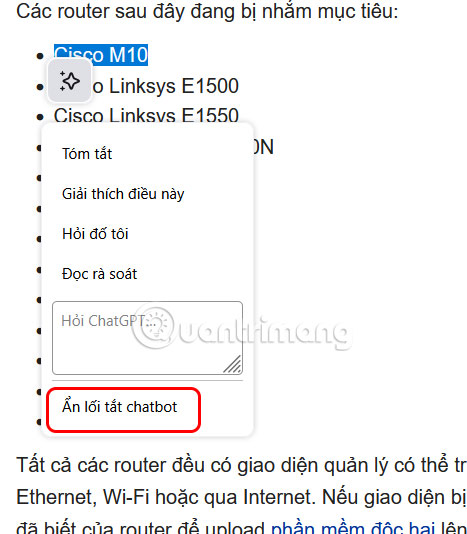
<p style="text-align: justify;">Nếu biểu tượng AI nổi xuất hiện khi bạn tô sáng văn bản gây mất tập trung, bạn bôi đen nội dung rồi nhấn vào&nbsp;<strong>biểu tượng chatbot</strong>. Lúc này bạn cần nhấn<strong>&nbsp;Ẩn lối tắt chatbot</strong>.</p>

<p style="text-align: justify;"><img alt="Vô hiệu hóa menu di chuột của AI Chatbot" data-i="0" data-src="https://st.quantrimang.com/photos/image/2025/05/14/vo-hieu-hoa-Chatbot-AI-Firefox-1.jpg" data-was-processed="true" height="457" src="https://st.quantrimang.com/photos/image/2025/05/14/vo-hieu-hoa-Chatbot-AI-Firefox-1.jpg" width="400" /></p>

<p style="text-align: justify;">Thao tác này sẽ xóa biểu tượng khỏi màn hình mỗi khi bạn chọn văn bản trong tương lai.</p>

<h2 style="text-align: justify;">Cách xóa menu chatbot click chuột phải</h2>

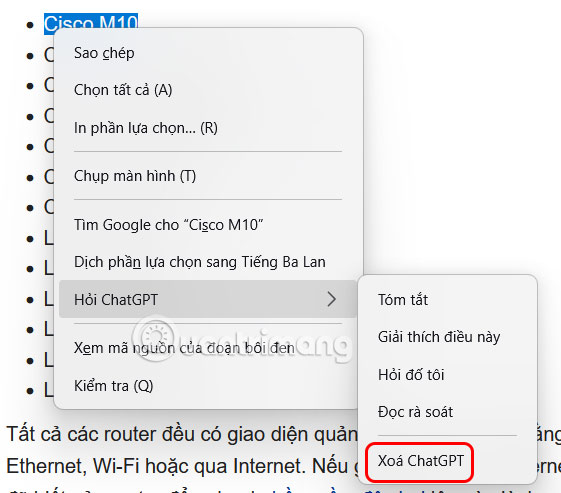
<p style="text-align: justify;">Nếu bạn không muốn thấy tùy chọn Hỏi ChatGPT ở menu chuột phải, chúng ta cũng cần bôi đen nội dung rồi nhấn chuột phải. Sau đó bạn chọn Xóa ChatGPT ở cuối danh sách.</p>

<div style="text-align: justify;">&nbsp;</div>

<p style="text-align: justify;"><img alt="Cách xóa menu chatbot click chuột phải" data-i="1" data-src="https://st.quantrimang.com/photos/image/2025/05/14/vo-hieu-hoa-Chatbot-AI-Firefox-2.jpg" data-was-processed="true" height="439" src="https://st.quantrimang.com/photos/image/2025/05/14/vo-hieu-hoa-Chatbot-AI-Firefox-2.jpg" width="500" /></p>

<p style="text-align: justify;">Và những lần chọn văn bản sau này, chatbot sẽ không hiển thị ở menu ngữ cảnh.</p>

<h2 style="text-align: justify;">Cách vô hiệu hóa Chatbot thanh bên Firefox</h2>

<p style="text-align: justify;">Thanh bên trong Firefox có hiển thị các tùy chọn chatbot AI để bạn click sử dụng nhanh chóng.</p>

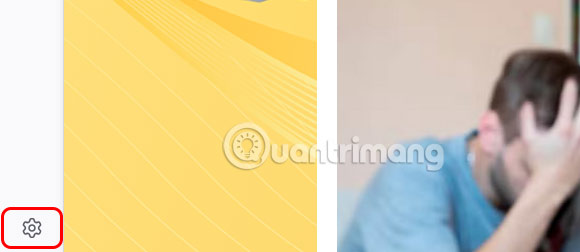
<p style="text-align: justify;">Tại giao diện trên trình duyệt Firefox bạn nhấn vào&nbsp;<strong>biểu tượng bánh răng cưa&nbsp;</strong>ở cuối giao diện.</p>

<p style="text-align: justify;"><img alt="Cài đặt thanh bên Firefox" data-i="2" data-src="https://st.quantrimang.com/photos/image/2025/05/14/vo-hieu-hoa-Chatbot-AI-Firefox-3.jpg" data-was-processed="true" height="239" src="https://st.quantrimang.com/photos/image/2025/05/14/vo-hieu-hoa-Chatbot-AI-Firefox-3.jpg" width="550" /></p>

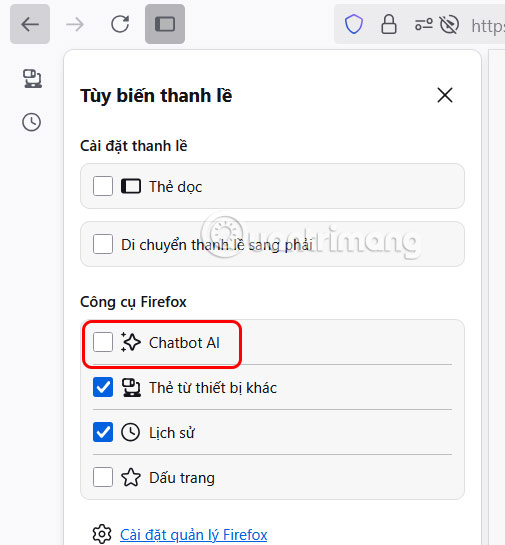
<p style="text-align: justify;">Sau đó chỉ cần<strong>&nbsp;bỏ tích tại Chatbot AI</strong>&nbsp;để tắt hiển thị biểu tượng Chatbot AI ở thanh bên.</p>

<p style="text-align: justify;"><img alt="Cách vô hiệu hóa Chatbot thanh bên Firefox" data-i="3" data-src="https://st.quantrimang.com/photos/image/2025/05/14/vo-hieu-hoa-Chatbot-AI-Firefox-4.jpg" data-was-processed="true" height="432" src="https://st.quantrimang.com/photos/image/2025/05/14/vo-hieu-hoa-Chatbot-AI-Firefox-4.jpg" width="400" /></p>

<div style="text-align: justify;">&nbsp;</div>

<h2 style="text-align: justify;">Cách tắt chatbot AI hoàn toàn trên Firefox</h2>

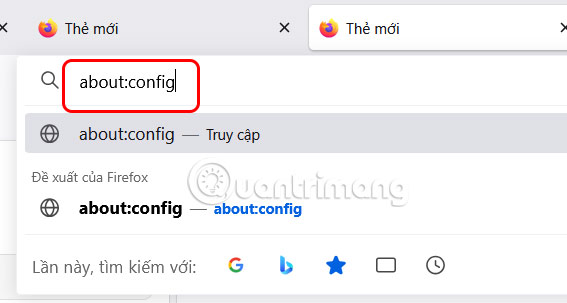
<p style="text-align: justify;">Đầu tiên bạn&nbsp;<strong>nhập about:config</strong>&nbsp;trên thanh địa chỉ trình duyệt Firefox.</p>

<p style="text-align: justify;"><img alt="Truy cập cài đặt hệ thống Firefox" data-i="4" data-src="https://st.quantrimang.com/photos/image/2025/05/14/vo-hieu-hoa-Chatbot-AI-Firefox-5.jpg" data-was-processed="true" height="294" src="https://st.quantrimang.com/photos/image/2025/05/14/vo-hieu-hoa-Chatbot-AI-Firefox-5.jpg" width="550" /></p>

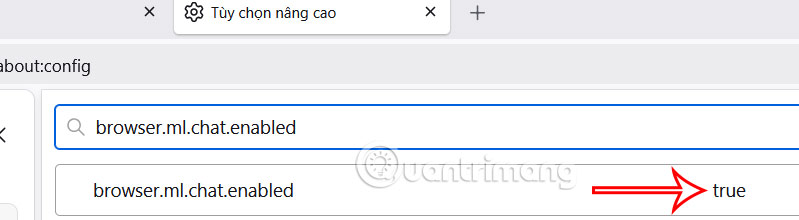
<p style="text-align: justify;">Tiếp đến bạn&nbsp;<strong>nhập browser.ml.chat.enabled</strong>&nbsp;trong thanh tìm kiếm và thấy giá trị mặc định để true.</p>

<p style="text-align: justify;"><img alt="browser.ml.chat.enabled Firefox" data-i="5" data-src="https://st.quantrimang.com/photos/image/2025/05/14/vo-hieu-hoa-Chatbot-AI-Firefox-6.jpg" data-was-processed="true" height="176" src="https://st.quantrimang.com/photos/image/2025/05/14/vo-hieu-hoa-Chatbot-AI-Firefox-6.jpg" width="640" /></p>

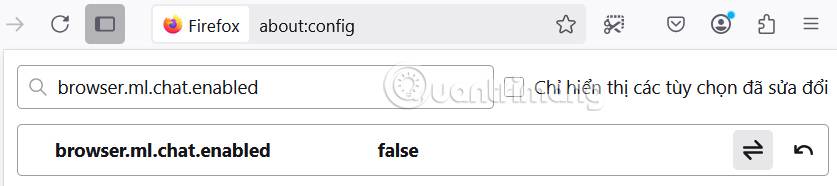
<p style="text-align: justify;">Lúc này bạn cần&nbsp;<strong>chuyển cài đặt này sang false</strong>&nbsp;và khởi động lại trình duyệt là được.</p>

<p style="text-align: justify;"><img alt="Tắt chatbot AI hoàn toàn trên Firefox" data-i="6" data-src="https://st.quantrimang.com/photos/image/2025/05/14/vo-hieu-hoa-Chatbot-AI-Firefox-7.jpg" data-was-processed="true" height="142" src="https://st.quantrimang.com/photos/image/2025/05/14/vo-hieu-hoa-Chatbot-AI-Firefox-7.jpg" width="640" /></p>

<div style="text-align: justify;">&nbsp;</div>
		</div>
				<div id="author">
						<p>
				<strong>Nguồn tin:</strong>
				Quantrimang.com:
			</p>
		</div>
	</div>
	<div id="footer" class="clearfix">
		<div id="url">
			<strong>URL của bản tin này: </strong><a href="https://www.nguoicodonvn2008.info/vi/news/savefile/kien-thuc-may-tinh/huong-dan-vo-hieu-hoa-chatbot-ai-firefox-10383.html" title="Hướng dẫn vô hiệu hóa Chatbot AI Firefox">https://www.nguoicodonvn2008.info/vi/news/savefile/kien-thuc-may-tinh/huong-dan-vo-hieu-hoa-chatbot-ai-firefox-10383.html</a>

		</div>
		<div class="clear"></div>
		<div class="copyright">
			&copy; .&#x3A; Nguoicodonvn2008.info - Cõi lòng người cô đơn &#x3A;.
		</div>
		<div id="contact">
			<a href="mailto:admin@nguoicodonvn2008.info">admin@nguoicodonvn2008.info</a>
		</div>
	</div>
</div>
        <div id="timeoutsess" class="chromeframe">
            Bạn đã không sử dụng Site, <a onclick="timeoutsesscancel();" href="https://nguoicodonvn2008.info/#">Bấm vào đây để duy trì trạng thái đăng nhập</a>. Thời gian chờ: <span id="secField"> 60 </span> giây
        </div>
        <div id="openidResult" class="nv-alert" style="display:none"></div>
        <div id="openidBt" data-result="" data-redirect=""></div>
		</script>
		<div class="car-top">
  <span><img src="https://nguoicodonvn2008.info/themes/default/images/car.png" alt=""></span>
</div>
<div id="run_cronjobs" style="visibility:hidden;display:none;"><img alt="cron" src="/index.php?second=cronjobs&amp;p=e0XXq23k" width="1" height="1" /></div>
<script src="https://nguoicodonvn2008.info/assets/js/jquery/jquery.min.js"></script>
<script>var nv_base_siteurl="/",nv_lang_data="vi",nv_lang_interface="vi",nv_name_variable="nv",nv_fc_variable="op",nv_lang_variable="language",nv_module_name="news",nv_func_name="savefile",nv_is_user=0, nv_my_ofs=-4,nv_my_abbr="EDT",nv_cookie_prefix="nv4c_e856T",nv_check_pass_mstime=1738000,nv_area_admin=0,nv_safemode=0,theme_responsive=0,nv_recaptcha_ver=2,nv_recaptcha_sitekey="",nv_recaptcha_type="image",XSSsanitize=1;</script>
<script src="https://nguoicodonvn2008.info/assets/js/language/vi.js"></script>
<script src="https://nguoicodonvn2008.info/assets/js/DOMPurify/purify3.js"></script>
<script src="https://nguoicodonvn2008.info/assets/js/global.js"></script>
<script src="https://nguoicodonvn2008.info/assets/js/site.js"></script>
<script src="https://nguoicodonvn2008.info/themes/default/js/news.js"></script>
<script src="https://nguoicodonvn2008.info/themes/default/js/main.js"></script>
<script src="https://nguoicodonvn2008.info/themes/default/js/custom.js"></script>
<script type="application/ld+json">
        {
            "@context": "https://schema.org",
            "@type": "Organization",
            "url": "https://nguoicodonvn2008.info",
            "logo": "https://nguoicodonvn2008.info/uploads/angel.gif"
        }
        </script>
<script src="https://nguoicodonvn2008.info/themes/default/js/bootstrap.min.js"></script>
<script type="text/javascript">
var $scrolltop = $('.car-top');
$scrolltop.on('click', function () {
    $('html,body').animate({
        scrollTop: 0
    }, 800);
    $(this).addClass("car-run");
    setTimeout(function(){ $scrolltop.removeClass('car-run');}, 1000);
    return false;
});
$(window).on('scroll', function ()
{ 
    if($(window).scrollTop() >= 200)
    {
        $scrolltop.addClass("show");
        $scrolltop.addClass("car-down");
    }
    else
    {
       $scrolltop.removeClass("show");
       setTimeout(function(){ $scrolltop.removeClass('car-down');}, 300);
    }
});
</script>
</body>
</html>