<!DOCTYPE html>
    <html lang="vi" xmlns="http://www.w3.org/1999/xhtml" prefix="og: http://ogp.me/ns#">
    <head>
<title>Hướng dẫn undervolt giảm nhiệt độ CPU</title>
<meta name="description" content="Hướng dẫn undervolt giảm nhiệt độ CPU - Savefile - Tin Tức -...">
<meta name="author" content=".: Nguoicodonvn2008.info - Cõi lòng người cô đơn :.">
<meta name="copyright" content=".: Nguoicodonvn2008.info - Cõi lòng người cô đơn :. [admin@nguoicodonvn2008.info]">
<meta name="robots" content="index, archive, follow, noodp">
<meta name="googlebot" content="index,archive,follow,noodp">
<meta name="msnbot" content="all,index,follow">
<meta name="generator" content="NukeViet v4.5">
<meta http-equiv="Content-Type" content="text/html; charset=utf-8">
<meta property="og:title" content="Hướng dẫn undervolt giảm nhiệt độ CPU">
<meta property="og:type" content="website">
<meta property="og:description" content="Savefile - Tin Tức - https&#x3A;&#x002F;&#x002F;www.nguoicodonvn2008.info&#x002F;vi&#x002F;news&#x002F;savefile&#x002F;kien-thuc-may-tinh&#x002F;huong-dan-undervolt-giam-nhiet-do-cpu-3063.html">
<meta property="og:site_name" content=".&#x3A; Nguoicodonvn2008.info - Cõi lòng người cô đơn &#x3A;.">
<meta property="og:url" content="https://www.nguoicodonvn2008.info/vi/news/savefile/kien-thuc-may-tinh/huong-dan-undervolt-giam-nhiet-do-cpu-3063.html">
<link rel="shortcut icon" href="https://nguoicodonvn2008.info/favicon.ico">
<link rel="canonical" href="https://www.nguoicodonvn2008.info/vi/news/savefile/kien-thuc-may-tinh/huong-dan-undervolt-giam-nhiet-do-cpu-3063.html">
<link rel="alternate" href="https://nguoicodonvn2008.info/vi/news/rss/" title="Tin Tức" type="application/rss+xml">
<link rel="alternate" href="https://nguoicodonvn2008.info/vi/news/rss/karaoke-dual/" title="Tin Tức - Karaoke Dual" type="application/rss+xml">
<link rel="alternate" href="https://nguoicodonvn2008.info/vi/news/rss/nhac-tre/" title="Tin Tức - Nhạc trẻ" type="application/rss+xml">
<link rel="alternate" href="https://nguoicodonvn2008.info/vi/news/rss/tru-tinh/" title="Tin Tức - Trữ tình" type="application/rss+xml">
<link rel="alternate" href="https://nguoicodonvn2008.info/vi/news/rss/nuoc-ngoai/" title="Tin Tức - Nước ngoài" type="application/rss+xml">
<link rel="alternate" href="https://nguoicodonvn2008.info/vi/news/rss/remix/" title="Tin Tức - Remix" type="application/rss+xml">
<link rel="alternate" href="https://nguoicodonvn2008.info/vi/news/rss/tam-su-tinh-yeu/" title="Tin Tức - Tâm sự tình yêu" type="application/rss+xml">
<link rel="alternate" href="https://nguoicodonvn2008.info/vi/news/rss/tho-suu-tam/" title="Tin Tức - Thơ sưu tầm" type="application/rss+xml">
<link rel="alternate" href="https://nguoicodonvn2008.info/vi/news/rss/cuoc-song/" title="Tin Tức - Cuộc sống" type="application/rss+xml">
<link rel="alternate" href="https://nguoicodonvn2008.info/vi/news/rss/phan-mem/" title="Tin Tức - Phần mềm" type="application/rss+xml">
<link rel="alternate" href="https://nguoicodonvn2008.info/vi/news/rss/kien-thuc-may-tinh/" title="Tin Tức - Kiến thức máy tính" type="application/rss+xml">
<link rel="alternate" href="https://nguoicodonvn2008.info/vi/news/rss/hoc-tap/" title="Tin Tức - Học tập" type="application/rss+xml">
<link rel="alternate" href="https://nguoicodonvn2008.info/vi/news/rss/tai-lieu/" title="Tin Tức - Tài liệu" type="application/rss+xml">
<link rel="alternate" href="https://nguoicodonvn2008.info/vi/news/rss/de-thi/" title="Tin Tức - Đề thi" type="application/rss+xml">
<link rel="preload" as="style" href="https://nguoicodonvn2008.info/assets/css/font-awesome.min.css" type="text/css">
<link rel="preload" as="style" href="https://nguoicodonvn2008.info/themes/default/css/bootstrap.non-responsive.css" type="text/css">
<link rel="preload" as="style" href="https://nguoicodonvn2008.info/themes/default/css/style.css" type="text/css">
<link rel="preload" as="style" href="https://nguoicodonvn2008.info/themes/default/css/style.non-responsive.css" type="text/css">
<link rel="preload" as="style" href="https://nguoicodonvn2008.info/themes/default/css/news.css" type="text/css">
<link rel="preload" as="style" href="https://nguoicodonvn2008.info/themes/default/css/custom.css" type="text/css">
<link rel="preload" as="script" href="https://nguoicodonvn2008.info/assets/js/jquery/jquery.min.js" type="text/javascript">
<link rel="preload" as="script" href="https://nguoicodonvn2008.info/assets/js/language/vi.js" type="text/javascript">
<link rel="preload" as="script" href="https://nguoicodonvn2008.info/assets/js/DOMPurify/purify3.js" type="text/javascript">
<link rel="preload" as="script" href="https://nguoicodonvn2008.info/assets/js/global.js" type="text/javascript">
<link rel="preload" as="script" href="https://nguoicodonvn2008.info/assets/js/site.js" type="text/javascript">
<link rel="preload" as="script" href="https://nguoicodonvn2008.info/themes/default/js/news.js" type="text/javascript">
<link rel="preload" as="script" href="https://nguoicodonvn2008.info/themes/default/js/main.js" type="text/javascript">
<link rel="preload" as="script" href="https://nguoicodonvn2008.info/themes/default/js/custom.js" type="text/javascript">
<link rel="preload" as="script" href="https://nguoicodonvn2008.info/themes/default/js/bootstrap.min.js" type="text/javascript">
<link rel="stylesheet" href="https://nguoicodonvn2008.info/assets/css/font-awesome.min.css">
<link rel="stylesheet" href="https://nguoicodonvn2008.info/themes/default/css/bootstrap.non-responsive.css">
<link rel="stylesheet" href="https://nguoicodonvn2008.info/themes/default/css/style.css">
<link rel="stylesheet" href="https://nguoicodonvn2008.info/themes/default/css/style.non-responsive.css">
<link rel="StyleSheet" href="https://nguoicodonvn2008.info/themes/default/css/news.css">
<link rel="stylesheet" href="https://nguoicodonvn2008.info/themes/default/css/custom.css">
<style type="text/css">
	body{background: #fff;}
</style>
    </head>
    <body>
<div id="print">
	<div id="hd_print">
		<h2 class="pull-left">.&#x3A; Nguoicodonvn2008.info - Cõi lòng người cô đơn &#x3A;.</h2>
		<p class="pull-right"><a title=".&#x3A; Nguoicodonvn2008.info - Cõi lòng người cô đơn &#x3A;." href="https://nguoicodonvn2008.info/">https://nguoicodonvn2008.info</a></p>
	</div>
	<div class="clear"></div>
	<hr />
	<div id="content">
		<h1>Hướng dẫn undervolt giảm nhiệt độ CPU</h1>
		<ul class="list-inline">
			<li>Thứ ba - 10/11/2020 23:52</li>
			<li class="hidden-print txtrequired"><em class="fa fa-print">&nbsp;</em><a title="In ra" href="javascript:;" onclick="window.print()">In ra</a></li>
			<li class="hidden-print txtrequired"><em class="fa fa-power-off">&nbsp;</em><a title="Đóng cửa sổ này" href="javascript:;" onclick="window.close()">Đóng cửa sổ này</a></li>
		</ul>
		<div class="clear"></div>
		<div id="hometext">
		</div>
				<div class="imghome">
			<img alt="Hướng dẫn undervolt giảm nhiệt độ CPU" src="https://st.quantrimang.com/photos/image/2018/06/11/giam-nhiet-do-cpu-bang-undervolt-2.jpg" width="460" class="img-thumbnail" />
		</div>
		<div class="clear"></div>
		<div id="bodytext" class="clearfix">
			<p style="text-align: justify;">Bạn càng thực hiện nhiều công việc trên máy tính,&nbsp;CPU&nbsp;(bộ xử lý) của bạn càng nóng lên, đặc biệt khi chơi game hoặc chỉnh sửa video nặng. CPU của bạn càng dễ bị nóng khi hệ thống thông gió kém hoặc&nbsp;keo tản nhiệt&nbsp;trên chip đã bị mòn. Tuy nhiên, có một quá trình có thể giúp bạn giảm nhiệt độ bộ xử lý được gọi là “undervolting”.</p>

<div style="text-align: justify;">&nbsp;</div>

<p style="text-align: justify;">Quá trình này là cách thức giảm nhiệt máy tính hiệu quả sử dụng phần mềm. Bài viết này sẽ sử dụng Throttlestop để làm mát CPU.</p>

<p style="text-align: justify;">&nbsp;</p>

<h2 style="text-align: justify;">Quá trình Undervolting là gì?</h2>

<p style="text-align: justify;">Trước khi đi vào hướng dẫn cụ thể, chúng ta cần biết đôi điều về quá trình này. Mặc dù undervolting không làm hỏng CPU, nhưng thực hiện quá có thể khiến hệ thống không ổn định (mặc dù có thể đảo ngược quá trình này dễ dàng). Mặt khác overvolting có thể làm hỏng CPU nếu lạm dụng nó, nhưng nếu được sử dụng cẩn thận, bạn có thể&nbsp;ép xung CPU&nbsp;lên tốc độ cao hơn.</p>

<p style="text-align: justify;">Undervolting đơn giản làm giảm lượng điện/điện áp trực tiếp vào CPU. Điện vào CPU càng nhiều, nhiệt độ càng tăng cao; và ngược lại càng ít điện năng, nhiệt độ càng thấp. Một khả năng khác của undervolting là nó có thể&nbsp;kéo dài tuổi thọ pin của máy tính xách tay. Và undervolting không ảnh hưởng đến hiệu suất ngay cả khi bạn thực hiện các hoạt động cường độ cao như chơi game.</p>

<h2 style="text-align: justify;">Những tính năng của Throttlestop</h2>

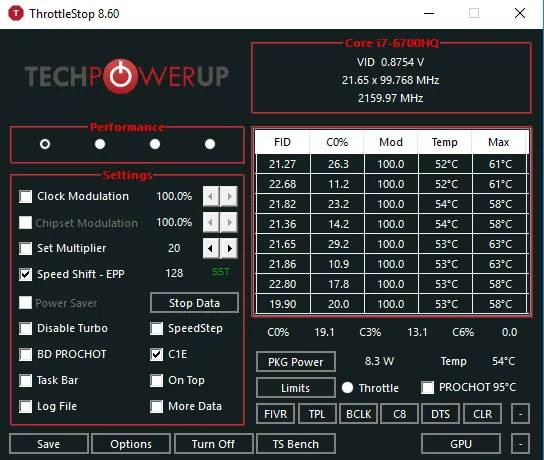
<p style="text-align: justify;">Throttlestop là một công cụ có nhiều mục đích. Hãy cùng xem các hộp kiểm trên màn hình Throttlestop chính.</p>

<p style="text-align: justify;">Bài viết sẽ chỉ xem xét những hộp có liên quan đến CPU hiện đại, vì một số hộp trong số đó liên quan đến các tính năng cho PC cũ nhiều hơn. Sau đây là các tính năng bạn nên tìm kiếm:</p>

<figure>
<div style="text-align: justify;"><img alt="Màn hình chính của Throttlestop " data-i="0" data-src="https://st.quantrimang.com/photos/image/2020/11/10/giam-nhiet-do-cpu-bang-undervolt.jpg" data-was-processed="true" height="460" src="https://st.quantrimang.com/photos/image/2020/11/10/giam-nhiet-do-cpu-bang-undervolt.jpg" width="544" /></div>

<figcaption>
<div style="text-align: justify;">Màn hình chính của Throttlestop</div>
</figcaption>
</figure>

<p style="text-align: justify;"><strong>Disable Turbo</strong>: Cài đặt này sẽ đảm bảo rằng không có lõi nào trên CPU chạy nhanh hơn tốc độ xung nhịp cơ bản của chúng. Nếu bạn có tốc độ xung nhịp cơ bản là 2,6GHz có khả năng tăng tốc lên đến 3GHz, việc chọn hộp này sẽ đảm bảo rằng nó vẫn ở trong vùng 2,6GHz thay vì tăng tốc.</p>

<p style="text-align: justify;"><strong>BD Prochot</strong>: Một tính năng an toàn điều chỉnh CPU khi mọi thứ bên trong laptop quá nóng. Nói chung, việc điều chỉnh sẽ bắt đầu hoạt động khi CPU đạt đến 100°C, nhưng với hộp này được đánh dấu, CPU sẽ điều tiết ngay cả khi GPU chỉ gần đạt mức này. Đó là một biện pháp an toàn tiện dụng đáng có trong những trường hợp cực kỳ hiếm gặp.</p>

<p style="text-align: justify;"><strong>Speed ​​Shift</strong>: Trên các CPU gần đây (2016 trở đi), Intel đã phát hành tính năng này, giúp CPU phản ứng nhanh hơn với những thay đổi về tốc độ xung nhịp do phần mềm thiết lập. Nếu tùy chọn này xuất hiện trong Throttlestop, thì bạn nên bật nó lên.</p>

<div style="text-align: justify;">&nbsp;</div>

<p style="text-align: justify;"><strong>SpeedStep</strong>: Nếu CPU của bạn cũ hơn thế hệ Intel Skylake (2015), thì Speedstep thực hiện công việc tương tự như Speed ​​Shift. Hãy bật tính năng này nếu bạn có CPU cũ.</p>

<p style="text-align: justify;"><strong>C1E</strong>: Bật tùy chọn này sẽ giúp tiết kiệm năng lượng khi bạn sắp hết pin, vì Throttlestop sẽ tự động tắt các lõi dựa trên mức độ căng thẳng của chúng.</p>

<h2 style="text-align: justify;">Undervolt CPU bằng cách sử dụng Throttlestop</h2>

<p style="text-align: justify;">Trước tiên, tải và cài đặt&nbsp;Throttlestop: <strong>https://www.techpowerup.com/download/techpowerup-throttlestop/</strong>, sau đó mở nó.</p>

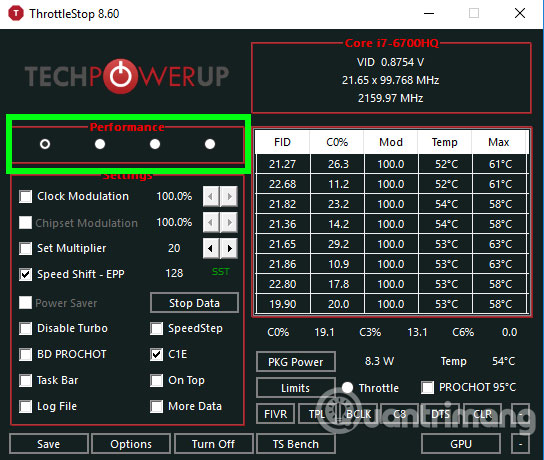
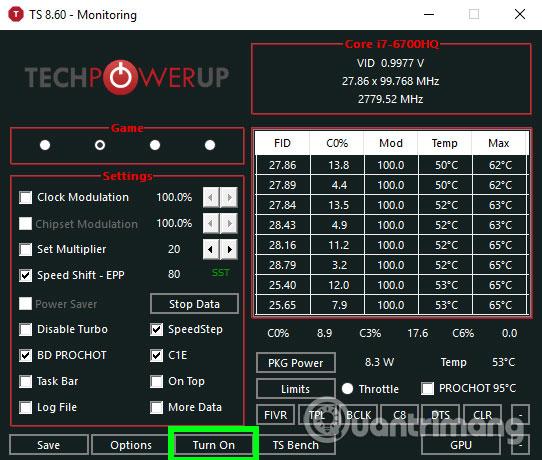
<p style="text-align: justify;">Bạn sẽ thấy một loạt các con số và các tùy chọn có thể làm bạn rối trí, tuy nhiên hãy lờ những con số này đi, bạn chỉ cần quan tâm 4 nút tròn trên cùng bên trái. Các nút này sẽ giúp bạn thay đổi các profile khác nhau, mỗi profile sẽ có các cài đặt undervolt của riêng nó. Bạn có thể tạo các profile khác nhau như “Game” để dùng khi chơi game hoặc “Performance” nếu muốn.</p>

<p style="text-align: justify;"><img alt="Nút chọn profile" data-i="1" data-src="https://st.quantrimang.com/photos/image/2018/06/11/giam-nhiet-do-cpu-bang-undervolt-2.jpg" data-was-processed="true" height="460" src="https://st.quantrimang.com/photos/image/2018/06/11/giam-nhiet-do-cpu-bang-undervolt-2.jpg" width="544" /></p>

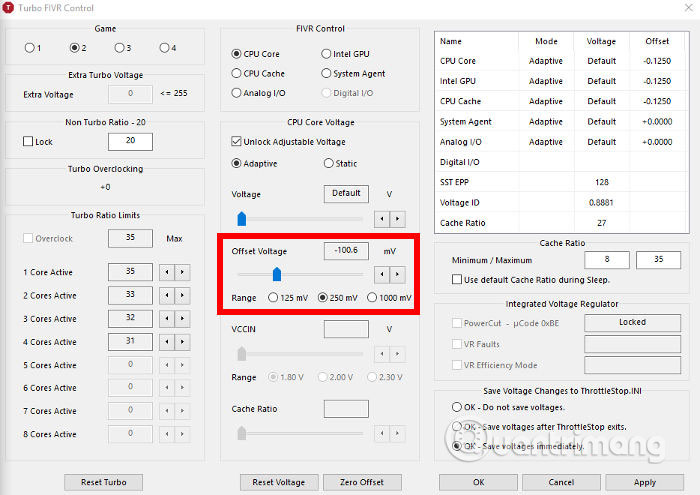
<p style="text-align: justify;">Vì vậy, với profile được chọn, bấm vào nút&nbsp;<strong>FIVR</strong>&nbsp;trong Throttlestop. Trong cửa sổ mới tích vào ô&nbsp;<strong>Unlock Adjustable Voltage</strong>. Tiếp theo, giảm thanh trượt&nbsp;<strong>Offset Voltage</strong>, trong phần&nbsp;<strong>Undervolting</strong>. Bạn nên giảm xuống còn -100mV.</p>

<p style="text-align: justify;"><img alt="Giảm thanh trượt Offset Voltage" data-i="2" data-src="https://st.quantrimang.com/photos/image/2018/06/11/giam-nhiet-do-cpu-bang-undervolt-3.jpg" data-was-processed="true" height="453" src="https://st.quantrimang.com/photos/image/2018/06/11/giam-nhiet-do-cpu-bang-undervolt-3.jpg" width="640" /></p>

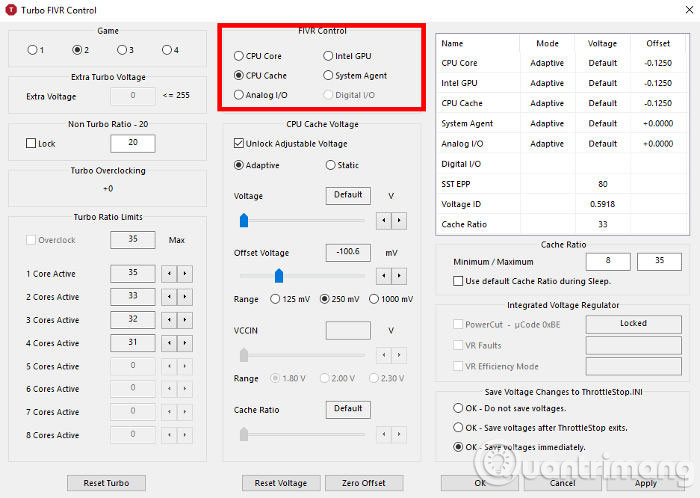
<p style="text-align: justify;">Sau đó, bấm vào &quot;<strong>CPU Cache</strong>&quot; trong phần &quot;<strong>FIVR Control</strong>&quot;, và thiết lập nó với cùng mức điện áp. Điều quan trọng là CPU Core và CPU Cache luôn có cùng mức Voltage Offset.</p>

<p style="text-align: justify;"><img alt="Chọn CPU Cacher trong phần FIVR Control" data-i="3" data-src="https://st.quantrimang.com/photos/image/2018/06/11/giam-nhiet-do-cpu-bang-undervolt-4.jpg" data-was-processed="true" height="455" src="https://st.quantrimang.com/photos/image/2018/06/11/giam-nhiet-do-cpu-bang-undervolt-4.jpg" width="640" /></p>

<p style="text-align: justify;">Khi đã hoàn thành các bước trên, click vào “<strong>Apply</strong>” và tiếp tục theo dõi độ ổn định của hệ thống và nhiệt độ CPU. Bạn có thể theo dõi nhiệt độ CPU từ cửa sổ chính của Throttlestop.</p>

<p style="text-align: justify;">Nếu hệ thống của bạn vẫn ổn định (không thấy xuất hiện&nbsp;màn hình xanh), bạn có thể tiếp tục giảm điện áp CPU Cache và CPU Core với mức -10mV để tiếp tục giảm nhiệt độ CPU. Nếu bạn đạt đến một điểm mà hệ thống bị treo, hãy khởi động lại máy tính, mở Throttlestop và trở lại mức Offset Voltage trước đó, lúc mà hệ thống vẫn còn ổn định.</p>

<p style="text-align: justify;">Với các CPU khác nhau, mức độ điện áp được áp dụng là không giống nhau. Bạn cần phải thử nghiệm để tìm ra giới hạn CPU của mình. Khi đã thực hiện xong các điều chỉnh, nhấn “<strong>OK</strong>” trong bảng điều khiển FIVR, sau đó chọn “<strong>Turn On</strong>” trong cửa sổ Throttlestop chính.</p>

<p style="text-align: justify;"><img alt="Chọn Turn On" data-i="4" data-src="https://st.quantrimang.com/photos/image/2018/06/11/giam-nhiet-do-cpu-bang-undervolt-5.jpg" data-was-processed="true" height="460" src="https://st.quantrimang.com/photos/image/2018/06/11/giam-nhiet-do-cpu-bang-undervolt-5.jpg" width="542" /></p>

<p style="text-align: justify;">Nếu không muốn mở Throttlestop theo cách thủ công mỗi lần muốn undervolt CPU, bạn có thể thiết lập để nó mở khi khởi động Windows.</p>

<p style="text-align: justify;">Bằng cách sử dụng phương pháp này, nhiều người giảm nhiệt độ CPU khi chơi game từ gần 90°C xuống còn 70-75°C. Cách này mang lại hiệu quả hơn khi bạn điều chỉnh nhiệt độ từ bên trong Windows. Tuy nhiên, nếu vẫn gặp sự cố, bạn có thể sử dụng keo tản nhiệt mới cho CPU hoặc vệ sinh máy tính.</p>
		</div>
				<div id="author">
						<p>
				<strong>Nguồn tin:</strong>
				Quantrimang.com
			</p>
		</div>
	</div>
	<div id="footer" class="clearfix">
		<div id="url">
			<strong>URL của bản tin này: </strong><a href="https://www.nguoicodonvn2008.info/vi/news/savefile/kien-thuc-may-tinh/huong-dan-undervolt-giam-nhiet-do-cpu-3063.html" title="Hướng dẫn undervolt giảm nhiệt độ CPU">https://www.nguoicodonvn2008.info/vi/news/savefile/kien-thuc-may-tinh/huong-dan-undervolt-giam-nhiet-do-cpu-3063.html</a>

		</div>
		<div class="clear"></div>
		<div class="copyright">
			&copy; .&#x3A; Nguoicodonvn2008.info - Cõi lòng người cô đơn &#x3A;.
		</div>
		<div id="contact">
			<a href="mailto:admin@nguoicodonvn2008.info">admin@nguoicodonvn2008.info</a>
		</div>
	</div>
</div>
        <div id="timeoutsess" class="chromeframe">
            Bạn đã không sử dụng Site, <a onclick="timeoutsesscancel();" href="https://nguoicodonvn2008.info/#">Bấm vào đây để duy trì trạng thái đăng nhập</a>. Thời gian chờ: <span id="secField"> 60 </span> giây
        </div>
        <div id="openidResult" class="nv-alert" style="display:none"></div>
        <div id="openidBt" data-result="" data-redirect=""></div>
		</script>
		<div class="car-top">
  <span><img src="https://nguoicodonvn2008.info/themes/default/images/car.png" alt=""></span>
</div>
<script src="https://nguoicodonvn2008.info/assets/js/jquery/jquery.min.js"></script>
<script>var nv_base_siteurl="/",nv_lang_data="vi",nv_lang_interface="vi",nv_name_variable="nv",nv_fc_variable="op",nv_lang_variable="language",nv_module_name="news",nv_func_name="savefile",nv_is_user=0, nv_my_ofs=-4,nv_my_abbr="EDT",nv_cookie_prefix="nv4c_e856T",nv_check_pass_mstime=1738000,nv_area_admin=0,nv_safemode=0,theme_responsive=0,nv_recaptcha_ver=2,nv_recaptcha_sitekey="",nv_recaptcha_type="image",XSSsanitize=1;</script>
<script src="https://nguoicodonvn2008.info/assets/js/language/vi.js"></script>
<script src="https://nguoicodonvn2008.info/assets/js/DOMPurify/purify3.js"></script>
<script src="https://nguoicodonvn2008.info/assets/js/global.js"></script>
<script src="https://nguoicodonvn2008.info/assets/js/site.js"></script>
<script src="https://nguoicodonvn2008.info/themes/default/js/news.js"></script>
<script src="https://nguoicodonvn2008.info/themes/default/js/main.js"></script>
<script src="https://nguoicodonvn2008.info/themes/default/js/custom.js"></script>
<script type="application/ld+json">
        {
            "@context": "https://schema.org",
            "@type": "Organization",
            "url": "https://nguoicodonvn2008.info",
            "logo": "https://nguoicodonvn2008.info/uploads/angel.gif"
        }
        </script>
<script src="https://nguoicodonvn2008.info/themes/default/js/bootstrap.min.js"></script>
<script type="text/javascript">
var $scrolltop = $('.car-top');
$scrolltop.on('click', function () {
    $('html,body').animate({
        scrollTop: 0
    }, 800);
    $(this).addClass("car-run");
    setTimeout(function(){ $scrolltop.removeClass('car-run');}, 1000);
    return false;
});
$(window).on('scroll', function ()
{ 
    if($(window).scrollTop() >= 200)
    {
        $scrolltop.addClass("show");
        $scrolltop.addClass("car-down");
    }
    else
    {
       $scrolltop.removeClass("show");
       setTimeout(function(){ $scrolltop.removeClass('car-down');}, 300);
    }
});
</script>
</body>
</html>