<!DOCTYPE html>
    <html lang="vi" xmlns="http://www.w3.org/1999/xhtml" prefix="og: http://ogp.me/ns#">
    <head>
<title>Hướng dẫn tải và cài đặt Crossfire Legends PC</title>
<meta name="description" content="Hướng dẫn tải và cài đặt Crossfire Legends PC - Savefile - Tin Tức -...">
<meta name="author" content=".: Nguoicodonvn2008.info - Cõi lòng người cô đơn :.">
<meta name="copyright" content=".: Nguoicodonvn2008.info - Cõi lòng người cô đơn :. [admin@nguoicodonvn2008.info]">
<meta name="robots" content="index, archive, follow, noodp">
<meta name="googlebot" content="index,archive,follow,noodp">
<meta name="msnbot" content="all,index,follow">
<meta name="generator" content="NukeViet v4.5">
<meta http-equiv="Content-Type" content="text/html; charset=utf-8">
<meta property="og:title" content="Hướng dẫn tải và cài đặt Crossfire Legends PC">
<meta property="og:type" content="website">
<meta property="og:description" content="Savefile - Tin Tức - https&#x3A;&#x002F;&#x002F;www.nguoicodonvn2008.info&#x002F;vi&#x002F;news&#x002F;savefile&#x002F;kien-thuc-may-tinh&#x002F;huong-dan-tai-va-cai-dat-crossfire-legends-pc-11896.html">
<meta property="og:site_name" content=".&#x3A; Nguoicodonvn2008.info - Cõi lòng người cô đơn &#x3A;.">
<meta property="og:url" content="https://www.nguoicodonvn2008.info/vi/news/savefile/kien-thuc-may-tinh/huong-dan-tai-va-cai-dat-crossfire-legends-pc-11896.html">
<link rel="shortcut icon" href="https://nguoicodonvn2008.info/favicon.ico">
<link rel="canonical" href="https://www.nguoicodonvn2008.info/vi/news/savefile/kien-thuc-may-tinh/huong-dan-tai-va-cai-dat-crossfire-legends-pc-11896.html">
<link rel="alternate" href="https://nguoicodonvn2008.info/vi/news/rss/" title="Tin Tức" type="application/rss+xml">
<link rel="alternate" href="https://nguoicodonvn2008.info/vi/news/rss/karaoke-dual/" title="Tin Tức - Karaoke Dual" type="application/rss+xml">
<link rel="alternate" href="https://nguoicodonvn2008.info/vi/news/rss/nhac-tre/" title="Tin Tức - Nhạc trẻ" type="application/rss+xml">
<link rel="alternate" href="https://nguoicodonvn2008.info/vi/news/rss/tru-tinh/" title="Tin Tức - Trữ tình" type="application/rss+xml">
<link rel="alternate" href="https://nguoicodonvn2008.info/vi/news/rss/nuoc-ngoai/" title="Tin Tức - Nước ngoài" type="application/rss+xml">
<link rel="alternate" href="https://nguoicodonvn2008.info/vi/news/rss/remix/" title="Tin Tức - Remix" type="application/rss+xml">
<link rel="alternate" href="https://nguoicodonvn2008.info/vi/news/rss/tam-su-tinh-yeu/" title="Tin Tức - Tâm sự tình yêu" type="application/rss+xml">
<link rel="alternate" href="https://nguoicodonvn2008.info/vi/news/rss/tho-suu-tam/" title="Tin Tức - Thơ sưu tầm" type="application/rss+xml">
<link rel="alternate" href="https://nguoicodonvn2008.info/vi/news/rss/cuoc-song/" title="Tin Tức - Cuộc sống" type="application/rss+xml">
<link rel="alternate" href="https://nguoicodonvn2008.info/vi/news/rss/phan-mem/" title="Tin Tức - Phần mềm" type="application/rss+xml">
<link rel="alternate" href="https://nguoicodonvn2008.info/vi/news/rss/kien-thuc-may-tinh/" title="Tin Tức - Kiến thức máy tính" type="application/rss+xml">
<link rel="alternate" href="https://nguoicodonvn2008.info/vi/news/rss/hoc-tap/" title="Tin Tức - Học tập" type="application/rss+xml">
<link rel="alternate" href="https://nguoicodonvn2008.info/vi/news/rss/tai-lieu/" title="Tin Tức - Tài liệu" type="application/rss+xml">
<link rel="alternate" href="https://nguoicodonvn2008.info/vi/news/rss/de-thi/" title="Tin Tức - Đề thi" type="application/rss+xml">
<link rel="preload" as="style" href="https://nguoicodonvn2008.info/assets/css/font-awesome.min.css" type="text/css">
<link rel="preload" as="style" href="https://nguoicodonvn2008.info/themes/default/css/bootstrap.non-responsive.css" type="text/css">
<link rel="preload" as="style" href="https://nguoicodonvn2008.info/themes/default/css/style.css" type="text/css">
<link rel="preload" as="style" href="https://nguoicodonvn2008.info/themes/default/css/style.non-responsive.css" type="text/css">
<link rel="preload" as="style" href="https://nguoicodonvn2008.info/themes/default/css/news.css" type="text/css">
<link rel="preload" as="style" href="https://nguoicodonvn2008.info/themes/default/css/custom.css" type="text/css">
<link rel="preload" as="script" href="https://nguoicodonvn2008.info/assets/js/jquery/jquery.min.js" type="text/javascript">
<link rel="preload" as="script" href="https://nguoicodonvn2008.info/assets/js/language/vi.js" type="text/javascript">
<link rel="preload" as="script" href="https://nguoicodonvn2008.info/assets/js/DOMPurify/purify3.js" type="text/javascript">
<link rel="preload" as="script" href="https://nguoicodonvn2008.info/assets/js/global.js" type="text/javascript">
<link rel="preload" as="script" href="https://nguoicodonvn2008.info/assets/js/site.js" type="text/javascript">
<link rel="preload" as="script" href="https://nguoicodonvn2008.info/themes/default/js/news.js" type="text/javascript">
<link rel="preload" as="script" href="https://nguoicodonvn2008.info/themes/default/js/main.js" type="text/javascript">
<link rel="preload" as="script" href="https://nguoicodonvn2008.info/themes/default/js/custom.js" type="text/javascript">
<link rel="preload" as="script" href="https://nguoicodonvn2008.info/themes/default/js/bootstrap.min.js" type="text/javascript">
<link rel="stylesheet" href="https://nguoicodonvn2008.info/assets/css/font-awesome.min.css">
<link rel="stylesheet" href="https://nguoicodonvn2008.info/themes/default/css/bootstrap.non-responsive.css">
<link rel="stylesheet" href="https://nguoicodonvn2008.info/themes/default/css/style.css">
<link rel="stylesheet" href="https://nguoicodonvn2008.info/themes/default/css/style.non-responsive.css">
<link rel="StyleSheet" href="https://nguoicodonvn2008.info/themes/default/css/news.css">
<link rel="stylesheet" href="https://nguoicodonvn2008.info/themes/default/css/custom.css">
<style type="text/css">
	body{background: #fff;}
</style>
    </head>
    <body>
<div id="print">
	<div id="hd_print">
		<h2 class="pull-left">.&#x3A; Nguoicodonvn2008.info - Cõi lòng người cô đơn &#x3A;.</h2>
		<p class="pull-right"><a title=".&#x3A; Nguoicodonvn2008.info - Cõi lòng người cô đơn &#x3A;." href="https://nguoicodonvn2008.info/">https://nguoicodonvn2008.info</a></p>
	</div>
	<div class="clear"></div>
	<hr />
	<div id="content">
		<h1>Hướng dẫn tải và cài đặt Crossfire Legends PC</h1>
		<ul class="list-inline">
			<li>Thứ ba - 16/12/2025 21:59</li>
			<li class="hidden-print txtrequired"><em class="fa fa-print">&nbsp;</em><a title="In ra" href="javascript:;" onclick="window.print()">In ra</a></li>
			<li class="hidden-print txtrequired"><em class="fa fa-power-off">&nbsp;</em><a title="Đóng cửa sổ này" href="javascript:;" onclick="window.close()">Đóng cửa sổ này</a></li>
		</ul>
		<div class="clear"></div>
		<div id="hometext">
		</div>
				<div class="imghome">
			<img alt="Hướng dẫn tải và cài đặt Crossfire Legends PC" src="https://st.quantrimang.com/photos/image/2025/12/16/Crossfire-Legends-PC-1.png" width="460" class="img-thumbnail" />
		</div>
		<div class="clear"></div>
		<div id="bodytext" class="clearfix">
			<h2 data-end="338" data-start="279">&nbsp;</h2>

<p data-end="720" data-start="340">Hiện tại,&nbsp;<strong data-end="404" data-start="350">Crossfire: Legends chưa có phiên bản PC chính thức</strong>&nbsp;như CrossFire truyền thống. Tuy nhiên, game thủ hoàn toàn có thể&nbsp;<strong data-end="518" data-start="470">chơi Crossfire: Legends Mobile trên máy tính</strong>&nbsp;thông qua các&nbsp;<strong data-end="558" data-start="533">trình giả lập Android</strong>&nbsp;phổ biến, ổn định và được nhiều người sử dụng hiện nay. Cách này giúp bạn trải nghiệm FPS mượt mà hơn, màn hình lớn và điều khiển bằng chuột – bàn phím tiện lợi. Đừng quên nhận&nbsp;code Crossfire Legends&nbsp;nhé.</p>
&nbsp;

<h3 data-end="769" data-start="722">Ưu điểm khi chơi Crossfire: Legends trên PC</h3>

<ul>
	<li data-end="822" data-start="772">Màn hình lớn, quan sát bản đồ và kẻ địch tốt hơn</li>
	<li data-end="877" data-start="825">Điều khiển chuột – bàn phím chính xác, phù hợp FPS</li>
	<li data-end="928" data-start="880">Hiệu năng ổn định, hạn chế nóng máy và tụt pin</li>
	<li data-end="976" data-start="931">Dễ livestream, quay video hoặc chơi lâu dài</li>
</ul>

<h2 data-end="1046" data-start="983">Các trình giả lập Android phù hợp để chơi Crossfire: Legends</h2>

<p data-end="1145" data-start="1048">Hiện nay, những giả lập Android dưới đây được đánh giá&nbsp;<strong data-end="1144" data-start="1103">tương thích tốt với CF Legends Mobile</strong>:</p>

<ul>
	<li data-end="1205" data-start="1149"><strong data-end="1163" data-start="1149">BlueStacks</strong>: Phổ biến, tối ưu tốt cho game bắn súng</li>
	<li data-end="1254" data-start="1208"><strong data-end="1220" data-start="1208">LDPlayer</strong>: Nhẹ, mượt, hỗ trợ map phím FPS</li>
	<li data-end="1313" data-start="1257"><strong data-end="1270" data-start="1257">NoxPlayer</strong>: Dễ dùng, tùy chỉnh điều khiển linh hoạt</li>
	<li data-end="1378" data-start="1316"><strong data-end="1329" data-start="1316">MEmu Play</strong>: Hiệu năng ổn định trên PC cấu hình trung bình</li>
</ul>

<p>Lưu ý: Nên dùng&nbsp;<strong data-end="1434" data-start="1398">phiên bản giả lập Android 64-bit</strong>&nbsp;để game chạy ổn định và hạn chế lỗi.</p>

<h2 data-end="1534" data-start="1478">Hướng dẫn cài Crossfire: Legends trên PC bằng giả lập</h2>

<p><iframe allow="autoplay" allowfullscreen="" data-src="https://xem.video/embed/28564" data-was-processed="true" frameborder="0" height="360" sandbox="allow-scripts allow-same-origin allow-forms allow-presentation allow-popups" scrolling="no" width="640"></iframe></p>

<h3 data-end="1577" data-start="1536">Bước 1: Cài đặt trình giả lập Android</h3>

<ol>
	<li data-end="1650" data-start="1580">Truy cập trang chủ của giả lập bạn chọn (BlueStacks,&nbsp;LDPlayer, Nox…)</li>
	<li data-end="1703" data-start="1653">Tải và cài đặt như phần mềm Windows thông thường</li>
	<li data-end="1742" data-start="1706">Khởi động giả lập sau khi cài xong</li>
</ol>

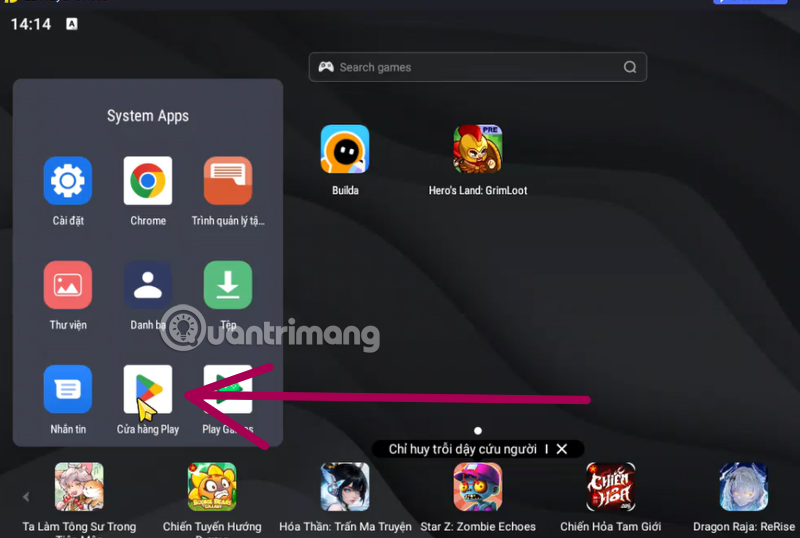
<h3 data-end="1777" data-start="1744">Bước 2: Đăng nhập Google Play</h3>

<p><img alt="cf legends mobile pc" data-adbro-processed="true" data-i="0" data-src="https://st.quantrimang.com/photos/image/2025/12/16/Crossfire-Legends-PC-1.png" data-was-processed="true" height="430" src="https://st.quantrimang.com/photos/image/2025/12/16/Crossfire-Legends-PC-1.png" width="640" /></p>

<ol>
	<li data-end="1820" data-start="1780">Mở&nbsp;<strong data-end="1804" data-start="1783">Google Play Store</strong>&nbsp;trong giả lập</li>
	<li data-end="1864" data-start="1823">Đăng nhập bằng tài khoản Google của bạn</li>
	<li data-end="1909" data-start="1867">Đảm bảo Play Store hoạt động bình thường</li>
</ol>

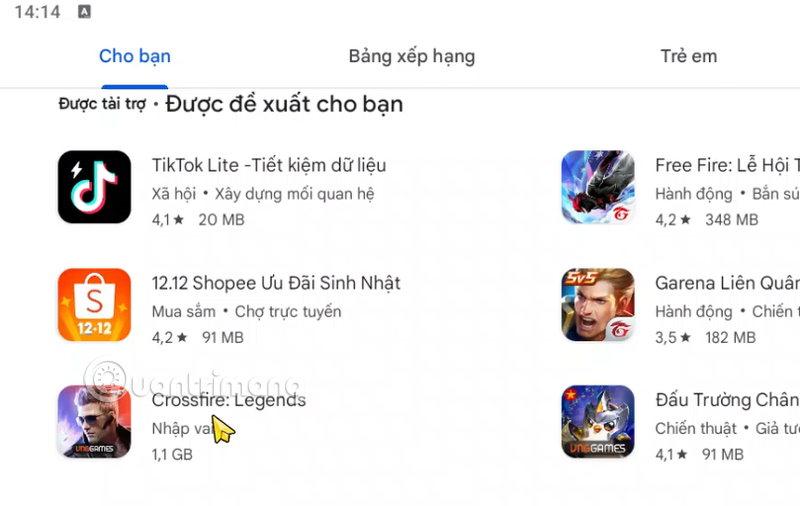
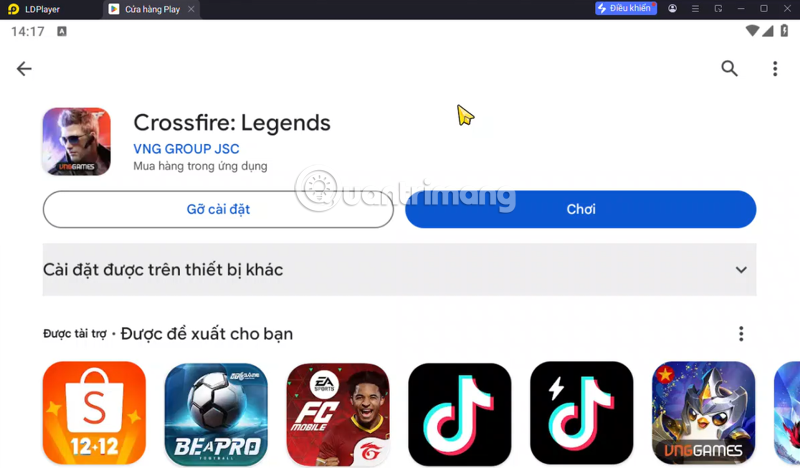
<h3 data-end="1952" data-start="1911">Bước 3: Tải Crossfire: Legends Mobile</h3>

<p><img alt="cf legends mobile pc" data-i="1" data-src="https://st.quantrimang.com/photos/image/2025/12/16/Crossfire-Legends-PC-2.png" data-was-processed="true" height="405" src="https://st.quantrimang.com/photos/image/2025/12/16/Crossfire-Legends-PC-2.png" width="640" /></p>

<ul>
	<li data-end="1988" data-start="1955">Tìm kiếm&nbsp;<strong data-end="1986" data-start="1964">Crossfire: Legends&nbsp;</strong>trong danh sách bảng xếp hạng ứng dụng, hoặc tìm trong thanh tìm kiếm ứng dụng.</li>
	<li data-end="2038" data-start="1991">Kiểm tra đúng nhà phát hành&nbsp;<strong data-end="2036" data-start="2019">VNG / Tencent</strong></li>
	<li data-end="2075" data-start="2041">Nhấn&nbsp;<strong data-end="2057" data-start="2046">Cài đặt</strong>&nbsp;và chờ tải xong</li>
</ul>

<p><img alt="cf legends mobile pc" data-i="2" data-src="https://st.quantrimang.com/photos/image/2025/12/16/Crossfire-Legends-PC-3.png" data-was-processed="true" height="374" src="https://st.quantrimang.com/photos/image/2025/12/16/Crossfire-Legends-PC-3.png" width="640" /></p>

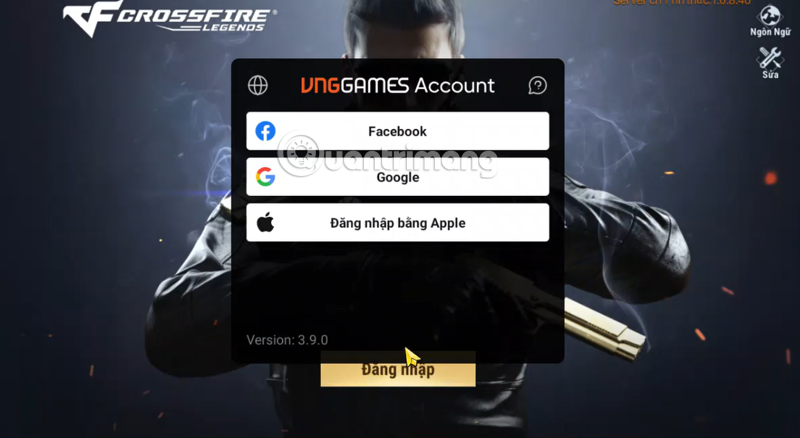
<h3 data-end="2122" data-start="2077">Bước 4: Đăng nhập và thiết lập điều khiển</h3>

<p><img alt="cf legends mobile pc" data-i="3" data-src="https://st.quantrimang.com/photos/image/2025/12/16/Crossfire-Legends-PC-4.png" data-was-processed="true" height="350" src="https://st.quantrimang.com/photos/image/2025/12/16/Crossfire-Legends-PC-4.png" width="640" /></p>

<ul>
	<li data-end="2153" data-start="2125">Mở game Crossfire: Legends</li>
	<li data-end="2228" data-start="2156">Đăng nhập tài khoản đã chơi trên điện thoại (Facebook, Google, Apple…)</li>
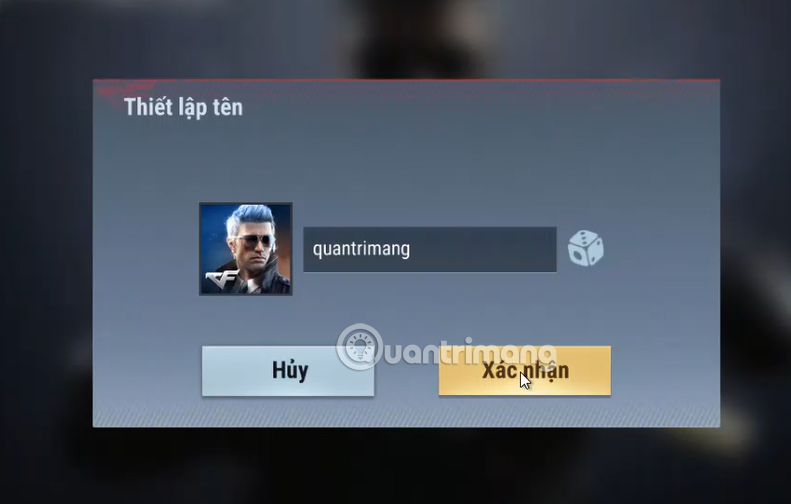
	<li data-end="2311" data-start="2231">Sau đó đặt tên nhân vật, hoàn thành việc hướng dẫn và sử dụng</li>
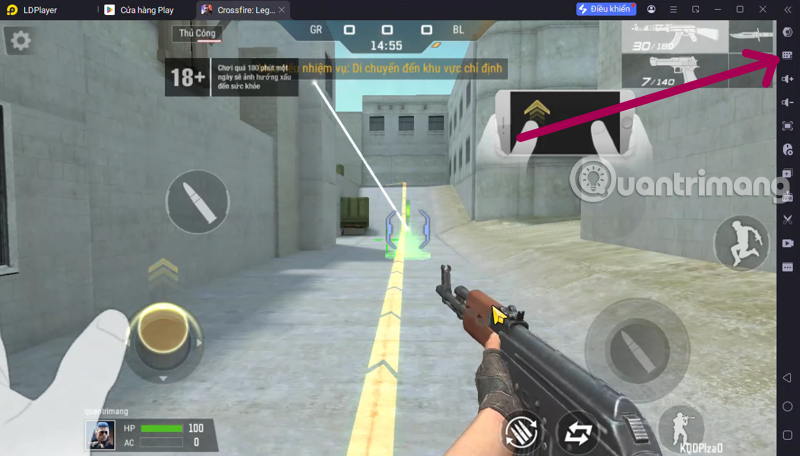
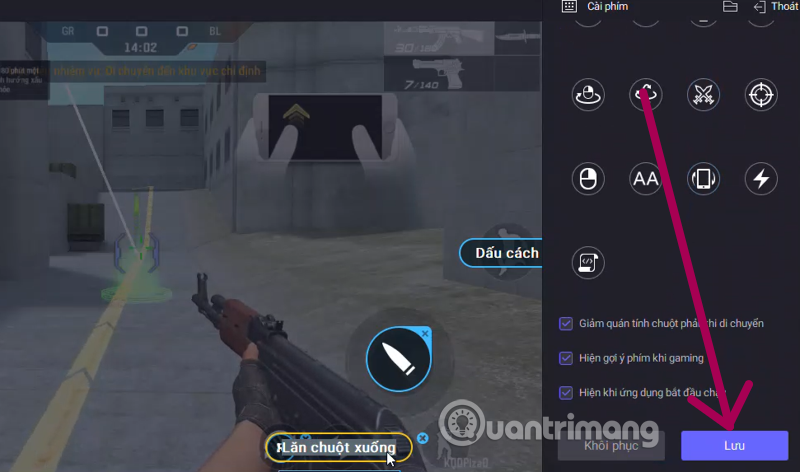
	<li data-end="2311" data-start="2231">Thiết lập&nbsp;<strong data-end="2255" data-start="2241">keymapping</strong>&nbsp;bằng các chọn biểu tượng chỉnh sửa phím tắt ở thứ 2 bên trên xuống (chuột – bàn phím) cho di chuyển, bắn, ngắm, thay đạn. Sau đó chọn Lưu để sử dụng.</li>
</ul>

<figure><img alt="cf legends pc" data-i="4" data-src="https://st.quantrimang.com/photos/image/2025/12/16/Crossfire-Legends-PC-4.png" data-was-processed="true" height="438" src="https://st.quantrimang.com/photos/image/2025/12/16/Crossfire-Legends-PC-4.png" width="800" /></figure>

<figure><img alt="crossfire legends pc" data-i="5" data-src="https://st.quantrimang.com/photos/image/2025/12/16/Crossfire-Legends-PC-5.png" data-was-processed="true" height="504" src="https://st.quantrimang.com/photos/image/2025/12/16/Crossfire-Legends-PC-5.png" width="791" /></figure>

<figure><img alt="tải cf legend pc" data-i="6" data-src="https://st.quantrimang.com/photos/image/2025/12/16/Crossfire-Legends-PC-6.png" data-was-processed="true" height="456" src="https://st.quantrimang.com/photos/image/2025/12/16/Crossfire-Legends-PC-6.png" width="800" /></figure>

<figure><img alt="tai cf legends pc" data-i="7" data-src="https://st.quantrimang.com/photos/image/2025/12/16/Crossfire-Legends-PC-7.png" data-was-processed="true" height="472" src="https://st.quantrimang.com/photos/image/2025/12/16/Crossfire-Legends-PC-7.png" width="800" /></figure>

<h2 data-end="2353" data-start="2318">Cấu hình PC đề nghị để chơi mượt</h2>

<ul>
	<li data-end="2388" data-start="2356"><strong data-end="2363" data-start="2356">CPU</strong>: Intel Core i3 trở lên</li>
	<li data-end="2434" data-start="2391"><strong data-end="2398" data-start="2391">RAM</strong>: Tối thiểu 8GB (khuyến nghị 16GB)</li>
	<li data-end="2478" data-start="2437"><strong data-end="2444" data-start="2437">GPU</strong>: Card đồ họa hỗ trợ OpenGL 3.0+</li>
	<li data-end="2515" data-start="2481"><strong data-end="2491" data-start="2481">Ổ cứng</strong>: Trống tối thiểu 10GB</li>
	<li data-end="2562" data-start="2518"><strong data-end="2534" data-start="2518">Hệ điều hành</strong>: Windows 10 / 11 (64-bit)</li>
</ul>

<h2 data-end="2623" data-start="2569">Một số lưu ý quan trọng khi chơi CF Legends trên PC</h2>

<ul>
	<li data-end="2698" data-start="2626">Không dùng giả lập chỉnh sửa hoặc gian lận để tránh&nbsp;<strong data-end="2696" data-start="2678">khóa tài khoản</strong></li>
	<li data-end="2763" data-start="2701">Cập nhật giả lập và game thường xuyên để tránh lỗi đăng nhập</li>
	<li data-end="2849" data-start="2766">Một số sự kiện có thể ưu tiên mobile, nhưng phần lớn vẫn chơi bình thường trên PC</li>
	<li data-end="2919" data-start="2852">Giftcode Crossfire: Legends&nbsp;<strong data-end="2919" data-start="2880">vẫn nhập được khi chơi bằng giả lập</strong></li>
</ul>

<h2 data-end="2968" data-start="2926">Có nên chơi Crossfire: Legends trên PC?</h2>

<p data-end="3196" data-start="2969">Nếu bạn quen FPS trên máy tính,&nbsp;<strong data-end="3066" data-start="3001">chơi Crossfire: Legends bằng giả lập là lựa chọn rất đáng thử</strong>. Trải nghiệm bắn súng chính xác, tốc độ khung hình ổn định và khả năng làm chủ giao tranh tốt hơn rõ rệt so với màn hình cảm ứng.</p>
		</div>
	</div>
	<div id="footer" class="clearfix">
		<div id="url">
			<strong>URL của bản tin này: </strong><a href="https://www.nguoicodonvn2008.info/vi/news/savefile/kien-thuc-may-tinh/huong-dan-tai-va-cai-dat-crossfire-legends-pc-11896.html" title="Hướng dẫn tải và cài đặt Crossfire Legends PC">https://www.nguoicodonvn2008.info/vi/news/savefile/kien-thuc-may-tinh/huong-dan-tai-va-cai-dat-crossfire-legends-pc-11896.html</a>

		</div>
		<div class="clear"></div>
		<div class="copyright">
			&copy; .&#x3A; Nguoicodonvn2008.info - Cõi lòng người cô đơn &#x3A;.
		</div>
		<div id="contact">
			<a href="mailto:admin@nguoicodonvn2008.info">admin@nguoicodonvn2008.info</a>
		</div>
	</div>
</div>
        <div id="timeoutsess" class="chromeframe">
            Bạn đã không sử dụng Site, <a onclick="timeoutsesscancel();" href="https://nguoicodonvn2008.info/#">Bấm vào đây để duy trì trạng thái đăng nhập</a>. Thời gian chờ: <span id="secField"> 60 </span> giây
        </div>
        <div id="openidResult" class="nv-alert" style="display:none"></div>
        <div id="openidBt" data-result="" data-redirect=""></div>
		</script>
		<div class="car-top">
  <span><img src="https://nguoicodonvn2008.info/themes/default/images/car.png" alt=""></span>
</div>
<script src="https://nguoicodonvn2008.info/assets/js/jquery/jquery.min.js"></script>
<script>var nv_base_siteurl="/",nv_lang_data="vi",nv_lang_interface="vi",nv_name_variable="nv",nv_fc_variable="op",nv_lang_variable="language",nv_module_name="news",nv_func_name="savefile",nv_is_user=0, nv_my_ofs=-4,nv_my_abbr="EDT",nv_cookie_prefix="nv4c_e856T",nv_check_pass_mstime=1738000,nv_area_admin=0,nv_safemode=0,theme_responsive=0,nv_recaptcha_ver=2,nv_recaptcha_sitekey="",nv_recaptcha_type="image",XSSsanitize=1;</script>
<script src="https://nguoicodonvn2008.info/assets/js/language/vi.js"></script>
<script src="https://nguoicodonvn2008.info/assets/js/DOMPurify/purify3.js"></script>
<script src="https://nguoicodonvn2008.info/assets/js/global.js"></script>
<script src="https://nguoicodonvn2008.info/assets/js/site.js"></script>
<script src="https://nguoicodonvn2008.info/themes/default/js/news.js"></script>
<script src="https://nguoicodonvn2008.info/themes/default/js/main.js"></script>
<script src="https://nguoicodonvn2008.info/themes/default/js/custom.js"></script>
<script type="application/ld+json">
        {
            "@context": "https://schema.org",
            "@type": "Organization",
            "url": "https://nguoicodonvn2008.info",
            "logo": "https://nguoicodonvn2008.info/uploads/angel.gif"
        }
        </script>
<script src="https://nguoicodonvn2008.info/themes/default/js/bootstrap.min.js"></script>
<script type="text/javascript">
var $scrolltop = $('.car-top');
$scrolltop.on('click', function () {
    $('html,body').animate({
        scrollTop: 0
    }, 800);
    $(this).addClass("car-run");
    setTimeout(function(){ $scrolltop.removeClass('car-run');}, 1000);
    return false;
});
$(window).on('scroll', function ()
{ 
    if($(window).scrollTop() >= 200)
    {
        $scrolltop.addClass("show");
        $scrolltop.addClass("car-down");
    }
    else
    {
       $scrolltop.removeClass("show");
       setTimeout(function(){ $scrolltop.removeClass('car-down');}, 300);
    }
});
</script>
</body>
</html>