<!DOCTYPE html>
    <html lang="vi" xmlns="http://www.w3.org/1999/xhtml" prefix="og: http://ogp.me/ns#">
    <head>
<title>Hướng dẫn sửa lỗi cố định cột, hàng Excel không hoạt động</title>
<meta name="description" content="Hướng dẫn sửa lỗi cố định cột, hàng Excel không hoạt động - Savefile - Tin Tức -...">
<meta name="author" content=".: Nguoicodonvn2008.info - Cõi lòng người cô đơn :.">
<meta name="copyright" content=".: Nguoicodonvn2008.info - Cõi lòng người cô đơn :. [admin@nguoicodonvn2008.info]">
<meta name="robots" content="index, archive, follow, noodp">
<meta name="googlebot" content="index,archive,follow,noodp">
<meta name="msnbot" content="all,index,follow">
<meta name="generator" content="NukeViet v4.5">
<meta http-equiv="Content-Type" content="text/html; charset=utf-8">
<meta property="og:title" content="Hướng dẫn sửa lỗi cố định cột, hàng Excel không hoạt động">
<meta property="og:type" content="website">
<meta property="og:description" content="Savefile - Tin Tức - https&#x3A;&#x002F;&#x002F;www.nguoicodonvn2008.info&#x002F;vi&#x002F;news&#x002F;savefile&#x002F;kien-thuc-may-tinh&#x002F;huong-dan-sua-loi-co-dinh-cot-hang-excel-khong-hoat-dong-9689.html">
<meta property="og:site_name" content=".&#x3A; Nguoicodonvn2008.info - Cõi lòng người cô đơn &#x3A;.">
<meta property="og:url" content="https://www.nguoicodonvn2008.info/vi/news/savefile/kien-thuc-may-tinh/huong-dan-sua-loi-co-dinh-cot-hang-excel-khong-hoat-dong-9689.html">
<link rel="shortcut icon" href="https://nguoicodonvn2008.info/favicon.ico">
<link rel="canonical" href="https://www.nguoicodonvn2008.info/vi/news/savefile/kien-thuc-may-tinh/huong-dan-sua-loi-co-dinh-cot-hang-excel-khong-hoat-dong-9689.html">
<link rel="alternate" href="https://nguoicodonvn2008.info/vi/news/rss/" title="Tin Tức" type="application/rss+xml">
<link rel="alternate" href="https://nguoicodonvn2008.info/vi/news/rss/karaoke-dual/" title="Tin Tức - Karaoke Dual" type="application/rss+xml">
<link rel="alternate" href="https://nguoicodonvn2008.info/vi/news/rss/nhac-tre/" title="Tin Tức - Nhạc trẻ" type="application/rss+xml">
<link rel="alternate" href="https://nguoicodonvn2008.info/vi/news/rss/tru-tinh/" title="Tin Tức - Trữ tình" type="application/rss+xml">
<link rel="alternate" href="https://nguoicodonvn2008.info/vi/news/rss/nuoc-ngoai/" title="Tin Tức - Nước ngoài" type="application/rss+xml">
<link rel="alternate" href="https://nguoicodonvn2008.info/vi/news/rss/remix/" title="Tin Tức - Remix" type="application/rss+xml">
<link rel="alternate" href="https://nguoicodonvn2008.info/vi/news/rss/tam-su-tinh-yeu/" title="Tin Tức - Tâm sự tình yêu" type="application/rss+xml">
<link rel="alternate" href="https://nguoicodonvn2008.info/vi/news/rss/tho-suu-tam/" title="Tin Tức - Thơ sưu tầm" type="application/rss+xml">
<link rel="alternate" href="https://nguoicodonvn2008.info/vi/news/rss/cuoc-song/" title="Tin Tức - Cuộc sống" type="application/rss+xml">
<link rel="alternate" href="https://nguoicodonvn2008.info/vi/news/rss/phan-mem/" title="Tin Tức - Phần mềm" type="application/rss+xml">
<link rel="alternate" href="https://nguoicodonvn2008.info/vi/news/rss/kien-thuc-may-tinh/" title="Tin Tức - Kiến thức máy tính" type="application/rss+xml">
<link rel="alternate" href="https://nguoicodonvn2008.info/vi/news/rss/hoc-tap/" title="Tin Tức - Học tập" type="application/rss+xml">
<link rel="alternate" href="https://nguoicodonvn2008.info/vi/news/rss/tai-lieu/" title="Tin Tức - Tài liệu" type="application/rss+xml">
<link rel="alternate" href="https://nguoicodonvn2008.info/vi/news/rss/de-thi/" title="Tin Tức - Đề thi" type="application/rss+xml">
<link rel="preload" as="style" href="https://nguoicodonvn2008.info/assets/css/font-awesome.min.css" type="text/css">
<link rel="preload" as="style" href="https://nguoicodonvn2008.info/themes/default/css/bootstrap.non-responsive.css" type="text/css">
<link rel="preload" as="style" href="https://nguoicodonvn2008.info/themes/default/css/style.css" type="text/css">
<link rel="preload" as="style" href="https://nguoicodonvn2008.info/themes/default/css/style.non-responsive.css" type="text/css">
<link rel="preload" as="style" href="https://nguoicodonvn2008.info/themes/default/css/news.css" type="text/css">
<link rel="preload" as="style" href="https://nguoicodonvn2008.info/themes/default/css/custom.css" type="text/css">
<link rel="preload" as="script" href="https://nguoicodonvn2008.info/assets/js/jquery/jquery.min.js" type="text/javascript">
<link rel="preload" as="script" href="https://nguoicodonvn2008.info/assets/js/language/vi.js" type="text/javascript">
<link rel="preload" as="script" href="https://nguoicodonvn2008.info/assets/js/DOMPurify/purify3.js" type="text/javascript">
<link rel="preload" as="script" href="https://nguoicodonvn2008.info/assets/js/global.js" type="text/javascript">
<link rel="preload" as="script" href="https://nguoicodonvn2008.info/assets/js/site.js" type="text/javascript">
<link rel="preload" as="script" href="https://nguoicodonvn2008.info/themes/default/js/news.js" type="text/javascript">
<link rel="preload" as="script" href="https://nguoicodonvn2008.info/themes/default/js/main.js" type="text/javascript">
<link rel="preload" as="script" href="https://nguoicodonvn2008.info/themes/default/js/custom.js" type="text/javascript">
<link rel="preload" as="script" href="https://nguoicodonvn2008.info/themes/default/js/bootstrap.min.js" type="text/javascript">
<link rel="stylesheet" href="https://nguoicodonvn2008.info/assets/css/font-awesome.min.css">
<link rel="stylesheet" href="https://nguoicodonvn2008.info/themes/default/css/bootstrap.non-responsive.css">
<link rel="stylesheet" href="https://nguoicodonvn2008.info/themes/default/css/style.css">
<link rel="stylesheet" href="https://nguoicodonvn2008.info/themes/default/css/style.non-responsive.css">
<link rel="StyleSheet" href="https://nguoicodonvn2008.info/themes/default/css/news.css">
<link rel="stylesheet" href="https://nguoicodonvn2008.info/themes/default/css/custom.css">
<style type="text/css">
	body{background: #fff;}
</style>
    </head>
    <body>
<div id="print">
	<div id="hd_print">
		<h2 class="pull-left">.&#x3A; Nguoicodonvn2008.info - Cõi lòng người cô đơn &#x3A;.</h2>
		<p class="pull-right"><a title=".&#x3A; Nguoicodonvn2008.info - Cõi lòng người cô đơn &#x3A;." href="https://nguoicodonvn2008.info/">https://nguoicodonvn2008.info</a></p>
	</div>
	<div class="clear"></div>
	<hr />
	<div id="content">
		<h1>Hướng dẫn sửa lỗi cố định cột, hàng Excel không hoạt động</h1>
		<ul class="list-inline">
			<li>Thứ năm - 16/01/2025 22:18</li>
			<li class="hidden-print txtrequired"><em class="fa fa-print">&nbsp;</em><a title="In ra" href="javascript:;" onclick="window.print()">In ra</a></li>
			<li class="hidden-print txtrequired"><em class="fa fa-power-off">&nbsp;</em><a title="Đóng cửa sổ này" href="javascript:;" onclick="window.close()">Đóng cửa sổ này</a></li>
		</ul>
		<div class="clear"></div>
		<div id="hometext">
		</div>
				<div class="imghome">
			<img alt="Hướng dẫn sửa lỗi cố định cột, hàng Excel không hoạt động" src="https://st.quantrimang.com/photos/image/2025/01/15/sua-loi-dong-bang-excel-1.jpg" width="460" class="img-thumbnail" />
		</div>
		<div class="clear"></div>
		<div id="bodytext" class="clearfix">
			<p style="text-align: justify;">Cố định hàng cột trong Excel giúp bạn có được cái nhìn tổng quan rõ ràng hơn về bảng thống kê với dữ liệu lớn. Trong một số trường hợp, bạn không thấy tùy chọn cố định cột hoặc hàng, khiến quá trình xử lý tài liệu và nhìn bao quát bảng dữ liệu ảnh hưởng. Nếu bạn gặp vấn đề về lỗi cố định cột/hàng trong Excel thì tham khảo cách sửa trong bài dưới đây.</p>

<h2 style="text-align: justify;">1. Kiểm tra có dùng công cụ Split Excel không?</h2>

<p style="text-align: justify;">Cách khắc phục đầu tiên đó là kiểm tra xem bạn có sử dụng&nbsp;tính năng Split trong Excel&nbsp;không. 2 tính năng này nếu hoạt động cùng nhau sẽ gặp phải lỗi.</p>

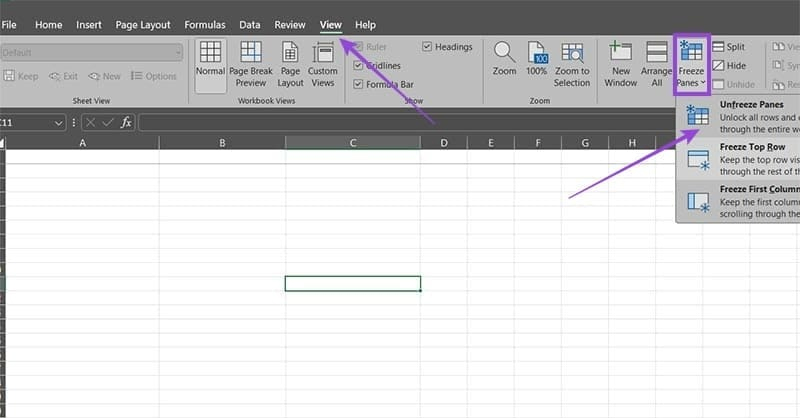
<p style="text-align: justify;">Chúng ta truy cập vào bảng dữ liệu, sau đó<strong>&nbsp;nhấn vào tab View&nbsp;</strong>và&nbsp;<strong>nhấp vào tính năng Freeze</strong>&nbsp;Pane. Nếu đã bị cố định, đóng băng thì&nbsp;<strong>nhấn vào Unfreeze Panes</strong>&nbsp;để hủy và thực hiện lại từ đầu.</p>

<p style="text-align: justify;"><img alt="Hủy đóng băng trong Excel " data-i="0" data-src="https://st.quantrimang.com/photos/image/2025/01/15/sua-loi-dong-bang-excel-1.jpg" data-was-processed="true" height="314" src="https://st.quantrimang.com/photos/image/2025/01/15/sua-loi-dong-bang-excel-1.jpg" width="600" /></p>

<h2 style="text-align: justify;">2. Kiểm tra các hàng ẩn trong Excel</h2>

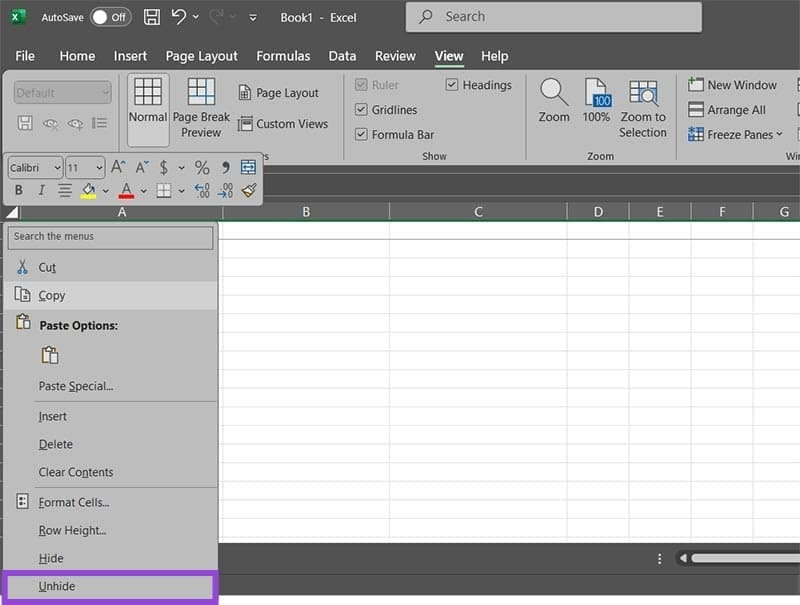
<p style="text-align: justify;">Nếu bảng dữ liệu có hàng ẩn thì việc sử dụng tính năng đóng băng hàng, hoặc cột cũng sẽ gặp vấn đề. Bạn kiểm tra lại bảng dữ liệu và sau đó bỏ ẩn hàng hoặc cột đó.</p>

<p style="text-align: justify;"><img alt="Bỏ ẩn hàng cột trong Excel " data-adbro-processed="true" data-i="1" data-src="https://st.quantrimang.com/photos/image/2025/01/15/sua-loi-dong-bang-excel-2.jpg" data-was-processed="true" height="416" src="https://st.quantrimang.com/photos/image/2025/01/15/sua-loi-dong-bang-excel-2.jpg" width="550" /></p>

<h2 style="text-align: justify;">3. Đổi chế độ thành mặc định trên Excel</h2>

<p style="text-align: justify;">Nếu bạn đang sử dụng chế độ xem khác với chế độ mặc định, thì tùy chọn cố định hàng hoặc cột trong Excel có thể sẽ bị tắt hoàn toàn. Bạn nhấn lại vào tab View sau đó nhấn tiếp vào Normal trong phần Workbook Views là được.</p>

<h2 style="text-align: justify;">4. Hủy chế độ bảo vệ trang tính Excel</h2>

<p style="text-align: justify;">Một số trường hợp khi bạn nhận được dữ liệu từ bên khác thì họ đã thiết lập chế độ&nbsp;bảo vệ trang tính, đóng băng hàng hoặc cột. Nếu các tính năng khác ngoài cố định các ô không hoạt động, thì bạn nên bỏ chế độ bảo vệ trang tính này.</p>

<p style="text-align: justify;">Bạn nhấn vào<strong>&nbsp;tab Review</strong>&nbsp;sau đó<strong>&nbsp;nhấn tiếp vào Unprotect Sheet&nbsp;</strong>để bỏ bảo vệ trang tính.</p>

<h2 style="text-align: justify;">5. Xóa Macro trong Excel</h2>

<p style="text-align: justify;">Nếu bạn vô tình tạo macro ngăn đóng băng cột, hàng thì bất cứ khi nào chạy macro này cũng đều làm cho tính năng đóng băng hàng, cột trong Excel không hoạt động. Khi đó cần kiểm tra lại macro này.</p>

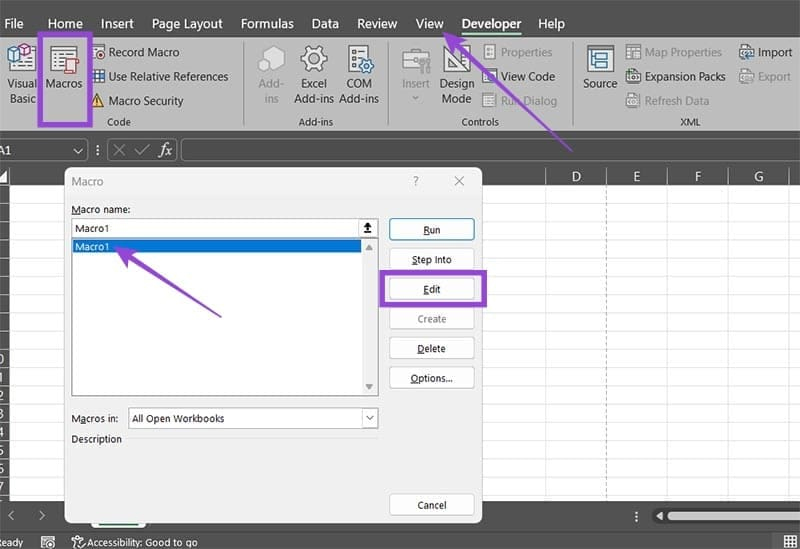
<p style="text-align: justify;">Chúng ta nhấn vào<strong>&nbsp;tab View và chọn Macros</strong>, sau đó&nbsp;<strong>nhấn vào Macro cần chỉnh sửa</strong>.</p>

<p style="text-align: justify;"><img alt="Chỉnh sửa macro trong Excel " data-i="2" data-src="https://st.quantrimang.com/photos/image/2025/01/15/sua-loi-dong-bang-excel-3.jpg" data-was-processed="true" height="377" src="https://st.quantrimang.com/photos/image/2025/01/15/sua-loi-dong-bang-excel-3.jpg" width="550" /></p>

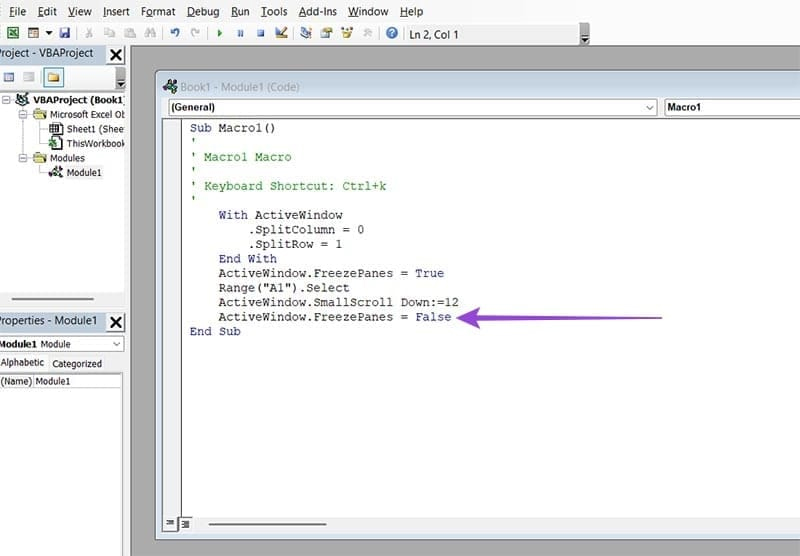
<p style="text-align: justify;">Trong cửa sổ VBA với mã của macro. Bạn kiểm tra xem nếu có dòng&nbsp;<strong>ActiveWindow.FreezePanes = False</strong>&nbsp;thì hãy xóa chúng.</p>

<p style="text-align: justify;"><img alt="Xóa macro đóng băng trong Excel " data-i="3" data-src="https://st.quantrimang.com/photos/image/2025/01/15/sua-loi-dong-bang-excel-4.jpg" data-was-processed="true" height="382" src="https://st.quantrimang.com/photos/image/2025/01/15/sua-loi-dong-bang-excel-4.jpg" width="550" /></p>

<div style="text-align: justify;">&nbsp;</div>
		</div>
				<div id="author">
						<p>
				<strong>Nguồn tin:</strong>
				Quantrimang.com:
			</p>
		</div>
	</div>
	<div id="footer" class="clearfix">
		<div id="url">
			<strong>URL của bản tin này: </strong><a href="https://www.nguoicodonvn2008.info/vi/news/savefile/kien-thuc-may-tinh/huong-dan-sua-loi-co-dinh-cot-hang-excel-khong-hoat-dong-9689.html" title="Hướng dẫn sửa lỗi cố định cột, hàng Excel không hoạt động">https://www.nguoicodonvn2008.info/vi/news/savefile/kien-thuc-may-tinh/huong-dan-sua-loi-co-dinh-cot-hang-excel-khong-hoat-dong-9689.html</a>

		</div>
		<div class="clear"></div>
		<div class="copyright">
			&copy; .&#x3A; Nguoicodonvn2008.info - Cõi lòng người cô đơn &#x3A;.
		</div>
		<div id="contact">
			<a href="mailto:admin@nguoicodonvn2008.info">admin@nguoicodonvn2008.info</a>
		</div>
	</div>
</div>
        <div id="timeoutsess" class="chromeframe">
            Bạn đã không sử dụng Site, <a onclick="timeoutsesscancel();" href="https://nguoicodonvn2008.info/#">Bấm vào đây để duy trì trạng thái đăng nhập</a>. Thời gian chờ: <span id="secField"> 60 </span> giây
        </div>
        <div id="openidResult" class="nv-alert" style="display:none"></div>
        <div id="openidBt" data-result="" data-redirect=""></div>
		</script>
		<div class="car-top">
  <span><img src="https://nguoicodonvn2008.info/themes/default/images/car.png" alt=""></span>
</div>
<div id="run_cronjobs" style="visibility:hidden;display:none;"><img alt="cron" src="/index.php?second=cronjobs&amp;p=f9gvIVi3" width="1" height="1" /></div>
<script src="https://nguoicodonvn2008.info/assets/js/jquery/jquery.min.js"></script>
<script>var nv_base_siteurl="/",nv_lang_data="vi",nv_lang_interface="vi",nv_name_variable="nv",nv_fc_variable="op",nv_lang_variable="language",nv_module_name="news",nv_func_name="savefile",nv_is_user=0, nv_my_ofs=-4,nv_my_abbr="EDT",nv_cookie_prefix="nv4c_e856T",nv_check_pass_mstime=1738000,nv_area_admin=0,nv_safemode=0,theme_responsive=0,nv_recaptcha_ver=2,nv_recaptcha_sitekey="",nv_recaptcha_type="image",XSSsanitize=1;</script>
<script src="https://nguoicodonvn2008.info/assets/js/language/vi.js"></script>
<script src="https://nguoicodonvn2008.info/assets/js/DOMPurify/purify3.js"></script>
<script src="https://nguoicodonvn2008.info/assets/js/global.js"></script>
<script src="https://nguoicodonvn2008.info/assets/js/site.js"></script>
<script src="https://nguoicodonvn2008.info/themes/default/js/news.js"></script>
<script src="https://nguoicodonvn2008.info/themes/default/js/main.js"></script>
<script src="https://nguoicodonvn2008.info/themes/default/js/custom.js"></script>
<script type="application/ld+json">
        {
            "@context": "https://schema.org",
            "@type": "Organization",
            "url": "https://nguoicodonvn2008.info",
            "logo": "https://nguoicodonvn2008.info/uploads/angel.gif"
        }
        </script>
<script src="https://nguoicodonvn2008.info/themes/default/js/bootstrap.min.js"></script>
<script type="text/javascript">
var $scrolltop = $('.car-top');
$scrolltop.on('click', function () {
    $('html,body').animate({
        scrollTop: 0
    }, 800);
    $(this).addClass("car-run");
    setTimeout(function(){ $scrolltop.removeClass('car-run');}, 1000);
    return false;
});
$(window).on('scroll', function ()
{ 
    if($(window).scrollTop() >= 200)
    {
        $scrolltop.addClass("show");
        $scrolltop.addClass("car-down");
    }
    else
    {
       $scrolltop.removeClass("show");
       setTimeout(function(){ $scrolltop.removeClass('car-down');}, 300);
    }
});
</script>
</body>
</html>