<!DOCTYPE html>
    <html lang="vi" xmlns="http://www.w3.org/1999/xhtml" prefix="og: http://ogp.me/ns#">
    <head>
<title>Hướng dẫn kích hoạt chế độ Dark Mode trên macOS Catalina</title>
<meta name="description" content="Hướng dẫn kích hoạt chế độ Dark Mode trên macOS Catalina - Savefile - Tin Tức -...">
<meta name="author" content=".: Nguoicodonvn2008.info - Cõi lòng người cô đơn :.">
<meta name="copyright" content=".: Nguoicodonvn2008.info - Cõi lòng người cô đơn :. [admin@nguoicodonvn2008.info]">
<meta name="robots" content="index, archive, follow, noodp">
<meta name="googlebot" content="index,archive,follow,noodp">
<meta name="msnbot" content="all,index,follow">
<meta name="generator" content="NukeViet v4.5">
<meta http-equiv="Content-Type" content="text/html; charset=utf-8">
<meta property="og:title" content="Hướng dẫn kích hoạt chế độ Dark Mode trên macOS Catalina">
<meta property="og:type" content="website">
<meta property="og:description" content="Savefile - Tin Tức - https&#x3A;&#x002F;&#x002F;www.nguoicodonvn2008.info&#x002F;vi&#x002F;news&#x002F;savefile&#x002F;kien-thuc-may-tinh&#x002F;huong-dan-kich-hoat-che-do-dark-mode-tren-macos-catalina-2140.html">
<meta property="og:site_name" content=".&#x3A; Nguoicodonvn2008.info - Cõi lòng người cô đơn &#x3A;.">
<meta property="og:url" content="https://www.nguoicodonvn2008.info/vi/news/savefile/kien-thuc-may-tinh/huong-dan-kich-hoat-che-do-dark-mode-tren-macos-catalina-2140.html">
<link rel="shortcut icon" href="https://nguoicodonvn2008.info/favicon.ico">
<link rel="canonical" href="https://www.nguoicodonvn2008.info/vi/news/savefile/kien-thuc-may-tinh/huong-dan-kich-hoat-che-do-dark-mode-tren-macos-catalina-2140.html">
<link rel="alternate" href="https://nguoicodonvn2008.info/vi/news/rss/" title="Tin Tức" type="application/rss+xml">
<link rel="alternate" href="https://nguoicodonvn2008.info/vi/news/rss/karaoke-dual/" title="Tin Tức - Karaoke Dual" type="application/rss+xml">
<link rel="alternate" href="https://nguoicodonvn2008.info/vi/news/rss/nhac-tre/" title="Tin Tức - Nhạc trẻ" type="application/rss+xml">
<link rel="alternate" href="https://nguoicodonvn2008.info/vi/news/rss/tru-tinh/" title="Tin Tức - Trữ tình" type="application/rss+xml">
<link rel="alternate" href="https://nguoicodonvn2008.info/vi/news/rss/nuoc-ngoai/" title="Tin Tức - Nước ngoài" type="application/rss+xml">
<link rel="alternate" href="https://nguoicodonvn2008.info/vi/news/rss/remix/" title="Tin Tức - Remix" type="application/rss+xml">
<link rel="alternate" href="https://nguoicodonvn2008.info/vi/news/rss/tam-su-tinh-yeu/" title="Tin Tức - Tâm sự tình yêu" type="application/rss+xml">
<link rel="alternate" href="https://nguoicodonvn2008.info/vi/news/rss/tho-suu-tam/" title="Tin Tức - Thơ sưu tầm" type="application/rss+xml">
<link rel="alternate" href="https://nguoicodonvn2008.info/vi/news/rss/cuoc-song/" title="Tin Tức - Cuộc sống" type="application/rss+xml">
<link rel="alternate" href="https://nguoicodonvn2008.info/vi/news/rss/phan-mem/" title="Tin Tức - Phần mềm" type="application/rss+xml">
<link rel="alternate" href="https://nguoicodonvn2008.info/vi/news/rss/kien-thuc-may-tinh/" title="Tin Tức - Kiến thức máy tính" type="application/rss+xml">
<link rel="alternate" href="https://nguoicodonvn2008.info/vi/news/rss/hoc-tap/" title="Tin Tức - Học tập" type="application/rss+xml">
<link rel="alternate" href="https://nguoicodonvn2008.info/vi/news/rss/tai-lieu/" title="Tin Tức - Tài liệu" type="application/rss+xml">
<link rel="alternate" href="https://nguoicodonvn2008.info/vi/news/rss/de-thi/" title="Tin Tức - Đề thi" type="application/rss+xml">
<link rel="preload" as="style" href="https://nguoicodonvn2008.info/assets/css/font-awesome.min.css" type="text/css">
<link rel="preload" as="style" href="https://nguoicodonvn2008.info/themes/default/css/bootstrap.non-responsive.css" type="text/css">
<link rel="preload" as="style" href="https://nguoicodonvn2008.info/themes/default/css/style.css" type="text/css">
<link rel="preload" as="style" href="https://nguoicodonvn2008.info/themes/default/css/style.non-responsive.css" type="text/css">
<link rel="preload" as="style" href="https://nguoicodonvn2008.info/themes/default/css/news.css" type="text/css">
<link rel="preload" as="style" href="https://nguoicodonvn2008.info/themes/default/css/custom.css" type="text/css">
<link rel="preload" as="script" href="https://nguoicodonvn2008.info/assets/js/jquery/jquery.min.js" type="text/javascript">
<link rel="preload" as="script" href="https://nguoicodonvn2008.info/assets/js/language/vi.js" type="text/javascript">
<link rel="preload" as="script" href="https://nguoicodonvn2008.info/assets/js/DOMPurify/purify3.js" type="text/javascript">
<link rel="preload" as="script" href="https://nguoicodonvn2008.info/assets/js/global.js" type="text/javascript">
<link rel="preload" as="script" href="https://nguoicodonvn2008.info/assets/js/site.js" type="text/javascript">
<link rel="preload" as="script" href="https://nguoicodonvn2008.info/themes/default/js/news.js" type="text/javascript">
<link rel="preload" as="script" href="https://nguoicodonvn2008.info/themes/default/js/main.js" type="text/javascript">
<link rel="preload" as="script" href="https://nguoicodonvn2008.info/themes/default/js/custom.js" type="text/javascript">
<link rel="preload" as="script" href="https://nguoicodonvn2008.info/themes/default/js/bootstrap.min.js" type="text/javascript">
<link rel="stylesheet" href="https://nguoicodonvn2008.info/assets/css/font-awesome.min.css">
<link rel="stylesheet" href="https://nguoicodonvn2008.info/themes/default/css/bootstrap.non-responsive.css">
<link rel="stylesheet" href="https://nguoicodonvn2008.info/themes/default/css/style.css">
<link rel="stylesheet" href="https://nguoicodonvn2008.info/themes/default/css/style.non-responsive.css">
<link rel="StyleSheet" href="https://nguoicodonvn2008.info/themes/default/css/news.css">
<link rel="stylesheet" href="https://nguoicodonvn2008.info/themes/default/css/custom.css">
<style type="text/css">
	body{background: #fff;}
</style>
    </head>
    <body>
<div id="print">
	<div id="hd_print">
		<h2 class="pull-left">.&#x3A; Nguoicodonvn2008.info - Cõi lòng người cô đơn &#x3A;.</h2>
		<p class="pull-right"><a title=".&#x3A; Nguoicodonvn2008.info - Cõi lòng người cô đơn &#x3A;." href="https://nguoicodonvn2008.info/">https://nguoicodonvn2008.info</a></p>
	</div>
	<div class="clear"></div>
	<hr />
	<div id="content">
		<h1>Hướng dẫn kích hoạt chế độ Dark Mode trên macOS Catalina</h1>
		<ul class="list-inline">
			<li>Thứ ba - 02/06/2020 00:56</li>
			<li class="hidden-print txtrequired"><em class="fa fa-print">&nbsp;</em><a title="In ra" href="javascript:;" onclick="window.print()">In ra</a></li>
			<li class="hidden-print txtrequired"><em class="fa fa-power-off">&nbsp;</em><a title="Đóng cửa sổ này" href="javascript:;" onclick="window.close()">Đóng cửa sổ này</a></li>
		</ul>
		<div class="clear"></div>
		<div id="hometext">
		</div>
				<div class="imghome">
			<img alt="Hướng dẫn kích hoạt chế độ Dark Mode trên macOS Catalina" src="https://st.quantrimang.com/photos/image/2020/06/02/dark-mode-tren-macos-5.jpg" width="460" class="img-thumbnail" />
		</div>
		<div class="clear"></div>
		<div id="bodytext" class="clearfix">
			<p style="text-align: justify;"><strong>&quot;Dark Mode&quot;</strong>&nbsp;là một trong những tính năng đáng chú ý nhất trên Mac. Khi kích hoạt chế độ Dark Mode, giao diện trên Mac sẽ thay đổi, chuyển sang màu tối. Và cũng giống như trên Windows, khi kích hoạt Dark Mode trên Mac vừa tiết kiệm được pin và vừa đỡ hại mắt người dùng (nhất là ban đêm).</p>

<p style="text-align: justify;"><strong>Một số điểm cần lưu ý:</strong></p>

<ul>
	<li style="text-align: justify;">Khi chế độ Dark Mode được kích hoạt, nền background trên Dock sẽ chuyển sang màu tối.</li>
	<li style="text-align: justify;">Menu dropdown trên thanh Menu trên macOS sẽ chuyển sang màu tối.</li>
	<li style="text-align: justify;">Hiện tại chỉ có các ứng dụng riêng của Apple hỗ trợ chế độ Dark Mode trên thanh Menu.</li>
	<li style="text-align: justify;">Dark Mode không tác động bất kỳ ảnh hưởng nào vào các phần khác trên giao diện macOS.</li>
</ul>

<h2 style="text-align: justify;">Cách bật chế độ Dark Mode trong macOS Catalina</h2>

<p style="text-align: justify;">MacOS Catalina rõ ràng là một trong những bản cập nhật giàu tính năng nhất từng có cho Mac. Và tính năng nổi bật nhất trong số đó là chế độ Dark Mode hoàn chỉnh, được thiết kế để nâng cao trải nghiệm xem của người dùng.</p>

<p style="text-align: justify;">Hãy thực hiện theo các bước sau đây để kích hoạt Dark Mode trên macOS Catalina và sử dụng máy Mac thoải mái hơn vào ban đêm.</p>

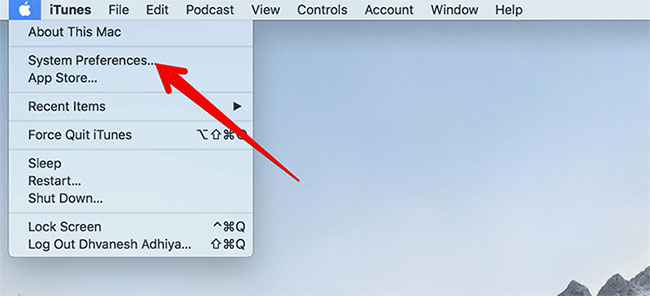
<p style="text-align: justify;"><strong>Bước 1</strong>: Nhấp vào&nbsp;<strong>menu Apple</strong>&nbsp;trên máy Mac.</p>

<p style="text-align: justify;"><strong>Bước 2</strong>: Bây giờ, nhấp vào&nbsp;<strong>System Preference.</strong></p>

<figure>
<div style="text-align: justify;"><img alt="Nhấp vào System Preference" data-i="0" data-src="https://st.quantrimang.com/photos/image/2020/06/02/dark-mode-tren-macos-1.jpg" data-was-processed="true" height="296" src="https://st.quantrimang.com/photos/image/2020/06/02/dark-mode-tren-macos-1.jpg" width="650" /></div>

<figcaption>
<div style="text-align: justify;">Nhấp vào System Preference</div>
</figcaption>
</figure>

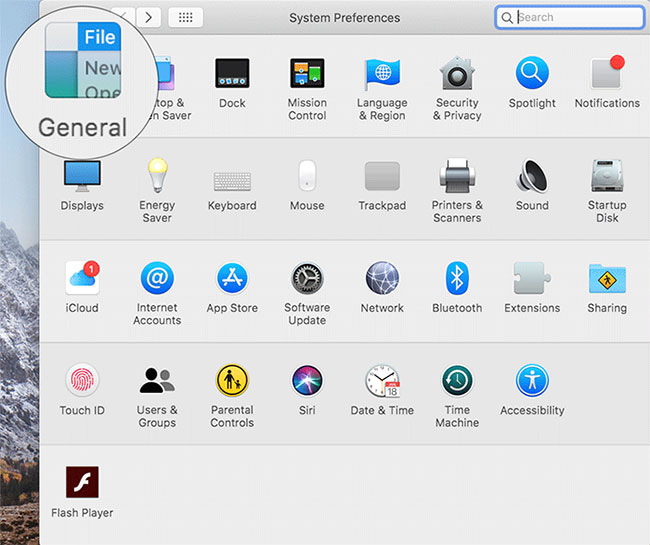
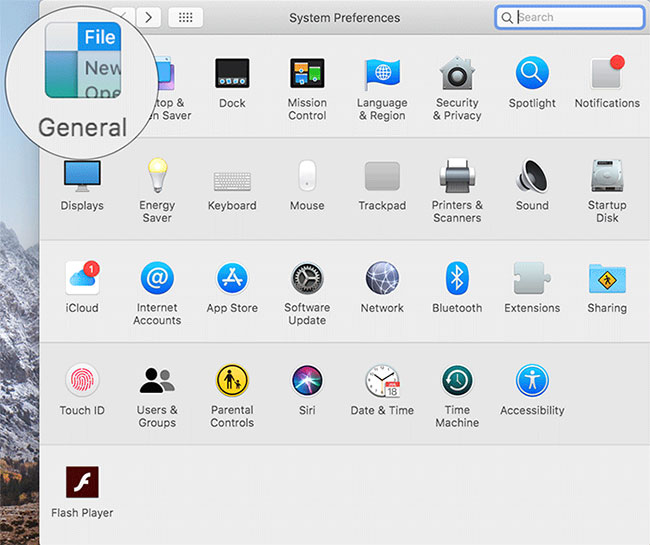
<p style="text-align: justify;"><strong>Bước 3</strong>: Tiếp theo, bạn cần nhấp vào&nbsp;<strong>General.</strong></p>

<figure>
<div style="text-align: justify;"><img alt="Nhấp vào General" data-i="1" data-src="https://st.quantrimang.com/photos/image/2020/06/02/dark-mode-tren-macos-2.jpg" data-was-processed="true" height="545" src="https://st.quantrimang.com/photos/image/2020/06/02/dark-mode-tren-macos-2.jpg" width="650" /></div>

<figcaption>
<div style="text-align: justify;">Nhấp vào General</div>
</figcaption>
</figure>

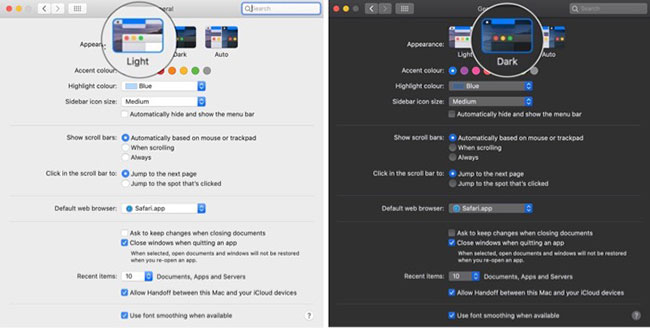
<p style="text-align: justify;"><strong>Bước 4:</strong>&nbsp;Tiếp theo, hãy xem tùy chọn thứ hai bên cạnh&nbsp;<strong>Appearance.</strong>&nbsp;Chỉ cần chọn nó để kích hoạt chế độ Dark Mode trên máy Mac.</p>

<figure>
<div style="text-align: justify;"><img alt="Chọn tùy chọn thứ hai bên cạnh Appearance để kích hoạt Dark Mode" data-i="2" data-src="https://st.quantrimang.com/photos/image/2020/06/02/dark-mode-tren-macos-3.jpg" data-was-processed="true" height="328" src="https://st.quantrimang.com/photos/image/2020/06/02/dark-mode-tren-macos-3.jpg" width="650" /></div>

<figcaption>
<div style="text-align: justify;">Chọn tùy chọn thứ hai bên cạnh Appearance để kích hoạt Dark Mode</div>
</figcaption>
</figure>

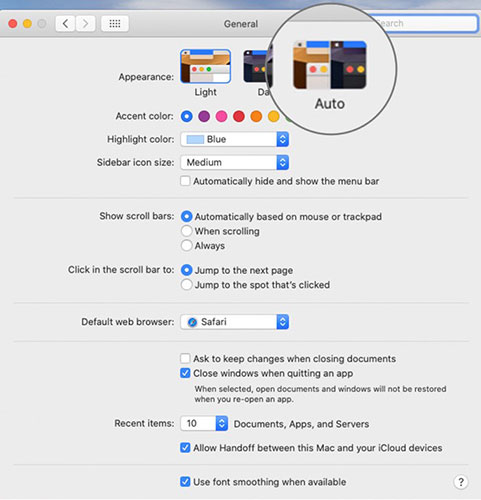
<p style="text-align: justify;">Bạn cũng có thể bật chế độ Dark Mode trên máy Mac bằng cách nhấp vào&nbsp;<strong>Auto.</strong></p>

<figure>
<div style="text-align: justify;"><img alt="Bạn cũng có thể bật chế độ Dark Mode trên máy Mac bằng cách nhấp vào Auto" data-i="3" data-src="https://st.quantrimang.com/photos/image/2020/06/02/dark-mode-tren-macos-4.jpg" data-was-processed="true" height="500" src="https://st.quantrimang.com/photos/image/2020/06/02/dark-mode-tren-macos-4.jpg" width="481" /></div>

<figcaption>
<div style="text-align: justify;">Bạn cũng có thể bật chế độ Dark Mode trên máy Mac bằng cách nhấp vào Auto</div>
</figcaption>
</figure>

<p style="text-align: justify;">Bây giờ, hãy tiếp tục và sử dụng máy tính theo ý thích. Như đã nói ở trên, bạn sẽ có trải nghiệm xem dễ chịu hơn. Bên cạnh đó, bạn cũng có tùy chọn để khám phá các màu nhấn (accent color) tùy chỉnh.</p>

<div style="text-align: justify;">&nbsp;</div>

<h2 style="text-align: justify;">Cách tắt chế độ Dark Mode trên máy Mac</h2>

<p style="text-align: justify;">Nếu bạn đã tận hưởng một thời gian dài với giao diện tối màu và cảm thấy đến lúc cần có một giao diện sáng sủa hơn, thì tin vui là việc vô hiệu hóa Dark Mode rất đơn giản!</p>

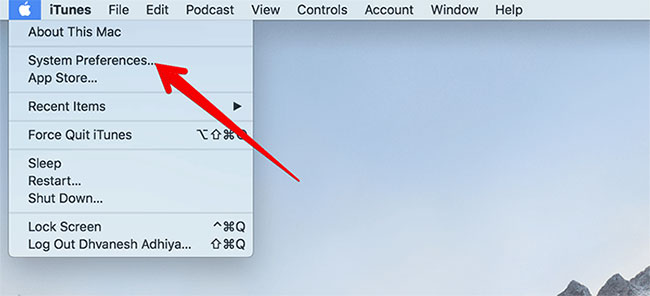
<p style="text-align: justify;"><strong>Bước 1</strong>: Mở&nbsp;<strong>menu Apple</strong>, rồi nhấp vào&nbsp;<strong>System Preferences</strong>.</p>

<figure>
<div style="text-align: justify;"><img alt="Mở menu Apple, rồi nhấp vào System Preferences" data-i="4" data-src="https://st.quantrimang.com/photos/image/2020/06/02/dark-mode-tren-macos-5.jpg" data-was-processed="true" height="296" src="https://st.quantrimang.com/photos/image/2020/06/02/dark-mode-tren-macos-5.jpg" width="650" /></div>

<figcaption>
<div style="text-align: justify;">Mở menu Apple, rồi nhấp vào System Preferences</div>
</figcaption>
</figure>

<p style="text-align: justify;"><strong>Bước 2</strong>: Nhấp vào&nbsp;<strong>General.</strong></p>

<figure>
<div style="text-align: justify;"><img alt="Chọn General" data-i="5" data-src="https://st.quantrimang.com/photos/image/2020/06/02/dark-mode-tren-macos-6.jpg" data-was-processed="true" height="545" src="https://st.quantrimang.com/photos/image/2020/06/02/dark-mode-tren-macos-6.jpg" width="650" /></div>

<figcaption>
<div style="text-align: justify;">Chọn General</div>
</figcaption>
</figure>

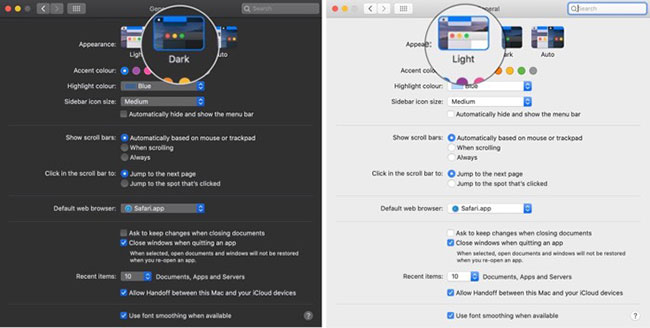
<p style="text-align: justify;"><strong>Bước 3</strong>: Bây giờ, bỏ chọn tùy chọn thứ hai ngay bên cạnh&nbsp;<strong>Appearance.</strong></p>

<figure>
<div style="text-align: justify;"><img alt="Bỏ chọn tùy chọn thứ hai ngay bên cạnh Appearance để vô hiệu hóa Dark Mode" data-i="6" data-src="https://st.quantrimang.com/photos/image/2020/06/02/dark-mode-tren-macos-7.jpg" data-was-processed="true" height="328" src="https://st.quantrimang.com/photos/image/2020/06/02/dark-mode-tren-macos-7.jpg" width="650" /></div>

<figcaption>
<div style="text-align: justify;">Bỏ chọn tùy chọn thứ hai ngay bên cạnh Appearance để vô hiệu hóa Dark Mode</div>
</figcaption>
</figure>
		</div>
				<div id="author">
						<p>
				<strong>Nguồn tin:</strong>
				Quantrimang.com
			</p>
		</div>
	</div>
	<div id="footer" class="clearfix">
		<div id="url">
			<strong>URL của bản tin này: </strong><a href="https://www.nguoicodonvn2008.info/vi/news/savefile/kien-thuc-may-tinh/huong-dan-kich-hoat-che-do-dark-mode-tren-macos-catalina-2140.html" title="Hướng dẫn kích hoạt chế độ Dark Mode trên macOS Catalina">https://www.nguoicodonvn2008.info/vi/news/savefile/kien-thuc-may-tinh/huong-dan-kich-hoat-che-do-dark-mode-tren-macos-catalina-2140.html</a>

		</div>
		<div class="clear"></div>
		<div class="copyright">
			&copy; .&#x3A; Nguoicodonvn2008.info - Cõi lòng người cô đơn &#x3A;.
		</div>
		<div id="contact">
			<a href="mailto:admin@nguoicodonvn2008.info">admin@nguoicodonvn2008.info</a>
		</div>
	</div>
</div>
        <div id="timeoutsess" class="chromeframe">
            Bạn đã không sử dụng Site, <a onclick="timeoutsesscancel();" href="https://nguoicodonvn2008.info/#">Bấm vào đây để duy trì trạng thái đăng nhập</a>. Thời gian chờ: <span id="secField"> 60 </span> giây
        </div>
        <div id="openidResult" class="nv-alert" style="display:none"></div>
        <div id="openidBt" data-result="" data-redirect=""></div>
		</script>
		<div class="car-top">
  <span><img src="https://nguoicodonvn2008.info/themes/default/images/car.png" alt=""></span>
</div>
<script src="https://nguoicodonvn2008.info/assets/js/jquery/jquery.min.js"></script>
<script>var nv_base_siteurl="/",nv_lang_data="vi",nv_lang_interface="vi",nv_name_variable="nv",nv_fc_variable="op",nv_lang_variable="language",nv_module_name="news",nv_func_name="savefile",nv_is_user=0, nv_my_ofs=-4,nv_my_abbr="EDT",nv_cookie_prefix="nv4c_e856T",nv_check_pass_mstime=1738000,nv_area_admin=0,nv_safemode=0,theme_responsive=0,nv_recaptcha_ver=2,nv_recaptcha_sitekey="",nv_recaptcha_type="image",XSSsanitize=1;</script>
<script src="https://nguoicodonvn2008.info/assets/js/language/vi.js"></script>
<script src="https://nguoicodonvn2008.info/assets/js/DOMPurify/purify3.js"></script>
<script src="https://nguoicodonvn2008.info/assets/js/global.js"></script>
<script src="https://nguoicodonvn2008.info/assets/js/site.js"></script>
<script src="https://nguoicodonvn2008.info/themes/default/js/news.js"></script>
<script src="https://nguoicodonvn2008.info/themes/default/js/main.js"></script>
<script src="https://nguoicodonvn2008.info/themes/default/js/custom.js"></script>
<script type="application/ld+json">
        {
            "@context": "https://schema.org",
            "@type": "Organization",
            "url": "https://nguoicodonvn2008.info",
            "logo": "https://nguoicodonvn2008.info/uploads/angel.gif"
        }
        </script>
<script src="https://nguoicodonvn2008.info/themes/default/js/bootstrap.min.js"></script>
<script type="text/javascript">
var $scrolltop = $('.car-top');
$scrolltop.on('click', function () {
    $('html,body').animate({
        scrollTop: 0
    }, 800);
    $(this).addClass("car-run");
    setTimeout(function(){ $scrolltop.removeClass('car-run');}, 1000);
    return false;
});
$(window).on('scroll', function ()
{ 
    if($(window).scrollTop() >= 200)
    {
        $scrolltop.addClass("show");
        $scrolltop.addClass("car-down");
    }
    else
    {
       $scrolltop.removeClass("show");
       setTimeout(function(){ $scrolltop.removeClass('car-down');}, 300);
    }
});
</script>
</body>
</html>