<!DOCTYPE html>
    <html lang="vi" xmlns="http://www.w3.org/1999/xhtml" prefix="og: http://ogp.me/ns#">
    <head>
<title>Hướng dẫn cài đặt Active Directory trên Windows Server 2016 và nâng cấp lên DC</title>
<meta name="description" content="Hướng dẫn cài đặt Active Directory trên Windows Server 2016 và nâng cấp lên DC - Savefile - Tin Tức -...">
<meta name="author" content=".: Nguoicodonvn2008.info - Cõi lòng người cô đơn :.">
<meta name="copyright" content=".: Nguoicodonvn2008.info - Cõi lòng người cô đơn :. [admin@nguoicodonvn2008.info]">
<meta name="robots" content="index, archive, follow, noodp">
<meta name="googlebot" content="index,archive,follow,noodp">
<meta name="msnbot" content="all,index,follow">
<meta name="generator" content="NukeViet v4.5">
<meta http-equiv="Content-Type" content="text/html; charset=utf-8">
<meta property="og:title" content="Hướng dẫn cài đặt Active Directory trên Windows Server 2016 và nâng cấp lên DC">
<meta property="og:type" content="website">
<meta property="og:description" content="Savefile - Tin Tức -...">
<meta property="og:site_name" content=".&#x3A; Nguoicodonvn2008.info - Cõi lòng người cô đơn &#x3A;.">
<meta property="og:url" content="https://www.nguoicodonvn2008.info/vi/news/savefile/kien-thuc-may-tinh/huong-dan-cai-dat-active-directory-tren-windows-server-2016-va-nang-cap-len-dc-2790.html">
<link rel="shortcut icon" href="https://nguoicodonvn2008.info/favicon.ico">
<link rel="canonical" href="https://www.nguoicodonvn2008.info/vi/news/savefile/kien-thuc-may-tinh/huong-dan-cai-dat-active-directory-tren-windows-server-2016-va-nang-cap-len-dc-2790.html">
<link rel="alternate" href="https://nguoicodonvn2008.info/vi/news/rss/" title="Tin Tức" type="application/rss+xml">
<link rel="alternate" href="https://nguoicodonvn2008.info/vi/news/rss/karaoke-dual/" title="Tin Tức - Karaoke Dual" type="application/rss+xml">
<link rel="alternate" href="https://nguoicodonvn2008.info/vi/news/rss/nhac-tre/" title="Tin Tức - Nhạc trẻ" type="application/rss+xml">
<link rel="alternate" href="https://nguoicodonvn2008.info/vi/news/rss/tru-tinh/" title="Tin Tức - Trữ tình" type="application/rss+xml">
<link rel="alternate" href="https://nguoicodonvn2008.info/vi/news/rss/nuoc-ngoai/" title="Tin Tức - Nước ngoài" type="application/rss+xml">
<link rel="alternate" href="https://nguoicodonvn2008.info/vi/news/rss/remix/" title="Tin Tức - Remix" type="application/rss+xml">
<link rel="alternate" href="https://nguoicodonvn2008.info/vi/news/rss/tam-su-tinh-yeu/" title="Tin Tức - Tâm sự tình yêu" type="application/rss+xml">
<link rel="alternate" href="https://nguoicodonvn2008.info/vi/news/rss/tho-suu-tam/" title="Tin Tức - Thơ sưu tầm" type="application/rss+xml">
<link rel="alternate" href="https://nguoicodonvn2008.info/vi/news/rss/cuoc-song/" title="Tin Tức - Cuộc sống" type="application/rss+xml">
<link rel="alternate" href="https://nguoicodonvn2008.info/vi/news/rss/phan-mem/" title="Tin Tức - Phần mềm" type="application/rss+xml">
<link rel="alternate" href="https://nguoicodonvn2008.info/vi/news/rss/kien-thuc-may-tinh/" title="Tin Tức - Kiến thức máy tính" type="application/rss+xml">
<link rel="alternate" href="https://nguoicodonvn2008.info/vi/news/rss/hoc-tap/" title="Tin Tức - Học tập" type="application/rss+xml">
<link rel="alternate" href="https://nguoicodonvn2008.info/vi/news/rss/tai-lieu/" title="Tin Tức - Tài liệu" type="application/rss+xml">
<link rel="alternate" href="https://nguoicodonvn2008.info/vi/news/rss/de-thi/" title="Tin Tức - Đề thi" type="application/rss+xml">
<link rel="preload" as="style" href="https://nguoicodonvn2008.info/assets/css/font-awesome.min.css" type="text/css">
<link rel="preload" as="style" href="https://nguoicodonvn2008.info/themes/default/css/bootstrap.non-responsive.css" type="text/css">
<link rel="preload" as="style" href="https://nguoicodonvn2008.info/themes/default/css/style.css" type="text/css">
<link rel="preload" as="style" href="https://nguoicodonvn2008.info/themes/default/css/style.non-responsive.css" type="text/css">
<link rel="preload" as="style" href="https://nguoicodonvn2008.info/themes/default/css/news.css" type="text/css">
<link rel="preload" as="style" href="https://nguoicodonvn2008.info/themes/default/css/custom.css" type="text/css">
<link rel="preload" as="script" href="https://nguoicodonvn2008.info/assets/js/jquery/jquery.min.js" type="text/javascript">
<link rel="preload" as="script" href="https://nguoicodonvn2008.info/assets/js/language/vi.js" type="text/javascript">
<link rel="preload" as="script" href="https://nguoicodonvn2008.info/assets/js/DOMPurify/purify3.js" type="text/javascript">
<link rel="preload" as="script" href="https://nguoicodonvn2008.info/assets/js/global.js" type="text/javascript">
<link rel="preload" as="script" href="https://nguoicodonvn2008.info/assets/js/site.js" type="text/javascript">
<link rel="preload" as="script" href="https://nguoicodonvn2008.info/themes/default/js/news.js" type="text/javascript">
<link rel="preload" as="script" href="https://nguoicodonvn2008.info/themes/default/js/main.js" type="text/javascript">
<link rel="preload" as="script" href="https://nguoicodonvn2008.info/themes/default/js/custom.js" type="text/javascript">
<link rel="preload" as="script" href="https://nguoicodonvn2008.info/themes/default/js/bootstrap.min.js" type="text/javascript">
<link rel="stylesheet" href="https://nguoicodonvn2008.info/assets/css/font-awesome.min.css">
<link rel="stylesheet" href="https://nguoicodonvn2008.info/themes/default/css/bootstrap.non-responsive.css">
<link rel="stylesheet" href="https://nguoicodonvn2008.info/themes/default/css/style.css">
<link rel="stylesheet" href="https://nguoicodonvn2008.info/themes/default/css/style.non-responsive.css">
<link rel="StyleSheet" href="https://nguoicodonvn2008.info/themes/default/css/news.css">
<link rel="stylesheet" href="https://nguoicodonvn2008.info/themes/default/css/custom.css">
<style type="text/css">
	body{background: #fff;}
</style>
    </head>
    <body>
<div id="print">
	<div id="hd_print">
		<h2 class="pull-left">.&#x3A; Nguoicodonvn2008.info - Cõi lòng người cô đơn &#x3A;.</h2>
		<p class="pull-right"><a title=".&#x3A; Nguoicodonvn2008.info - Cõi lòng người cô đơn &#x3A;." href="https://nguoicodonvn2008.info/">https://nguoicodonvn2008.info</a></p>
	</div>
	<div class="clear"></div>
	<hr />
	<div id="content">
		<h1>Hướng dẫn cài đặt Active Directory trên Windows Server 2016 và nâng cấp lên DC</h1>
		<ul class="list-inline">
			<li>Thứ bảy - 26/09/2020 00:50</li>
			<li class="hidden-print txtrequired"><em class="fa fa-print">&nbsp;</em><a title="In ra" href="javascript:;" onclick="window.print()">In ra</a></li>
			<li class="hidden-print txtrequired"><em class="fa fa-power-off">&nbsp;</em><a title="Đóng cửa sổ này" href="javascript:;" onclick="window.close()">Đóng cửa sổ này</a></li>
		</ul>
		<div class="clear"></div>
		<div id="hometext">
		</div>
				<div class="imghome">
			<img alt="Hướng dẫn cài đặt Active Directory trên Windows Server 2016 và nâng cấp lên DC" src="https://st.quantrimang.com/photos/image/2020/09/25/cai-dat-active-directory-1.jpg" width="460" class="img-thumbnail" />
		</div>
		<div class="clear"></div>
		<div id="bodytext" class="clearfix">
			<p style="text-align: justify;">Những tính năng thú vị mới hiện đã có sẵn trong Windows Server 2016 như nhóm thành viên dựa trên thời gian, quản lý quyền truy cập đặc quyền và các tính năng khác. Bài viết sau đây sẽ trình bày chi tiết cách cài&nbsp;Active Directory&nbsp;(AD) trên Windows Server 2016.</p>

<h2 style="text-align: justify;">Các bước cài đặt Active Directory trong Server 2016</h2>

<p style="text-align: justify;">Đăng nhập vào server bạn muốn cài đặt Active Directory. Sau đó, mở&nbsp;<strong>Server Manager</strong>.</p>

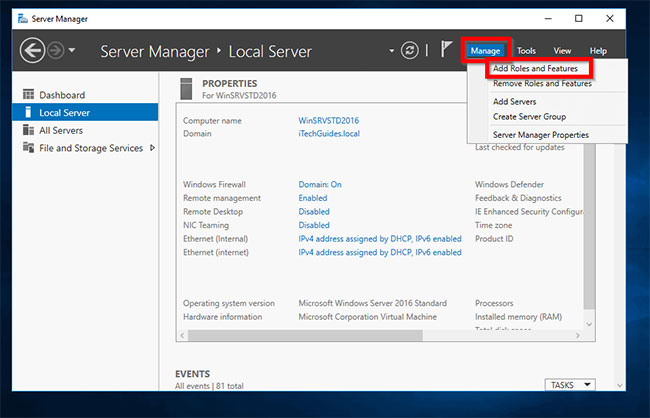
<p style="text-align: justify;">Từ&nbsp;<strong>Server Manager</strong>, nhấp vào&nbsp;<strong>Manage</strong>&nbsp;và chọn&nbsp;<strong>Add roles and Features.</strong></p>

<figure>
<div style="text-align: justify;"><img alt="Chọn Add roles and Features" data-i="0" data-src="https://st.quantrimang.com/photos/image/2020/09/25/cai-dat-active-directory-1.jpg" data-was-processed="true" height="418" src="https://st.quantrimang.com/photos/image/2020/09/25/cai-dat-active-directory-1.jpg" width="650" /></div>

<figcaption>
<div style="text-align: justify;">Chọn Add roles and Features</div>
</figcaption>
</figure>

<p style="text-align: justify;">Tại màn hình&nbsp;<strong>Before you begin</strong>, hãy nhấp vào&nbsp;<strong>Next.</strong></p>

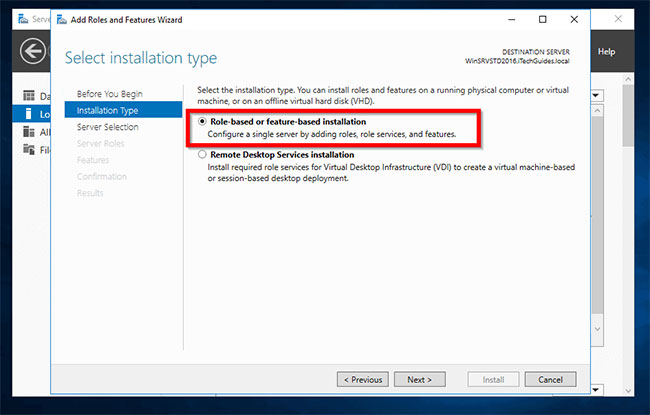
<p style="text-align: justify;">Khi bạn đến màn hình&nbsp;<strong>Select installation type</strong>, hãy chọn&nbsp;<strong>Role-based or feature-based installation</strong>. Sau đó nhấp vào&nbsp;<strong>Next.</strong></p>

<figure>
<div style="text-align: justify;"><img alt="Chọn Role-based or feature-based installation" data-i="1" data-src="https://st.quantrimang.com/photos/image/2020/09/25/cai-dat-active-directory-2.jpg" data-was-processed="true" height="415" src="https://st.quantrimang.com/photos/image/2020/09/25/cai-dat-active-directory-2.jpg" width="650" /></div>

<figcaption>
<div style="text-align: justify;">Chọn Role-based or feature-based installation</div>
</figcaption>
</figure>

<p style="text-align: justify;">Tại màn hình&nbsp;<strong>Select destination server</strong>, chọn server bạn muốn cài đặt Active Directory. Sau đó nhấp vào&nbsp;<strong>Next.</strong></p>

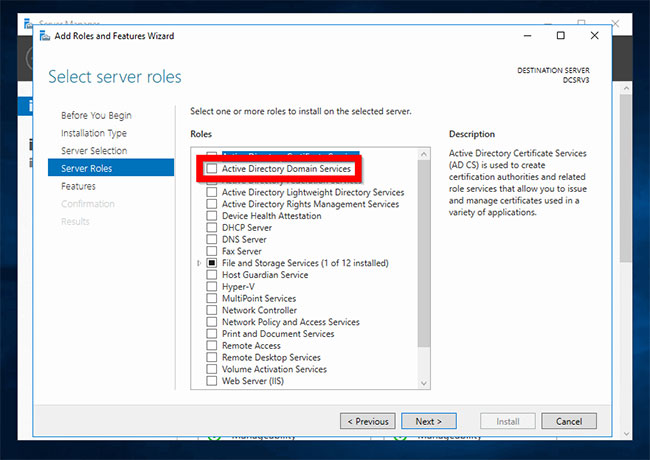
<p style="text-align: justify;">Khi màn hình&nbsp;<strong>Select server roles</strong>&nbsp;mở ra, hãy chọn hộp bên cạnh&nbsp;<strong>Active Directory Domain Services</strong>. Bạn sẽ nhận được lời nhắc&nbsp;<strong>Add features that are required for Active Directory Domain Services</strong>&nbsp;(<em>Thêm các tính năng cần thiết cho Active Directory Domain Services</em>). Nhấp vào&nbsp;<strong>Add Features.</strong></p>

<figure>
<div style="text-align: justify;"><img alt="Chọn hộp bên cạnh Active Directory Domain Services" data-i="2" data-src="https://st.quantrimang.com/photos/image/2020/09/25/cai-dat-active-directory-3.jpg" data-was-processed="true" height="460" src="https://st.quantrimang.com/photos/image/2020/09/25/cai-dat-active-directory-3.jpg" width="650" /></div>

<figcaption>
<div style="text-align: justify;">Chọn hộp bên cạnh Active Directory Domain Services</div>
</figcaption>
</figure>

<p style="text-align: justify;">Khi bạn quay lại&nbsp;<strong>Select server roles</strong>, hãy nhấp vào&nbsp;<strong>Next.</strong></p>

<p style="text-align: justify;">Sau đó tại màn hình&nbsp;<strong>Select Features</strong>, nhấp vào&nbsp;<strong>Next.</strong></p>

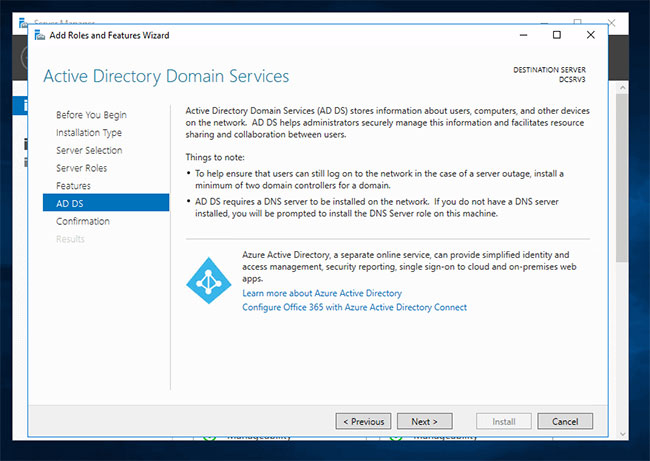
<p style="text-align: justify;">Đọc thông tin được cung cấp về AD DS. Sau đó nhấp vào&nbsp;<strong>Next.</strong></p>

<figure>
<div style="text-align: justify;"><img alt="Đọc thông tin được cung cấp về AD DS" data-i="3" data-src="https://st.quantrimang.com/photos/image/2020/09/25/cai-dat-active-directory-4.jpg" data-was-processed="true" height="461" src="https://st.quantrimang.com/photos/image/2020/09/25/cai-dat-active-directory-4.jpg" width="650" /></div>

<figcaption>
<div style="text-align: justify;">Đọc thông tin được cung cấp về AD DS</div>
</figcaption>
</figure>

<p style="text-align: justify;">Sau đó, tại màn hình&nbsp;<strong>Confirmation</strong>, hãy xem lại các lựa chọn và nhấp vào&nbsp;<strong>Install.</strong></p>

<p style="text-align: justify;">Khi cài đặt hoàn tất, hãy nhấp vào&nbsp;<strong>Close.</strong></p>

<p style="text-align: justify;">Bạn cũng có thể cài đặt Active Directory trong Server 2016 bằng lệnh&nbsp;PowerShell&nbsp;bên dưới:</p>

<pre id="pre0">
<code>Install-windowsfeature -name AD-Domain-Services -IncludeManagementTools</code></pre>

<div style="text-align: justify;">&nbsp;</div>

<h2 style="text-align: justify;">Nâng cấp server lên Domain Controller</h2>

<p style="text-align: justify;">Sau khi bạn cài đặt Active Directory trong Server 2016, bước tiếp theo là nâng cấp server lên&nbsp;Domain Controller. Bạn có thể tạo domain mới hoặc thêm DC vào domain hiện có.</p>

<p style="text-align: justify;">Hướng dẫn này trình bày cách thêm DC vào domain hiện có.</p>

<p style="text-align: justify;">Trước khi bạn nâng cấp server thành DC, hãy&nbsp;gán cho nó một địa chỉ IP tĩnh.</p>

<p style="text-align: justify;">Đây là các bước cần thực hiện:</p>

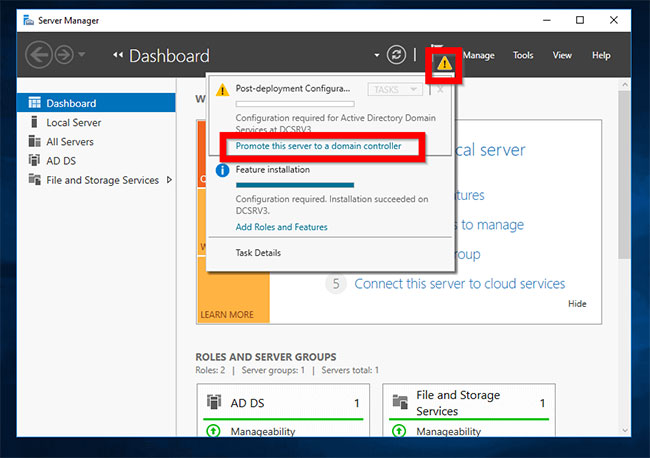
<p style="text-align: justify;">Từ&nbsp;<strong>Server Manager</strong>, nhấp vào hình tam giác thông báo màu hổ phách. Sau đó nhấp vào&nbsp;<strong>Promote this server to a domain controller</strong>.</p>

<figure>
<div style="text-align: justify;"><img alt="Nhấp vào Promote this server to a domain controller" data-i="4" data-src="https://st.quantrimang.com/photos/image/2020/09/25/cai-dat-active-directory-5.jpg" data-was-processed="true" height="458" src="https://st.quantrimang.com/photos/image/2020/09/25/cai-dat-active-directory-5.jpg" width="650" /></div>

<figcaption>
<div style="text-align: justify;">Nhấp vào Promote this server to a domain controller</div>
</figcaption>
</figure>

<p style="text-align: justify;">Tại màn hình&nbsp;<strong>Deployment Configuration</strong>, chọn một hoạt động triển khai. Để tạo một domain mới, hãy chọn tùy chọn cuối cùng -&nbsp;<strong>Add a new forest</strong>. Nếu bạn đang thêm DC vào domain hiện có, hãy chọn tùy chọn đầu tiên -&nbsp;<strong>Add a domain controller to an existing domain</strong>.</p>

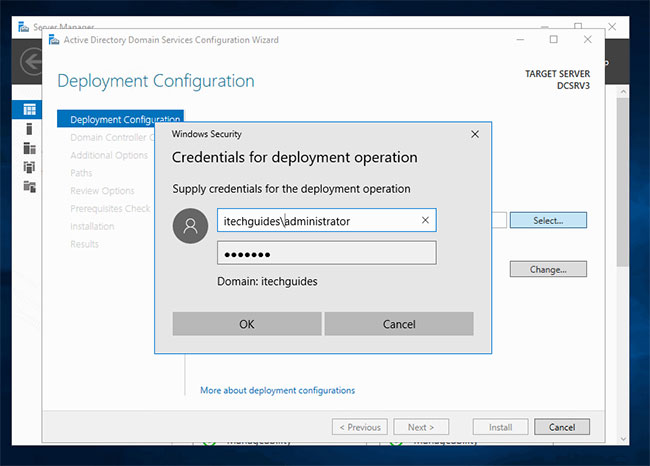
<p style="text-align: justify;">Nếu chọn&nbsp;<strong>Add a domain controller to an existing domain</strong>, bạn sẽ được yêu cầu cung cấp domain. Bên cạnh trường&nbsp;<strong>Domain</strong>, hãy nhấp vào&nbsp;<strong>Select.</strong>&nbsp;Sau đó, nhập thông tin đăng nhập domain theo định dạng được hiển thị bên dưới. Sau đó bấm&nbsp;<strong>OK.</strong></p>

<figure>
<div style="text-align: justify;"><img alt="Nhập thông tin đăng nhập domain" data-i="5" data-src="https://st.quantrimang.com/photos/image/2020/09/25/cai-dat-active-directory-6.jpg" data-was-processed="true" height="466" src="https://st.quantrimang.com/photos/image/2020/09/25/cai-dat-active-directory-6.jpg" width="650" /></div>

<figcaption>
<div style="text-align: justify;">Nhập thông tin đăng nhập domain</div>
</figcaption>
</figure>

<p style="text-align: justify;">Trình hướng dẫn sẽ liệt kê tất cả các domain có sẵn trong forest. Chọn domain bạn muốn thêm DC và nhấp vào&nbsp;<strong>OK.</strong></p>

<p style="text-align: justify;">Các trường Domain và thông tin đăng nhập sẽ được tự động điền. Xác nhận rằng thông tin là chính xác. Sau đó nhấp vào&nbsp;<strong>Next.</strong></p>

<div style="text-align: justify;">&nbsp;</div>

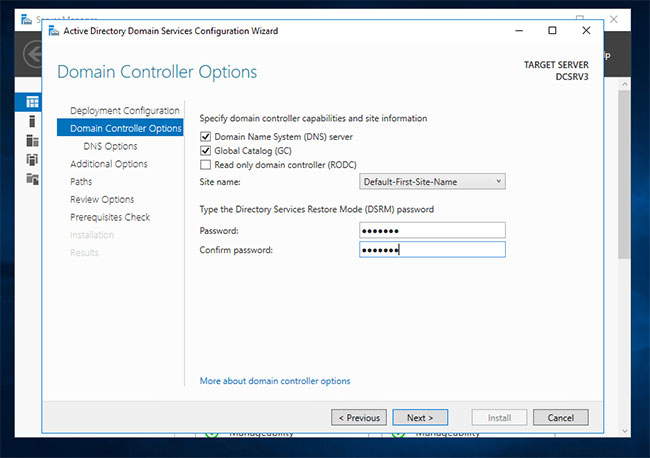
<p style="text-align: justify;">Tại màn hình&nbsp;<strong>Domain Controller Operations</strong>, hãy chọn các role bạn muốn DC thực hiện. Sau đó nhập mật khẩu DSRM và nhấp vào&nbsp;<strong>Next.</strong></p>

<figure>
<div style="text-align: justify;"><img alt="Nhập mật khẩu DSRM" data-i="6" data-src="https://st.quantrimang.com/photos/image/2020/09/25/cai-dat-active-directory-7.jpg" data-was-processed="true" height="458" src="https://st.quantrimang.com/photos/image/2020/09/25/cai-dat-active-directory-7.jpg" width="650" /></div>

<figcaption>
<div style="text-align: justify;">Nhập mật khẩu DSRM</div>
</figcaption>
</figure>

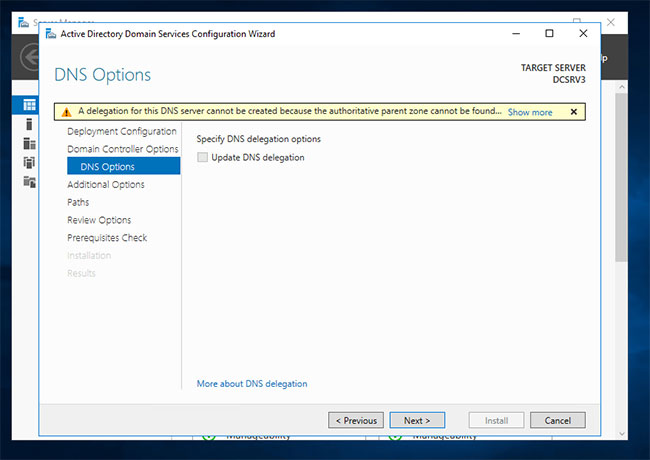
<p style="text-align: justify;">Nếu bạn nhận được cảnh báo này về DNS, hãy bỏ qua nó và nhấp vào&nbsp;<strong>Next.</strong></p>

<figure>
<div style="text-align: justify;"><img alt="Nếu bạn nhận được cảnh báo này về DNS, hãy bỏ qua nó" data-i="7" data-src="https://st.quantrimang.com/photos/image/2020/09/25/cai-dat-active-directory-8.jpg" data-was-processed="true" height="460" src="https://st.quantrimang.com/photos/image/2020/09/25/cai-dat-active-directory-8.jpg" width="650" /></div>

<figcaption>
<div style="text-align: justify;">Nếu bạn nhận được cảnh báo này về DNS, hãy bỏ qua nó</div>
</figcaption>
</figure>

<p style="text-align: justify;">Vì bạn đang thêm DC này vào domain hiện có, DC mới sẽ cần sao chép dữ liệu AD từ DC hiện có. Để sao chép từ một DC cụ thể, hãy nhấp vào menu drop-down&nbsp;<strong>Replicate from</strong>, chọn một DC và nhấp vào&nbsp;<strong>Next.</strong></p>

<p style="text-align: justify;">Sau đó chọn đường dẫn đến cơ sở dữ liệu AD DS, file nhật ký và SYSVOL. Nhấn&nbsp;<strong>Next.</strong></p>

<p style="text-align: justify;">Cuối cùng, xem lại các tùy chọn và nhấp vào&nbsp;<strong>Next.</strong></p>

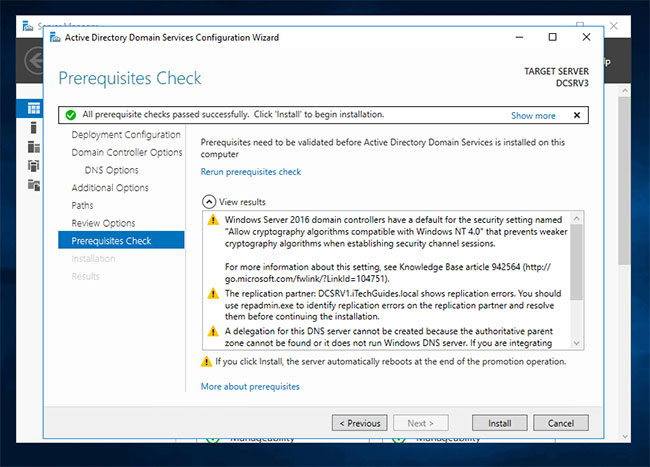
<p style="text-align: justify;">Và nếu vượt qua phần&nbsp;<strong>Prerequisite Check</strong>, hãy nhấp vào&nbsp;<strong>Install.</strong></p>

<figure>
<div style="text-align: justify;"><img alt="Nếu vượt qua phần Prerequisite Check, hãy nhấp vào Install" data-i="8" data-src="https://st.quantrimang.com/photos/image/2020/09/25/cai-dat-active-directory-9.jpg" data-was-processed="true" height="467" src="https://st.quantrimang.com/photos/image/2020/09/25/cai-dat-active-directory-9.jpg" width="650" /></div>

<figcaption>
<div style="text-align: justify;">Nếu vượt qua phần Prerequisite Check, hãy nhấp vào Install</div>
</figcaption>
</figure>

<p style="text-align: justify;">Khi server được nâng cấp thành DC, có thể tiến hành khởi động lại.</p>
		</div>
				<div id="author">
						<p>
				<strong>Nguồn tin:</strong>
				Quantrimang.com
			</p>
		</div>
	</div>
	<div id="footer" class="clearfix">
		<div id="url">
			<strong>URL của bản tin này: </strong><a href="https://www.nguoicodonvn2008.info/vi/news/savefile/kien-thuc-may-tinh/huong-dan-cai-dat-active-directory-tren-windows-server-2016-va-nang-cap-len-dc-2790.html" title="Hướng dẫn cài đặt Active Directory trên Windows Server 2016 và nâng cấp lên DC">https://www.nguoicodonvn2008.info/vi/news/savefile/kien-thuc-may-tinh/huong-dan-cai-dat-active-directory-tren-windows-server-2016-va-nang-cap-len-dc-2790.html</a>

		</div>
		<div class="clear"></div>
		<div class="copyright">
			&copy; .&#x3A; Nguoicodonvn2008.info - Cõi lòng người cô đơn &#x3A;.
		</div>
		<div id="contact">
			<a href="mailto:admin@nguoicodonvn2008.info">admin@nguoicodonvn2008.info</a>
		</div>
	</div>
</div>
        <div id="timeoutsess" class="chromeframe">
            Bạn đã không sử dụng Site, <a onclick="timeoutsesscancel();" href="https://nguoicodonvn2008.info/#">Bấm vào đây để duy trì trạng thái đăng nhập</a>. Thời gian chờ: <span id="secField"> 60 </span> giây
        </div>
        <div id="openidResult" class="nv-alert" style="display:none"></div>
        <div id="openidBt" data-result="" data-redirect=""></div>
		</script>
		<div class="car-top">
  <span><img src="https://nguoicodonvn2008.info/themes/default/images/car.png" alt=""></span>
</div>
<script src="https://nguoicodonvn2008.info/assets/js/jquery/jquery.min.js"></script>
<script>var nv_base_siteurl="/",nv_lang_data="vi",nv_lang_interface="vi",nv_name_variable="nv",nv_fc_variable="op",nv_lang_variable="language",nv_module_name="news",nv_func_name="savefile",nv_is_user=0, nv_my_ofs=-4,nv_my_abbr="EDT",nv_cookie_prefix="nv4c_e856T",nv_check_pass_mstime=1738000,nv_area_admin=0,nv_safemode=0,theme_responsive=0,nv_recaptcha_ver=2,nv_recaptcha_sitekey="",nv_recaptcha_type="image",XSSsanitize=1;</script>
<script src="https://nguoicodonvn2008.info/assets/js/language/vi.js"></script>
<script src="https://nguoicodonvn2008.info/assets/js/DOMPurify/purify3.js"></script>
<script src="https://nguoicodonvn2008.info/assets/js/global.js"></script>
<script src="https://nguoicodonvn2008.info/assets/js/site.js"></script>
<script src="https://nguoicodonvn2008.info/themes/default/js/news.js"></script>
<script src="https://nguoicodonvn2008.info/themes/default/js/main.js"></script>
<script src="https://nguoicodonvn2008.info/themes/default/js/custom.js"></script>
<script type="application/ld+json">
        {
            "@context": "https://schema.org",
            "@type": "Organization",
            "url": "https://nguoicodonvn2008.info",
            "logo": "https://nguoicodonvn2008.info/uploads/angel.gif"
        }
        </script>
<script src="https://nguoicodonvn2008.info/themes/default/js/bootstrap.min.js"></script>
<script type="text/javascript">
var $scrolltop = $('.car-top');
$scrolltop.on('click', function () {
    $('html,body').animate({
        scrollTop: 0
    }, 800);
    $(this).addClass("car-run");
    setTimeout(function(){ $scrolltop.removeClass('car-run');}, 1000);
    return false;
});
$(window).on('scroll', function ()
{ 
    if($(window).scrollTop() >= 200)
    {
        $scrolltop.addClass("show");
        $scrolltop.addClass("car-down");
    }
    else
    {
       $scrolltop.removeClass("show");
       setTimeout(function(){ $scrolltop.removeClass('car-down');}, 300);
    }
});
</script>
</body>
</html>