<!DOCTYPE html>
    <html lang="vi" xmlns="http://www.w3.org/1999/xhtml" prefix="og: http://ogp.me/ns#">
    <head>
<title>Hướng dẫn cách Recall, thu hồi lại thư đã gửi trong MS Outlook</title>
<meta name="description" content="Hướng dẫn cách Recall, thu hồi lại thư đã gửi trong MS Outlook - Savefile - Tin Tức -...">
<meta name="author" content=".: Nguoicodonvn2008.info - Cõi lòng người cô đơn :.">
<meta name="copyright" content=".: Nguoicodonvn2008.info - Cõi lòng người cô đơn :. [admin@nguoicodonvn2008.info]">
<meta name="robots" content="index, archive, follow, noodp">
<meta name="googlebot" content="index,archive,follow,noodp">
<meta name="msnbot" content="all,index,follow">
<meta name="generator" content="NukeViet v4.5">
<meta http-equiv="Content-Type" content="text/html; charset=utf-8">
<meta property="og:title" content="Hướng dẫn cách Recall, thu hồi lại thư đã gửi trong MS Outlook">
<meta property="og:type" content="website">
<meta property="og:description" content="Savefile - Tin Tức - https&#x3A;&#x002F;&#x002F;www.nguoicodonvn2008.info&#x002F;vi&#x002F;news&#x002F;savefile&#x002F;kien-thuc-may-tinh&#x002F;huong-dan-cach-recall-thu-hoi-lai-thu-da-gui-trong-ms-outlook-8782.html">
<meta property="og:site_name" content=".&#x3A; Nguoicodonvn2008.info - Cõi lòng người cô đơn &#x3A;.">
<meta property="og:url" content="https://www.nguoicodonvn2008.info/vi/news/savefile/kien-thuc-may-tinh/huong-dan-cach-recall-thu-hoi-lai-thu-da-gui-trong-ms-outlook-8782.html">
<link rel="shortcut icon" href="https://nguoicodonvn2008.info/favicon.ico">
<link rel="canonical" href="https://www.nguoicodonvn2008.info/vi/news/savefile/kien-thuc-may-tinh/huong-dan-cach-recall-thu-hoi-lai-thu-da-gui-trong-ms-outlook-8782.html">
<link rel="alternate" href="https://nguoicodonvn2008.info/vi/news/rss/" title="Tin Tức" type="application/rss+xml">
<link rel="alternate" href="https://nguoicodonvn2008.info/vi/news/rss/karaoke-dual/" title="Tin Tức - Karaoke Dual" type="application/rss+xml">
<link rel="alternate" href="https://nguoicodonvn2008.info/vi/news/rss/nhac-tre/" title="Tin Tức - Nhạc trẻ" type="application/rss+xml">
<link rel="alternate" href="https://nguoicodonvn2008.info/vi/news/rss/tru-tinh/" title="Tin Tức - Trữ tình" type="application/rss+xml">
<link rel="alternate" href="https://nguoicodonvn2008.info/vi/news/rss/nuoc-ngoai/" title="Tin Tức - Nước ngoài" type="application/rss+xml">
<link rel="alternate" href="https://nguoicodonvn2008.info/vi/news/rss/remix/" title="Tin Tức - Remix" type="application/rss+xml">
<link rel="alternate" href="https://nguoicodonvn2008.info/vi/news/rss/tam-su-tinh-yeu/" title="Tin Tức - Tâm sự tình yêu" type="application/rss+xml">
<link rel="alternate" href="https://nguoicodonvn2008.info/vi/news/rss/tho-suu-tam/" title="Tin Tức - Thơ sưu tầm" type="application/rss+xml">
<link rel="alternate" href="https://nguoicodonvn2008.info/vi/news/rss/cuoc-song/" title="Tin Tức - Cuộc sống" type="application/rss+xml">
<link rel="alternate" href="https://nguoicodonvn2008.info/vi/news/rss/phan-mem/" title="Tin Tức - Phần mềm" type="application/rss+xml">
<link rel="alternate" href="https://nguoicodonvn2008.info/vi/news/rss/kien-thuc-may-tinh/" title="Tin Tức - Kiến thức máy tính" type="application/rss+xml">
<link rel="alternate" href="https://nguoicodonvn2008.info/vi/news/rss/hoc-tap/" title="Tin Tức - Học tập" type="application/rss+xml">
<link rel="alternate" href="https://nguoicodonvn2008.info/vi/news/rss/tai-lieu/" title="Tin Tức - Tài liệu" type="application/rss+xml">
<link rel="alternate" href="https://nguoicodonvn2008.info/vi/news/rss/de-thi/" title="Tin Tức - Đề thi" type="application/rss+xml">
<link rel="preload" as="style" href="https://nguoicodonvn2008.info/assets/css/font-awesome.min.css" type="text/css">
<link rel="preload" as="style" href="https://nguoicodonvn2008.info/themes/default/css/bootstrap.non-responsive.css" type="text/css">
<link rel="preload" as="style" href="https://nguoicodonvn2008.info/themes/default/css/style.css" type="text/css">
<link rel="preload" as="style" href="https://nguoicodonvn2008.info/themes/default/css/style.non-responsive.css" type="text/css">
<link rel="preload" as="style" href="https://nguoicodonvn2008.info/themes/default/css/news.css" type="text/css">
<link rel="preload" as="style" href="https://nguoicodonvn2008.info/themes/default/css/custom.css" type="text/css">
<link rel="preload" as="script" href="https://nguoicodonvn2008.info/assets/js/jquery/jquery.min.js" type="text/javascript">
<link rel="preload" as="script" href="https://nguoicodonvn2008.info/assets/js/language/vi.js" type="text/javascript">
<link rel="preload" as="script" href="https://nguoicodonvn2008.info/assets/js/DOMPurify/purify3.js" type="text/javascript">
<link rel="preload" as="script" href="https://nguoicodonvn2008.info/assets/js/global.js" type="text/javascript">
<link rel="preload" as="script" href="https://nguoicodonvn2008.info/assets/js/site.js" type="text/javascript">
<link rel="preload" as="script" href="https://nguoicodonvn2008.info/themes/default/js/news.js" type="text/javascript">
<link rel="preload" as="script" href="https://nguoicodonvn2008.info/themes/default/js/main.js" type="text/javascript">
<link rel="preload" as="script" href="https://nguoicodonvn2008.info/themes/default/js/custom.js" type="text/javascript">
<link rel="preload" as="script" href="https://nguoicodonvn2008.info/themes/default/js/bootstrap.min.js" type="text/javascript">
<link rel="stylesheet" href="https://nguoicodonvn2008.info/assets/css/font-awesome.min.css">
<link rel="stylesheet" href="https://nguoicodonvn2008.info/themes/default/css/bootstrap.non-responsive.css">
<link rel="stylesheet" href="https://nguoicodonvn2008.info/themes/default/css/style.css">
<link rel="stylesheet" href="https://nguoicodonvn2008.info/themes/default/css/style.non-responsive.css">
<link rel="StyleSheet" href="https://nguoicodonvn2008.info/themes/default/css/news.css">
<link rel="stylesheet" href="https://nguoicodonvn2008.info/themes/default/css/custom.css">
<style type="text/css">
	body{background: #fff;}
</style>
    </head>
    <body>
<div id="print">
	<div id="hd_print">
		<h2 class="pull-left">.&#x3A; Nguoicodonvn2008.info - Cõi lòng người cô đơn &#x3A;.</h2>
		<p class="pull-right"><a title=".&#x3A; Nguoicodonvn2008.info - Cõi lòng người cô đơn &#x3A;." href="https://nguoicodonvn2008.info/">https://nguoicodonvn2008.info</a></p>
	</div>
	<div class="clear"></div>
	<hr />
	<div id="content">
		<h1>Hướng dẫn cách Recall, thu hồi lại thư đã gửi trong MS Outlook</h1>
		<ul class="list-inline">
			<li>Thứ ba - 30/07/2024 00:24</li>
			<li class="hidden-print txtrequired"><em class="fa fa-print">&nbsp;</em><a title="In ra" href="javascript:;" onclick="window.print()">In ra</a></li>
			<li class="hidden-print txtrequired"><em class="fa fa-power-off">&nbsp;</em><a title="Đóng cửa sổ này" href="javascript:;" onclick="window.close()">Đóng cửa sổ này</a></li>
		</ul>
		<div class="clear"></div>
		<div id="hometext">
		</div>
				<div class="imghome">
			<img alt="Hướng dẫn cách Recall, thu hồi lại thư đã gửi trong MS Outlook" src="https://st.quantrimang.com/photos/image/2019/09/05/recall-email-outlook-1.png" width="460" class="img-thumbnail" />
		</div>
		<div class="clear"></div>
		<div id="bodytext" class="clearfix">
			<p style="text-align: justify;">Chỉ cần một cú click chuột là bạn đã có thể gửi thông điệp qua email đến cho người khác. Tuy vậy, đôi khi sự nhanh nhạy đó lại làm cho bạn phải khổ sở khi đã lỡ tay gửi đi nội dung thư không mong muốn, gửi nhầm thư quan trọng cho người khác mà không thể nào chỉnh sửa hay lấy lại được. Nhưng bạn không phải lo lắng, MS Outlook sẽ giúp bạn giải quyết khó khăn đó trong nháy mắt.</p>

<h2 style="text-align: justify;">Điều kiện thực hiện tính năng thu hồi email trên Outlook</h2>

<p style="text-align: justify;">Email được gửi bằng Microsoft Outlook có thể bị xóa khỏi hộp thư đến của người nhận hoặc được thay thế bằng e-mail mới cần phải đáp ứng các điều kiện sau:</p>

<ul>
	<li style="text-align: justify;">Trình đọc e-mail của cả người gửi và người nhận đều phải kết nối với máy chủ Microsoft Exchange.</li>
	<li style="text-align: justify;">Email muốn thu hồi được gửi cho các địa chỉ nằm trong cùng một tổ chức/doanh nghiệp và phải sử dụng ứng dụng Outlook trên máy tính hoặc Office 365.</li>
	<li style="text-align: justify;">Người nhận chưa mở thư.</li>
</ul>

<p style="text-align: justify;">Nếu ba yêu cầu này được đáp ứng thì email có thể được recall mà không gặp vấn đề gì.</p>

<h2 style="text-align: justify;">Recall email trên Outlook 2016, 2013 và 2010</h2>

<p style="text-align: justify;">Để thu hồi email đã được gửi bằng Outlook 2016, 2013 hoặc 2010, bạn cần làm như sau:</p>

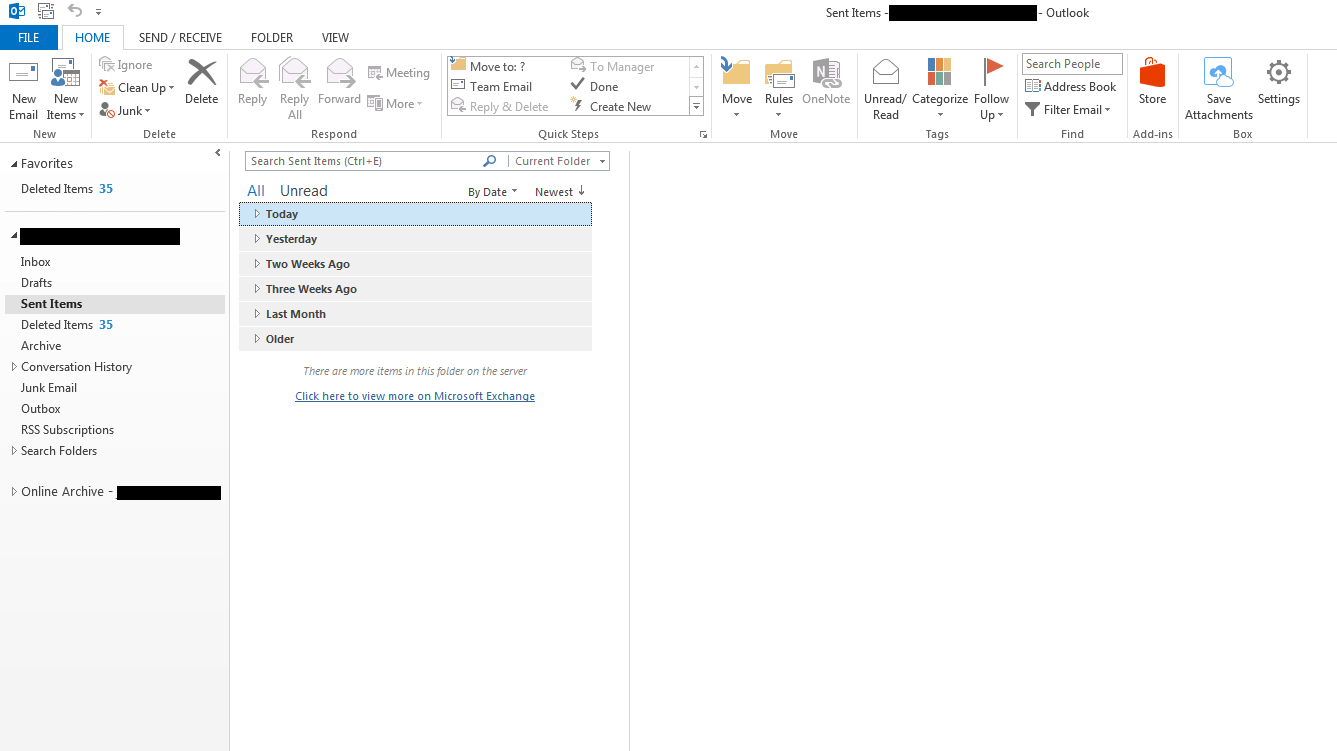
<p style="text-align: justify;"><strong>Bước 1:</strong>&nbsp;Nhấp vào thư mục&nbsp;<strong>Sent Items</strong>&nbsp;nằm ở bên trái của cửa sổ Outlook.</p>

<p style="text-align: justify;">Tất cả các thư gửi đi sẽ được lưu tự động trong thư mục&nbsp;<strong>Sent Items.</strong></p>

<figure>
<div style="text-align: justify;"><img alt="Tất cả các tin nhắn gửi đi sẽ được lưu tự động trong thư mục Sent Items" data-i="0" data-src="https://st.quantrimang.com/photos/image/2019/09/05/recall-email-outlook-1.png" data-was-processed="true" height="751" src="https://st.quantrimang.com/photos/image/2019/09/05/recall-email-outlook-1.png" width="1337" /></div>

<figcaption>
<div style="text-align: justify;">Tất cả các tin nhắn gửi đi sẽ được lưu tự động trong thư mục Sent Items</div>
</figcaption>
</figure>

<div style="text-align: justify;">&nbsp;</div>

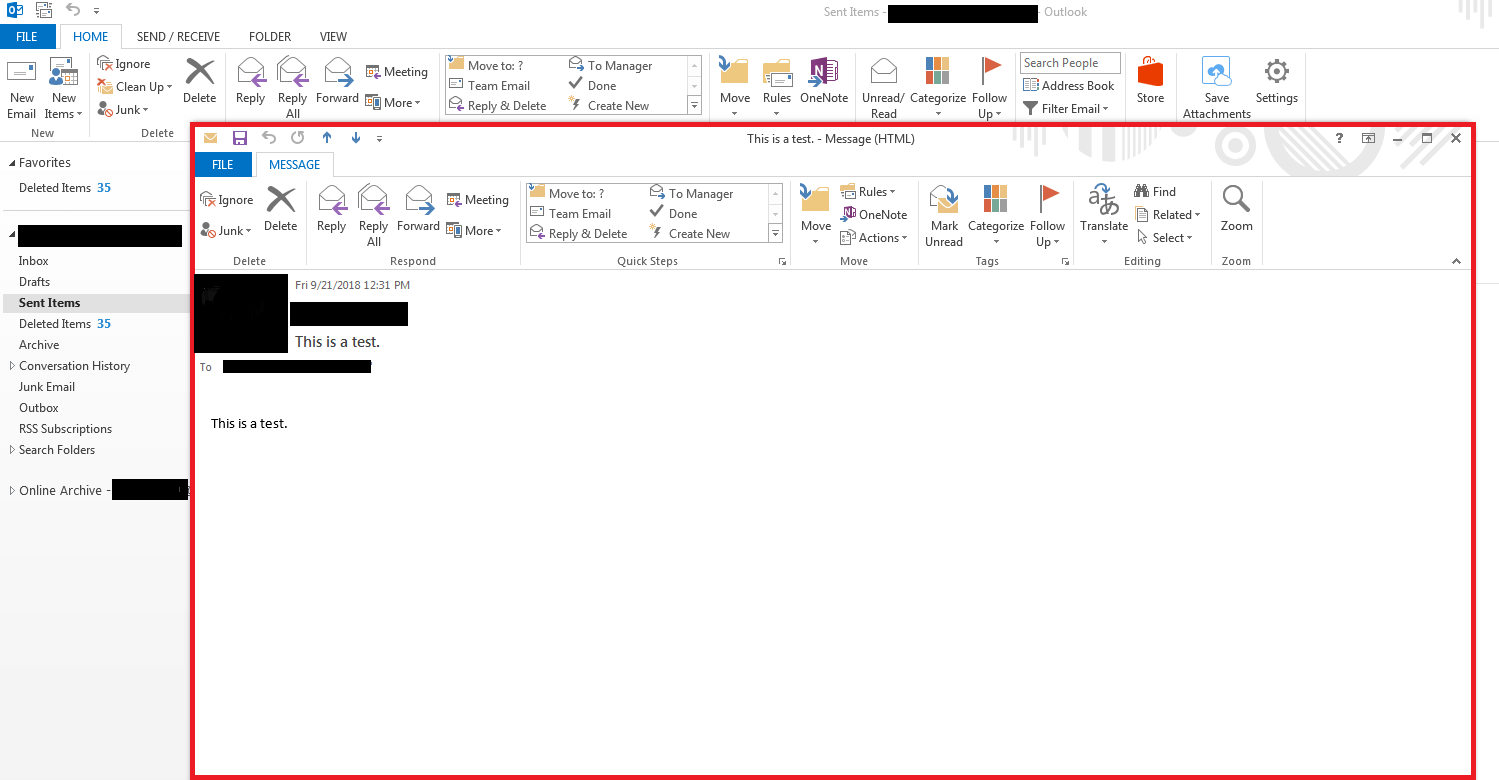
<p style="text-align: justify;"><strong>Bước 2:</strong>&nbsp;Chọn email bạn muốn thu hồi và nhấp đúp chuột để mở trong cửa sổ mới</p>

<p style="text-align: justify;">Khi mở ra, Outlook sẽ cung cấp một số chức năng khác nhau như chuyển tiếp, trả lời hoặc di chuyển email ở ngay trên giao diện.</p>

<figure>
<div style="text-align: justify;"><img alt="Khi mở ra, Outlook sẽ cung cấp một số chức năng khác nhau" data-adbro-processed="true" data-i="1" data-src="https://st.quantrimang.com/photos/image/2019/09/05/recall-email-outlook-2.png" data-was-processed="true" height="780" src="https://st.quantrimang.com/photos/image/2019/09/05/recall-email-outlook-2.png" width="1499" /></div>

<figcaption>
<div style="text-align: justify;">Khi mở ra, Outlook sẽ cung cấp một số chức năng khác nhau</div>
</figcaption>
</figure>

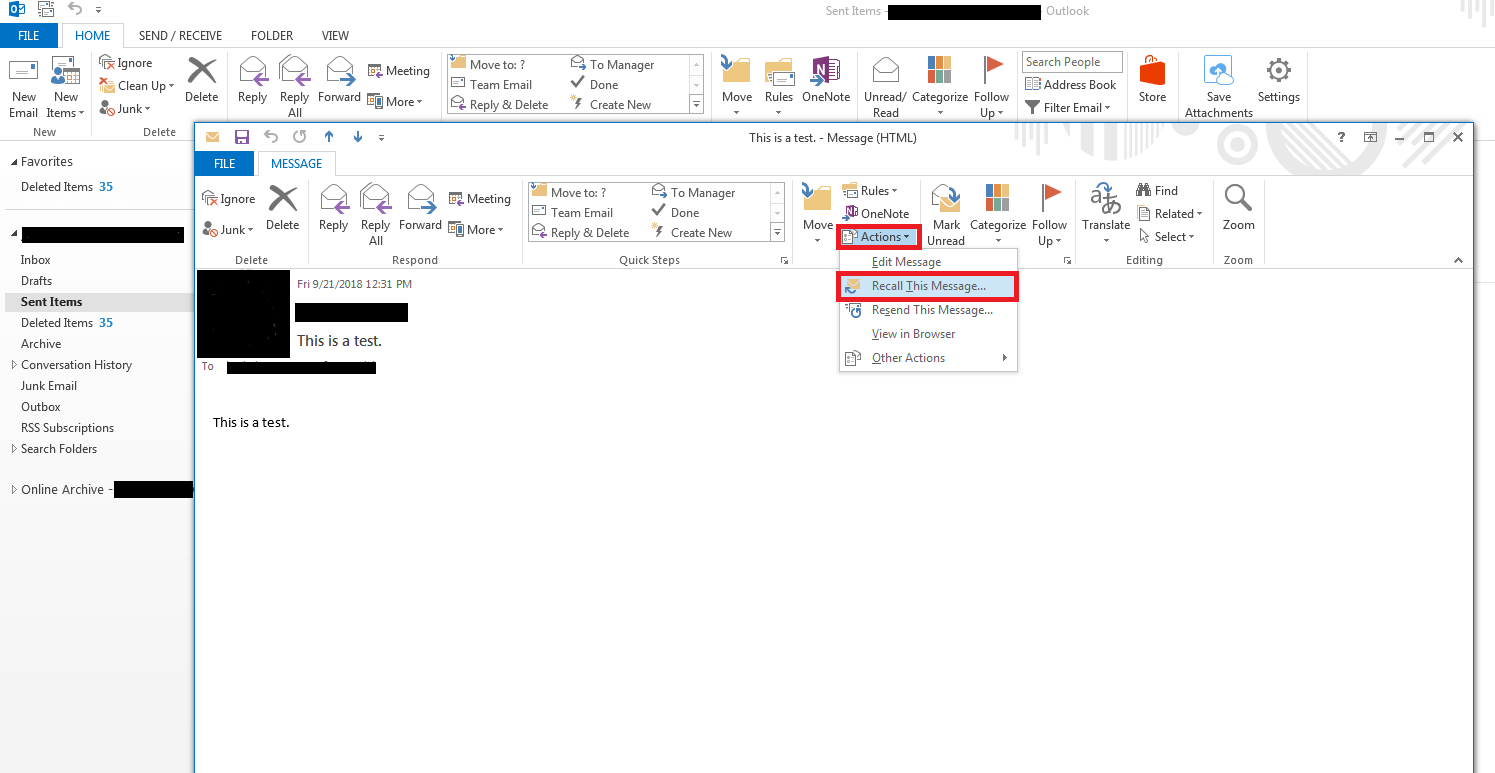
<p style="text-align: justify;"><strong>Bước 3:</strong>&nbsp;Click vào nút&nbsp;<strong>Actions</strong>&nbsp;và chọn mục&nbsp;<strong>Recall This Message</strong>&nbsp;từ menu thả xuống.</p>

<figure>
<div style="text-align: justify;"><img alt="Nút Actions nằm cạnh Move" data-i="2" data-src="https://st.quantrimang.com/photos/image/2019/09/05/recall-email-outlook-3.png" data-was-processed="true" height="773" src="https://st.quantrimang.com/photos/image/2019/09/05/recall-email-outlook-3.png" width="1495" /></div>

<figcaption>
<div style="text-align: justify;">Nút Actions nằm cạnh Move</div>
</figcaption>
</figure>

<div style="text-align: justify;">&nbsp;</div>

<p style="text-align: justify;">Nếu bạn không thấy hiển thị tùy chọn&nbsp;<strong>Recall This Message</strong>&nbsp;nghĩa là bạn không sử dụng tài khoản Exchange hoặc chức năng recall đã bị vô hiệu hóa bởi quản trị viên của máy chủ Exchange.</p>

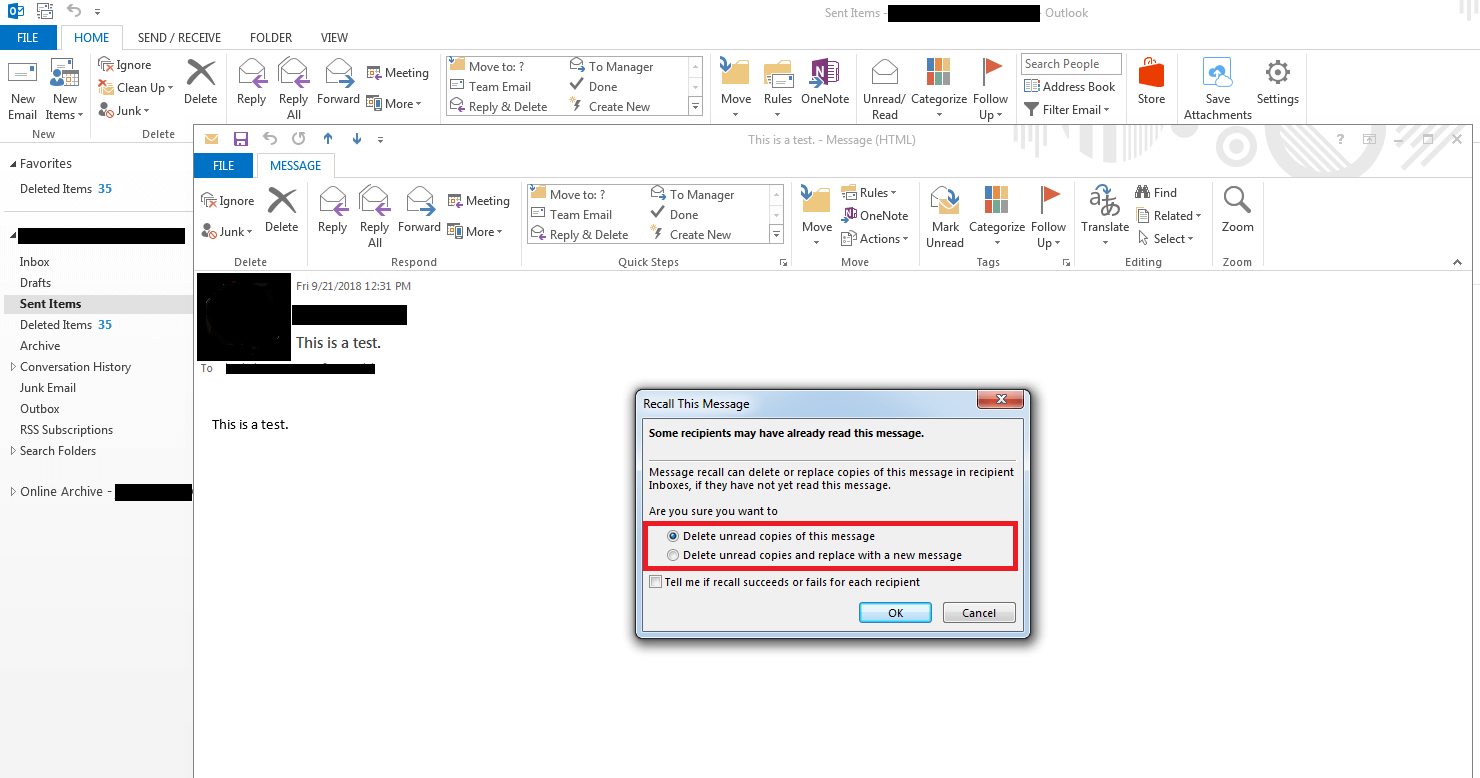
<p style="text-align: justify;"><strong>Bước 4:</strong>&nbsp;Chọn một trong hai tùy chọn thu hồi.</p>

<ul>
	<li style="text-align: justify;"><strong>Delete unread copies of this message:</strong>&nbsp;hệ thống thu hồi lại thư đã gửi.</li>
	<li style="text-align: justify;"><strong>Delete unread copies and replace with a new message:</strong>&nbsp;hệ thống thu hồi lại thư đã gửi và thay thế bằng lá thư mới.</li>
</ul>

<p style="text-align: justify;">Tuy nhiên, không phải lá thư nào cũng có thể thu hồi được, MS Outlook hiện chỉ có khả năng thu hồi các lá thư mà người nhận chưa đọc. Vì thế, bạn nên thiết lập để hệ thống báo cho bạn trong trường hợp thư đã được thu hồi hay chưa thu hồi, bằng cách đánh dấu chọn&nbsp;<strong>Tell me if recall succeeds or fails for each recipient</strong>.</p>

<figure>
<div style="text-align: justify;"><img alt="Nên đánh dấu chọn Tell me if recall succeeds or fails for each recipient" data-i="3" data-src="https://st.quantrimang.com/photos/image/2019/09/05/recall-email-outlook-4.png" data-was-processed="true" height="778" src="https://st.quantrimang.com/photos/image/2019/09/05/recall-email-outlook-4.png" width="1480" /></div>

<figcaption>
<div style="text-align: justify;">Nên đánh dấu chọn Tell me if recall succeeds or fails for each recipient</div>
</figcaption>
</figure>

<p style="text-align: justify;"><strong>Bước 5:</strong>&nbsp;Xác nhận lựa chọn của bạn bằng cách nhấp vào&nbsp;<strong>OK</strong>.</p>

<p style="text-align: justify;"><strong>Bước 6:</strong>&nbsp;Để đảm bảo rằng việc thu hồi đã thành công, Outlook sẽ luôn thông báo cho bạn bằng email về kết quả thu hồi. Nếu bạn đã kích hoạt chức năng tương ứng, người nhận thư cũng sẽ được thông báo về việc thu hồi.</p>

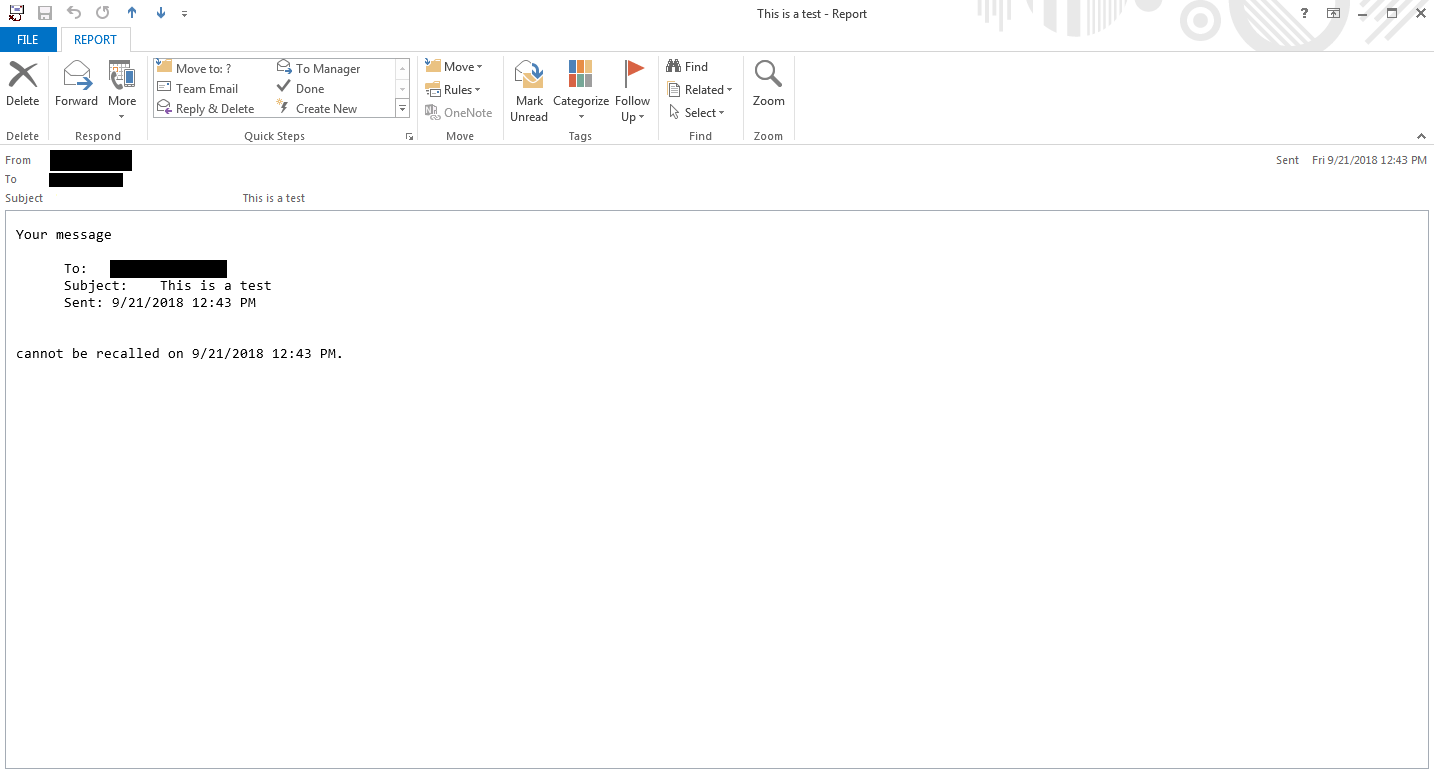
<p style="text-align: justify;"><strong>Recall thất bại:</strong>&nbsp;Email về việc thu hồi thất bại bao gồm các thông tin sau: người nhận, chủ đề, thời gian và thông báo thu hồi thất bại.</p>

<figure>
<div style="text-align: justify;"><img alt="Thông báo Recall thất bại" data-i="4" data-src="https://st.quantrimang.com/photos/image/2019/09/05/recall-email-outlook-5.png" data-was-processed="true" height="775" src="https://st.quantrimang.com/photos/image/2019/09/05/recall-email-outlook-5.png" width="1434" /></div>

<figcaption>
<div style="text-align: justify;">Thông báo Recall thất bại</div>
</figcaption>
</figure>

<div style="text-align: justify;">&nbsp;</div>

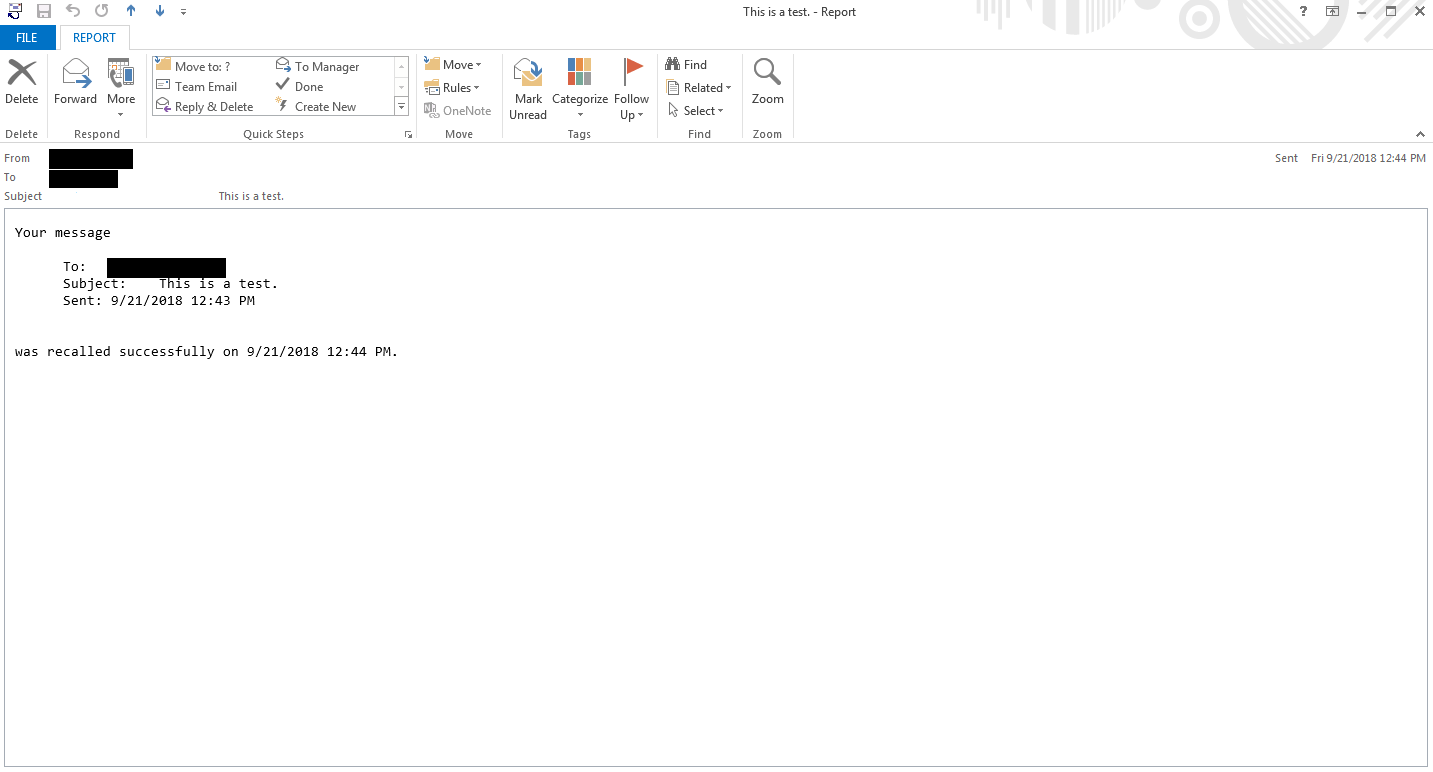
<p style="text-align: justify;"><strong>Recall thành công:</strong>&nbsp;Email về việc thu hồi thành công cũng bao gồm các thông tin tương tự như khi recall thất bại, chỉ khác là sẽ có thông báo email đã được thu hồi thành công.</p>

<figure>
<div style="text-align: justify;"><img alt="Thông báo Recall thành công" data-i="5" data-src="https://st.quantrimang.com/photos/image/2019/09/05/recall-email-outlook-6.png" data-was-processed="true" height="772" src="https://st.quantrimang.com/photos/image/2019/09/05/recall-email-outlook-6.png" width="1433" /></div>

<figcaption>
<div style="text-align: justify;">Thông báo Recall thành công</div>
</figcaption>
</figure>

<h2 style="text-align: justify;">Liệu email đã chắc chắn được recall thành công chưa?</h2>

<p style="text-align: justify;">Việc một email đã gửi có thể được thu hồi và thay thế bằng một thư mới&nbsp;<strong>không chỉ phụ thuộc vào các yêu cầu được liệt kê ở trên</strong>&nbsp;<strong>mà còn phụ thuộc vào cài đặt Outlook của người nhận.</strong></p>

<p style="text-align: justify;"><strong>Trường hợp 1: Outlook của người nhận bật tính năng &quot;Automatically process meeting requests and responses to meeting requests and polls&quot;.</strong></p>

<p style="text-align: justify;">Ở trường hợp này, cả thư gốc và thư về việc thu hồi đều sẽ được lưu trong hộp thư đến của người nhận.&nbsp;<strong>Việc thu hồi có thành công hay không phụ thuộc vào việc thư đã được đọc hay chưa:</strong></p>

<ul>
	<li style="text-align: justify;">Nếu người nhận chưa đọc email gốc, nó sẽ được thay thế bằng email thu hồi. Người nhận vẫn được thông báo rằng bạn đã recall mail ban đầu.</li>
	<li style="text-align: justify;">Nếu email được đánh dấu là đã đọc thì bạn không thể recall được nữa, mail sẽ vẫn còn trong hộp thư đến của người nhận. Tuy nhiên, người nhận vẫn sẽ được thông báo rằng bạn đang cố recall thư này.</li>
</ul>

<p style="text-align: justify;"><strong>Trường hợp 2: Outlook của người nhận vô hiệu hóa tính năng &quot;Automatically process meeting requests and responses to meeting requests and polls&quot;</strong></p>

<p style="text-align: justify;">Ở trường hợp này, cả mail gốc và mail về việc thu hồi sẽ được lưu trong hộp thư đến của người nhận.&nbsp;<strong>Việc thu hồi có thành công hay không phụ thuộc vào email nào được mở trước:</strong></p>

<ul>
	<li style="text-align: justify;">Nếu người nhận mở mail về việc thu hồi trước, mail ban đầu sẽ bị xóa, nghĩa là việc thu hồi đã thành công.</li>
	<li style="text-align: justify;">Nếu người nhận mở e-mail gốc trước, việc thu hồi sẽ không thành công.</li>
</ul>

<p style="text-align: justify;"><strong>Trường hợp 3: Người nhận sử dụng các quy tắc (Rules) khiến email gốc bị di chuyển sang các thư mục khác Hộp thư đến.</strong></p>

<p style="text-align: justify;">Nếu người nhận thiết lập các quy tắc trong Outlook để những email tương tự luôn được nhóm lại với nhau, có nghĩa là email gốc và email thu hồi sẽ được lưu trữ trong các thư mục khác nhau, việc thu hồi sẽ thất bại.</p>

<p style="text-align: justify;"><strong>Trường hợp 4: Người nhận sử dụng các quy tắc (Rules) nhưng cả email gốc và email thu hồi đều chuyển sang thư mục khác.</strong></p>

<p style="text-align: justify;">Nếu người nhận thiết lập quy tắc trong Outlook mà cả hai email đều được lưu trữ trong cùng một thư mục thì nó phụ thuộc vào email nào được mở trước.</p>

<ul>
	<li style="text-align: justify;">Nếu người nhận mở mail về việc thu hồi trước, mail ban đầu sẽ bị xóa, nghĩa là việc thu hồi đã thành công.</li>
	<li style="text-align: justify;">Nếu người nhận mở e-mail gốc trước, việc thu hồi sẽ không thành công.</li>
</ul>

<p style="text-align: justify;">Vậy là Quantrimang.com đã vừa hướng dẫn bạn cách recall/thu hồi email đã gửi trên Outlook. Nó không hề phức tạp nhưng lại phụ thuộc vào nhiều yếu tố khác không chỉ từ người gửi.</p>

<p style="text-align: justify;">Bạn hãy thử xem có vấn đề gì không nhé. Chúc các bạn thành công!</p>
		</div>
				<div id="author">
						<p>
				<strong>Nguồn tin:</strong>
				Quantrimang.com:
			</p>
		</div>
	</div>
	<div id="footer" class="clearfix">
		<div id="url">
			<strong>URL của bản tin này: </strong><a href="https://www.nguoicodonvn2008.info/vi/news/savefile/kien-thuc-may-tinh/huong-dan-cach-recall-thu-hoi-lai-thu-da-gui-trong-ms-outlook-8782.html" title="Hướng dẫn cách Recall, thu hồi lại thư đã gửi trong MS Outlook">https://www.nguoicodonvn2008.info/vi/news/savefile/kien-thuc-may-tinh/huong-dan-cach-recall-thu-hoi-lai-thu-da-gui-trong-ms-outlook-8782.html</a>

		</div>
		<div class="clear"></div>
		<div class="copyright">
			&copy; .&#x3A; Nguoicodonvn2008.info - Cõi lòng người cô đơn &#x3A;.
		</div>
		<div id="contact">
			<a href="mailto:admin@nguoicodonvn2008.info">admin@nguoicodonvn2008.info</a>
		</div>
	</div>
</div>
        <div id="timeoutsess" class="chromeframe">
            Bạn đã không sử dụng Site, <a onclick="timeoutsesscancel();" href="https://nguoicodonvn2008.info/#">Bấm vào đây để duy trì trạng thái đăng nhập</a>. Thời gian chờ: <span id="secField"> 60 </span> giây
        </div>
        <div id="openidResult" class="nv-alert" style="display:none"></div>
        <div id="openidBt" data-result="" data-redirect=""></div>
		</script>
		<div class="car-top">
  <span><img src="https://nguoicodonvn2008.info/themes/default/images/car.png" alt=""></span>
</div>
<script src="https://nguoicodonvn2008.info/assets/js/jquery/jquery.min.js"></script>
<script>var nv_base_siteurl="/",nv_lang_data="vi",nv_lang_interface="vi",nv_name_variable="nv",nv_fc_variable="op",nv_lang_variable="language",nv_module_name="news",nv_func_name="savefile",nv_is_user=0, nv_my_ofs=-4,nv_my_abbr="EDT",nv_cookie_prefix="nv4c_e856T",nv_check_pass_mstime=1738000,nv_area_admin=0,nv_safemode=0,theme_responsive=0,nv_recaptcha_ver=2,nv_recaptcha_sitekey="",nv_recaptcha_type="image",XSSsanitize=1;</script>
<script src="https://nguoicodonvn2008.info/assets/js/language/vi.js"></script>
<script src="https://nguoicodonvn2008.info/assets/js/DOMPurify/purify3.js"></script>
<script src="https://nguoicodonvn2008.info/assets/js/global.js"></script>
<script src="https://nguoicodonvn2008.info/assets/js/site.js"></script>
<script src="https://nguoicodonvn2008.info/themes/default/js/news.js"></script>
<script src="https://nguoicodonvn2008.info/themes/default/js/main.js"></script>
<script src="https://nguoicodonvn2008.info/themes/default/js/custom.js"></script>
<script type="application/ld+json">
        {
            "@context": "https://schema.org",
            "@type": "Organization",
            "url": "https://nguoicodonvn2008.info",
            "logo": "https://nguoicodonvn2008.info/uploads/angel.gif"
        }
        </script>
<script src="https://nguoicodonvn2008.info/themes/default/js/bootstrap.min.js"></script>
<script type="text/javascript">
var $scrolltop = $('.car-top');
$scrolltop.on('click', function () {
    $('html,body').animate({
        scrollTop: 0
    }, 800);
    $(this).addClass("car-run");
    setTimeout(function(){ $scrolltop.removeClass('car-run');}, 1000);
    return false;
});
$(window).on('scroll', function ()
{ 
    if($(window).scrollTop() >= 200)
    {
        $scrolltop.addClass("show");
        $scrolltop.addClass("car-down");
    }
    else
    {
       $scrolltop.removeClass("show");
       setTimeout(function(){ $scrolltop.removeClass('car-down');}, 300);
    }
});
</script>
</body>
</html>