<!DOCTYPE html>
    <html lang="vi" xmlns="http://www.w3.org/1999/xhtml" prefix="og: http://ogp.me/ns#">
    <head>
<title>Hàm Round, cách dùng hàm làm tròn trong Excel</title>
<meta name="description" content="Hàm Round, cách dùng hàm làm tròn trong Excel - Savefile - Tin Tức -...">
<meta name="author" content=".: Nguoicodonvn2008.info - Cõi lòng người cô đơn :.">
<meta name="copyright" content=".: Nguoicodonvn2008.info - Cõi lòng người cô đơn :. [admin@nguoicodonvn2008.info]">
<meta name="robots" content="index, archive, follow, noodp">
<meta name="googlebot" content="index,archive,follow,noodp">
<meta name="msnbot" content="all,index,follow">
<meta name="generator" content="NukeViet v4.5">
<meta http-equiv="Content-Type" content="text/html; charset=utf-8">
<meta property="og:title" content="Hàm Round, cách dùng hàm làm tròn trong Excel">
<meta property="og:type" content="website">
<meta property="og:description" content="Savefile - Tin Tức - https&#x3A;&#x002F;&#x002F;www.nguoicodonvn2008.info&#x002F;vi&#x002F;news&#x002F;savefile&#x002F;kien-thuc-may-tinh&#x002F;ham-round-cach-dung-ham-lam-tron-trong-excel-10867.html">
<meta property="og:site_name" content=".&#x3A; Nguoicodonvn2008.info - Cõi lòng người cô đơn &#x3A;.">
<meta property="og:url" content="https://www.nguoicodonvn2008.info/vi/news/savefile/kien-thuc-may-tinh/ham-round-cach-dung-ham-lam-tron-trong-excel-10867.html">
<link rel="shortcut icon" href="https://nguoicodonvn2008.info/favicon.ico">
<link rel="canonical" href="https://www.nguoicodonvn2008.info/vi/news/savefile/kien-thuc-may-tinh/ham-round-cach-dung-ham-lam-tron-trong-excel-10867.html">
<link rel="alternate" href="https://nguoicodonvn2008.info/vi/news/rss/" title="Tin Tức" type="application/rss+xml">
<link rel="alternate" href="https://nguoicodonvn2008.info/vi/news/rss/karaoke-dual/" title="Tin Tức - Karaoke Dual" type="application/rss+xml">
<link rel="alternate" href="https://nguoicodonvn2008.info/vi/news/rss/nhac-tre/" title="Tin Tức - Nhạc trẻ" type="application/rss+xml">
<link rel="alternate" href="https://nguoicodonvn2008.info/vi/news/rss/tru-tinh/" title="Tin Tức - Trữ tình" type="application/rss+xml">
<link rel="alternate" href="https://nguoicodonvn2008.info/vi/news/rss/nuoc-ngoai/" title="Tin Tức - Nước ngoài" type="application/rss+xml">
<link rel="alternate" href="https://nguoicodonvn2008.info/vi/news/rss/remix/" title="Tin Tức - Remix" type="application/rss+xml">
<link rel="alternate" href="https://nguoicodonvn2008.info/vi/news/rss/tam-su-tinh-yeu/" title="Tin Tức - Tâm sự tình yêu" type="application/rss+xml">
<link rel="alternate" href="https://nguoicodonvn2008.info/vi/news/rss/tho-suu-tam/" title="Tin Tức - Thơ sưu tầm" type="application/rss+xml">
<link rel="alternate" href="https://nguoicodonvn2008.info/vi/news/rss/cuoc-song/" title="Tin Tức - Cuộc sống" type="application/rss+xml">
<link rel="alternate" href="https://nguoicodonvn2008.info/vi/news/rss/phan-mem/" title="Tin Tức - Phần mềm" type="application/rss+xml">
<link rel="alternate" href="https://nguoicodonvn2008.info/vi/news/rss/kien-thuc-may-tinh/" title="Tin Tức - Kiến thức máy tính" type="application/rss+xml">
<link rel="alternate" href="https://nguoicodonvn2008.info/vi/news/rss/hoc-tap/" title="Tin Tức - Học tập" type="application/rss+xml">
<link rel="alternate" href="https://nguoicodonvn2008.info/vi/news/rss/tai-lieu/" title="Tin Tức - Tài liệu" type="application/rss+xml">
<link rel="alternate" href="https://nguoicodonvn2008.info/vi/news/rss/de-thi/" title="Tin Tức - Đề thi" type="application/rss+xml">
<link rel="preload" as="style" href="https://nguoicodonvn2008.info/assets/css/font-awesome.min.css" type="text/css">
<link rel="preload" as="style" href="https://nguoicodonvn2008.info/themes/default/css/bootstrap.non-responsive.css" type="text/css">
<link rel="preload" as="style" href="https://nguoicodonvn2008.info/themes/default/css/style.css" type="text/css">
<link rel="preload" as="style" href="https://nguoicodonvn2008.info/themes/default/css/style.non-responsive.css" type="text/css">
<link rel="preload" as="style" href="https://nguoicodonvn2008.info/themes/default/css/news.css" type="text/css">
<link rel="preload" as="style" href="https://nguoicodonvn2008.info/themes/default/css/custom.css" type="text/css">
<link rel="preload" as="script" href="https://nguoicodonvn2008.info/assets/js/jquery/jquery.min.js" type="text/javascript">
<link rel="preload" as="script" href="https://nguoicodonvn2008.info/assets/js/language/vi.js" type="text/javascript">
<link rel="preload" as="script" href="https://nguoicodonvn2008.info/assets/js/DOMPurify/purify3.js" type="text/javascript">
<link rel="preload" as="script" href="https://nguoicodonvn2008.info/assets/js/global.js" type="text/javascript">
<link rel="preload" as="script" href="https://nguoicodonvn2008.info/assets/js/site.js" type="text/javascript">
<link rel="preload" as="script" href="https://nguoicodonvn2008.info/themes/default/js/news.js" type="text/javascript">
<link rel="preload" as="script" href="https://nguoicodonvn2008.info/themes/default/js/main.js" type="text/javascript">
<link rel="preload" as="script" href="https://nguoicodonvn2008.info/themes/default/js/custom.js" type="text/javascript">
<link rel="preload" as="script" href="https://nguoicodonvn2008.info/themes/default/js/bootstrap.min.js" type="text/javascript">
<link rel="stylesheet" href="https://nguoicodonvn2008.info/assets/css/font-awesome.min.css">
<link rel="stylesheet" href="https://nguoicodonvn2008.info/themes/default/css/bootstrap.non-responsive.css">
<link rel="stylesheet" href="https://nguoicodonvn2008.info/themes/default/css/style.css">
<link rel="stylesheet" href="https://nguoicodonvn2008.info/themes/default/css/style.non-responsive.css">
<link rel="StyleSheet" href="https://nguoicodonvn2008.info/themes/default/css/news.css">
<link rel="stylesheet" href="https://nguoicodonvn2008.info/themes/default/css/custom.css">
<style type="text/css">
	body{background: #fff;}
</style>
    </head>
    <body>
<div id="print">
	<div id="hd_print">
		<h2 class="pull-left">.&#x3A; Nguoicodonvn2008.info - Cõi lòng người cô đơn &#x3A;.</h2>
		<p class="pull-right"><a title=".&#x3A; Nguoicodonvn2008.info - Cõi lòng người cô đơn &#x3A;." href="https://nguoicodonvn2008.info/">https://nguoicodonvn2008.info</a></p>
	</div>
	<div class="clear"></div>
	<hr />
	<div id="content">
		<h1>Hàm Round, cách dùng hàm làm tròn trong Excel</h1>
		<ul class="list-inline">
			<li>Thứ tư - 30/07/2025 00:24</li>
			<li class="hidden-print txtrequired"><em class="fa fa-print">&nbsp;</em><a title="In ra" href="javascript:;" onclick="window.print()">In ra</a></li>
			<li class="hidden-print txtrequired"><em class="fa fa-power-off">&nbsp;</em><a title="Đóng cửa sổ này" href="javascript:;" onclick="window.close()">Đóng cửa sổ này</a></li>
		</ul>
		<div class="clear"></div>
		<div id="hometext">
		</div>
				<div class="imghome">
			<img alt="Hàm Round, cách dùng hàm làm tròn trong Excel" src="https://st.quantrimang.com/photos/image/2023/03/28/ham-round-excel.jpg" width="460" class="img-thumbnail" />
		</div>
		<div class="clear"></div>
		<div id="bodytext" class="clearfix">
			<p style="text-align: justify;"><strong>Hàm ROUND trong Excel&nbsp;</strong>có nhiều ứng dụng thực tế. Dưới đây là chi tiết<strong>&nbsp;cách dùng và công thức ROUND trong Excel</strong>.</p>

<p style="text-align: justify;">Khi làm việc với các bảng dữ liệu trong bảng tính Excel, việc làm tròn số đôi khi rất hữu ích Điều này khiến các phép tính trở nên đơn giản hơn và cho bạn tóm tắt tổng quan tốt hơn về các con số hiện có trong Excel.</p>

<p style="text-align: justify;">Nếu thường xuyên dùng Excel, ắt hẳn bạn đã biết phần mềm này có rất nhiều hàm. Và để làm tròn số trong Excel nhanh nhất, hàm ROUND sẽ giúp bạn.</p>

<div style="text-align: justify;">Accounting software</div>

<p style="text-align: justify;">Nếu bạn chưa biết cách sử dụng hàm Round trong Excel hay chưa sử dụng thành thạo hàm Round, hãy theo dõi bài viết dưới đây của Quản trị mạng.</p>

<div style="text-align: justify;">&nbsp;</div>

<h2 style="text-align: justify;">Hướng dẫn dùng hàm Round trong Excel</h2>

<p style="text-align: justify;">Hàm Round trong Excel có cú pháp&nbsp;<strong>=ROUND(number,n)</strong>.</p>

<p style="text-align: justify;">Trong đó:</p>

<ul>
	<li style="text-align: justify;">Number là số cần làm tròn.</li>
	<li style="text-align: justify;">N là đối số có thể âm hoặc dương.</li>
</ul>

<p style="text-align: justify;">Với đối số N chúng ta sẽ có một số trường hợp khác nhau.</p>

<ul>
	<li style="text-align: justify;">Nếu N = 0 thì ta sẽ làm tròn tới số nguyên gần nhất. Chẳng hạn làm tròn số ROUND(9.23.0) = 9</li>
	<li style="text-align: justify;">Nếu N &gt; 0 thì số sẽ được làm tròn tới vị trí thập phân chỉ định. Chẳng hạn ROUND(21.25464,5) = 21.25. Nếu N =1 lấy 1 số lẻ, n=2 lấy 2 số lẻ,…</li>
	<li style="text-align: justify;">Nếu N &lt; 0 thì số sẽ được làm tròn sang bên trái dấu thập phân. Ví dụ: ROUND(23.23434, -1) = 20. Nếu N = -1 thì làm tròn đến hàng chục, N = -2 làm tròn đến trăm và N = -3 là đến hàng nghìn...</li>
</ul>

<h2 style="text-align: justify;">Lưu ý khi sử dụng hàm ROUND trong&nbsp;&nbsp;Microsoft Excel</h2>

<p style="text-align: justify;">Hàm ROUND làm tròn số tới một số vị trí nhất định. ROUND làm tròn lên khi số có nghĩa cuối cùng bằng hoặc lớn hơn 5, và làm tròn xuống khi số có nghĩa cuối cùng nhỏ hơn 5.</p>

<div style="text-align: justify;">&nbsp;</div>

<p style="text-align: justify;">ROUND tính hai đối số, number và num_digits. Number là số được làm tròn, num_digits là vị trí số cần được làm tròn. Khi num_digits lớn hơn 0, hàm ROUND làm tròn số bên phải của dấu thập phân. Khi num_digits nhỏ hơn hoặc bằng 0, hàm ROUND làm tròn số bên trái của dấu thập phân.</p>

<p style="text-align: justify;">Sử dụng 0 cho num_digits để làm tròn thành số nguyên gần nhất. Bảng bên dưới sẽ cho bạn hiểu rõ hơn về cách làm tròn số của hàm ROUND trong Excel:</p>

<table cellpadding="3" cellspacing="3">
		<tr>
			<th style="text-align: justify;">Số</th>
			<th style="text-align: justify;">Cách làm tròn</th>
		</tr>
	<tbody>
		<tr>
			<td style="text-align: justify;">&gt;0</td>
			<td style="text-align: justify;">Làm tròn tới số gần nhất .1, .01, .001, etc.</td>
		</tr>
		<tr>
			<td style="text-align: justify;">&lt;0</td>
			<td style="text-align: justify;">Làm tròn tới số gần nhất 10, 100, 1000, etc.</td>
		</tr>
		<tr>
			<td style="text-align: justify;">=0</td>
			<td style="text-align: justify;">Là tròn tới số 1 gần nhất</td>
		</tr>
	</tbody>
</table>

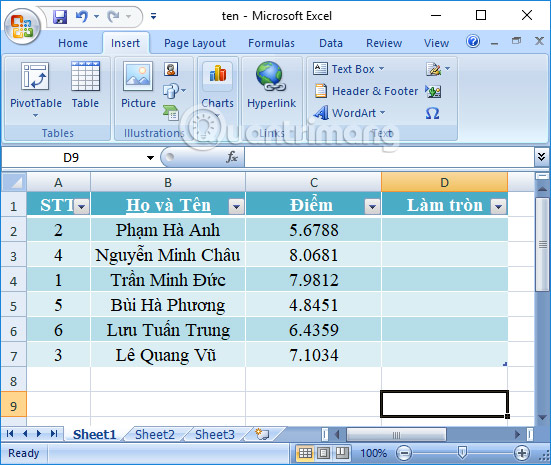
<p style="text-align: justify;">Chúng ta sẽ thực hiện với bảng dữ liệu điểm số dưới đây. Hãy làm tròn số đến 2 chữ số thập phân.</p>

<p style="text-align: justify;"><img alt="Bảng dữ liệu" data-i="0" data-src="https://st.quantrimang.com/photos/image/2018/02/02/Excel-ham-ROUND-bang-du-lieu.jpg" data-was-processed="true" height="465" src="https://st.quantrimang.com/photos/image/2018/02/02/Excel-ham-ROUND-bang-du-lieu.jpg" width="551" /></p>

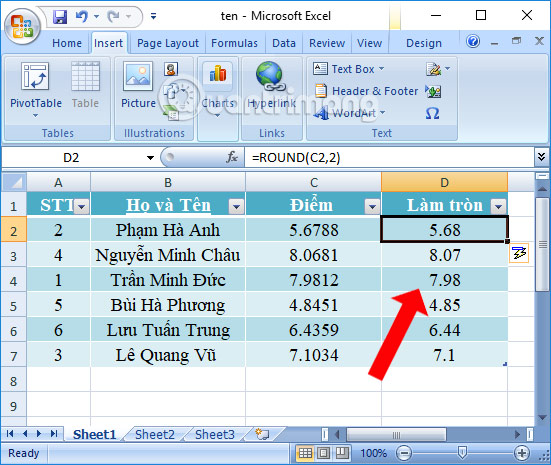
<p style="text-align: justify;">Tại ô nhập kết quả điểm số làm tròn, chúng ta nhập&nbsp;<strong>công thức =ROUND(C2,2)</strong>&nbsp;rồi nhấn Enter.</p>

<p style="text-align: justify;">Trong đó cột C2 là điểm trung bình của sinh viên. 2 là chỉ lấy 2 số bên phải của dấu thập phân, làm tròn tới 2 số sau dấu phẩy. Trường hơp N &lt; 0 thường xuất hiện trong bảng lương hoặc hóa đơn.</p>

<p style="text-align: justify;">Ngay lập tức kết quả sẽ cho ra điểm số được làm tròn tới số thứ 2 sau dấu thập phân. Bạn kéo xuống dưới để nhập nốt điểm số cho sinh viên.</p>

<p style="text-align: justify;">&nbsp;</p>

<div style="text-align: justify;"><br />
<img alt="Làm tròn số liệu Excel" data-adbro-processed="true" data-i="1" data-src="https://st.quantrimang.com/photos/image/2018/02/02/Excel-ham-ROUND-lam-tron.jpg" data-was-processed="true" height="465" src="https://st.quantrimang.com/photos/image/2018/02/02/Excel-ham-ROUND-lam-tron.jpg" width="551" /></div>

<p style="text-align: justify;">Với hàm Round trong Excel, người dùng sẽ dễ dàng trong việc làm tròn số liệu, gọn gàng bảng tính hơn thay vì để nhiều số đằng sau số thập phân. Khi làm tròn, người xem sẽ dễ dàng theo dõi bảng dữ liệu Excel mà bạn cũng nhanh chóng tính toán hơn.</p>

<h2 style="text-align: justify;">Cách dùng lệnh ROUND trong Excel ở các công thức lồng nhau</h2>

<p style="text-align: justify;">Trong Excel, công thức lồng nhau là công thức chứa nhiều hơn một hàm. Hãy xem xét ví dụ dưới đây để thấy rõ điều đó.</p>

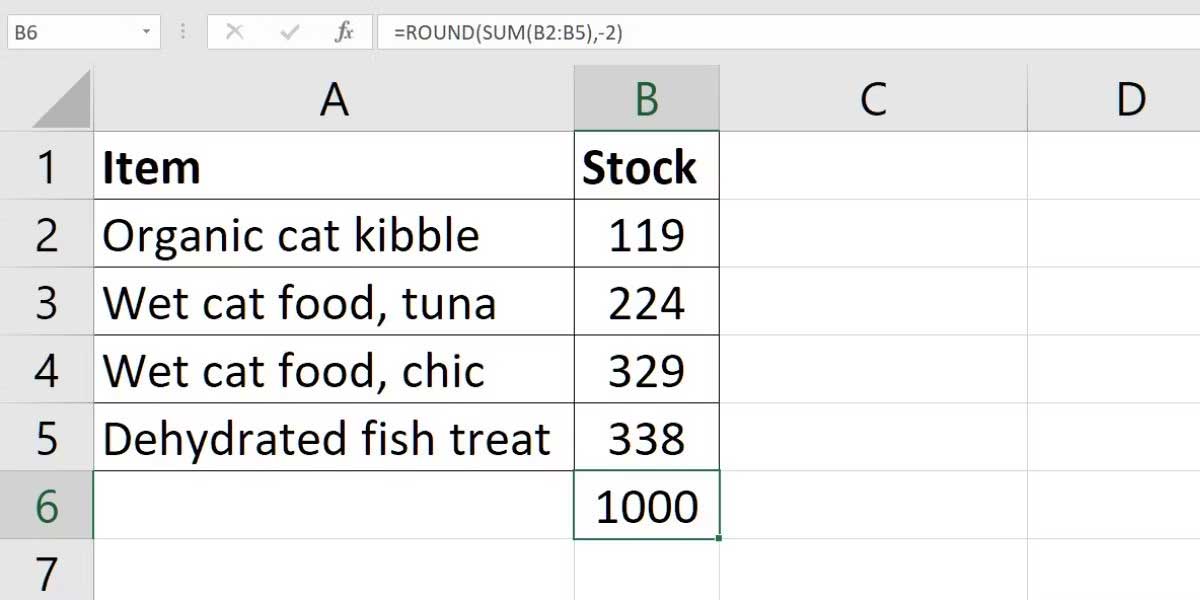
<p style="text-align: justify;">Ví dụ này yêu cầu tính tổng số lượng tồn kho và làm tròn tổng số tới gần số 100 nhất.</p>

<p style="text-align: justify;"><img alt="Hàm ROUND trong Excel" data-i="2" data-src="https://st.quantrimang.com/photos/image/2023/03/28/ham-round-excel.jpg" data-was-processed="true" height="325" src="https://st.quantrimang.com/photos/image/2023/03/28/ham-round-excel.jpg" width="650" /></p>

<ol>
	<li style="text-align: justify;">Chọn một ô trống (B6).</li>
	<li style="text-align: justify;">Mấu chốt nằm ở công thức<strong>&nbsp;=ROUND(SUM(B2:B5),-2)</strong>. Hàm SUM được dùng để thêm số trong Excel. Num_digit là -2 để làm tròn tới số 100 gần nhất.</li>
	<li style="text-align: justify;">Nhấn&nbsp;<strong>Enter</strong>. Tổng của 1010 được làm tròn tới 1000.</li>
</ol>

<p style="text-align: justify;"><strong>Tóm lại, những điều cần nhớ khi dùng hàm ROUND trong Excel</strong></p>

<ul>
	<li style="text-align: justify;">Hàm ROUND làm tròn số tới một cấp độ chính xác nhất định, được quyết định bởi num_digits.</li>
	<li style="text-align: justify;">Nếu number đã được làm tròn tới số của vị trí được cung cấp, ROUND không làm tròn số.</li>
	<li style="text-align: justify;">Nếu number không phải là số, ROUND cho kết quả lỗi<strong>&nbsp;#VALUE!</strong></li>
</ul>
		</div>
				<div id="author">
						<p>
				<strong>Nguồn tin:</strong>
				Quantrimang.com:
			</p>
		</div>
	</div>
	<div id="footer" class="clearfix">
		<div id="url">
			<strong>URL của bản tin này: </strong><a href="https://www.nguoicodonvn2008.info/vi/news/savefile/kien-thuc-may-tinh/ham-round-cach-dung-ham-lam-tron-trong-excel-10867.html" title="Hàm Round, cách dùng hàm làm tròn trong Excel">https://www.nguoicodonvn2008.info/vi/news/savefile/kien-thuc-may-tinh/ham-round-cach-dung-ham-lam-tron-trong-excel-10867.html</a>

		</div>
		<div class="clear"></div>
		<div class="copyright">
			&copy; .&#x3A; Nguoicodonvn2008.info - Cõi lòng người cô đơn &#x3A;.
		</div>
		<div id="contact">
			<a href="mailto:admin@nguoicodonvn2008.info">admin@nguoicodonvn2008.info</a>
		</div>
	</div>
</div>
        <div id="timeoutsess" class="chromeframe">
            Bạn đã không sử dụng Site, <a onclick="timeoutsesscancel();" href="https://nguoicodonvn2008.info/#">Bấm vào đây để duy trì trạng thái đăng nhập</a>. Thời gian chờ: <span id="secField"> 60 </span> giây
        </div>
        <div id="openidResult" class="nv-alert" style="display:none"></div>
        <div id="openidBt" data-result="" data-redirect=""></div>
		</script>
		<div class="car-top">
  <span><img src="https://nguoicodonvn2008.info/themes/default/images/car.png" alt=""></span>
</div>
<script src="https://nguoicodonvn2008.info/assets/js/jquery/jquery.min.js"></script>
<script>var nv_base_siteurl="/",nv_lang_data="vi",nv_lang_interface="vi",nv_name_variable="nv",nv_fc_variable="op",nv_lang_variable="language",nv_module_name="news",nv_func_name="savefile",nv_is_user=0, nv_my_ofs=-4,nv_my_abbr="EDT",nv_cookie_prefix="nv4c_e856T",nv_check_pass_mstime=1738000,nv_area_admin=0,nv_safemode=0,theme_responsive=0,nv_recaptcha_ver=2,nv_recaptcha_sitekey="",nv_recaptcha_type="image",XSSsanitize=1;</script>
<script src="https://nguoicodonvn2008.info/assets/js/language/vi.js"></script>
<script src="https://nguoicodonvn2008.info/assets/js/DOMPurify/purify3.js"></script>
<script src="https://nguoicodonvn2008.info/assets/js/global.js"></script>
<script src="https://nguoicodonvn2008.info/assets/js/site.js"></script>
<script src="https://nguoicodonvn2008.info/themes/default/js/news.js"></script>
<script src="https://nguoicodonvn2008.info/themes/default/js/main.js"></script>
<script src="https://nguoicodonvn2008.info/themes/default/js/custom.js"></script>
<script type="application/ld+json">
        {
            "@context": "https://schema.org",
            "@type": "Organization",
            "url": "https://nguoicodonvn2008.info",
            "logo": "https://nguoicodonvn2008.info/uploads/angel.gif"
        }
        </script>
<script src="https://nguoicodonvn2008.info/themes/default/js/bootstrap.min.js"></script>
<script type="text/javascript">
var $scrolltop = $('.car-top');
$scrolltop.on('click', function () {
    $('html,body').animate({
        scrollTop: 0
    }, 800);
    $(this).addClass("car-run");
    setTimeout(function(){ $scrolltop.removeClass('car-run');}, 1000);
    return false;
});
$(window).on('scroll', function ()
{ 
    if($(window).scrollTop() >= 200)
    {
        $scrolltop.addClass("show");
        $scrolltop.addClass("car-down");
    }
    else
    {
       $scrolltop.removeClass("show");
       setTimeout(function(){ $scrolltop.removeClass('car-down');}, 300);
    }
});
</script>
</body>
</html>