<!DOCTYPE html>
    <html lang="vi" xmlns="http://www.w3.org/1999/xhtml" prefix="og: http://ogp.me/ns#">
    <head>
<title>Hàm map&#40;&#41; trong Python</title>
<meta name="description" content="Hàm map&#40;&#41; trong Python - Savefile - Tin Tức - https&#x3A;&#x002F;&#x002F;www.nguoicodonvn2008.info&#x002F;vi&#x002F;news&#x002F;savefile&#x002F;kien-thuc-may-tinh&#x002F;ham-map-trong-python-7255.html">
<meta name="author" content=".: Nguoicodonvn2008.info - Cõi lòng người cô đơn :.">
<meta name="copyright" content=".: Nguoicodonvn2008.info - Cõi lòng người cô đơn :. [admin@nguoicodonvn2008.info]">
<meta name="robots" content="index, archive, follow, noodp">
<meta name="googlebot" content="index,archive,follow,noodp">
<meta name="msnbot" content="all,index,follow">
<meta name="generator" content="NukeViet v4.5">
<meta http-equiv="Content-Type" content="text/html; charset=utf-8">
<meta property="og:title" content="Hàm map&#40;&#41; trong Python">
<meta property="og:type" content="website">
<meta property="og:description" content="Savefile - Tin Tức - https&#x3A;&#x002F;&#x002F;www.nguoicodonvn2008.info&#x002F;vi&#x002F;news&#x002F;savefile&#x002F;kien-thuc-may-tinh&#x002F;ham-map-trong-python-7255.html">
<meta property="og:site_name" content=".&#x3A; Nguoicodonvn2008.info - Cõi lòng người cô đơn &#x3A;.">
<meta property="og:url" content="https://www.nguoicodonvn2008.info/vi/news/savefile/kien-thuc-may-tinh/ham-map-trong-python-7255.html">
<link rel="shortcut icon" href="https://nguoicodonvn2008.info/favicon.ico">
<link rel="canonical" href="https://www.nguoicodonvn2008.info/vi/news/savefile/kien-thuc-may-tinh/ham-map-trong-python-7255.html">
<link rel="alternate" href="https://nguoicodonvn2008.info/vi/news/rss/" title="Tin Tức" type="application/rss+xml">
<link rel="alternate" href="https://nguoicodonvn2008.info/vi/news/rss/karaoke-dual/" title="Tin Tức - Karaoke Dual" type="application/rss+xml">
<link rel="alternate" href="https://nguoicodonvn2008.info/vi/news/rss/nhac-tre/" title="Tin Tức - Nhạc trẻ" type="application/rss+xml">
<link rel="alternate" href="https://nguoicodonvn2008.info/vi/news/rss/tru-tinh/" title="Tin Tức - Trữ tình" type="application/rss+xml">
<link rel="alternate" href="https://nguoicodonvn2008.info/vi/news/rss/nuoc-ngoai/" title="Tin Tức - Nước ngoài" type="application/rss+xml">
<link rel="alternate" href="https://nguoicodonvn2008.info/vi/news/rss/remix/" title="Tin Tức - Remix" type="application/rss+xml">
<link rel="alternate" href="https://nguoicodonvn2008.info/vi/news/rss/tam-su-tinh-yeu/" title="Tin Tức - Tâm sự tình yêu" type="application/rss+xml">
<link rel="alternate" href="https://nguoicodonvn2008.info/vi/news/rss/tho-suu-tam/" title="Tin Tức - Thơ sưu tầm" type="application/rss+xml">
<link rel="alternate" href="https://nguoicodonvn2008.info/vi/news/rss/cuoc-song/" title="Tin Tức - Cuộc sống" type="application/rss+xml">
<link rel="alternate" href="https://nguoicodonvn2008.info/vi/news/rss/phan-mem/" title="Tin Tức - Phần mềm" type="application/rss+xml">
<link rel="alternate" href="https://nguoicodonvn2008.info/vi/news/rss/kien-thuc-may-tinh/" title="Tin Tức - Kiến thức máy tính" type="application/rss+xml">
<link rel="alternate" href="https://nguoicodonvn2008.info/vi/news/rss/hoc-tap/" title="Tin Tức - Học tập" type="application/rss+xml">
<link rel="alternate" href="https://nguoicodonvn2008.info/vi/news/rss/tai-lieu/" title="Tin Tức - Tài liệu" type="application/rss+xml">
<link rel="alternate" href="https://nguoicodonvn2008.info/vi/news/rss/de-thi/" title="Tin Tức - Đề thi" type="application/rss+xml">
<link rel="preload" as="style" href="https://nguoicodonvn2008.info/assets/css/font-awesome.min.css" type="text/css">
<link rel="preload" as="style" href="https://nguoicodonvn2008.info/themes/default/css/bootstrap.non-responsive.css" type="text/css">
<link rel="preload" as="style" href="https://nguoicodonvn2008.info/themes/default/css/style.css" type="text/css">
<link rel="preload" as="style" href="https://nguoicodonvn2008.info/themes/default/css/style.non-responsive.css" type="text/css">
<link rel="preload" as="style" href="https://nguoicodonvn2008.info/themes/default/css/news.css" type="text/css">
<link rel="preload" as="style" href="https://nguoicodonvn2008.info/themes/default/css/custom.css" type="text/css">
<link rel="preload" as="script" href="https://nguoicodonvn2008.info/assets/js/jquery/jquery.min.js" type="text/javascript">
<link rel="preload" as="script" href="https://nguoicodonvn2008.info/assets/js/language/vi.js" type="text/javascript">
<link rel="preload" as="script" href="https://nguoicodonvn2008.info/assets/js/DOMPurify/purify3.js" type="text/javascript">
<link rel="preload" as="script" href="https://nguoicodonvn2008.info/assets/js/global.js" type="text/javascript">
<link rel="preload" as="script" href="https://nguoicodonvn2008.info/assets/js/site.js" type="text/javascript">
<link rel="preload" as="script" href="https://nguoicodonvn2008.info/themes/default/js/news.js" type="text/javascript">
<link rel="preload" as="script" href="https://nguoicodonvn2008.info/themes/default/js/main.js" type="text/javascript">
<link rel="preload" as="script" href="https://nguoicodonvn2008.info/themes/default/js/custom.js" type="text/javascript">
<link rel="preload" as="script" href="https://nguoicodonvn2008.info/themes/default/js/bootstrap.min.js" type="text/javascript">
<link rel="stylesheet" href="https://nguoicodonvn2008.info/assets/css/font-awesome.min.css">
<link rel="stylesheet" href="https://nguoicodonvn2008.info/themes/default/css/bootstrap.non-responsive.css">
<link rel="stylesheet" href="https://nguoicodonvn2008.info/themes/default/css/style.css">
<link rel="stylesheet" href="https://nguoicodonvn2008.info/themes/default/css/style.non-responsive.css">
<link rel="StyleSheet" href="https://nguoicodonvn2008.info/themes/default/css/news.css">
<link rel="stylesheet" href="https://nguoicodonvn2008.info/themes/default/css/custom.css">
<style type="text/css">
	body{background: #fff;}
</style>
    </head>
    <body>
<div id="print">
	<div id="hd_print">
		<h2 class="pull-left">.&#x3A; Nguoicodonvn2008.info - Cõi lòng người cô đơn &#x3A;.</h2>
		<p class="pull-right"><a title=".&#x3A; Nguoicodonvn2008.info - Cõi lòng người cô đơn &#x3A;." href="https://nguoicodonvn2008.info/">https://nguoicodonvn2008.info</a></p>
	</div>
	<div class="clear"></div>
	<hr />
	<div id="content">
		<h1>Hàm map&#40;&#41; trong Python</h1>
		<ul class="list-inline">
			<li>Thứ ba - 04/07/2023 10:18</li>
			<li class="hidden-print txtrequired"><em class="fa fa-print">&nbsp;</em><a title="In ra" href="javascript:;" onclick="window.print()">In ra</a></li>
			<li class="hidden-print txtrequired"><em class="fa fa-power-off">&nbsp;</em><a title="Đóng cửa sổ này" href="javascript:;" onclick="window.close()">Đóng cửa sổ này</a></li>
		</ul>
		<div class="clear"></div>
		<div id="hometext">
		</div>
				<div class="imghome">
			<img alt="Hàm map&#40;&#41; trong Python" src="https://st.quantrimang.com/photos/image/2022/08/30/ham-map-trong-python-3.jpg" width="460" class="img-thumbnail" />
		</div>
		<div class="clear"></div>
		<div id="bodytext" class="clearfix">
			<p style="text-align: justify;"><strong>Hàm map() trong Python</strong>&nbsp;được sử dụng như thế nào khi lập trình? Hãy cùng Quantrimang.com tìm hiểu mọi điều cần biết về map() trong Python nhé!</p>

<h2 style="text-align: justify;">Hàm map() trong Python là gì?</h2>

<p style="text-align: justify;">Python là một ngôn ngữ lập trình mạnh mẽ và linh hoạt, cung cấp các hàm tích hợp khác nhau để triển khai nhiều hoạt động xử lý dữ liệu. Một trong số những hàm như thế là hàm map(), được dùng để áp dụng một tính năng cho mỗi thành phần trong một lần lặp (như list hoặc tuple) và trả về một lần lặp mới với cùng kết quả.</p>

<p style="text-align: justify;">map() nhận hai đối số: một hàm và một lặp lại (iterable). Hàm sẽ được áp dụng cho mỗi thành phần của iterable, còn class lặp lại là biến lặp mà hàm đó sẽ áp dụng. Cú pháp của hàm map() rất dễ nhớ.</p>

<h2 style="text-align: justify;">Cú pháp hàm map() trong Python</h2>

<pre id="pre0" style="text-align: justify;">
map(function, iterable, ...)</pre>

<h2 style="text-align: justify;">Các tham số của hàm map()</h2>

<ul>
	<li style="text-align: justify;"><code>function</code>: Hàm thực thi cho từng phần tử trong iterable.</li>
	<li style="text-align: justify;"><code>iterable</code>: một list, tuple, dictionary... muốn duyệt.</li>
</ul>

<p style="text-align: justify;">Bạn có thể truyền nhiều iterablecho hàm map().</p>

<h2 style="text-align: justify;">Giá trị trả về từ map()</h2>

<p style="text-align: justify;">Hàm map() duyệt tất cả các phần tử của iterable qua function và trả về một list kết quả sau khi thực thi.</p>

<p style="text-align: justify;">Giá trị trả về từ map() được gọi là map object. Đối tượng này có thể được truyền vào các hàm&nbsp;<a href="https://quantrimang.com/cong-nghe/ham-list-trong-python-162152" title="Hàm list() trong Python">list()</a>&nbsp;(để tạo list trong Python), hay set() (để tạo một set các phần tử mới)...</p>

<h2 style="text-align: justify;">Ví dụ 1: map() hoạt động như thế nào?</h2>

<pre id="pre1" style="text-align: justify;">
def binhphuong(n):
  return n*n

# viet boi Quantrimang.com
number = (25, 100, 225, 400)
ketqua = map(binhphuong, number)

# chuyen map object thanh list
print(list(ketqua))</pre>

<p style="text-align: justify;">Khi bạn chạy chương trình, output trả về sẽ là:</p>

<pre id="pre2" style="text-align: justify;">
&#91;625, 10000, 50625, 160000&#93;</pre>

<p style="text-align: justify;">Ở ví dụ trên, mỗi phần tử trong tuple ban đầu đều được bình phương lên.</p>

<h2 style="text-align: justify;">Ví dụ 2: Cách sử dụng hàm lambda với map()</h2>

<p style="text-align: justify;">Vì map() luôn cần tham số để truyền vào, vậy nên các hàm lambda thường xuyên được sử dụng với map().</p>

<p style="text-align: justify;">Trong Python, hàm lambda hay hàm vô danh được định nghĩa mà không có tên. Nếu các hàm bình thường được định nghĩa bằng cách sử dụng từ khóa&nbsp;<code>def</code>, thì hàm vô danh được định nghĩa bằng cách sử dụng từ khóa&nbsp;<code>lambda</code>.</p>

<p style="text-align: justify;">Đọc thêm:&nbsp;<a href="https://quantrimang.com/hoc/ham-vo-danh-lambda-trong-python-146099" title="Hàm vô danh, Lambda trong Python">Hàm vô danh, Lambda trong Python</a>.</p>

<pre id="pre3" style="text-align: justify;">
# viet boi Quantrimang.com
number = (5, 10, 15, 20)
result = map(lambda x: x*x, number)

# chuyen map object thanh list
sobinhphuong = list(result)
print(sobinhphuong)</pre>

<p style="text-align: justify;">Chạy chương trình, kết quả trả về là:</p>

<pre id="pre4" style="text-align: justify;">
&#91;25, 100, 225, 400&#93;</pre>

<p style="text-align: justify;">Kết quả không khác gì&nbsp;<strong>ví dụ 1</strong>.</p>

<h2 style="text-align: justify;">Ví dụ 3: Truyền nhiều tham số iterator vào map() sử dụng lambda</h2>

<p style="text-align: justify;">Trong ví dụ này, các phần tử tương ứng của hai danh sách được thêm vào.</p>

<pre id="pre5" style="text-align: justify;">
num1 = &#91;4, 5, 6&#93;
num2 = &#91;5, 6, 7&#93;

result = map(lambda n1, n2: n1+n2, num1, num2)
print(list(result))</pre>

<p style="text-align: justify;">Kết quả trả về là:</p>

<pre id="pre6" style="text-align: justify;">
&#91;9, 11, 13&#93;</pre>

<p style="text-align: justify;"><strong>Ví dụ dùng map() chuyển đổi nhiệt độ từ độ C sang độ F</strong></p>

<p style="text-align: justify;">Code:</p>

<pre id="pre7" style="text-align: justify;">
# Mẫu chương trình Python cho hàm map()
temperatures = &#91;0, 10, 20, 30, 40&#93;
# Hàm lambda xác định công thức chuyển đổi
fahrenheit_temperatures = list(map( lambda x : (9/5)*x + 32, temperatures ))

# in danh sách nhiệt độ F
print(fahrenheit_temperatures)</pre>

<p style="text-align: justify;">Kết quả:</p>

<pre id="pre8" style="text-align: justify;">
&#91;32.0, 50.0, 68.0, 86.0, 104.0&#93;</pre>

<h2 style="text-align: justify;">Ví dụ 4: Sử dụng cho vòng lặp</h2>

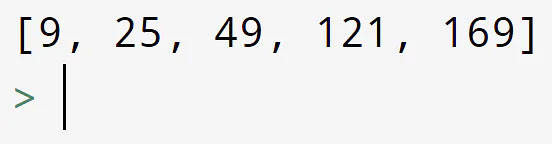
<pre id="pre9" style="text-align: justify;">
num = &#91;3, 5, 7, 11, 13&#93;
mul = &#91;&#93;

for n in num:
    mul.append(n ** 2)
print (mul)</pre>

<p style="text-align: justify;">Kết quả trả về là:</p>

<p style="text-align: justify;"><img alt="Sử dụng cho vòng lặp" data-i="0" data-src="https://st.quantrimang.com/photos/image/2022/08/30/ham-map-trong-python-1.jpg" data-was-processed="true" height="144" src="https://st.quantrimang.com/photos/image/2022/08/30/ham-map-trong-python-1.jpg" width="552" /></p>

<h2 style="text-align: justify;">Ví dụ 5: Sử dụng map() với len()</h2>

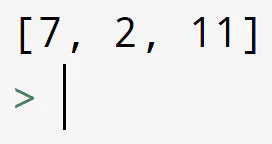
<p style="text-align: justify;">Trong đoạn code này, bạn phải sử dụng hàm Python len() cùng với map() để tìm độ dài của một số từ.</p>

<pre id="pre10" style="text-align: justify;">
example = &#91;&quot;Welcome&quot;, &quot;to&quot;, &quot;Simplilearn&quot;&#93;
x = list(map(len, example))
print(x)</pre>

<p style="text-align: justify;">Kết quả trả về là:</p>

<p style="text-align: justify;"><img alt="Sử dụng map() với len()" data-i="1" data-src="https://st.quantrimang.com/photos/image/2022/08/30/ham-map-trong-python-2.jpg" data-was-processed="true" height="144" src="https://st.quantrimang.com/photos/image/2022/08/30/ham-map-trong-python-2.jpg" width="272" /></p>

<h2 style="text-align: justify;">Ví dụ 6: Sử dụng map trong Python với math.sqrt()</h2>

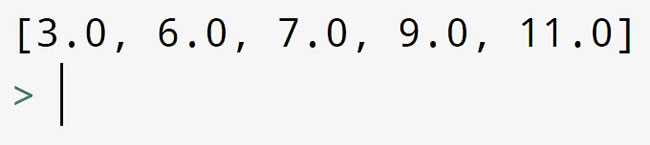
<p style="text-align: justify;">Trong chương trình bên dưới, trước tiên bạn sẽ nhập thư việnmath để sử dụng hàm math.sqrt() với map trong Python.</p>

<pre id="pre11" style="text-align: justify;">
import math
num = &#91;9, 36, 49, 81, 121&#93;
x = list(map(math.sqrt, num))
print(x)</pre>

<p style="text-align: justify;">Kết quả trả về là:</p>

<p style="text-align: justify;"><img alt="Sử dụng map trong Python với math.sqrt()" data-i="2" data-src="https://st.quantrimang.com/photos/image/2022/08/30/ham-map-trong-python-3.jpg" data-was-processed="true" height="145" src="https://st.quantrimang.com/photos/image/2022/08/30/ham-map-trong-python-3.jpg" width="650" /></p>

<h2 style="text-align: justify;">Dùng lệnh if với hàm map()</h2>

<p style="text-align: justify;">Ở ví dụ này, hàm double_even nhân đôi số chẵn và giữ nguyên số lẻ. Hàm map() được dùng để áp dụng hàm này cho từng nhân tố trong danh sách đánh số. Một lệnh if được dùng trong hàm này để triển khai các logic điều kiện cần thiết.</p>

<p style="text-align: justify;"><strong>Phân tích độ phức tạp của thời gian:</strong></p>

<p style="text-align: justify;">Hàm map() này dùng double_even cho từng nhân tố trong danh sách. Độ phức tạp về thời gian của hàm map là 0(n), trong đó n là số của các nhân tố trong danh sách. Độ phức tạp về thời gian của hàm nhân đối số chẵn là hằng số, 0(1), vì nó chỉ thực hiện phép toán số học và phép so sánh. Do đó, tổng thời gian phức tạp của chương trình là O(n).</p>

<p style="text-align: justify;">Ví dụ:</p>

<pre id="pre12" style="text-align: justify;">
# Định nghĩa hàm nhân đôi số chẵn và để nguyên số lẻ
def double_even(num):
if num % 2 == 0:
return num * 2
else:
return num

# Tạo danh sách số để dùng hàm
numbers = &#91;1, 2, 3, 4, 5&#93;

# Dùng map để áp dụng hàm cho từng nguyên tố trong danh sách
result = list(map(double_even, numbers))

# In kết quả
print(result) # &#91;1, 4, 3, 8, 5&#93;</pre>

<p style="text-align: justify;"><strong>Kết quả:</strong></p>

<p style="text-align: justify;"><code>&#91;1, 4, 3, 8, 5&#93;</code></p>

<p style="text-align: justify;">Trong bài viết này, bạn đã tìm hiểu về hàm map() trong Python. Bạn đã xem một số ví dụ để hiểu hàm này hoạt động như thế nào với nhiều hàm và iterable khác nhau. Một số điểm chính cần nhớ là hàm map() trong Python được sử dụng để áp dụng một hàm chuyển đổi cho toàn bộ iterable. Ngoài ra, bạn có thể chuyển nhiều iterable vào một hàm map(). Nếu muốn tìm hiểu thêm về iterable, map hoặc các khái niệm lập trình Python cơ bản khác, bạn có thể chọn tham gia&nbsp;Khóa học cấp chứng chỉ Python trực tuyến của Simplilearn.</p>

<p style="text-align: justify;">Mặt khác, nếu bạn quan tâm đến việc học ngành Khoa học dữ liệu, bạn có thể chọn tham gia&nbsp;Khóa học cấp chứng chỉ về Khoa học dữ liệu với Python. Cả hai khóa học đều cung cấp kinh nghiệm thực hành về ứng dụng để giúp bạn vượt trội trong các lĩnh vực liên quan.</p>

<div style="text-align: justify;">&nbsp;</div>
		</div>
				<div id="author">
						<p>
				<strong>Nguồn tin:</strong>
				Quantrimang.com
			</p>
		</div>
	</div>
	<div id="footer" class="clearfix">
		<div id="url">
			<strong>URL của bản tin này: </strong><a href="https://www.nguoicodonvn2008.info/vi/news/savefile/kien-thuc-may-tinh/ham-map-trong-python-7255.html" title="Hàm map&#40;&#41; trong Python">https://www.nguoicodonvn2008.info/vi/news/savefile/kien-thuc-may-tinh/ham-map-trong-python-7255.html</a>

		</div>
		<div class="clear"></div>
		<div class="copyright">
			&copy; .&#x3A; Nguoicodonvn2008.info - Cõi lòng người cô đơn &#x3A;.
		</div>
		<div id="contact">
			<a href="mailto:admin@nguoicodonvn2008.info">admin@nguoicodonvn2008.info</a>
		</div>
	</div>
</div>
        <div id="timeoutsess" class="chromeframe">
            Bạn đã không sử dụng Site, <a onclick="timeoutsesscancel();" href="https://nguoicodonvn2008.info/#">Bấm vào đây để duy trì trạng thái đăng nhập</a>. Thời gian chờ: <span id="secField"> 60 </span> giây
        </div>
        <div id="openidResult" class="nv-alert" style="display:none"></div>
        <div id="openidBt" data-result="" data-redirect=""></div>
		</script>
		<div class="car-top">
  <span><img src="https://nguoicodonvn2008.info/themes/default/images/car.png" alt=""></span>
</div>
<div id="run_cronjobs" style="visibility:hidden;display:none;"><img alt="cron" src="/index.php?second=cronjobs&amp;p=s7fLlY5O" width="1" height="1" /></div>
<script src="https://nguoicodonvn2008.info/assets/js/jquery/jquery.min.js"></script>
<script>var nv_base_siteurl="/",nv_lang_data="vi",nv_lang_interface="vi",nv_name_variable="nv",nv_fc_variable="op",nv_lang_variable="language",nv_module_name="news",nv_func_name="savefile",nv_is_user=0, nv_my_ofs=-4,nv_my_abbr="EDT",nv_cookie_prefix="nv4c_e856T",nv_check_pass_mstime=1738000,nv_area_admin=0,nv_safemode=0,theme_responsive=0,nv_recaptcha_ver=2,nv_recaptcha_sitekey="",nv_recaptcha_type="image",XSSsanitize=1;</script>
<script src="https://nguoicodonvn2008.info/assets/js/language/vi.js"></script>
<script src="https://nguoicodonvn2008.info/assets/js/DOMPurify/purify3.js"></script>
<script src="https://nguoicodonvn2008.info/assets/js/global.js"></script>
<script src="https://nguoicodonvn2008.info/assets/js/site.js"></script>
<script src="https://nguoicodonvn2008.info/themes/default/js/news.js"></script>
<script src="https://nguoicodonvn2008.info/themes/default/js/main.js"></script>
<script src="https://nguoicodonvn2008.info/themes/default/js/custom.js"></script>
<script type="application/ld+json">
        {
            "@context": "https://schema.org",
            "@type": "Organization",
            "url": "https://nguoicodonvn2008.info",
            "logo": "https://nguoicodonvn2008.info/uploads/angel.gif"
        }
        </script>
<script src="https://nguoicodonvn2008.info/themes/default/js/bootstrap.min.js"></script>
<script type="text/javascript">
var $scrolltop = $('.car-top');
$scrolltop.on('click', function () {
    $('html,body').animate({
        scrollTop: 0
    }, 800);
    $(this).addClass("car-run");
    setTimeout(function(){ $scrolltop.removeClass('car-run');}, 1000);
    return false;
});
$(window).on('scroll', function ()
{ 
    if($(window).scrollTop() >= 200)
    {
        $scrolltop.addClass("show");
        $scrolltop.addClass("car-down");
    }
    else
    {
       $scrolltop.removeClass("show");
       setTimeout(function(){ $scrolltop.removeClass('car-down');}, 300);
    }
});
</script>
</body>
</html>