<!DOCTYPE html>
    <html lang="vi" xmlns="http://www.w3.org/1999/xhtml" prefix="og: http://ogp.me/ns#">
    <head>
<title>Hàm CORREL trong Excel là gì?</title>
<meta name="description" content="Hàm CORREL trong Excel là gì? - Savefile - Tin Tức - https&#x3A;&#x002F;&#x002F;www.nguoicodonvn2008.info&#x002F;vi&#x002F;news&#x002F;savefile&#x002F;kien-thuc-may-tinh&#x002F;ham-correl-trong-excel-la-gi-9776.html">
<meta name="author" content=".: Nguoicodonvn2008.info - Cõi lòng người cô đơn :.">
<meta name="copyright" content=".: Nguoicodonvn2008.info - Cõi lòng người cô đơn :. [admin@nguoicodonvn2008.info]">
<meta name="robots" content="index, archive, follow, noodp">
<meta name="googlebot" content="index,archive,follow,noodp">
<meta name="msnbot" content="all,index,follow">
<meta name="generator" content="NukeViet v4.5">
<meta http-equiv="Content-Type" content="text/html; charset=utf-8">
<meta property="og:title" content="Hàm CORREL trong Excel là gì?">
<meta property="og:type" content="website">
<meta property="og:description" content="Savefile - Tin Tức - https&#x3A;&#x002F;&#x002F;www.nguoicodonvn2008.info&#x002F;vi&#x002F;news&#x002F;savefile&#x002F;kien-thuc-may-tinh&#x002F;ham-correl-trong-excel-la-gi-9776.html">
<meta property="og:site_name" content=".&#x3A; Nguoicodonvn2008.info - Cõi lòng người cô đơn &#x3A;.">
<meta property="og:url" content="https://www.nguoicodonvn2008.info/vi/news/savefile/kien-thuc-may-tinh/ham-correl-trong-excel-la-gi-9776.html">
<link rel="shortcut icon" href="https://nguoicodonvn2008.info/favicon.ico">
<link rel="canonical" href="https://www.nguoicodonvn2008.info/vi/news/savefile/kien-thuc-may-tinh/ham-correl-trong-excel-la-gi-9776.html">
<link rel="alternate" href="https://nguoicodonvn2008.info/vi/news/rss/" title="Tin Tức" type="application/rss+xml">
<link rel="alternate" href="https://nguoicodonvn2008.info/vi/news/rss/karaoke-dual/" title="Tin Tức - Karaoke Dual" type="application/rss+xml">
<link rel="alternate" href="https://nguoicodonvn2008.info/vi/news/rss/nhac-tre/" title="Tin Tức - Nhạc trẻ" type="application/rss+xml">
<link rel="alternate" href="https://nguoicodonvn2008.info/vi/news/rss/tru-tinh/" title="Tin Tức - Trữ tình" type="application/rss+xml">
<link rel="alternate" href="https://nguoicodonvn2008.info/vi/news/rss/nuoc-ngoai/" title="Tin Tức - Nước ngoài" type="application/rss+xml">
<link rel="alternate" href="https://nguoicodonvn2008.info/vi/news/rss/remix/" title="Tin Tức - Remix" type="application/rss+xml">
<link rel="alternate" href="https://nguoicodonvn2008.info/vi/news/rss/tam-su-tinh-yeu/" title="Tin Tức - Tâm sự tình yêu" type="application/rss+xml">
<link rel="alternate" href="https://nguoicodonvn2008.info/vi/news/rss/tho-suu-tam/" title="Tin Tức - Thơ sưu tầm" type="application/rss+xml">
<link rel="alternate" href="https://nguoicodonvn2008.info/vi/news/rss/cuoc-song/" title="Tin Tức - Cuộc sống" type="application/rss+xml">
<link rel="alternate" href="https://nguoicodonvn2008.info/vi/news/rss/phan-mem/" title="Tin Tức - Phần mềm" type="application/rss+xml">
<link rel="alternate" href="https://nguoicodonvn2008.info/vi/news/rss/kien-thuc-may-tinh/" title="Tin Tức - Kiến thức máy tính" type="application/rss+xml">
<link rel="alternate" href="https://nguoicodonvn2008.info/vi/news/rss/hoc-tap/" title="Tin Tức - Học tập" type="application/rss+xml">
<link rel="alternate" href="https://nguoicodonvn2008.info/vi/news/rss/tai-lieu/" title="Tin Tức - Tài liệu" type="application/rss+xml">
<link rel="alternate" href="https://nguoicodonvn2008.info/vi/news/rss/de-thi/" title="Tin Tức - Đề thi" type="application/rss+xml">
<link rel="preload" as="style" href="https://nguoicodonvn2008.info/assets/css/font-awesome.min.css" type="text/css">
<link rel="preload" as="style" href="https://nguoicodonvn2008.info/themes/default/css/bootstrap.non-responsive.css" type="text/css">
<link rel="preload" as="style" href="https://nguoicodonvn2008.info/themes/default/css/style.css" type="text/css">
<link rel="preload" as="style" href="https://nguoicodonvn2008.info/themes/default/css/style.non-responsive.css" type="text/css">
<link rel="preload" as="style" href="https://nguoicodonvn2008.info/themes/default/css/news.css" type="text/css">
<link rel="preload" as="style" href="https://nguoicodonvn2008.info/themes/default/css/custom.css" type="text/css">
<link rel="preload" as="script" href="https://nguoicodonvn2008.info/assets/js/jquery/jquery.min.js" type="text/javascript">
<link rel="preload" as="script" href="https://nguoicodonvn2008.info/assets/js/language/vi.js" type="text/javascript">
<link rel="preload" as="script" href="https://nguoicodonvn2008.info/assets/js/DOMPurify/purify3.js" type="text/javascript">
<link rel="preload" as="script" href="https://nguoicodonvn2008.info/assets/js/global.js" type="text/javascript">
<link rel="preload" as="script" href="https://nguoicodonvn2008.info/assets/js/site.js" type="text/javascript">
<link rel="preload" as="script" href="https://nguoicodonvn2008.info/themes/default/js/news.js" type="text/javascript">
<link rel="preload" as="script" href="https://nguoicodonvn2008.info/themes/default/js/main.js" type="text/javascript">
<link rel="preload" as="script" href="https://nguoicodonvn2008.info/themes/default/js/custom.js" type="text/javascript">
<link rel="preload" as="script" href="https://nguoicodonvn2008.info/themes/default/js/bootstrap.min.js" type="text/javascript">
<link rel="stylesheet" href="https://nguoicodonvn2008.info/assets/css/font-awesome.min.css">
<link rel="stylesheet" href="https://nguoicodonvn2008.info/themes/default/css/bootstrap.non-responsive.css">
<link rel="stylesheet" href="https://nguoicodonvn2008.info/themes/default/css/style.css">
<link rel="stylesheet" href="https://nguoicodonvn2008.info/themes/default/css/style.non-responsive.css">
<link rel="StyleSheet" href="https://nguoicodonvn2008.info/themes/default/css/news.css">
<link rel="stylesheet" href="https://nguoicodonvn2008.info/themes/default/css/custom.css">
<style type="text/css">
	body{background: #fff;}
</style>
    </head>
    <body>
<div id="print">
	<div id="hd_print">
		<h2 class="pull-left">.&#x3A; Nguoicodonvn2008.info - Cõi lòng người cô đơn &#x3A;.</h2>
		<p class="pull-right"><a title=".&#x3A; Nguoicodonvn2008.info - Cõi lòng người cô đơn &#x3A;." href="https://nguoicodonvn2008.info/">https://nguoicodonvn2008.info</a></p>
	</div>
	<div class="clear"></div>
	<hr />
	<div id="content">
		<h1>Hàm CORREL trong Excel là gì?</h1>
		<ul class="list-inline">
			<li>Thứ sáu - 07/02/2025 22:06</li>
			<li class="hidden-print txtrequired"><em class="fa fa-print">&nbsp;</em><a title="In ra" href="javascript:;" onclick="window.print()">In ra</a></li>
			<li class="hidden-print txtrequired"><em class="fa fa-power-off">&nbsp;</em><a title="Đóng cửa sổ này" href="javascript:;" onclick="window.close()">Đóng cửa sổ này</a></li>
		</ul>
		<div class="clear"></div>
		<div id="hometext">
		</div>
				<div class="imghome">
			<img alt="Hàm CORREL trong Excel là gì?" src="https://st.quantrimang.com/photos/image/2025/02/07/ham-correl-trong-excel-5.jpg" width="460" class="img-thumbnail" />
		</div>
		<div class="clear"></div>
		<div id="bodytext" class="clearfix">
			<p style="text-align: justify;">Dữ liệu có thể rất nhiều, nhưng hàm CORREL của Excel giúp bạn loại bỏ nhiễu. Tính toán hệ số tương quan là vũ khí bí mật để tìm ra xu hướng ẩn và đưa ra quyết định thông minh hơn.</p>

<h2 style="text-align: justify;">Hàm CORREL trong Excel là gì?</h2>

<p style="text-align: justify;">CORREL là một hàm thống kê trong Excel dùng để đo mối quan hệ giữa hai tập dữ liệu. Hàm này tính toán hệ số tương quan - một giá trị từ -1 đến 1 cho biết mức độ liên quan tuyến tính giữa hai biến. Sau đây là cú pháp của hàm CORREL trong Excel:</p>

<pre id="pre0">
<code>=CORREL(array1, array2)</code></pre>

<p style="text-align: justify;"><strong>Array1</strong>&nbsp;và&nbsp;<strong>array2</strong>&nbsp;là hai phạm vi dữ liệu bạn muốn phân tích.</p>

<p style="text-align: justify;">Hệ số tương quan 1 có nghĩa là tương quan dương hoàn hảo, trong khi -1 cho biết tương quan âm hoàn hảo. Giá trị 0 cho thấy không có mối quan hệ tuyến tính. Theo cách này, CORREL giúp bạn định lượng cường độ và hướng của các mối quan hệ này trong dữ liệu của mình.</p>

<h2 style="text-align: justify;">Cách sử dụng hàm CORREL trong Excel</h2>

<p style="text-align: justify;">Bây giờ, bạn đã hiểu hàm CORREL thực hiện chức năng gì và cách chuẩn bị dữ liệu của mình, hãy cùng xem qua một ví dụ để xem hàm CORREL hoạt động như thế nào.</p>

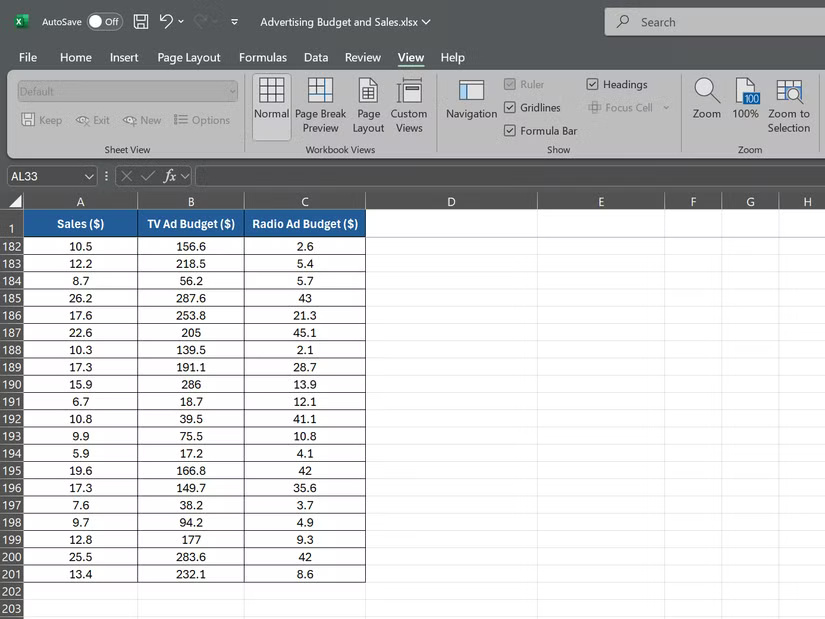
<p style="text-align: justify;">Giả sử bạn là một giám đốc bán hàng đang phân tích dữ liệu của năm trước. Bạn có 3 tập dữ liệu: Doanh thu bán hàng hàng tháng, chi tiêu quảng cáo trên TV và chi tiêu quảng cáo trên radio, mỗi tập có 200 điểm dữ liệu.</p>

<figure>
<div style="text-align: justify;"><img alt="Ngân sách quảng cáo và bảng dữ liệu bán hàng trong Excel" data-i="0" data-src="https://st.quantrimang.com/photos/image/2025/02/07/ham-correl-trong-excel-1.jpg" data-was-processed="true" height="619" src="https://st.quantrimang.com/photos/image/2025/02/07/ham-correl-trong-excel-1.jpg" width="825" /></div>

<figcaption>
<div style="text-align: justify;">Ngân sách quảng cáo và bảng dữ liệu bán hàng trong Excel</div>
</figcaption>
</figure>

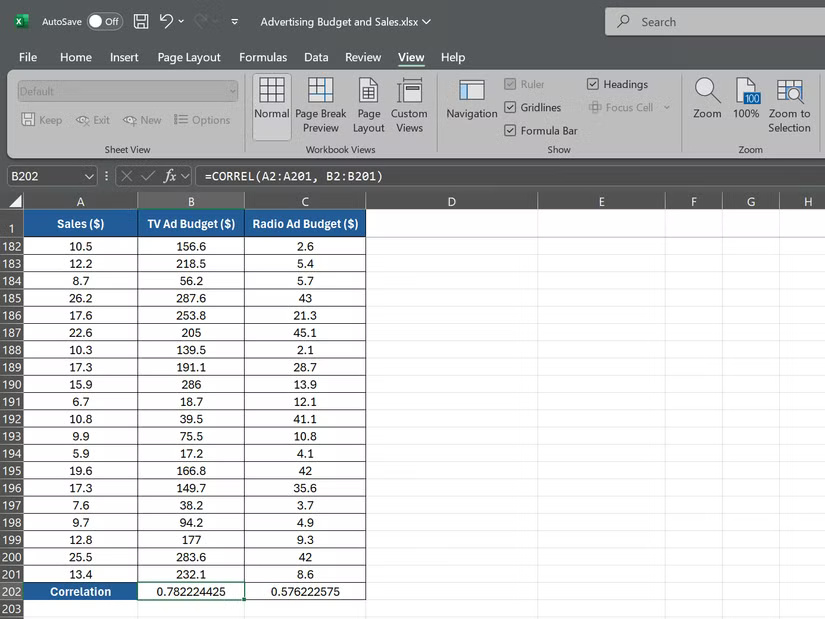
<p style="text-align: justify;">Để tính mối tương quan giữa doanh thu bán hàng và chi tiêu quảng cáo trên TV, hãy chọn một ô trống và nhập:</p>

<pre id="pre1">
<code>=CORREL(A2:A201, B2:B201)</code></pre>

<figure>
<div style="text-align: justify;"><img alt="Công thức tương quan cho ngân sách quảng cáo trên TV trong Excel" data-adbro-processed="true" data-i="1" data-src="https://st.quantrimang.com/photos/image/2025/02/07/ham-correl-trong-excel-2.jpg" data-was-processed="true" height="619" src="https://st.quantrimang.com/photos/image/2025/02/07/ham-correl-trong-excel-2.jpg" width="825" /></div>

<figcaption>
<div style="text-align: justify;">Công thức tương quan cho ngân sách quảng cáo trên TV trong Excel</div>
</figcaption>
</figure>

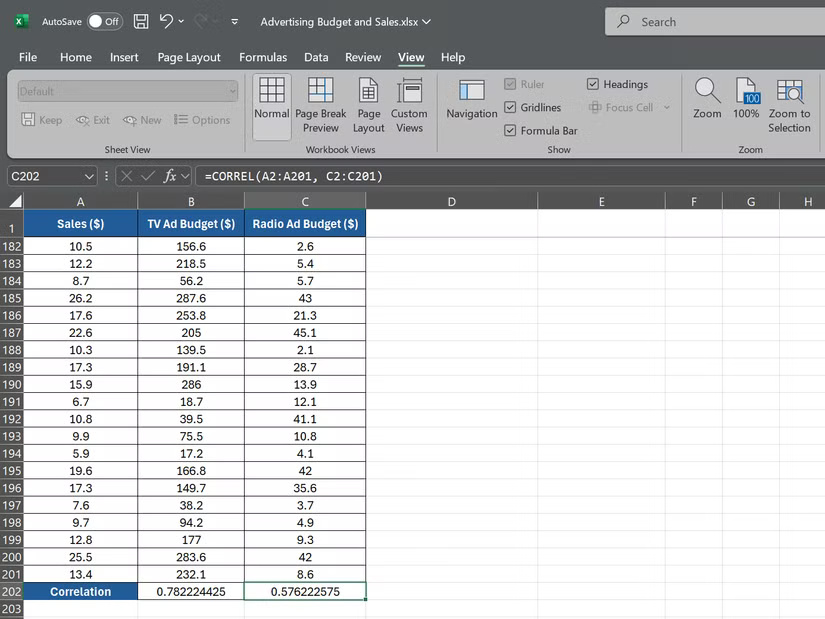
<p style="text-align: justify;">Công thức này yêu cầu Excel tính toán mối tương quan giữa dữ liệu doanh thu bán hàng trong&nbsp;<strong>A2:A201</strong>&nbsp;và dữ liệu chi tiêu quảng cáo trên TV trong&nbsp;<strong>B2:B201</strong>. Tiếp theo, để tính toán mối tương quan giữa doanh thu bán hàng và chi tiêu quảng cáo trên radio, hãy sử dụng công thức sau:</p>

<pre id="pre2">
<code>=CORREL(A2:A201, C2:C201)</code></pre>

<figure>
<div style="text-align: justify;"><img alt="Công thức tương quan cho ngân sách quảng cáo trên radio trong Excel" data-i="2" data-src="https://st.quantrimang.com/photos/image/2025/02/07/ham-correl-trong-excel-3.jpg" data-was-processed="true" height="619" src="https://st.quantrimang.com/photos/image/2025/02/07/ham-correl-trong-excel-3.jpg" width="825" /></div>

<figcaption>
<div style="text-align: justify;">Công thức tương quan cho ngân sách quảng cáo trên radio trong Excel</div>
</figcaption>
</figure>

<p style="text-align: justify;">Công thức này sẽ cung cấp cho bạn hệ số tương quan giữa dữ liệu doanh thu bán hàng trong&nbsp;<strong>A2:A201</strong>&nbsp;và chi tiêu quảng cáo trên radio trong&nbsp;<strong>C2:C201.</strong></p>

<p style="text-align: justify;">Giả sử công thức đầu tiên trả về hệ số tương quan là 0,78, cho thấy mối tương quan dương mạnh giữa chi tiêu quảng cáo trên TV và doanh thu bán hàng. Công thức thứ hai trả về hệ số tương quan là 0,576, cho thấy mối tương quan dương yếu hơn giữa chi tiêu quảng cáo trên radio và doanh thu bán hàng.</p>

<h2 style="text-align: justify;">Kết hợp hàm CORREL với các công cụ Excel khác</h2>

<p style="text-align: justify;">Hàm CORREL là một công cụ mạnh mẽ, nhưng khi kết hợp với các tính năng Excel khác, nó trở nên mạnh mẽ hơn nữa. Hai công cụ chính có thể nâng cao phân tích tương quan của bạn là PivotTables và XLMiner Analysis ToolPak.</p>

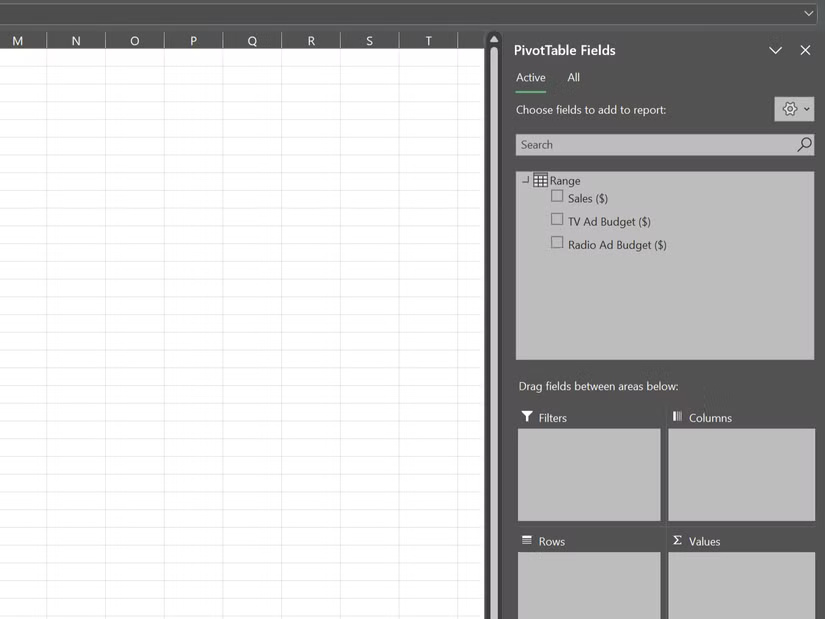
<p style="text-align: justify;">PivotTables trong Excel cho phép bạn tóm tắt và phân tích các tập dữ liệu lớn một cách nhanh chóng.&nbsp;Sử dụng PivotTable, bạn có thể dễ dàng tính toán tương quan giữa các biến và phát hiện xu hướng trên nhiều chiều.</p>

<figure>
<div style="text-align: justify;"><img alt="Thanh bên báo cáo PivotTable trong Excel" data-i="3" data-src="https://st.quantrimang.com/photos/image/2025/02/07/ham-correl-trong-excel-4.jpg" data-was-processed="true" height="619" src="https://st.quantrimang.com/photos/image/2025/02/07/ham-correl-trong-excel-4.jpg" width="825" /></div>

<figcaption>
<div style="text-align: justify;">Thanh bên báo cáo PivotTable trong Excel</div>
</figcaption>
</figure>

<p style="text-align: justify;">Ví dụ, giả sử bạn có dữ liệu bán hàng được chia nhỏ theo khu vực và danh mục sản phẩm; bạn có thể sử dụng PivotTable để tính tương quan giữa doanh số và các yếu tố khác nhau như giá, chi tiêu quảng cáo hoặc thông tin nhân khẩu học của khách hàng cho từng kết hợp giữa khu vực và danh mục.</p>

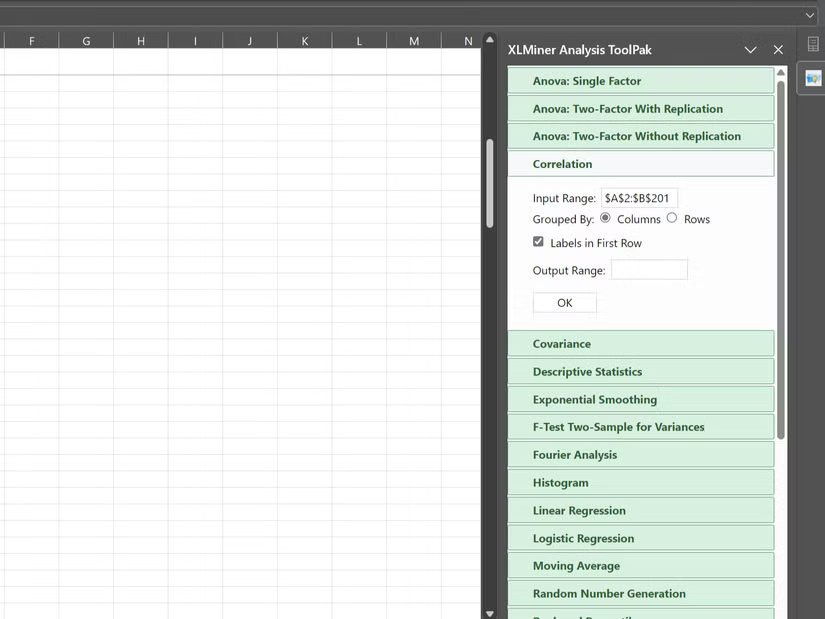
<p style="text-align: justify;"><a href="https://quantrimang.com/url?u=aHR0cHM6Ly9hcHBzb3VyY2UubWljcm9zb2Z0LmNvbS9lbi11cy9wcm9kdWN0L29mZmljZS93YTEwNDM3OTE5MA%3D%3D" rel="nofollow noopener" target="_blank">XLMiner Analysis ToolPak</a>&nbsp;là add-in cung cấp các hàm thống kê nâng cao, bao gồm cả tương quan. Trong khi hàm CORREL tính toán tương quan giữa hai biến, công cụ Correlation trong XLMiner Analysis ToolPak có thể tính toán tương quan cho toàn bộ tập dữ liệu chỉ trong một lần.</p>

<figure>
<div style="text-align: justify;"><img alt="Thanh bên XLMiner Analysis ToolPak trong Excel" data-i="4" data-src="https://st.quantrimang.com/photos/image/2025/02/07/ham-correl-trong-excel-5.jpg" data-was-processed="true" height="619" src="https://st.quantrimang.com/photos/image/2025/02/07/ham-correl-trong-excel-5.jpg" width="825" /></div>

<figcaption>
<div style="text-align: justify;">Thanh bên XLMiner Analysis ToolPak trong Excel</div>
</figcaption>
</figure>

<p style="text-align: justify;">Hàm CORREL là một công cụ mạnh mẽ để phân tích các mối quan hệ trong dữ liệu, giúp bạn có được những hiểu biết sâu sắc hơn. Tuy nhiên, nếu bạn muốn phân tích dữ liệu của mình theo thời gian,&nbsp;hàm TREND trong Excel&nbsp;là một công cụ tuyệt vời khác để khám phá.</p>

<div style="text-align: justify;">&nbsp;</div>
		</div>
				<div id="author">
						<p>
				<strong>Nguồn tin:</strong>
				Quantrimang.com:
			</p>
		</div>
	</div>
	<div id="footer" class="clearfix">
		<div id="url">
			<strong>URL của bản tin này: </strong><a href="https://www.nguoicodonvn2008.info/vi/news/savefile/kien-thuc-may-tinh/ham-correl-trong-excel-la-gi-9776.html" title="Hàm CORREL trong Excel là gì?">https://www.nguoicodonvn2008.info/vi/news/savefile/kien-thuc-may-tinh/ham-correl-trong-excel-la-gi-9776.html</a>

		</div>
		<div class="clear"></div>
		<div class="copyright">
			&copy; .&#x3A; Nguoicodonvn2008.info - Cõi lòng người cô đơn &#x3A;.
		</div>
		<div id="contact">
			<a href="mailto:admin@nguoicodonvn2008.info">admin@nguoicodonvn2008.info</a>
		</div>
	</div>
</div>
        <div id="timeoutsess" class="chromeframe">
            Bạn đã không sử dụng Site, <a onclick="timeoutsesscancel();" href="https://nguoicodonvn2008.info/#">Bấm vào đây để duy trì trạng thái đăng nhập</a>. Thời gian chờ: <span id="secField"> 60 </span> giây
        </div>
        <div id="openidResult" class="nv-alert" style="display:none"></div>
        <div id="openidBt" data-result="" data-redirect=""></div>
		</script>
		<div class="car-top">
  <span><img src="https://nguoicodonvn2008.info/themes/default/images/car.png" alt=""></span>
</div>
<div id="run_cronjobs" style="visibility:hidden;display:none;"><img alt="cron" src="/index.php?second=cronjobs&amp;p=v98g4IUr" width="1" height="1" /></div>
<script src="https://nguoicodonvn2008.info/assets/js/jquery/jquery.min.js"></script>
<script>var nv_base_siteurl="/",nv_lang_data="vi",nv_lang_interface="vi",nv_name_variable="nv",nv_fc_variable="op",nv_lang_variable="language",nv_module_name="news",nv_func_name="savefile",nv_is_user=0, nv_my_ofs=-4,nv_my_abbr="EDT",nv_cookie_prefix="nv4c_e856T",nv_check_pass_mstime=1738000,nv_area_admin=0,nv_safemode=0,theme_responsive=0,nv_recaptcha_ver=2,nv_recaptcha_sitekey="",nv_recaptcha_type="image",XSSsanitize=1;</script>
<script src="https://nguoicodonvn2008.info/assets/js/language/vi.js"></script>
<script src="https://nguoicodonvn2008.info/assets/js/DOMPurify/purify3.js"></script>
<script src="https://nguoicodonvn2008.info/assets/js/global.js"></script>
<script src="https://nguoicodonvn2008.info/assets/js/site.js"></script>
<script src="https://nguoicodonvn2008.info/themes/default/js/news.js"></script>
<script src="https://nguoicodonvn2008.info/themes/default/js/main.js"></script>
<script src="https://nguoicodonvn2008.info/themes/default/js/custom.js"></script>
<script type="application/ld+json">
        {
            "@context": "https://schema.org",
            "@type": "Organization",
            "url": "https://nguoicodonvn2008.info",
            "logo": "https://nguoicodonvn2008.info/uploads/angel.gif"
        }
        </script>
<script src="https://nguoicodonvn2008.info/themes/default/js/bootstrap.min.js"></script>
<script type="text/javascript">
var $scrolltop = $('.car-top');
$scrolltop.on('click', function () {
    $('html,body').animate({
        scrollTop: 0
    }, 800);
    $(this).addClass("car-run");
    setTimeout(function(){ $scrolltop.removeClass('car-run');}, 1000);
    return false;
});
$(window).on('scroll', function ()
{ 
    if($(window).scrollTop() >= 200)
    {
        $scrolltop.addClass("show");
        $scrolltop.addClass("car-down");
    }
    else
    {
       $scrolltop.removeClass("show");
       setTimeout(function(){ $scrolltop.removeClass('car-down');}, 300);
    }
});
</script>
</body>
</html>