<!DOCTYPE html>
    <html lang="vi" xmlns="http://www.w3.org/1999/xhtml" prefix="og: http://ogp.me/ns#">
    <head>
<title>Google vừa giải quyết vấn đề đau đầu nhất của Windows 11 chỉ bằng một động thái</title>
<meta name="description" content="Google vừa giải quyết vấn đề đau đầu nhất của Windows 11 chỉ bằng một động thái - Savefile - Tin Tức -...">
<meta name="author" content=".: Nguoicodonvn2008.info - Cõi lòng người cô đơn :.">
<meta name="copyright" content=".: Nguoicodonvn2008.info - Cõi lòng người cô đơn :. [admin@nguoicodonvn2008.info]">
<meta name="robots" content="index, archive, follow, noodp">
<meta name="googlebot" content="index,archive,follow,noodp">
<meta name="msnbot" content="all,index,follow">
<meta name="generator" content="NukeViet v4.5">
<meta http-equiv="Content-Type" content="text/html; charset=utf-8">
<meta property="og:title" content="Google vừa giải quyết vấn đề đau đầu nhất của Windows 11 chỉ bằng một động thái">
<meta property="og:type" content="website">
<meta property="og:description" content="Savefile - Tin Tức -...">
<meta property="og:site_name" content=".&#x3A; Nguoicodonvn2008.info - Cõi lòng người cô đơn &#x3A;.">
<meta property="og:url" content="https://www.nguoicodonvn2008.info/vi/news/savefile/kien-thuc-may-tinh/google-vua-giai-quyet-van-de-dau-dau-nhat-cua-windows-11-chi-bang-mot-dong-thai-11177.html">
<link rel="shortcut icon" href="https://nguoicodonvn2008.info/favicon.ico">
<link rel="canonical" href="https://www.nguoicodonvn2008.info/vi/news/savefile/kien-thuc-may-tinh/google-vua-giai-quyet-van-de-dau-dau-nhat-cua-windows-11-chi-bang-mot-dong-thai-11177.html">
<link rel="alternate" href="https://nguoicodonvn2008.info/vi/news/rss/" title="Tin Tức" type="application/rss+xml">
<link rel="alternate" href="https://nguoicodonvn2008.info/vi/news/rss/karaoke-dual/" title="Tin Tức - Karaoke Dual" type="application/rss+xml">
<link rel="alternate" href="https://nguoicodonvn2008.info/vi/news/rss/nhac-tre/" title="Tin Tức - Nhạc trẻ" type="application/rss+xml">
<link rel="alternate" href="https://nguoicodonvn2008.info/vi/news/rss/tru-tinh/" title="Tin Tức - Trữ tình" type="application/rss+xml">
<link rel="alternate" href="https://nguoicodonvn2008.info/vi/news/rss/nuoc-ngoai/" title="Tin Tức - Nước ngoài" type="application/rss+xml">
<link rel="alternate" href="https://nguoicodonvn2008.info/vi/news/rss/remix/" title="Tin Tức - Remix" type="application/rss+xml">
<link rel="alternate" href="https://nguoicodonvn2008.info/vi/news/rss/tam-su-tinh-yeu/" title="Tin Tức - Tâm sự tình yêu" type="application/rss+xml">
<link rel="alternate" href="https://nguoicodonvn2008.info/vi/news/rss/tho-suu-tam/" title="Tin Tức - Thơ sưu tầm" type="application/rss+xml">
<link rel="alternate" href="https://nguoicodonvn2008.info/vi/news/rss/cuoc-song/" title="Tin Tức - Cuộc sống" type="application/rss+xml">
<link rel="alternate" href="https://nguoicodonvn2008.info/vi/news/rss/phan-mem/" title="Tin Tức - Phần mềm" type="application/rss+xml">
<link rel="alternate" href="https://nguoicodonvn2008.info/vi/news/rss/kien-thuc-may-tinh/" title="Tin Tức - Kiến thức máy tính" type="application/rss+xml">
<link rel="alternate" href="https://nguoicodonvn2008.info/vi/news/rss/hoc-tap/" title="Tin Tức - Học tập" type="application/rss+xml">
<link rel="alternate" href="https://nguoicodonvn2008.info/vi/news/rss/tai-lieu/" title="Tin Tức - Tài liệu" type="application/rss+xml">
<link rel="alternate" href="https://nguoicodonvn2008.info/vi/news/rss/de-thi/" title="Tin Tức - Đề thi" type="application/rss+xml">
<link rel="preload" as="style" href="https://nguoicodonvn2008.info/assets/css/font-awesome.min.css" type="text/css">
<link rel="preload" as="style" href="https://nguoicodonvn2008.info/themes/default/css/bootstrap.non-responsive.css" type="text/css">
<link rel="preload" as="style" href="https://nguoicodonvn2008.info/themes/default/css/style.css" type="text/css">
<link rel="preload" as="style" href="https://nguoicodonvn2008.info/themes/default/css/style.non-responsive.css" type="text/css">
<link rel="preload" as="style" href="https://nguoicodonvn2008.info/themes/default/css/news.css" type="text/css">
<link rel="preload" as="style" href="https://nguoicodonvn2008.info/themes/default/css/custom.css" type="text/css">
<link rel="preload" as="script" href="https://nguoicodonvn2008.info/assets/js/jquery/jquery.min.js" type="text/javascript">
<link rel="preload" as="script" href="https://nguoicodonvn2008.info/assets/js/language/vi.js" type="text/javascript">
<link rel="preload" as="script" href="https://nguoicodonvn2008.info/assets/js/DOMPurify/purify3.js" type="text/javascript">
<link rel="preload" as="script" href="https://nguoicodonvn2008.info/assets/js/global.js" type="text/javascript">
<link rel="preload" as="script" href="https://nguoicodonvn2008.info/assets/js/site.js" type="text/javascript">
<link rel="preload" as="script" href="https://nguoicodonvn2008.info/themes/default/js/news.js" type="text/javascript">
<link rel="preload" as="script" href="https://nguoicodonvn2008.info/themes/default/js/main.js" type="text/javascript">
<link rel="preload" as="script" href="https://nguoicodonvn2008.info/themes/default/js/custom.js" type="text/javascript">
<link rel="preload" as="script" href="https://nguoicodonvn2008.info/themes/default/js/bootstrap.min.js" type="text/javascript">
<link rel="stylesheet" href="https://nguoicodonvn2008.info/assets/css/font-awesome.min.css">
<link rel="stylesheet" href="https://nguoicodonvn2008.info/themes/default/css/bootstrap.non-responsive.css">
<link rel="stylesheet" href="https://nguoicodonvn2008.info/themes/default/css/style.css">
<link rel="stylesheet" href="https://nguoicodonvn2008.info/themes/default/css/style.non-responsive.css">
<link rel="StyleSheet" href="https://nguoicodonvn2008.info/themes/default/css/news.css">
<link rel="stylesheet" href="https://nguoicodonvn2008.info/themes/default/css/custom.css">
<style type="text/css">
	body{background: #fff;}
</style>
    </head>
    <body>
<div id="print">
	<div id="hd_print">
		<h2 class="pull-left">.&#x3A; Nguoicodonvn2008.info - Cõi lòng người cô đơn &#x3A;.</h2>
		<p class="pull-right"><a title=".&#x3A; Nguoicodonvn2008.info - Cõi lòng người cô đơn &#x3A;." href="https://nguoicodonvn2008.info/">https://nguoicodonvn2008.info</a></p>
	</div>
	<div class="clear"></div>
	<hr />
	<div id="content">
		<h1>Google vừa giải quyết vấn đề đau đầu nhất của Windows 11 chỉ bằng một động thái</h1>
		<ul class="list-inline">
			<li>Thứ năm - 18/09/2025 23:07</li>
			<li class="hidden-print txtrequired"><em class="fa fa-print">&nbsp;</em><a title="In ra" href="javascript:;" onclick="window.print()">In ra</a></li>
			<li class="hidden-print txtrequired"><em class="fa fa-power-off">&nbsp;</em><a title="Đóng cửa sổ này" href="javascript:;" onclick="window.close()">Đóng cửa sổ này</a></li>
		</ul>
		<div class="clear"></div>
		<div id="hometext">
		</div>
				<div class="imghome">
			<img alt="Google vừa giải quyết vấn đề đau đầu nhất của Windows 11 chỉ bằng một động thái" src="https://st.quantrimang.com/photos/image/2025/09/18/google-giai-quyet-van-de-dau-dau-nhat-cua-windows-11-1.jpg" width="460" class="img-thumbnail" />
		</div>
		<div class="clear"></div>
		<div id="bodytext" class="clearfix">
			<h1>&nbsp;</h1>

<p>Windows 11&nbsp;tệ hại theo nhiều cách. Chúng ta đều biết điều này và đã từng nói về nó trước đây. Mọi người đã từng phàn nàn về việc ứng dụng Settings tệ hại như thế nào, với giao diện người dùng không nhất quán, các nút chuyển đổi bị ẩn và việc liên tục phải chuyển đổi qua lại với Control Panel. Họ cũng đã phàn nàn về File Explorer mới, trông hiện đại nhưng lại hoạt động kém hơn so với phiên bản đã ra đời cách đây cả thập kỷ. Nhưng trên hết, menu Start của Windows 11 thực sự tệ hại - cả về mặt kỹ thuật lẫn trải nghiệm sử dụng thực tế.</p>
&nbsp;

<h2>Ứng dụng Google dành cho Windows đã có mặt</h2>

<h3>Spotlight dành cho Windows, nhưng thực sự hữu ích</h3>

<figure><img alt="" data-adbro-processed="true" data-i="0" data-src="https://st.quantrimang.com/photos/image/2025/09/18/google-giai-quyet-van-de-dau-dau-nhat-cua-windows-11-1.jpg" data-was-processed="true" height="844" src="https://st.quantrimang.com/photos/image/2025/09/18/google-giai-quyet-van-de-dau-dau-nhat-cua-windows-11-1.jpg" width="1500" /></figure>

<figure><img alt="" data-i="1" data-src="https://st.quantrimang.com/photos/image/2025/09/18/google-giai-quyet-van-de-dau-dau-nhat-cua-windows-11-2.jpg" data-was-processed="true" height="844" src="https://st.quantrimang.com/photos/image/2025/09/18/google-giai-quyet-van-de-dau-dau-nhat-cua-windows-11-2.jpg" width="1500" /></figure>
&nbsp;

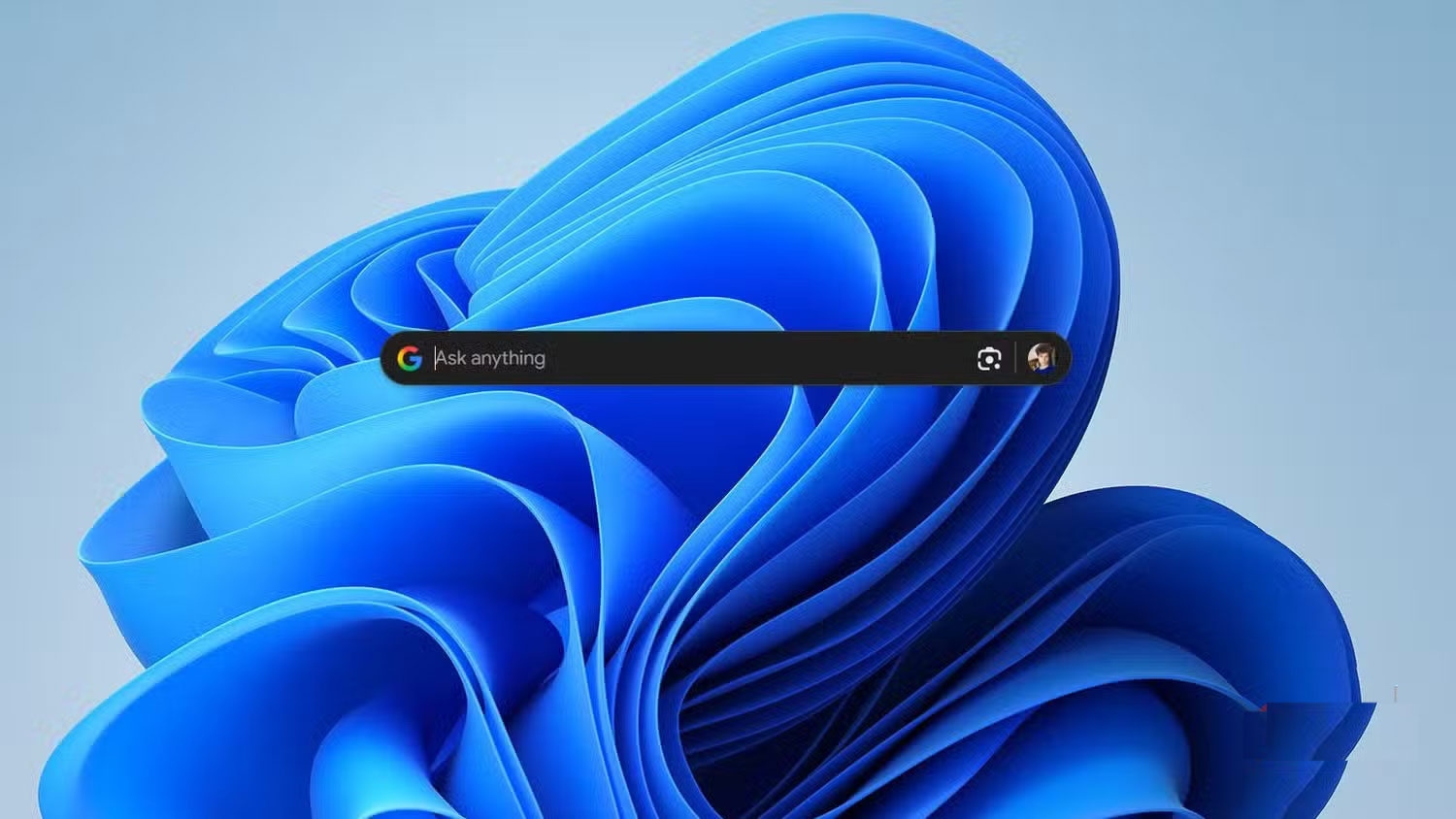
<p>Ứng dụng mới của Google dành cho Windows&nbsp;là một phần trong các thử nghiệm AI đang diễn ra. Bạn chỉ có thể kích hoạt ứng dụng này nếu tài khoản Google của bạn được đặt ở Hoa Kỳ, nhưng đó là rào cản thực sự duy nhất. Khi ứng dụng đã có sẵn, bạn chỉ cần tải xuống một file thực thi nhỏ, chạy trình cài đặt, đăng nhập và thế là xong - bạn đã sẵn sàng.</p>

<p>Ứng dụng Google dành cho Windows gợi nhớ rất nhiều đến Spotlight trên macOS. Nó nhẹ, thanh lịch và có thể truy cập ngay lập tức. Chỉ cần nhấn&nbsp;<strong>Alt + Space</strong>&nbsp;là ứng dụng sẽ được hiển thị, bất kể bạn đang làm gì. Nó luôn ở đó, sẵn sàng hoạt động, không hề lộn xộn hay chậm trễ như cách tiếp cận của Microsoft.</p>

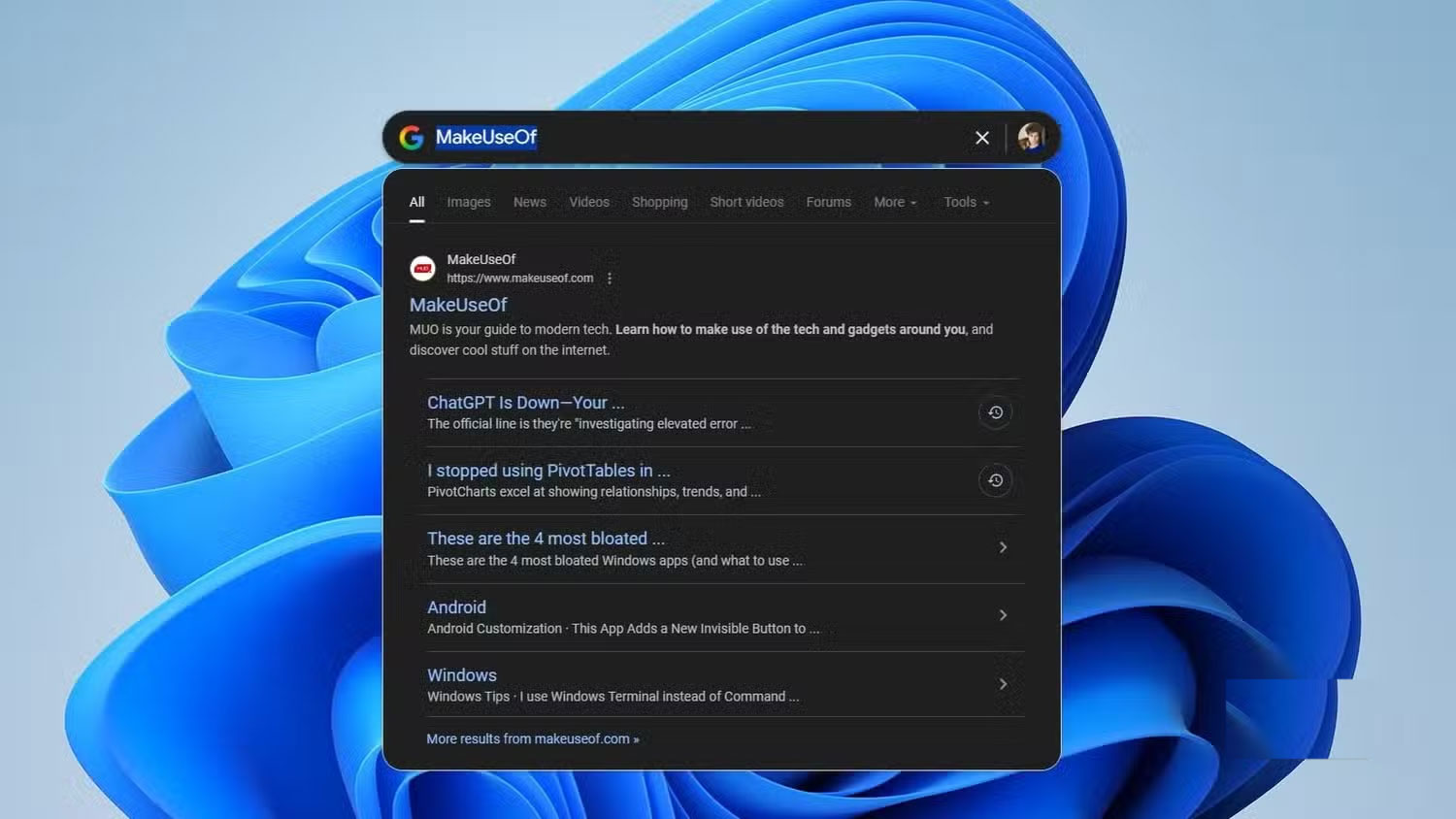
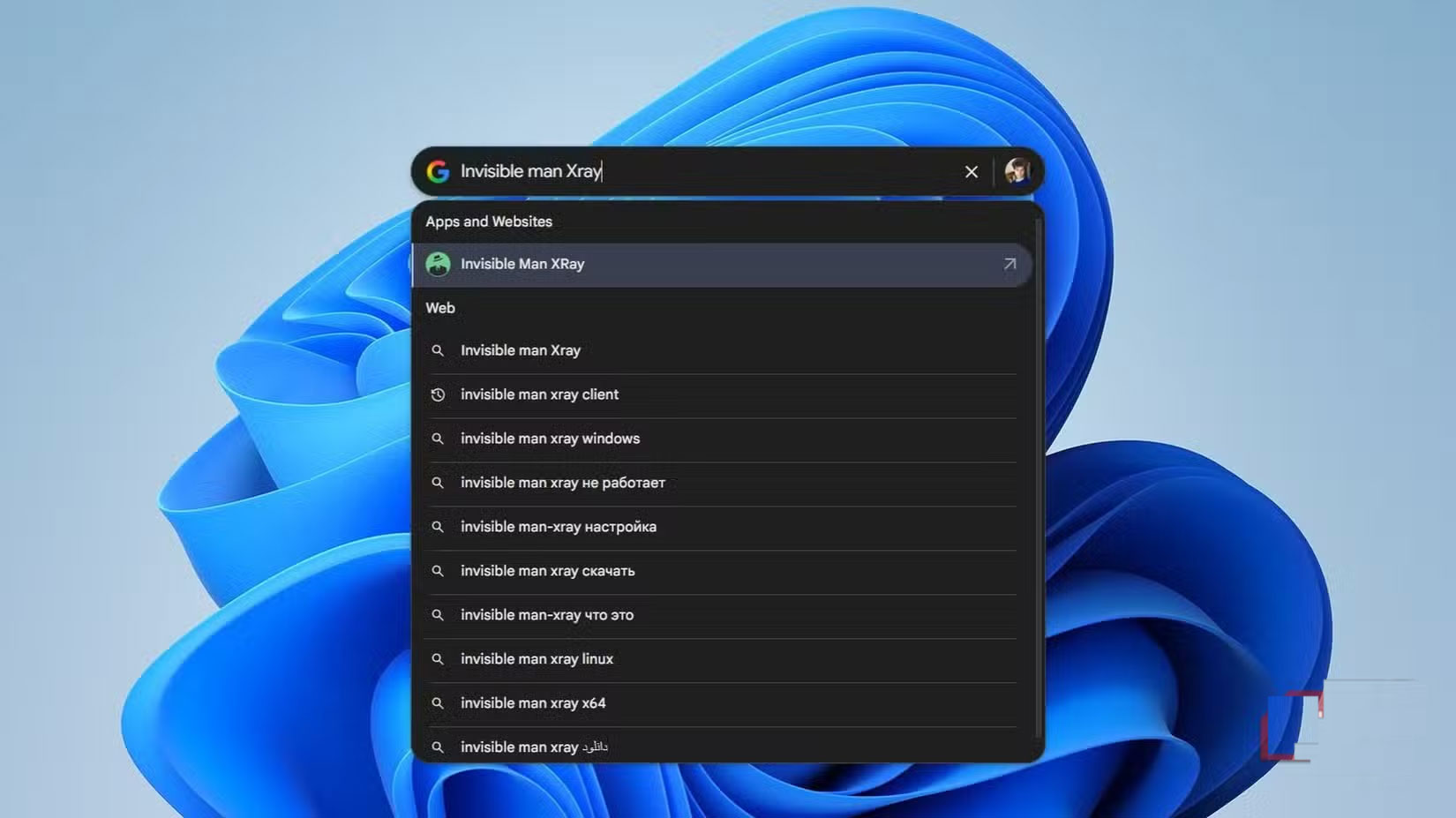
<p>Ứng dụng này hoạt động như một trung tâm tìm kiếm cục bộ và trực tuyến. Bạn có thể sử dụng nó để tìm file hoặc ứng dụng trên PC và Google Drive, hoặc tìm kiếm trên web như trên trình duyệt. Mặc dù được phân loại là &quot;thử nghiệm AI&quot;, ứng dụng này lại không được bật AI theo mặc định. Bạn có thể bật AI Mode của Google trong phần cài đặt nếu muốn.</p>

<p>Việc có một cửa sổ nhỏ, không bị phân tâm dành riêng cho việc tìm kiếm trên Google là một lợi ích lớn. Điều này có nghĩa là bạn không phải mở hàng tá tab Chrome vô dụng để tra cứu nhanh chóng. Nếu bạn chỉ muốn kiểm tra điều gì đó, nó sẽ được thực hiện trong ứng dụng. Nếu thực sự cần tìm hiểu sâu hơn về một trang, nó sẽ mở trong Chrome - đúng như mong đợi!</p>

<p>Ứng dụng cũng được tích hợp sẵn&nbsp;Google Lens. Điều này mở rộng Lens ra ngoài trình duyệt và biến nó thành một công cụ cấp hệ thống. Rất nhiều người dùng trung thành với tính năng Circle to Search và các tính năng tương tự trên điện thoại. Đối với họ, việc có nó trên desktop cũng là một lợi thế lớn. Đây là một cách khác mà Google đang âm thầm khiến Windows trở nên mạnh mẽ hơn Microsoft.</p>

<h2>Tìm kiếm của Google nhanh hơn Windows rất nhiều</h2>

<h3>Google sửa lỗi Windows cho Microsoft</h3>

<p>Giờ hãy nói về hiệu suất, bởi vì đây chính là điểm&nbsp;Google&nbsp;thực sự khiến Microsoft phải xấu hổ. Việc tìm kiếm một file trong Windows File Explorer thật sự là một thảm họa. Phải mất vài phút mới tìm thấy thứ gì đó đáng lẽ phải nhanh chóng. Nhiều người thậm chí không buồn so sánh với File Explorer.</p>

<figure><img alt="" data-i="5" data-src="https://st.quantrimang.com/photos/image/2025/09/18/google-giai-quyet-van-de-dau-dau-nhat-cua-windows-11-6.jpg" data-was-processed="true" height="929" src="https://st.quantrimang.com/photos/image/2025/09/18/google-giai-quyet-van-de-dau-dau-nhat-cua-windows-11-6.jpg" width="1650" /></figure>

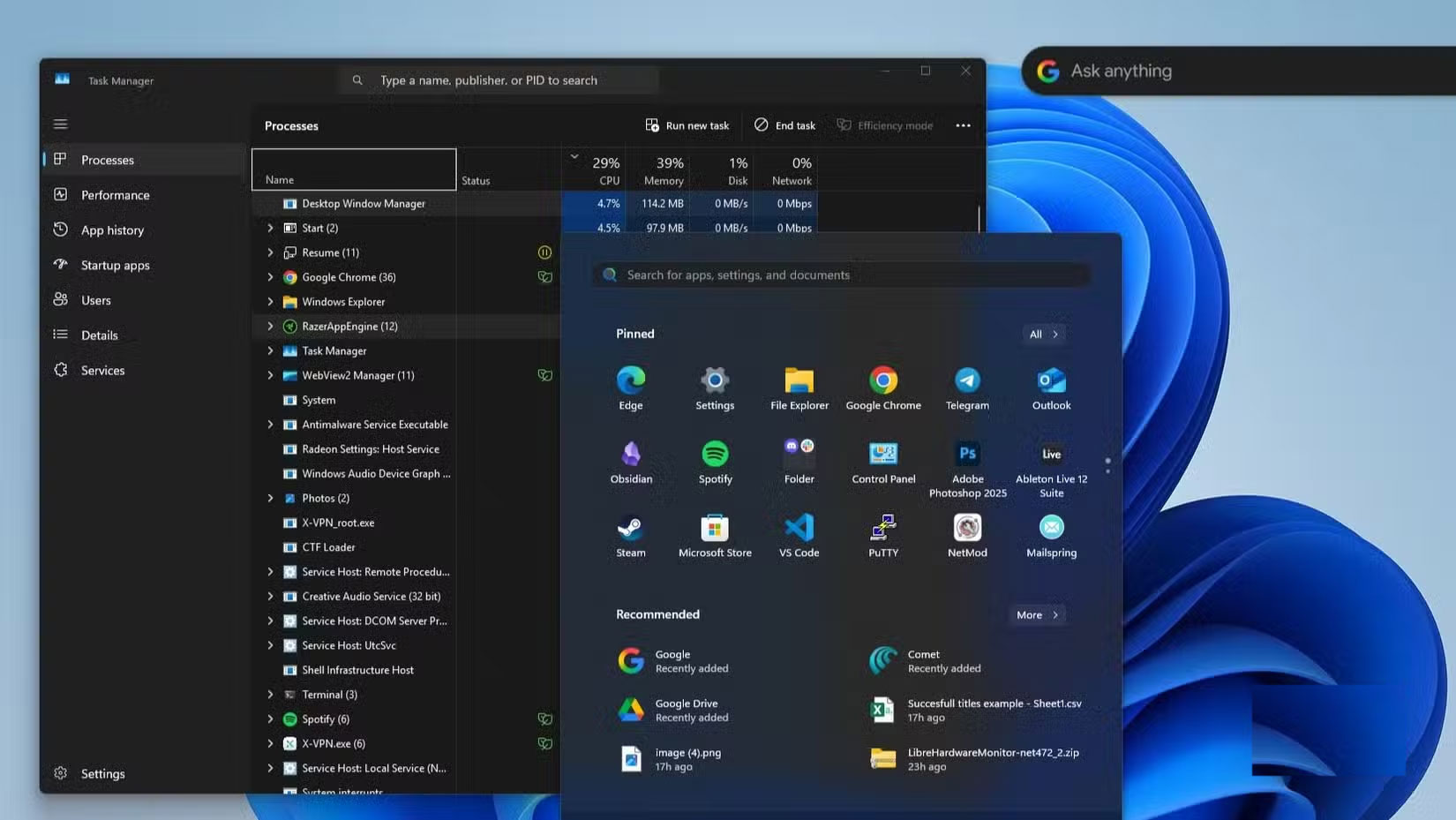
<p>Mặt khác, chức năng tìm kiếm trong menu Start lại rất tai tiếng. Nó đã được cải thiện đôi chút qua nhiều năm, và mặc dù cố gắng để nhanh hơn, nhưng vẫn rất thiếu chính xác. Trên thực tế, toàn bộ thiết kế của menu Start trên Windows 11 khá phản cảm. Quảng cáo, sự lộn xộn và các tích hợp không cần thiết đã phá hỏng phần lẽ ra là đơn giản nhất của một hệ điều hành. Ngay cả về mặt kỹ thuật, nó vẫn là một mớ hỗn độn. Bạn có biết một số phần của menu Start thực sự chạy trên React không? Thay vì WinUI mà Microsoft đang thúc đẩy mạnh mẽ, hãy thử&nbsp;mở Task Manager&nbsp;và nhấn phím Start. Bạn sẽ thấy CPU tăng đột biến, thật nực cười đối với một thứ lẽ ra phải nhẹ như menu.</p>

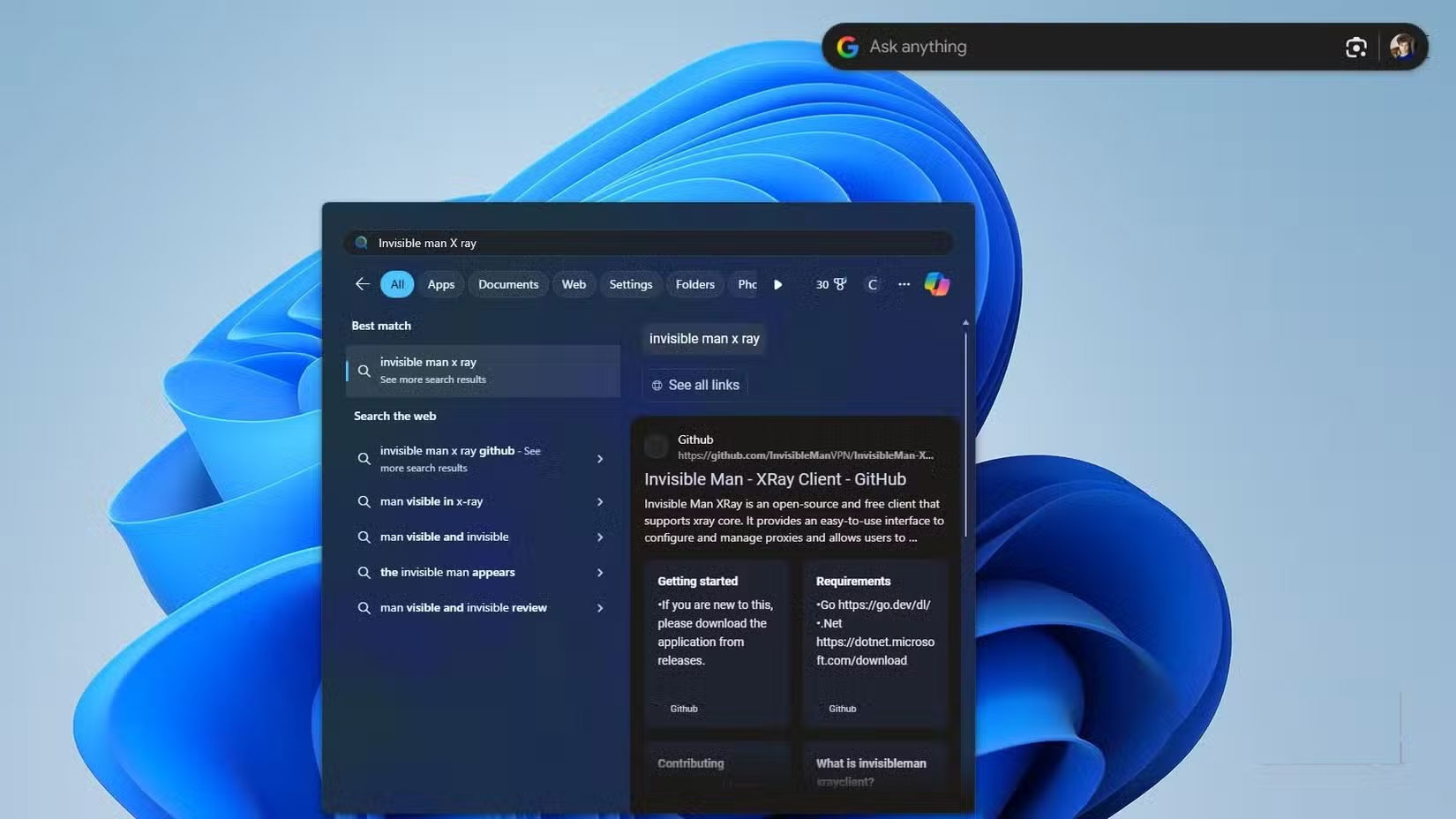
<p>Khi menu Start cuối cùng cũng tìm kiếm được, nó thường thất bại ở những điều cơ bản. Một nửa số lần, khi tìm kiếm một ứng dụng cục bộ, bạn không nhận được ứng dụng đó - mà chỉ nhận được kết quả tìm kiếm trên web. Khi tìm kiếm một ứng dụng mà bạn biết là đã được cài đặt, thay vì hiển thị ứng dụng, Windows lại lấy kho lưu trữ GitHub của nó từ Bing. Trong khi đó, ứng dụng Google, vốn thậm chí không phải là một tính năng gốc của Windows, lại ngay lập tức tìm thấy ứng dụng thực tế trên hệ thống. Thật trớ trêu! Gã khổng lồ tìm kiếm web cung cấp cho bạn file cục bộ trên Windows, trong khi bản thân Windows lại hướng bạn đến một tìm kiếm trên web.</p>

<figure><img alt="" data-i="6" data-src="https://st.quantrimang.com/photos/image/2025/09/18/google-giai-quyet-van-de-dau-dau-nhat-cua-windows-11-7.jpg" data-was-processed="true" height="928" src="https://st.quantrimang.com/photos/image/2025/09/18/google-giai-quyet-van-de-dau-dau-nhat-cua-windows-11-7.jpg" width="1650" /></figure>

<figure><img alt="" data-i="7" data-src="https://st.quantrimang.com/photos/image/2025/09/18/google-giai-quyet-van-de-dau-dau-nhat-cua-windows-11-8.jpg" data-was-processed="true" height="927" src="https://st.quantrimang.com/photos/image/2025/09/18/google-giai-quyet-van-de-dau-dau-nhat-cua-windows-11-8.jpg" width="1650" /></figure>

<p>Ứng dụng Google dành cho Windows không thực sự ấn tượng. Nó không có bất kỳ thủ thuật kỳ diệu nào. Nhưng xét về bối cảnh, nó rất đáng chú ý. Chỉ cần tồn tại và hoạt động trơn tru, nó đã vượt trội hơn cả công cụ tìm kiếm gốc do chính Microsoft thiết kế. Và điều đó nói lên tất cả về việc Microsoft đã xử lý Windows 11 kém cỏi như thế nào.</p>

<p>Khi một công ty có quy mô như Microsoft tạo ra một tính năng hệ thống cốt lõi, các lựa chọn thay thế của bên thứ ba hiếm khi vượt qua được nó về tốc độ, thiết kế hoặc khả năng tích hợp. Nhưng Microsoft đã hạ thấp tiêu chuẩn đến mức Google, thậm chí không cần cố gắng nhiều, đã mang đến một thứ gì đó tốt hơn. Đó chính là điều chúng ta đang thấy: Các công cụ của bên thứ ba liên tục vượt mặt Microsoft trong lĩnh vực của riêng mình. Và lần này, Google đã vào cuộc và sửa chữa những gì lẽ ra không bao giờ nên bị hỏng ngay từ đầu. Vậy nên, cảm ơn Google!</p>
&nbsp;
		</div>
				<div id="author">
						<p>
				<strong>Nguồn tin:</strong>
				Quantrimang.com:
			</p>
		</div>
	</div>
	<div id="footer" class="clearfix">
		<div id="url">
			<strong>URL của bản tin này: </strong><a href="https://www.nguoicodonvn2008.info/vi/news/savefile/kien-thuc-may-tinh/google-vua-giai-quyet-van-de-dau-dau-nhat-cua-windows-11-chi-bang-mot-dong-thai-11177.html" title="Google vừa giải quyết vấn đề đau đầu nhất của Windows 11 chỉ bằng một động thái">https://www.nguoicodonvn2008.info/vi/news/savefile/kien-thuc-may-tinh/google-vua-giai-quyet-van-de-dau-dau-nhat-cua-windows-11-chi-bang-mot-dong-thai-11177.html</a>

		</div>
		<div class="clear"></div>
		<div class="copyright">
			&copy; .&#x3A; Nguoicodonvn2008.info - Cõi lòng người cô đơn &#x3A;.
		</div>
		<div id="contact">
			<a href="mailto:admin@nguoicodonvn2008.info">admin@nguoicodonvn2008.info</a>
		</div>
	</div>
</div>
        <div id="timeoutsess" class="chromeframe">
            Bạn đã không sử dụng Site, <a onclick="timeoutsesscancel();" href="https://nguoicodonvn2008.info/#">Bấm vào đây để duy trì trạng thái đăng nhập</a>. Thời gian chờ: <span id="secField"> 60 </span> giây
        </div>
        <div id="openidResult" class="nv-alert" style="display:none"></div>
        <div id="openidBt" data-result="" data-redirect=""></div>
		</script>
		<div class="car-top">
  <span><img src="https://nguoicodonvn2008.info/themes/default/images/car.png" alt=""></span>
</div>
<script src="https://nguoicodonvn2008.info/assets/js/jquery/jquery.min.js"></script>
<script>var nv_base_siteurl="/",nv_lang_data="vi",nv_lang_interface="vi",nv_name_variable="nv",nv_fc_variable="op",nv_lang_variable="language",nv_module_name="news",nv_func_name="savefile",nv_is_user=0, nv_my_ofs=-4,nv_my_abbr="EDT",nv_cookie_prefix="nv4c_e856T",nv_check_pass_mstime=1738000,nv_area_admin=0,nv_safemode=0,theme_responsive=0,nv_recaptcha_ver=2,nv_recaptcha_sitekey="",nv_recaptcha_type="image",XSSsanitize=1;</script>
<script src="https://nguoicodonvn2008.info/assets/js/language/vi.js"></script>
<script src="https://nguoicodonvn2008.info/assets/js/DOMPurify/purify3.js"></script>
<script src="https://nguoicodonvn2008.info/assets/js/global.js"></script>
<script src="https://nguoicodonvn2008.info/assets/js/site.js"></script>
<script src="https://nguoicodonvn2008.info/themes/default/js/news.js"></script>
<script src="https://nguoicodonvn2008.info/themes/default/js/main.js"></script>
<script src="https://nguoicodonvn2008.info/themes/default/js/custom.js"></script>
<script type="application/ld+json">
        {
            "@context": "https://schema.org",
            "@type": "Organization",
            "url": "https://nguoicodonvn2008.info",
            "logo": "https://nguoicodonvn2008.info/uploads/angel.gif"
        }
        </script>
<script src="https://nguoicodonvn2008.info/themes/default/js/bootstrap.min.js"></script>
<script type="text/javascript">
var $scrolltop = $('.car-top');
$scrolltop.on('click', function () {
    $('html,body').animate({
        scrollTop: 0
    }, 800);
    $(this).addClass("car-run");
    setTimeout(function(){ $scrolltop.removeClass('car-run');}, 1000);
    return false;
});
$(window).on('scroll', function ()
{ 
    if($(window).scrollTop() >= 200)
    {
        $scrolltop.addClass("show");
        $scrolltop.addClass("car-down");
    }
    else
    {
       $scrolltop.removeClass("show");
       setTimeout(function(){ $scrolltop.removeClass('car-down');}, 300);
    }
});
</script>
</body>
</html>