<!DOCTYPE html>
    <html lang="vi" xmlns="http://www.w3.org/1999/xhtml" prefix="og: http://ogp.me/ns#">
    <head>
<title>File prefetch là gì? Có quan trọng trong Windows không?</title>
<meta name="description" content="File prefetch là gì? Có quan trọng trong Windows không? - Savefile - Tin Tức -...">
<meta name="author" content=".: Nguoicodonvn2008.info - Cõi lòng người cô đơn :.">
<meta name="copyright" content=".: Nguoicodonvn2008.info - Cõi lòng người cô đơn :. [admin@nguoicodonvn2008.info]">
<meta name="robots" content="index, archive, follow, noodp">
<meta name="googlebot" content="index,archive,follow,noodp">
<meta name="msnbot" content="all,index,follow">
<meta name="generator" content="NukeViet v4.5">
<meta http-equiv="Content-Type" content="text/html; charset=utf-8">
<meta property="og:title" content="File prefetch là gì? Có quan trọng trong Windows không?">
<meta property="og:type" content="website">
<meta property="og:description" content="Savefile - Tin Tức - https&#x3A;&#x002F;&#x002F;www.nguoicodonvn2008.info&#x002F;vi&#x002F;news&#x002F;savefile&#x002F;kien-thuc-may-tinh&#x002F;file-prefetch-la-gi-co-quan-trong-trong-windows-khong-5366.html">
<meta property="og:site_name" content=".&#x3A; Nguoicodonvn2008.info - Cõi lòng người cô đơn &#x3A;.">
<meta property="og:url" content="https://www.nguoicodonvn2008.info/vi/news/savefile/kien-thuc-may-tinh/file-prefetch-la-gi-co-quan-trong-trong-windows-khong-5366.html">
<link rel="shortcut icon" href="https://nguoicodonvn2008.info/favicon.ico">
<link rel="canonical" href="https://www.nguoicodonvn2008.info/vi/news/savefile/kien-thuc-may-tinh/file-prefetch-la-gi-co-quan-trong-trong-windows-khong-5366.html">
<link rel="alternate" href="https://nguoicodonvn2008.info/vi/news/rss/" title="Tin Tức" type="application/rss+xml">
<link rel="alternate" href="https://nguoicodonvn2008.info/vi/news/rss/karaoke-dual/" title="Tin Tức - Karaoke Dual" type="application/rss+xml">
<link rel="alternate" href="https://nguoicodonvn2008.info/vi/news/rss/nhac-tre/" title="Tin Tức - Nhạc trẻ" type="application/rss+xml">
<link rel="alternate" href="https://nguoicodonvn2008.info/vi/news/rss/tru-tinh/" title="Tin Tức - Trữ tình" type="application/rss+xml">
<link rel="alternate" href="https://nguoicodonvn2008.info/vi/news/rss/nuoc-ngoai/" title="Tin Tức - Nước ngoài" type="application/rss+xml">
<link rel="alternate" href="https://nguoicodonvn2008.info/vi/news/rss/remix/" title="Tin Tức - Remix" type="application/rss+xml">
<link rel="alternate" href="https://nguoicodonvn2008.info/vi/news/rss/tam-su-tinh-yeu/" title="Tin Tức - Tâm sự tình yêu" type="application/rss+xml">
<link rel="alternate" href="https://nguoicodonvn2008.info/vi/news/rss/tho-suu-tam/" title="Tin Tức - Thơ sưu tầm" type="application/rss+xml">
<link rel="alternate" href="https://nguoicodonvn2008.info/vi/news/rss/cuoc-song/" title="Tin Tức - Cuộc sống" type="application/rss+xml">
<link rel="alternate" href="https://nguoicodonvn2008.info/vi/news/rss/phan-mem/" title="Tin Tức - Phần mềm" type="application/rss+xml">
<link rel="alternate" href="https://nguoicodonvn2008.info/vi/news/rss/kien-thuc-may-tinh/" title="Tin Tức - Kiến thức máy tính" type="application/rss+xml">
<link rel="alternate" href="https://nguoicodonvn2008.info/vi/news/rss/hoc-tap/" title="Tin Tức - Học tập" type="application/rss+xml">
<link rel="alternate" href="https://nguoicodonvn2008.info/vi/news/rss/tai-lieu/" title="Tin Tức - Tài liệu" type="application/rss+xml">
<link rel="alternate" href="https://nguoicodonvn2008.info/vi/news/rss/de-thi/" title="Tin Tức - Đề thi" type="application/rss+xml">
<link rel="preload" as="style" href="https://nguoicodonvn2008.info/assets/css/font-awesome.min.css" type="text/css">
<link rel="preload" as="style" href="https://nguoicodonvn2008.info/themes/default/css/bootstrap.non-responsive.css" type="text/css">
<link rel="preload" as="style" href="https://nguoicodonvn2008.info/themes/default/css/style.css" type="text/css">
<link rel="preload" as="style" href="https://nguoicodonvn2008.info/themes/default/css/style.non-responsive.css" type="text/css">
<link rel="preload" as="style" href="https://nguoicodonvn2008.info/themes/default/css/news.css" type="text/css">
<link rel="preload" as="style" href="https://nguoicodonvn2008.info/themes/default/css/custom.css" type="text/css">
<link rel="preload" as="script" href="https://nguoicodonvn2008.info/assets/js/jquery/jquery.min.js" type="text/javascript">
<link rel="preload" as="script" href="https://nguoicodonvn2008.info/assets/js/language/vi.js" type="text/javascript">
<link rel="preload" as="script" href="https://nguoicodonvn2008.info/assets/js/DOMPurify/purify3.js" type="text/javascript">
<link rel="preload" as="script" href="https://nguoicodonvn2008.info/assets/js/global.js" type="text/javascript">
<link rel="preload" as="script" href="https://nguoicodonvn2008.info/assets/js/site.js" type="text/javascript">
<link rel="preload" as="script" href="https://nguoicodonvn2008.info/themes/default/js/news.js" type="text/javascript">
<link rel="preload" as="script" href="https://nguoicodonvn2008.info/themes/default/js/main.js" type="text/javascript">
<link rel="preload" as="script" href="https://nguoicodonvn2008.info/themes/default/js/custom.js" type="text/javascript">
<link rel="preload" as="script" href="https://nguoicodonvn2008.info/themes/default/js/bootstrap.min.js" type="text/javascript">
<link rel="stylesheet" href="https://nguoicodonvn2008.info/assets/css/font-awesome.min.css">
<link rel="stylesheet" href="https://nguoicodonvn2008.info/themes/default/css/bootstrap.non-responsive.css">
<link rel="stylesheet" href="https://nguoicodonvn2008.info/themes/default/css/style.css">
<link rel="stylesheet" href="https://nguoicodonvn2008.info/themes/default/css/style.non-responsive.css">
<link rel="StyleSheet" href="https://nguoicodonvn2008.info/themes/default/css/news.css">
<link rel="stylesheet" href="https://nguoicodonvn2008.info/themes/default/css/custom.css">
<style type="text/css">
	body{background: #fff;}
</style>
    </head>
    <body>
<div id="print">
	<div id="hd_print">
		<h2 class="pull-left">.&#x3A; Nguoicodonvn2008.info - Cõi lòng người cô đơn &#x3A;.</h2>
		<p class="pull-right"><a title=".&#x3A; Nguoicodonvn2008.info - Cõi lòng người cô đơn &#x3A;." href="https://nguoicodonvn2008.info/">https://nguoicodonvn2008.info</a></p>
	</div>
	<div class="clear"></div>
	<hr />
	<div id="content">
		<h1>File prefetch là gì? Có quan trọng trong Windows không?</h1>
		<ul class="list-inline">
			<li>Thứ năm - 31/03/2022 01:52</li>
			<li class="hidden-print txtrequired"><em class="fa fa-print">&nbsp;</em><a title="In ra" href="javascript:;" onclick="window.print()">In ra</a></li>
			<li class="hidden-print txtrequired"><em class="fa fa-power-off">&nbsp;</em><a title="Đóng cửa sổ này" href="javascript:;" onclick="window.close()">Đóng cửa sổ này</a></li>
		</ul>
		<div class="clear"></div>
		<div id="hometext">
		</div>
				<div class="imghome">
			<img alt="File prefetch là gì? Có quan trọng trong Windows không?" src="https://st.quantrimang.com/photos/image/2022/03/30/file-prefetch-la-gi-2.jpg" width="460" class="img-thumbnail" />
		</div>
		<div class="clear"></div>
		<div id="bodytext" class="clearfix">
			<p style="text-align: justify;">Hệ điều hành Windows liên tục tạo file để giúp load mọi thứ nhanh hơn, một trong số đó là các file prefetch. Nhưng các file prefetch là gì và chính xác thì chúng đóng vai trò ra sao trong hệ điều hành? Xóa những file này có an toàn không hay bạn không bao giờ nên động tới chúng?</p>

<p style="text-align: justify;">Dưới đây là những điều bạn cần biết về các file prefetch trong Windows.</p>

<h2 style="text-align: justify;">File prefetch trong Windows là gì?</h2>

<p style="text-align: justify;">Kể từ Windows XP, Windows tạo file prefetch mỗi khi bạn chạy ứng dụng lần đầu tiên. File này chứa dữ liệu mà hệ điều hành cần để tăng tốc thời gian load của ứng dụng bất cứ khi nào bạn chạy nó. Và đây là một sự trợ giúp lớn trong quá trình khởi động vì nó giúp Windows load nhanh hơn.</p>

<div style="text-align: justify;">&nbsp;</div>

<h2 style="text-align: justify;">Có thể tìm các file prefetch ở đâu?</h2>

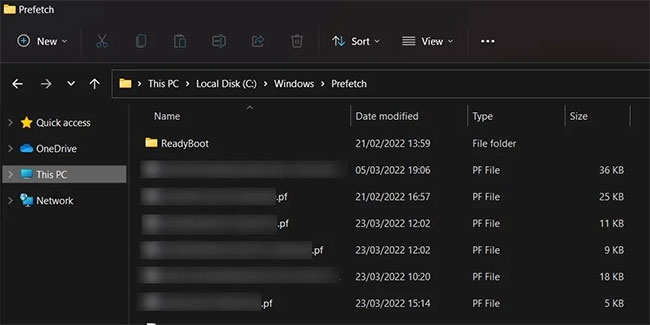
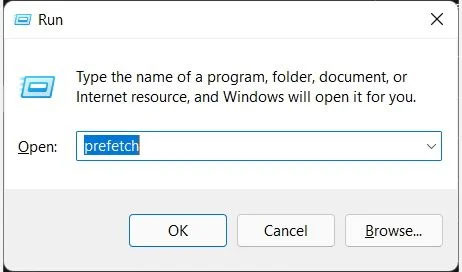
<p style="text-align: justify;">Để tìm file prefetch, bạn phải điều hướng đến thư mục&nbsp;<strong>Prefetch</strong>&nbsp;trước bằng cách đi tới&nbsp;<strong>This PC &gt; Local Disk (C:) &gt; Windows &gt; Prefetch</strong>. Bạn cũng có thể truy cập thư mục bằng cách nhấn&nbsp;<strong>Win + R</strong>, nhập&nbsp;<strong>prefetch</strong>&nbsp;và nhấn phím&nbsp;<strong>Enter.</strong></p>

<figure>
<div style="text-align: justify;"><img alt="Mở thư mục Prefetch bằng Windows Run" data-i="0" data-src="https://st.quantrimang.com/photos/image/2022/03/30/file-prefetch-la-gi-1.jpg" data-was-processed="true" height="272" src="https://st.quantrimang.com/photos/image/2022/03/30/file-prefetch-la-gi-1.jpg" width="462" /></div>

<figcaption>
<div style="text-align: justify;">Mở thư mục Prefetch bằng Windows Run</div>
</figcaption>
</figure>

<p style="text-align: justify;">Khi lần đầu tiên mở thư mục&nbsp;<strong>Prefetch</strong>, bạn có thể nhận được lời nhắc cho biết rằng bạn không có quyền truy cập vào nó. Bạn phải nhấp vào&nbsp;<strong>Continue</strong>&nbsp;để cấp cho mình quyền xem và chỉnh sửa nội dung của thư mục.</p>

<p style="text-align: justify;">Các file prefetch sẽ ở dạng text file, có phần mở rộng .pf và được mã hóa để chỉ hệ thống Windows mới có thể đọc dữ liệu ứng dụng.</p>

<figure>
<div style="text-align: justify;"><img alt="Các file prefetch trong Windows" data-i="1" data-src="https://st.quantrimang.com/photos/image/2022/03/30/file-prefetch-la-gi-2.jpg" data-was-processed="true" height="325" src="https://st.quantrimang.com/photos/image/2022/03/30/file-prefetch-la-gi-2.jpg" width="650" /></div>

<figcaption>
<div style="text-align: justify;">Các file prefetch trong Windows</div>
</figcaption>
</figure>

<h2 style="text-align: justify;">Có thể xóa các file prefetch không?</h2>

<p style="text-align: justify;">Vì hệ điều hành tự tạo file prefetch nên về cơ bản chúng là file Windows. Và bạn có thể xóa một số file Windows để&nbsp;giải phóng dung lượng ổ đĩa&nbsp;của mình, nhưng hãy nhớ có một số file Windows bạn không bao giờ nên động vào. Tuy nhiên, việc xóa các file prefetch khá vô hại và Windows sẽ tạo lại chúng vào lần tiếp theo khi bạn mở ứng dụng trên máy của mình.</p>

<p style="text-align: justify;">Hãy nhớ rằng vì các file prefetch giúp giảm thời gian khởi động của hệ điều hành, nên việc xóa chúng có thể khiến hệ thống của bạn chậm hơn khi khởi động. Một số ứng dụng cũng có thể mất nhiều thời gian hơn để load.</p>

<p style="text-align: justify;">Tóm lại, các file prefetch không quá quan trọng đối với hoạt động bình thường của hệ điều hành Windows, nhưng chúng giúp tăng tốc mọi thứ khi load ứng dụng. Bạn có thể xóa chúng, nhưng không nên làm như vậy, vì nó có thể làm chậm quá trình khởi động trên PC.</p>
		</div>
				<div id="author">
						<p>
				<strong>Nguồn tin:</strong>
				Quantrimang.com
			</p>
		</div>
	</div>
	<div id="footer" class="clearfix">
		<div id="url">
			<strong>URL của bản tin này: </strong><a href="https://www.nguoicodonvn2008.info/vi/news/savefile/kien-thuc-may-tinh/file-prefetch-la-gi-co-quan-trong-trong-windows-khong-5366.html" title="File prefetch là gì? Có quan trọng trong Windows không?">https://www.nguoicodonvn2008.info/vi/news/savefile/kien-thuc-may-tinh/file-prefetch-la-gi-co-quan-trong-trong-windows-khong-5366.html</a>

		</div>
		<div class="clear"></div>
		<div class="copyright">
			&copy; .&#x3A; Nguoicodonvn2008.info - Cõi lòng người cô đơn &#x3A;.
		</div>
		<div id="contact">
			<a href="mailto:admin@nguoicodonvn2008.info">admin@nguoicodonvn2008.info</a>
		</div>
	</div>
</div>
        <div id="timeoutsess" class="chromeframe">
            Bạn đã không sử dụng Site, <a onclick="timeoutsesscancel();" href="https://nguoicodonvn2008.info/#">Bấm vào đây để duy trì trạng thái đăng nhập</a>. Thời gian chờ: <span id="secField"> 60 </span> giây
        </div>
        <div id="openidResult" class="nv-alert" style="display:none"></div>
        <div id="openidBt" data-result="" data-redirect=""></div>
		</script>
		<div class="car-top">
  <span><img src="https://nguoicodonvn2008.info/themes/default/images/car.png" alt=""></span>
</div>
<script src="https://nguoicodonvn2008.info/assets/js/jquery/jquery.min.js"></script>
<script>var nv_base_siteurl="/",nv_lang_data="vi",nv_lang_interface="vi",nv_name_variable="nv",nv_fc_variable="op",nv_lang_variable="language",nv_module_name="news",nv_func_name="savefile",nv_is_user=0, nv_my_ofs=-4,nv_my_abbr="EDT",nv_cookie_prefix="nv4c_e856T",nv_check_pass_mstime=1738000,nv_area_admin=0,nv_safemode=0,theme_responsive=0,nv_recaptcha_ver=2,nv_recaptcha_sitekey="",nv_recaptcha_type="image",XSSsanitize=1;</script>
<script src="https://nguoicodonvn2008.info/assets/js/language/vi.js"></script>
<script src="https://nguoicodonvn2008.info/assets/js/DOMPurify/purify3.js"></script>
<script src="https://nguoicodonvn2008.info/assets/js/global.js"></script>
<script src="https://nguoicodonvn2008.info/assets/js/site.js"></script>
<script src="https://nguoicodonvn2008.info/themes/default/js/news.js"></script>
<script src="https://nguoicodonvn2008.info/themes/default/js/main.js"></script>
<script src="https://nguoicodonvn2008.info/themes/default/js/custom.js"></script>
<script type="application/ld+json">
        {
            "@context": "https://schema.org",
            "@type": "Organization",
            "url": "https://nguoicodonvn2008.info",
            "logo": "https://nguoicodonvn2008.info/uploads/angel.gif"
        }
        </script>
<script src="https://nguoicodonvn2008.info/themes/default/js/bootstrap.min.js"></script>
<script type="text/javascript">
var $scrolltop = $('.car-top');
$scrolltop.on('click', function () {
    $('html,body').animate({
        scrollTop: 0
    }, 800);
    $(this).addClass("car-run");
    setTimeout(function(){ $scrolltop.removeClass('car-run');}, 1000);
    return false;
});
$(window).on('scroll', function ()
{ 
    if($(window).scrollTop() >= 200)
    {
        $scrolltop.addClass("show");
        $scrolltop.addClass("car-down");
    }
    else
    {
       $scrolltop.removeClass("show");
       setTimeout(function(){ $scrolltop.removeClass('car-down');}, 300);
    }
});
</script>
</body>
</html>