<!DOCTYPE html>
    <html lang="vi" xmlns="http://www.w3.org/1999/xhtml" prefix="og: http://ogp.me/ns#">
    <head>
<title>File 7Z là gì? Mở file này như thế nào?</title>
<meta name="description" content="File 7Z là gì? Mở file này như thế nào? - Savefile - Tin Tức -...">
<meta name="author" content=".: Nguoicodonvn2008.info - Cõi lòng người cô đơn :.">
<meta name="copyright" content=".: Nguoicodonvn2008.info - Cõi lòng người cô đơn :. [admin@nguoicodonvn2008.info]">
<meta name="robots" content="index, archive, follow, noodp">
<meta name="googlebot" content="index,archive,follow,noodp">
<meta name="msnbot" content="all,index,follow">
<meta name="generator" content="NukeViet v4.5">
<meta http-equiv="Content-Type" content="text/html; charset=utf-8">
<meta property="og:title" content="File 7Z là gì? Mở file này như thế nào?">
<meta property="og:type" content="website">
<meta property="og:description" content="Savefile - Tin Tức - https&#x3A;&#x002F;&#x002F;www.nguoicodonvn2008.info&#x002F;vi&#x002F;news&#x002F;savefile&#x002F;kien-thuc-may-tinh&#x002F;file-7z-la-gi-mo-file-nay-nhu-the-nao-10042.html">
<meta property="og:site_name" content=".&#x3A; Nguoicodonvn2008.info - Cõi lòng người cô đơn &#x3A;.">
<meta property="og:url" content="https://www.nguoicodonvn2008.info/vi/news/savefile/kien-thuc-may-tinh/file-7z-la-gi-mo-file-nay-nhu-the-nao-10042.html">
<link rel="shortcut icon" href="https://nguoicodonvn2008.info/favicon.ico">
<link rel="canonical" href="https://www.nguoicodonvn2008.info/vi/news/savefile/kien-thuc-may-tinh/file-7z-la-gi-mo-file-nay-nhu-the-nao-10042.html">
<link rel="alternate" href="https://nguoicodonvn2008.info/vi/news/rss/" title="Tin Tức" type="application/rss+xml">
<link rel="alternate" href="https://nguoicodonvn2008.info/vi/news/rss/karaoke-dual/" title="Tin Tức - Karaoke Dual" type="application/rss+xml">
<link rel="alternate" href="https://nguoicodonvn2008.info/vi/news/rss/nhac-tre/" title="Tin Tức - Nhạc trẻ" type="application/rss+xml">
<link rel="alternate" href="https://nguoicodonvn2008.info/vi/news/rss/tru-tinh/" title="Tin Tức - Trữ tình" type="application/rss+xml">
<link rel="alternate" href="https://nguoicodonvn2008.info/vi/news/rss/nuoc-ngoai/" title="Tin Tức - Nước ngoài" type="application/rss+xml">
<link rel="alternate" href="https://nguoicodonvn2008.info/vi/news/rss/remix/" title="Tin Tức - Remix" type="application/rss+xml">
<link rel="alternate" href="https://nguoicodonvn2008.info/vi/news/rss/tam-su-tinh-yeu/" title="Tin Tức - Tâm sự tình yêu" type="application/rss+xml">
<link rel="alternate" href="https://nguoicodonvn2008.info/vi/news/rss/tho-suu-tam/" title="Tin Tức - Thơ sưu tầm" type="application/rss+xml">
<link rel="alternate" href="https://nguoicodonvn2008.info/vi/news/rss/cuoc-song/" title="Tin Tức - Cuộc sống" type="application/rss+xml">
<link rel="alternate" href="https://nguoicodonvn2008.info/vi/news/rss/phan-mem/" title="Tin Tức - Phần mềm" type="application/rss+xml">
<link rel="alternate" href="https://nguoicodonvn2008.info/vi/news/rss/kien-thuc-may-tinh/" title="Tin Tức - Kiến thức máy tính" type="application/rss+xml">
<link rel="alternate" href="https://nguoicodonvn2008.info/vi/news/rss/hoc-tap/" title="Tin Tức - Học tập" type="application/rss+xml">
<link rel="alternate" href="https://nguoicodonvn2008.info/vi/news/rss/tai-lieu/" title="Tin Tức - Tài liệu" type="application/rss+xml">
<link rel="alternate" href="https://nguoicodonvn2008.info/vi/news/rss/de-thi/" title="Tin Tức - Đề thi" type="application/rss+xml">
<link rel="preload" as="style" href="https://nguoicodonvn2008.info/assets/css/font-awesome.min.css" type="text/css">
<link rel="preload" as="style" href="https://nguoicodonvn2008.info/themes/default/css/bootstrap.non-responsive.css" type="text/css">
<link rel="preload" as="style" href="https://nguoicodonvn2008.info/themes/default/css/style.css" type="text/css">
<link rel="preload" as="style" href="https://nguoicodonvn2008.info/themes/default/css/style.non-responsive.css" type="text/css">
<link rel="preload" as="style" href="https://nguoicodonvn2008.info/themes/default/css/news.css" type="text/css">
<link rel="preload" as="style" href="https://nguoicodonvn2008.info/themes/default/css/custom.css" type="text/css">
<link rel="preload" as="script" href="https://nguoicodonvn2008.info/assets/js/jquery/jquery.min.js" type="text/javascript">
<link rel="preload" as="script" href="https://nguoicodonvn2008.info/assets/js/language/vi.js" type="text/javascript">
<link rel="preload" as="script" href="https://nguoicodonvn2008.info/assets/js/DOMPurify/purify3.js" type="text/javascript">
<link rel="preload" as="script" href="https://nguoicodonvn2008.info/assets/js/global.js" type="text/javascript">
<link rel="preload" as="script" href="https://nguoicodonvn2008.info/assets/js/site.js" type="text/javascript">
<link rel="preload" as="script" href="https://nguoicodonvn2008.info/themes/default/js/news.js" type="text/javascript">
<link rel="preload" as="script" href="https://nguoicodonvn2008.info/themes/default/js/main.js" type="text/javascript">
<link rel="preload" as="script" href="https://nguoicodonvn2008.info/themes/default/js/custom.js" type="text/javascript">
<link rel="preload" as="script" href="https://nguoicodonvn2008.info/themes/default/js/bootstrap.min.js" type="text/javascript">
<link rel="stylesheet" href="https://nguoicodonvn2008.info/assets/css/font-awesome.min.css">
<link rel="stylesheet" href="https://nguoicodonvn2008.info/themes/default/css/bootstrap.non-responsive.css">
<link rel="stylesheet" href="https://nguoicodonvn2008.info/themes/default/css/style.css">
<link rel="stylesheet" href="https://nguoicodonvn2008.info/themes/default/css/style.non-responsive.css">
<link rel="StyleSheet" href="https://nguoicodonvn2008.info/themes/default/css/news.css">
<link rel="stylesheet" href="https://nguoicodonvn2008.info/themes/default/css/custom.css">
<style type="text/css">
	body{background: #fff;}
</style>
    </head>
    <body>
<div id="print">
	<div id="hd_print">
		<h2 class="pull-left">.&#x3A; Nguoicodonvn2008.info - Cõi lòng người cô đơn &#x3A;.</h2>
		<p class="pull-right"><a title=".&#x3A; Nguoicodonvn2008.info - Cõi lòng người cô đơn &#x3A;." href="https://nguoicodonvn2008.info/">https://nguoicodonvn2008.info</a></p>
	</div>
	<div class="clear"></div>
	<hr />
	<div id="content">
		<h1>File 7Z là gì? Mở file này như thế nào?</h1>
		<ul class="list-inline">
			<li>Thứ sáu - 21/03/2025 23:19</li>
			<li class="hidden-print txtrequired"><em class="fa fa-print">&nbsp;</em><a title="In ra" href="javascript:;" onclick="window.print()">In ra</a></li>
			<li class="hidden-print txtrequired"><em class="fa fa-power-off">&nbsp;</em><a title="Đóng cửa sổ này" href="javascript:;" onclick="window.close()">Đóng cửa sổ này</a></li>
		</ul>
		<div class="clear"></div>
		<div id="hometext">
		</div>
				<div class="imghome">
			<img alt="File 7Z là gì? Mở file này như thế nào?" src="https://st.quantrimang.com/photos/image/2024/03/21/file-7z-la-gi-6.jpg" width="460" class="img-thumbnail" />
		</div>
		<div class="clear"></div>
		<div id="bodytext" class="clearfix">
			<p style="text-align: justify;">Chắc hẳn bạn đã gặp một số file lưu trữ như&nbsp;ZIP,&nbsp;RAR, v.v… Chúng giống như một file đơn nhưng hoạt động giống như một gói, cho phép người dùng gộp và nén nhiều file và thư mục vào một file đơn nhỏ hơn. File 7Z có cách hoạt động tương tự, đặc biệt cho công cụ nén 7-Zip nổi tiếng.</p>

<div style="text-align: justify;">&nbsp;</div>

<h2 style="text-align: justify;">File 7Z là gì?</h2>

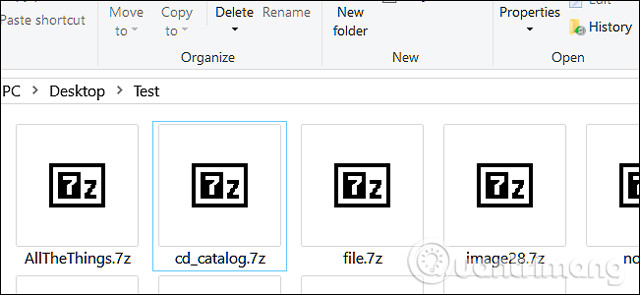
<p style="text-align: justify;">7Z là&nbsp;phần mở rộng file&nbsp;được sử dụng cho file lưu trữ được tạo bằng cách sử dụng 7-Zip, công cụ nén file nguồn mở miễn phí. 7Z cũng giống như các định dạng lưu trữ khác, chẳng hạn như ZIP, RAR và ISO nhưng nó sử dụng tỷ lệ nén cao hơn cùng với mã hóa AES-256.</p>

<div style="text-align: justify;">&nbsp;</div>

<p style="text-align: justify;"><img alt="File 7Z" data-i="0" data-src="https://st.quantrimang.com/photos/image/2018/07/10/file-7z-la-gi-1.jpg" data-was-processed="true" height="295" src="https://st.quantrimang.com/photos/image/2018/07/10/file-7z-la-gi-1.jpg" width="640" /></p>

<p style="text-align: justify;">Các file 7Z giúp dễ dàng gửi và tải file từ Internet,&nbsp;giải phóng dung lượng trên ổ cứng&nbsp;với tốc độ nén cao được sử dụng khi lưu trữ. Chúng còn hỗ trợ kích thước file lên đến 16 tỷ GB theo lý thuyết.</p>

<p style="text-align: justify;">7-Zip là một trong những công cụ nén phổ biến trên mạng, nhưng hầu hết mọi người sử dụng nó để mở hoặc tạo file ZIP hơn là sử dụng cho file 7Z. Lý do chính là khả năng tương thích. Có nhiều cách để mở file Zip hơn là file 7Z vì khi sử dụng loại file này bạn cần cài đặt 7-Zip hoặc một ứng dụng bên thứ ba khác hỗ trợ làm việc với nó. Tuy nhiên đây là định dạng nén tốt hơn.</p>

<h2 style="text-align: justify;">Cách mở file 7Z</h2>

<p style="text-align: justify;">Mặc dù hầu hết các hệ điều hành đều có công cụ tích hợp để làm việc với file ZIP (và một số định dạng nén khác, như ISO) nhưng không có tùy chọn tích hợp cho file 7Z.</p>

<p style="text-align: justify;">Nếu sử dụng&nbsp;&nbsp;Windows, cách tốt nhất để mở file 7Z là công cụ nguồn mở miễn phí 7-Zip. Đây là công cụ nén yêu thích trên Windows vì nó có thể làm việc với nhiều định dạng nén như ZIP, ISO, RAR, và các định dạng khác. Trên macOS, The Unarchiver là một công cụ miễn phí tuyệt vời có thể xử lý nhiều định dạng nén như 7Z. Trên Linux, bạn có thể tìm thấy các gói 7-Zip khác nhau cho các bản phân phối ở cuối trang tải 7-Zip chính.</p>

<h3 style="text-align: justify;">Mở file 7Z bằng 7-Zip trong Windows</h3>

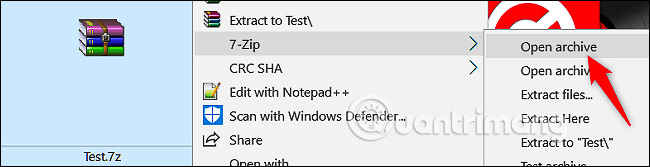
<p style="text-align: justify;">Mở file 7Z bằng 7-Zip hoàn toàn dễ dàng và có thể hoàn thành trong ít nhất hai bước. Sau khi tải và cài đặt 7-Zip, điều hướng đến file muốn mở, click chuột phải vào file và chỉ đến tùy chọn&nbsp;<strong>7-Zip</strong>&nbsp;trong menu ngữ cảnh và sau đó click lệnh&nbsp;<strong>Open Archive</strong>.</p>

<ul>
	<li style="text-align: justify;">Tải&nbsp;7-Zip:&nbsp;<span style="color:rgb(231, 76, 60);"><strong>https://download.com.vn/7-zip-32-bit-4795</strong></span></li>
</ul>

<p style="text-align: justify;"><img alt="Chọn Open Archive" data-i="1" data-src="https://st.quantrimang.com/photos/image/2018/07/10/file-7z-la-gi-2.jpg" data-was-processed="true" height="167" src="https://st.quantrimang.com/photos/image/2018/07/10/file-7z-la-gi-2.jpg" width="650" /></p>

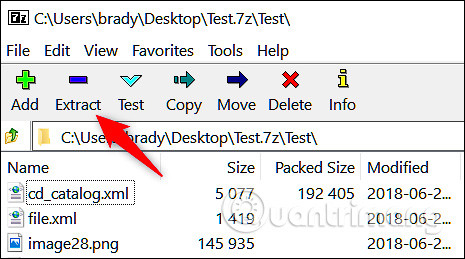
<p style="text-align: justify;">Thao tác này sẽ mở 7-Zip và hiển thị nội dung lưu trữ. Từ đây, bạn có thể trích xuất nội dung sang một vị trí khác trên ổ cứng bằng cách sử dụng nút “<strong>Extract</strong>” ở trên cùng. Hoặc nếu chỉ có một vài file bạn cần trong file lưu trữ này, bạn có thể kéo và thả chúng vào cửa sổ File Explorer.</p>

<p style="text-align: justify;"><img alt="Chọn Extract" data-i="2" data-src="https://st.quantrimang.com/photos/image/2018/07/10/file-7z-la-gi-3.jpg" data-was-processed="true" height="259" src="https://st.quantrimang.com/photos/image/2018/07/10/file-7z-la-gi-3.jpg" width="465" /></p>

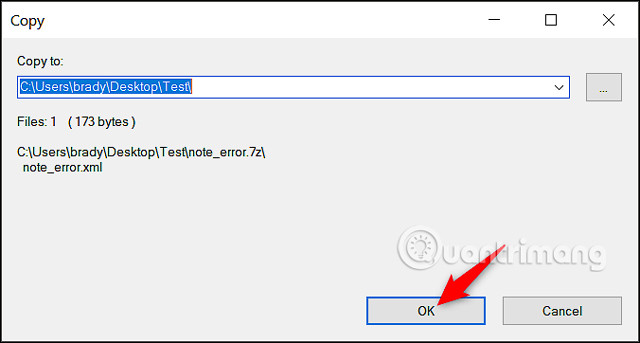
<p style="text-align: justify;">Chọn vị trí mới cho (các) file và click vào “<strong>OK</strong>”.</p>

<p style="text-align: justify;"><img alt="Chọn vị trí mới cho các file " data-i="3" data-src="https://st.quantrimang.com/photos/image/2018/07/10/file-7z-la-gi-4.jpg" data-was-processed="true" height="343" src="https://st.quantrimang.com/photos/image/2018/07/10/file-7z-la-gi-4.jpg" width="640" /></p>

<h3 style="text-align: justify;">Giải nén tập tin 7Z bằng ứng dụng web</h3>

<p style="text-align: justify;"><img alt="Trang web B1 Online Archiver" data-i="4" data-src="https://st.quantrimang.com/photos/image/2018/07/10/file-7z-la-gi-5.jpg" data-was-processed="true" height="127" src="https://st.quantrimang.com/photos/image/2018/07/10/file-7z-la-gi-5.jpg" width="650" /></p>

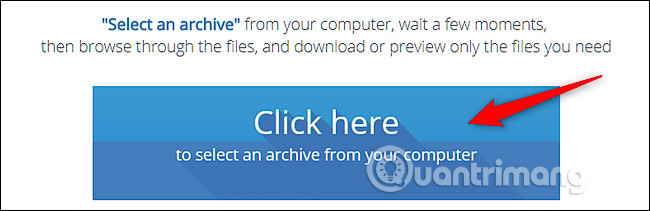
<p style="text-align: justify;">Nếu bạn chỉ có một vài file lưu trữ để trích xuất và không muốn tải phần mềm, có một dịch vụ trực tuyến giúp bạn thực hiện điều này. Trang web không lưu trữ file của bạn và xóa chúng ngay sau khi trích xuất. Truy cập vào Online.b1.org/online và trên trang chủ click vào nút “<strong>Click Here</strong>”.</p>

<p style="text-align: justify;"><img alt="Chọn Click Here" data-i="5" data-src="https://st.quantrimang.com/photos/image/2018/07/10/file-7z-la-gi-6.jpg" data-was-processed="true" height="211" src="https://st.quantrimang.com/photos/image/2018/07/10/file-7z-la-gi-6.jpg" width="650" /></p>

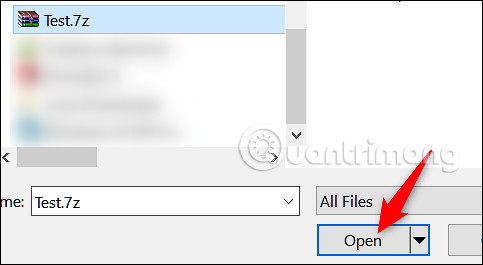
<p style="text-align: justify;">Trong cửa sổ bật lên, điều hướng đến file 7Z trên&nbsp;&nbsp;máy tính&nbsp;và sau đó nhấp vào nút “<strong>Open</strong>”.</p>

<p style="text-align: justify;"><img alt="Chọn Open" data-i="6" data-src="https://st.quantrimang.com/photos/image/2018/07/10/file-7z-la-gi-7.jpg" data-was-processed="true" height="265" src="https://st.quantrimang.com/photos/image/2018/07/10/file-7z-la-gi-7.jpg" width="483" /></p>

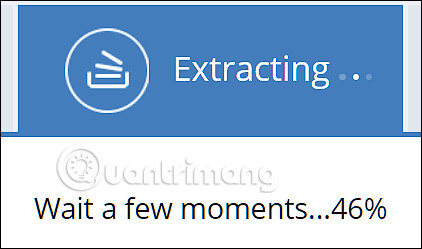
<p style="text-align: justify;">Trang web bắt đầu trích xuất.</p>

<p style="text-align: justify;"><img alt="Trang web bắt đầu trích xuất" data-i="7" data-src="https://st.quantrimang.com/photos/image/2018/07/10/file-7z-la-gi-8.jpg" data-was-processed="true" height="249" src="https://st.quantrimang.com/photos/image/2018/07/10/file-7z-la-gi-8.jpg" width="422" /></p>

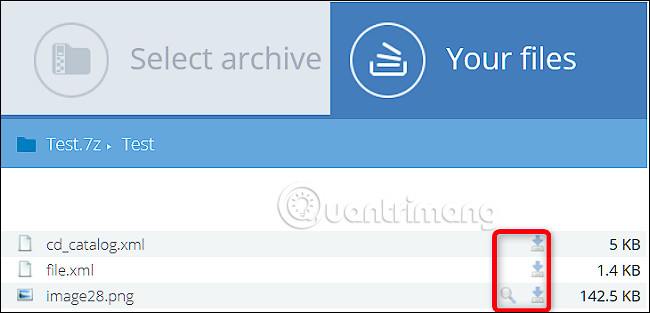
<p style="text-align: justify;">Sau khi hoàn tất quá trình trích xuất, bạn sẽ thấy danh sách tất cả các file và thư mục bên trong file 7Z. Bạn có thể tải bất kỳ file nào xuống máy tính của mình và xem bất kỳ hình ảnh nào từ trang web bằng cách sử dụng các biểu tượng ở bên phải.</p>

<p style="text-align: justify;"><img alt="Sử dụng biểu tượng bên phải để tải và xem ảnh " data-adbro-processed="true" data-i="8" data-src="https://st.quantrimang.com/photos/image/2018/07/10/file-7z-la-gi-9.jpg" data-was-processed="true" height="313" src="https://st.quantrimang.com/photos/image/2018/07/10/file-7z-la-gi-9.jpg" width="650" /></p>

<p style="text-align: justify;">Bất kể sử dụng hệ điều hành nào đi nữa, bạn có thể dễ dàng mở file 7Z với phần mềm bên thứ ba hoặc&nbsp;ứng dụng giải nén online.</p>

<h2 style="text-align: justify;">Làm cách nào để chuyển đổi file 7Z sang định dạng khác?</h2>

<p style="text-align: justify;">Cách dễ dàng và an toàn nhất để chuyển đổi file 7Z sang hầu hết các định dạng lưu trữ khác là sử dụng WinRAR. Bạn sẽ tìm thấy nhiều dịch vụ trực tuyến cho phép bạn chuyển đổi trực tuyến 7Z sang các định dạng lưu trữ khác. Hầu hết chúng có thể sẽ hoạt động, nhưng bạn không bao giờ có thể quá chắc chắn về những gì được thực hiện với dữ liệu của mình trong những tình huống đó. Nói chung, tốt nhất là bạn nên giữ mọi thứ trên&nbsp;<a data-google-interstitial="false" data-google-vignette="false" href="https://quantrimang.com/cong-nghe/file-7z-la-gi-mo-file-nay-nhu-the-nao-154507#">&nbsp;PC</a>&nbsp;của riêng mình và sử dụng phần mềm nổi tiếng về an toàn, đó là lý do tại sao bài viết chọn sử dụng WinRAR tại đây.</p>

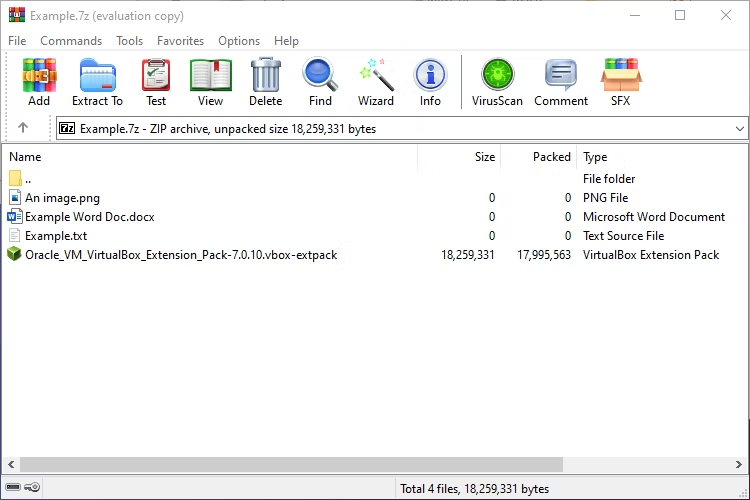
<p style="text-align: justify;">Đầu tiên, hãy mở file 7Z trong WinRAR. Bám sát ví dụ trước, nó sẽ trông như thế này:</p>

<figure>
<div style="text-align: justify;"><img alt="Một file 7Z mở trong WinRAR" data-i="9" data-src="https://st.quantrimang.com/photos/image/2024/03/21/file-7z-la-gi-1.jpg" data-was-processed="true" height="500" src="https://st.quantrimang.com/photos/image/2024/03/21/file-7z-la-gi-1.jpg" width="750" /></div>

<figcaption>
<div style="text-align: justify;">Một file 7Z mở trong WinRAR</div>
</figcaption>
</figure>

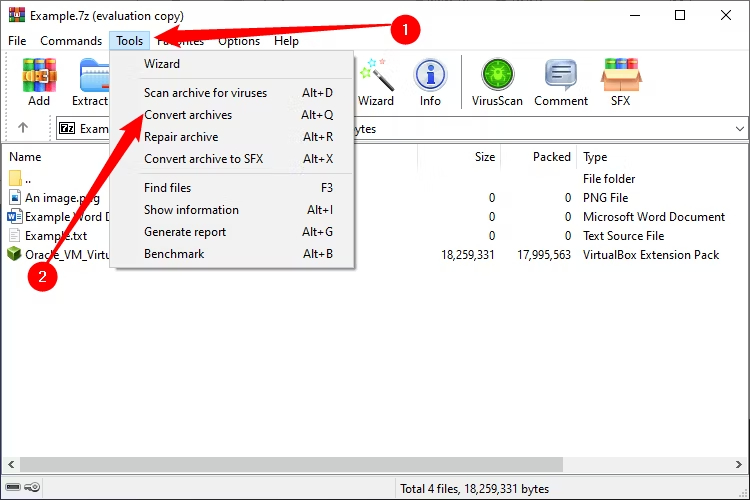
<p style="text-align: justify;">Đi tới&nbsp;<strong>Tools &gt; Convert Archives&nbsp;</strong>hoặc nhấn&nbsp;<strong>Ctrl + Q</strong>.</p>

<figure>
<div style="text-align: justify;"><img alt="Mở menu drop-down Tools, sau đó chọn Convert Archives " data-i="10" data-src="https://st.quantrimang.com/photos/image/2024/03/21/file-7z-la-gi-2.jpg" data-was-processed="true" height="500" src="https://st.quantrimang.com/photos/image/2024/03/21/file-7z-la-gi-2.jpg" width="750" /></div>

<figcaption>
<div style="text-align: justify;">Mở menu drop-down Tools, sau đó chọn Convert Archives</div>
</figcaption>
</figure>

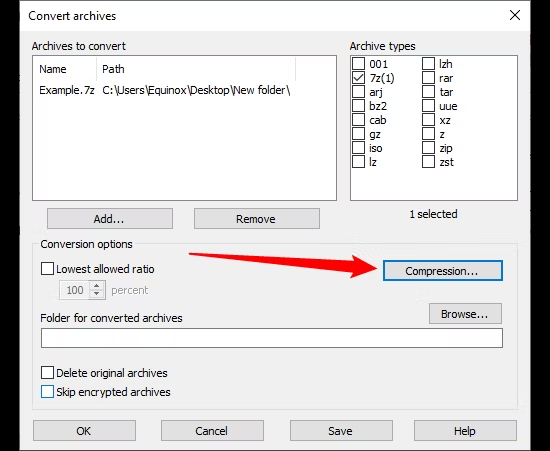
<p style="text-align: justify;">Bây giờ, bạn cần cho WinRAR biết mình thực sự muốn sử dụng định dạng nào. Theo mặc định, nó sẽ tạo file RAR nhưng cũng có thể tạo file ZIP. Nhấp vào&nbsp;<strong>Compression</strong>&nbsp;để mở các tùy chọn lưu trữ của bạn.</p>

<figure>
<div style="text-align: justify;"><img alt="Nhấp vào Compression" data-i="11" data-src="https://st.quantrimang.com/photos/image/2024/03/21/file-7z-la-gi-3.jpg" data-was-processed="true" height="451" src="https://st.quantrimang.com/photos/image/2024/03/21/file-7z-la-gi-3.jpg" width="550" /></div>

<figcaption>
<div style="text-align: justify;">Nhấp vào Compression</div>
</figcaption>
</figure>

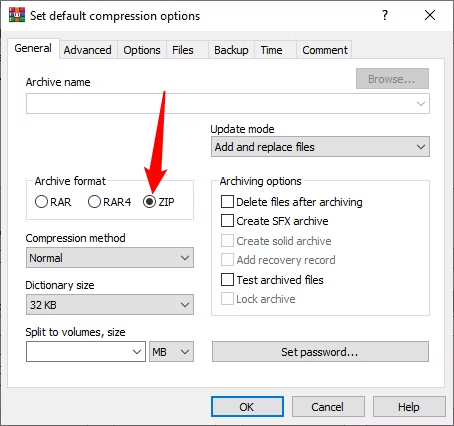
<p style="text-align: justify;">Chọn&nbsp;<strong>&quot;ZIP&quot;</strong>&nbsp;và áp dụng bất kỳ cài đặt nào khác mà bạn muốn áp dụng cho kho lưu trữ đã chuyển đổi, sau đó nhấp vào&nbsp;<strong>&quot;OK&quot;.</strong></p>

<figure>
<div style="text-align: justify;"><img alt="Các định dạng lưu trữ WinRAR cho phép bạn chuyển đổi để bao gồm RAR, RAR4 và ZIP. Chọn &#039;ZIP&#039;, sau đó nhấp vào &#039;OK&#039;" data-i="12" data-src="https://st.quantrimang.com/photos/image/2024/03/21/file-7z-la-gi-4.jpg" data-was-processed="true" height="426" src="https://st.quantrimang.com/photos/image/2024/03/21/file-7z-la-gi-4.jpg" width="454" /></div>

<figcaption>
<div style="text-align: justify;">Các định dạng lưu trữ WinRAR cho phép bạn chuyển đổi để bao gồm RAR, RAR4 và ZIP. Chọn &quot;ZIP&quot;, sau đó nhấp vào &quot;OK&quot;</div>
</figcaption>
</figure>

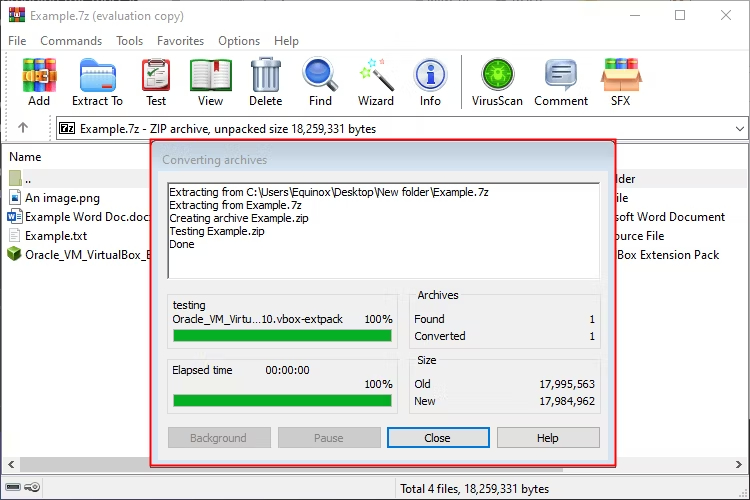
<p style="text-align: justify;">WinRAR sẽ hiển thị cho bạn cửa sổ tiến trình trong khi nó tạo file lưu trữ mới với các tùy chọn bạn đã chỉ định. Tùy thuộc vào độ lớn của file 7Z ban đầu, quá trình này có thể mất một lúc.</p>

<figure>
<div style="text-align: justify;"><img alt="WinRAR xác nhận ZIP đã được tạo" data-i="13" data-src="https://st.quantrimang.com/photos/image/2024/03/21/file-7z-la-gi-5.jpg" data-was-processed="true" height="500" src="https://st.quantrimang.com/photos/image/2024/03/21/file-7z-la-gi-5.jpg" width="750" /></div>

<figcaption>
<div style="text-align: justify;">WinRAR xác nhận ZIP đã được tạo</div>
</figcaption>
</figure>

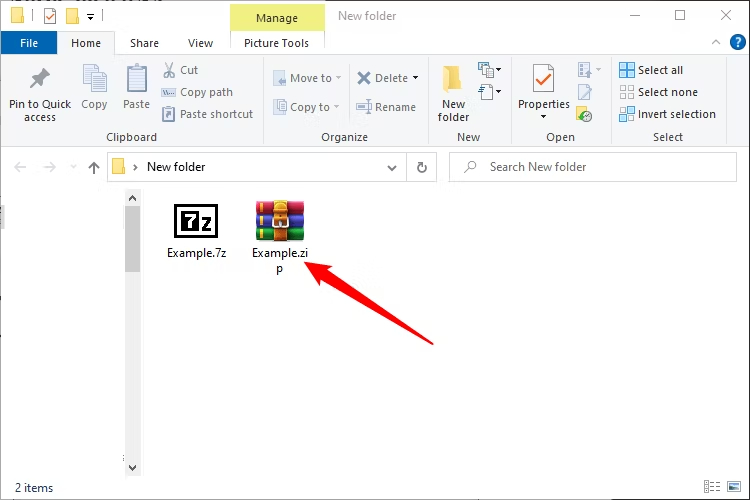
<p style="text-align: justify;">Theo mặc định, file ZIP mới sẽ được đặt cùng với file 7Z gốc của bạn. Sau khi xác nhận rằng kho lưu trữ mới hoạt động và tất cả các file của bạn đều có mặt, bạn có thể xóa file 7Z gốc.</p>

<figure>
<div style="text-align: justify;"><img alt="File ZIP mới cùng với file 7Z gốc" data-i="14" data-src="https://st.quantrimang.com/photos/image/2024/03/21/file-7z-la-gi-6.jpg" data-was-processed="true" height="500" src="https://st.quantrimang.com/photos/image/2024/03/21/file-7z-la-gi-6.jpg" width="750" /></div>

<figcaption>
<div style="text-align: justify;">File ZIP mới cùng với file 7Z gốc</div>
</figcaption>
</figure>

<p style="text-align: justify;">Dù bạn đang sử dụng hệ điều hành nào, các file 7Z đều có thể được trích xuất và quản lý bằng nhiều lựa chọn phần mềm của bên thứ ba hoặc sử dụng các ứng dụng trực tuyến.</p>

<p style="text-align: justify;">Chúc các bạn thực hiện thành công!</p>
		</div>
				<div id="author">
						<p>
				<strong>Nguồn tin:</strong>
				Quantrimang.com:
			</p>
		</div>
	</div>
	<div id="footer" class="clearfix">
		<div id="url">
			<strong>URL của bản tin này: </strong><a href="https://www.nguoicodonvn2008.info/vi/news/savefile/kien-thuc-may-tinh/file-7z-la-gi-mo-file-nay-nhu-the-nao-10042.html" title="File 7Z là gì? Mở file này như thế nào?">https://www.nguoicodonvn2008.info/vi/news/savefile/kien-thuc-may-tinh/file-7z-la-gi-mo-file-nay-nhu-the-nao-10042.html</a>

		</div>
		<div class="clear"></div>
		<div class="copyright">
			&copy; .&#x3A; Nguoicodonvn2008.info - Cõi lòng người cô đơn &#x3A;.
		</div>
		<div id="contact">
			<a href="mailto:admin@nguoicodonvn2008.info">admin@nguoicodonvn2008.info</a>
		</div>
	</div>
</div>
        <div id="timeoutsess" class="chromeframe">
            Bạn đã không sử dụng Site, <a onclick="timeoutsesscancel();" href="https://nguoicodonvn2008.info/#">Bấm vào đây để duy trì trạng thái đăng nhập</a>. Thời gian chờ: <span id="secField"> 60 </span> giây
        </div>
        <div id="openidResult" class="nv-alert" style="display:none"></div>
        <div id="openidBt" data-result="" data-redirect=""></div>
		</script>
		<div class="car-top">
  <span><img src="https://nguoicodonvn2008.info/themes/default/images/car.png" alt=""></span>
</div>
<script src="https://nguoicodonvn2008.info/assets/js/jquery/jquery.min.js"></script>
<script>var nv_base_siteurl="/",nv_lang_data="vi",nv_lang_interface="vi",nv_name_variable="nv",nv_fc_variable="op",nv_lang_variable="language",nv_module_name="news",nv_func_name="savefile",nv_is_user=0, nv_my_ofs=-4,nv_my_abbr="EDT",nv_cookie_prefix="nv4c_e856T",nv_check_pass_mstime=1738000,nv_area_admin=0,nv_safemode=0,theme_responsive=0,nv_recaptcha_ver=2,nv_recaptcha_sitekey="",nv_recaptcha_type="image",XSSsanitize=1;</script>
<script src="https://nguoicodonvn2008.info/assets/js/language/vi.js"></script>
<script src="https://nguoicodonvn2008.info/assets/js/DOMPurify/purify3.js"></script>
<script src="https://nguoicodonvn2008.info/assets/js/global.js"></script>
<script src="https://nguoicodonvn2008.info/assets/js/site.js"></script>
<script src="https://nguoicodonvn2008.info/themes/default/js/news.js"></script>
<script src="https://nguoicodonvn2008.info/themes/default/js/main.js"></script>
<script src="https://nguoicodonvn2008.info/themes/default/js/custom.js"></script>
<script type="application/ld+json">
        {
            "@context": "https://schema.org",
            "@type": "Organization",
            "url": "https://nguoicodonvn2008.info",
            "logo": "https://nguoicodonvn2008.info/uploads/angel.gif"
        }
        </script>
<script src="https://nguoicodonvn2008.info/themes/default/js/bootstrap.min.js"></script>
<script type="text/javascript">
var $scrolltop = $('.car-top');
$scrolltop.on('click', function () {
    $('html,body').animate({
        scrollTop: 0
    }, 800);
    $(this).addClass("car-run");
    setTimeout(function(){ $scrolltop.removeClass('car-run');}, 1000);
    return false;
});
$(window).on('scroll', function ()
{ 
    if($(window).scrollTop() >= 200)
    {
        $scrolltop.addClass("show");
        $scrolltop.addClass("car-down");
    }
    else
    {
       $scrolltop.removeClass("show");
       setTimeout(function(){ $scrolltop.removeClass('car-down');}, 300);
    }
});
</script>
</body>
</html>