<!DOCTYPE html>
    <html lang="vi" xmlns="http://www.w3.org/1999/xhtml" prefix="og: http://ogp.me/ns#">
    <head>
<title>Excel 2019 &#40;Phần 27&#41;&#x3A; Thực hiện nhiều tác vụ với PivotTables</title>
<meta name="description" content="Excel 2019 &#40;Phần 27&#41;&#x3A; Thực hiện nhiều tác vụ với PivotTables - Savefile - Tin Tức -...">
<meta name="author" content=".: Nguoicodonvn2008.info - Cõi lòng người cô đơn :.">
<meta name="copyright" content=".: Nguoicodonvn2008.info - Cõi lòng người cô đơn :. [admin@nguoicodonvn2008.info]">
<meta name="robots" content="index, archive, follow, noodp">
<meta name="googlebot" content="index,archive,follow,noodp">
<meta name="msnbot" content="all,index,follow">
<meta name="generator" content="NukeViet v4.5">
<meta http-equiv="Content-Type" content="text/html; charset=utf-8">
<meta property="og:title" content="Excel 2019 &#40;Phần 27&#41;&#x3A; Thực hiện nhiều tác vụ với PivotTables">
<meta property="og:type" content="website">
<meta property="og:description" content="Savefile - Tin Tức - https&#x3A;&#x002F;&#x002F;www.nguoicodonvn2008.info&#x002F;vi&#x002F;news&#x002F;savefile&#x002F;kien-thuc-may-tinh&#x002F;excel-2019-phan-27-thuc-hien-nhieu-tac-vu-voi-pivottables-5326.html">
<meta property="og:site_name" content=".&#x3A; Nguoicodonvn2008.info - Cõi lòng người cô đơn &#x3A;.">
<meta property="og:url" content="https://www.nguoicodonvn2008.info/vi/news/savefile/kien-thuc-may-tinh/excel-2019-phan-27-thuc-hien-nhieu-tac-vu-voi-pivottables-5326.html">
<link rel="shortcut icon" href="https://nguoicodonvn2008.info/favicon.ico">
<link rel="canonical" href="https://www.nguoicodonvn2008.info/vi/news/savefile/kien-thuc-may-tinh/excel-2019-phan-27-thuc-hien-nhieu-tac-vu-voi-pivottables-5326.html">
<link rel="alternate" href="https://nguoicodonvn2008.info/vi/news/rss/" title="Tin Tức" type="application/rss+xml">
<link rel="alternate" href="https://nguoicodonvn2008.info/vi/news/rss/karaoke-dual/" title="Tin Tức - Karaoke Dual" type="application/rss+xml">
<link rel="alternate" href="https://nguoicodonvn2008.info/vi/news/rss/nhac-tre/" title="Tin Tức - Nhạc trẻ" type="application/rss+xml">
<link rel="alternate" href="https://nguoicodonvn2008.info/vi/news/rss/tru-tinh/" title="Tin Tức - Trữ tình" type="application/rss+xml">
<link rel="alternate" href="https://nguoicodonvn2008.info/vi/news/rss/nuoc-ngoai/" title="Tin Tức - Nước ngoài" type="application/rss+xml">
<link rel="alternate" href="https://nguoicodonvn2008.info/vi/news/rss/remix/" title="Tin Tức - Remix" type="application/rss+xml">
<link rel="alternate" href="https://nguoicodonvn2008.info/vi/news/rss/tam-su-tinh-yeu/" title="Tin Tức - Tâm sự tình yêu" type="application/rss+xml">
<link rel="alternate" href="https://nguoicodonvn2008.info/vi/news/rss/tho-suu-tam/" title="Tin Tức - Thơ sưu tầm" type="application/rss+xml">
<link rel="alternate" href="https://nguoicodonvn2008.info/vi/news/rss/cuoc-song/" title="Tin Tức - Cuộc sống" type="application/rss+xml">
<link rel="alternate" href="https://nguoicodonvn2008.info/vi/news/rss/phan-mem/" title="Tin Tức - Phần mềm" type="application/rss+xml">
<link rel="alternate" href="https://nguoicodonvn2008.info/vi/news/rss/kien-thuc-may-tinh/" title="Tin Tức - Kiến thức máy tính" type="application/rss+xml">
<link rel="alternate" href="https://nguoicodonvn2008.info/vi/news/rss/hoc-tap/" title="Tin Tức - Học tập" type="application/rss+xml">
<link rel="alternate" href="https://nguoicodonvn2008.info/vi/news/rss/tai-lieu/" title="Tin Tức - Tài liệu" type="application/rss+xml">
<link rel="alternate" href="https://nguoicodonvn2008.info/vi/news/rss/de-thi/" title="Tin Tức - Đề thi" type="application/rss+xml">
<link rel="preload" as="style" href="https://nguoicodonvn2008.info/assets/css/font-awesome.min.css" type="text/css">
<link rel="preload" as="style" href="https://nguoicodonvn2008.info/themes/default/css/bootstrap.non-responsive.css" type="text/css">
<link rel="preload" as="style" href="https://nguoicodonvn2008.info/themes/default/css/style.css" type="text/css">
<link rel="preload" as="style" href="https://nguoicodonvn2008.info/themes/default/css/style.non-responsive.css" type="text/css">
<link rel="preload" as="style" href="https://nguoicodonvn2008.info/themes/default/css/news.css" type="text/css">
<link rel="preload" as="style" href="https://nguoicodonvn2008.info/themes/default/css/custom.css" type="text/css">
<link rel="preload" as="script" href="https://nguoicodonvn2008.info/assets/js/jquery/jquery.min.js" type="text/javascript">
<link rel="preload" as="script" href="https://nguoicodonvn2008.info/assets/js/language/vi.js" type="text/javascript">
<link rel="preload" as="script" href="https://nguoicodonvn2008.info/assets/js/DOMPurify/purify3.js" type="text/javascript">
<link rel="preload" as="script" href="https://nguoicodonvn2008.info/assets/js/global.js" type="text/javascript">
<link rel="preload" as="script" href="https://nguoicodonvn2008.info/assets/js/site.js" type="text/javascript">
<link rel="preload" as="script" href="https://nguoicodonvn2008.info/themes/default/js/news.js" type="text/javascript">
<link rel="preload" as="script" href="https://nguoicodonvn2008.info/themes/default/js/main.js" type="text/javascript">
<link rel="preload" as="script" href="https://nguoicodonvn2008.info/themes/default/js/custom.js" type="text/javascript">
<link rel="preload" as="script" href="https://nguoicodonvn2008.info/themes/default/js/bootstrap.min.js" type="text/javascript">
<link rel="stylesheet" href="https://nguoicodonvn2008.info/assets/css/font-awesome.min.css">
<link rel="stylesheet" href="https://nguoicodonvn2008.info/themes/default/css/bootstrap.non-responsive.css">
<link rel="stylesheet" href="https://nguoicodonvn2008.info/themes/default/css/style.css">
<link rel="stylesheet" href="https://nguoicodonvn2008.info/themes/default/css/style.non-responsive.css">
<link rel="StyleSheet" href="https://nguoicodonvn2008.info/themes/default/css/news.css">
<link rel="stylesheet" href="https://nguoicodonvn2008.info/themes/default/css/custom.css">
<style type="text/css">
	body{background: #fff;}
</style>
    </head>
    <body>
<div id="print">
	<div id="hd_print">
		<h2 class="pull-left">.&#x3A; Nguoicodonvn2008.info - Cõi lòng người cô đơn &#x3A;.</h2>
		<p class="pull-right"><a title=".&#x3A; Nguoicodonvn2008.info - Cõi lòng người cô đơn &#x3A;." href="https://nguoicodonvn2008.info/">https://nguoicodonvn2008.info</a></p>
	</div>
	<div class="clear"></div>
	<hr />
	<div id="content">
		<h1>Excel 2019 &#40;Phần 27&#41;&#x3A; Thực hiện nhiều tác vụ với PivotTables</h1>
		<ul class="list-inline">
			<li>Thứ tư - 23/03/2022 23:22</li>
			<li class="hidden-print txtrequired"><em class="fa fa-print">&nbsp;</em><a title="In ra" href="javascript:;" onclick="window.print()">In ra</a></li>
			<li class="hidden-print txtrequired"><em class="fa fa-power-off">&nbsp;</em><a title="Đóng cửa sổ này" href="javascript:;" onclick="window.close()">Đóng cửa sổ này</a></li>
		</ul>
		<div class="clear"></div>
		<div id="hometext">
		</div>
				<div class="imghome">
			<img alt="Excel 2019 &#40;Phần 27&#41;&#x3A; Thực hiện nhiều tác vụ với PivotTables" src="https://st.quantrimang.com/photos/image/2022/03/24/thuc-hien-nhieu-tac-vu-voi-pivottables-2.png" width="460" class="img-thumbnail" />
		</div>
		<div class="clear"></div>
		<div id="bodytext" class="clearfix">
			<p style="text-align: justify;">Như trong bài viết trước,&nbsp;PivotTables&nbsp;có thể được sử dụng để tóm tắt và phân tích hầu hết mọi loại dữ liệu. Để thao tác với PivotTable và hiểu sâu hơn nữa về dữ liệu,&nbsp;Excel&nbsp;cung cấp ba công cụ bổ sung: bộ lọc, slicer và PivotChart.</p>

<h2 style="text-align: justify;">Bộ lọc</h2>

<p style="text-align: justify;">Đôi khi bạn có thể muốn tập trung vào một phần nhất định trong dữ liệu. Bộ lọc có thể được sử dụng để thu hẹp dữ liệu trong PivotTable để bạn có thể xem chỉ riêng thông tin mình cần.</p>

<h3 style="text-align: justify;">Cách thêm bộ lọc</h3>

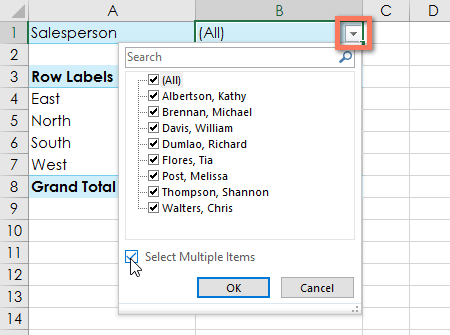
<p style="text-align: justify;">Ví dụ dưới đây sẽ lọc ra một số nhân viên bán hàng nhất định để xác định mức độ ảnh hưởng của doanh số bán hàng riêng lẻ đối với từng khu vực.</p>

<p style="text-align: justify;">1. Kéo một trường từ&nbsp;<strong>Field List</strong>&nbsp;vào vùng&nbsp;<strong>Filters.</strong>&nbsp;Ví dụ này sẽ sử dụng trường&nbsp;<strong>Salesperson.</strong></p>

<p style="text-align: justify;"><img alt="" data-i="0" data-src="https://st.quantrimang.com/photos/image/2022/03/24/thuc-hien-nhieu-tac-vu-voi-pivottables-1.png" data-was-processed="true" height="500" src="https://st.quantrimang.com/photos/image/2022/03/24/thuc-hien-nhieu-tac-vu-voi-pivottables-1.png" width="212" /></p>

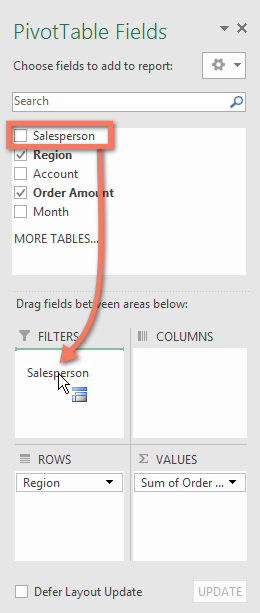
<p style="text-align: justify;">2. Bộ lọc sẽ xuất hiện phía trên PivotTable. Nhấp vào mũi tên drop-đown, sau đó chọn hộp bên cạnh&nbsp;<strong>Select Multiple Items</strong>.</p>

<p style="text-align: justify;"><img alt="" data-i="1" data-src="https://st.quantrimang.com/photos/image/2022/03/24/thuc-hien-nhieu-tac-vu-voi-pivottables-2.png" data-was-processed="true" height="335" src="https://st.quantrimang.com/photos/image/2022/03/24/thuc-hien-nhieu-tac-vu-voi-pivottables-2.png" width="450" /></p>

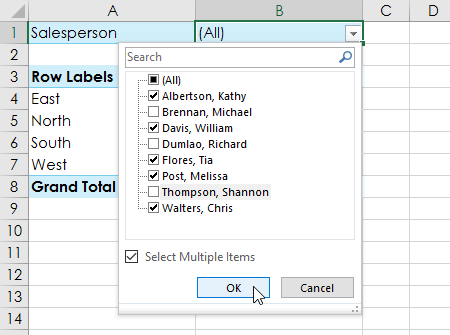
<p style="text-align: justify;">3. Bỏ chọn hộp bên cạnh bất kỳ mục nào bạn không muốn đưa vào PivotTable. Ví dụ sẽ bỏ chọn các hộp cho một vài nhân viên bán hàng, sau đó nhấp vào&nbsp;<strong>OK.</strong></p>

<p style="text-align: justify;"><strong><img alt="" data-i="2" data-src="https://st.quantrimang.com/photos/image/2022/03/24/thuc-hien-nhieu-tac-vu-voi-pivottables-3.png" data-was-processed="true" height="335" src="https://st.quantrimang.com/photos/image/2022/03/24/thuc-hien-nhieu-tac-vu-voi-pivottables-3.png" width="450" /></strong></p>

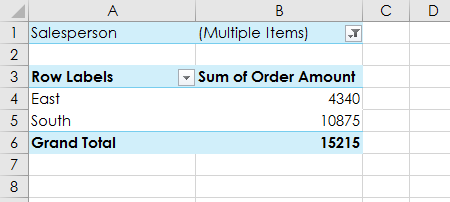
<p style="text-align: justify;">4. PivotTable sẽ điều chỉnh để phản ánh các thay đổi.</p>

<p style="text-align: justify;"><img alt="" data-i="3" data-src="https://st.quantrimang.com/photos/image/2022/03/24/thuc-hien-nhieu-tac-vu-voi-pivottables-4.png" data-was-processed="true" height="202" src="https://st.quantrimang.com/photos/image/2022/03/24/thuc-hien-nhieu-tac-vu-voi-pivottables-4.png" width="450" /></p>

<h2 style="text-align: justify;">Slicer</h2>

<p style="text-align: justify;">Slicer giúp lọc dữ liệu trong PivotTable dễ dàng hơn. Slicer về cơ bản chỉ là bộ lọc nhưng dễ sử dụng và nhanh hơn, cho phép bạn xoay vòng dữ liệu của mình ngay lập tức. Nếu phải thường xuyên lọc PivotTable, bạn có thể muốn xem xét sử dụng slicer thay vì bộ lọc.</p>

<h3 style="text-align: justify;">Cách thêm một slicer</h3>

<p style="text-align: justify;">1. Chọn bất kỳ ô nào trong PivotTable.</p>

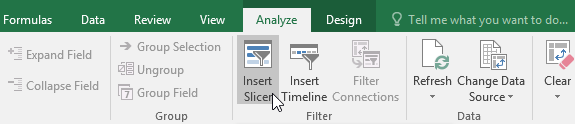
<p style="text-align: justify;">2. Từ tab&nbsp;<strong>Analyze</strong>, nhấp vào lệnh&nbsp;<strong>Insert Slicer.</strong></p>

<p style="text-align: justify;"><img alt="" data-i="4" data-src="https://st.quantrimang.com/photos/image/2022/03/24/thuc-hien-nhieu-tac-vu-voi-pivottables-5.png" data-was-processed="true" height="124" src="https://st.quantrimang.com/photos/image/2022/03/24/thuc-hien-nhieu-tac-vu-voi-pivottables-5.png" width="575" /></p>

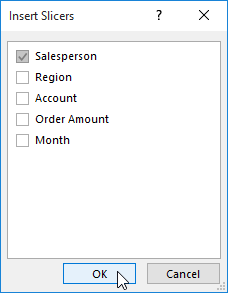
<p style="text-align: justify;">3. Một hộp thoại sẽ xuất hiện. Chọn hộp bên cạnh trường mong muốn. Ví dụ sẽ chọn&nbsp;<strong>Salesperson</strong>, sau đó nhấp vào&nbsp;<strong>OK.</strong></p>

<p style="text-align: justify;"><strong><img alt="" data-i="5" data-src="https://st.quantrimang.com/photos/image/2022/03/24/thuc-hien-nhieu-tac-vu-voi-pivottables-6.png" data-was-processed="true" height="293" src="https://st.quantrimang.com/photos/image/2022/03/24/thuc-hien-nhieu-tac-vu-voi-pivottables-6.png" width="228" /></strong></p>

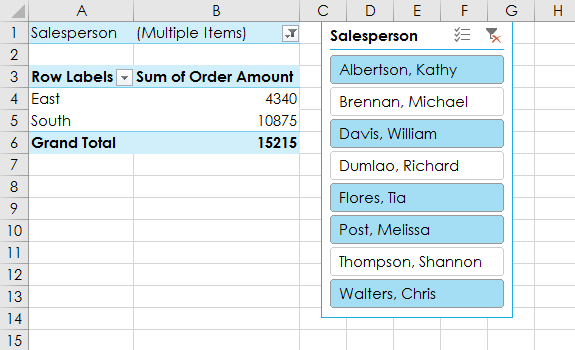
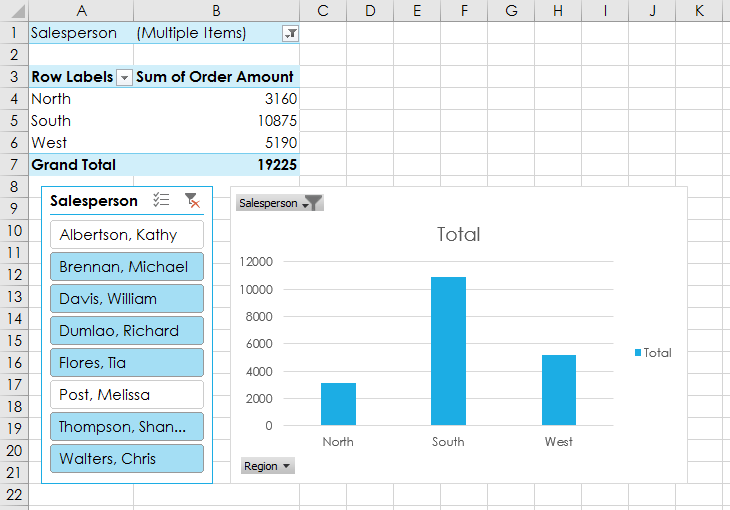
<p style="text-align: justify;">4. Slicer sẽ xuất hiện bên cạnh PivotTable. Mỗi mục được chọn sẽ được đánh dấu bằng màu xanh lam. Trong ví dụ dưới đây, slicer có tất cả 8 nhân viên bán hàng, nhưng chỉ 5 người trong số họ hiện được chọn.</p>

<p style="text-align: justify;"><img alt="" data-i="6" data-src="https://st.quantrimang.com/photos/image/2022/03/24/thuc-hien-nhieu-tac-vu-voi-pivottables-7.png" data-was-processed="true" height="350" src="https://st.quantrimang.com/photos/image/2022/03/24/thuc-hien-nhieu-tac-vu-voi-pivottables-7.png" width="575" /></p>

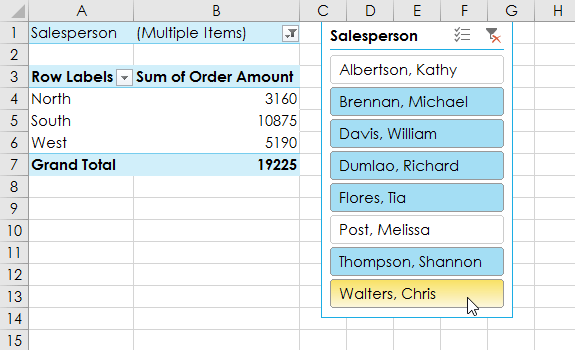
<p style="text-align: justify;">5. Cũng giống như bộ lọc, chỉ các mục đã chọn mới được sử dụng trong PivotTable. Khi bạn chọn hoặc bỏ chọn một mục, PivotTable sẽ ngay lập tức phản ánh thay đổi. Hãy thử chọn các mục khác nhau để xem chúng ảnh hưởng như thế nào đến PivotTable. Nhấn và giữ phím&nbsp;<strong>Ctrl</strong>&nbsp;trên bàn phím để chọn nhiều mục cùng lúc.</p>

<p style="text-align: justify;"><img alt="" data-i="7" data-src="https://st.quantrimang.com/photos/image/2022/03/24/thuc-hien-nhieu-tac-vu-voi-pivottables-8.png" data-was-processed="true" height="350" src="https://st.quantrimang.com/photos/image/2022/03/24/thuc-hien-nhieu-tac-vu-voi-pivottables-8.png" width="575" /></p>

<p style="text-align: justify;">Bạn cũng có thể nhấp vào biểu tượng bộ lọc ở góc trên bên phải của slicer để chọn tất cả các mục cùng một lúc.</p>

<h2 style="text-align: justify;">PivotChart</h2>

<p style="text-align: justify;">PivotChart giống như các biểu đồ thông thường, ngoại trừ chúng hiển thị dữ liệu từ PivotTable. Cũng giống như các biểu đồ thông thường, bạn sẽ có thể chọn loại biểu đồ, bố cục và kiểu thể hiện tốt nhất dữ liệu.</p>

<h3 style="text-align: justify;">Cách tạo PivotChart</h3>

<p style="text-align: justify;">Trong ví dụ bên dưới, PivotTable đang hiển thị một phần số liệu bán hàng của từng khu vực. PivotChart sẽ được sử dụng để có thể xem thông tin rõ ràng hơn.</p>

<p style="text-align: justify;">1. Chọn bất kỳ ô nào trong PivotTable.</p>

<p style="text-align: justify;">2. Từ tab&nbsp;<strong>Insert</strong>, bấm vào lệnh&nbsp;<strong>PivotChart.</strong></p>

<p style="text-align: justify;"><strong><img alt="" data-i="8" data-src="https://st.quantrimang.com/photos/image/2022/03/24/thuc-hien-nhieu-tac-vu-voi-pivottables-9.png" data-was-processed="true" height="110" src="https://st.quantrimang.com/photos/image/2022/03/24/thuc-hien-nhieu-tac-vu-voi-pivottables-9.png" width="650" /></strong></p>

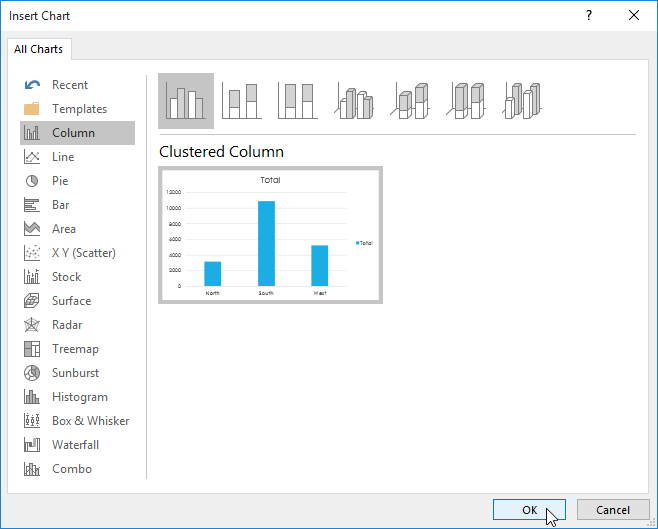
<p style="text-align: justify;">3. Hộp thoại&nbsp;<strong>Insert Chart</strong>&nbsp;sẽ xuất hiện. Chọn kiểu và bố cục biểu đồ mong muốn, sau đó bấm&nbsp;<strong>OK.</strong></p>

<p style="text-align: justify;"><strong><img alt="" data-i="9" data-src="https://st.quantrimang.com/photos/image/2022/03/24/thuc-hien-nhieu-tac-vu-voi-pivottables-10.png" data-was-processed="true" height="523" src="https://st.quantrimang.com/photos/image/2022/03/24/thuc-hien-nhieu-tac-vu-voi-pivottables-10.png" width="650" /></strong></p>

<p style="text-align: justify;">4. PivotChart sẽ xuất hiện.</p>

<p style="text-align: justify;"><img alt="" data-i="10" data-src="https://st.quantrimang.com/photos/image/2022/03/24/thuc-hien-nhieu-tac-vu-voi-pivottables-11.png" data-was-processed="true" height="454" src="https://st.quantrimang.com/photos/image/2022/03/24/thuc-hien-nhieu-tac-vu-voi-pivottables-11.png" width="650" /></p>

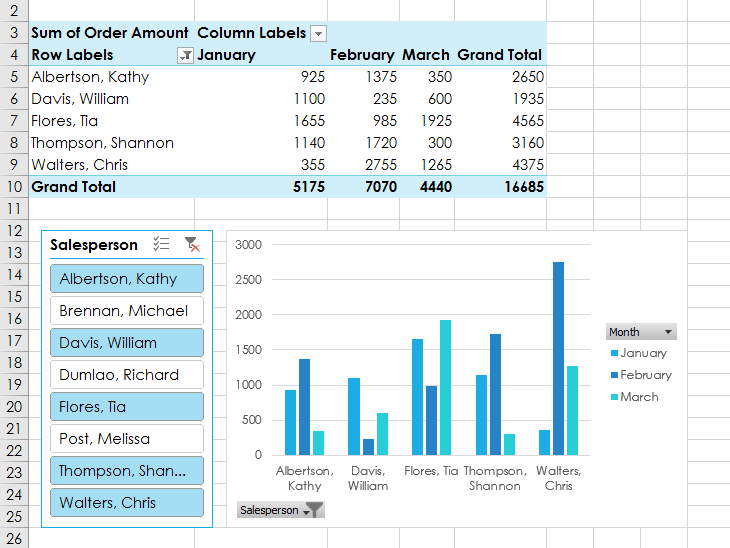
<p style="text-align: justify;">Hãy thử sử dụng bộ lọc hoặc slicer để thu hẹp dữ liệu trong PivotChart của bạn. Để xem những tập hợp con thông tin khác nhau, hãy thay đổi các cột hoặc hàng trong PivotTable. Ví dụ bên dưới đã thay đổi PivotTable để xem doanh số hàng tháng cho từng nhân viên bán hàng.</p>

<p style="text-align: justify;"><img alt="" data-i="11" data-src="https://st.quantrimang.com/photos/image/2022/03/24/thuc-hien-nhieu-tac-vu-voi-pivottables-12.png" data-was-processed="true" height="488" src="https://st.quantrimang.com/photos/image/2022/03/24/thuc-hien-nhieu-tac-vu-voi-pivottables-12.png" width="650" /></p>
		</div>
				<div id="author">
						<p>
				<strong>Nguồn tin:</strong>
				Quantrimang.com
			</p>
		</div>
	</div>
	<div id="footer" class="clearfix">
		<div id="url">
			<strong>URL của bản tin này: </strong><a href="https://www.nguoicodonvn2008.info/vi/news/savefile/kien-thuc-may-tinh/excel-2019-phan-27-thuc-hien-nhieu-tac-vu-voi-pivottables-5326.html" title="Excel 2019 &#40;Phần 27&#41;&#x3A; Thực hiện nhiều tác vụ với PivotTables">https://www.nguoicodonvn2008.info/vi/news/savefile/kien-thuc-may-tinh/excel-2019-phan-27-thuc-hien-nhieu-tac-vu-voi-pivottables-5326.html</a>

		</div>
		<div class="clear"></div>
		<div class="copyright">
			&copy; .&#x3A; Nguoicodonvn2008.info - Cõi lòng người cô đơn &#x3A;.
		</div>
		<div id="contact">
			<a href="mailto:admin@nguoicodonvn2008.info">admin@nguoicodonvn2008.info</a>
		</div>
	</div>
</div>
        <div id="timeoutsess" class="chromeframe">
            Bạn đã không sử dụng Site, <a onclick="timeoutsesscancel();" href="https://nguoicodonvn2008.info/#">Bấm vào đây để duy trì trạng thái đăng nhập</a>. Thời gian chờ: <span id="secField"> 60 </span> giây
        </div>
        <div id="openidResult" class="nv-alert" style="display:none"></div>
        <div id="openidBt" data-result="" data-redirect=""></div>
		</script>
		<div class="car-top">
  <span><img src="https://nguoicodonvn2008.info/themes/default/images/car.png" alt=""></span>
</div>
<script src="https://nguoicodonvn2008.info/assets/js/jquery/jquery.min.js"></script>
<script>var nv_base_siteurl="/",nv_lang_data="vi",nv_lang_interface="vi",nv_name_variable="nv",nv_fc_variable="op",nv_lang_variable="language",nv_module_name="news",nv_func_name="savefile",nv_is_user=0, nv_my_ofs=-4,nv_my_abbr="EDT",nv_cookie_prefix="nv4c_e856T",nv_check_pass_mstime=1738000,nv_area_admin=0,nv_safemode=0,theme_responsive=0,nv_recaptcha_ver=2,nv_recaptcha_sitekey="",nv_recaptcha_type="image",XSSsanitize=1;</script>
<script src="https://nguoicodonvn2008.info/assets/js/language/vi.js"></script>
<script src="https://nguoicodonvn2008.info/assets/js/DOMPurify/purify3.js"></script>
<script src="https://nguoicodonvn2008.info/assets/js/global.js"></script>
<script src="https://nguoicodonvn2008.info/assets/js/site.js"></script>
<script src="https://nguoicodonvn2008.info/themes/default/js/news.js"></script>
<script src="https://nguoicodonvn2008.info/themes/default/js/main.js"></script>
<script src="https://nguoicodonvn2008.info/themes/default/js/custom.js"></script>
<script type="application/ld+json">
        {
            "@context": "https://schema.org",
            "@type": "Organization",
            "url": "https://nguoicodonvn2008.info",
            "logo": "https://nguoicodonvn2008.info/uploads/angel.gif"
        }
        </script>
<script src="https://nguoicodonvn2008.info/themes/default/js/bootstrap.min.js"></script>
<script type="text/javascript">
var $scrolltop = $('.car-top');
$scrolltop.on('click', function () {
    $('html,body').animate({
        scrollTop: 0
    }, 800);
    $(this).addClass("car-run");
    setTimeout(function(){ $scrolltop.removeClass('car-run');}, 1000);
    return false;
});
$(window).on('scroll', function ()
{ 
    if($(window).scrollTop() >= 200)
    {
        $scrolltop.addClass("show");
        $scrolltop.addClass("car-down");
    }
    else
    {
       $scrolltop.removeClass("show");
       setTimeout(function(){ $scrolltop.removeClass('car-down');}, 300);
    }
});
</script>
</body>
</html>