<!DOCTYPE html>
    <html lang="vi" xmlns="http://www.w3.org/1999/xhtml" prefix="og: http://ogp.me/ns#">
    <head>
<title>Đừng vội cập nhật máy tính ngay&#33; Bản vá lỗi Windows 11 mới nhất làm hỏng File Explorer</title>
<meta name="description" content="Đừng vội cập nhật máy tính ngay&#33; Bản vá lỗi Windows 11 mới nhất làm hỏng File Explorer - Savefile - Tin Tức -...">
<meta name="author" content=".: Nguoicodonvn2008.info - Cõi lòng người cô đơn :.">
<meta name="copyright" content=".: Nguoicodonvn2008.info - Cõi lòng người cô đơn :. [admin@nguoicodonvn2008.info]">
<meta name="robots" content="index, archive, follow, noodp">
<meta name="googlebot" content="index,archive,follow,noodp">
<meta name="msnbot" content="all,index,follow">
<meta name="generator" content="NukeViet v4.5">
<meta http-equiv="Content-Type" content="text/html; charset=utf-8">
<meta property="og:title" content="Đừng vội cập nhật máy tính ngay&#33; Bản vá lỗi Windows 11 mới nhất làm hỏng File Explorer">
<meta property="og:type" content="website">
<meta property="og:description" content="Savefile - Tin Tức -...">
<meta property="og:site_name" content=".&#x3A; Nguoicodonvn2008.info - Cõi lòng người cô đơn &#x3A;.">
<meta property="og:url" content="https://www.nguoicodonvn2008.info/vi/news/savefile/kien-thuc-may-tinh/dung-voi-cap-nhat-may-tinh-ngay-ban-va-loi-windows-11-moi-nhat-lam-hong-file-explorer-9839.html">
<link rel="shortcut icon" href="https://nguoicodonvn2008.info/favicon.ico">
<link rel="canonical" href="https://www.nguoicodonvn2008.info/vi/news/savefile/kien-thuc-may-tinh/dung-voi-cap-nhat-may-tinh-ngay-ban-va-loi-windows-11-moi-nhat-lam-hong-file-explorer-9839.html">
<link rel="alternate" href="https://nguoicodonvn2008.info/vi/news/rss/" title="Tin Tức" type="application/rss+xml">
<link rel="alternate" href="https://nguoicodonvn2008.info/vi/news/rss/karaoke-dual/" title="Tin Tức - Karaoke Dual" type="application/rss+xml">
<link rel="alternate" href="https://nguoicodonvn2008.info/vi/news/rss/nhac-tre/" title="Tin Tức - Nhạc trẻ" type="application/rss+xml">
<link rel="alternate" href="https://nguoicodonvn2008.info/vi/news/rss/tru-tinh/" title="Tin Tức - Trữ tình" type="application/rss+xml">
<link rel="alternate" href="https://nguoicodonvn2008.info/vi/news/rss/nuoc-ngoai/" title="Tin Tức - Nước ngoài" type="application/rss+xml">
<link rel="alternate" href="https://nguoicodonvn2008.info/vi/news/rss/remix/" title="Tin Tức - Remix" type="application/rss+xml">
<link rel="alternate" href="https://nguoicodonvn2008.info/vi/news/rss/tam-su-tinh-yeu/" title="Tin Tức - Tâm sự tình yêu" type="application/rss+xml">
<link rel="alternate" href="https://nguoicodonvn2008.info/vi/news/rss/tho-suu-tam/" title="Tin Tức - Thơ sưu tầm" type="application/rss+xml">
<link rel="alternate" href="https://nguoicodonvn2008.info/vi/news/rss/cuoc-song/" title="Tin Tức - Cuộc sống" type="application/rss+xml">
<link rel="alternate" href="https://nguoicodonvn2008.info/vi/news/rss/phan-mem/" title="Tin Tức - Phần mềm" type="application/rss+xml">
<link rel="alternate" href="https://nguoicodonvn2008.info/vi/news/rss/kien-thuc-may-tinh/" title="Tin Tức - Kiến thức máy tính" type="application/rss+xml">
<link rel="alternate" href="https://nguoicodonvn2008.info/vi/news/rss/hoc-tap/" title="Tin Tức - Học tập" type="application/rss+xml">
<link rel="alternate" href="https://nguoicodonvn2008.info/vi/news/rss/tai-lieu/" title="Tin Tức - Tài liệu" type="application/rss+xml">
<link rel="alternate" href="https://nguoicodonvn2008.info/vi/news/rss/de-thi/" title="Tin Tức - Đề thi" type="application/rss+xml">
<link rel="preload" as="style" href="https://nguoicodonvn2008.info/assets/css/font-awesome.min.css" type="text/css">
<link rel="preload" as="style" href="https://nguoicodonvn2008.info/themes/default/css/bootstrap.non-responsive.css" type="text/css">
<link rel="preload" as="style" href="https://nguoicodonvn2008.info/themes/default/css/style.css" type="text/css">
<link rel="preload" as="style" href="https://nguoicodonvn2008.info/themes/default/css/style.non-responsive.css" type="text/css">
<link rel="preload" as="style" href="https://nguoicodonvn2008.info/themes/default/css/news.css" type="text/css">
<link rel="preload" as="style" href="https://nguoicodonvn2008.info/themes/default/css/custom.css" type="text/css">
<link rel="preload" as="script" href="https://nguoicodonvn2008.info/assets/js/jquery/jquery.min.js" type="text/javascript">
<link rel="preload" as="script" href="https://nguoicodonvn2008.info/assets/js/language/vi.js" type="text/javascript">
<link rel="preload" as="script" href="https://nguoicodonvn2008.info/assets/js/DOMPurify/purify3.js" type="text/javascript">
<link rel="preload" as="script" href="https://nguoicodonvn2008.info/assets/js/global.js" type="text/javascript">
<link rel="preload" as="script" href="https://nguoicodonvn2008.info/assets/js/site.js" type="text/javascript">
<link rel="preload" as="script" href="https://nguoicodonvn2008.info/themes/default/js/news.js" type="text/javascript">
<link rel="preload" as="script" href="https://nguoicodonvn2008.info/themes/default/js/main.js" type="text/javascript">
<link rel="preload" as="script" href="https://nguoicodonvn2008.info/themes/default/js/custom.js" type="text/javascript">
<link rel="preload" as="script" href="https://nguoicodonvn2008.info/themes/default/js/bootstrap.min.js" type="text/javascript">
<link rel="stylesheet" href="https://nguoicodonvn2008.info/assets/css/font-awesome.min.css">
<link rel="stylesheet" href="https://nguoicodonvn2008.info/themes/default/css/bootstrap.non-responsive.css">
<link rel="stylesheet" href="https://nguoicodonvn2008.info/themes/default/css/style.css">
<link rel="stylesheet" href="https://nguoicodonvn2008.info/themes/default/css/style.non-responsive.css">
<link rel="StyleSheet" href="https://nguoicodonvn2008.info/themes/default/css/news.css">
<link rel="stylesheet" href="https://nguoicodonvn2008.info/themes/default/css/custom.css">
<style type="text/css">
	body{background: #fff;}
</style>
    </head>
    <body>
<div id="print">
	<div id="hd_print">
		<h2 class="pull-left">.&#x3A; Nguoicodonvn2008.info - Cõi lòng người cô đơn &#x3A;.</h2>
		<p class="pull-right"><a title=".&#x3A; Nguoicodonvn2008.info - Cõi lòng người cô đơn &#x3A;." href="https://nguoicodonvn2008.info/">https://nguoicodonvn2008.info</a></p>
	</div>
	<div class="clear"></div>
	<hr />
	<div id="content">
		<h1>Đừng vội cập nhật máy tính ngay&#33; Bản vá lỗi Windows 11 mới nhất làm hỏng File Explorer</h1>
		<ul class="list-inline">
			<li>Thứ ba - 18/02/2025 23:13</li>
			<li class="hidden-print txtrequired"><em class="fa fa-print">&nbsp;</em><a title="In ra" href="javascript:;" onclick="window.print()">In ra</a></li>
			<li class="hidden-print txtrequired"><em class="fa fa-power-off">&nbsp;</em><a title="Đóng cửa sổ này" href="javascript:;" onclick="window.close()">Đóng cửa sổ này</a></li>
		</ul>
		<div class="clear"></div>
		<div id="hometext">
		</div>
				<div class="imghome">
			<img alt="Đừng vội cập nhật máy tính ngay&#33; Bản vá lỗi Windows 11 mới nhất làm hỏng File Explorer" src="https://st.quantrimang.com/photos/image/2025/02/18/ban-va-loi-windows-11-moi-nhat-lam-hong-file-explorer-3.png" width="460" class="img-thumbnail" />
		</div>
		<div class="clear"></div>
		<div id="bodytext" class="clearfix">
			<p style="text-align: justify;">Microsoft được biết đến là thường xuyên phát hành các bản cập nhật cho Windows 11, để giải quyết lỗi hoặc cài đặt các tính năng mới. Tuy nhiên, bản cập nhật Windows mới nhất đã làm hỏng File Explorer.</p>

<h2 style="text-align: justify;">File Explorer từ chối mở thư mục sau khi cài đặt bản cập nhật Windows 11 KB5051987</h2>

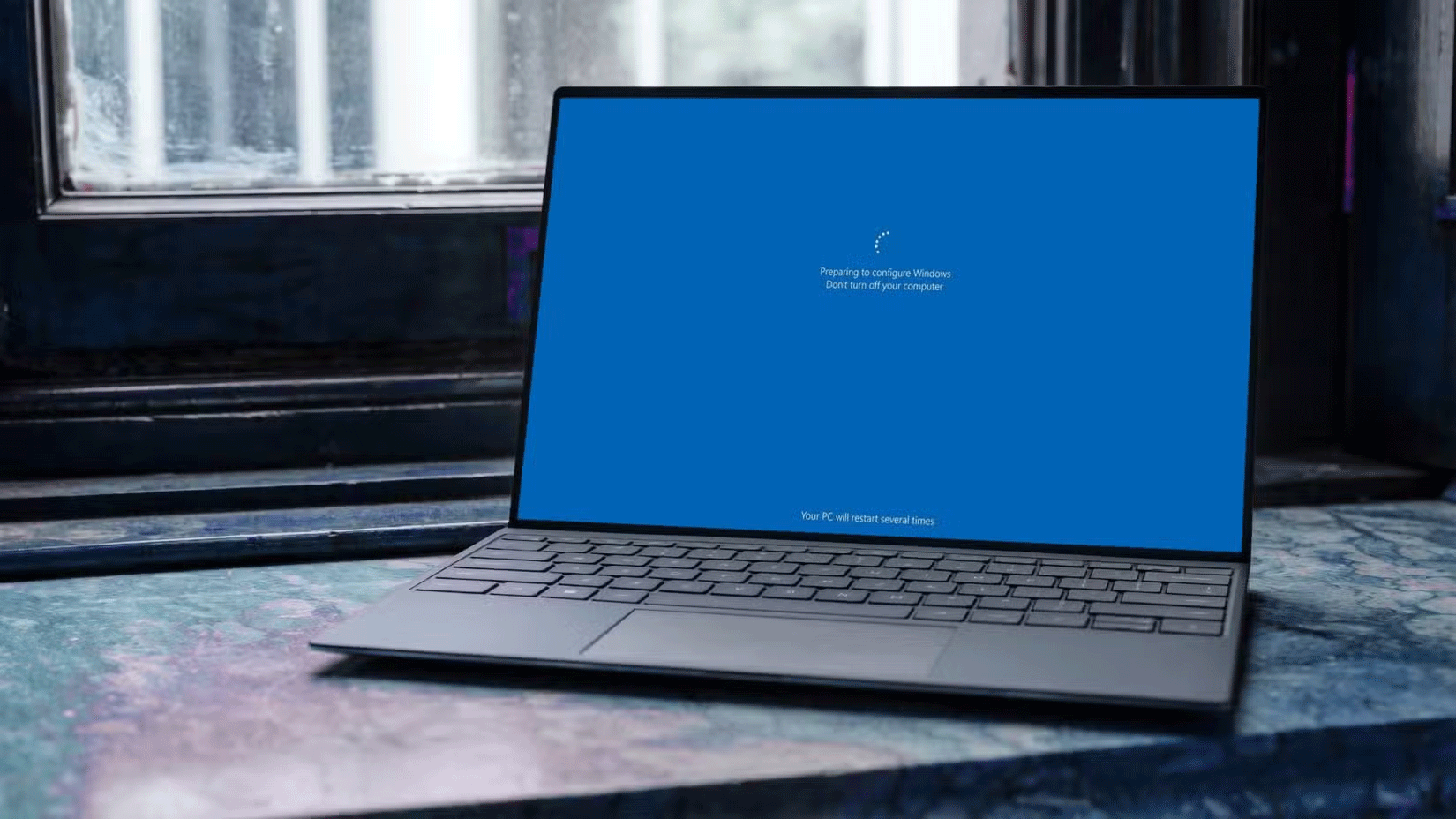
<p style="text-align: justify;">Một số người dùng đã báo cáo rằng Windows 11 KB5051987 đã làm hỏng File Explorer, ứng dụng chính mà hầu hết mọi người sử dụng để truy cập các file và thư mục trên PC của họ. Theo Windows Latest, nhóm của họ không thể mở bất kỳ thư mục nào trên ứng dụng File Explorer sau khi cài đặt bản cập nhật. Ngay cả khi họ cố gắng mở bất kỳ thư mục nào thông qua desktop shortcut hoặc Windows Search, thì nó vẫn không phản hồi. Tuy nhiên, ứng dụng vẫn chưa bị sập, với tiến trình explorer.exe vẫn chạy bình thường trong Task Manager. Thay vào đó, nó chỉ cố gắng bỏ qua bạn.</p>

<p style="text-align: justify;">Nếu điều này xảy ra với bạn và bạn thực sự cần truy cập các file của mình, lựa chọn tốt nhất tiếp theo là cài đặt một trong&nbsp;những giải pháp thay thế Windows File Explorer tốt nhất&nbsp;để mọi thứ diễn ra suôn sẻ. Điều này có thể không lý tưởng, nhưng ít nhất bạn có thể lấy lại dữ liệu trong khi chờ bản sửa lỗi từ Microsoft.</p>

<figure>
<div style="text-align: justify;"><img alt="" data-i="0" data-src="https://st.quantrimang.com/photos/image/2025/02/18/ban-va-loi-windows-11-moi-nhat-lam-hong-file-explorer-1.png" data-was-processed="true" height="928" src="https://st.quantrimang.com/photos/image/2025/02/18/ban-va-loi-windows-11-moi-nhat-lam-hong-file-explorer-1.png" width="1650" /></div>
</figure>

<p style="text-align: justify;">Tuy nhiên, đây không phải là sự cố duy nhất được báo cáo với bản cập nhật này. Những người dùng khác cho biết quá trình tải xuống bản cập nhật bị kẹt ở mức 0% trong nhiều giờ liền, trong khi một số người khác có thể tải xuống bản cập nhật thành công, chỉ để nhận được lỗi &quot;Có điều gì đó không diễn ra như dự kiến&quot; khi cài đặt. Tuy nhiên, đây có thể là một điều tốt, vì ít nhất bạn không phải giải quyết sự cố File Explorer khó chịu.</p>

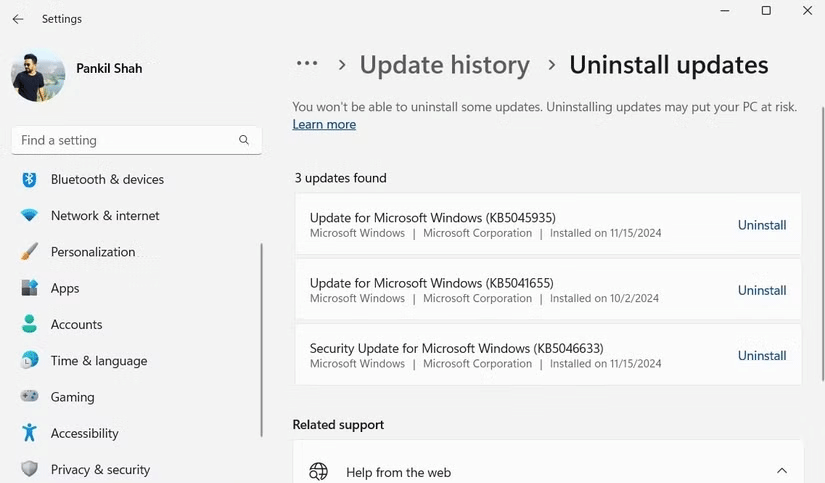
<p style="text-align: justify;">Các sự cố khác được báo cáo bao gồm vô hiệu hóa camera tích hợp trên laptop HP Spectre, hiệu suất GPU giảm đáng kể trên Nvidia RTX 4090 và Windows từ chối khởi động hoàn toàn sau khi cập nhật. Đối với những người dùng đã cài đặt bản cập nhật và gặp sự cố File Explorer hoặc các sự cố khác, bạn có thể gỡ cài đặt thủ công bản cập nhật Windows để PC của mình hoạt động bình thường trở lại.</p>

<figure>
<div style="text-align: justify;"><img alt="Gỡ cài đặt Windows Update qua Settings" data-adbro-processed="true" data-i="1" data-src="https://st.quantrimang.com/photos/image/2025/02/18/ban-va-loi-windows-11-moi-nhat-lam-hong-file-explorer-2.png" data-was-processed="true" height="483" src="https://st.quantrimang.com/photos/image/2025/02/18/ban-va-loi-windows-11-moi-nhat-lam-hong-file-explorer-2.png" width="825" /></div>

<figcaption>
<div style="text-align: justify;">Gỡ cài đặt Windows Update qua Settings</div>
</figcaption>
</figure>

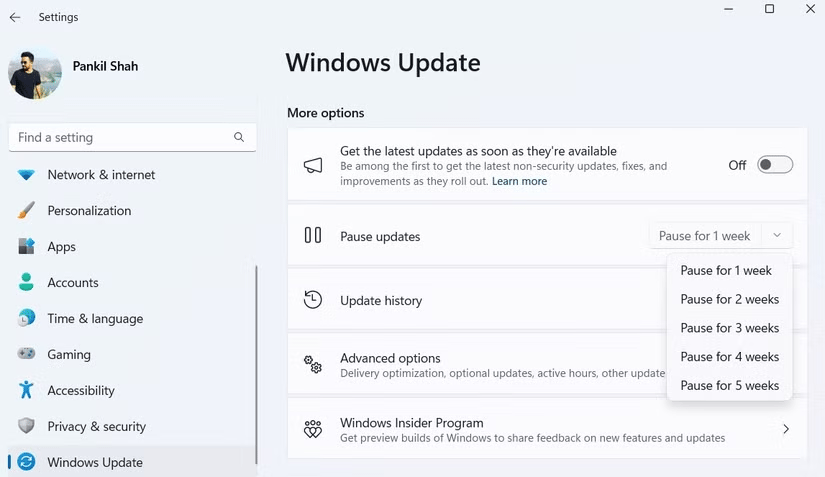
<p style="text-align: justify;">Tuy nhiên, bạn có thể cần tạm thời tắt cập nhật tự động vì KB5051987 là bản cập nhật bảo mật bắt buộc và nó sẽ cố gắng cài đặt lại. Để thực hiện, bạn cần vào&nbsp;<strong>Settings &gt; Windows Update &gt; Pause updates</strong>.</p>

<figure>
<div style="text-align: justify;"><img alt="Tùy chọn Pause updates trong ứng dụng Settings" data-i="2" data-src="https://st.quantrimang.com/photos/image/2025/02/18/ban-va-loi-windows-11-moi-nhat-lam-hong-file-explorer-3.png" data-was-processed="true" height="477" src="https://st.quantrimang.com/photos/image/2025/02/18/ban-va-loi-windows-11-moi-nhat-lam-hong-file-explorer-3.png" width="825" /></div>

<figcaption>
<div style="text-align: justify;">Tùy chọn Pause updates trong ứng dụng Settings</div>
</figcaption>
</figure>

<p style="text-align: justify;">Từ đó, bạn có thể chọn từ 1 đến 5 tuần trong menu drop-down, hy vọng là đủ thời gian để Microsoft phát hành bản cập nhật khác sẽ khắc phục sự cố này.</p>

<div style="text-align: justify;">&nbsp;</div>
		</div>
				<div id="author">
						<p>
				<strong>Nguồn tin:</strong>
				Quantrimang.com:
			</p>
		</div>
	</div>
	<div id="footer" class="clearfix">
		<div id="url">
			<strong>URL của bản tin này: </strong><a href="https://www.nguoicodonvn2008.info/vi/news/savefile/kien-thuc-may-tinh/dung-voi-cap-nhat-may-tinh-ngay-ban-va-loi-windows-11-moi-nhat-lam-hong-file-explorer-9839.html" title="Đừng vội cập nhật máy tính ngay&#33; Bản vá lỗi Windows 11 mới nhất làm hỏng File Explorer">https://www.nguoicodonvn2008.info/vi/news/savefile/kien-thuc-may-tinh/dung-voi-cap-nhat-may-tinh-ngay-ban-va-loi-windows-11-moi-nhat-lam-hong-file-explorer-9839.html</a>

		</div>
		<div class="clear"></div>
		<div class="copyright">
			&copy; .&#x3A; Nguoicodonvn2008.info - Cõi lòng người cô đơn &#x3A;.
		</div>
		<div id="contact">
			<a href="mailto:admin@nguoicodonvn2008.info">admin@nguoicodonvn2008.info</a>
		</div>
	</div>
</div>
        <div id="timeoutsess" class="chromeframe">
            Bạn đã không sử dụng Site, <a onclick="timeoutsesscancel();" href="https://nguoicodonvn2008.info/#">Bấm vào đây để duy trì trạng thái đăng nhập</a>. Thời gian chờ: <span id="secField"> 60 </span> giây
        </div>
        <div id="openidResult" class="nv-alert" style="display:none"></div>
        <div id="openidBt" data-result="" data-redirect=""></div>
		</script>
		<div class="car-top">
  <span><img src="https://nguoicodonvn2008.info/themes/default/images/car.png" alt=""></span>
</div>
<script src="https://nguoicodonvn2008.info/assets/js/jquery/jquery.min.js"></script>
<script>var nv_base_siteurl="/",nv_lang_data="vi",nv_lang_interface="vi",nv_name_variable="nv",nv_fc_variable="op",nv_lang_variable="language",nv_module_name="news",nv_func_name="savefile",nv_is_user=0, nv_my_ofs=-4,nv_my_abbr="EDT",nv_cookie_prefix="nv4c_e856T",nv_check_pass_mstime=1738000,nv_area_admin=0,nv_safemode=0,theme_responsive=0,nv_recaptcha_ver=2,nv_recaptcha_sitekey="",nv_recaptcha_type="image",XSSsanitize=1;</script>
<script src="https://nguoicodonvn2008.info/assets/js/language/vi.js"></script>
<script src="https://nguoicodonvn2008.info/assets/js/DOMPurify/purify3.js"></script>
<script src="https://nguoicodonvn2008.info/assets/js/global.js"></script>
<script src="https://nguoicodonvn2008.info/assets/js/site.js"></script>
<script src="https://nguoicodonvn2008.info/themes/default/js/news.js"></script>
<script src="https://nguoicodonvn2008.info/themes/default/js/main.js"></script>
<script src="https://nguoicodonvn2008.info/themes/default/js/custom.js"></script>
<script type="application/ld+json">
        {
            "@context": "https://schema.org",
            "@type": "Organization",
            "url": "https://nguoicodonvn2008.info",
            "logo": "https://nguoicodonvn2008.info/uploads/angel.gif"
        }
        </script>
<script src="https://nguoicodonvn2008.info/themes/default/js/bootstrap.min.js"></script>
<script type="text/javascript">
var $scrolltop = $('.car-top');
$scrolltop.on('click', function () {
    $('html,body').animate({
        scrollTop: 0
    }, 800);
    $(this).addClass("car-run");
    setTimeout(function(){ $scrolltop.removeClass('car-run');}, 1000);
    return false;
});
$(window).on('scroll', function ()
{ 
    if($(window).scrollTop() >= 200)
    {
        $scrolltop.addClass("show");
        $scrolltop.addClass("car-down");
    }
    else
    {
       $scrolltop.removeClass("show");
       setTimeout(function(){ $scrolltop.removeClass('car-down');}, 300);
    }
});
</script>
</body>
</html>