<!DOCTYPE html>
    <html lang="vi" xmlns="http://www.w3.org/1999/xhtml" prefix="og: http://ogp.me/ns#">
    <head>
<title>Đã có thể chuyển tệp và thư mục từ Dropbox sang Google Drive</title>
<meta name="description" content="Đã có thể chuyển tệp và thư mục từ Dropbox sang Google Drive - Savefile - Tin Tức -...">
<meta name="author" content=".: Nguoicodonvn2008.info - Cõi lòng người cô đơn :.">
<meta name="copyright" content=".: Nguoicodonvn2008.info - Cõi lòng người cô đơn :. [admin@nguoicodonvn2008.info]">
<meta name="robots" content="index, archive, follow, noodp">
<meta name="googlebot" content="index,archive,follow,noodp">
<meta name="msnbot" content="all,index,follow">
<meta name="generator" content="NukeViet v4.5">
<meta http-equiv="Content-Type" content="text/html; charset=utf-8">
<meta property="og:title" content="Đã có thể chuyển tệp và thư mục từ Dropbox sang Google Drive">
<meta property="og:type" content="website">
<meta property="og:description" content="Savefile - Tin Tức - https&#x3A;&#x002F;&#x002F;www.nguoicodonvn2008.info&#x002F;vi&#x002F;news&#x002F;savefile&#x002F;kien-thuc-may-tinh&#x002F;da-co-the-chuyen-tep-va-thu-muc-tu-dropbox-sang-google-drive-11604.html">
<meta property="og:site_name" content=".&#x3A; Nguoicodonvn2008.info - Cõi lòng người cô đơn &#x3A;.">
<meta property="og:url" content="https://www.nguoicodonvn2008.info/vi/news/savefile/kien-thuc-may-tinh/da-co-the-chuyen-tep-va-thu-muc-tu-dropbox-sang-google-drive-11604.html">
<link rel="shortcut icon" href="https://nguoicodonvn2008.info/favicon.ico">
<link rel="canonical" href="https://www.nguoicodonvn2008.info/vi/news/savefile/kien-thuc-may-tinh/da-co-the-chuyen-tep-va-thu-muc-tu-dropbox-sang-google-drive-11604.html">
<link rel="alternate" href="https://nguoicodonvn2008.info/vi/news/rss/" title="Tin Tức" type="application/rss+xml">
<link rel="alternate" href="https://nguoicodonvn2008.info/vi/news/rss/karaoke-dual/" title="Tin Tức - Karaoke Dual" type="application/rss+xml">
<link rel="alternate" href="https://nguoicodonvn2008.info/vi/news/rss/nhac-tre/" title="Tin Tức - Nhạc trẻ" type="application/rss+xml">
<link rel="alternate" href="https://nguoicodonvn2008.info/vi/news/rss/tru-tinh/" title="Tin Tức - Trữ tình" type="application/rss+xml">
<link rel="alternate" href="https://nguoicodonvn2008.info/vi/news/rss/nuoc-ngoai/" title="Tin Tức - Nước ngoài" type="application/rss+xml">
<link rel="alternate" href="https://nguoicodonvn2008.info/vi/news/rss/remix/" title="Tin Tức - Remix" type="application/rss+xml">
<link rel="alternate" href="https://nguoicodonvn2008.info/vi/news/rss/tam-su-tinh-yeu/" title="Tin Tức - Tâm sự tình yêu" type="application/rss+xml">
<link rel="alternate" href="https://nguoicodonvn2008.info/vi/news/rss/tho-suu-tam/" title="Tin Tức - Thơ sưu tầm" type="application/rss+xml">
<link rel="alternate" href="https://nguoicodonvn2008.info/vi/news/rss/cuoc-song/" title="Tin Tức - Cuộc sống" type="application/rss+xml">
<link rel="alternate" href="https://nguoicodonvn2008.info/vi/news/rss/phan-mem/" title="Tin Tức - Phần mềm" type="application/rss+xml">
<link rel="alternate" href="https://nguoicodonvn2008.info/vi/news/rss/kien-thuc-may-tinh/" title="Tin Tức - Kiến thức máy tính" type="application/rss+xml">
<link rel="alternate" href="https://nguoicodonvn2008.info/vi/news/rss/hoc-tap/" title="Tin Tức - Học tập" type="application/rss+xml">
<link rel="alternate" href="https://nguoicodonvn2008.info/vi/news/rss/tai-lieu/" title="Tin Tức - Tài liệu" type="application/rss+xml">
<link rel="alternate" href="https://nguoicodonvn2008.info/vi/news/rss/de-thi/" title="Tin Tức - Đề thi" type="application/rss+xml">
<link rel="preload" as="style" href="https://nguoicodonvn2008.info/assets/css/font-awesome.min.css" type="text/css">
<link rel="preload" as="style" href="https://nguoicodonvn2008.info/themes/default/css/bootstrap.non-responsive.css" type="text/css">
<link rel="preload" as="style" href="https://nguoicodonvn2008.info/themes/default/css/style.css" type="text/css">
<link rel="preload" as="style" href="https://nguoicodonvn2008.info/themes/default/css/style.non-responsive.css" type="text/css">
<link rel="preload" as="style" href="https://nguoicodonvn2008.info/themes/default/css/news.css" type="text/css">
<link rel="preload" as="style" href="https://nguoicodonvn2008.info/themes/default/css/custom.css" type="text/css">
<link rel="preload" as="script" href="https://nguoicodonvn2008.info/assets/js/jquery/jquery.min.js" type="text/javascript">
<link rel="preload" as="script" href="https://nguoicodonvn2008.info/assets/js/language/vi.js" type="text/javascript">
<link rel="preload" as="script" href="https://nguoicodonvn2008.info/assets/js/DOMPurify/purify3.js" type="text/javascript">
<link rel="preload" as="script" href="https://nguoicodonvn2008.info/assets/js/global.js" type="text/javascript">
<link rel="preload" as="script" href="https://nguoicodonvn2008.info/assets/js/site.js" type="text/javascript">
<link rel="preload" as="script" href="https://nguoicodonvn2008.info/themes/default/js/news.js" type="text/javascript">
<link rel="preload" as="script" href="https://nguoicodonvn2008.info/themes/default/js/main.js" type="text/javascript">
<link rel="preload" as="script" href="https://nguoicodonvn2008.info/themes/default/js/custom.js" type="text/javascript">
<link rel="preload" as="script" href="https://nguoicodonvn2008.info/themes/default/js/bootstrap.min.js" type="text/javascript">
<link rel="stylesheet" href="https://nguoicodonvn2008.info/assets/css/font-awesome.min.css">
<link rel="stylesheet" href="https://nguoicodonvn2008.info/themes/default/css/bootstrap.non-responsive.css">
<link rel="stylesheet" href="https://nguoicodonvn2008.info/themes/default/css/style.css">
<link rel="stylesheet" href="https://nguoicodonvn2008.info/themes/default/css/style.non-responsive.css">
<link rel="StyleSheet" href="https://nguoicodonvn2008.info/themes/default/css/news.css">
<link rel="stylesheet" href="https://nguoicodonvn2008.info/themes/default/css/custom.css">
<style type="text/css">
	body{background: #fff;}
</style>
    </head>
    <body>
<div id="print">
	<div id="hd_print">
		<h2 class="pull-left">.&#x3A; Nguoicodonvn2008.info - Cõi lòng người cô đơn &#x3A;.</h2>
		<p class="pull-right"><a title=".&#x3A; Nguoicodonvn2008.info - Cõi lòng người cô đơn &#x3A;." href="https://nguoicodonvn2008.info/">https://nguoicodonvn2008.info</a></p>
	</div>
	<div class="clear"></div>
	<hr />
	<div id="content">
		<h1>Đã có thể chuyển tệp và thư mục từ Dropbox sang Google Drive</h1>
		<ul class="list-inline">
			<li>Thứ năm - 13/11/2025 22:39</li>
			<li class="hidden-print txtrequired"><em class="fa fa-print">&nbsp;</em><a title="In ra" href="javascript:;" onclick="window.print()">In ra</a></li>
			<li class="hidden-print txtrequired"><em class="fa fa-power-off">&nbsp;</em><a title="Đóng cửa sổ này" href="javascript:;" onclick="window.close()">Đóng cửa sổ này</a></li>
		</ul>
		<div class="clear"></div>
		<div id="hometext">
		</div>
				<div class="imghome">
			<img alt="Đã có thể chuyển tệp và thư mục từ Dropbox sang Google Drive" src="https://st.quantrimang.com/photos/image/2025/11/12/chuyen-tep-va-thu-muc-tu-dropbox-sang-google-drive1.jpg" width="460" class="img-thumbnail" />
		</div>
		<div class="clear"></div>
		<div id="bodytext" class="clearfix">
			<p style="text-align: justify;">Google vừa giới thiệu một tính năng mới trong&nbsp;<strong>Dịch vụ Di chuyển Dữ liệu (Data Migration Service)</strong>, cho phép người dùng chuyển trực tiếp tệp, thư mục và cả quyền chia sẻ từ Dropbox sang Google Drive. Đây là bước mở rộng tiếp theo sau khi hãng ra mắt công cụ tương tự dành cho OneDrive cách đây hơn một năm.</p>

<div style="text-align: justify;">&nbsp;</div>

<p style="text-align: justify;">Tuy nhiên, không phải ai cũng có thể tự thực hiện quá trình này. Google yêu cầu việc di chuyển dữ liệu phải được thực hiện bởi quản trị viên cấp cao (Super Administrator) trong bảng điều khiển Google Admin Console. Mỗi lần thao tác, hệ thống chỉ hỗ trợ tối đa 100 người dùng Dropbox và thư mục nhóm, vì vậy các doanh nghiệp lớn sẽ cần chia nhỏ quy trình di chuyển thành nhiều đợt. Google cũng lưu ý rằng đây là một công cụ hỗ trợ năng suất, chứ không phải công cụ phục vụ mục đích pháp lý, nên các công ty vẫn cần tự sao lưu dữ liệu cần thiết cho những trường hợp lưu trữ theo quy định.</p>

<h4 style="text-align: justify;">Cách thực hiện di chuyển dữ liệu:</h4>

<ol>
	<li aria-level="1" style="text-align: justify;"><strong>Truy cập bảng điều khiển Google Admin Console</strong>, đi theo đường dẫn:<br />
	<strong>Menu → Data → Data Import &amp; Export → Data Migration (New)</strong></li>
	<li aria-level="1" style="text-align: justify;"><strong>Kết nối tài khoản Dropbox Business</strong>&nbsp;bằng thông tin đăng nhập của&nbsp;<strong>Quản trị viên nhóm (Team Administrator)</strong>.</li>
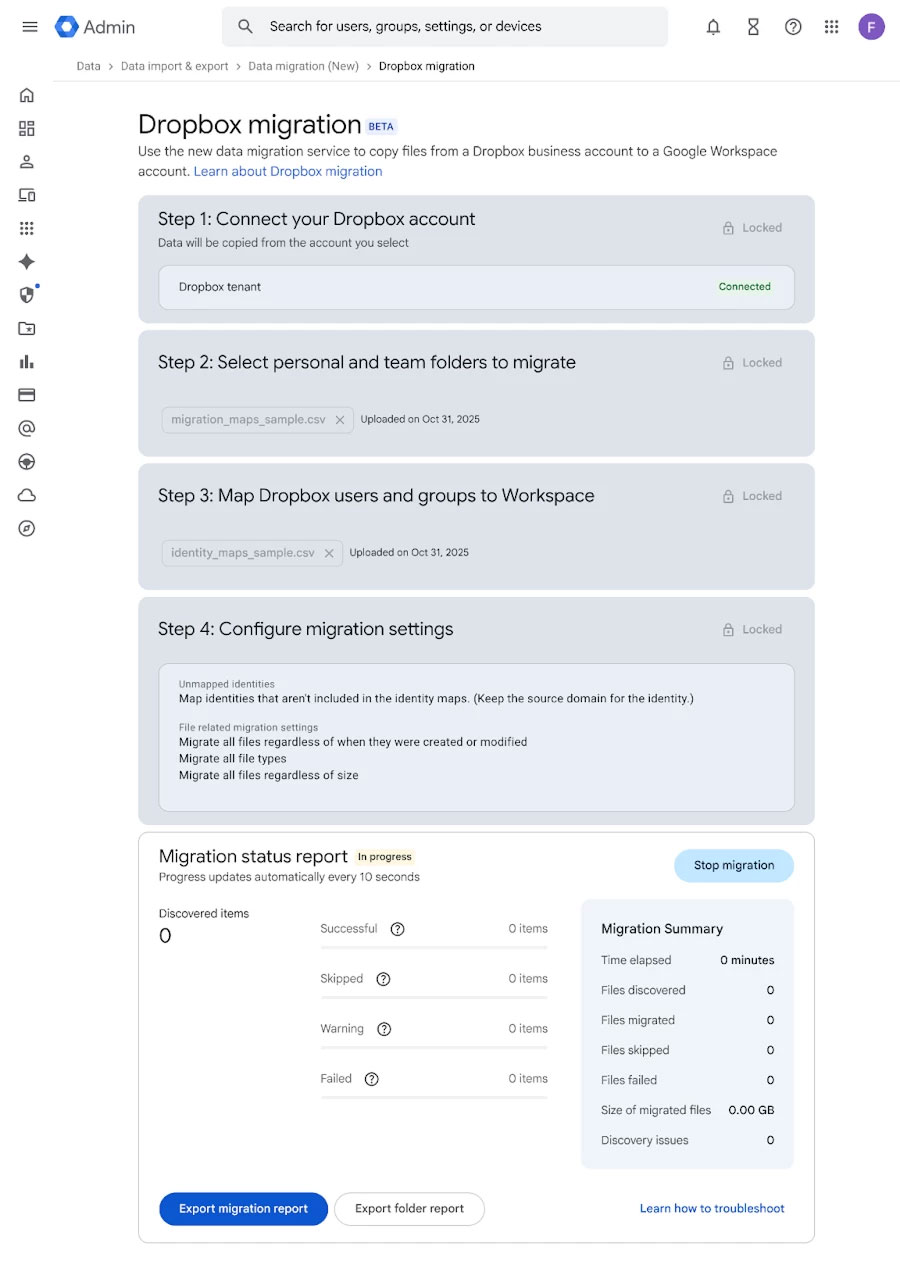
	<li aria-level="1" style="text-align: justify;">Quá trình di chuyển dữ liệu sẽ được thiết lập&nbsp;<strong>thông qua các tệp CSV</strong>:
	<ul>
		<li aria-level="2">Một tệp để xác định&nbsp;<strong>các thư mục Dropbox cần sao chép</strong>.</li>
		<li aria-level="2">Một tệp khác để&nbsp;<strong>ánh xạ (map)</strong>&nbsp;tài khoản người dùng giữa Dropbox và Google Workspace.</li>
	</ul>
	</li>
</ol>

<figure>
<div style="text-align: justify;"><img alt="" data-adbro-processed="true" data-i="0" data-src="https://st.quantrimang.com/photos/image/2025/11/12/chuyen-tep-va-thu-muc-tu-dropbox-sang-google-drive1.jpg" data-was-processed="true" height="1269" src="https://st.quantrimang.com/photos/image/2025/11/12/chuyen-tep-va-thu-muc-tu-dropbox-sang-google-drive1.jpg" width="900" /></div>
</figure>

<p style="text-align: justify;">Phần cốt lõi của quá trình di chuyển nằm ở việc&nbsp;<strong>thiết lập các tệp CSV</strong>&nbsp;để xác định dữ liệu cần chuyển và ánh xạ người dùng. Cụ thể, bạn cần tạo một tệp CSV chỉ rõ thư mục Dropbox nào sẽ được sao chép, cùng với tệp thứ hai để liên kết tài khoản người dùng giữa hai nền tảng. Trong tệp ánh xạ thư mục, cột&nbsp;<code>Source DropboxValue&nbsp;</code>chứa địa chỉ email của người dùng cá nhân hoặc đường dẫn thư mục nhóm, trong khi&nbsp;<code>Target Drive FolderID</code>&nbsp;chỉ định thư mục Drive đích. Cột&nbsp;<code>Target GUser</code>&nbsp;sẽ điền địa chỉ email Workspace để xác định người sở hữu dữ liệu sau khi di chuyển. Tệp CSV ánh xạ danh tính thì đơn giản hơn, chỉ cần kết nối email Dropbox với email Google Workspace tương ứng.</p>

<p style="text-align: justify;">Tính năng mới này hiện được triển khai cho nhiều gói&nbsp;<strong>Google Workspace</strong>, bao gồm Business Starter, Standard, Plus; Enterprise Starter, Standard, Plus; Essentials Starter, Enterprise Essentials, Enterprise Essentials Plus; Education Fundamentals, Standard, Plus; và Nonprofits. Google cho biết quá trình cập nhật có thể mất tới 15 ngày kể từ khi công bố để xuất hiện trong toàn bộ bảng điều khiển của quản trị viên.</p>

<p style="text-align: justify;">Với việc bổ sung hỗ trợ cho Dropbox, Google đang hoàn thiện dần hệ sinh thái quản lý dữ liệu của mình, giúp người dùng doanh nghiệp dễ dàng hợp nhất và vận hành trên Drive mà không cần dùng công cụ bên thứ ba.</p>

<div style="text-align: justify;">&nbsp;</div>
		</div>
				<div id="author">
						<p>
				<strong>Nguồn tin:</strong>
				Quantrimang.com:
			</p>
		</div>
	</div>
	<div id="footer" class="clearfix">
		<div id="url">
			<strong>URL của bản tin này: </strong><a href="https://www.nguoicodonvn2008.info/vi/news/savefile/kien-thuc-may-tinh/da-co-the-chuyen-tep-va-thu-muc-tu-dropbox-sang-google-drive-11604.html" title="Đã có thể chuyển tệp và thư mục từ Dropbox sang Google Drive">https://www.nguoicodonvn2008.info/vi/news/savefile/kien-thuc-may-tinh/da-co-the-chuyen-tep-va-thu-muc-tu-dropbox-sang-google-drive-11604.html</a>

		</div>
		<div class="clear"></div>
		<div class="copyright">
			&copy; .&#x3A; Nguoicodonvn2008.info - Cõi lòng người cô đơn &#x3A;.
		</div>
		<div id="contact">
			<a href="mailto:admin@nguoicodonvn2008.info">admin@nguoicodonvn2008.info</a>
		</div>
	</div>
</div>
        <div id="timeoutsess" class="chromeframe">
            Bạn đã không sử dụng Site, <a onclick="timeoutsesscancel();" href="https://nguoicodonvn2008.info/#">Bấm vào đây để duy trì trạng thái đăng nhập</a>. Thời gian chờ: <span id="secField"> 60 </span> giây
        </div>
        <div id="openidResult" class="nv-alert" style="display:none"></div>
        <div id="openidBt" data-result="" data-redirect=""></div>
		</script>
		<div class="car-top">
  <span><img src="https://nguoicodonvn2008.info/themes/default/images/car.png" alt=""></span>
</div>
<script src="https://nguoicodonvn2008.info/assets/js/jquery/jquery.min.js"></script>
<script>var nv_base_siteurl="/",nv_lang_data="vi",nv_lang_interface="vi",nv_name_variable="nv",nv_fc_variable="op",nv_lang_variable="language",nv_module_name="news",nv_func_name="savefile",nv_is_user=0, nv_my_ofs=-4,nv_my_abbr="EDT",nv_cookie_prefix="nv4c_e856T",nv_check_pass_mstime=1738000,nv_area_admin=0,nv_safemode=0,theme_responsive=0,nv_recaptcha_ver=2,nv_recaptcha_sitekey="",nv_recaptcha_type="image",XSSsanitize=1;</script>
<script src="https://nguoicodonvn2008.info/assets/js/language/vi.js"></script>
<script src="https://nguoicodonvn2008.info/assets/js/DOMPurify/purify3.js"></script>
<script src="https://nguoicodonvn2008.info/assets/js/global.js"></script>
<script src="https://nguoicodonvn2008.info/assets/js/site.js"></script>
<script src="https://nguoicodonvn2008.info/themes/default/js/news.js"></script>
<script src="https://nguoicodonvn2008.info/themes/default/js/main.js"></script>
<script src="https://nguoicodonvn2008.info/themes/default/js/custom.js"></script>
<script type="application/ld+json">
        {
            "@context": "https://schema.org",
            "@type": "Organization",
            "url": "https://nguoicodonvn2008.info",
            "logo": "https://nguoicodonvn2008.info/uploads/angel.gif"
        }
        </script>
<script src="https://nguoicodonvn2008.info/themes/default/js/bootstrap.min.js"></script>
<script type="text/javascript">
var $scrolltop = $('.car-top');
$scrolltop.on('click', function () {
    $('html,body').animate({
        scrollTop: 0
    }, 800);
    $(this).addClass("car-run");
    setTimeout(function(){ $scrolltop.removeClass('car-run');}, 1000);
    return false;
});
$(window).on('scroll', function ()
{ 
    if($(window).scrollTop() >= 200)
    {
        $scrolltop.addClass("show");
        $scrolltop.addClass("car-down");
    }
    else
    {
       $scrolltop.removeClass("show");
       setTimeout(function(){ $scrolltop.removeClass('car-down');}, 300);
    }
});
</script>
</body>
</html>