<!DOCTYPE html>
    <html lang="vi" xmlns="http://www.w3.org/1999/xhtml" prefix="og: http://ogp.me/ns#">
    <head>
<title>Control Panel trên Mac nằm ở đâu?</title>
<meta name="description" content="Control Panel trên Mac nằm ở đâu? - Savefile - Tin Tức - https&#x3A;&#x002F;&#x002F;www.nguoicodonvn2008.info&#x002F;vi&#x002F;news&#x002F;savefile&#x002F;kien-thuc-may-tinh&#x002F;control-panel-tren-mac-nam-o-dau-2531.html">
<meta name="author" content=".: Nguoicodonvn2008.info - Cõi lòng người cô đơn :.">
<meta name="copyright" content=".: Nguoicodonvn2008.info - Cõi lòng người cô đơn :. [admin@nguoicodonvn2008.info]">
<meta name="robots" content="index, archive, follow, noodp">
<meta name="googlebot" content="index,archive,follow,noodp">
<meta name="msnbot" content="all,index,follow">
<meta name="generator" content="NukeViet v4.5">
<meta http-equiv="Content-Type" content="text/html; charset=utf-8">
<meta property="og:title" content="Control Panel trên Mac nằm ở đâu?">
<meta property="og:type" content="website">
<meta property="og:description" content="Savefile - Tin Tức - https&#x3A;&#x002F;&#x002F;www.nguoicodonvn2008.info&#x002F;vi&#x002F;news&#x002F;savefile&#x002F;kien-thuc-may-tinh&#x002F;control-panel-tren-mac-nam-o-dau-2531.html">
<meta property="og:site_name" content=".&#x3A; Nguoicodonvn2008.info - Cõi lòng người cô đơn &#x3A;.">
<meta property="og:url" content="https://www.nguoicodonvn2008.info/vi/news/savefile/kien-thuc-may-tinh/control-panel-tren-mac-nam-o-dau-2531.html">
<link rel="shortcut icon" href="https://nguoicodonvn2008.info/favicon.ico">
<link rel="canonical" href="https://www.nguoicodonvn2008.info/vi/news/savefile/kien-thuc-may-tinh/control-panel-tren-mac-nam-o-dau-2531.html">
<link rel="alternate" href="https://nguoicodonvn2008.info/vi/news/rss/" title="Tin Tức" type="application/rss+xml">
<link rel="alternate" href="https://nguoicodonvn2008.info/vi/news/rss/karaoke-dual/" title="Tin Tức - Karaoke Dual" type="application/rss+xml">
<link rel="alternate" href="https://nguoicodonvn2008.info/vi/news/rss/nhac-tre/" title="Tin Tức - Nhạc trẻ" type="application/rss+xml">
<link rel="alternate" href="https://nguoicodonvn2008.info/vi/news/rss/tru-tinh/" title="Tin Tức - Trữ tình" type="application/rss+xml">
<link rel="alternate" href="https://nguoicodonvn2008.info/vi/news/rss/nuoc-ngoai/" title="Tin Tức - Nước ngoài" type="application/rss+xml">
<link rel="alternate" href="https://nguoicodonvn2008.info/vi/news/rss/remix/" title="Tin Tức - Remix" type="application/rss+xml">
<link rel="alternate" href="https://nguoicodonvn2008.info/vi/news/rss/tam-su-tinh-yeu/" title="Tin Tức - Tâm sự tình yêu" type="application/rss+xml">
<link rel="alternate" href="https://nguoicodonvn2008.info/vi/news/rss/tho-suu-tam/" title="Tin Tức - Thơ sưu tầm" type="application/rss+xml">
<link rel="alternate" href="https://nguoicodonvn2008.info/vi/news/rss/cuoc-song/" title="Tin Tức - Cuộc sống" type="application/rss+xml">
<link rel="alternate" href="https://nguoicodonvn2008.info/vi/news/rss/phan-mem/" title="Tin Tức - Phần mềm" type="application/rss+xml">
<link rel="alternate" href="https://nguoicodonvn2008.info/vi/news/rss/kien-thuc-may-tinh/" title="Tin Tức - Kiến thức máy tính" type="application/rss+xml">
<link rel="alternate" href="https://nguoicodonvn2008.info/vi/news/rss/hoc-tap/" title="Tin Tức - Học tập" type="application/rss+xml">
<link rel="alternate" href="https://nguoicodonvn2008.info/vi/news/rss/tai-lieu/" title="Tin Tức - Tài liệu" type="application/rss+xml">
<link rel="alternate" href="https://nguoicodonvn2008.info/vi/news/rss/de-thi/" title="Tin Tức - Đề thi" type="application/rss+xml">
<link rel="preload" as="style" href="https://nguoicodonvn2008.info/assets/css/font-awesome.min.css" type="text/css">
<link rel="preload" as="style" href="https://nguoicodonvn2008.info/themes/default/css/bootstrap.non-responsive.css" type="text/css">
<link rel="preload" as="style" href="https://nguoicodonvn2008.info/themes/default/css/style.css" type="text/css">
<link rel="preload" as="style" href="https://nguoicodonvn2008.info/themes/default/css/style.non-responsive.css" type="text/css">
<link rel="preload" as="style" href="https://nguoicodonvn2008.info/themes/default/css/news.css" type="text/css">
<link rel="preload" as="style" href="https://nguoicodonvn2008.info/themes/default/css/custom.css" type="text/css">
<link rel="preload" as="script" href="https://nguoicodonvn2008.info/assets/js/jquery/jquery.min.js" type="text/javascript">
<link rel="preload" as="script" href="https://nguoicodonvn2008.info/assets/js/language/vi.js" type="text/javascript">
<link rel="preload" as="script" href="https://nguoicodonvn2008.info/assets/js/DOMPurify/purify3.js" type="text/javascript">
<link rel="preload" as="script" href="https://nguoicodonvn2008.info/assets/js/global.js" type="text/javascript">
<link rel="preload" as="script" href="https://nguoicodonvn2008.info/assets/js/site.js" type="text/javascript">
<link rel="preload" as="script" href="https://nguoicodonvn2008.info/themes/default/js/news.js" type="text/javascript">
<link rel="preload" as="script" href="https://nguoicodonvn2008.info/themes/default/js/main.js" type="text/javascript">
<link rel="preload" as="script" href="https://nguoicodonvn2008.info/themes/default/js/custom.js" type="text/javascript">
<link rel="preload" as="script" href="https://nguoicodonvn2008.info/themes/default/js/bootstrap.min.js" type="text/javascript">
<link rel="stylesheet" href="https://nguoicodonvn2008.info/assets/css/font-awesome.min.css">
<link rel="stylesheet" href="https://nguoicodonvn2008.info/themes/default/css/bootstrap.non-responsive.css">
<link rel="stylesheet" href="https://nguoicodonvn2008.info/themes/default/css/style.css">
<link rel="stylesheet" href="https://nguoicodonvn2008.info/themes/default/css/style.non-responsive.css">
<link rel="StyleSheet" href="https://nguoicodonvn2008.info/themes/default/css/news.css">
<link rel="stylesheet" href="https://nguoicodonvn2008.info/themes/default/css/custom.css">
<style type="text/css">
	body{background: #fff;}
</style>
    </head>
    <body>
<div id="print">
	<div id="hd_print">
		<h2 class="pull-left">.&#x3A; Nguoicodonvn2008.info - Cõi lòng người cô đơn &#x3A;.</h2>
		<p class="pull-right"><a title=".&#x3A; Nguoicodonvn2008.info - Cõi lòng người cô đơn &#x3A;." href="https://nguoicodonvn2008.info/">https://nguoicodonvn2008.info</a></p>
	</div>
	<div class="clear"></div>
	<hr />
	<div id="content">
		<h1>Control Panel trên Mac nằm ở đâu?</h1>
		<ul class="list-inline">
			<li>Thứ bảy - 15/08/2020 00:45</li>
			<li class="hidden-print txtrequired"><em class="fa fa-print">&nbsp;</em><a title="In ra" href="javascript:;" onclick="window.print()">In ra</a></li>
			<li class="hidden-print txtrequired"><em class="fa fa-power-off">&nbsp;</em><a title="Đóng cửa sổ này" href="javascript:;" onclick="window.close()">Đóng cửa sổ này</a></li>
		</ul>
		<div class="clear"></div>
		<div id="hometext">
		</div>
				<div class="imghome">
			<img alt="Control Panel trên Mac nằm ở đâu?" src="https://st.quantrimang.com/photos/image/2020/08/15/system-preferences-tren-mac-2.jpg" width="460" class="img-thumbnail" />
		</div>
		<div class="clear"></div>
		<div id="bodytext" class="clearfix">
			<p style="text-align: justify;">Nếu&nbsp;mới chuyển sang sử dụng Mac&nbsp;và muốn thay đổi một vài cài đặt hệ thống, bạn có thể loay hoay đi tìm một công cụ tương đương với&nbsp;Control Panel&nbsp;trên Mac. Công cụ đó được gọi là System Preferences, và dưới đây là cách sử dụng nó.</p>

<h2 style="text-align: justify;">System Preferences chính là Control Panel trên Mac</h2>

<p style="text-align: justify;">Trong khi Windows gọi các cài đặt hệ thống của nó là “settings” thì macOS sử dụng một từ khác đó là “preferences”. Trước khi bạn muốn thay đổi bất kỳ cài đặt nào, bạn phải mở ứng dụng System Preferences trước.</p>

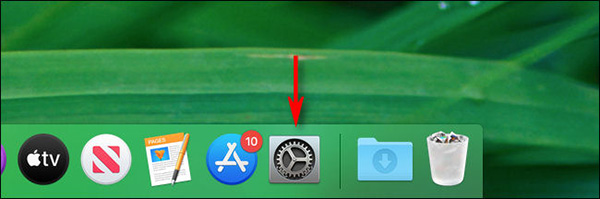
<p style="text-align: justify;">Trên những desktop Mac và MacBook đời mới, System Preferences sẽ được đặt mặc định ngay ngoài thanh Dock. Nó có màu xám, biểu tượng là bánh răng cưa, bấm vào đó để mở System Preferences.</p>

<figure>
<div style="text-align: justify;"><img alt="Biểu tượng System Preferences trên Dock " data-i="0" data-src="https://st.quantrimang.com/photos/image/2020/08/15/system-preferences-tren-mac-1.jpg" data-was-processed="true" height="199" src="https://st.quantrimang.com/photos/image/2020/08/15/system-preferences-tren-mac-1.jpg" width="600" /></div>

<figcaption>
<div style="text-align: justify;">Biểu tượng System Preferences trên Dock</div>
</figcaption>
</figure>

<div style="text-align: justify;">&nbsp;</div>

<h2 style="text-align: justify;">Cách khác để mở System Preferences</h2>

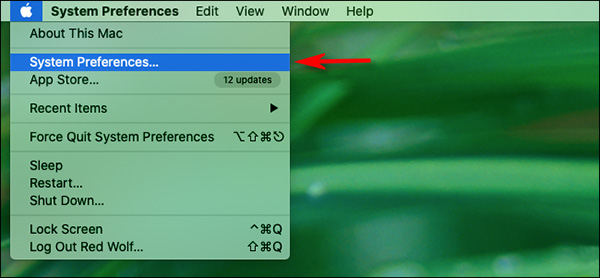
<p style="text-align: justify;">Nếu biểu tượng System Preferences không ở trên thanh Dock, hoặc bạn muốn truy cập vào ứng dụng này nhanh hơn, hãy bấm vào biểu tượng Apple ở góc trái màn hình và chọn System Preferences… từ danh sách.</p>

<figure>
<div style="text-align: justify;"><img alt="Truy cập từ menu Apple " data-i="1" data-src="https://st.quantrimang.com/photos/image/2020/08/15/system-preferences-tren-mac-2.jpg" data-was-processed="true" height="278" src="https://st.quantrimang.com/photos/image/2020/08/15/system-preferences-tren-mac-2.jpg" width="600" /></div>

<figcaption>
<div style="text-align: justify;">Truy cập từ menu Apple</div>
</figcaption>
</figure>

<p style="text-align: justify;">Một cách nữa đó là sử dụng tìm kiếm Spotlight hoặc Launchpad. Với cả hai phương pháp này, bạn đều phải gõ system preferences sau đó ấn Enter để mở ứng dụng.</p>

<h2 style="text-align: justify;">Giới thiệu nhanh về System Preferences</h2>

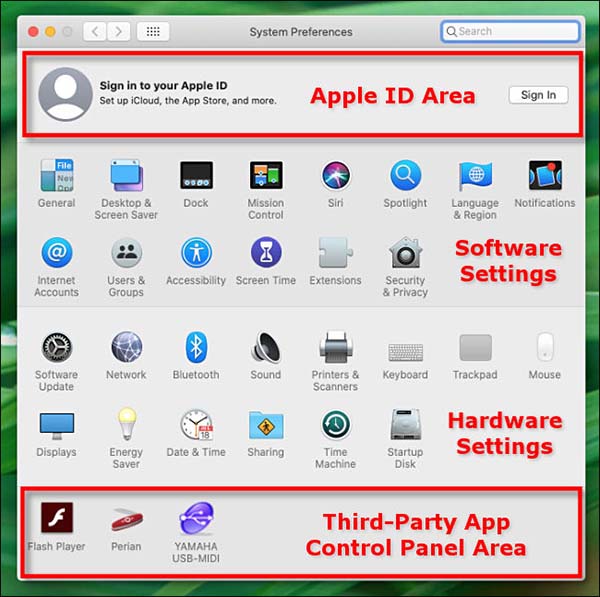
<p style="text-align: justify;">Sau khi mở System Preferences, bạn sẽ thấy một cửa sổ rất nhiều biểu tượng được chia làm bốn phần.</p>

<figure>
<div style="text-align: justify;"><img alt="Bốn phần trong menu System Preferences" data-i="2" data-src="https://st.quantrimang.com/photos/image/2020/08/15/system-preferences-tren-mac-3.jpg" data-was-processed="true" height="597" src="https://st.quantrimang.com/photos/image/2020/08/15/system-preferences-tren-mac-3.jpg" width="600" /></div>

<figcaption>
<div style="text-align: justify;">Bốn phần trong menu System Preferences</div>
</figcaption>
</figure>

<p style="text-align: justify;">Đầu tiên, chúng ta có khu vực tài khoản Apple. Nếu bạn đã đăng nhập vào tài khoản Apple, bấm vào đó để thay đổi các thông tin cá nhân trên tài khoản, cài đặt iCloud, phương thức thanh toán App Store,...</p>

<p style="text-align: justify;">Ngay bên dưới là các cài đặt điều chỉnh phần mềm macOS cơ bản, bao gồm Dock, hình nền và thông báo. Những cài đặt này sẽ thể hiện hệ điều hành làm việc như thế nào.</p>

<p style="text-align: justify;">Tiếp theo chúng ta có những cài đặt phần cứng của Mac, có âm thanh input và output, chuột hoặc trackpad, Bluetooth, màn hình.</p>

<p style="text-align: justify;">Cuối cùng, bạn sẽ thấy một vài biểu tượng của các ứng dụng bên ngoài, ví dụ như Adobe Flash. Mọi biểu tượng ở đây (nếu có) được cài đặt vào và không phải là ứng dụng chính thức của macOS.</p>

<div style="text-align: justify;">&nbsp;</div>

<h2 style="text-align: justify;">Điều chỉnh System Preferences</h2>

<p style="text-align: justify;">Sử dụng System Preferences rất dễ, chỉ cần tìm phần cài đặt muốn thay đổi và bấm vào đó.</p>

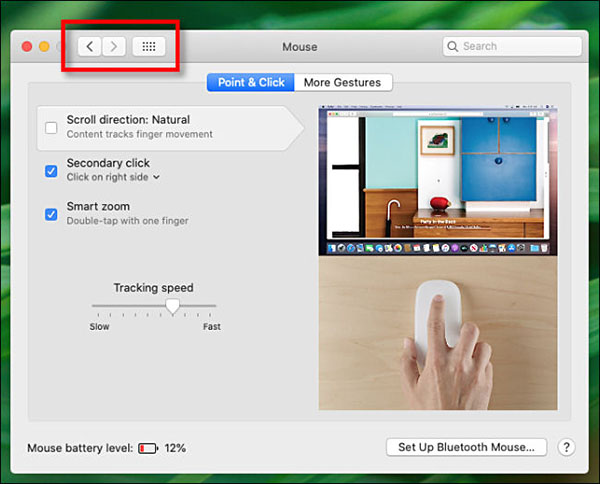
<p style="text-align: justify;">Thông thường, bạn có thể dùng hai nút mũi tên trên đầu cửa sổ System Preferences để chuyển qua lại giữa các tab trong ứng dụng. Bạn cũng có thể bấm vào nút trở về menu chính (nút có 12 chấm đen) để xem toàn bộ menu Preferences một lần nữa.</p>

<figure>
<div style="text-align: justify;"><img alt="Các nút điều chỉnh chính trên System Preferences" data-i="3" data-src="https://st.quantrimang.com/photos/image/2020/08/15/system-preferences-tren-mac-4.jpg" data-was-processed="true" height="484" src="https://st.quantrimang.com/photos/image/2020/08/15/system-preferences-tren-mac-4.jpg" width="600" /></div>

<figcaption>
<div style="text-align: justify;">Các nút điều chỉnh chính trên System Preferences</div>
</figcaption>
</figure>

<p style="text-align: justify;">Nếu không tìm thấy mục cài đặt mình muốn sửa, bạn có thể sử dụng thanh “Search” ở góc phải cửa sổ để tìm kiếm trong System Preferences.</p>

<figure>
<div style="text-align: justify;"><img alt="Thanh tìm kiếm " data-i="4" data-src="https://st.quantrimang.com/photos/image/2020/08/15/system-preferences-tren-mac-5.jpg" data-was-processed="true" height="81" src="https://st.quantrimang.com/photos/image/2020/08/15/system-preferences-tren-mac-5.jpg" width="600" /></div>

<figcaption>
<div style="text-align: justify;">Thanh tìm kiếm</div>
</figcaption>
</figure>

<p style="text-align: justify;">Bấm vào kết quả gần giống nhất với thứ bạn đang tìm kiếm và bạn sẽ được đưa thẳng đến trang cài đặt tính năng ấy.</p>
		</div>
				<div id="author">
						<p>
				<strong>Nguồn tin:</strong>
				Quantrimang.com
			</p>
		</div>
	</div>
	<div id="footer" class="clearfix">
		<div id="url">
			<strong>URL của bản tin này: </strong><a href="https://www.nguoicodonvn2008.info/vi/news/savefile/kien-thuc-may-tinh/control-panel-tren-mac-nam-o-dau-2531.html" title="Control Panel trên Mac nằm ở đâu?">https://www.nguoicodonvn2008.info/vi/news/savefile/kien-thuc-may-tinh/control-panel-tren-mac-nam-o-dau-2531.html</a>

		</div>
		<div class="clear"></div>
		<div class="copyright">
			&copy; .&#x3A; Nguoicodonvn2008.info - Cõi lòng người cô đơn &#x3A;.
		</div>
		<div id="contact">
			<a href="mailto:admin@nguoicodonvn2008.info">admin@nguoicodonvn2008.info</a>
		</div>
	</div>
</div>
        <div id="timeoutsess" class="chromeframe">
            Bạn đã không sử dụng Site, <a onclick="timeoutsesscancel();" href="https://nguoicodonvn2008.info/#">Bấm vào đây để duy trì trạng thái đăng nhập</a>. Thời gian chờ: <span id="secField"> 60 </span> giây
        </div>
        <div id="openidResult" class="nv-alert" style="display:none"></div>
        <div id="openidBt" data-result="" data-redirect=""></div>
		</script>
		<div class="car-top">
  <span><img src="https://nguoicodonvn2008.info/themes/default/images/car.png" alt=""></span>
</div>
<script src="https://nguoicodonvn2008.info/assets/js/jquery/jquery.min.js"></script>
<script>var nv_base_siteurl="/",nv_lang_data="vi",nv_lang_interface="vi",nv_name_variable="nv",nv_fc_variable="op",nv_lang_variable="language",nv_module_name="news",nv_func_name="savefile",nv_is_user=0, nv_my_ofs=-4,nv_my_abbr="EDT",nv_cookie_prefix="nv4c_e856T",nv_check_pass_mstime=1738000,nv_area_admin=0,nv_safemode=0,theme_responsive=0,nv_recaptcha_ver=2,nv_recaptcha_sitekey="",nv_recaptcha_type="image",XSSsanitize=1;</script>
<script src="https://nguoicodonvn2008.info/assets/js/language/vi.js"></script>
<script src="https://nguoicodonvn2008.info/assets/js/DOMPurify/purify3.js"></script>
<script src="https://nguoicodonvn2008.info/assets/js/global.js"></script>
<script src="https://nguoicodonvn2008.info/assets/js/site.js"></script>
<script src="https://nguoicodonvn2008.info/themes/default/js/news.js"></script>
<script src="https://nguoicodonvn2008.info/themes/default/js/main.js"></script>
<script src="https://nguoicodonvn2008.info/themes/default/js/custom.js"></script>
<script type="application/ld+json">
        {
            "@context": "https://schema.org",
            "@type": "Organization",
            "url": "https://nguoicodonvn2008.info",
            "logo": "https://nguoicodonvn2008.info/uploads/angel.gif"
        }
        </script>
<script src="https://nguoicodonvn2008.info/themes/default/js/bootstrap.min.js"></script>
<script type="text/javascript">
var $scrolltop = $('.car-top');
$scrolltop.on('click', function () {
    $('html,body').animate({
        scrollTop: 0
    }, 800);
    $(this).addClass("car-run");
    setTimeout(function(){ $scrolltop.removeClass('car-run');}, 1000);
    return false;
});
$(window).on('scroll', function ()
{ 
    if($(window).scrollTop() >= 200)
    {
        $scrolltop.addClass("show");
        $scrolltop.addClass("car-down");
    }
    else
    {
       $scrolltop.removeClass("show");
       setTimeout(function(){ $scrolltop.removeClass('car-down');}, 300);
    }
});
</script>
</body>
</html>