<!DOCTYPE html>
    <html lang="vi" xmlns="http://www.w3.org/1999/xhtml" prefix="og: http://ogp.me/ns#">
    <head>
<title>Command Prompt &#40;cmd&#41; và PowerShell khác nhau như thế nào?</title>
<meta name="description" content="Command Prompt &#40;cmd&#41; và PowerShell khác nhau như thế nào? - Savefile - Tin Tức -...">
<meta name="author" content=".: Nguoicodonvn2008.info - Cõi lòng người cô đơn :.">
<meta name="copyright" content=".: Nguoicodonvn2008.info - Cõi lòng người cô đơn :. [admin@nguoicodonvn2008.info]">
<meta name="robots" content="index, archive, follow, noodp">
<meta name="googlebot" content="index,archive,follow,noodp">
<meta name="msnbot" content="all,index,follow">
<meta name="generator" content="NukeViet v4.5">
<meta http-equiv="Content-Type" content="text/html; charset=utf-8">
<meta property="og:title" content="Command Prompt &#40;cmd&#41; và PowerShell khác nhau như thế nào?">
<meta property="og:type" content="website">
<meta property="og:description" content="Savefile - Tin Tức - https&#x3A;&#x002F;&#x002F;www.nguoicodonvn2008.info&#x002F;vi&#x002F;news&#x002F;savefile&#x002F;kien-thuc-may-tinh&#x002F;command-prompt-cmd-va-powershell-khac-nhau-nhu-the-nao-7860.html">
<meta property="og:site_name" content=".&#x3A; Nguoicodonvn2008.info - Cõi lòng người cô đơn &#x3A;.">
<meta property="og:url" content="https://www.nguoicodonvn2008.info/vi/news/savefile/kien-thuc-may-tinh/command-prompt-cmd-va-powershell-khac-nhau-nhu-the-nao-7860.html">
<link rel="shortcut icon" href="https://nguoicodonvn2008.info/favicon.ico">
<link rel="canonical" href="https://www.nguoicodonvn2008.info/vi/news/savefile/kien-thuc-may-tinh/command-prompt-cmd-va-powershell-khac-nhau-nhu-the-nao-7860.html">
<link rel="alternate" href="https://nguoicodonvn2008.info/vi/news/rss/" title="Tin Tức" type="application/rss+xml">
<link rel="alternate" href="https://nguoicodonvn2008.info/vi/news/rss/karaoke-dual/" title="Tin Tức - Karaoke Dual" type="application/rss+xml">
<link rel="alternate" href="https://nguoicodonvn2008.info/vi/news/rss/nhac-tre/" title="Tin Tức - Nhạc trẻ" type="application/rss+xml">
<link rel="alternate" href="https://nguoicodonvn2008.info/vi/news/rss/tru-tinh/" title="Tin Tức - Trữ tình" type="application/rss+xml">
<link rel="alternate" href="https://nguoicodonvn2008.info/vi/news/rss/nuoc-ngoai/" title="Tin Tức - Nước ngoài" type="application/rss+xml">
<link rel="alternate" href="https://nguoicodonvn2008.info/vi/news/rss/remix/" title="Tin Tức - Remix" type="application/rss+xml">
<link rel="alternate" href="https://nguoicodonvn2008.info/vi/news/rss/tam-su-tinh-yeu/" title="Tin Tức - Tâm sự tình yêu" type="application/rss+xml">
<link rel="alternate" href="https://nguoicodonvn2008.info/vi/news/rss/tho-suu-tam/" title="Tin Tức - Thơ sưu tầm" type="application/rss+xml">
<link rel="alternate" href="https://nguoicodonvn2008.info/vi/news/rss/cuoc-song/" title="Tin Tức - Cuộc sống" type="application/rss+xml">
<link rel="alternate" href="https://nguoicodonvn2008.info/vi/news/rss/phan-mem/" title="Tin Tức - Phần mềm" type="application/rss+xml">
<link rel="alternate" href="https://nguoicodonvn2008.info/vi/news/rss/kien-thuc-may-tinh/" title="Tin Tức - Kiến thức máy tính" type="application/rss+xml">
<link rel="alternate" href="https://nguoicodonvn2008.info/vi/news/rss/hoc-tap/" title="Tin Tức - Học tập" type="application/rss+xml">
<link rel="alternate" href="https://nguoicodonvn2008.info/vi/news/rss/tai-lieu/" title="Tin Tức - Tài liệu" type="application/rss+xml">
<link rel="alternate" href="https://nguoicodonvn2008.info/vi/news/rss/de-thi/" title="Tin Tức - Đề thi" type="application/rss+xml">
<link rel="preload" as="style" href="https://nguoicodonvn2008.info/assets/css/font-awesome.min.css" type="text/css">
<link rel="preload" as="style" href="https://nguoicodonvn2008.info/themes/default/css/bootstrap.non-responsive.css" type="text/css">
<link rel="preload" as="style" href="https://nguoicodonvn2008.info/themes/default/css/style.css" type="text/css">
<link rel="preload" as="style" href="https://nguoicodonvn2008.info/themes/default/css/style.non-responsive.css" type="text/css">
<link rel="preload" as="style" href="https://nguoicodonvn2008.info/themes/default/css/news.css" type="text/css">
<link rel="preload" as="style" href="https://nguoicodonvn2008.info/themes/default/css/custom.css" type="text/css">
<link rel="preload" as="script" href="https://nguoicodonvn2008.info/assets/js/jquery/jquery.min.js" type="text/javascript">
<link rel="preload" as="script" href="https://nguoicodonvn2008.info/assets/js/language/vi.js" type="text/javascript">
<link rel="preload" as="script" href="https://nguoicodonvn2008.info/assets/js/DOMPurify/purify3.js" type="text/javascript">
<link rel="preload" as="script" href="https://nguoicodonvn2008.info/assets/js/global.js" type="text/javascript">
<link rel="preload" as="script" href="https://nguoicodonvn2008.info/assets/js/site.js" type="text/javascript">
<link rel="preload" as="script" href="https://nguoicodonvn2008.info/themes/default/js/news.js" type="text/javascript">
<link rel="preload" as="script" href="https://nguoicodonvn2008.info/themes/default/js/main.js" type="text/javascript">
<link rel="preload" as="script" href="https://nguoicodonvn2008.info/themes/default/js/custom.js" type="text/javascript">
<link rel="preload" as="script" href="https://nguoicodonvn2008.info/themes/default/js/bootstrap.min.js" type="text/javascript">
<link rel="stylesheet" href="https://nguoicodonvn2008.info/assets/css/font-awesome.min.css">
<link rel="stylesheet" href="https://nguoicodonvn2008.info/themes/default/css/bootstrap.non-responsive.css">
<link rel="stylesheet" href="https://nguoicodonvn2008.info/themes/default/css/style.css">
<link rel="stylesheet" href="https://nguoicodonvn2008.info/themes/default/css/style.non-responsive.css">
<link rel="StyleSheet" href="https://nguoicodonvn2008.info/themes/default/css/news.css">
<link rel="stylesheet" href="https://nguoicodonvn2008.info/themes/default/css/custom.css">
<style type="text/css">
	body{background: #fff;}
</style>
    </head>
    <body>
<div id="print">
	<div id="hd_print">
		<h2 class="pull-left">.&#x3A; Nguoicodonvn2008.info - Cõi lòng người cô đơn &#x3A;.</h2>
		<p class="pull-right"><a title=".&#x3A; Nguoicodonvn2008.info - Cõi lòng người cô đơn &#x3A;." href="https://nguoicodonvn2008.info/">https://nguoicodonvn2008.info</a></p>
	</div>
	<div class="clear"></div>
	<hr />
	<div id="content">
		<h1>Command Prompt &#40;cmd&#41; và PowerShell khác nhau như thế nào?</h1>
		<ul class="list-inline">
			<li>Thứ hai - 18/12/2023 08:59</li>
			<li class="hidden-print txtrequired"><em class="fa fa-print">&nbsp;</em><a title="In ra" href="javascript:;" onclick="window.print()">In ra</a></li>
			<li class="hidden-print txtrequired"><em class="fa fa-power-off">&nbsp;</em><a title="Đóng cửa sổ này" href="javascript:;" onclick="window.close()">Đóng cửa sổ này</a></li>
		</ul>
		<div class="clear"></div>
		<div id="hometext">
		</div>
				<div class="imghome">
			<img alt="Command Prompt &#40;cmd&#41; và PowerShell khác nhau như thế nào?" src="https://st.quantrimang.com/photos/image/2023/12/18/command-prompt-cmd-va-powershell-1.jpg" width="460" class="img-thumbnail" />
		</div>
		<div class="clear"></div>
		<div id="bodytext" class="clearfix">
			<p style="text-align: justify;">Nếu đang sử dụng&nbsp;Windows 11&nbsp;hoặc&nbsp;Windows 10, bạn sẽ thấy&nbsp;PowerShell&nbsp;và Windows Terminal được cài đặt sẵn. Cả hai đều là giao diện dòng lệnh cho phép bạn nhập lệnh văn bản để thực hiện nhiều tác vụ khác nhau, nhưng điều gì khiến chúng khác nhau?</p>

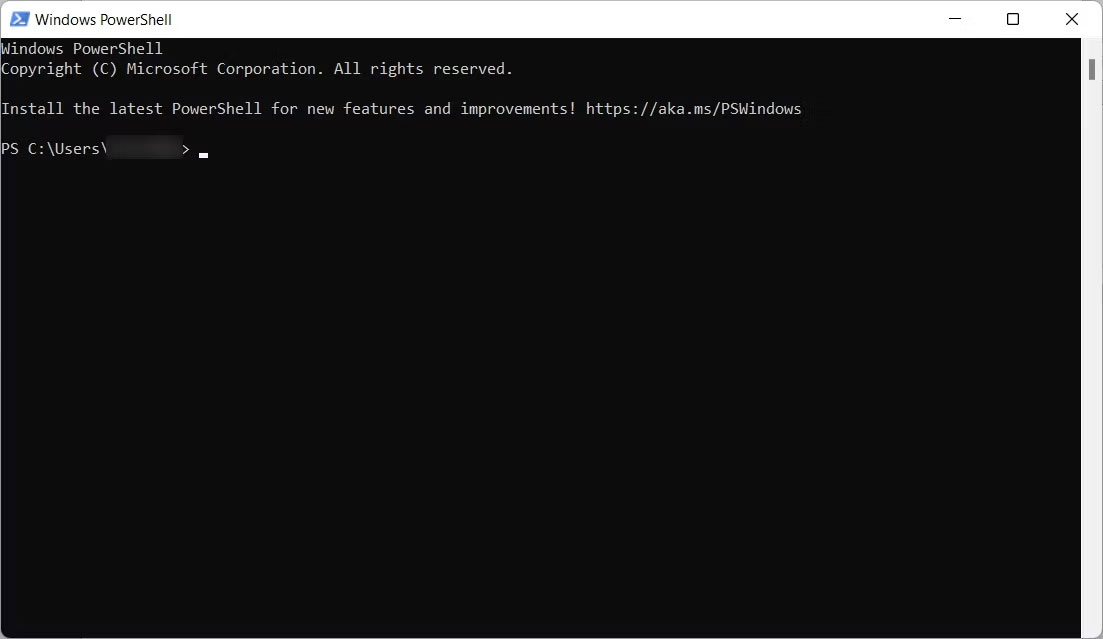
<h2 style="text-align: justify;">PowerShell là một cải tiến so với Command Prompt</h2>

<figure>
<div style="text-align: justify;"><img alt="Giao diện Windows PowerShell trong Windows 11" data-i="0" data-src="https://st.quantrimang.com/photos/image/2023/12/18/command-prompt-cmd-va-powershell-1.jpg" data-was-processed="true" height="639" src="https://st.quantrimang.com/photos/image/2023/12/18/command-prompt-cmd-va-powershell-1.jpg" width="1103" /></div>

<figcaption>
<div style="text-align: justify;">Giao diện Windows PowerShell trong Windows 11</div>
</figcaption>
</figure>

<p style="text-align: justify;">Microsoft đã giới thiệu PowerShell vào năm 2006 để nâng cấp những gì mọi người có thể làm trong Command Prompt lên một tầm cao mới. Vì Microsoft đã xây dựng PowerShell dựa trên .NET Framework nên bạn có thể sử dụng các ngôn ngữ .NET với những lệnh dựa trên văn bản để tương tác với hệ điều hành của mình. Ngôn ngữ phổ biến nhất cho PowerShell là C#, cho phép bạn khai thác các tính năng nâng cao của công cụ và tăng năng suất.</p>

<div style="text-align: justify;"><iframe allowtransparency="true" data-google-container-id="a!2" data-google-query-id="CLKTy7eSmYMDFcNCKgodxMwBMg" data-load-complete="true" frameborder="0" height="0" hspace="0" id="aswift_1" marginheight="0" marginwidth="0" name="aswift_1" sandbox="" scrolling="no" vspace="0" width="694"></iframe></div>

<p style="text-align: justify;">Ngoài các lệnh tiêu chuẩn, PowerShell còn có hơn 200 cmdlet, một loại lớp C# đặc biệt mà Microsoft định nghĩa là &quot;các lệnh nhẹ&quot;. Con số có thể thay đổi tùy thuộc vào các mô-đun được cài đặt trong hệ thống của bạn. Khi PowerShell thực thi chúng, chúng sẽ trả về một đối tượng .NET mà bạn có thể thao tác. Ví dụ, điều này cho phép bạn không chỉ tương tác với các chương trình trên máy tính được hỗ trợ bởi .NET Core mà còn xử lý đầu vào của chúng (không cần bất kỳ code phức tạp nào).</p>

<p style="text-align: justify;">Hơn nữa, mặc dù PowerShell có thể chạy các file batch theo cách tương tự như CMD, nhưng nó cũng cho phép tự động hóa tốt hơn bằng cách cho phép bạn lên lịch các tác vụ trong PowerShell để tiết kiệm thời gian. Bằng cách đó, bạn có thể lập kế hoạch hành động của mình tốt hơn.</p>

<h2 style="text-align: justify;">Windows Terminal là trình giả lập terminal</h2>

<figure>
<div style="text-align: justify;"><br />
<img alt="Windows Terminal với danh sách drop-down cấu hình được mở rộng" data-adbro-processed="true" data-i="1" data-src="https://st.quantrimang.com/photos/image/2023/12/18/command-prompt-cmd-va-powershell-2.jpg" data-was-processed="true" height="792" src="https://st.quantrimang.com/photos/image/2023/12/18/command-prompt-cmd-va-powershell-2.jpg" width="1138" /></div>

<figcaption>
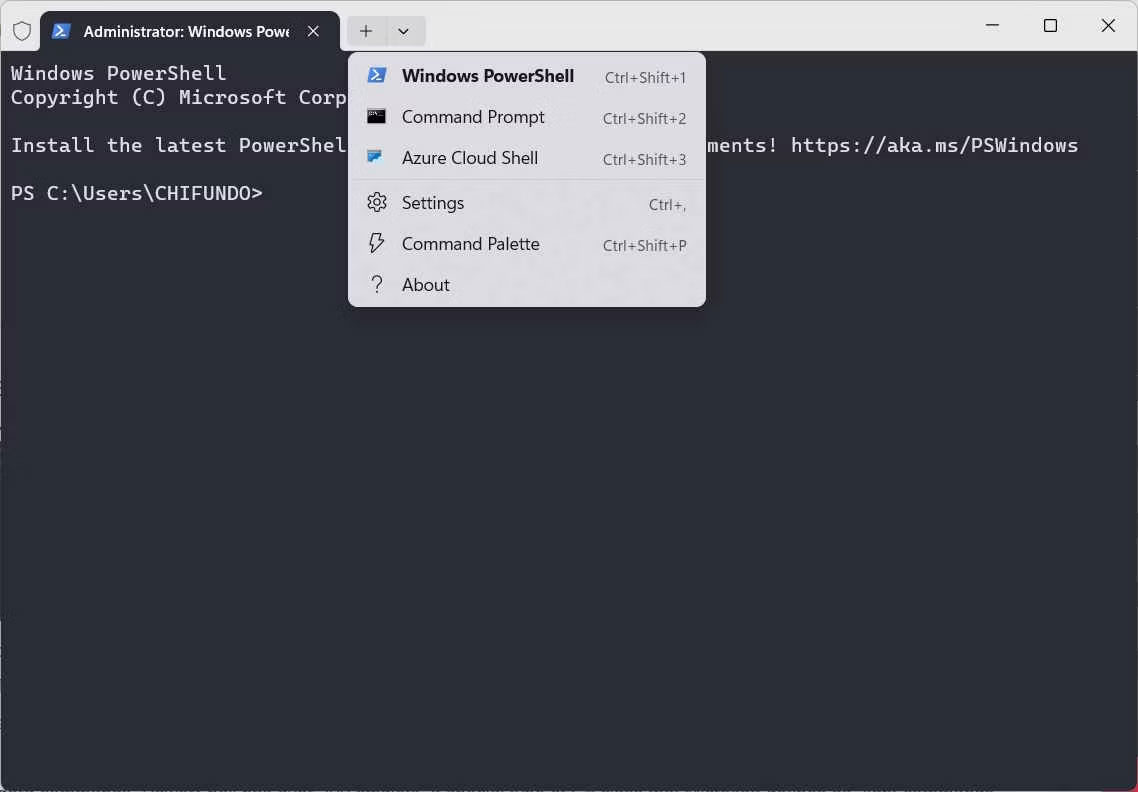
<div style="text-align: justify;">Windows Terminal với danh sách drop-down cấu hình được mở rộng</div>
</figcaption>
</figure>

<div style="text-align: justify;"><iframe allowtransparency="true" data-google-container-id="a!3" data-google-query-id="CPfi57eSmYMDFQ1XKgodaxgA-w" data-load-complete="true" frameborder="0" height="0" hspace="0" id="aswift_2" marginheight="0" marginwidth="0" name="aswift_2" sandbox="" scrolling="no" vspace="0" width="694"></iframe></div>

<p style="text-align: justify;">Microsoft đã giới thiệu Windows Terminal như một trình giả lập terminal vào năm 2019 (trong kỷ nguyên của Windows 10). Trong ngữ cảnh này, nó có thể mô phỏng hành vi và chức năng của các shell dòng lệnh, bao gồm&nbsp;Command Prompt&nbsp;và PowerShell. Ứng dụng này đáng chú ý nhất khi đưa một công cụ dòng lệnh lên Windows mà cộng đồng Linux đã ghen tị từ lâu: BASH (Bourne Again SHell).</p>

<p style="text-align: justify;">Để chạy BASH và các Linux shell khác, bao gồm ZSH, FISH và Ksh (KornShell) trong Windows Terminal, trước tiên bạn phải&nbsp;bật Windows Subsystems for Linux (WSL). Bạn cũng có thể chạy Azure Cloud Shell trong Windows Terminal, điều này cho phép bạn quản lý tài nguyên Azure của mình từ bên trong Windows Terminal.</p>

<h2 style="text-align: justify;">Giao diện người dùng và khả năng tùy chỉnh</h2>

<figure>
<div style="text-align: justify;"><img alt="Trang cài đặt của Windows Terminal" data-i="2" data-src="https://st.quantrimang.com/photos/image/2023/12/18/command-prompt-cmd-va-powershell-3.jpg" data-was-processed="true" height="792" src="https://st.quantrimang.com/photos/image/2023/12/18/command-prompt-cmd-va-powershell-3.jpg" width="1138" /></div>

<figcaption>
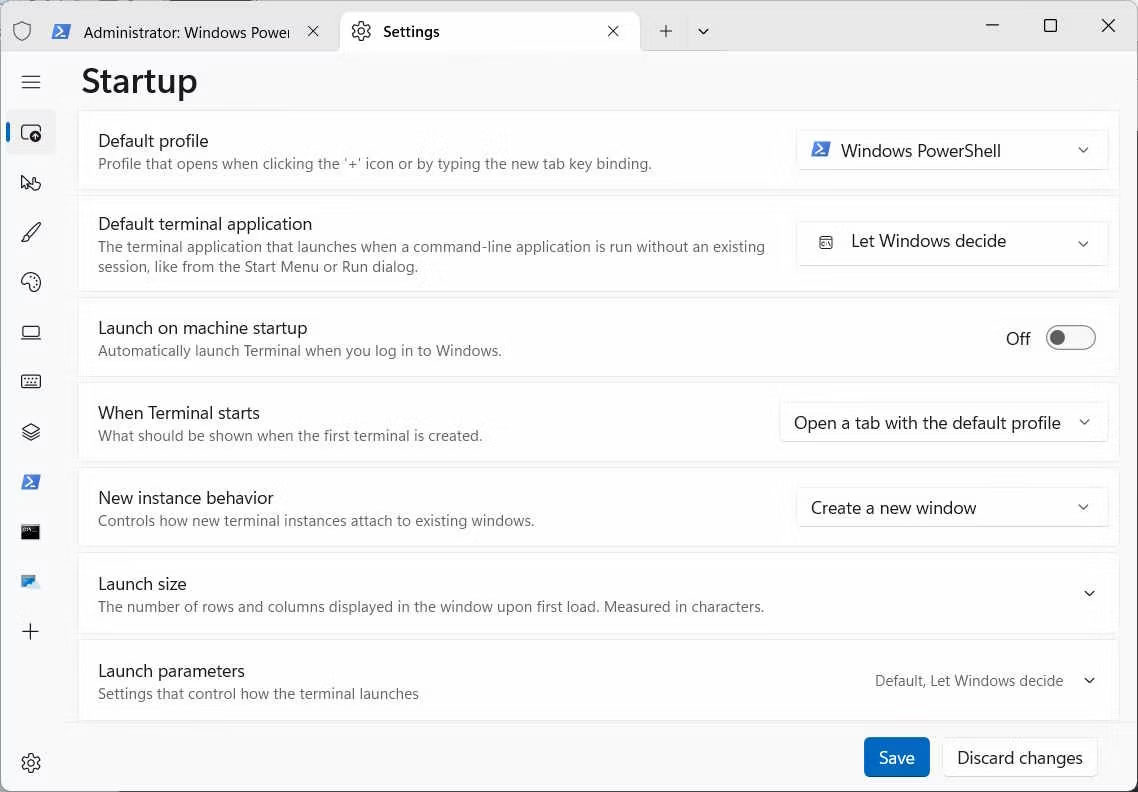
<div style="text-align: justify;">Trang cài đặt của Windows Terminal</div>
</figcaption>
</figure>

<p style="text-align: justify;">Một trong những tính năng đáng chú ý nhất của Windows Terminal là việc chuyển sang giao diện tab hiện đại cho phép bạn chạy nhiều tiện ích dòng lệnh cạnh nhau. Chẳng hạn, bạn có thể có nhiều phiên bản Command Prompt chạy đồng thời trong khi sử dụng PowerShell, BASH hoặc Azure.​​​​ Đây là điều mà PowerShell không thể làm được.</p>

<p style="text-align: justify;">Giao diện người dùng của cả PowerShell và Windows Terminal đều có thể tùy chỉnh. Trong PowerShell, ở mức độ thấp hơn, bạn có thể tùy chỉnh môi trường một cách trực quan bằng cách thay đổi phông chữ, màu phông chữ và lời nhắc. Bạn có thể tùy chỉnh Windows Terminal theo nhiều cách khác nhau, bao gồm điều chỉnh cài đặt cấu hình bắt đầu, cách phối màu, tương tác và tùy chọn hiển thị.</p>

<div style="text-align: justify;"><iframe allowtransparency="true" data-google-container-id="a!4" data-google-query-id="CM69sr-SmYMDFW0yewcdLpQOqw" data-load-complete="true" frameborder="0" height="0" hspace="0" id="aswift_3" marginheight="0" marginwidth="0" name="aswift_3" sandbox="" scrolling="no" vspace="0" width="694"></iframe></div>

<p style="text-align: justify;">Lưu ý rằng bạn cũng có thể tùy chỉnh PowerShell bằng cách sử dụng các bảng màu đặt sẵn trong Windows Terminal.</p>

<h2 style="text-align: justify;">Hỗ trợ Unicode và UTF</h2>

<p style="text-align: justify;">Trong Windows Terminal, bạn có thể sử dụng biểu tượng cảm xúc và ký tự từ các ngôn ngữ khác nhờ hỗ trợ Unicode và UTF. Khi bạn kết hợp tính năng này với công cụ kết xuất văn bản GPU được tăng tốc mới, nó có thể hiển thị các ký tự không chuẩn mà không gặp vấn đề gì. Ví dụ, bạn có thể sao chép biểu tượng cảm xúc từ một trang web và dán nó vào Windows Terminal và nó sẽ hiển thị chính xác.</p>

<p style="text-align: justify;">PowerShell cũng có hỗ trợ Unicode và UTF, nhưng bạn có thể gặp vấn đề về mã hóa, chẳng hạn như lỗi và hạn chế với các ký tự cụ thể. Điều này đặc biệt đúng đối với các ký tự từ những ngôn ngữ và biểu tượng cảm xúc khác. Windows Terminal cung cấp trải nghiệm tốt hơn nhiều về vấn đề này.</p>

<h2 style="text-align: justify;">Sự đóng góp cho cộng đồng</h2>

<p style="text-align: justify;">Windows Terminal và PowerShell là các dự án nguồn mở có cộng đồng tích cực tham gia vào quá trình phát triển của chúng. Cả hai cộng đồng đều đam mê các dự án và sẽ liên tục hỗ trợ ứng dụng của họ, cải thiện hiệu suất và bổ sung thêm nhiều tính năng hơn. Ngoài ra còn có tài liệu phong phú dành cho Windows Terminal và PowerShell, vì vậy bạn sẽ thấy không thiếu các diễn đàn và hướng dẫn để giúp bạn sử dụng chúng một cách hiệu quả.</p>

<h2 style="text-align: justify;">Windows Terminal là tất cả những gì bạn cần!</h2>

<p style="text-align: justify;">PowerShell giúp mang sức mạnh của .NET Framework vào môi trường dòng lệnh, trong khi Windows Terminal mô phỏng nhiều shell khác nhau, bao gồm cả các shell từ&nbsp;Linux, trên máy tính Windows của bạn. Hơn nữa, Terminal có nhiều tùy chọn tùy chỉnh hơn và hỗ trợ Unicode/UTF tốt hơn PowerShell.</p>

<p style="text-align: justify;">Mặc dù mỗi công cụ này đều có sức mạnh riêng nhưng không cần phải mở PowerShell bằng Windows Terminal vì nó cũng có thể mô phỏng môi trường Shell.</p>

<div style="text-align: justify;">&nbsp;</div>
		</div>
				<div id="author">
						<p>
				<strong>Nguồn tin:</strong>
				Quantrimang.com
			</p>
		</div>
	</div>
	<div id="footer" class="clearfix">
		<div id="url">
			<strong>URL của bản tin này: </strong><a href="https://www.nguoicodonvn2008.info/vi/news/savefile/kien-thuc-may-tinh/command-prompt-cmd-va-powershell-khac-nhau-nhu-the-nao-7860.html" title="Command Prompt &#40;cmd&#41; và PowerShell khác nhau như thế nào?">https://www.nguoicodonvn2008.info/vi/news/savefile/kien-thuc-may-tinh/command-prompt-cmd-va-powershell-khac-nhau-nhu-the-nao-7860.html</a>

		</div>
		<div class="clear"></div>
		<div class="copyright">
			&copy; .&#x3A; Nguoicodonvn2008.info - Cõi lòng người cô đơn &#x3A;.
		</div>
		<div id="contact">
			<a href="mailto:admin@nguoicodonvn2008.info">admin@nguoicodonvn2008.info</a>
		</div>
	</div>
</div>
        <div id="timeoutsess" class="chromeframe">
            Bạn đã không sử dụng Site, <a onclick="timeoutsesscancel();" href="https://nguoicodonvn2008.info/#">Bấm vào đây để duy trì trạng thái đăng nhập</a>. Thời gian chờ: <span id="secField"> 60 </span> giây
        </div>
        <div id="openidResult" class="nv-alert" style="display:none"></div>
        <div id="openidBt" data-result="" data-redirect=""></div>
		</script>
		<div class="car-top">
  <span><img src="https://nguoicodonvn2008.info/themes/default/images/car.png" alt=""></span>
</div>
<script src="https://nguoicodonvn2008.info/assets/js/jquery/jquery.min.js"></script>
<script>var nv_base_siteurl="/",nv_lang_data="vi",nv_lang_interface="vi",nv_name_variable="nv",nv_fc_variable="op",nv_lang_variable="language",nv_module_name="news",nv_func_name="savefile",nv_is_user=0, nv_my_ofs=-4,nv_my_abbr="EDT",nv_cookie_prefix="nv4c_e856T",nv_check_pass_mstime=1738000,nv_area_admin=0,nv_safemode=0,theme_responsive=0,nv_recaptcha_ver=2,nv_recaptcha_sitekey="",nv_recaptcha_type="image",XSSsanitize=1;</script>
<script src="https://nguoicodonvn2008.info/assets/js/language/vi.js"></script>
<script src="https://nguoicodonvn2008.info/assets/js/DOMPurify/purify3.js"></script>
<script src="https://nguoicodonvn2008.info/assets/js/global.js"></script>
<script src="https://nguoicodonvn2008.info/assets/js/site.js"></script>
<script src="https://nguoicodonvn2008.info/themes/default/js/news.js"></script>
<script src="https://nguoicodonvn2008.info/themes/default/js/main.js"></script>
<script src="https://nguoicodonvn2008.info/themes/default/js/custom.js"></script>
<script type="application/ld+json">
        {
            "@context": "https://schema.org",
            "@type": "Organization",
            "url": "https://nguoicodonvn2008.info",
            "logo": "https://nguoicodonvn2008.info/uploads/angel.gif"
        }
        </script>
<script src="https://nguoicodonvn2008.info/themes/default/js/bootstrap.min.js"></script>
<script type="text/javascript">
var $scrolltop = $('.car-top');
$scrolltop.on('click', function () {
    $('html,body').animate({
        scrollTop: 0
    }, 800);
    $(this).addClass("car-run");
    setTimeout(function(){ $scrolltop.removeClass('car-run');}, 1000);
    return false;
});
$(window).on('scroll', function ()
{ 
    if($(window).scrollTop() >= 200)
    {
        $scrolltop.addClass("show");
        $scrolltop.addClass("car-down");
    }
    else
    {
       $scrolltop.removeClass("show");
       setTimeout(function(){ $scrolltop.removeClass('car-down');}, 300);
    }
});
</script>
</body>
</html>