<!DOCTYPE html>
    <html lang="vi" xmlns="http://www.w3.org/1999/xhtml" prefix="og: http://ogp.me/ns#">
    <head>
<title>Client Server Runtime Process hay csrss.exe là gì và tại sao nó lại chạy trên máy tính?</title>
<meta name="description" content="Client Server Runtime Process hay csrss.exe là gì và tại sao nó lại chạy trên máy tính? - Savefile - Tin Tức -...">
<meta name="author" content=".: Nguoicodonvn2008.info - Cõi lòng người cô đơn :.">
<meta name="copyright" content=".: Nguoicodonvn2008.info - Cõi lòng người cô đơn :. [admin@nguoicodonvn2008.info]">
<meta name="robots" content="index, archive, follow, noodp">
<meta name="googlebot" content="index,archive,follow,noodp">
<meta name="msnbot" content="all,index,follow">
<meta name="generator" content="NukeViet v4.5">
<meta http-equiv="Content-Type" content="text/html; charset=utf-8">
<meta property="og:title" content="Client Server Runtime Process hay csrss.exe là gì và tại sao nó lại chạy trên máy tính?">
<meta property="og:type" content="website">
<meta property="og:description" content="Savefile - Tin Tức -...">
<meta property="og:site_name" content=".&#x3A; Nguoicodonvn2008.info - Cõi lòng người cô đơn &#x3A;.">
<meta property="og:url" content="https://www.nguoicodonvn2008.info/vi/news/savefile/kien-thuc-may-tinh/client-server-runtime-process-hay-csrss-exe-la-gi-va-tai-sao-no-lai-chay-tren-may-tinh-2752.html">
<link rel="shortcut icon" href="https://nguoicodonvn2008.info/favicon.ico">
<link rel="canonical" href="https://www.nguoicodonvn2008.info/vi/news/savefile/kien-thuc-may-tinh/client-server-runtime-process-hay-csrss-exe-la-gi-va-tai-sao-no-lai-chay-tren-may-tinh-2752.html">
<link rel="alternate" href="https://nguoicodonvn2008.info/vi/news/rss/" title="Tin Tức" type="application/rss+xml">
<link rel="alternate" href="https://nguoicodonvn2008.info/vi/news/rss/karaoke-dual/" title="Tin Tức - Karaoke Dual" type="application/rss+xml">
<link rel="alternate" href="https://nguoicodonvn2008.info/vi/news/rss/nhac-tre/" title="Tin Tức - Nhạc trẻ" type="application/rss+xml">
<link rel="alternate" href="https://nguoicodonvn2008.info/vi/news/rss/tru-tinh/" title="Tin Tức - Trữ tình" type="application/rss+xml">
<link rel="alternate" href="https://nguoicodonvn2008.info/vi/news/rss/nuoc-ngoai/" title="Tin Tức - Nước ngoài" type="application/rss+xml">
<link rel="alternate" href="https://nguoicodonvn2008.info/vi/news/rss/remix/" title="Tin Tức - Remix" type="application/rss+xml">
<link rel="alternate" href="https://nguoicodonvn2008.info/vi/news/rss/tam-su-tinh-yeu/" title="Tin Tức - Tâm sự tình yêu" type="application/rss+xml">
<link rel="alternate" href="https://nguoicodonvn2008.info/vi/news/rss/tho-suu-tam/" title="Tin Tức - Thơ sưu tầm" type="application/rss+xml">
<link rel="alternate" href="https://nguoicodonvn2008.info/vi/news/rss/cuoc-song/" title="Tin Tức - Cuộc sống" type="application/rss+xml">
<link rel="alternate" href="https://nguoicodonvn2008.info/vi/news/rss/phan-mem/" title="Tin Tức - Phần mềm" type="application/rss+xml">
<link rel="alternate" href="https://nguoicodonvn2008.info/vi/news/rss/kien-thuc-may-tinh/" title="Tin Tức - Kiến thức máy tính" type="application/rss+xml">
<link rel="alternate" href="https://nguoicodonvn2008.info/vi/news/rss/hoc-tap/" title="Tin Tức - Học tập" type="application/rss+xml">
<link rel="alternate" href="https://nguoicodonvn2008.info/vi/news/rss/tai-lieu/" title="Tin Tức - Tài liệu" type="application/rss+xml">
<link rel="alternate" href="https://nguoicodonvn2008.info/vi/news/rss/de-thi/" title="Tin Tức - Đề thi" type="application/rss+xml">
<link rel="preload" as="style" href="https://nguoicodonvn2008.info/assets/css/font-awesome.min.css" type="text/css">
<link rel="preload" as="style" href="https://nguoicodonvn2008.info/themes/default/css/bootstrap.non-responsive.css" type="text/css">
<link rel="preload" as="style" href="https://nguoicodonvn2008.info/themes/default/css/style.css" type="text/css">
<link rel="preload" as="style" href="https://nguoicodonvn2008.info/themes/default/css/style.non-responsive.css" type="text/css">
<link rel="preload" as="style" href="https://nguoicodonvn2008.info/themes/default/css/news.css" type="text/css">
<link rel="preload" as="style" href="https://nguoicodonvn2008.info/themes/default/css/custom.css" type="text/css">
<link rel="preload" as="script" href="https://nguoicodonvn2008.info/assets/js/jquery/jquery.min.js" type="text/javascript">
<link rel="preload" as="script" href="https://nguoicodonvn2008.info/assets/js/language/vi.js" type="text/javascript">
<link rel="preload" as="script" href="https://nguoicodonvn2008.info/assets/js/DOMPurify/purify3.js" type="text/javascript">
<link rel="preload" as="script" href="https://nguoicodonvn2008.info/assets/js/global.js" type="text/javascript">
<link rel="preload" as="script" href="https://nguoicodonvn2008.info/assets/js/site.js" type="text/javascript">
<link rel="preload" as="script" href="https://nguoicodonvn2008.info/themes/default/js/news.js" type="text/javascript">
<link rel="preload" as="script" href="https://nguoicodonvn2008.info/themes/default/js/main.js" type="text/javascript">
<link rel="preload" as="script" href="https://nguoicodonvn2008.info/themes/default/js/custom.js" type="text/javascript">
<link rel="preload" as="script" href="https://nguoicodonvn2008.info/themes/default/js/bootstrap.min.js" type="text/javascript">
<link rel="stylesheet" href="https://nguoicodonvn2008.info/assets/css/font-awesome.min.css">
<link rel="stylesheet" href="https://nguoicodonvn2008.info/themes/default/css/bootstrap.non-responsive.css">
<link rel="stylesheet" href="https://nguoicodonvn2008.info/themes/default/css/style.css">
<link rel="stylesheet" href="https://nguoicodonvn2008.info/themes/default/css/style.non-responsive.css">
<link rel="StyleSheet" href="https://nguoicodonvn2008.info/themes/default/css/news.css">
<link rel="stylesheet" href="https://nguoicodonvn2008.info/themes/default/css/custom.css">
<style type="text/css">
	body{background: #fff;}
</style>
    </head>
    <body>
<div id="print">
	<div id="hd_print">
		<h2 class="pull-left">.&#x3A; Nguoicodonvn2008.info - Cõi lòng người cô đơn &#x3A;.</h2>
		<p class="pull-right"><a title=".&#x3A; Nguoicodonvn2008.info - Cõi lòng người cô đơn &#x3A;." href="https://nguoicodonvn2008.info/">https://nguoicodonvn2008.info</a></p>
	</div>
	<div class="clear"></div>
	<hr />
	<div id="content">
		<h1>Client Server Runtime Process hay csrss.exe là gì và tại sao nó lại chạy trên máy tính?</h1>
		<ul class="list-inline">
			<li>Thứ bảy - 19/09/2020 00:54</li>
			<li class="hidden-print txtrequired"><em class="fa fa-print">&nbsp;</em><a title="In ra" href="javascript:;" onclick="window.print()">In ra</a></li>
			<li class="hidden-print txtrequired"><em class="fa fa-power-off">&nbsp;</em><a title="Đóng cửa sổ này" href="javascript:;" onclick="window.close()">Đóng cửa sổ này</a></li>
		</ul>
		<div class="clear"></div>
		<div id="hometext">
		</div>
				<div class="imghome">
			<img alt="Client Server Runtime Process hay csrss.exe là gì và tại sao nó lại chạy trên máy tính?" src="https://st.quantrimang.com/photos/image/2020/09/18/client-server-runtime-process.jpg" width="460" class="img-thumbnail" />
		</div>
		<div class="clear"></div>
		<div id="bodytext" class="clearfix">
			<p style="text-align: justify;">Nếu đang sử dụng máy tính Windows và&nbsp;<a href="https://quantrimang.com/6-cach-don-gian-mo-task-manager-tren-windows-119941" title="6 cách đơn giản mở Task Manager trên Windows">mở Task Manager</a>, chắc chắn bạn sẽ thấy một hoặc nhiều tiến trình Client Server Runtime Process (csrss.exe) chạy trên máy tính. Vậy tiến trình này là gì, nó có phải là một phần của Windows không? Và tại sao nó lại chạy trên máy tính? Bài viết này sẽ giải thích các thắc mắc này của các bạn.</p>

<h2 style="text-align: justify;">Client Server Runtime Process là gì?</h2>

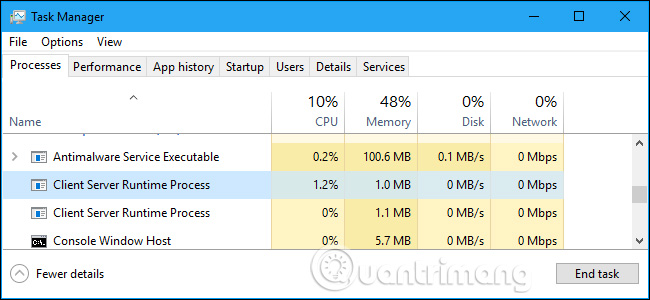
<p style="text-align: justify;">Tiến trình csrss.exe là một phần quan trọng của hệ điều hành Windows. Trước khi Windows NT 4.0 được phát hành vào năm 1996, csrss.exe chịu trách nhiệm về toàn bộ hệ thống con đồ họa, bao gồm quản lý cửa sổ, vẽ mọi thứ trên màn hình và các chức năng hệ điều hành khác có liên quan.</p>

<p style="text-align: justify;"><img alt="Tiến trình Client Server Runtime Process " data-i="0" data-src="https://st.quantrimang.com/photos/image/2018/05/07/Client-Server-Runtime-Process-hay-csrss.exe-la-gi-1.jpg" data-was-processed="true" height="300" src="https://st.quantrimang.com/photos/image/2018/05/07/Client-Server-Runtime-Process-hay-csrss.exe-la-gi-1.jpg" width="650" /></p>

<p style="text-align: justify;">Với Windows NT 4.0, nhiều chức năng của Client Server Runtime Process đã được chuyển thành nhân Windows và chạy thành một tiến trình bình thường. Tuy nhiên tiến trình csrss.exe vẫn chịu trách nhiệm về các cửa sổ console và quá trình tắt máy, đó là các chức năng quan trọng của Windows.</p>

<div style="text-align: justify;">&nbsp;</div>

<p style="text-align: justify;">Trước Windows 7, tiến trình CSRSS đã tự vẽ cửa sổ console (Command Prompt). Trên Windows 7 và các phiên bản sau đó,&nbsp;tiến trình Console Host (conhost.exe)&nbsp;thực hiện nhiệm vụ này. Tuy nhiên tiến trình csrss.exe vẫn chịu trách nhiệm khởi chạy tiến trình conhost.exe khi cần thiết. Nói cách khác, tiến trình này chịu trách nhiệm cho một vài chức năng hệ thống quan trọng trong nền. Đó là cách Windows làm việc.</p>

<div style="text-align: justify;">&nbsp;</div>

<h2 style="text-align: justify;">Có thể vô hiệu hóa tiến trình csrss.exe không?</h2>

<p style="text-align: justify;"><img alt="Vô hiệu hóa tiến trình csrss.exe" data-i="1" data-src="https://st.quantrimang.com/photos/image/2018/05/07/Client-Server-Runtime-Process-hay-csrss.exe-la-gi-2.jpg" data-was-processed="true" height="443" src="https://st.quantrimang.com/photos/image/2018/05/07/Client-Server-Runtime-Process-hay-csrss.exe-la-gi-2.jpg" width="648" /></p>

<p style="text-align: justify;">Bạn không thể vô hiệu hóa tiến trình này, vì nó là một phần quan trọng của Windows và không có lý do để vô hiệu hóa nó vì nó chỉ sử dụng một lượng nhỏ tài nguyên và thực hiện một vài chức năng hệ thống quan trọng.</p>

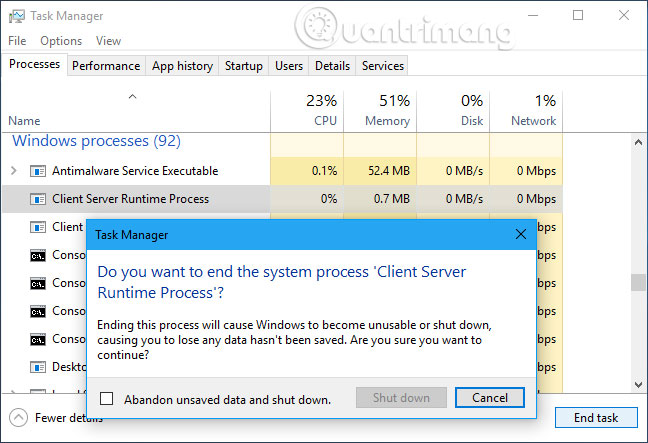
<p style="text-align: justify;">Nếu truy cập vào Task Manager và cố gắng kết thúc tiến trình Client Server Runtime Process, Windows sẽ thông báo máy tính của bạn sẽ không sử dụng được hoặc bị tắt. Click qua cảnh báo này và bạn sẽ thấy thông báo “Access is Denied”. Đây là tiến trình được bảo vệ, do đó bạn không thể vô hiệu hóa hoặc kết thúc nó.</p>

<div style="text-align: justify;">&nbsp;</div>

<p style="text-align: justify;">Windows luôn khởi chạy tiến trình này khi khởi động. Nếu không thể khởi chạy csrss.exe khi Windows khởi động, Windows sẽ hiện màn hình xanh với mã lỗi 0xC000021A.</p>

<div style="text-align: justify;">&nbsp;</div>

<h2 style="text-align: justify;">Nó có thể trở thành một loại virus?</h2>

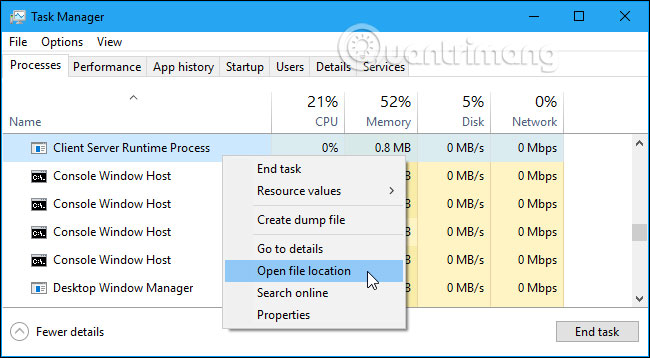
<p style="text-align: justify;">File csrss.exe hợp pháp nằm trong&nbsp;thư mục C:\Windows\system32&nbsp;trên hệ thống của bạn. Để xác minh đó là Client Server Runtime Process thực, bạn có thể click chuột phải vào Task Manager và chọn&nbsp;<strong>Open location location</strong>.</p>

<p style="text-align: justify;"><img alt="Chọn Open file location" data-i="2" data-src="https://st.quantrimang.com/photos/image/2018/05/07/Client-Server-Runtime-Process-hay-csrss.exe-la-gi-3.jpg" data-was-processed="true" height="358" src="https://st.quantrimang.com/photos/image/2018/05/07/Client-Server-Runtime-Process-hay-csrss.exe-la-gi-3.jpg" width="650" /></p>

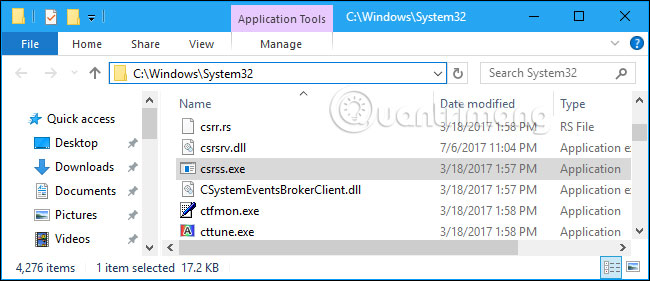
<p style="text-align: justify;">File Explorer hoặc Windows Explorer sẽ mở thư mục C:\Windows\System32 có chứa file csrss.exe.</p>

<p style="text-align: justify;">Nếu ai đó nói với bạn rằng các file csrss.exe nằm trong C:\Windows\System32 là một loại virus, đó là một trò lừa bịp. Đây là file thực và loại bỏ nó sẽ gây ra vấn đề với máy tính của bạn.</p>

<p style="text-align: justify;">Những kẻ lừa đảo hỗ trợ công nghệ khác có thể nói với bạn rằng nếu thấy file csrss.exe trên máy tính, nó có thể là phần mềm độc hại. Điều này là sai vì mọi máy tính PC đều chạy tiến trình Client Server Runtime.</p>

<p style="text-align: justify;"><img alt="Tiến trình csrss.exe nằm ở thư mục System32" data-i="3" data-src="https://st.quantrimang.com/photos/image/2018/05/07/Client-Server-Runtime-Process-hay-csrss.exe-la-gi-4.jpg" data-was-processed="true" height="281" src="https://st.quantrimang.com/photos/image/2018/05/07/Client-Server-Runtime-Process-hay-csrss.exe-la-gi-4.jpg" width="650" /></p>

<p style="text-align: justify;">Nếu thấy file csrss.exe nằm thư mục khác không phải là thư mục System32, điều đó có nghĩa là bạn đã gặp phải vấn đề. Một số chương trình độc hại giả mạo tiến trình này để tránh bị nghi ngờ. Trong trường hợp này, bạn nên quét máy tính với phần mềm diệt virus hiệu quả, tham khảo bài viết&nbsp;10 phần mềm diệt virus hiệu quả nhất cho Windows, nó sẽ kiểm tra máy tính và loại bỏ bất cứ thứ gì nó tìm thấy.</p>

<div style="text-align: justify;">&nbsp;</div>

<h2 style="text-align: justify;">Csrss.exe có thể gây ra hiện tượng sử dụng CPU, RAM hoặc tài nguyên hệ thống khác ở mức cao không?</h2>

<p style="text-align: justify;">Tiến trình csrss.exe không thực sự giữ nhiều trọng trách trong Windows 10 (hầu hết các nhiệm vụ trước đây của nó được chia nhỏ thành những tiến trình khác). Do đó, trong hầu hết mọi trường hợp, bạn sẽ không thấy việc sử dụng quá nhiều tài nguyên hệ thống từ tiến trình này.</p>

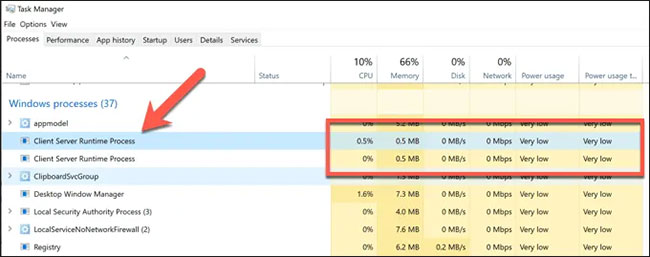
<p style="text-align: justify;">Nếu bạn thấy Client Server Runtime Process được liệt kê trong Windows Task Manager đang sử dụng nhiều tài nguyên hệ thống (chẳng hạn như sử dụng CPU hoặc RAM ở mức cao), thì điều đó có nghĩa là cài đặt Windows của bạn đang gặp phải một số vấn đề.</p>

<figure data-inimage-loaded="true">
<div style="text-align: justify;"><br />
<img alt="Nếu Client Server Runtime Process đang sử dụng nhiều tài nguyên, thì cài đặt Windows có thể đang gặp một số vấn đề" data-i="5" data-src="https://st.quantrimang.com/photos/image/2020/09/18/client-server-runtime-process.jpg" data-was-processed="true" height="257" src="https://st.quantrimang.com/photos/image/2020/09/18/client-server-runtime-process.jpg" width="650" /></div>

<figcaption>
<div style="text-align: justify;">Nếu Client Server Runtime Process đang sử dụng nhiều tài nguyên, thì cài đặt Windows có thể đang gặp một số vấn đề</div>
</figcaption>
</figure>

<p style="text-align: justify;">Kiểm tra để chắc chắn file đó không phải là phần mềm độc hại bằng cách sử dụng các bước được liệt kê ở trên, bao gồm cả thực hiện quét trước khi hệ điều hành được load hoàn toàn (boot scan). Nếu bạn tin rằng phần mềm độc hại không phải là nguyên nhân, thì có thể có một vấn đề khác với cài đặt Windows tổng thể.</p>

<p style="text-align: justify;">Vì tiến trình csrss liên quan đến giao diện người dùng đồ họa Windows, hãy nhớ&nbsp;kiểm tra driver đồ họa hiện có, đặc biệt nếu gần đây bạn đã cài đặt một card đồ họa mới. Không chắc đây là nguyên nhân của vấn đề, nhưng cũng đáng để kiểm tra.</p>

<p style="text-align: justify;">Nếu bạn đã thử hết các tùy chọn và mức sử dụng tài nguyên hệ thống vẫn còn quá cao, thì bạn có thể cần&nbsp;reset lại cài đặt Windows&nbsp;của mình để bắt đầu với một tập hợp file hệ thống và cấu hình mới.</p>
		</div>
				<div id="author">
						<p>
				<strong>Nguồn tin:</strong>
				Quantrimang.com
			</p>
		</div>
	</div>
	<div id="footer" class="clearfix">
		<div id="url">
			<strong>URL của bản tin này: </strong><a href="https://www.nguoicodonvn2008.info/vi/news/savefile/kien-thuc-may-tinh/client-server-runtime-process-hay-csrss-exe-la-gi-va-tai-sao-no-lai-chay-tren-may-tinh-2752.html" title="Client Server Runtime Process hay csrss.exe là gì và tại sao nó lại chạy trên máy tính?">https://www.nguoicodonvn2008.info/vi/news/savefile/kien-thuc-may-tinh/client-server-runtime-process-hay-csrss-exe-la-gi-va-tai-sao-no-lai-chay-tren-may-tinh-2752.html</a>

		</div>
		<div class="clear"></div>
		<div class="copyright">
			&copy; .&#x3A; Nguoicodonvn2008.info - Cõi lòng người cô đơn &#x3A;.
		</div>
		<div id="contact">
			<a href="mailto:admin@nguoicodonvn2008.info">admin@nguoicodonvn2008.info</a>
		</div>
	</div>
</div>
        <div id="timeoutsess" class="chromeframe">
            Bạn đã không sử dụng Site, <a onclick="timeoutsesscancel();" href="https://nguoicodonvn2008.info/#">Bấm vào đây để duy trì trạng thái đăng nhập</a>. Thời gian chờ: <span id="secField"> 60 </span> giây
        </div>
        <div id="openidResult" class="nv-alert" style="display:none"></div>
        <div id="openidBt" data-result="" data-redirect=""></div>
		</script>
		<div class="car-top">
  <span><img src="https://nguoicodonvn2008.info/themes/default/images/car.png" alt=""></span>
</div>
<script src="https://nguoicodonvn2008.info/assets/js/jquery/jquery.min.js"></script>
<script>var nv_base_siteurl="/",nv_lang_data="vi",nv_lang_interface="vi",nv_name_variable="nv",nv_fc_variable="op",nv_lang_variable="language",nv_module_name="news",nv_func_name="savefile",nv_is_user=0, nv_my_ofs=-4,nv_my_abbr="EDT",nv_cookie_prefix="nv4c_e856T",nv_check_pass_mstime=1738000,nv_area_admin=0,nv_safemode=0,theme_responsive=0,nv_recaptcha_ver=2,nv_recaptcha_sitekey="",nv_recaptcha_type="image",XSSsanitize=1;</script>
<script src="https://nguoicodonvn2008.info/assets/js/language/vi.js"></script>
<script src="https://nguoicodonvn2008.info/assets/js/DOMPurify/purify3.js"></script>
<script src="https://nguoicodonvn2008.info/assets/js/global.js"></script>
<script src="https://nguoicodonvn2008.info/assets/js/site.js"></script>
<script src="https://nguoicodonvn2008.info/themes/default/js/news.js"></script>
<script src="https://nguoicodonvn2008.info/themes/default/js/main.js"></script>
<script src="https://nguoicodonvn2008.info/themes/default/js/custom.js"></script>
<script type="application/ld+json">
        {
            "@context": "https://schema.org",
            "@type": "Organization",
            "url": "https://nguoicodonvn2008.info",
            "logo": "https://nguoicodonvn2008.info/uploads/angel.gif"
        }
        </script>
<script src="https://nguoicodonvn2008.info/themes/default/js/bootstrap.min.js"></script>
<script type="text/javascript">
var $scrolltop = $('.car-top');
$scrolltop.on('click', function () {
    $('html,body').animate({
        scrollTop: 0
    }, 800);
    $(this).addClass("car-run");
    setTimeout(function(){ $scrolltop.removeClass('car-run');}, 1000);
    return false;
});
$(window).on('scroll', function ()
{ 
    if($(window).scrollTop() >= 200)
    {
        $scrolltop.addClass("show");
        $scrolltop.addClass("car-down");
    }
    else
    {
       $scrolltop.removeClass("show");
       setTimeout(function(){ $scrolltop.removeClass('car-down');}, 300);
    }
});
</script>
</body>
</html>