<!DOCTYPE html>
    <html lang="vi" xmlns="http://www.w3.org/1999/xhtml" prefix="og: http://ogp.me/ns#">
    <head>
<title>Cấu trúc cây thư mục trong Linux</title>
<meta name="description" content="Cấu trúc cây thư mục trong Linux - Savefile - Tin Tức - https&#x3A;&#x002F;&#x002F;www.nguoicodonvn2008.info&#x002F;vi&#x002F;news&#x002F;savefile&#x002F;kien-thuc-may-tinh&#x002F;cau-truc-cay-thu-muc-trong-linux-3112.html">
<meta name="author" content=".: Nguoicodonvn2008.info - Cõi lòng người cô đơn :.">
<meta name="copyright" content=".: Nguoicodonvn2008.info - Cõi lòng người cô đơn :. [admin@nguoicodonvn2008.info]">
<meta name="robots" content="index, archive, follow, noodp">
<meta name="googlebot" content="index,archive,follow,noodp">
<meta name="msnbot" content="all,index,follow">
<meta name="generator" content="NukeViet v4.5">
<meta http-equiv="Content-Type" content="text/html; charset=utf-8">
<meta property="og:title" content="Cấu trúc cây thư mục trong Linux">
<meta property="og:type" content="website">
<meta property="og:description" content="Savefile - Tin Tức - https&#x3A;&#x002F;&#x002F;www.nguoicodonvn2008.info&#x002F;vi&#x002F;news&#x002F;savefile&#x002F;kien-thuc-may-tinh&#x002F;cau-truc-cay-thu-muc-trong-linux-3112.html">
<meta property="og:site_name" content=".&#x3A; Nguoicodonvn2008.info - Cõi lòng người cô đơn &#x3A;.">
<meta property="og:url" content="https://www.nguoicodonvn2008.info/vi/news/savefile/kien-thuc-may-tinh/cau-truc-cay-thu-muc-trong-linux-3112.html">
<link rel="shortcut icon" href="https://nguoicodonvn2008.info/favicon.ico">
<link rel="canonical" href="https://www.nguoicodonvn2008.info/vi/news/savefile/kien-thuc-may-tinh/cau-truc-cay-thu-muc-trong-linux-3112.html">
<link rel="alternate" href="https://nguoicodonvn2008.info/vi/news/rss/" title="Tin Tức" type="application/rss+xml">
<link rel="alternate" href="https://nguoicodonvn2008.info/vi/news/rss/karaoke-dual/" title="Tin Tức - Karaoke Dual" type="application/rss+xml">
<link rel="alternate" href="https://nguoicodonvn2008.info/vi/news/rss/nhac-tre/" title="Tin Tức - Nhạc trẻ" type="application/rss+xml">
<link rel="alternate" href="https://nguoicodonvn2008.info/vi/news/rss/tru-tinh/" title="Tin Tức - Trữ tình" type="application/rss+xml">
<link rel="alternate" href="https://nguoicodonvn2008.info/vi/news/rss/nuoc-ngoai/" title="Tin Tức - Nước ngoài" type="application/rss+xml">
<link rel="alternate" href="https://nguoicodonvn2008.info/vi/news/rss/remix/" title="Tin Tức - Remix" type="application/rss+xml">
<link rel="alternate" href="https://nguoicodonvn2008.info/vi/news/rss/tam-su-tinh-yeu/" title="Tin Tức - Tâm sự tình yêu" type="application/rss+xml">
<link rel="alternate" href="https://nguoicodonvn2008.info/vi/news/rss/tho-suu-tam/" title="Tin Tức - Thơ sưu tầm" type="application/rss+xml">
<link rel="alternate" href="https://nguoicodonvn2008.info/vi/news/rss/cuoc-song/" title="Tin Tức - Cuộc sống" type="application/rss+xml">
<link rel="alternate" href="https://nguoicodonvn2008.info/vi/news/rss/phan-mem/" title="Tin Tức - Phần mềm" type="application/rss+xml">
<link rel="alternate" href="https://nguoicodonvn2008.info/vi/news/rss/kien-thuc-may-tinh/" title="Tin Tức - Kiến thức máy tính" type="application/rss+xml">
<link rel="alternate" href="https://nguoicodonvn2008.info/vi/news/rss/hoc-tap/" title="Tin Tức - Học tập" type="application/rss+xml">
<link rel="alternate" href="https://nguoicodonvn2008.info/vi/news/rss/tai-lieu/" title="Tin Tức - Tài liệu" type="application/rss+xml">
<link rel="alternate" href="https://nguoicodonvn2008.info/vi/news/rss/de-thi/" title="Tin Tức - Đề thi" type="application/rss+xml">
<link rel="preload" as="style" href="https://nguoicodonvn2008.info/assets/css/font-awesome.min.css" type="text/css">
<link rel="preload" as="style" href="https://nguoicodonvn2008.info/themes/default/css/bootstrap.non-responsive.css" type="text/css">
<link rel="preload" as="style" href="https://nguoicodonvn2008.info/themes/default/css/style.css" type="text/css">
<link rel="preload" as="style" href="https://nguoicodonvn2008.info/themes/default/css/style.non-responsive.css" type="text/css">
<link rel="preload" as="style" href="https://nguoicodonvn2008.info/themes/default/css/news.css" type="text/css">
<link rel="preload" as="style" href="https://nguoicodonvn2008.info/themes/default/css/custom.css" type="text/css">
<link rel="preload" as="script" href="https://nguoicodonvn2008.info/assets/js/jquery/jquery.min.js" type="text/javascript">
<link rel="preload" as="script" href="https://nguoicodonvn2008.info/assets/js/language/vi.js" type="text/javascript">
<link rel="preload" as="script" href="https://nguoicodonvn2008.info/assets/js/DOMPurify/purify3.js" type="text/javascript">
<link rel="preload" as="script" href="https://nguoicodonvn2008.info/assets/js/global.js" type="text/javascript">
<link rel="preload" as="script" href="https://nguoicodonvn2008.info/assets/js/site.js" type="text/javascript">
<link rel="preload" as="script" href="https://nguoicodonvn2008.info/themes/default/js/news.js" type="text/javascript">
<link rel="preload" as="script" href="https://nguoicodonvn2008.info/themes/default/js/main.js" type="text/javascript">
<link rel="preload" as="script" href="https://nguoicodonvn2008.info/themes/default/js/custom.js" type="text/javascript">
<link rel="preload" as="script" href="https://nguoicodonvn2008.info/themes/default/js/bootstrap.min.js" type="text/javascript">
<link rel="stylesheet" href="https://nguoicodonvn2008.info/assets/css/font-awesome.min.css">
<link rel="stylesheet" href="https://nguoicodonvn2008.info/themes/default/css/bootstrap.non-responsive.css">
<link rel="stylesheet" href="https://nguoicodonvn2008.info/themes/default/css/style.css">
<link rel="stylesheet" href="https://nguoicodonvn2008.info/themes/default/css/style.non-responsive.css">
<link rel="StyleSheet" href="https://nguoicodonvn2008.info/themes/default/css/news.css">
<link rel="stylesheet" href="https://nguoicodonvn2008.info/themes/default/css/custom.css">
<style type="text/css">
	body{background: #fff;}
</style>
    </head>
    <body>
<div id="print">
	<div id="hd_print">
		<h2 class="pull-left">.&#x3A; Nguoicodonvn2008.info - Cõi lòng người cô đơn &#x3A;.</h2>
		<p class="pull-right"><a title=".&#x3A; Nguoicodonvn2008.info - Cõi lòng người cô đơn &#x3A;." href="https://nguoicodonvn2008.info/">https://nguoicodonvn2008.info</a></p>
	</div>
	<div class="clear"></div>
	<hr />
	<div id="content">
		<h1>Cấu trúc cây thư mục trong Linux</h1>
		<ul class="list-inline">
			<li>Thứ sáu - 20/11/2020 23:59</li>
			<li class="hidden-print txtrequired"><em class="fa fa-print">&nbsp;</em><a title="In ra" href="javascript:;" onclick="window.print()">In ra</a></li>
			<li class="hidden-print txtrequired"><em class="fa fa-power-off">&nbsp;</em><a title="Đóng cửa sổ này" href="javascript:;" onclick="window.close()">Đóng cửa sổ này</a></li>
		</ul>
		<div class="clear"></div>
		<div id="hometext">
		</div>
				<div class="imghome">
			<img alt="Cấu trúc cây thư mục trong Linux" src="https://st.quantrimang.com/photos/image/2020/11/20/cau-truc-cay-thu-muc-trong-linux-5.jpg" width="460" class="img-thumbnail" />
		</div>
		<div class="clear"></div>
		<div id="bodytext" class="clearfix">
			<p style="text-align: justify;">Bạn có bao giờ thắc mắc tại sao các một số chương trình trong Linux được lưu dưới các thư mục khác nhau như /bin, /sbin, /usr/bin hay /usr/sbin?</p>

<p style="text-align: justify;">Ví dụ như, một số được lưu trong /usr/bin. Sao không là /bin hay /sbin? Điểm khác biệt giữa các thư mục đó là gì?</p>

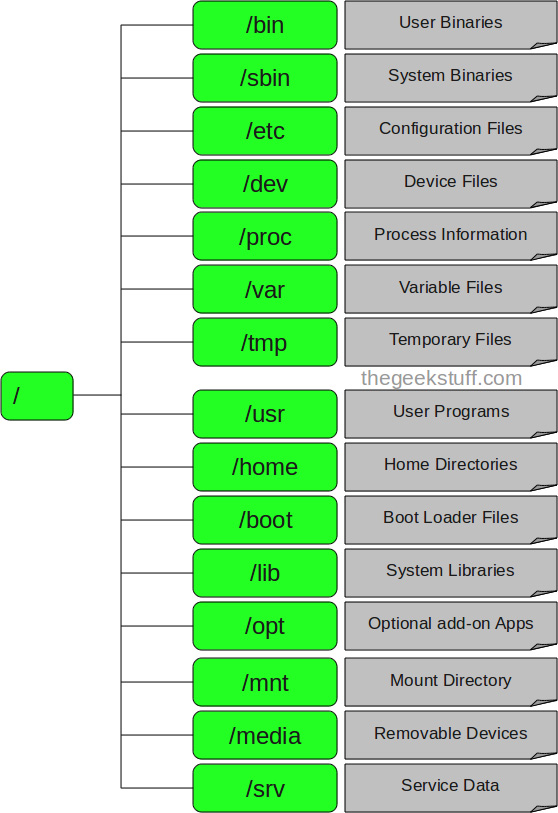
<p style="text-align: justify;"><img alt="" data-i="0" data-src="https://st.quantrimang.com/photos/image/122011/05/tree.jpg" data-was-processed="true" height="813" src="https://st.quantrimang.com/photos/image/122011/05/tree.jpg" width="558" /></p>

<p style="text-align: justify;">Trong bài viết này, chúng tôi sẽ ôn lại giúp bạn về cấu trúc file hệ thống của Linux và ý nghĩa của từng thư mục chính.</p>

<h2 style="text-align: justify;">Cấu trúc cây thư mục trong Linux</h2>

<div style="text-align: justify;">&nbsp;</div>

<h3 style="text-align: justify;">1. / - Root</h3>

<p style="text-align: justify;">Đúng với tên gọi của mình: nút gốc (root) đây là nơi bắt đầu của tất cả các file và thư mục. Chỉ có root user mới có quyền ghi trong thư mục này. Chú ý rằng /root là thư mục home của root user chứ không phải là /.</p>

<h3 style="text-align: justify;">2. /bin - Chương trình của người dùng</h3>

<p style="text-align: justify;">Thư mục này chứa các chương trình thực thi. Các chương trình chung của Linux được sử dụng bởi tất cả người dùng được lưu ở đây. Ví dụ như: ps, ls, ping...</p>

<div style="text-align: justify;">&nbsp;</div>

<h3 style="text-align: justify;">3. /sbin - Chương trình hệ thống</h3>

<p style="text-align: justify;">Cũng giống như /bin, /sbinn cũng chứa các chương trình thực thi, nhưng chúng là những chương trình của admin, dành cho việc bảo trì hệ thống. Ví dụ như: reboot, fdisk, iptables...</p>

<h3 style="text-align: justify;">4. /etc - Các file cấu hình</h3>

<p style="text-align: justify;">Thư mục này chứa các file cấu hình của các chương trình, đồng thời nó còn chứa các shell script dùng để khởi động hoặc tắt các chương trình khác. Ví dụ: /etc/resolv.conf, /etc/logrolate.conf</p>

<h3 style="text-align: justify;">5. /dev - Các file thiết bị</h3>

<p style="text-align: justify;">Các phân vùng ổ cứng, thiết bị ngoại vi như USB, ổ đĩa cắm ngoài, hay bất cứ thiết bị nào gắn kèm vào hệ thống đều được lưu ở đây. Ví dụ: /dev/sdb1 là tên của USB bạn vừa cắm vào máy, để mở được USB này bạn cần sử dụng lệnh mount với quyền root:&nbsp;# mount /dev/sdb1 /tmp</p>

<div style="text-align: justify;">&nbsp;</div>

<h3 style="text-align: justify;">6. /tmp - Các file tạm</h3>

<p style="text-align: justify;">Thư mục này chứa các file tạm thời được tạo bởi hệ thống và các người dùng. Các file lưu trong thư mục này sẽ bị xóa khi hệ thống khởi động lại.</p>

<h3 style="text-align: justify;">7. /proc - Thông tin về các tiến trình</h3>

<p style="text-align: justify;">Thông tin về các tiến trình đang chạy sẽ được lưu trong /proc dưới dạng một hệ thống file thư mục mô phỏng. Ví dụ thư mục con /proc/{pid} chứa các thông tin về tiến trình có ID là pid (pid ~ process ID). Ngoài ra đây cũng là nơi lưu thông tin về về các tài nguyên đang sử dụng của hệ thống như: /proc/version, /proc/uptime...</p>

<h3 style="text-align: justify;">8. /var - File về biến của chương trình</h3>

<p style="text-align: justify;">Thông tin về các biến của hệ thống được lưu trong thư mục này. Như thông tin về log file: /var/log, các gói và cơ sở dữ liệu /var/lib...</p>

<h3 style="text-align: justify;">9. /usr - Chương trình của người dùng</h3>

<p style="text-align: justify;">Chứa các thư viện, file thực thi, tài liệu hướng dẫn và mã nguồn cho chương trình chạy ở level 2 của hệ thống. Trong đó</p>

<ul>
	<li style="text-align: justify;">/usr/bin chứa các file thực thi của người dùng như: at, awk, cc, less... Nếu bạn không tìm thấy chúng trong /bin hãy tìm trong /usr/bin</li>
	<li style="text-align: justify;">/usr/sbin chứa các file thực thi của hệ thống dưới quyền của admin như: atd, cron, sshd... Nếu bạn không tìm thấy chúng trong /sbin thì hãy tìm trong thư mục này.</li>
	<li style="text-align: justify;">/usr/lib chứa các thư viện cho các chương trình trong /usr/bin và /usr/sbin</li>
	<li style="text-align: justify;">/usr/local chứa các chương tình của người dùng được cài từ mã nguồn. Ví dụ như bạn cài apache từ mã nguồn, nó sẽ được lưu dưới /usr/local/apache2</li>
</ul>

<h3 style="text-align: justify;">10. /home - Thư mục người của dùng</h3>

<p style="text-align: justify;">Thư mục này chứa tất cả các file cá nhân của từng người dùng. Ví dụ: /home/john, /home/marie</p>

<h3 style="text-align: justify;">11. /boot - Các file khởi động</h3>

<p style="text-align: justify;">Tất cả các file yêu cầu khi khởi động như initrd, vmlinux. grub được lưu tại đây. Ví dụ vmlixuz-2.6.32-24-generic</p>

<h3 style="text-align: justify;">12. /lib - Thư viện hệ thống</h3>

<p style="text-align: justify;">Chứa cá thư viện hỗ trợ cho các file thực thi trong /bin và /sbin. Các thư viện này thường có tên bắt đầu bằng ld* hoặc lib*.so.*. Ví dụ như ld-2.11.1.so hay libncurses.so.5.7</p>

<h3 style="text-align: justify;">13. /opt - Các ứng dụng phụ tùy chọn</h3>

<p style="text-align: justify;">Tên thư mục này nghĩa là optional (tùy chọn), nó chứa các ứng dụng thêm vào từ các nhà cung cấp độc lập khác. Các ứng dụng này có thể được cài ở /opt hoặc một thư mục con của /opt</p>

<h3 style="text-align: justify;">14. /mnt - Thư mục để mount</h3>

<p style="text-align: justify;">Đây là thư mục tạm để mount các file hệ thống. Ví dụ như # mount /dev/sda2 /mnt</p>

<h3 style="text-align: justify;">15. /media - Các thiết bị gắn có thể gỡ bỏ</h3>

<p style="text-align: justify;">Thư mục tạm này chứa các thiết bị như CdRom /media/cdrom. floppy /media/floopy hay các phân vùng đĩa cứng /media/Data (hiểu như là ổ D:/Data trong Windows)</p>

<h3 style="text-align: justify;">16. /srv - Dữ liệu của các dịch vụ khác</h3>

<p style="text-align: justify;">Chứa dữ liệu liên quan đến các dịch vụ máy chủ như /srv/svs, chứa các dữ liệu liên quan đến CVS.</p>

<h2 style="text-align: justify;">Cách in cấu trúc cây thư mục trong Linux</h2>

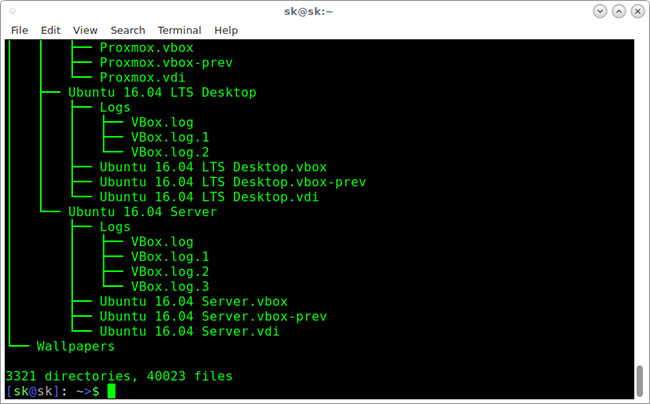
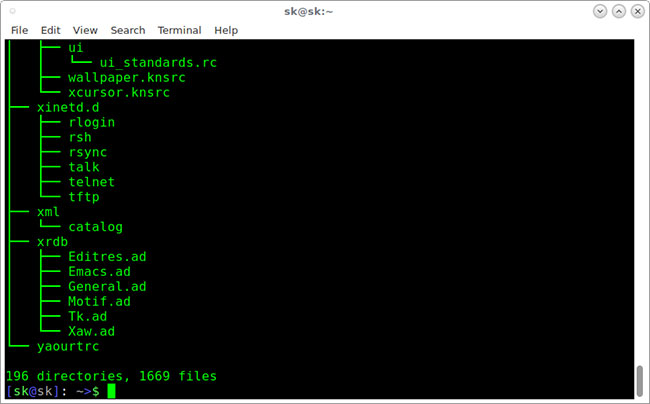
<p style="text-align: justify;">Phần này sẽ chỉ cho bạn cách xem cấu trúc thư mục bằng lệnh tree. Lệnh này sẽ hiển thị nội dung của một thư mục ở định dạng cây.</p>

<p style="text-align: justify;">Nếu bạn chạy lệnh tree mà không có bất kỳ đối số nào, lệnh tree sẽ hiển thị tất cả nội dung của thư mục làm việc hiện hành ở định dạng cây.</p>

<pre id="pre0">
<code>$ tree</code></pre>

<p style="text-align: justify;">Đầu ra mẫu:</p>

<figure>
<div style="text-align: justify;"><img alt="Chạy lệnh tree không có bất kỳ đối số nào" data-i="1" data-src="https://st.quantrimang.com/photos/image/2020/11/20/cau-truc-cay-thu-muc-trong-linux-1.jpg" data-was-processed="true" height="404" src="https://st.quantrimang.com/photos/image/2020/11/20/cau-truc-cay-thu-muc-trong-linux-1.jpg" width="650" /></div>

<figcaption>
<div style="text-align: justify;">Chạy lệnh tree không có bất kỳ đối số nào</div>
</figcaption>
</figure>

<p style="text-align: justify;">Sau khi hoàn thành việc liệt kê tất cả các file/thư mục được tìm thấy, lệnh tree trả về tổng số file và/hoặc thư mục được liệt kê. Như bạn thấy trong đầu ra ở trên, thư mục hiện tại chứa 3321 thư mục con và 40023 file.</p>

<p style="text-align: justify;">Để liệt kê các file của thư mục cụ thể ở định dạng cây, chẳng hạn như /etc, hãy chạy lệnh:</p>

<pre id="pre1">
<code>$ tree /etc/</code></pre>

<p style="text-align: justify;">Đầu ra mẫu:</p>

<figure>
<div style="text-align: justify;"><img alt="Liệt kê các file của thư mục cụ thể ở định dạng cây" data-i="2" data-src="https://st.quantrimang.com/photos/image/2020/11/20/cau-truc-cay-thu-muc-trong-linux-2.jpg" data-was-processed="true" height="404" src="https://st.quantrimang.com/photos/image/2020/11/20/cau-truc-cay-thu-muc-trong-linux-2.jpg" width="650" /></div>

<figcaption>
<div style="text-align: justify;">Liệt kê các file của thư mục cụ thể ở định dạng cây</div>
</figcaption>
</figure>

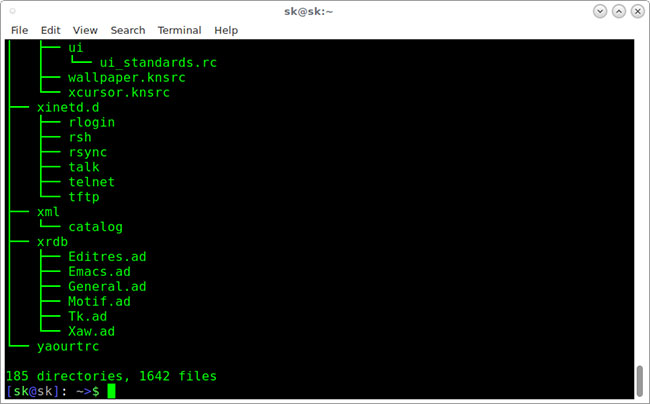
<p style="text-align: justify;">Theo mặc định, lệnh tree sẽ không liệt kê các file ẩn. Nếu bạn muốn liệt kê các file ẩn, hãy sử dụng tham số&nbsp;<strong>-a</strong>&nbsp;như bên dưới.</p>

<pre id="pre2">
<code>$ tree -a /etc/</code></pre>

<p style="text-align: justify;">Đầu ra mẫu:</p>

<figure>
<div style="text-align: justify;"><img alt="Lệnh tree hiển thị các file ẩn" data-i="3" data-src="https://st.quantrimang.com/photos/image/2020/11/20/cau-truc-cay-thu-muc-trong-linux-3.jpg" data-was-processed="true" height="404" src="https://st.quantrimang.com/photos/image/2020/11/20/cau-truc-cay-thu-muc-trong-linux-3.jpg" width="650" /></div>

<figcaption>
<div style="text-align: justify;">Lệnh tree hiển thị các file ẩn</div>
</figcaption>
</figure>

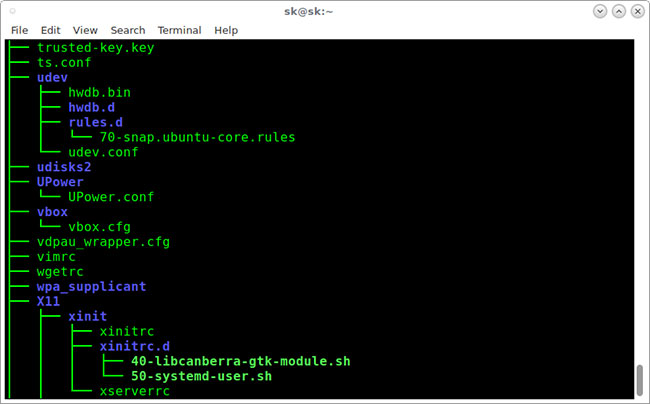
<p style="text-align: justify;">Bây giờ, hãy kiểm tra đầu ra ở trên. Tổng số thư mục và file cao hơn đầu ra trước đó. Đó là bởi vì, lần này lệnh tree liệt kê tất cả các thư mục và file, bao gồm cả file ẩn.<br />
<br />
Để xem cấu trúc thư mục ở định dạng màu, hãy sử dụng tham số&nbsp;<strong>-C.</strong></p>

<pre id="pre3">
<code>$ tree -C /etc/</code></pre>

<p style="text-align: justify;">Đầu ra mẫu:</p>

<figure>
<div style="text-align: justify;"><img alt="Xem cấu trúc thư mục ở định dạng màu" data-i="4" data-src="https://st.quantrimang.com/photos/image/2020/11/20/cau-truc-cay-thu-muc-trong-linux-4.jpg" data-was-processed="true" height="404" src="https://st.quantrimang.com/photos/image/2020/11/20/cau-truc-cay-thu-muc-trong-linux-4.jpg" width="650" /></div>

<figcaption>
<div style="text-align: justify;">Xem cấu trúc thư mục ở định dạng màu</div>
</figcaption>
</figure>

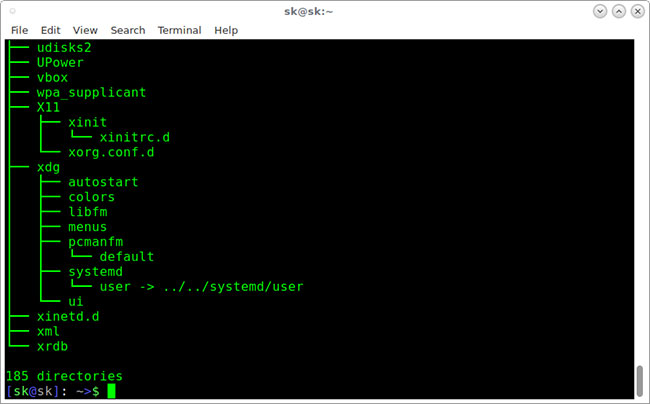
<p style="text-align: justify;">Bạn có để ý không? Bây giờ, lệnh tree liệt kê các thư mục và file với những màu khác nhau. Điều này sẽ hữu ích trong việc phân biệt các thư mục và file.<br />
<br />
Như bạn có thể nhận thấy, tất cả các lệnh trên đều liệt kê các thư mục con và file. Bạn cũng có thể chỉ liệt kê các thư mục sử dụng tham số&nbsp;<strong>-d</strong>&nbsp;như bên dưới.</p>

<pre id="pre4">
<code>$ tree -d /etc/</code></pre>

<p style="text-align: justify;">Đầu ra mẫu:</p>

<figure>
<div style="text-align: justify;"><img alt="Chỉ liệt kê các thư mục" data-i="5" data-src="https://st.quantrimang.com/photos/image/2020/11/20/cau-truc-cay-thu-muc-trong-linux-5.jpg" data-was-processed="true" height="404" src="https://st.quantrimang.com/photos/image/2020/11/20/cau-truc-cay-thu-muc-trong-linux-5.jpg" width="650" /></div>

<figcaption>
<div style="text-align: justify;">Chỉ liệt kê các thư mục</div>
</figcaption>
</figure>

<p style="text-align: justify;">Bạn cũng có thể hiển thị danh sách thư mục theo từng dòng bằng cách sử dụng lệnh sau:</p>

<pre id="pre5">
<code>$ tree -d /etc/ | less</code></pre>

<p style="text-align: justify;">Nhấn&nbsp;<strong>ENTER</strong>&nbsp;để điều hướng qua đầu ra.</p>

<p style="text-align: justify;">Theo mặc định, lệnh tree sẽ liệt kê tất cả các thư mục con và file bên trong thư mục chính. Để giới hạn độ sâu hoặc mức độ đệ quy, hãy sử dụng tham số&nbsp;<strong>-L</strong>&nbsp;như bên dưới.</p>

<pre id="pre6">
<code>$ tree -L 2 /etc</code></pre>

<p style="text-align: justify;">Ở đây,&nbsp;<strong>L</strong>&nbsp;cho biết độ sâu hiển thị tối đa của cây thư mục.</p>

<p style="text-align: justify;">Để biết thêm chi tiết, hãy tham khảo các trang man:</p>

<pre id="pre7">
<code>$ man tree</code></pre>
		</div>
				<div id="author">
						<p>
				<strong>Nguồn tin:</strong>
				Quantrimang.com
			</p>
		</div>
	</div>
	<div id="footer" class="clearfix">
		<div id="url">
			<strong>URL của bản tin này: </strong><a href="https://www.nguoicodonvn2008.info/vi/news/savefile/kien-thuc-may-tinh/cau-truc-cay-thu-muc-trong-linux-3112.html" title="Cấu trúc cây thư mục trong Linux">https://www.nguoicodonvn2008.info/vi/news/savefile/kien-thuc-may-tinh/cau-truc-cay-thu-muc-trong-linux-3112.html</a>

		</div>
		<div class="clear"></div>
		<div class="copyright">
			&copy; .&#x3A; Nguoicodonvn2008.info - Cõi lòng người cô đơn &#x3A;.
		</div>
		<div id="contact">
			<a href="mailto:admin@nguoicodonvn2008.info">admin@nguoicodonvn2008.info</a>
		</div>
	</div>
</div>
        <div id="timeoutsess" class="chromeframe">
            Bạn đã không sử dụng Site, <a onclick="timeoutsesscancel();" href="https://nguoicodonvn2008.info/#">Bấm vào đây để duy trì trạng thái đăng nhập</a>. Thời gian chờ: <span id="secField"> 60 </span> giây
        </div>
        <div id="openidResult" class="nv-alert" style="display:none"></div>
        <div id="openidBt" data-result="" data-redirect=""></div>
		</script>
		<div class="car-top">
  <span><img src="https://nguoicodonvn2008.info/themes/default/images/car.png" alt=""></span>
</div>
<script src="https://nguoicodonvn2008.info/assets/js/jquery/jquery.min.js"></script>
<script>var nv_base_siteurl="/",nv_lang_data="vi",nv_lang_interface="vi",nv_name_variable="nv",nv_fc_variable="op",nv_lang_variable="language",nv_module_name="news",nv_func_name="savefile",nv_is_user=0, nv_my_ofs=-4,nv_my_abbr="EDT",nv_cookie_prefix="nv4c_e856T",nv_check_pass_mstime=1738000,nv_area_admin=0,nv_safemode=0,theme_responsive=0,nv_recaptcha_ver=2,nv_recaptcha_sitekey="",nv_recaptcha_type="image",XSSsanitize=1;</script>
<script src="https://nguoicodonvn2008.info/assets/js/language/vi.js"></script>
<script src="https://nguoicodonvn2008.info/assets/js/DOMPurify/purify3.js"></script>
<script src="https://nguoicodonvn2008.info/assets/js/global.js"></script>
<script src="https://nguoicodonvn2008.info/assets/js/site.js"></script>
<script src="https://nguoicodonvn2008.info/themes/default/js/news.js"></script>
<script src="https://nguoicodonvn2008.info/themes/default/js/main.js"></script>
<script src="https://nguoicodonvn2008.info/themes/default/js/custom.js"></script>
<script type="application/ld+json">
        {
            "@context": "https://schema.org",
            "@type": "Organization",
            "url": "https://nguoicodonvn2008.info",
            "logo": "https://nguoicodonvn2008.info/uploads/angel.gif"
        }
        </script>
<script src="https://nguoicodonvn2008.info/themes/default/js/bootstrap.min.js"></script>
<script type="text/javascript">
var $scrolltop = $('.car-top');
$scrolltop.on('click', function () {
    $('html,body').animate({
        scrollTop: 0
    }, 800);
    $(this).addClass("car-run");
    setTimeout(function(){ $scrolltop.removeClass('car-run');}, 1000);
    return false;
});
$(window).on('scroll', function ()
{ 
    if($(window).scrollTop() >= 200)
    {
        $scrolltop.addClass("show");
        $scrolltop.addClass("car-down");
    }
    else
    {
       $scrolltop.removeClass("show");
       setTimeout(function(){ $scrolltop.removeClass('car-down');}, 300);
    }
});
</script>
</body>
</html>