<!DOCTYPE html>
    <html lang="vi" xmlns="http://www.w3.org/1999/xhtml" prefix="og: http://ogp.me/ns#">
    <head>
<title>Cần mở bao nhiêu tab để làm chậm trình duyệt của bạn?</title>
<meta name="description" content="Cần mở bao nhiêu tab để làm chậm trình duyệt của bạn? - Savefile - Tin Tức -...">
<meta name="author" content=".: Nguoicodonvn2008.info - Cõi lòng người cô đơn :.">
<meta name="copyright" content=".: Nguoicodonvn2008.info - Cõi lòng người cô đơn :. [admin@nguoicodonvn2008.info]">
<meta name="robots" content="index, archive, follow, noodp">
<meta name="googlebot" content="index,archive,follow,noodp">
<meta name="msnbot" content="all,index,follow">
<meta name="generator" content="NukeViet v4.5">
<meta http-equiv="Content-Type" content="text/html; charset=utf-8">
<meta property="og:title" content="Cần mở bao nhiêu tab để làm chậm trình duyệt của bạn?">
<meta property="og:type" content="website">
<meta property="og:description" content="Savefile - Tin Tức - https&#x3A;&#x002F;&#x002F;www.nguoicodonvn2008.info&#x002F;vi&#x002F;news&#x002F;savefile&#x002F;kien-thuc-may-tinh&#x002F;can-mo-bao-nhieu-tab-de-lam-cham-trinh-duyet-cua-ban-8358.html">
<meta property="og:site_name" content=".&#x3A; Nguoicodonvn2008.info - Cõi lòng người cô đơn &#x3A;.">
<meta property="og:url" content="https://www.nguoicodonvn2008.info/vi/news/savefile/kien-thuc-may-tinh/can-mo-bao-nhieu-tab-de-lam-cham-trinh-duyet-cua-ban-8358.html">
<link rel="shortcut icon" href="https://nguoicodonvn2008.info/favicon.ico">
<link rel="canonical" href="https://www.nguoicodonvn2008.info/vi/news/savefile/kien-thuc-may-tinh/can-mo-bao-nhieu-tab-de-lam-cham-trinh-duyet-cua-ban-8358.html">
<link rel="alternate" href="https://nguoicodonvn2008.info/vi/news/rss/" title="Tin Tức" type="application/rss+xml">
<link rel="alternate" href="https://nguoicodonvn2008.info/vi/news/rss/karaoke-dual/" title="Tin Tức - Karaoke Dual" type="application/rss+xml">
<link rel="alternate" href="https://nguoicodonvn2008.info/vi/news/rss/nhac-tre/" title="Tin Tức - Nhạc trẻ" type="application/rss+xml">
<link rel="alternate" href="https://nguoicodonvn2008.info/vi/news/rss/tru-tinh/" title="Tin Tức - Trữ tình" type="application/rss+xml">
<link rel="alternate" href="https://nguoicodonvn2008.info/vi/news/rss/nuoc-ngoai/" title="Tin Tức - Nước ngoài" type="application/rss+xml">
<link rel="alternate" href="https://nguoicodonvn2008.info/vi/news/rss/remix/" title="Tin Tức - Remix" type="application/rss+xml">
<link rel="alternate" href="https://nguoicodonvn2008.info/vi/news/rss/tam-su-tinh-yeu/" title="Tin Tức - Tâm sự tình yêu" type="application/rss+xml">
<link rel="alternate" href="https://nguoicodonvn2008.info/vi/news/rss/tho-suu-tam/" title="Tin Tức - Thơ sưu tầm" type="application/rss+xml">
<link rel="alternate" href="https://nguoicodonvn2008.info/vi/news/rss/cuoc-song/" title="Tin Tức - Cuộc sống" type="application/rss+xml">
<link rel="alternate" href="https://nguoicodonvn2008.info/vi/news/rss/phan-mem/" title="Tin Tức - Phần mềm" type="application/rss+xml">
<link rel="alternate" href="https://nguoicodonvn2008.info/vi/news/rss/kien-thuc-may-tinh/" title="Tin Tức - Kiến thức máy tính" type="application/rss+xml">
<link rel="alternate" href="https://nguoicodonvn2008.info/vi/news/rss/hoc-tap/" title="Tin Tức - Học tập" type="application/rss+xml">
<link rel="alternate" href="https://nguoicodonvn2008.info/vi/news/rss/tai-lieu/" title="Tin Tức - Tài liệu" type="application/rss+xml">
<link rel="alternate" href="https://nguoicodonvn2008.info/vi/news/rss/de-thi/" title="Tin Tức - Đề thi" type="application/rss+xml">
<link rel="preload" as="style" href="https://nguoicodonvn2008.info/assets/css/font-awesome.min.css" type="text/css">
<link rel="preload" as="style" href="https://nguoicodonvn2008.info/themes/default/css/bootstrap.non-responsive.css" type="text/css">
<link rel="preload" as="style" href="https://nguoicodonvn2008.info/themes/default/css/style.css" type="text/css">
<link rel="preload" as="style" href="https://nguoicodonvn2008.info/themes/default/css/style.non-responsive.css" type="text/css">
<link rel="preload" as="style" href="https://nguoicodonvn2008.info/themes/default/css/news.css" type="text/css">
<link rel="preload" as="style" href="https://nguoicodonvn2008.info/themes/default/css/custom.css" type="text/css">
<link rel="preload" as="script" href="https://nguoicodonvn2008.info/assets/js/jquery/jquery.min.js" type="text/javascript">
<link rel="preload" as="script" href="https://nguoicodonvn2008.info/assets/js/language/vi.js" type="text/javascript">
<link rel="preload" as="script" href="https://nguoicodonvn2008.info/assets/js/DOMPurify/purify3.js" type="text/javascript">
<link rel="preload" as="script" href="https://nguoicodonvn2008.info/assets/js/global.js" type="text/javascript">
<link rel="preload" as="script" href="https://nguoicodonvn2008.info/assets/js/site.js" type="text/javascript">
<link rel="preload" as="script" href="https://nguoicodonvn2008.info/themes/default/js/news.js" type="text/javascript">
<link rel="preload" as="script" href="https://nguoicodonvn2008.info/themes/default/js/main.js" type="text/javascript">
<link rel="preload" as="script" href="https://nguoicodonvn2008.info/themes/default/js/custom.js" type="text/javascript">
<link rel="preload" as="script" href="https://nguoicodonvn2008.info/themes/default/js/bootstrap.min.js" type="text/javascript">
<link rel="stylesheet" href="https://nguoicodonvn2008.info/assets/css/font-awesome.min.css">
<link rel="stylesheet" href="https://nguoicodonvn2008.info/themes/default/css/bootstrap.non-responsive.css">
<link rel="stylesheet" href="https://nguoicodonvn2008.info/themes/default/css/style.css">
<link rel="stylesheet" href="https://nguoicodonvn2008.info/themes/default/css/style.non-responsive.css">
<link rel="StyleSheet" href="https://nguoicodonvn2008.info/themes/default/css/news.css">
<link rel="stylesheet" href="https://nguoicodonvn2008.info/themes/default/css/custom.css">
<style type="text/css">
	body{background: #fff;}
</style>
    </head>
    <body>
<div id="print">
	<div id="hd_print">
		<h2 class="pull-left">.&#x3A; Nguoicodonvn2008.info - Cõi lòng người cô đơn &#x3A;.</h2>
		<p class="pull-right"><a title=".&#x3A; Nguoicodonvn2008.info - Cõi lòng người cô đơn &#x3A;." href="https://nguoicodonvn2008.info/">https://nguoicodonvn2008.info</a></p>
	</div>
	<div class="clear"></div>
	<hr />
	<div id="content">
		<h1>Cần mở bao nhiêu tab để làm chậm trình duyệt của bạn?</h1>
		<ul class="list-inline">
			<li>Thứ tư - 15/05/2024 23:57</li>
			<li class="hidden-print txtrequired"><em class="fa fa-print">&nbsp;</em><a title="In ra" href="javascript:;" onclick="window.print()">In ra</a></li>
			<li class="hidden-print txtrequired"><em class="fa fa-power-off">&nbsp;</em><a title="Đóng cửa sổ này" href="javascript:;" onclick="window.close()">Đóng cửa sổ này</a></li>
		</ul>
		<div class="clear"></div>
		<div id="hometext">
		</div>
				<div class="imghome">
			<img alt="Cần mở bao nhiêu tab để làm chậm trình duyệt của bạn?" src="https://st.quantrimang.com/photos/image/2024/05/15/can-mo-bao-nhieu-tab-de-lam-cham-trinh-duyet1.jpg" width="460" class="img-thumbnail" />
		</div>
		<div class="clear"></div>
		<div id="bodytext" class="clearfix">
			<div class="ckeditor-html5-audio" style="text-align: center;">
<audio controls="controls" controlslist="nodownload" src="https://st.quantrimang.com/photos/media/2024/05/15/638513841273140094.mp3">&nbsp;</audio>
</div>

<p style="text-align: justify;">Có thể vì thói quen hoặc do nhu cầu công việc, chúng ta thường phải mở hàng tá các tab khác nhau trên trình duyệt web của máy tính, điện thoại. Nhưng bạn thường giữ các tab trình duyệt của mình luôn mở bao lâu? Đã bao giờ bạn thắc mắc trình duyệt của mình sẽ chịu được bao bao nhiêu tab mở cùng lúc trước khi bắt đầu bị suy giảm hiệu năng?</p>

<p style="text-align: justify;">Có vẻ hợp lý khi cho rằng càng mở nhiều tab thì trình duyệt sẽ càng hoạt động vất vả hơn. Nói cách khác, nhiều người tin rằng hiệu suất trình duyệt sẽ bị ảnh hưởng tiêu cực nếu bạn liên tục có hàng tá tab ngốn tài nguyên. Tuy nhiên, quan điểm đó chưa hẳn là đúng. Các trình duyệt hiện đại sở hữu một số thủ thuật thú vị để vượt qua những tình huống như vậy.</p>

<p style="text-align: justify;">Để kiểm tra tính hiệu quả việc quản lý bộ nhớ của Chrome, Firefox và Edge, bạn có thể sử dụng các công cụ đánh giá hiệu suất trình duyệt, chẳng hạn như Speedometer 3.0. Có rất nhiều biến số xảy ra trong một thử nghiệm như thế này—chủ yếu là từ thông số kỹ thuật của máy tính và trang web mà bạn mở. Để giữ mọi thứ nhất quán nhất có thể, bạn nên mở 5 trang web khác nhau, chạy kiểm tra, mở lại năm tab giống nhau, chạy kiểm tra và lặp lại cho đến khi mở được khoảng 30 tab.</p>

<p style="text-align: justify;">Ở ví dụ tham khảo trong bài viết này, PC thử nghiệm chạy Windows 11, 16GB RAM, CPU Ryzen 5 3600 và 500GB dung lượng lưu trữ. Các trình duyệt tham chiếu là Chrome, Firefox và Edge, tất cả đều ở thiết lập mặc định. Điểm số cụ thể sẽ không quan trọng trong các kết quả kiểm tra —yếu tố cần lưu ý hơn cả là tính ổn định, nhất quán khi mở nhiều tab.</p>

<div class="adbox adsense in-article" id="articleads">
<div id="aswift_1_host" style="border: medium none; height: 0px; width: 694px; margin: 0px; padding: 0px; position: relative; visibility: visible; background-color: transparent; display: inline-block; overflow: hidden; opacity: 0; text-align: justify;"><iframe allowtransparency="true" aria-label="Advertisement" data-google-container-id="a!2" data-google-query-id="CN-Zw9SjkYYDFR-C6QUdUCEM9g" data-load-complete="true" frameborder="0" height="0" hspace="0" id="aswift_1" marginheight="0" marginwidth="0" name="aswift_1" sandbox="" scrolling="no" style="left: 0px; position: absolute; top: 0px; border: 0px none; width: 694px; height: 0px;" tabindex="0" title="Advertisement" vspace="0" width="694"></iframe></div>
</div>

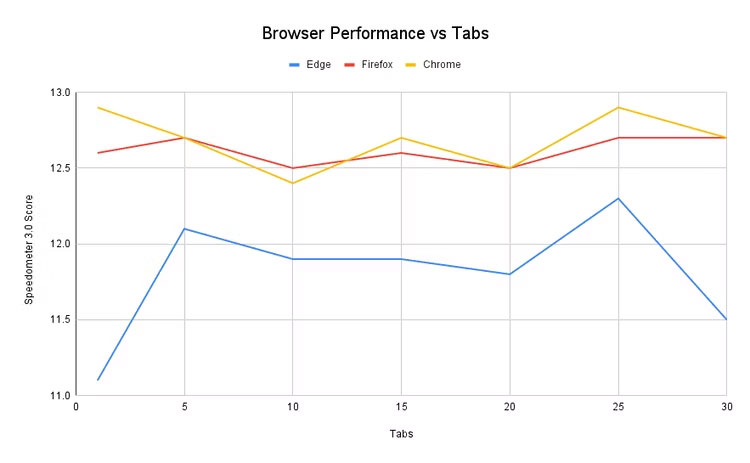
<p style="text-align: justify;">Kết quả cho thấy cả ba trình duyệt đều hoạt động khá ổn định mặc dù có khá nhiều tab được mở đồng thời. Biểu đồ bên dưới hiển thị điểm Speedometer 3.0 cho số lượng tab mở ngày càng tăng (bắt đầu bằng một tab làm đường cơ sở).</p>

<figure>
<div style="text-align: justify;"><img alt="" class="lazy lightbox loaded" data-i="0" data-src="https://st.quantrimang.com/photos/image/2024/05/15/can-mo-bao-nhieu-tab-de-lam-cham-trinh-duyet1.jpg" data-was-processed="true" height="463" src="https://st.quantrimang.com/photos/image/2024/05/15/can-mo-bao-nhieu-tab-de-lam-cham-trinh-duyet1.jpg" style="height: 429px; width: 696px;" width="750" /></div>
</figure>

<p style="text-align: justify;">Microsoft Edge có điểm số chênh lệch nhiều nhất, nhưng bạn sẽ nhận thấy về cơ bản hiệu suất của trình duyệt không tệ đi khi có nhiều tab được mở hơn. Điều kỳ lạ là hai điểm tệ nhất lại nằm ở hai đầu đối diện của quang phổ—1 tab và 30 tab. Điều đó cho thấy số lượng tab về cơ bản có rất ít tác động đến hiệu suất.</p>

<p style="text-align: justify;">Firefox và Chrome hoạt động ổn định hơn và một lần nữa, điểm số hiệu năng của trình duyệt dường như không hiển thị bất kỳ mối liên hệ nào với số lượng tab. Cả hai trình duyệt đều ghi điểm rất giống nhau khi chỉ mở một tab và 30 tab. Tất cả những kết quả này—bao gồm cả Edge—cho thấy rằng bạn có thể mở nhiều tab hơn và hiệu suất trình duyệt sẽ vẫn ổn định.</p>

<p style="text-align: justify;">Tuy nhiên, điều gì sẽ xảy ra nếu tắt tính năng tiết kiệm bộ nhớ và hiệu suất của trình duyệt? Chẳng hạn khi tắt tất cả các tùy chọn trong cài đặt &quot;Tối ưu hóa hiệu suất&quot; của Edge và chạy thử nghiệm lại khi mở 30 tab, điểm số thu được là 10,9, vẫn không phải là một sự khác biệt quá lớn.</p>

<p style="text-align: justify;">Nhìn chung, các trình duyệt web hiện đại sở hữu những tính năng tích hợp sẵn để đảm bảo hiệu suất không bị ảnh hưởng khi bạn mở quá nhiều tab. Như đã đề cập ở trên, Chrome, Firefox và Edge đều có một số tính năng &quot;Tiết kiệm bộ nhớ&quot; hoặc &quot;Tối ưu hóa hiệu suất&quot; giúp giải phóng bộ nhớ ở chế độ nền. Những tính năng này có thể được bật hoặc tắt, nhưng cũng có một vài trường hợp đã được tích hợp vào lõi của trình duyệt.</p>

<div class="adbox in-article adsense" id="articleads2">
<div id="aswift_2_host" style="border: medium none; height: 0px; width: 694px; margin: 0px; padding: 0px; position: relative; visibility: visible; background-color: transparent; display: inline-block; overflow: hidden; opacity: 0; text-align: justify;"><iframe allowtransparency="true" aria-label="Advertisement" data-google-container-id="a!3" data-google-query-id="CJb9w9SjkYYDFd6D6QUdJhUCRw" data-load-complete="true" frameborder="0" height="0" hspace="0" id="aswift_2" marginheight="0" marginwidth="0" name="aswift_2" sandbox="" scrolling="no" style="left: 0px; position: absolute; top: 0px; border: 0px none; width: 694px; height: 0px;" tabindex="0" title="Advertisement" vspace="0" width="694"></iframe></div>
</div>

<p style="text-align: justify;">Khái niệm này rất giống với cách các thiết bị iPhone và Android quản lý bộ nhớ. Ngược lại với những gì bạn nghĩ, bạn không cần phải đóng các ứng dụng chạy nền trên điện thoại. Nếu bạn không sử dụng một ứng dụng trong một thời gian, ứng dụng đó sẽ được chuyển sang chế độ ngủ ở chế độ nền. Điều tương tự cũng áp dụng cho các trình duyệt.</p>
		</div>
				<div id="author">
						<p>
				<strong>Nguồn tin:</strong>
				Quantrimang.com
			</p>
		</div>
	</div>
	<div id="footer" class="clearfix">
		<div id="url">
			<strong>URL của bản tin này: </strong><a href="https://www.nguoicodonvn2008.info/vi/news/savefile/kien-thuc-may-tinh/can-mo-bao-nhieu-tab-de-lam-cham-trinh-duyet-cua-ban-8358.html" title="Cần mở bao nhiêu tab để làm chậm trình duyệt của bạn?">https://www.nguoicodonvn2008.info/vi/news/savefile/kien-thuc-may-tinh/can-mo-bao-nhieu-tab-de-lam-cham-trinh-duyet-cua-ban-8358.html</a>

		</div>
		<div class="clear"></div>
		<div class="copyright">
			&copy; .&#x3A; Nguoicodonvn2008.info - Cõi lòng người cô đơn &#x3A;.
		</div>
		<div id="contact">
			<a href="mailto:admin@nguoicodonvn2008.info">admin@nguoicodonvn2008.info</a>
		</div>
	</div>
</div>
        <div id="timeoutsess" class="chromeframe">
            Bạn đã không sử dụng Site, <a onclick="timeoutsesscancel();" href="https://nguoicodonvn2008.info/#">Bấm vào đây để duy trì trạng thái đăng nhập</a>. Thời gian chờ: <span id="secField"> 60 </span> giây
        </div>
        <div id="openidResult" class="nv-alert" style="display:none"></div>
        <div id="openidBt" data-result="" data-redirect=""></div>
		</script>
		<div class="car-top">
  <span><img src="https://nguoicodonvn2008.info/themes/default/images/car.png" alt=""></span>
</div>
<script src="https://nguoicodonvn2008.info/assets/js/jquery/jquery.min.js"></script>
<script>var nv_base_siteurl="/",nv_lang_data="vi",nv_lang_interface="vi",nv_name_variable="nv",nv_fc_variable="op",nv_lang_variable="language",nv_module_name="news",nv_func_name="savefile",nv_is_user=0, nv_my_ofs=-4,nv_my_abbr="EDT",nv_cookie_prefix="nv4c_e856T",nv_check_pass_mstime=1738000,nv_area_admin=0,nv_safemode=0,theme_responsive=0,nv_recaptcha_ver=2,nv_recaptcha_sitekey="",nv_recaptcha_type="image",XSSsanitize=1;</script>
<script src="https://nguoicodonvn2008.info/assets/js/language/vi.js"></script>
<script src="https://nguoicodonvn2008.info/assets/js/DOMPurify/purify3.js"></script>
<script src="https://nguoicodonvn2008.info/assets/js/global.js"></script>
<script src="https://nguoicodonvn2008.info/assets/js/site.js"></script>
<script src="https://nguoicodonvn2008.info/themes/default/js/news.js"></script>
<script src="https://nguoicodonvn2008.info/themes/default/js/main.js"></script>
<script src="https://nguoicodonvn2008.info/themes/default/js/custom.js"></script>
<script type="application/ld+json">
        {
            "@context": "https://schema.org",
            "@type": "Organization",
            "url": "https://nguoicodonvn2008.info",
            "logo": "https://nguoicodonvn2008.info/uploads/angel.gif"
        }
        </script>
<script src="https://nguoicodonvn2008.info/themes/default/js/bootstrap.min.js"></script>
<script type="text/javascript">
var $scrolltop = $('.car-top');
$scrolltop.on('click', function () {
    $('html,body').animate({
        scrollTop: 0
    }, 800);
    $(this).addClass("car-run");
    setTimeout(function(){ $scrolltop.removeClass('car-run');}, 1000);
    return false;
});
$(window).on('scroll', function ()
{ 
    if($(window).scrollTop() >= 200)
    {
        $scrolltop.addClass("show");
        $scrolltop.addClass("car-down");
    }
    else
    {
       $scrolltop.removeClass("show");
       setTimeout(function(){ $scrolltop.removeClass('car-down');}, 300);
    }
});
</script>
</body>
</html>