<!DOCTYPE html>
    <html lang="vi" xmlns="http://www.w3.org/1999/xhtml" prefix="og: http://ogp.me/ns#">
    <head>
<title>Cách xuất dữ liệu Microsoft Access sang Word</title>
<meta name="description" content="Cách xuất dữ liệu Microsoft Access sang Word - Savefile - Tin Tức -...">
<meta name="author" content=".: Nguoicodonvn2008.info - Cõi lòng người cô đơn :.">
<meta name="copyright" content=".: Nguoicodonvn2008.info - Cõi lòng người cô đơn :. [admin@nguoicodonvn2008.info]">
<meta name="robots" content="index, archive, follow, noodp">
<meta name="googlebot" content="index,archive,follow,noodp">
<meta name="msnbot" content="all,index,follow">
<meta name="generator" content="NukeViet v4.5">
<meta http-equiv="Content-Type" content="text/html; charset=utf-8">
<meta property="og:title" content="Cách xuất dữ liệu Microsoft Access sang Word">
<meta property="og:type" content="website">
<meta property="og:description" content="Savefile - Tin Tức - https&#x3A;&#x002F;&#x002F;www.nguoicodonvn2008.info&#x002F;vi&#x002F;news&#x002F;savefile&#x002F;kien-thuc-may-tinh&#x002F;cach-xuat-du-lieu-microsoft-access-sang-word-11785.html">
<meta property="og:site_name" content=".&#x3A; Nguoicodonvn2008.info - Cõi lòng người cô đơn &#x3A;.">
<meta property="og:url" content="https://www.nguoicodonvn2008.info/vi/news/savefile/kien-thuc-may-tinh/cach-xuat-du-lieu-microsoft-access-sang-word-11785.html">
<link rel="shortcut icon" href="https://nguoicodonvn2008.info/favicon.ico">
<link rel="canonical" href="https://www.nguoicodonvn2008.info/vi/news/savefile/kien-thuc-may-tinh/cach-xuat-du-lieu-microsoft-access-sang-word-11785.html">
<link rel="alternate" href="https://nguoicodonvn2008.info/vi/news/rss/" title="Tin Tức" type="application/rss+xml">
<link rel="alternate" href="https://nguoicodonvn2008.info/vi/news/rss/karaoke-dual/" title="Tin Tức - Karaoke Dual" type="application/rss+xml">
<link rel="alternate" href="https://nguoicodonvn2008.info/vi/news/rss/nhac-tre/" title="Tin Tức - Nhạc trẻ" type="application/rss+xml">
<link rel="alternate" href="https://nguoicodonvn2008.info/vi/news/rss/tru-tinh/" title="Tin Tức - Trữ tình" type="application/rss+xml">
<link rel="alternate" href="https://nguoicodonvn2008.info/vi/news/rss/nuoc-ngoai/" title="Tin Tức - Nước ngoài" type="application/rss+xml">
<link rel="alternate" href="https://nguoicodonvn2008.info/vi/news/rss/remix/" title="Tin Tức - Remix" type="application/rss+xml">
<link rel="alternate" href="https://nguoicodonvn2008.info/vi/news/rss/tam-su-tinh-yeu/" title="Tin Tức - Tâm sự tình yêu" type="application/rss+xml">
<link rel="alternate" href="https://nguoicodonvn2008.info/vi/news/rss/tho-suu-tam/" title="Tin Tức - Thơ sưu tầm" type="application/rss+xml">
<link rel="alternate" href="https://nguoicodonvn2008.info/vi/news/rss/cuoc-song/" title="Tin Tức - Cuộc sống" type="application/rss+xml">
<link rel="alternate" href="https://nguoicodonvn2008.info/vi/news/rss/phan-mem/" title="Tin Tức - Phần mềm" type="application/rss+xml">
<link rel="alternate" href="https://nguoicodonvn2008.info/vi/news/rss/kien-thuc-may-tinh/" title="Tin Tức - Kiến thức máy tính" type="application/rss+xml">
<link rel="alternate" href="https://nguoicodonvn2008.info/vi/news/rss/hoc-tap/" title="Tin Tức - Học tập" type="application/rss+xml">
<link rel="alternate" href="https://nguoicodonvn2008.info/vi/news/rss/tai-lieu/" title="Tin Tức - Tài liệu" type="application/rss+xml">
<link rel="alternate" href="https://nguoicodonvn2008.info/vi/news/rss/de-thi/" title="Tin Tức - Đề thi" type="application/rss+xml">
<link rel="preload" as="style" href="https://nguoicodonvn2008.info/assets/css/font-awesome.min.css" type="text/css">
<link rel="preload" as="style" href="https://nguoicodonvn2008.info/themes/default/css/bootstrap.non-responsive.css" type="text/css">
<link rel="preload" as="style" href="https://nguoicodonvn2008.info/themes/default/css/style.css" type="text/css">
<link rel="preload" as="style" href="https://nguoicodonvn2008.info/themes/default/css/style.non-responsive.css" type="text/css">
<link rel="preload" as="style" href="https://nguoicodonvn2008.info/themes/default/css/news.css" type="text/css">
<link rel="preload" as="style" href="https://nguoicodonvn2008.info/themes/default/css/custom.css" type="text/css">
<link rel="preload" as="script" href="https://nguoicodonvn2008.info/assets/js/jquery/jquery.min.js" type="text/javascript">
<link rel="preload" as="script" href="https://nguoicodonvn2008.info/assets/js/language/vi.js" type="text/javascript">
<link rel="preload" as="script" href="https://nguoicodonvn2008.info/assets/js/DOMPurify/purify3.js" type="text/javascript">
<link rel="preload" as="script" href="https://nguoicodonvn2008.info/assets/js/global.js" type="text/javascript">
<link rel="preload" as="script" href="https://nguoicodonvn2008.info/assets/js/site.js" type="text/javascript">
<link rel="preload" as="script" href="https://nguoicodonvn2008.info/themes/default/js/news.js" type="text/javascript">
<link rel="preload" as="script" href="https://nguoicodonvn2008.info/themes/default/js/main.js" type="text/javascript">
<link rel="preload" as="script" href="https://nguoicodonvn2008.info/themes/default/js/custom.js" type="text/javascript">
<link rel="preload" as="script" href="https://nguoicodonvn2008.info/themes/default/js/bootstrap.min.js" type="text/javascript">
<link rel="stylesheet" href="https://nguoicodonvn2008.info/assets/css/font-awesome.min.css">
<link rel="stylesheet" href="https://nguoicodonvn2008.info/themes/default/css/bootstrap.non-responsive.css">
<link rel="stylesheet" href="https://nguoicodonvn2008.info/themes/default/css/style.css">
<link rel="stylesheet" href="https://nguoicodonvn2008.info/themes/default/css/style.non-responsive.css">
<link rel="StyleSheet" href="https://nguoicodonvn2008.info/themes/default/css/news.css">
<link rel="stylesheet" href="https://nguoicodonvn2008.info/themes/default/css/custom.css">
<style type="text/css">
	body{background: #fff;}
</style>
    </head>
    <body>
<div id="print">
	<div id="hd_print">
		<h2 class="pull-left">.&#x3A; Nguoicodonvn2008.info - Cõi lòng người cô đơn &#x3A;.</h2>
		<p class="pull-right"><a title=".&#x3A; Nguoicodonvn2008.info - Cõi lòng người cô đơn &#x3A;." href="https://nguoicodonvn2008.info/">https://nguoicodonvn2008.info</a></p>
	</div>
	<div class="clear"></div>
	<hr />
	<div id="content">
		<h1>Cách xuất dữ liệu Microsoft Access sang Word</h1>
		<ul class="list-inline">
			<li>Thứ năm - 04/12/2025 00:59</li>
			<li class="hidden-print txtrequired"><em class="fa fa-print">&nbsp;</em><a title="In ra" href="javascript:;" onclick="window.print()">In ra</a></li>
			<li class="hidden-print txtrequired"><em class="fa fa-power-off">&nbsp;</em><a title="Đóng cửa sổ này" href="javascript:;" onclick="window.close()">Đóng cửa sổ này</a></li>
		</ul>
		<div class="clear"></div>
		<div id="hometext">
		</div>
				<div class="imghome">
			<img alt="Cách xuất dữ liệu Microsoft Access sang Word" src="https://st.quantrimang.com/photos/image/2025/12/02/xuat-Microsoft-Access-sang-Word-4.jpg" width="460" class="img-thumbnail" />
		</div>
		<div class="clear"></div>
		<div id="bodytext" class="clearfix">
			<p style="text-align: justify;">Microsoft Access cung đầy đủ các tính năng của một hệ thống quản lý cơ sở dữ liệu. Bạn có thể tạo bảng, biểu mẫu, truy vấn, báo cáo, macro, mô-đun,... Nhưng đôi khi, bạn có thể muốn xuất dữ liệu từ Microsoft Access sang Word để dễ dàng xử lý dữ liệu hơn. Dưới đây là hướng dẫn xuất dữ liệu Microsoft Access sang Word.</p>

<div style="text-align: justify;">&nbsp;</div>

<h2 style="text-align: justify;">Hướng dẫn xuất dữ liệu Microsoft Access sang Word</h2>

<p style="text-align: justify;"><strong>Bước 1:</strong></p>

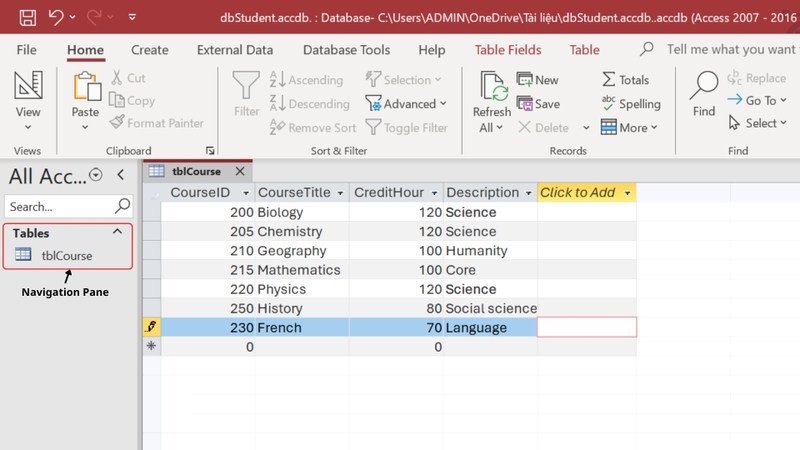
<p style="text-align: justify;">Chúng ta&nbsp;<strong>truy cập Microsoft Access</strong>&nbsp;rồi&nbsp;<strong>mở cơ sở dữ liệu muốn xuất</strong>&nbsp;sang Word. Trong&nbsp;<strong>Navigation Pane</strong>,&nbsp;<strong>nhấp chọn đối tượng</strong>.</p>

<p style="text-align: justify;"><img alt="Chọn đối tượng tại Microsoft Access" data-adbro-processed="true" data-i="0" data-src="https://st.quantrimang.com/photos/image/2025/12/02/xuat-Microsoft-Access-sang-Word-1.jpg" data-was-processed="true" height="338" src="https://st.quantrimang.com/photos/image/2025/12/02/xuat-Microsoft-Access-sang-Word-1.jpg" width="600" /></p>

<p style="text-align: justify;"><strong>Bước 2:</strong></p>

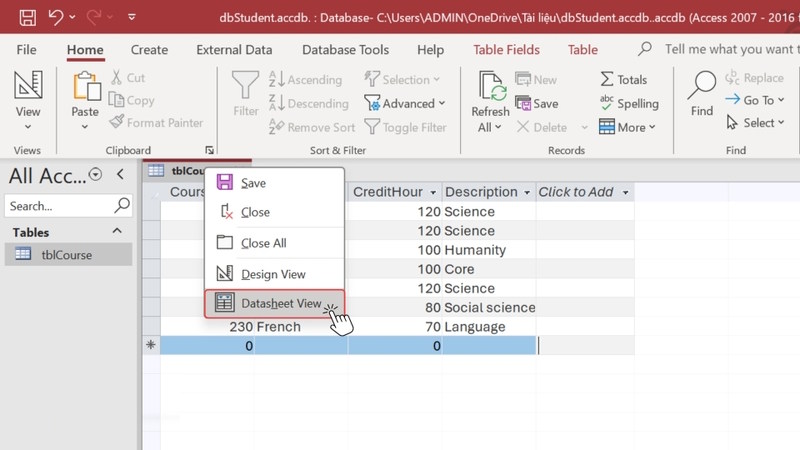
<p style="text-align: justify;">Trong trường hợp bạn&nbsp;<strong>chỉ muốn xuất một phần dữ liệu</strong>&nbsp;thì&nbsp;<strong>nhấn Datasheet View</strong>&nbsp;rồi&nbsp;<strong>chọn dữ liệu muốn xuất</strong>. Nếu xuất toàn bộ thì bỏ qua bước thực hiện này.</p>

<p style="text-align: justify;"><img alt="Chọn xuất một vài dữ liệu" data-i="1" data-src="https://st.quantrimang.com/photos/image/2025/12/02/xuat-Microsoft-Access-sang-Word-2.jpg" data-was-processed="true" height="338" src="https://st.quantrimang.com/photos/image/2025/12/02/xuat-Microsoft-Access-sang-Word-2.jpg" width="600" /></p>

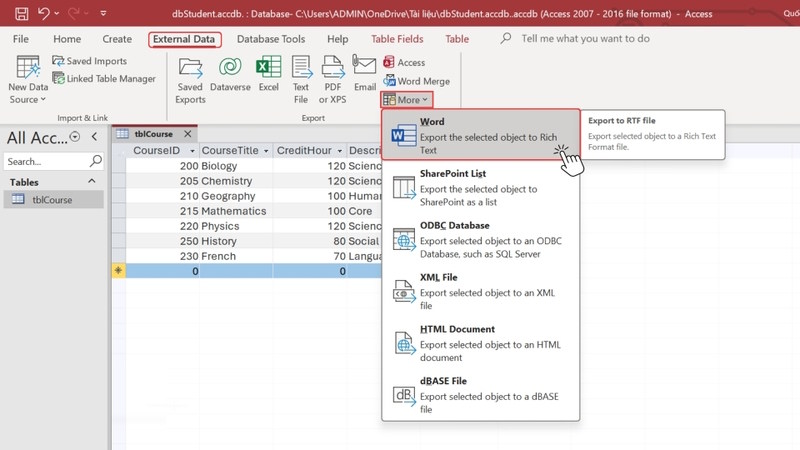
<p style="text-align: justify;">Tại thanh công cụ chúng ta lựa chọn&nbsp;<strong>External Data &gt; More &gt; Word</strong>&nbsp;trong menu hiển thị.</p>

<p style="text-align: justify;"><img alt="Chọn đầu ra xuất dữ liệu" data-i="2" data-src="https://st.quantrimang.com/photos/image/2025/12/02/xuat-Microsoft-Access-sang-Word-3.jpg" data-was-processed="true" height="338" src="https://st.quantrimang.com/photos/image/2025/12/02/xuat-Microsoft-Access-sang-Word-3.jpg" width="600" /></p>

<p style="text-align: justify;"><strong>Bước 3:</strong></p>

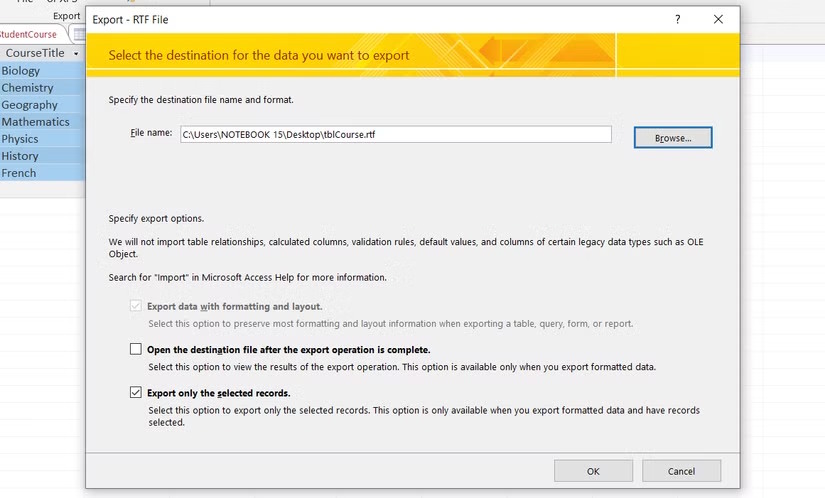
<p style="text-align: justify;">Ngay sau đó bạn sẽ thấy&nbsp;<strong>giao diện Export - RTF File Wizard</strong>&nbsp;hiển thị. Bạn&nbsp;<strong>nhập tên tệp</strong>, chọn&nbsp;<strong>thư mục lưu trữ</strong>&nbsp;rồi điều chỉnh các tùy chọn xuất theo nhu cầu:</p>

<ul>
	<li style="text-align: justify;">Open the destination file after the export operation is complete: mở tài liệu Word sau khi xuất từ Microsoft Access.</li>
	<li style="text-align: justify;">Export only the selected records: xuất các bản ghi đã chọn nếu muốn xuất toàn bộ dữ liệu thì giữ nguyên mặc định.</li>
</ul>

<p style="text-align: justify;">Sau khi chọn xong bạn nhấn OK để tiến hành xuất dữ liệu từ Microsoft Access sang Word.</p>

<p style="text-align: justify;"><img alt="Chọn thư mục lưu dữ liệu từ Microsoft Access sang" data-i="3" data-src="https://st.quantrimang.com/photos/image/2025/12/02/xuat-Microsoft-Access-sang-Word-4.jpg" data-was-processed="true" height="362" src="https://st.quantrimang.com/photos/image/2025/12/02/xuat-Microsoft-Access-sang-Word-4.jpg" width="600" /></p>

<p style="text-align: justify;"><strong>Bước 5:</strong></p>

<p style="text-align: justify;">Kết quả bạn có&nbsp;<strong>tệp định dạng RTF</strong>. Bạn chỉ cần mở tệp rồi sao chép toàn bộ nội dung rồi paste sang tài liệu Word là được.</p>

<h3 style="text-align: justify;">Lưu ý khi xuất dữ liệu Microsoft Access sang Word</h3>

<ul>
	<li style="text-align: justify;">Để có được nội dung từ Microsoft Access sang Word thì bạn cần phải biết được những nội dung nào được xuất, tránh trường hợp bị lỗi.</li>
	<li style="text-align: justify;">Chỉ có thể xuất bảng, truy vấn, biểu mẫu và báo cáo. Với mỗi loại dữ liệu thì Access chỉ xuất các bản ghi hiển thị trong dạng xem hiện tại, không bao gồm dữ liệu ẩn.</li>
	<li style="text-align: justify;">Access chỉ có thể xuất biểu mẫu và bảng dữ liệu với các biểu mẫu con và bảng dữ liệu con. Để xuất đầy đủ dữ liệu thì xuất tất cả các biểu mẫu phụ và bảng dữ liệu phụ. Nếu bạn xuất báo cáo chính, bạn có thể xuất nhiều biểu mẫu phụ và báo cáo phụ.</li>
	<li style="text-align: justify;">Các loại dữ liệu như mối quan hệ (Relationships), macro, mô-đun (Modules), hình ảnh và đồ thị Microsoft Graph không thể xuất sang Word. Access chỉ xuất kết quả từ biểu thức chứ không phải bản thân biểu thức.</li>
	<li style="text-align: justify;">Không thể nhập dữ liệu ngược từ Word sang Access.</li>
</ul>

<div style="text-align: justify;">&nbsp;</div>
		</div>
				<div id="author">
						<p>
				<strong>Nguồn tin:</strong>
				Quantrimang.com:
			</p>
		</div>
	</div>
	<div id="footer" class="clearfix">
		<div id="url">
			<strong>URL của bản tin này: </strong><a href="https://www.nguoicodonvn2008.info/vi/news/savefile/kien-thuc-may-tinh/cach-xuat-du-lieu-microsoft-access-sang-word-11785.html" title="Cách xuất dữ liệu Microsoft Access sang Word">https://www.nguoicodonvn2008.info/vi/news/savefile/kien-thuc-may-tinh/cach-xuat-du-lieu-microsoft-access-sang-word-11785.html</a>

		</div>
		<div class="clear"></div>
		<div class="copyright">
			&copy; .&#x3A; Nguoicodonvn2008.info - Cõi lòng người cô đơn &#x3A;.
		</div>
		<div id="contact">
			<a href="mailto:admin@nguoicodonvn2008.info">admin@nguoicodonvn2008.info</a>
		</div>
	</div>
</div>
        <div id="timeoutsess" class="chromeframe">
            Bạn đã không sử dụng Site, <a onclick="timeoutsesscancel();" href="https://nguoicodonvn2008.info/#">Bấm vào đây để duy trì trạng thái đăng nhập</a>. Thời gian chờ: <span id="secField"> 60 </span> giây
        </div>
        <div id="openidResult" class="nv-alert" style="display:none"></div>
        <div id="openidBt" data-result="" data-redirect=""></div>
		</script>
		<div class="car-top">
  <span><img src="https://nguoicodonvn2008.info/themes/default/images/car.png" alt=""></span>
</div>
<div id="run_cronjobs" style="visibility:hidden;display:none;"><img alt="cron" src="/index.php?second=cronjobs&amp;p=n1r7fcjp" width="1" height="1" /></div>
<script src="https://nguoicodonvn2008.info/assets/js/jquery/jquery.min.js"></script>
<script>var nv_base_siteurl="/",nv_lang_data="vi",nv_lang_interface="vi",nv_name_variable="nv",nv_fc_variable="op",nv_lang_variable="language",nv_module_name="news",nv_func_name="savefile",nv_is_user=0, nv_my_ofs=-4,nv_my_abbr="EDT",nv_cookie_prefix="nv4c_e856T",nv_check_pass_mstime=1738000,nv_area_admin=0,nv_safemode=0,theme_responsive=0,nv_recaptcha_ver=2,nv_recaptcha_sitekey="",nv_recaptcha_type="image",XSSsanitize=1;</script>
<script src="https://nguoicodonvn2008.info/assets/js/language/vi.js"></script>
<script src="https://nguoicodonvn2008.info/assets/js/DOMPurify/purify3.js"></script>
<script src="https://nguoicodonvn2008.info/assets/js/global.js"></script>
<script src="https://nguoicodonvn2008.info/assets/js/site.js"></script>
<script src="https://nguoicodonvn2008.info/themes/default/js/news.js"></script>
<script src="https://nguoicodonvn2008.info/themes/default/js/main.js"></script>
<script src="https://nguoicodonvn2008.info/themes/default/js/custom.js"></script>
<script type="application/ld+json">
        {
            "@context": "https://schema.org",
            "@type": "Organization",
            "url": "https://nguoicodonvn2008.info",
            "logo": "https://nguoicodonvn2008.info/uploads/angel.gif"
        }
        </script>
<script src="https://nguoicodonvn2008.info/themes/default/js/bootstrap.min.js"></script>
<script type="text/javascript">
var $scrolltop = $('.car-top');
$scrolltop.on('click', function () {
    $('html,body').animate({
        scrollTop: 0
    }, 800);
    $(this).addClass("car-run");
    setTimeout(function(){ $scrolltop.removeClass('car-run');}, 1000);
    return false;
});
$(window).on('scroll', function ()
{ 
    if($(window).scrollTop() >= 200)
    {
        $scrolltop.addClass("show");
        $scrolltop.addClass("car-down");
    }
    else
    {
       $scrolltop.removeClass("show");
       setTimeout(function(){ $scrolltop.removeClass('car-down');}, 300);
    }
});
</script>
</body>
</html>