<!DOCTYPE html>
    <html lang="vi" xmlns="http://www.w3.org/1999/xhtml" prefix="og: http://ogp.me/ns#">
    <head>
<title>Cách xuất danh sách các tiến trình đang chạy dưới dạng file văn bản trong Windows 11</title>
<meta name="description" content="Cách xuất danh sách các tiến trình đang chạy dưới dạng file văn bản trong Windows 11 - Savefile - Tin Tức -...">
<meta name="author" content=".: Nguoicodonvn2008.info - Cõi lòng người cô đơn :.">
<meta name="copyright" content=".: Nguoicodonvn2008.info - Cõi lòng người cô đơn :. [admin@nguoicodonvn2008.info]">
<meta name="robots" content="index, archive, follow, noodp">
<meta name="googlebot" content="index,archive,follow,noodp">
<meta name="msnbot" content="all,index,follow">
<meta name="generator" content="NukeViet v4.5">
<meta http-equiv="Content-Type" content="text/html; charset=utf-8">
<meta property="og:title" content="Cách xuất danh sách các tiến trình đang chạy dưới dạng file văn bản trong Windows 11">
<meta property="og:type" content="website">
<meta property="og:description" content="Savefile - Tin Tức -...">
<meta property="og:site_name" content=".&#x3A; Nguoicodonvn2008.info - Cõi lòng người cô đơn &#x3A;.">
<meta property="og:url" content="https://www.nguoicodonvn2008.info/vi/news/savefile/kien-thuc-may-tinh/cach-xuat-danh-sach-cac-tien-trinh-dang-chay-duoi-dang-file-van-ban-trong-windows-11-4773.html">
<link rel="shortcut icon" href="https://nguoicodonvn2008.info/favicon.ico">
<link rel="canonical" href="https://www.nguoicodonvn2008.info/vi/news/savefile/kien-thuc-may-tinh/cach-xuat-danh-sach-cac-tien-trinh-dang-chay-duoi-dang-file-van-ban-trong-windows-11-4773.html">
<link rel="alternate" href="https://nguoicodonvn2008.info/vi/news/rss/" title="Tin Tức" type="application/rss+xml">
<link rel="alternate" href="https://nguoicodonvn2008.info/vi/news/rss/karaoke-dual/" title="Tin Tức - Karaoke Dual" type="application/rss+xml">
<link rel="alternate" href="https://nguoicodonvn2008.info/vi/news/rss/nhac-tre/" title="Tin Tức - Nhạc trẻ" type="application/rss+xml">
<link rel="alternate" href="https://nguoicodonvn2008.info/vi/news/rss/tru-tinh/" title="Tin Tức - Trữ tình" type="application/rss+xml">
<link rel="alternate" href="https://nguoicodonvn2008.info/vi/news/rss/nuoc-ngoai/" title="Tin Tức - Nước ngoài" type="application/rss+xml">
<link rel="alternate" href="https://nguoicodonvn2008.info/vi/news/rss/remix/" title="Tin Tức - Remix" type="application/rss+xml">
<link rel="alternate" href="https://nguoicodonvn2008.info/vi/news/rss/tam-su-tinh-yeu/" title="Tin Tức - Tâm sự tình yêu" type="application/rss+xml">
<link rel="alternate" href="https://nguoicodonvn2008.info/vi/news/rss/tho-suu-tam/" title="Tin Tức - Thơ sưu tầm" type="application/rss+xml">
<link rel="alternate" href="https://nguoicodonvn2008.info/vi/news/rss/cuoc-song/" title="Tin Tức - Cuộc sống" type="application/rss+xml">
<link rel="alternate" href="https://nguoicodonvn2008.info/vi/news/rss/phan-mem/" title="Tin Tức - Phần mềm" type="application/rss+xml">
<link rel="alternate" href="https://nguoicodonvn2008.info/vi/news/rss/kien-thuc-may-tinh/" title="Tin Tức - Kiến thức máy tính" type="application/rss+xml">
<link rel="alternate" href="https://nguoicodonvn2008.info/vi/news/rss/hoc-tap/" title="Tin Tức - Học tập" type="application/rss+xml">
<link rel="alternate" href="https://nguoicodonvn2008.info/vi/news/rss/tai-lieu/" title="Tin Tức - Tài liệu" type="application/rss+xml">
<link rel="alternate" href="https://nguoicodonvn2008.info/vi/news/rss/de-thi/" title="Tin Tức - Đề thi" type="application/rss+xml">
<link rel="preload" as="style" href="https://nguoicodonvn2008.info/assets/css/font-awesome.min.css" type="text/css">
<link rel="preload" as="style" href="https://nguoicodonvn2008.info/themes/default/css/bootstrap.non-responsive.css" type="text/css">
<link rel="preload" as="style" href="https://nguoicodonvn2008.info/themes/default/css/style.css" type="text/css">
<link rel="preload" as="style" href="https://nguoicodonvn2008.info/themes/default/css/style.non-responsive.css" type="text/css">
<link rel="preload" as="style" href="https://nguoicodonvn2008.info/themes/default/css/news.css" type="text/css">
<link rel="preload" as="style" href="https://nguoicodonvn2008.info/themes/default/css/custom.css" type="text/css">
<link rel="preload" as="script" href="https://nguoicodonvn2008.info/assets/js/jquery/jquery.min.js" type="text/javascript">
<link rel="preload" as="script" href="https://nguoicodonvn2008.info/assets/js/language/vi.js" type="text/javascript">
<link rel="preload" as="script" href="https://nguoicodonvn2008.info/assets/js/DOMPurify/purify3.js" type="text/javascript">
<link rel="preload" as="script" href="https://nguoicodonvn2008.info/assets/js/global.js" type="text/javascript">
<link rel="preload" as="script" href="https://nguoicodonvn2008.info/assets/js/site.js" type="text/javascript">
<link rel="preload" as="script" href="https://nguoicodonvn2008.info/themes/default/js/news.js" type="text/javascript">
<link rel="preload" as="script" href="https://nguoicodonvn2008.info/themes/default/js/main.js" type="text/javascript">
<link rel="preload" as="script" href="https://nguoicodonvn2008.info/themes/default/js/custom.js" type="text/javascript">
<link rel="preload" as="script" href="https://nguoicodonvn2008.info/themes/default/js/bootstrap.min.js" type="text/javascript">
<link rel="stylesheet" href="https://nguoicodonvn2008.info/assets/css/font-awesome.min.css">
<link rel="stylesheet" href="https://nguoicodonvn2008.info/themes/default/css/bootstrap.non-responsive.css">
<link rel="stylesheet" href="https://nguoicodonvn2008.info/themes/default/css/style.css">
<link rel="stylesheet" href="https://nguoicodonvn2008.info/themes/default/css/style.non-responsive.css">
<link rel="StyleSheet" href="https://nguoicodonvn2008.info/themes/default/css/news.css">
<link rel="stylesheet" href="https://nguoicodonvn2008.info/themes/default/css/custom.css">
<style type="text/css">
	body{background: #fff;}
</style>
    </head>
    <body>
<div id="print">
	<div id="hd_print">
		<h2 class="pull-left">.&#x3A; Nguoicodonvn2008.info - Cõi lòng người cô đơn &#x3A;.</h2>
		<p class="pull-right"><a title=".&#x3A; Nguoicodonvn2008.info - Cõi lòng người cô đơn &#x3A;." href="https://nguoicodonvn2008.info/">https://nguoicodonvn2008.info</a></p>
	</div>
	<div class="clear"></div>
	<hr />
	<div id="content">
		<h1>Cách xuất danh sách các tiến trình đang chạy dưới dạng file văn bản trong Windows 11</h1>
		<ul class="list-inline">
			<li>Thứ sáu - 19/11/2021 23:56</li>
			<li class="hidden-print txtrequired"><em class="fa fa-print">&nbsp;</em><a title="In ra" href="javascript:;" onclick="window.print()">In ra</a></li>
			<li class="hidden-print txtrequired"><em class="fa fa-power-off">&nbsp;</em><a title="Đóng cửa sổ này" href="javascript:;" onclick="window.close()">Đóng cửa sổ này</a></li>
		</ul>
		<div class="clear"></div>
		<div id="hometext">
		</div>
				<div class="imghome">
			<img alt="Cách xuất danh sách các tiến trình đang chạy dưới dạng file văn bản trong Windows 11" src="https://st.quantrimang.com/photos/image/2021/11/11/xuat-danh-sach-tien-trinh-duoi-dang-file-van-ban-windows-111.jpg" width="460" class="img-thumbnail" />
		</div>
		<div class="clear"></div>
		<div id="bodytext" class="clearfix">
			<p style="text-align: justify;">Nếu bạn muốn chẩn đoán vấn đề đang gặp phải trên PC Windows 11 của mình, hoặc nếu bạn cần sự trợ giúp của quản trị viên, việc xuất danh sách các tiến trình hiện đang chạy để điều tra sự cố là việc đầu tiên bạn nên nghĩ tới.</p>

<p style="text-align: justify;">Bạn có thể sử dụng Task Manager để xem danh sách các quy trình hiện đang chạy. Những vấn đề là không có cách nào để xuất danh sách đó dưới dạng file văn bản trực tiếp từ Task Manager. Thay vào đó, bạn sẽ cần phải chạy lệnh trong Command Prompt.</p>

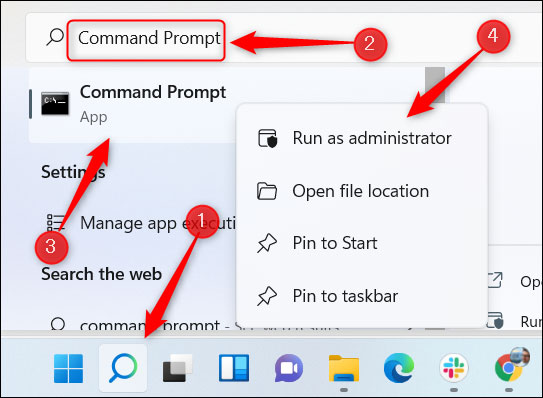
<p style="text-align: justify;">Trước tiên, hãy mở Command Prompt với tư cách quản trị viên. Để thực hiện việc này, hãy nhấp vào biểu tượng Windows Search trên thanh tác vụ, nhập từ khóa “Command Prompt” vào thanh Search, nhấp chuột phải vào ứng dụng Command Prompt trong kết quả tìm kiếm trả về, sau đó bấm chọn “Run as Administrator” trong menu hiện ra.</p>

<p style="text-align: justify;"><img alt="Mở Command Prompt với tư cách quản trị viên" data-i="0" data-src="https://st.quantrimang.com/photos/image/2021/11/11/xuat-danh-sach-tien-trinh-duoi-dang-file-van-ban-windows-111.jpg" data-was-processed="true" height="398" src="https://st.quantrimang.com/photos/image/2021/11/11/xuat-danh-sach-tien-trinh-duoi-dang-file-van-ban-windows-111.jpg" width="543" /></p>

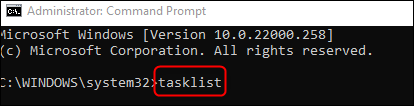
<p style="text-align: justify;">Command Prompt sẽ lập tức được khởi chạy với với các quyền nâng cao. Trên giao diện dòng lệnh hiện ra, bạn chạy lệnh sau:</p>

<pre id="pre0" style="text-align: justify;">
tasklist</pre>

<p style="text-align: justify;"><img alt="Chạy lệnh" data-i="1" data-src="https://st.quantrimang.com/photos/image/2021/11/11/xuat-danh-sach-tien-trinh-duoi-dang-file-van-ban-windows-112.png" data-was-processed="true" height="106" src="https://st.quantrimang.com/photos/image/2021/11/11/xuat-danh-sach-tien-trinh-duoi-dang-file-van-ban-windows-112.png" width="414" /></p>

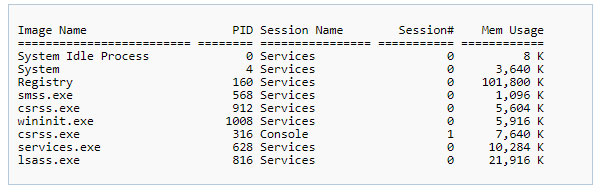
<p style="text-align: justify;">Lệnh này trả về một danh sách thông tin liên quan đến từng tiến trình cụ thể đang chạy trên hệ thống:</p>

<ul>
	<li style="text-align: justify;">Image Name</li>
	<li style="text-align: justify;">Process ID (PID)</li>
	<li style="text-align: justify;">Session Name</li>
	<li style="text-align: justify;">Session #</li>
	<li style="text-align: justify;">Mem Usage</li>
</ul>

<p style="text-align: justify;">Dưới đây là một ví dụ về danh sách tiến trình trả về sau khi bạn chạy lệnh. Lưu ý rằng danh sách thực tế có thể sẽ dài hơn nhiều, tùy thuộc vào số lượng tiến trình đang mở trên hệ thống của bạn.</p>

<p style="text-align: justify;"><img alt="Danh sách tiến trình trả về" data-i="2" data-src="https://st.quantrimang.com/photos/image/2021/11/11/xuat-danh-sach-tien-trinh-duoi-dang-file-van-ban-windows-113.jpg" data-was-processed="true" height="193" src="https://st.quantrimang.com/photos/image/2021/11/11/xuat-danh-sach-tien-trinh-duoi-dang-file-van-ban-windows-113.jpg" width="601" /></p>

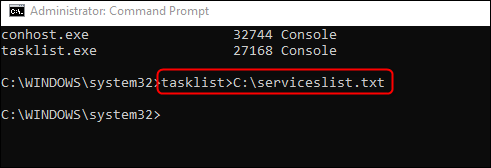
<p style="text-align: justify;">Bây giờ, nếu bạn muốn xuất danh sách này dưới dạng tệp văn bản thuần túy TXT để tiện lưu trữ hoặc chia sẻ với người khác, hãy chạy lệnh sau:</p>

<pre id="pre1" style="text-align: justify;">
tasklist&gt;C:\serviceslist.txt</pre>

<p style="text-align: justify;"><img alt="Chạy lệnh " data-i="3" data-src="https://st.quantrimang.com/photos/image/2021/11/11/xuat-danh-sach-tien-trinh-duoi-dang-file-van-ban-windows-114.png" data-was-processed="true" height="168" src="https://st.quantrimang.com/photos/image/2021/11/11/xuat-danh-sach-tien-trinh-duoi-dang-file-van-ban-windows-114.png" width="491" /></p>

<p style="text-align: justify;">Bạn có thể thay thế serviceslist bằng bất kỳ tên gọi nào muốn đặt cho tệp văn bản.</p>

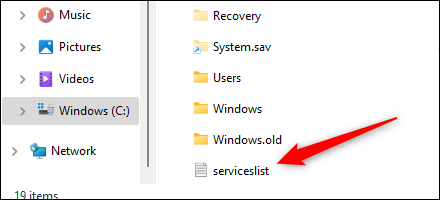
<p style="text-align: justify;">Tệp TXT tương ứng hiện đã được trích xuất và sẵn sàng sử dụng. Bạn có thể tìm thấy nó trong ổ Windows (C:). Mở File Explorer, điều hướng đến “Windows (C:),” và sau đó tìm tệp văn bản “serviceslist” (hoặc bất kỳ tên gọi nào mà bạn đã đặt).</p>

<p style="text-align: justify;"><img alt="File văn bản" data-i="4" data-src="https://st.quantrimang.com/photos/image/2021/11/11/xuat-danh-sach-tien-trinh-duoi-dang-file-van-ban-windows-115.png" data-was-processed="true" height="200" src="https://st.quantrimang.com/photos/image/2021/11/11/xuat-danh-sach-tien-trinh-duoi-dang-file-van-ban-windows-115.png" width="440" /></p>

<p style="text-align: justify;">Bạn có thể nhấp đúp vào tệp để mở hoặc chia sẻ nó đến bất cứ ai như một dạng file văn bản thông thường.</p>
		</div>
				<div id="author">
						<p>
				<strong>Nguồn tin:</strong>
				Quantrimang.com
			</p>
		</div>
	</div>
	<div id="footer" class="clearfix">
		<div id="url">
			<strong>URL của bản tin này: </strong><a href="https://www.nguoicodonvn2008.info/vi/news/savefile/kien-thuc-may-tinh/cach-xuat-danh-sach-cac-tien-trinh-dang-chay-duoi-dang-file-van-ban-trong-windows-11-4773.html" title="Cách xuất danh sách các tiến trình đang chạy dưới dạng file văn bản trong Windows 11">https://www.nguoicodonvn2008.info/vi/news/savefile/kien-thuc-may-tinh/cach-xuat-danh-sach-cac-tien-trinh-dang-chay-duoi-dang-file-van-ban-trong-windows-11-4773.html</a>

		</div>
		<div class="clear"></div>
		<div class="copyright">
			&copy; .&#x3A; Nguoicodonvn2008.info - Cõi lòng người cô đơn &#x3A;.
		</div>
		<div id="contact">
			<a href="mailto:admin@nguoicodonvn2008.info">admin@nguoicodonvn2008.info</a>
		</div>
	</div>
</div>
        <div id="timeoutsess" class="chromeframe">
            Bạn đã không sử dụng Site, <a onclick="timeoutsesscancel();" href="https://nguoicodonvn2008.info/#">Bấm vào đây để duy trì trạng thái đăng nhập</a>. Thời gian chờ: <span id="secField"> 60 </span> giây
        </div>
        <div id="openidResult" class="nv-alert" style="display:none"></div>
        <div id="openidBt" data-result="" data-redirect=""></div>
		</script>
		<div class="car-top">
  <span><img src="https://nguoicodonvn2008.info/themes/default/images/car.png" alt=""></span>
</div>
<div id="run_cronjobs" style="visibility:hidden;display:none;"><img alt="cron" src="/index.php?second=cronjobs&amp;p=s5Odw43P" width="1" height="1" /></div>
<script src="https://nguoicodonvn2008.info/assets/js/jquery/jquery.min.js"></script>
<script>var nv_base_siteurl="/",nv_lang_data="vi",nv_lang_interface="vi",nv_name_variable="nv",nv_fc_variable="op",nv_lang_variable="language",nv_module_name="news",nv_func_name="savefile",nv_is_user=0, nv_my_ofs=-4,nv_my_abbr="EDT",nv_cookie_prefix="nv4c_e856T",nv_check_pass_mstime=1738000,nv_area_admin=0,nv_safemode=0,theme_responsive=0,nv_recaptcha_ver=2,nv_recaptcha_sitekey="",nv_recaptcha_type="image",XSSsanitize=1;</script>
<script src="https://nguoicodonvn2008.info/assets/js/language/vi.js"></script>
<script src="https://nguoicodonvn2008.info/assets/js/DOMPurify/purify3.js"></script>
<script src="https://nguoicodonvn2008.info/assets/js/global.js"></script>
<script src="https://nguoicodonvn2008.info/assets/js/site.js"></script>
<script src="https://nguoicodonvn2008.info/themes/default/js/news.js"></script>
<script src="https://nguoicodonvn2008.info/themes/default/js/main.js"></script>
<script src="https://nguoicodonvn2008.info/themes/default/js/custom.js"></script>
<script type="application/ld+json">
        {
            "@context": "https://schema.org",
            "@type": "Organization",
            "url": "https://nguoicodonvn2008.info",
            "logo": "https://nguoicodonvn2008.info/uploads/angel.gif"
        }
        </script>
<script src="https://nguoicodonvn2008.info/themes/default/js/bootstrap.min.js"></script>
<script type="text/javascript">
var $scrolltop = $('.car-top');
$scrolltop.on('click', function () {
    $('html,body').animate({
        scrollTop: 0
    }, 800);
    $(this).addClass("car-run");
    setTimeout(function(){ $scrolltop.removeClass('car-run');}, 1000);
    return false;
});
$(window).on('scroll', function ()
{ 
    if($(window).scrollTop() >= 200)
    {
        $scrolltop.addClass("show");
        $scrolltop.addClass("car-down");
    }
    else
    {
       $scrolltop.removeClass("show");
       setTimeout(function(){ $scrolltop.removeClass('car-down');}, 300);
    }
});
</script>
</body>
</html>