<!DOCTYPE html>
    <html lang="vi" xmlns="http://www.w3.org/1999/xhtml" prefix="og: http://ogp.me/ns#">
    <head>
<title>Cách xóa và reset bộ nhớ cache của Microsoft Store trên Windows 10</title>
<meta name="description" content="Cách xóa và reset bộ nhớ cache của Microsoft Store trên Windows 10 - Savefile - Tin Tức -...">
<meta name="author" content=".: Nguoicodonvn2008.info - Cõi lòng người cô đơn :.">
<meta name="copyright" content=".: Nguoicodonvn2008.info - Cõi lòng người cô đơn :. [admin@nguoicodonvn2008.info]">
<meta name="robots" content="index, archive, follow, noodp">
<meta name="googlebot" content="index,archive,follow,noodp">
<meta name="msnbot" content="all,index,follow">
<meta name="generator" content="NukeViet v4.5">
<meta http-equiv="Content-Type" content="text/html; charset=utf-8">
<meta property="og:title" content="Cách xóa và reset bộ nhớ cache của Microsoft Store trên Windows 10">
<meta property="og:type" content="website">
<meta property="og:description" content="Savefile - Tin Tức - https&#x3A;&#x002F;&#x002F;www.nguoicodonvn2008.info&#x002F;vi&#x002F;news&#x002F;savefile&#x002F;kien-thuc-may-tinh&#x002F;cach-xoa-va-reset-bo-nho-cache-cua-microsoft-store-tren-windows-10-1065.html">
<meta property="og:site_name" content=".&#x3A; Nguoicodonvn2008.info - Cõi lòng người cô đơn &#x3A;.">
<meta property="og:url" content="https://www.nguoicodonvn2008.info/vi/news/savefile/kien-thuc-may-tinh/cach-xoa-va-reset-bo-nho-cache-cua-microsoft-store-tren-windows-10-1065.html">
<link rel="shortcut icon" href="https://nguoicodonvn2008.info/favicon.ico">
<link rel="canonical" href="https://www.nguoicodonvn2008.info/vi/news/savefile/kien-thuc-may-tinh/cach-xoa-va-reset-bo-nho-cache-cua-microsoft-store-tren-windows-10-1065.html">
<link rel="alternate" href="https://nguoicodonvn2008.info/vi/news/rss/" title="Tin Tức" type="application/rss+xml">
<link rel="alternate" href="https://nguoicodonvn2008.info/vi/news/rss/karaoke-dual/" title="Tin Tức - Karaoke Dual" type="application/rss+xml">
<link rel="alternate" href="https://nguoicodonvn2008.info/vi/news/rss/nhac-tre/" title="Tin Tức - Nhạc trẻ" type="application/rss+xml">
<link rel="alternate" href="https://nguoicodonvn2008.info/vi/news/rss/tru-tinh/" title="Tin Tức - Trữ tình" type="application/rss+xml">
<link rel="alternate" href="https://nguoicodonvn2008.info/vi/news/rss/nuoc-ngoai/" title="Tin Tức - Nước ngoài" type="application/rss+xml">
<link rel="alternate" href="https://nguoicodonvn2008.info/vi/news/rss/remix/" title="Tin Tức - Remix" type="application/rss+xml">
<link rel="alternate" href="https://nguoicodonvn2008.info/vi/news/rss/tam-su-tinh-yeu/" title="Tin Tức - Tâm sự tình yêu" type="application/rss+xml">
<link rel="alternate" href="https://nguoicodonvn2008.info/vi/news/rss/tho-suu-tam/" title="Tin Tức - Thơ sưu tầm" type="application/rss+xml">
<link rel="alternate" href="https://nguoicodonvn2008.info/vi/news/rss/cuoc-song/" title="Tin Tức - Cuộc sống" type="application/rss+xml">
<link rel="alternate" href="https://nguoicodonvn2008.info/vi/news/rss/phan-mem/" title="Tin Tức - Phần mềm" type="application/rss+xml">
<link rel="alternate" href="https://nguoicodonvn2008.info/vi/news/rss/kien-thuc-may-tinh/" title="Tin Tức - Kiến thức máy tính" type="application/rss+xml">
<link rel="alternate" href="https://nguoicodonvn2008.info/vi/news/rss/hoc-tap/" title="Tin Tức - Học tập" type="application/rss+xml">
<link rel="alternate" href="https://nguoicodonvn2008.info/vi/news/rss/tai-lieu/" title="Tin Tức - Tài liệu" type="application/rss+xml">
<link rel="alternate" href="https://nguoicodonvn2008.info/vi/news/rss/de-thi/" title="Tin Tức - Đề thi" type="application/rss+xml">
<link rel="preload" as="style" href="https://nguoicodonvn2008.info/assets/css/font-awesome.min.css" type="text/css">
<link rel="preload" as="style" href="https://nguoicodonvn2008.info/themes/default/css/bootstrap.non-responsive.css" type="text/css">
<link rel="preload" as="style" href="https://nguoicodonvn2008.info/themes/default/css/style.css" type="text/css">
<link rel="preload" as="style" href="https://nguoicodonvn2008.info/themes/default/css/style.non-responsive.css" type="text/css">
<link rel="preload" as="style" href="https://nguoicodonvn2008.info/themes/default/css/news.css" type="text/css">
<link rel="preload" as="style" href="https://nguoicodonvn2008.info/themes/default/css/custom.css" type="text/css">
<link rel="preload" as="script" href="https://nguoicodonvn2008.info/assets/js/jquery/jquery.min.js" type="text/javascript">
<link rel="preload" as="script" href="https://nguoicodonvn2008.info/assets/js/language/vi.js" type="text/javascript">
<link rel="preload" as="script" href="https://nguoicodonvn2008.info/assets/js/DOMPurify/purify3.js" type="text/javascript">
<link rel="preload" as="script" href="https://nguoicodonvn2008.info/assets/js/global.js" type="text/javascript">
<link rel="preload" as="script" href="https://nguoicodonvn2008.info/assets/js/site.js" type="text/javascript">
<link rel="preload" as="script" href="https://nguoicodonvn2008.info/themes/default/js/news.js" type="text/javascript">
<link rel="preload" as="script" href="https://nguoicodonvn2008.info/themes/default/js/main.js" type="text/javascript">
<link rel="preload" as="script" href="https://nguoicodonvn2008.info/themes/default/js/custom.js" type="text/javascript">
<link rel="preload" as="script" href="https://nguoicodonvn2008.info/themes/default/js/bootstrap.min.js" type="text/javascript">
<link rel="stylesheet" href="https://nguoicodonvn2008.info/assets/css/font-awesome.min.css">
<link rel="stylesheet" href="https://nguoicodonvn2008.info/themes/default/css/bootstrap.non-responsive.css">
<link rel="stylesheet" href="https://nguoicodonvn2008.info/themes/default/css/style.css">
<link rel="stylesheet" href="https://nguoicodonvn2008.info/themes/default/css/style.non-responsive.css">
<link rel="StyleSheet" href="https://nguoicodonvn2008.info/themes/default/css/news.css">
<link rel="stylesheet" href="https://nguoicodonvn2008.info/themes/default/css/custom.css">
<style type="text/css">
	body{background: #fff;}
</style>
    </head>
    <body>
<div id="print">
	<div id="hd_print">
		<h2 class="pull-left">.&#x3A; Nguoicodonvn2008.info - Cõi lòng người cô đơn &#x3A;.</h2>
		<p class="pull-right"><a title=".&#x3A; Nguoicodonvn2008.info - Cõi lòng người cô đơn &#x3A;." href="https://nguoicodonvn2008.info/">https://nguoicodonvn2008.info</a></p>
	</div>
	<div class="clear"></div>
	<hr />
	<div id="content">
		<h1>Cách xóa và reset bộ nhớ cache của Microsoft Store trên Windows 10</h1>
		<ul class="list-inline">
			<li>Thứ hai - 30/09/2019 07:53</li>
			<li class="hidden-print txtrequired"><em class="fa fa-print">&nbsp;</em><a title="In ra" href="javascript:;" onclick="window.print()">In ra</a></li>
			<li class="hidden-print txtrequired"><em class="fa fa-power-off">&nbsp;</em><a title="Đóng cửa sổ này" href="javascript:;" onclick="window.close()">Đóng cửa sổ này</a></li>
		</ul>
		<div class="clear"></div>
		<div id="hometext">
		</div>
				<div class="imghome">
			<img alt="Cách xóa và reset bộ nhớ cache của Microsoft Store trên Windows 10" src="https://st.quantrimang.com/photos/image/2019/09/30/xoa-bo-nho-cache-micorsoft-store-3.png" width="460" class="img-thumbnail" />
		</div>
		<div class="clear"></div>
		<div id="bodytext" class="clearfix">
			<p style="text-align: justify;">Microsoft Store trong Windows 10 cung cấp nhiều ứng dụng, game, âm nhạc, phim và sách để người dùng có thể duyệt, mua hoặc tải miễn phí với&nbsp;tài khoản Microsoft&nbsp;trên máy tính và thiết bị Windows 10.</p>

<p style="text-align: justify;">Nếu gặp vấn đề với cài đặt hoặc cập nhật ứng dụng Store trên Windows 10, thì đó có thể là do sự cố với bộ cache của cửa hàng. Bài viết này sẽ hướng dẫn bạn cách xóa và reset bộ nhớ cache Microsoft Store cho tài khoản trên Windows 10.</p>

<div style="text-align: justify;">&nbsp;</div>

<p style="text-align: justify;"><strong>Lưu ý:</strong>&nbsp;Đảm bảo thiết lập đúng múi giờ, ngày và giờ để tránh gặp sự cố đồng bộ Store.&nbsp;Bạn cần chạy dịch vụ Storage Service và thiết lập tự động cập nhật Store để hoạt động đúng.</p>

<h2 style="text-align: justify;">1. Xóa bộ nhớ cache Store cho ứng dụng mặc định</h2>

<p style="text-align: justify;"><strong>Bước 1.</strong>&nbsp;Nhấn&nbsp;<code>Win</code>+<code>R</code>&nbsp;để mở hộp thoại&nbsp;<strong>Run</strong>.</p>

<p style="text-align: justify;"><strong>Bước 2</strong>. Gõ&nbsp;<strong>WSReset.exe</strong>&nbsp;và click vào&nbsp;<strong>Ok</strong>.</p>

<p style="text-align: justify;"><strong>Lưu ý:</strong>&nbsp;Công cụ WSReset reset Windows Store mà không thay đổi cài đặt tài khoản hoặc xóa ứng dụng đã cài đặt.</p>

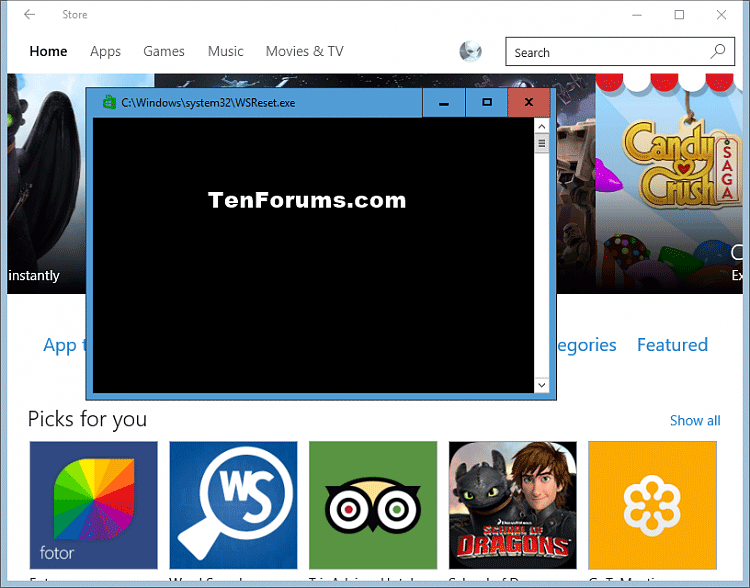
<p style="text-align: justify;"><strong>Bước 3.</strong>&nbsp;Command Prompt&nbsp;sẽ mở ra mà không có thông báo. Sau khoảng 30 giây, Command Prompt sẽ tự động đóng và mở Microsoft Store.</p>

<p style="text-align: justify;"><img alt="Chạy công cụ Công cụ WSReset" data-i="0" data-src="https://st.quantrimang.com/photos/image/2019/09/30/xoa-bo-nho-cache-micorsoft-store-1.png" data-was-processed="true" height="502" src="https://st.quantrimang.com/photos/image/2019/09/30/xoa-bo-nho-cache-micorsoft-store-1.png" width="640" /></p>

<div style="text-align: justify;">&nbsp;</div>

<h2 style="text-align: justify;">2. Xóa bộ nhớ cache Store cho ứng dụng bên thứ ba</h2>

<p style="text-align: justify;"><strong>Lưu ý</strong>: Bạn cần đăng nhập với tư cách quản trị viên để thực hiện phần này.</p>

<p style="text-align: justify;"><strong>Bước 4</strong>.&nbsp;Mở Command Prompt.</p>

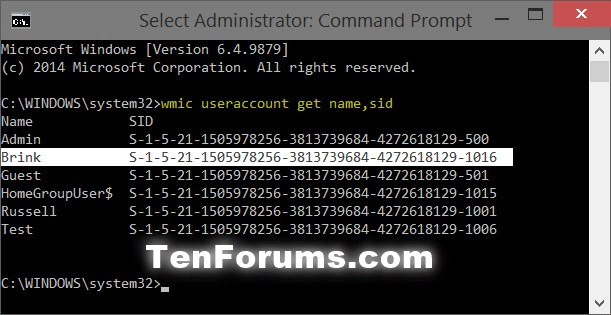
<p style="text-align: justify;"><strong>Bước 5.</strong>&nbsp;Nhập lệnh muốn sử dụng bên dưới trong Command Prompt và nhấn&nbsp;<strong>Enter</strong>. Lệnh này sẽ cung cấp cho bạn&nbsp;<a href="https://quantrimang.com/cach-tim-ma-sid-security-identifier-cho-tai-khoan-nguoi-dung-trong-windows-154577" title="Cách tìm SID (Security Identifier) cho tài khoản người dùng trong Windows">SID</a>&nbsp;người dùng cho từng tài khoản máy tính PC. Ghi số SID (ví dụ: S-1-5-21-1505978256-3813739684-4272618129-1016) cho tài khoản người dùng mà ứng dụng không hoạt động.</p>

<p style="text-align: justify;"><strong>SID người dùng hiện tại</strong>: whoami /user</p>

<p style="text-align: justify;">Hoặc</p>

<p style="text-align: justify;"><strong>SID tất cả tài khoản:</strong>&nbsp;wmic useraccount get name,sid</p>

<p style="text-align: justify;"><img alt="Tìm SID tài khoản người dùng" data-i="1" data-src="https://st.quantrimang.com/photos/image/2019/09/30/xoa-bo-nho-cache-micorsoft-store-2.png" data-was-processed="true" height="315" src="https://st.quantrimang.com/photos/image/2019/09/30/xoa-bo-nho-cache-micorsoft-store-2.png" width="611" /></p>

<p style="text-align: justify;"><strong>Bước 6</strong>. Nhấn&nbsp;<code>Win</code>+<code>R</code>&nbsp;để mở hộp thoại Run, gõ&nbsp;<strong>regedit</strong>&nbsp;và click vào&nbsp;<strong>OK</strong>.</p>

<p style="text-align: justify;"><strong>Bước 7.</strong>&nbsp;Nếu thấy thông báo&nbsp;UAC, click vào&nbsp;<strong>Yes</strong>.</p>

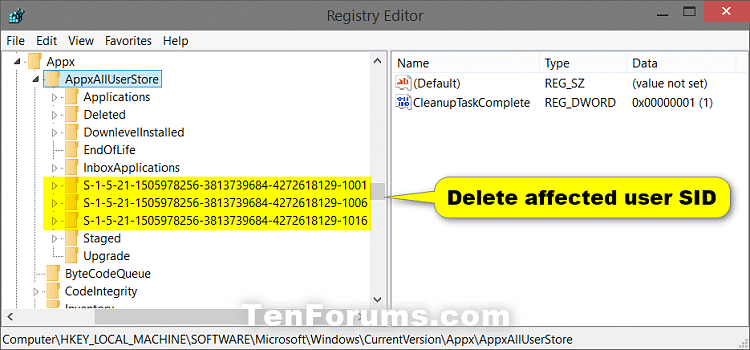
<p style="text-align: justify;"><strong>Bước 8</strong>. Trong Registry Editor, điều hướng đến vị trí sau.</p>

<pre id="pre0">
<code>HKEY_LOCAL_MACHINE\SOFTWARE\Microsoft\Windows\CurrentVersion\Appx\AppxAllUserStore</code></pre>

<p style="text-align: justify;"><img alt="" data-i="2" data-src="https://st.quantrimang.com/photos/image/2019/09/30/xoa-bo-nho-cache-micorsoft-store-3.png" data-was-processed="true" height="299" src="https://st.quantrimang.com/photos/image/2019/09/30/xoa-bo-nho-cache-micorsoft-store-3.png" width="640" /></p>

<p style="text-align: justify;"><strong>Bước 9</strong>. Ở khung bên trái trong key AppxAllUserStore, click chuột phải vào key SID từ bước 6, click vào&nbsp;<strong>Delete</strong>, sau đó click vào&nbsp;<strong>Yes</strong>&nbsp;để xác nhận.</p>

<p style="text-align: justify;"><strong>Bước 10</strong>. Đóng Registry Editor và Command Prompt.</p>

<p style="text-align: justify;"><strong>Bước 11</strong>.&nbsp;Khởi động lại máy tính&nbsp;để áp dụng thay đổi.</p>

<p style="text-align: justify;">Chúc các bạn thực hiện thành công!</p>
		</div>
				<div id="author">
						<p>
				<strong>Nguồn tin:</strong>
				Quantrimang.com
			</p>
		</div>
	</div>
	<div id="footer" class="clearfix">
		<div id="url">
			<strong>URL của bản tin này: </strong><a href="https://www.nguoicodonvn2008.info/vi/news/savefile/kien-thuc-may-tinh/cach-xoa-va-reset-bo-nho-cache-cua-microsoft-store-tren-windows-10-1065.html" title="Cách xóa và reset bộ nhớ cache của Microsoft Store trên Windows 10">https://www.nguoicodonvn2008.info/vi/news/savefile/kien-thuc-may-tinh/cach-xoa-va-reset-bo-nho-cache-cua-microsoft-store-tren-windows-10-1065.html</a>

		</div>
		<div class="clear"></div>
		<div class="copyright">
			&copy; .&#x3A; Nguoicodonvn2008.info - Cõi lòng người cô đơn &#x3A;.
		</div>
		<div id="contact">
			<a href="mailto:admin@nguoicodonvn2008.info">admin@nguoicodonvn2008.info</a>
		</div>
	</div>
</div>
        <div id="timeoutsess" class="chromeframe">
            Bạn đã không sử dụng Site, <a onclick="timeoutsesscancel();" href="https://nguoicodonvn2008.info/#">Bấm vào đây để duy trì trạng thái đăng nhập</a>. Thời gian chờ: <span id="secField"> 60 </span> giây
        </div>
        <div id="openidResult" class="nv-alert" style="display:none"></div>
        <div id="openidBt" data-result="" data-redirect=""></div>
		</script>
		<div class="car-top">
  <span><img src="https://nguoicodonvn2008.info/themes/default/images/car.png" alt=""></span>
</div>
<div id="run_cronjobs" style="visibility:hidden;display:none;"><img alt="cron" src="/index.php?second=cronjobs&amp;p=e22eGx8s" width="1" height="1" /></div>
<script src="https://nguoicodonvn2008.info/assets/js/jquery/jquery.min.js"></script>
<script>var nv_base_siteurl="/",nv_lang_data="vi",nv_lang_interface="vi",nv_name_variable="nv",nv_fc_variable="op",nv_lang_variable="language",nv_module_name="news",nv_func_name="savefile",nv_is_user=0, nv_my_ofs=-4,nv_my_abbr="EDT",nv_cookie_prefix="nv4c_e856T",nv_check_pass_mstime=1738000,nv_area_admin=0,nv_safemode=0,theme_responsive=0,nv_recaptcha_ver=2,nv_recaptcha_sitekey="",nv_recaptcha_type="image",XSSsanitize=1;</script>
<script src="https://nguoicodonvn2008.info/assets/js/language/vi.js"></script>
<script src="https://nguoicodonvn2008.info/assets/js/DOMPurify/purify3.js"></script>
<script src="https://nguoicodonvn2008.info/assets/js/global.js"></script>
<script src="https://nguoicodonvn2008.info/assets/js/site.js"></script>
<script src="https://nguoicodonvn2008.info/themes/default/js/news.js"></script>
<script src="https://nguoicodonvn2008.info/themes/default/js/main.js"></script>
<script src="https://nguoicodonvn2008.info/themes/default/js/custom.js"></script>
<script type="application/ld+json">
        {
            "@context": "https://schema.org",
            "@type": "Organization",
            "url": "https://nguoicodonvn2008.info",
            "logo": "https://nguoicodonvn2008.info/uploads/angel.gif"
        }
        </script>
<script src="https://nguoicodonvn2008.info/themes/default/js/bootstrap.min.js"></script>
<script type="text/javascript">
var $scrolltop = $('.car-top');
$scrolltop.on('click', function () {
    $('html,body').animate({
        scrollTop: 0
    }, 800);
    $(this).addClass("car-run");
    setTimeout(function(){ $scrolltop.removeClass('car-run');}, 1000);
    return false;
});
$(window).on('scroll', function ()
{ 
    if($(window).scrollTop() >= 200)
    {
        $scrolltop.addClass("show");
        $scrolltop.addClass("car-down");
    }
    else
    {
       $scrolltop.removeClass("show");
       setTimeout(function(){ $scrolltop.removeClass('car-down');}, 300);
    }
});
</script>
</body>
</html>