<!DOCTYPE html>
    <html lang="vi" xmlns="http://www.w3.org/1999/xhtml" prefix="og: http://ogp.me/ns#">
    <head>
<title>Cách xóa PPA trên các bản phân phối dựa trên Ubuntu</title>
<meta name="description" content="Cách xóa PPA trên các bản phân phối dựa trên Ubuntu - Savefile - Tin Tức -...">
<meta name="author" content=".: Nguoicodonvn2008.info - Cõi lòng người cô đơn :.">
<meta name="copyright" content=".: Nguoicodonvn2008.info - Cõi lòng người cô đơn :. [admin@nguoicodonvn2008.info]">
<meta name="robots" content="index, archive, follow, noodp">
<meta name="googlebot" content="index,archive,follow,noodp">
<meta name="msnbot" content="all,index,follow">
<meta name="generator" content="NukeViet v4.5">
<meta http-equiv="Content-Type" content="text/html; charset=utf-8">
<meta property="og:title" content="Cách xóa PPA trên các bản phân phối dựa trên Ubuntu">
<meta property="og:type" content="website">
<meta property="og:description" content="Savefile - Tin Tức - https&#x3A;&#x002F;&#x002F;www.nguoicodonvn2008.info&#x002F;vi&#x002F;news&#x002F;savefile&#x002F;kien-thuc-may-tinh&#x002F;cach-xoa-ppa-tren-cac-ban-phan-phoi-dua-tren-ubuntu-1147.html">
<meta property="og:site_name" content=".&#x3A; Nguoicodonvn2008.info - Cõi lòng người cô đơn &#x3A;.">
<meta property="og:url" content="https://www.nguoicodonvn2008.info/vi/news/savefile/kien-thuc-may-tinh/cach-xoa-ppa-tren-cac-ban-phan-phoi-dua-tren-ubuntu-1147.html">
<link rel="shortcut icon" href="https://nguoicodonvn2008.info/favicon.ico">
<link rel="canonical" href="https://www.nguoicodonvn2008.info/vi/news/savefile/kien-thuc-may-tinh/cach-xoa-ppa-tren-cac-ban-phan-phoi-dua-tren-ubuntu-1147.html">
<link rel="alternate" href="https://nguoicodonvn2008.info/vi/news/rss/" title="Tin Tức" type="application/rss+xml">
<link rel="alternate" href="https://nguoicodonvn2008.info/vi/news/rss/karaoke-dual/" title="Tin Tức - Karaoke Dual" type="application/rss+xml">
<link rel="alternate" href="https://nguoicodonvn2008.info/vi/news/rss/nhac-tre/" title="Tin Tức - Nhạc trẻ" type="application/rss+xml">
<link rel="alternate" href="https://nguoicodonvn2008.info/vi/news/rss/tru-tinh/" title="Tin Tức - Trữ tình" type="application/rss+xml">
<link rel="alternate" href="https://nguoicodonvn2008.info/vi/news/rss/nuoc-ngoai/" title="Tin Tức - Nước ngoài" type="application/rss+xml">
<link rel="alternate" href="https://nguoicodonvn2008.info/vi/news/rss/remix/" title="Tin Tức - Remix" type="application/rss+xml">
<link rel="alternate" href="https://nguoicodonvn2008.info/vi/news/rss/tam-su-tinh-yeu/" title="Tin Tức - Tâm sự tình yêu" type="application/rss+xml">
<link rel="alternate" href="https://nguoicodonvn2008.info/vi/news/rss/tho-suu-tam/" title="Tin Tức - Thơ sưu tầm" type="application/rss+xml">
<link rel="alternate" href="https://nguoicodonvn2008.info/vi/news/rss/cuoc-song/" title="Tin Tức - Cuộc sống" type="application/rss+xml">
<link rel="alternate" href="https://nguoicodonvn2008.info/vi/news/rss/phan-mem/" title="Tin Tức - Phần mềm" type="application/rss+xml">
<link rel="alternate" href="https://nguoicodonvn2008.info/vi/news/rss/kien-thuc-may-tinh/" title="Tin Tức - Kiến thức máy tính" type="application/rss+xml">
<link rel="alternate" href="https://nguoicodonvn2008.info/vi/news/rss/hoc-tap/" title="Tin Tức - Học tập" type="application/rss+xml">
<link rel="alternate" href="https://nguoicodonvn2008.info/vi/news/rss/tai-lieu/" title="Tin Tức - Tài liệu" type="application/rss+xml">
<link rel="alternate" href="https://nguoicodonvn2008.info/vi/news/rss/de-thi/" title="Tin Tức - Đề thi" type="application/rss+xml">
<link rel="preload" as="style" href="https://nguoicodonvn2008.info/assets/css/font-awesome.min.css" type="text/css">
<link rel="preload" as="style" href="https://nguoicodonvn2008.info/themes/default/css/bootstrap.non-responsive.css" type="text/css">
<link rel="preload" as="style" href="https://nguoicodonvn2008.info/themes/default/css/style.css" type="text/css">
<link rel="preload" as="style" href="https://nguoicodonvn2008.info/themes/default/css/style.non-responsive.css" type="text/css">
<link rel="preload" as="style" href="https://nguoicodonvn2008.info/themes/default/css/news.css" type="text/css">
<link rel="preload" as="style" href="https://nguoicodonvn2008.info/themes/default/css/custom.css" type="text/css">
<link rel="preload" as="script" href="https://nguoicodonvn2008.info/assets/js/jquery/jquery.min.js" type="text/javascript">
<link rel="preload" as="script" href="https://nguoicodonvn2008.info/assets/js/language/vi.js" type="text/javascript">
<link rel="preload" as="script" href="https://nguoicodonvn2008.info/assets/js/DOMPurify/purify3.js" type="text/javascript">
<link rel="preload" as="script" href="https://nguoicodonvn2008.info/assets/js/global.js" type="text/javascript">
<link rel="preload" as="script" href="https://nguoicodonvn2008.info/assets/js/site.js" type="text/javascript">
<link rel="preload" as="script" href="https://nguoicodonvn2008.info/themes/default/js/news.js" type="text/javascript">
<link rel="preload" as="script" href="https://nguoicodonvn2008.info/themes/default/js/main.js" type="text/javascript">
<link rel="preload" as="script" href="https://nguoicodonvn2008.info/themes/default/js/custom.js" type="text/javascript">
<link rel="preload" as="script" href="https://nguoicodonvn2008.info/themes/default/js/bootstrap.min.js" type="text/javascript">
<link rel="stylesheet" href="https://nguoicodonvn2008.info/assets/css/font-awesome.min.css">
<link rel="stylesheet" href="https://nguoicodonvn2008.info/themes/default/css/bootstrap.non-responsive.css">
<link rel="stylesheet" href="https://nguoicodonvn2008.info/themes/default/css/style.css">
<link rel="stylesheet" href="https://nguoicodonvn2008.info/themes/default/css/style.non-responsive.css">
<link rel="StyleSheet" href="https://nguoicodonvn2008.info/themes/default/css/news.css">
<link rel="stylesheet" href="https://nguoicodonvn2008.info/themes/default/css/custom.css">
<style type="text/css">
	body{background: #fff;}
</style>
    </head>
    <body>
<div id="print">
	<div id="hd_print">
		<h2 class="pull-left">.&#x3A; Nguoicodonvn2008.info - Cõi lòng người cô đơn &#x3A;.</h2>
		<p class="pull-right"><a title=".&#x3A; Nguoicodonvn2008.info - Cõi lòng người cô đơn &#x3A;." href="https://nguoicodonvn2008.info/">https://nguoicodonvn2008.info</a></p>
	</div>
	<div class="clear"></div>
	<hr />
	<div id="content">
		<h1>Cách xóa PPA trên các bản phân phối dựa trên Ubuntu</h1>
		<ul class="list-inline">
			<li>Thứ năm - 10/10/2019 11:39</li>
			<li class="hidden-print txtrequired"><em class="fa fa-print">&nbsp;</em><a title="In ra" href="javascript:;" onclick="window.print()">In ra</a></li>
			<li class="hidden-print txtrequired"><em class="fa fa-power-off">&nbsp;</em><a title="Đóng cửa sổ này" href="javascript:;" onclick="window.close()">Đóng cửa sổ này</a></li>
		</ul>
		<div class="clear"></div>
		<div id="hometext">
		</div>
				<div class="imghome">
			<img alt="Cách xóa PPA trên các bản phân phối dựa trên Ubuntu" src="https://st.quantrimang.com/photos/image/2019/10/09/xoa-ppa-tren-cac-ban-phan-phoi-dua-tren-ubuntu-2.jpg" width="460" class="img-thumbnail" />
		</div>
		<div class="clear"></div>
		<div id="bodytext" class="clearfix">
			<p style="text-align: justify;">Personal Package Archives (PPA) thật tuyệt vời. Bạn nhận được phần mềm hoặc chương trình mới bị thiếu trong kho lưu trữ mặc định của bản phân phối. Nhưng theo thời gian, bạn sẽ muốn loại bỏ một PPA vì nhiều lý do. Việc làm thế nào bạn làm điều này phụ thuộc vào những gì bạn muốn đạt được. Thông thường, bạn sẽ thấy mình thuộc trong một trong hai trường hợp sau:</p>

<ul>
	<li style="text-align: justify;">Bạn muốn xóa PPA khỏi danh sách nguồn phần mềm và loại bỏ các gói đã cài đặt.</li>
	<li style="text-align: justify;">Bạn muốn xóa PPA khỏi danh sách nguồn phần mềm của mình và trở lại các gói mặc định do bản phân phối cung cấp.</li>
</ul>

<p style="text-align: justify;">Hãy cùng khám phá kịch bản đầu tiên!</p>

<h2 style="text-align: justify;">Loại bỏ PPA và các gói của nó</h2>

<p style="text-align: justify;">Hãy chắc chắn rằng bạn đã cài đặt tiện ích&nbsp;<strong>“add-apt-repository”.</strong>&nbsp;Tiện ích này nên có sẵn, theo mặc định, trên hầu hết các bản phân phối dựa trên&nbsp;Ubuntu, nhưng để đảm bảo, hãy chạy lệnh sau.</p>

<pre id="pre0">
<code>sudo apt install software-properties-common</code></pre>

<p style="text-align: justify;">Tiếp theo, bạn cần tên chính xác của PPA muốn loại bỏ. Nếu quên nó, bạn có thể tìm kiếm trên Google, mở trang Launchpad nơi nó được lưu trữ và tìm hướng dẫn cài đặt. Ở đó, bạn sẽ tìm thấy tên chính xác của PPA (ví dụ:&nbsp;<strong>“ppa:libreoffice/ppa”</strong>).</p>

<p style="text-align: justify;"><img alt="Tìm tên PPA" data-i="0" data-src="https://st.quantrimang.com/photos/image/2019/10/09/xoa-ppa-tren-cac-ban-phan-phoi-dua-tren-ubuntu-1.jpg" data-was-processed="true" height="229" src="https://st.quantrimang.com/photos/image/2019/10/09/xoa-ppa-tren-cac-ban-phan-phoi-dua-tren-ubuntu-1.jpg" width="532" /></p>

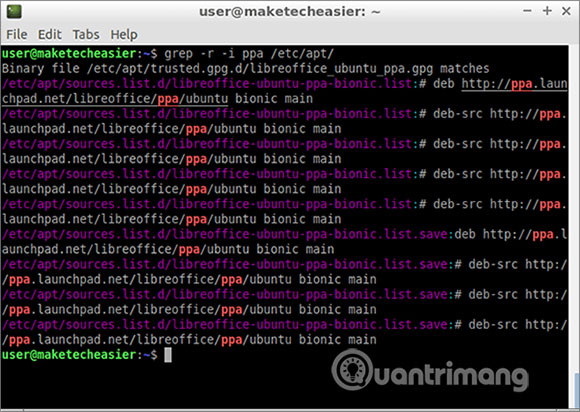
<p style="text-align: justify;">Ngoài ra, thay vì tìm kiếm trên web, bạn có thể tìm kiếm danh sách nguồn phần mềm của mình để xem PPA nào hiện đang hoạt động.</p>

<pre id="pre1">
<code>grep -r -i ppa /etc/apt/</code></pre>

<p style="text-align: justify;"><img alt="Thay vì tìm kiếm trên web, bạn có thể tìm kiếm danh sách nguồn phần mềm" data-i="1" data-src="https://st.quantrimang.com/photos/image/2019/10/09/xoa-ppa-tren-cac-ban-phan-phoi-dua-tren-ubuntu-2.jpg" data-was-processed="true" height="412" src="https://st.quantrimang.com/photos/image/2019/10/09/xoa-ppa-tren-cac-ban-phan-phoi-dua-tren-ubuntu-2.jpg" width="580" /></p>

<p style="text-align: justify;">Tiếp theo, bạn có thể mở bất kỳ liên kết nào bắt đầu với tên&nbsp;<strong>http://ppa.launchpad.net</strong>&nbsp;và tìm tên PPA chính xác mà bạn cần.</p>

<p style="text-align: justify;">Thay thế&nbsp;<strong>“NAME_OF_PPA”</strong>&nbsp;trong lệnh tiếp theo bằng tên thực tế bạn đã tìm thấy trước đó. Ví dụ, lệnh cuối cùng có thể trông như thế này:&nbsp;<code>sudo add-apt-repository --remove ppa:libreoffice/ppa</code>.</p>

<pre id="pre2">
<code>sudo add-apt-repository --remove NAME_OF_PPA</code></pre>

<p style="text-align: justify;">Làm mới thông tin của trình quản lý gói.</p>

<pre id="pre3">
<code>sudo apt update</code></pre>

<p style="text-align: justify;">Cuối cùng, loại bỏ gói và các dependency của nó với:</p>

<pre id="pre4">
<code>sudo apt autoremove NAME_OF_PACKAGE</code></pre>

<p style="text-align: justify;">Sau khi bạn nhập lệnh này, hãy chú ý đến danh sách các gói sẽ bị xóa. Nếu thấy một cái gì đó bạn cần trong danh sách này, thì hãy sử dụng tùy chọn&nbsp;<code>remove</code>&nbsp;của apt (thay vì&nbsp;<code>autoremove</code>):</p>

<pre id="pre5">
<code>sudo apt remove NAME_OF_PACKAGE</code></pre>

<div style="text-align: justify;">&nbsp;</div>

<h2 style="text-align: justify;">Tìm tất cả các gói được cài đặt từ PPA</h2>

<p style="text-align: justify;">Nếu tùy chọn&nbsp;<code>autoremove</code>&nbsp;dường như không thể gỡ cài đặt tất cả các gói đến từ PPA đó, bạn có thể phải xóa chúng theo cách thủ công.</p>

<p style="text-align: justify;">Cài đặt các tiện ích sau.</p>

<pre id="pre6">
<code>sudo apt install apt-forktracer</code></pre>

<p style="text-align: justify;">Bây giờ, bạn có thể tìm thấy tất cả các gói được cài đặt trên hệ thống đến từ PPA.</p>

<pre id="pre7">
<code>apt-forktracer | grep -i ppa | awk &#039;{print $1}&#039;</code></pre>

<p style="text-align: justify;">Tiếp theo, bạn có thể xóa chúng bằng&nbsp;<code>sudo apt remove</code>&nbsp;hoặc&nbsp;<code>sudo apt autoremove</code>.&nbsp;<code>autoremove</code>&nbsp;sẽ cố gắng tự động gỡ cài đặt (các) gói bạn chỉ định, cộng với tất cả những dependency.&nbsp;<code>remove</code>&nbsp;sẽ chỉ gỡ cài đặt (các) gói bạn chỉ định.</p>

<p style="text-align: justify;">Nếu chắc chắn rằng bạn có thể xóa tất cả các gói được hiển thị trước đó bởi&nbsp;<code>apt-forktracer</code>, bạn có thể sử dụng một lệnh như sau:</p>

<pre id="pre8">
<code>sudo apt remove $(apt-forktracer | grep -i ppa | awk &#039;{print $1}&#039;)</code></pre>

<p style="text-align: justify;">Hãy chắc chắn kiểm tra kỹ những gì sẽ bị xóa để bạn không vô tình gỡ cài đặt thứ gì đó bạn cần.</p>

<h2 style="text-align: justify;">Xóa gói PPA và hoàn nguyên các phiên bản mặc định của bản phân phối</h2>

<p style="text-align: justify;">Giống như trong phần trước, trước tiên bạn cần biết tên chính xác của PPA. Nếu bạn không biết, hãy thử các phương pháp trên.</p>

<p style="text-align: justify;">Cài đặt&nbsp;<strong>ppa-purge</strong>.</p>

<pre id="pre9">
<code>sudo apt install ppa-purge</code></pre>

<p style="text-align: justify;">Chạy script&nbsp;<strong>ppa-purge.</strong>&nbsp;Script này sẽ xóa PPA khỏi kho phần mềm của bạn và thay thế các gói PPA đã cài đặt bằng những gói mặc định của bản phân phối. Tất nhiên, điều này đòi hỏi bản phân phối Linux của bạn có sẵn các gói này. Trong hầu hết các trường hợp, điều này có nghĩa là phần mềm mới sẽ bị hạ cấp xuống các phiên bản cũ hơn.</p>

<pre id="pre10">
<code>sudo ppa-purge NAME_OF_PPA</code></pre>

<p style="text-align: justify;">Lệnh ví dụ:</p>

<pre id="pre11">
<code>sudo ppa-purge ppa:libreoffice/ppa</code></pre>

<p style="text-align: justify;">Trên các hệ thống “sạch”, các lệnh trên sẽ chạy mà không gặp bất kỳ trở ngại nào. Tuy nhiên, trên những hệ thống khác, bạn có thể gặp phải một số xung đột do các gói không tương thích với nhau. Thật không may, không có giải pháp chung, vì điều đó phụ thuộc vào tình huống cụ thể mà bạn gặp phải.</p>

<p style="text-align: justify;">Hầu hết mọi trường hợp có thể được giải quyết bằng cách xóa, hạ cấp hoặc nâng cấp một số gói trong số đó. Để tránh trải nghiệm như vậy trong tương lai, bạn có thể đọc bài viết:&nbsp;Đừng phá hỏng hệ thống Debian!&nbsp;để biết cách giữ cho hệ điều hành của mình ở trạng thái “sạch”.</p>

<p style="text-align: justify;">Chúc bạn thực hiện thành công!</p>
		</div>
				<div id="author">
						<p>
				<strong>Nguồn tin:</strong>
				Quantrimang.com
			</p>
		</div>
	</div>
	<div id="footer" class="clearfix">
		<div id="url">
			<strong>URL của bản tin này: </strong><a href="https://www.nguoicodonvn2008.info/vi/news/savefile/kien-thuc-may-tinh/cach-xoa-ppa-tren-cac-ban-phan-phoi-dua-tren-ubuntu-1147.html" title="Cách xóa PPA trên các bản phân phối dựa trên Ubuntu">https://www.nguoicodonvn2008.info/vi/news/savefile/kien-thuc-may-tinh/cach-xoa-ppa-tren-cac-ban-phan-phoi-dua-tren-ubuntu-1147.html</a>

		</div>
		<div class="clear"></div>
		<div class="copyright">
			&copy; .&#x3A; Nguoicodonvn2008.info - Cõi lòng người cô đơn &#x3A;.
		</div>
		<div id="contact">
			<a href="mailto:admin@nguoicodonvn2008.info">admin@nguoicodonvn2008.info</a>
		</div>
	</div>
</div>
        <div id="timeoutsess" class="chromeframe">
            Bạn đã không sử dụng Site, <a onclick="timeoutsesscancel();" href="https://nguoicodonvn2008.info/#">Bấm vào đây để duy trì trạng thái đăng nhập</a>. Thời gian chờ: <span id="secField"> 60 </span> giây
        </div>
        <div id="openidResult" class="nv-alert" style="display:none"></div>
        <div id="openidBt" data-result="" data-redirect=""></div>
		</script>
		<div class="car-top">
  <span><img src="https://nguoicodonvn2008.info/themes/default/images/car.png" alt=""></span>
</div>
<script src="https://nguoicodonvn2008.info/assets/js/jquery/jquery.min.js"></script>
<script>var nv_base_siteurl="/",nv_lang_data="vi",nv_lang_interface="vi",nv_name_variable="nv",nv_fc_variable="op",nv_lang_variable="language",nv_module_name="news",nv_func_name="savefile",nv_is_user=0, nv_my_ofs=-4,nv_my_abbr="EDT",nv_cookie_prefix="nv4c_e856T",nv_check_pass_mstime=1738000,nv_area_admin=0,nv_safemode=0,theme_responsive=0,nv_recaptcha_ver=2,nv_recaptcha_sitekey="",nv_recaptcha_type="image",XSSsanitize=1;</script>
<script src="https://nguoicodonvn2008.info/assets/js/language/vi.js"></script>
<script src="https://nguoicodonvn2008.info/assets/js/DOMPurify/purify3.js"></script>
<script src="https://nguoicodonvn2008.info/assets/js/global.js"></script>
<script src="https://nguoicodonvn2008.info/assets/js/site.js"></script>
<script src="https://nguoicodonvn2008.info/themes/default/js/news.js"></script>
<script src="https://nguoicodonvn2008.info/themes/default/js/main.js"></script>
<script src="https://nguoicodonvn2008.info/themes/default/js/custom.js"></script>
<script type="application/ld+json">
        {
            "@context": "https://schema.org",
            "@type": "Organization",
            "url": "https://nguoicodonvn2008.info",
            "logo": "https://nguoicodonvn2008.info/uploads/angel.gif"
        }
        </script>
<script src="https://nguoicodonvn2008.info/themes/default/js/bootstrap.min.js"></script>
<script type="text/javascript">
var $scrolltop = $('.car-top');
$scrolltop.on('click', function () {
    $('html,body').animate({
        scrollTop: 0
    }, 800);
    $(this).addClass("car-run");
    setTimeout(function(){ $scrolltop.removeClass('car-run');}, 1000);
    return false;
});
$(window).on('scroll', function ()
{ 
    if($(window).scrollTop() >= 200)
    {
        $scrolltop.addClass("show");
        $scrolltop.addClass("car-down");
    }
    else
    {
       $scrolltop.removeClass("show");
       setTimeout(function(){ $scrolltop.removeClass('car-down');}, 300);
    }
});
</script>
</body>
</html>