<!DOCTYPE html>
    <html lang="vi" xmlns="http://www.w3.org/1999/xhtml" prefix="og: http://ogp.me/ns#">
    <head>
<title>Cách xóa nhanh siêu dữ liệu khỏi file trên Linux</title>
<meta name="description" content="Cách xóa nhanh siêu dữ liệu khỏi file trên Linux - Savefile - Tin Tức -...">
<meta name="author" content=".: Nguoicodonvn2008.info - Cõi lòng người cô đơn :.">
<meta name="copyright" content=".: Nguoicodonvn2008.info - Cõi lòng người cô đơn :. [admin@nguoicodonvn2008.info]">
<meta name="robots" content="index, archive, follow, noodp">
<meta name="googlebot" content="index,archive,follow,noodp">
<meta name="msnbot" content="all,index,follow">
<meta name="generator" content="NukeViet v4.5">
<meta http-equiv="Content-Type" content="text/html; charset=utf-8">
<meta property="og:title" content="Cách xóa nhanh siêu dữ liệu khỏi file trên Linux">
<meta property="og:type" content="website">
<meta property="og:description" content="Savefile - Tin Tức - https&#x3A;&#x002F;&#x002F;www.nguoicodonvn2008.info&#x002F;vi&#x002F;news&#x002F;savefile&#x002F;kien-thuc-may-tinh&#x002F;cach-xoa-nhanh-sieu-du-lieu-khoi-file-tren-linux-6090.html">
<meta property="og:site_name" content=".&#x3A; Nguoicodonvn2008.info - Cõi lòng người cô đơn &#x3A;.">
<meta property="og:url" content="https://www.nguoicodonvn2008.info/vi/news/savefile/kien-thuc-may-tinh/cach-xoa-nhanh-sieu-du-lieu-khoi-file-tren-linux-6090.html">
<link rel="shortcut icon" href="https://nguoicodonvn2008.info/favicon.ico">
<link rel="canonical" href="https://www.nguoicodonvn2008.info/vi/news/savefile/kien-thuc-may-tinh/cach-xoa-nhanh-sieu-du-lieu-khoi-file-tren-linux-6090.html">
<link rel="alternate" href="https://nguoicodonvn2008.info/vi/news/rss/" title="Tin Tức" type="application/rss+xml">
<link rel="alternate" href="https://nguoicodonvn2008.info/vi/news/rss/karaoke-dual/" title="Tin Tức - Karaoke Dual" type="application/rss+xml">
<link rel="alternate" href="https://nguoicodonvn2008.info/vi/news/rss/nhac-tre/" title="Tin Tức - Nhạc trẻ" type="application/rss+xml">
<link rel="alternate" href="https://nguoicodonvn2008.info/vi/news/rss/tru-tinh/" title="Tin Tức - Trữ tình" type="application/rss+xml">
<link rel="alternate" href="https://nguoicodonvn2008.info/vi/news/rss/nuoc-ngoai/" title="Tin Tức - Nước ngoài" type="application/rss+xml">
<link rel="alternate" href="https://nguoicodonvn2008.info/vi/news/rss/remix/" title="Tin Tức - Remix" type="application/rss+xml">
<link rel="alternate" href="https://nguoicodonvn2008.info/vi/news/rss/tam-su-tinh-yeu/" title="Tin Tức - Tâm sự tình yêu" type="application/rss+xml">
<link rel="alternate" href="https://nguoicodonvn2008.info/vi/news/rss/tho-suu-tam/" title="Tin Tức - Thơ sưu tầm" type="application/rss+xml">
<link rel="alternate" href="https://nguoicodonvn2008.info/vi/news/rss/cuoc-song/" title="Tin Tức - Cuộc sống" type="application/rss+xml">
<link rel="alternate" href="https://nguoicodonvn2008.info/vi/news/rss/phan-mem/" title="Tin Tức - Phần mềm" type="application/rss+xml">
<link rel="alternate" href="https://nguoicodonvn2008.info/vi/news/rss/kien-thuc-may-tinh/" title="Tin Tức - Kiến thức máy tính" type="application/rss+xml">
<link rel="alternate" href="https://nguoicodonvn2008.info/vi/news/rss/hoc-tap/" title="Tin Tức - Học tập" type="application/rss+xml">
<link rel="alternate" href="https://nguoicodonvn2008.info/vi/news/rss/tai-lieu/" title="Tin Tức - Tài liệu" type="application/rss+xml">
<link rel="alternate" href="https://nguoicodonvn2008.info/vi/news/rss/de-thi/" title="Tin Tức - Đề thi" type="application/rss+xml">
<link rel="preload" as="style" href="https://nguoicodonvn2008.info/assets/css/font-awesome.min.css" type="text/css">
<link rel="preload" as="style" href="https://nguoicodonvn2008.info/themes/default/css/bootstrap.non-responsive.css" type="text/css">
<link rel="preload" as="style" href="https://nguoicodonvn2008.info/themes/default/css/style.css" type="text/css">
<link rel="preload" as="style" href="https://nguoicodonvn2008.info/themes/default/css/style.non-responsive.css" type="text/css">
<link rel="preload" as="style" href="https://nguoicodonvn2008.info/themes/default/css/news.css" type="text/css">
<link rel="preload" as="style" href="https://nguoicodonvn2008.info/themes/default/css/custom.css" type="text/css">
<link rel="preload" as="script" href="https://nguoicodonvn2008.info/assets/js/jquery/jquery.min.js" type="text/javascript">
<link rel="preload" as="script" href="https://nguoicodonvn2008.info/assets/js/language/vi.js" type="text/javascript">
<link rel="preload" as="script" href="https://nguoicodonvn2008.info/assets/js/DOMPurify/purify3.js" type="text/javascript">
<link rel="preload" as="script" href="https://nguoicodonvn2008.info/assets/js/global.js" type="text/javascript">
<link rel="preload" as="script" href="https://nguoicodonvn2008.info/assets/js/site.js" type="text/javascript">
<link rel="preload" as="script" href="https://nguoicodonvn2008.info/themes/default/js/news.js" type="text/javascript">
<link rel="preload" as="script" href="https://nguoicodonvn2008.info/themes/default/js/main.js" type="text/javascript">
<link rel="preload" as="script" href="https://nguoicodonvn2008.info/themes/default/js/custom.js" type="text/javascript">
<link rel="preload" as="script" href="https://nguoicodonvn2008.info/themes/default/js/bootstrap.min.js" type="text/javascript">
<link rel="stylesheet" href="https://nguoicodonvn2008.info/assets/css/font-awesome.min.css">
<link rel="stylesheet" href="https://nguoicodonvn2008.info/themes/default/css/bootstrap.non-responsive.css">
<link rel="stylesheet" href="https://nguoicodonvn2008.info/themes/default/css/style.css">
<link rel="stylesheet" href="https://nguoicodonvn2008.info/themes/default/css/style.non-responsive.css">
<link rel="StyleSheet" href="https://nguoicodonvn2008.info/themes/default/css/news.css">
<link rel="stylesheet" href="https://nguoicodonvn2008.info/themes/default/css/custom.css">
<style type="text/css">
	body{background: #fff;}
</style>
    </head>
    <body>
<div id="print">
	<div id="hd_print">
		<h2 class="pull-left">.&#x3A; Nguoicodonvn2008.info - Cõi lòng người cô đơn &#x3A;.</h2>
		<p class="pull-right"><a title=".&#x3A; Nguoicodonvn2008.info - Cõi lòng người cô đơn &#x3A;." href="https://nguoicodonvn2008.info/">https://nguoicodonvn2008.info</a></p>
	</div>
	<div class="clear"></div>
	<hr />
	<div id="content">
		<h1>Cách xóa nhanh siêu dữ liệu khỏi file trên Linux</h1>
		<ul class="list-inline">
			<li>Thứ ba - 20/09/2022 00:49</li>
			<li class="hidden-print txtrequired"><em class="fa fa-print">&nbsp;</em><a title="In ra" href="javascript:;" onclick="window.print()">In ra</a></li>
			<li class="hidden-print txtrequired"><em class="fa fa-power-off">&nbsp;</em><a title="Đóng cửa sổ này" href="javascript:;" onclick="window.close()">Đóng cửa sổ này</a></li>
		</ul>
		<div class="clear"></div>
		<div id="hometext">
		</div>
				<div class="imghome">
			<img alt="Cách xóa nhanh siêu dữ liệu khỏi file trên Linux" src="https://st.quantrimang.com/photos/image/2022/09/17/xoa-nhanh-sieu-du-lieu-khoi-file-linux-1.jpg" width="460" class="img-thumbnail" />
		</div>
		<div class="clear"></div>
		<div id="bodytext" class="clearfix">
			<p style="text-align: justify;">Khi bạn tạo một file, tất cả các loại siêu dữ liệu bổ sung sẽ được thêm vào file đó. Bất kỳ ai có quyền truy cập vào file đều có thể đọc thông tin này, thông tin này có thể bao gồm các chi tiết mà bạn không muốn bất kỳ ai khác biết.</p>

<p style="text-align: justify;">Đây là cách xóa siêu dữ liệu khỏi file trên&nbsp;Linux.</p>

<h2 style="text-align: justify;">Siêu dữ liệu là gì? Nó có thể cho bạn biết điều gì?</h2>

<p style="text-align: justify;">Siêu dữ liệu được ẩn trong tiêu đề của hầu hết các file máy tính và cung cấp ngữ cảnh về dữ liệu mà file chứa. Nó sẽ cho biết loại dữ liệu được lưu trữ trong file - bất kể phần mở rộng file là gì. Siêu dữ liệu có thể sẽ chứa ngày tạo, tên người dùng tạo file và công cụ được sử dụng để tạo file.</p>

<p style="text-align: justify;">Nếu file là ảnh, siêu dữ liệu sẽ chứa thông tin chi tiết về model điện thoại hoặc camera và các cài đặt được sử dụng. Nếu nhiếp ảnh gia chưa tắt tính năng gắn thẻ vị trí, siêu dữ liệu sẽ cung cấp một bộ tọa độ chính xác của nơi họ chụp ảnh. Nếu bạn đang chụp ảnh selfie vào giờ vàng trong phòng ngủ trên&nbsp;iPhone 14 Pro Max&nbsp;hoàn toàn mới của mình, có lẽ bạn không muốn thông tin đó bị lộ ra ngoài.</p>

<h2 style="text-align: justify;">Cách xem siêu dữ liệu file trên Linux</h2>

<p style="text-align: justify;">Rất dễ dàng để xem siêu dữ liệu cho bất kỳ loại file nào trên Linux và ExifTool là một tiện ích miễn phí có thể giúp ích cho bạn.</p>

<p style="text-align: justify;">Để cài đặt ExifTool trên các bản phân phối có nguồn gốc Debian, bao gồm cả&nbsp;<a href="https://quantrimang.com/cong-nghe/meo-va-thu-thuat-sau-khi-cai-dat-ubuntu-84487" title="Mẹo và thủ thuật sau khi cài đặt Ubuntu">Ubuntu</a>, hãy chạy:</p>

<pre id="pre0">
<code>sudo apt install exiftool</code></pre>

<p style="text-align: justify;">ExifTool cũng có sẵn trong Arch User Repository (AUR) và người dùng Arch có thể tải xuống từ đó.</p>

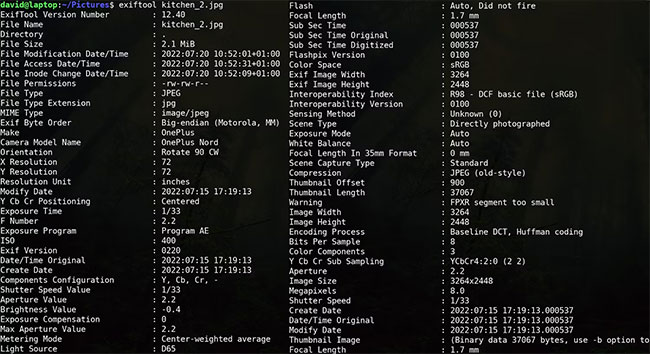
<p style="text-align: justify;">Để xem file chứa siêu dữ liệu nào, hãy&nbsp;mở một terminal&nbsp;và nhập:</p>

<pre id="pre1">
<code>exiftool /path/to/file</code></pre>

<figure>
<div style="text-align: justify;"><img alt="Siêu dữ liệu file trên Linux" data-i="0" data-src="https://st.quantrimang.com/photos/image/2022/09/17/xoa-nhanh-sieu-du-lieu-khoi-file-linux-1.jpg" data-was-processed="true" height="354" src="https://st.quantrimang.com/photos/image/2022/09/17/xoa-nhanh-sieu-du-lieu-khoi-file-linux-1.jpg" width="650" /></div>

<figcaption>
<div style="text-align: justify;">Siêu dữ liệu file trên Linux</div>
</figcaption>
</figure>

<p style="text-align: justify;">ExifTool hoạt động trên bất kỳ file nào lưu trữ siêu dữ liệu bao gồm tài liệu Word, PDF, hình ảnh, script và file văn bản - mặc dù lượng thông tin có sẵn sẽ rất khác nhau.</p>

<h2 style="text-align: justify;">Cách xóa nhanh siêu dữ liệu khỏi file trên Linux</h2>

<p style="text-align: justify;">Với tất cả những thông tin đó có sẵn cho bất kỳ ai có quyền truy cập vào file của bạn, việc bạn muốn xóa nó là điều hợp lý. ExifTool có thể thực hiện công việc cho bạn.</p>

<p style="text-align: justify;">Để loại bỏ tất cả siêu dữ liệu thừa của file:</p>

<pre id="pre2">
<code>exiftool -all= /path/to/file</code></pre>

<p style="text-align: justify;">Thao tác này sẽ xóa tất cả, trừ siêu dữ liệu cơ bản nhất như ngày tạo file, loại file và kiểu MIME, nếu không có siêu dữ liệu này sẽ rất khó mở file.</p>

<p style="text-align: justify;">Nó sẽ lưu file gốc, với siêu dữ liệu còn nguyên vẹn, dưới một tên file mới với hậu tố&nbsp;<strong>_original.</strong>&nbsp;Bạn có thể xóa cái này bằng:</p>

<pre id="pre3">
<code>rm /path/to/file_original</code></pre>

<h2 style="text-align: justify;">Xóa siêu dữ liệu khỏi file sẽ bảo vệ quyền riêng tư của bạn</h2>

<p style="text-align: justify;">Siêu dữ liệu có thể cung cấp nhiều thứ ngoài vị trí của bạn, thậm chí chính xác mức giá điện thoại của bạn là bao nhiêu. Là tác giả của một tài liệu được phân phối rộng rãi, bạn có thể không muốn bất kỳ ai biết thông tin đăng nhập PC của mình hoặc phiên bản trình xử lý văn bản mà bạn đã sử dụng để tạo file. Kẻ tấn công có thể sử dụng cả hai phần thông tin này để xâm phạm bảo mật của bạn. Càng cung cấp ít thông tin càng tốt.</p>

<p style="text-align: justify;">Nếu bạn thực sự nghiêm túc về vấn đề bảo mật trực tuyến của mình, hãy cân nhắc sử dụng hệ điều hành được phát triển đặc biệt cho những người dùng chú trọng đến quyền riêng tư.</p>
		</div>
				<div id="author">
						<p>
				<strong>Nguồn tin:</strong>
				Quantrimang.com
			</p>
		</div>
	</div>
	<div id="footer" class="clearfix">
		<div id="url">
			<strong>URL của bản tin này: </strong><a href="https://www.nguoicodonvn2008.info/vi/news/savefile/kien-thuc-may-tinh/cach-xoa-nhanh-sieu-du-lieu-khoi-file-tren-linux-6090.html" title="Cách xóa nhanh siêu dữ liệu khỏi file trên Linux">https://www.nguoicodonvn2008.info/vi/news/savefile/kien-thuc-may-tinh/cach-xoa-nhanh-sieu-du-lieu-khoi-file-tren-linux-6090.html</a>

		</div>
		<div class="clear"></div>
		<div class="copyright">
			&copy; .&#x3A; Nguoicodonvn2008.info - Cõi lòng người cô đơn &#x3A;.
		</div>
		<div id="contact">
			<a href="mailto:admin@nguoicodonvn2008.info">admin@nguoicodonvn2008.info</a>
		</div>
	</div>
</div>
        <div id="timeoutsess" class="chromeframe">
            Bạn đã không sử dụng Site, <a onclick="timeoutsesscancel();" href="https://nguoicodonvn2008.info/#">Bấm vào đây để duy trì trạng thái đăng nhập</a>. Thời gian chờ: <span id="secField"> 60 </span> giây
        </div>
        <div id="openidResult" class="nv-alert" style="display:none"></div>
        <div id="openidBt" data-result="" data-redirect=""></div>
		</script>
		<div class="car-top">
  <span><img src="https://nguoicodonvn2008.info/themes/default/images/car.png" alt=""></span>
</div>
<script src="https://nguoicodonvn2008.info/assets/js/jquery/jquery.min.js"></script>
<script>var nv_base_siteurl="/",nv_lang_data="vi",nv_lang_interface="vi",nv_name_variable="nv",nv_fc_variable="op",nv_lang_variable="language",nv_module_name="news",nv_func_name="savefile",nv_is_user=0, nv_my_ofs=-4,nv_my_abbr="EDT",nv_cookie_prefix="nv4c_e856T",nv_check_pass_mstime=1738000,nv_area_admin=0,nv_safemode=0,theme_responsive=0,nv_recaptcha_ver=2,nv_recaptcha_sitekey="",nv_recaptcha_type="image",XSSsanitize=1;</script>
<script src="https://nguoicodonvn2008.info/assets/js/language/vi.js"></script>
<script src="https://nguoicodonvn2008.info/assets/js/DOMPurify/purify3.js"></script>
<script src="https://nguoicodonvn2008.info/assets/js/global.js"></script>
<script src="https://nguoicodonvn2008.info/assets/js/site.js"></script>
<script src="https://nguoicodonvn2008.info/themes/default/js/news.js"></script>
<script src="https://nguoicodonvn2008.info/themes/default/js/main.js"></script>
<script src="https://nguoicodonvn2008.info/themes/default/js/custom.js"></script>
<script type="application/ld+json">
        {
            "@context": "https://schema.org",
            "@type": "Organization",
            "url": "https://nguoicodonvn2008.info",
            "logo": "https://nguoicodonvn2008.info/uploads/angel.gif"
        }
        </script>
<script src="https://nguoicodonvn2008.info/themes/default/js/bootstrap.min.js"></script>
<script type="text/javascript">
var $scrolltop = $('.car-top');
$scrolltop.on('click', function () {
    $('html,body').animate({
        scrollTop: 0
    }, 800);
    $(this).addClass("car-run");
    setTimeout(function(){ $scrolltop.removeClass('car-run');}, 1000);
    return false;
});
$(window).on('scroll', function ()
{ 
    if($(window).scrollTop() >= 200)
    {
        $scrolltop.addClass("show");
        $scrolltop.addClass("car-down");
    }
    else
    {
       $scrolltop.removeClass("show");
       setTimeout(function(){ $scrolltop.removeClass('car-down');}, 300);
    }
});
</script>
</body>
</html>