<!DOCTYPE html>
    <html lang="vi" xmlns="http://www.w3.org/1999/xhtml" prefix="og: http://ogp.me/ns#">
    <head>
<title>Cách xóa mật khẩu tệp PDF trên máy Mac</title>
<meta name="description" content="Cách xóa mật khẩu tệp PDF trên máy Mac - Savefile - Tin Tức -...">
<meta name="author" content=".: Nguoicodonvn2008.info - Cõi lòng người cô đơn :.">
<meta name="copyright" content=".: Nguoicodonvn2008.info - Cõi lòng người cô đơn :. [admin@nguoicodonvn2008.info]">
<meta name="robots" content="index, archive, follow, noodp">
<meta name="googlebot" content="index,archive,follow,noodp">
<meta name="msnbot" content="all,index,follow">
<meta name="generator" content="NukeViet v4.5">
<meta http-equiv="Content-Type" content="text/html; charset=utf-8">
<meta property="og:title" content="Cách xóa mật khẩu tệp PDF trên máy Mac">
<meta property="og:type" content="website">
<meta property="og:description" content="Savefile - Tin Tức - https&#x3A;&#x002F;&#x002F;www.nguoicodonvn2008.info&#x002F;vi&#x002F;news&#x002F;savefile&#x002F;kien-thuc-may-tinh&#x002F;cach-xoa-mat-khau-tep-pdf-tren-may-mac-4184.html">
<meta property="og:site_name" content=".&#x3A; Nguoicodonvn2008.info - Cõi lòng người cô đơn &#x3A;.">
<meta property="og:url" content="https://www.nguoicodonvn2008.info/vi/news/savefile/kien-thuc-may-tinh/cach-xoa-mat-khau-tep-pdf-tren-may-mac-4184.html">
<link rel="shortcut icon" href="https://nguoicodonvn2008.info/favicon.ico">
<link rel="canonical" href="https://www.nguoicodonvn2008.info/vi/news/savefile/kien-thuc-may-tinh/cach-xoa-mat-khau-tep-pdf-tren-may-mac-4184.html">
<link rel="alternate" href="https://nguoicodonvn2008.info/vi/news/rss/" title="Tin Tức" type="application/rss+xml">
<link rel="alternate" href="https://nguoicodonvn2008.info/vi/news/rss/karaoke-dual/" title="Tin Tức - Karaoke Dual" type="application/rss+xml">
<link rel="alternate" href="https://nguoicodonvn2008.info/vi/news/rss/nhac-tre/" title="Tin Tức - Nhạc trẻ" type="application/rss+xml">
<link rel="alternate" href="https://nguoicodonvn2008.info/vi/news/rss/tru-tinh/" title="Tin Tức - Trữ tình" type="application/rss+xml">
<link rel="alternate" href="https://nguoicodonvn2008.info/vi/news/rss/nuoc-ngoai/" title="Tin Tức - Nước ngoài" type="application/rss+xml">
<link rel="alternate" href="https://nguoicodonvn2008.info/vi/news/rss/remix/" title="Tin Tức - Remix" type="application/rss+xml">
<link rel="alternate" href="https://nguoicodonvn2008.info/vi/news/rss/tam-su-tinh-yeu/" title="Tin Tức - Tâm sự tình yêu" type="application/rss+xml">
<link rel="alternate" href="https://nguoicodonvn2008.info/vi/news/rss/tho-suu-tam/" title="Tin Tức - Thơ sưu tầm" type="application/rss+xml">
<link rel="alternate" href="https://nguoicodonvn2008.info/vi/news/rss/cuoc-song/" title="Tin Tức - Cuộc sống" type="application/rss+xml">
<link rel="alternate" href="https://nguoicodonvn2008.info/vi/news/rss/phan-mem/" title="Tin Tức - Phần mềm" type="application/rss+xml">
<link rel="alternate" href="https://nguoicodonvn2008.info/vi/news/rss/kien-thuc-may-tinh/" title="Tin Tức - Kiến thức máy tính" type="application/rss+xml">
<link rel="alternate" href="https://nguoicodonvn2008.info/vi/news/rss/hoc-tap/" title="Tin Tức - Học tập" type="application/rss+xml">
<link rel="alternate" href="https://nguoicodonvn2008.info/vi/news/rss/tai-lieu/" title="Tin Tức - Tài liệu" type="application/rss+xml">
<link rel="alternate" href="https://nguoicodonvn2008.info/vi/news/rss/de-thi/" title="Tin Tức - Đề thi" type="application/rss+xml">
<link rel="preload" as="style" href="https://nguoicodonvn2008.info/assets/css/font-awesome.min.css" type="text/css">
<link rel="preload" as="style" href="https://nguoicodonvn2008.info/themes/default/css/bootstrap.non-responsive.css" type="text/css">
<link rel="preload" as="style" href="https://nguoicodonvn2008.info/themes/default/css/style.css" type="text/css">
<link rel="preload" as="style" href="https://nguoicodonvn2008.info/themes/default/css/style.non-responsive.css" type="text/css">
<link rel="preload" as="style" href="https://nguoicodonvn2008.info/themes/default/css/news.css" type="text/css">
<link rel="preload" as="style" href="https://nguoicodonvn2008.info/themes/default/css/custom.css" type="text/css">
<link rel="preload" as="script" href="https://nguoicodonvn2008.info/assets/js/jquery/jquery.min.js" type="text/javascript">
<link rel="preload" as="script" href="https://nguoicodonvn2008.info/assets/js/language/vi.js" type="text/javascript">
<link rel="preload" as="script" href="https://nguoicodonvn2008.info/assets/js/DOMPurify/purify3.js" type="text/javascript">
<link rel="preload" as="script" href="https://nguoicodonvn2008.info/assets/js/global.js" type="text/javascript">
<link rel="preload" as="script" href="https://nguoicodonvn2008.info/assets/js/site.js" type="text/javascript">
<link rel="preload" as="script" href="https://nguoicodonvn2008.info/themes/default/js/news.js" type="text/javascript">
<link rel="preload" as="script" href="https://nguoicodonvn2008.info/themes/default/js/main.js" type="text/javascript">
<link rel="preload" as="script" href="https://nguoicodonvn2008.info/themes/default/js/custom.js" type="text/javascript">
<link rel="preload" as="script" href="https://nguoicodonvn2008.info/themes/default/js/bootstrap.min.js" type="text/javascript">
<link rel="stylesheet" href="https://nguoicodonvn2008.info/assets/css/font-awesome.min.css">
<link rel="stylesheet" href="https://nguoicodonvn2008.info/themes/default/css/bootstrap.non-responsive.css">
<link rel="stylesheet" href="https://nguoicodonvn2008.info/themes/default/css/style.css">
<link rel="stylesheet" href="https://nguoicodonvn2008.info/themes/default/css/style.non-responsive.css">
<link rel="StyleSheet" href="https://nguoicodonvn2008.info/themes/default/css/news.css">
<link rel="stylesheet" href="https://nguoicodonvn2008.info/themes/default/css/custom.css">
<style type="text/css">
	body{background: #fff;}
</style>
    </head>
    <body>
<div id="print">
	<div id="hd_print">
		<h2 class="pull-left">.&#x3A; Nguoicodonvn2008.info - Cõi lòng người cô đơn &#x3A;.</h2>
		<p class="pull-right"><a title=".&#x3A; Nguoicodonvn2008.info - Cõi lòng người cô đơn &#x3A;." href="https://nguoicodonvn2008.info/">https://nguoicodonvn2008.info</a></p>
	</div>
	<div class="clear"></div>
	<hr />
	<div id="content">
		<h1>Cách xóa mật khẩu tệp PDF trên máy Mac</h1>
		<ul class="list-inline">
			<li>Thứ sáu - 04/06/2021 00:56</li>
			<li class="hidden-print txtrequired"><em class="fa fa-print">&nbsp;</em><a title="In ra" href="javascript:;" onclick="window.print()">In ra</a></li>
			<li class="hidden-print txtrequired"><em class="fa fa-power-off">&nbsp;</em><a title="Đóng cửa sổ này" href="javascript:;" onclick="window.close()">Đóng cửa sổ này</a></li>
		</ul>
		<div class="clear"></div>
		<div id="hometext">
		</div>
				<div class="imghome">
			<img alt="Cách xóa mật khẩu tệp PDF trên máy Mac" src="https://st.quantrimang.com/photos/image/2021/05/19/xoa-mat-khau-tep-pdf-tren-may-mac1.jpg" width="460" class="img-thumbnail" />
		</div>
		<div class="clear"></div>
		<div id="bodytext" class="clearfix">
			<p style="text-align: justify;">Một trong những cách tốt nhất để bạn bảo mật thông tin trong bất cứ loại tệp tài liệu nào là đặt mật khẩu hạn chế truy cập, và PDF cũng không phải ngoại lệ.</p>

<p style="text-align: justify;">Sau khi mật khẩu được thiết lập, bất cứ ai muốn đọc nội dung trong tệp của bạn đều phải cung cấp chính xác mật khẩu xác thực mà chỉ bạn và người nhận được ủy quyền mới biết. Điều này giúp bạn ngăn chặn mọi hành vi truy cập trái phép vào các tệp tài liệu PDF của mình.</p>

<div style="text-align: justify;">&nbsp;</div>

<p style="text-align: justify;">Mặt khác, đôi khi bạn cũng cần xóa mật khẩu bảo vệ tệp PDF của mình để mọi người có thể truy cập và xem không giới hạn. Nhìn chung, việc xóa mật khẩu bảo vệ khỏi tệp PDF trên máy Mac rất đơn giản, bản chỉ cần làm theo các bước dưới đây.</p>

<h2 style="text-align: justify;">Xóa mật khẩu khỏi tệp PDF trên Mac bằng công cụ Preview</h2>

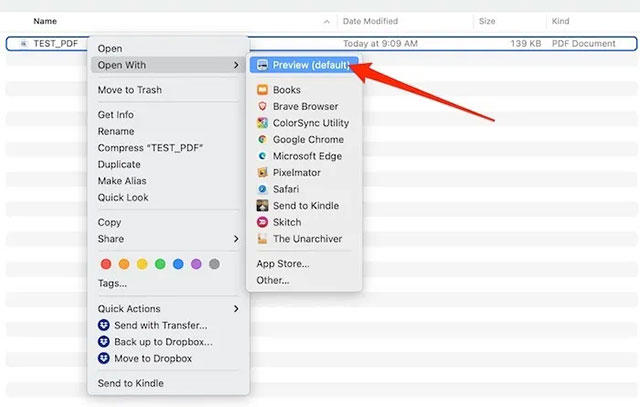
<p style="text-align: justify;">Bước đầu tiên, bạn cần sử dụng Preview để mở tệp PDF đang được bảo vệ bằng mật khẩu.</p>

<p style="text-align: justify;">Để làm điều này, bạn chỉ cần nhấp chuột phải vào tệp PDF mà mình muốn xóa mật khẩu và chọn Open With &gt; Preview. Ngoài ra, bạn cũng có thể nhấp đúp vào tệp để mở nó với Preview. Sử dụng phương pháp nào cũng được.</p>

<p style="text-align: justify;"><img alt="Mở tệp trong Preview" data-i="0" data-src="https://st.quantrimang.com/photos/image/2021/05/19/xoa-mat-khau-tep-pdf-tren-may-mac1.jpg" data-was-processed="true" height="407" src="https://st.quantrimang.com/photos/image/2021/05/19/xoa-mat-khau-tep-pdf-tren-may-mac1.jpg" width="640" /></p>

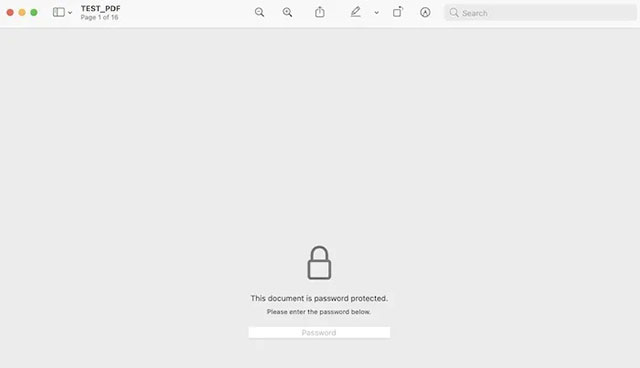
<p style="text-align: justify;">Vì tệp đang được bảo vệ bằng mật khẩu, Preview sẽ yêu cầu bạn nhập chính xác mã xác thực trước khi có thể xem bất kỳ nội dung nào bên trong.</p>

<p style="text-align: justify;"><img alt="Nhập mật khẩu" data-i="1" data-src="https://st.quantrimang.com/photos/image/2021/05/19/xoa-mat-khau-tep-pdf-tren-may-mac3.jpg" data-was-processed="true" height="368" src="https://st.quantrimang.com/photos/image/2021/05/19/xoa-mat-khau-tep-pdf-tren-may-mac3.jpg" width="640" /></p>

<p style="text-align: justify;">Chỉ cần nhập mật khẩu của bạn vào ô đã cho và nhấn Enter. Nếu mật khẩu chính xác, bạn sẽ có thể xem tệp PDF này ở chế độ Preview.</p>

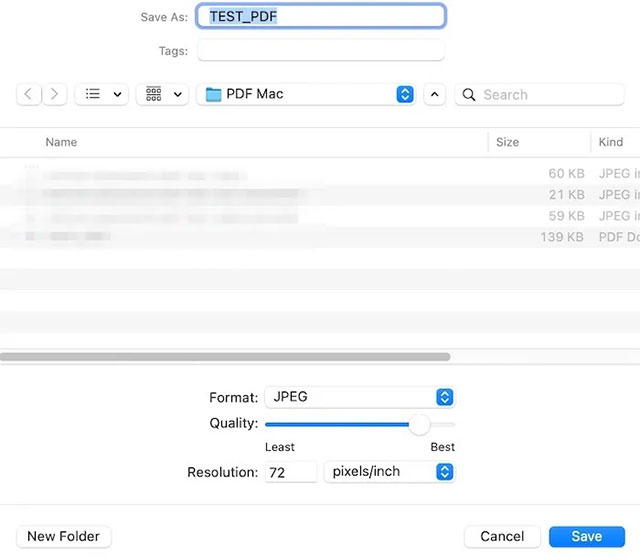
<p style="text-align: justify;">Sau khi tệp được mở, hãy nhấp vào menu “File” &gt; “Save…” hoặc nhấn tổ hợp phím tắt Command + S. Bây giờ bạn có thể lưu tệp PDF của mình dưới dạng tài liệu mới và đổi tên nó. Nói cách khác, thao tác này sẽ cho phép tạo một bản của tệp PDF này - nhưng hoàn toàn công còn có mật khẩu. Ngoài ra, bạn cũng có thể chọn một vị trí lưu mới cho tệp - chẳng hạn như thư mục download hoặc vị trí nào đó trong iCloud để tiện truy cập nhanh trong tương lai.</p>

<p style="text-align: justify;"><img alt="Lưu tệp mới" data-i="2" data-src="https://st.quantrimang.com/photos/image/2021/05/19/xoa-mat-khau-tep-pdf-tren-may-mac4.jpg" data-was-processed="true" height="558" src="https://st.quantrimang.com/photos/image/2021/05/19/xoa-mat-khau-tep-pdf-tren-may-mac4.jpg" width="640" /></p>

<p style="text-align: justify;">Bạn sẽ thấy tệp PDF mới được lưu trong thư mục đính mà mình đã chọn phía trên. Khi khởi chạy tệp này trong bất kỳ trình đọc PDF nào, bao gồm cả Preview , bạn sẽ thấy rằng nó không yêu cầu mật khẩu nữa. Bạn có thể gửi tệp cho bất kỳ ai và họ sẽ hoàn toàn có thể thoải mái truy cập không hạn chế vào nội dung tệp.</p>
		</div>
				<div id="author">
						<p>
				<strong>Nguồn tin:</strong>
				Quantrimang.com
			</p>
		</div>
	</div>
	<div id="footer" class="clearfix">
		<div id="url">
			<strong>URL của bản tin này: </strong><a href="https://www.nguoicodonvn2008.info/vi/news/savefile/kien-thuc-may-tinh/cach-xoa-mat-khau-tep-pdf-tren-may-mac-4184.html" title="Cách xóa mật khẩu tệp PDF trên máy Mac">https://www.nguoicodonvn2008.info/vi/news/savefile/kien-thuc-may-tinh/cach-xoa-mat-khau-tep-pdf-tren-may-mac-4184.html</a>

		</div>
		<div class="clear"></div>
		<div class="copyright">
			&copy; .&#x3A; Nguoicodonvn2008.info - Cõi lòng người cô đơn &#x3A;.
		</div>
		<div id="contact">
			<a href="mailto:admin@nguoicodonvn2008.info">admin@nguoicodonvn2008.info</a>
		</div>
	</div>
</div>
        <div id="timeoutsess" class="chromeframe">
            Bạn đã không sử dụng Site, <a onclick="timeoutsesscancel();" href="https://nguoicodonvn2008.info/#">Bấm vào đây để duy trì trạng thái đăng nhập</a>. Thời gian chờ: <span id="secField"> 60 </span> giây
        </div>
        <div id="openidResult" class="nv-alert" style="display:none"></div>
        <div id="openidBt" data-result="" data-redirect=""></div>
		</script>
		<div class="car-top">
  <span><img src="https://nguoicodonvn2008.info/themes/default/images/car.png" alt=""></span>
</div>
<script src="https://nguoicodonvn2008.info/assets/js/jquery/jquery.min.js"></script>
<script>var nv_base_siteurl="/",nv_lang_data="vi",nv_lang_interface="vi",nv_name_variable="nv",nv_fc_variable="op",nv_lang_variable="language",nv_module_name="news",nv_func_name="savefile",nv_is_user=0, nv_my_ofs=-4,nv_my_abbr="EDT",nv_cookie_prefix="nv4c_e856T",nv_check_pass_mstime=1738000,nv_area_admin=0,nv_safemode=0,theme_responsive=0,nv_recaptcha_ver=2,nv_recaptcha_sitekey="",nv_recaptcha_type="image",XSSsanitize=1;</script>
<script src="https://nguoicodonvn2008.info/assets/js/language/vi.js"></script>
<script src="https://nguoicodonvn2008.info/assets/js/DOMPurify/purify3.js"></script>
<script src="https://nguoicodonvn2008.info/assets/js/global.js"></script>
<script src="https://nguoicodonvn2008.info/assets/js/site.js"></script>
<script src="https://nguoicodonvn2008.info/themes/default/js/news.js"></script>
<script src="https://nguoicodonvn2008.info/themes/default/js/main.js"></script>
<script src="https://nguoicodonvn2008.info/themes/default/js/custom.js"></script>
<script type="application/ld+json">
        {
            "@context": "https://schema.org",
            "@type": "Organization",
            "url": "https://nguoicodonvn2008.info",
            "logo": "https://nguoicodonvn2008.info/uploads/angel.gif"
        }
        </script>
<script src="https://nguoicodonvn2008.info/themes/default/js/bootstrap.min.js"></script>
<script type="text/javascript">
var $scrolltop = $('.car-top');
$scrolltop.on('click', function () {
    $('html,body').animate({
        scrollTop: 0
    }, 800);
    $(this).addClass("car-run");
    setTimeout(function(){ $scrolltop.removeClass('car-run');}, 1000);
    return false;
});
$(window).on('scroll', function ()
{ 
    if($(window).scrollTop() >= 200)
    {
        $scrolltop.addClass("show");
        $scrolltop.addClass("car-down");
    }
    else
    {
       $scrolltop.removeClass("show");
       setTimeout(function(){ $scrolltop.removeClass('car-down');}, 300);
    }
});
</script>
</body>
</html>