<!DOCTYPE html>
    <html lang="vi" xmlns="http://www.w3.org/1999/xhtml" prefix="og: http://ogp.me/ns#">
    <head>
<title>Cách xóa lịch sử trong Ubuntu</title>
<meta name="description" content="Cách xóa lịch sử trong Ubuntu - Savefile - Tin Tức - https&#x3A;&#x002F;&#x002F;www.nguoicodonvn2008.info&#x002F;vi&#x002F;news&#x002F;savefile&#x002F;kien-thuc-may-tinh&#x002F;cach-xoa-lich-su-trong-ubuntu-8465.html">
<meta name="author" content=".: Nguoicodonvn2008.info - Cõi lòng người cô đơn :.">
<meta name="copyright" content=".: Nguoicodonvn2008.info - Cõi lòng người cô đơn :. [admin@nguoicodonvn2008.info]">
<meta name="robots" content="index, archive, follow, noodp">
<meta name="googlebot" content="index,archive,follow,noodp">
<meta name="msnbot" content="all,index,follow">
<meta name="generator" content="NukeViet v4.5">
<meta http-equiv="Content-Type" content="text/html; charset=utf-8">
<meta property="og:title" content="Cách xóa lịch sử trong Ubuntu">
<meta property="og:type" content="website">
<meta property="og:description" content="Savefile - Tin Tức - https&#x3A;&#x002F;&#x002F;www.nguoicodonvn2008.info&#x002F;vi&#x002F;news&#x002F;savefile&#x002F;kien-thuc-may-tinh&#x002F;cach-xoa-lich-su-trong-ubuntu-8465.html">
<meta property="og:site_name" content=".&#x3A; Nguoicodonvn2008.info - Cõi lòng người cô đơn &#x3A;.">
<meta property="og:url" content="https://www.nguoicodonvn2008.info/vi/news/savefile/kien-thuc-may-tinh/cach-xoa-lich-su-trong-ubuntu-8465.html">
<link rel="shortcut icon" href="https://nguoicodonvn2008.info/favicon.ico">
<link rel="canonical" href="https://www.nguoicodonvn2008.info/vi/news/savefile/kien-thuc-may-tinh/cach-xoa-lich-su-trong-ubuntu-8465.html">
<link rel="alternate" href="https://nguoicodonvn2008.info/vi/news/rss/" title="Tin Tức" type="application/rss+xml">
<link rel="alternate" href="https://nguoicodonvn2008.info/vi/news/rss/karaoke-dual/" title="Tin Tức - Karaoke Dual" type="application/rss+xml">
<link rel="alternate" href="https://nguoicodonvn2008.info/vi/news/rss/nhac-tre/" title="Tin Tức - Nhạc trẻ" type="application/rss+xml">
<link rel="alternate" href="https://nguoicodonvn2008.info/vi/news/rss/tru-tinh/" title="Tin Tức - Trữ tình" type="application/rss+xml">
<link rel="alternate" href="https://nguoicodonvn2008.info/vi/news/rss/nuoc-ngoai/" title="Tin Tức - Nước ngoài" type="application/rss+xml">
<link rel="alternate" href="https://nguoicodonvn2008.info/vi/news/rss/remix/" title="Tin Tức - Remix" type="application/rss+xml">
<link rel="alternate" href="https://nguoicodonvn2008.info/vi/news/rss/tam-su-tinh-yeu/" title="Tin Tức - Tâm sự tình yêu" type="application/rss+xml">
<link rel="alternate" href="https://nguoicodonvn2008.info/vi/news/rss/tho-suu-tam/" title="Tin Tức - Thơ sưu tầm" type="application/rss+xml">
<link rel="alternate" href="https://nguoicodonvn2008.info/vi/news/rss/cuoc-song/" title="Tin Tức - Cuộc sống" type="application/rss+xml">
<link rel="alternate" href="https://nguoicodonvn2008.info/vi/news/rss/phan-mem/" title="Tin Tức - Phần mềm" type="application/rss+xml">
<link rel="alternate" href="https://nguoicodonvn2008.info/vi/news/rss/kien-thuc-may-tinh/" title="Tin Tức - Kiến thức máy tính" type="application/rss+xml">
<link rel="alternate" href="https://nguoicodonvn2008.info/vi/news/rss/hoc-tap/" title="Tin Tức - Học tập" type="application/rss+xml">
<link rel="alternate" href="https://nguoicodonvn2008.info/vi/news/rss/tai-lieu/" title="Tin Tức - Tài liệu" type="application/rss+xml">
<link rel="alternate" href="https://nguoicodonvn2008.info/vi/news/rss/de-thi/" title="Tin Tức - Đề thi" type="application/rss+xml">
<link rel="preload" as="style" href="https://nguoicodonvn2008.info/assets/css/font-awesome.min.css" type="text/css">
<link rel="preload" as="style" href="https://nguoicodonvn2008.info/themes/default/css/bootstrap.non-responsive.css" type="text/css">
<link rel="preload" as="style" href="https://nguoicodonvn2008.info/themes/default/css/style.css" type="text/css">
<link rel="preload" as="style" href="https://nguoicodonvn2008.info/themes/default/css/style.non-responsive.css" type="text/css">
<link rel="preload" as="style" href="https://nguoicodonvn2008.info/themes/default/css/news.css" type="text/css">
<link rel="preload" as="style" href="https://nguoicodonvn2008.info/themes/default/css/custom.css" type="text/css">
<link rel="preload" as="script" href="https://nguoicodonvn2008.info/assets/js/jquery/jquery.min.js" type="text/javascript">
<link rel="preload" as="script" href="https://nguoicodonvn2008.info/assets/js/language/vi.js" type="text/javascript">
<link rel="preload" as="script" href="https://nguoicodonvn2008.info/assets/js/DOMPurify/purify3.js" type="text/javascript">
<link rel="preload" as="script" href="https://nguoicodonvn2008.info/assets/js/global.js" type="text/javascript">
<link rel="preload" as="script" href="https://nguoicodonvn2008.info/assets/js/site.js" type="text/javascript">
<link rel="preload" as="script" href="https://nguoicodonvn2008.info/themes/default/js/news.js" type="text/javascript">
<link rel="preload" as="script" href="https://nguoicodonvn2008.info/themes/default/js/main.js" type="text/javascript">
<link rel="preload" as="script" href="https://nguoicodonvn2008.info/themes/default/js/custom.js" type="text/javascript">
<link rel="preload" as="script" href="https://nguoicodonvn2008.info/themes/default/js/bootstrap.min.js" type="text/javascript">
<link rel="stylesheet" href="https://nguoicodonvn2008.info/assets/css/font-awesome.min.css">
<link rel="stylesheet" href="https://nguoicodonvn2008.info/themes/default/css/bootstrap.non-responsive.css">
<link rel="stylesheet" href="https://nguoicodonvn2008.info/themes/default/css/style.css">
<link rel="stylesheet" href="https://nguoicodonvn2008.info/themes/default/css/style.non-responsive.css">
<link rel="StyleSheet" href="https://nguoicodonvn2008.info/themes/default/css/news.css">
<link rel="stylesheet" href="https://nguoicodonvn2008.info/themes/default/css/custom.css">
<style type="text/css">
	body{background: #fff;}
</style>
    </head>
    <body>
<div id="print">
	<div id="hd_print">
		<h2 class="pull-left">.&#x3A; Nguoicodonvn2008.info - Cõi lòng người cô đơn &#x3A;.</h2>
		<p class="pull-right"><a title=".&#x3A; Nguoicodonvn2008.info - Cõi lòng người cô đơn &#x3A;." href="https://nguoicodonvn2008.info/">https://nguoicodonvn2008.info</a></p>
	</div>
	<div class="clear"></div>
	<hr />
	<div id="content">
		<h1>Cách xóa lịch sử trong Ubuntu</h1>
		<ul class="list-inline">
			<li>Thứ tư - 12/06/2024 01:49</li>
			<li class="hidden-print txtrequired"><em class="fa fa-print">&nbsp;</em><a title="In ra" href="javascript:;" onclick="window.print()">In ra</a></li>
			<li class="hidden-print txtrequired"><em class="fa fa-power-off">&nbsp;</em><a title="Đóng cửa sổ này" href="javascript:;" onclick="window.close()">Đóng cửa sổ này</a></li>
		</ul>
		<div class="clear"></div>
		<div id="hometext">
		</div>
				<div class="imghome">
			<img alt="Cách xóa lịch sử trong Ubuntu" src="https://st.quantrimang.com/photos/image/2024/06/11/xoa-lich-su-trong-ubuntu-1.jpg" width="460" class="img-thumbnail" />
		</div>
		<div class="clear"></div>
		<div id="bodytext" class="clearfix">
			<p style="text-align: justify;">Xóa nhật ký lịch sử hệ thống&nbsp;Linux&nbsp;là điều quan trọng để duy trì một máy tính khỏe mạnh. Nó cho phép tiết kiệm dung lượng ổ đĩa quý giá và bảo vệ các hoạt động kỹ thuật số của người dùng khỏi những con mắt tò mò. Bài viết hôm nay sẽ chỉ cho bạn cách xóa dữ liệu lịch sử trên shell Bash, trình quản lý file và trình soạn thảo văn bản trên Ubuntu Linux.</p>

<h2 style="text-align: justify;">Xóa lịch sử lệnh trong Bash</h2>

<p style="text-align: justify;">Linux là một hệ điều hành dựa trên dòng lệnh. Từ quản lý file đến cấu hình chương trình, hầu hết mọi hành động trong Linux đều thực hiện dưới dạng lệnh terminal. Theo thời gian, các lệnh này sẽ chồng chất lên shell hệ thống Bash, có thể chiếm nhiều dung lượng ổ đĩa.</p>

<p style="text-align: justify;">Cách dễ nhất để xóa lịch sử lệnh Bash trong Ubuntu là sử dụng UNIX pipe để chuyển hướng một chuỗi trống đến file “.bash_history”:</p>

<pre id="pre0">
<code>echo &quot;&quot; &gt; ~/.bash_history</code></pre>

<p style="text-align: justify;">Điều đó có nghĩa là thao tác này sẽ không xóa buffer lịch sử cho phiên Bash hiện tại. Để làm điều đó, hãy chạy lệnh sau:</p>

<pre id="pre1">
<code>history -cw</code></pre>

<p style="text-align: justify;"><strong>Lưu ý</strong>: Bạn cần chạy lại lệnh này cho mọi shell Bash đang hoạt động trên phiên desktop hiện tại của mình.</p>

<p style="text-align: justify;">Xác nhận rằng lịch sử Bash hiện tại của bạn bị xóa bằng cách chạy lệnh history mà không có bất kỳ đối số nào.</p>

<figure>
<div style="text-align: justify;"><img alt="Terminal hiển thị lịch sử đã xóa của phiên shell hiện tại." data-i="0" data-src="https://st.quantrimang.com/photos/image/2024/06/11/xoa-lich-su-trong-ubuntu-1.jpg" data-was-processed="true" height="131" src="https://st.quantrimang.com/photos/image/2024/06/11/xoa-lich-su-trong-ubuntu-1.jpg" width="703" /></div>

<figcaption>
<div style="text-align: justify;">Terminal hiển thị lịch sử đã xóa của phiên shell hiện tại.</div>
</figcaption>
</figure>

<h3 style="text-align: justify;">Vô hiệu hóa nhật ký lịch sử trong Bash</h3>

<p style="text-align: justify;">Có thể buộc Bash không lưu mọi lịch sử lệnh từ bất kỳ phiên nào trong tương lai. Điều này có thể hữu ích nếu bạn đang thiết lập một máy tính dùng chung và không muốn những người dùng khác biết các lệnh bạn đang chạy trên tài khoản của mình.</p>

<div style="text-align: justify;">&nbsp;</div>

<p style="text-align: justify;">Bắt đầu bằng cách đảm bảo rằng buffer lịch sử hiện tại trong Ubuntu hoàn toàn bị xóa:</p>

<pre id="pre2">
<code>history -cw</code></pre>

<p style="text-align: justify;">Mở file .bashrc bằng trình soạn thảo yêu thích của bạn:</p>

<pre id="pre3">
<code>nano ~/.bashrc</code></pre>

<p style="text-align: justify;">Dán các dòng code sau vào cuối file .bashrc:</p>

<pre id="pre4">
<code>export HISTSIZE=0
export HISTFILESIZE=0</code></pre>

<p style="text-align: justify;"><strong>Lưu ý</strong>: Biến HISTSIZE xác định số lượng dòng mà Bash sẽ giữ trong một phiên hoạt động. Trong khi đó, HISTFILESIZE đặt số lượng dòng mà file nhật ký lịch sử sẽ duy trì theo thời gian.</p>

<p style="text-align: justify;">Lưu file .bashrc, sau đó chạy lệnh sau để áp dụng cài đặt mới cho phiên shell hiện tại:</p>

<pre id="pre5">
<code>source ~/.bashrc</code></pre>

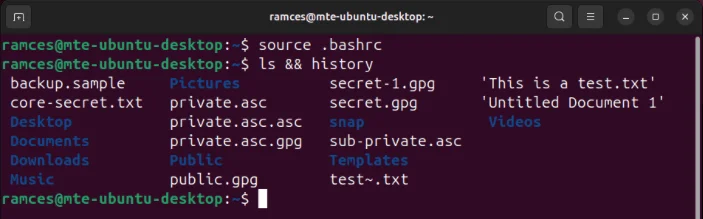
<p style="text-align: justify;">Kiểm tra cài đặt mới bằng cách chạy lệnh ls trên thư mục hiện tại, sau đó chạy lại lệnh history:</p>

<pre id="pre6">
<code>ls &amp;&amp; history</code></pre>

<figure>
<div style="text-align: justify;"><img alt="Terminal hiển thị file lịch sử Bash và cache hoàn toàn bị xóa." data-i="1" data-src="https://st.quantrimang.com/photos/image/2024/06/11/xoa-lich-su-trong-ubuntu-2.jpg" data-was-processed="true" height="219" src="https://st.quantrimang.com/photos/image/2024/06/11/xoa-lich-su-trong-ubuntu-2.jpg" width="703" /></div>

<figcaption>
<div style="text-align: justify;">Terminal hiển thị file lịch sử Bash và cache hoàn toàn bị xóa.</div>
</figcaption>
</figure>

<h3 style="text-align: justify;">Xóa các mục nhập lịch sử Bash cụ thể</h3>

<p style="text-align: justify;">Lệnh history cũng có thể xóa các mục cụ thể khỏi cache và nhật ký lịch sử của nó. Điều này có thể hữu ích nếu bạn chỉ muốn bỏ qua một số lệnh thay vì xóa toàn bộ lịch sử của shell.</p>

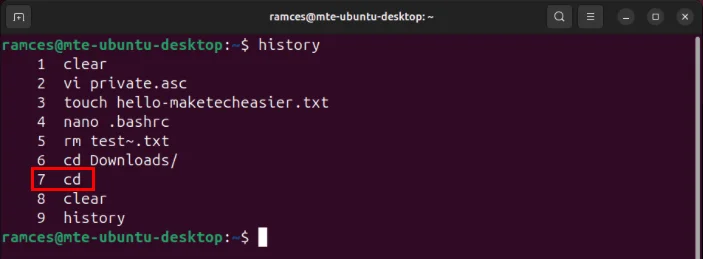
<p style="text-align: justify;">Sử dụng lệnh history để tìm số chỉ mục của lệnh muốn xóa. Trường hợp ví dụ muốn xóa lệnh thứ 7 trong lịch sử shell của mình.</p>

<figure>
<div style="text-align: justify;"><img alt="Mục nhập lịch sử thứ bảy trên phiên shell hiện tại." data-i="2" data-src="https://st.quantrimang.com/photos/image/2024/06/11/xoa-lich-su-trong-ubuntu-3.jpg" data-was-processed="true" height="259" src="https://st.quantrimang.com/photos/image/2024/06/11/xoa-lich-su-trong-ubuntu-3.jpg" width="703" /></div>

<figcaption>
<div style="text-align: justify;">Mục nhập lịch sử thứ bảy trên phiên shell hiện tại.</div>
</figcaption>
</figure>

<p style="text-align: justify;"><strong>Lưu ý</strong>: Bạn có thể tìm kiếm lệnh cụ thể muốn xóa bằng cách chuyển lệnh history tới grep:</p>

<pre id="pre7">
<code>history | grep my-history-command</code></pre>

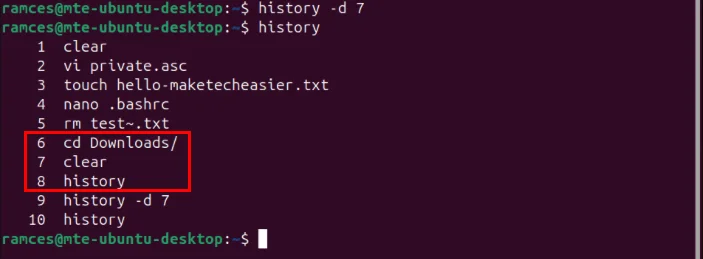
<p style="text-align: justify;">Chạy lệnh sau cùng với số chỉ mục của mục bạn muốn loại bỏ:</p>
&nbsp;

<pre id="pre8">
<code>history -d 7</code></pre>

<p style="text-align: justify;">Xác nhận rằng mục nhập lịch sử đã biến mất bằng cách chạy lại lệnh history.</p>

<figure>
<div style="text-align: justify;"><img alt="Các lệnh xung quanh mục nhập lịch sử thứ bảy đã bị xóa." data-i="3" data-src="https://st.quantrimang.com/photos/image/2024/06/11/xoa-lich-su-trong-ubuntu-4.jpg" data-was-processed="true" height="259" src="https://st.quantrimang.com/photos/image/2024/06/11/xoa-lich-su-trong-ubuntu-4.jpg" width="703" /></div>

<figcaption>
<div style="text-align: justify;">Các lệnh xung quanh mục nhập lịch sử thứ bảy đã bị xóa.</div>
</figcaption>
</figure>

<div style="text-align: justify;">&nbsp;</div>
		</div>
				<div id="author">
						<p>
				<strong>Nguồn tin:</strong>
				Quantrimang.com:
			</p>
		</div>
	</div>
	<div id="footer" class="clearfix">
		<div id="url">
			<strong>URL của bản tin này: </strong><a href="https://www.nguoicodonvn2008.info/vi/news/savefile/kien-thuc-may-tinh/cach-xoa-lich-su-trong-ubuntu-8465.html" title="Cách xóa lịch sử trong Ubuntu">https://www.nguoicodonvn2008.info/vi/news/savefile/kien-thuc-may-tinh/cach-xoa-lich-su-trong-ubuntu-8465.html</a>

		</div>
		<div class="clear"></div>
		<div class="copyright">
			&copy; .&#x3A; Nguoicodonvn2008.info - Cõi lòng người cô đơn &#x3A;.
		</div>
		<div id="contact">
			<a href="mailto:admin@nguoicodonvn2008.info">admin@nguoicodonvn2008.info</a>
		</div>
	</div>
</div>
        <div id="timeoutsess" class="chromeframe">
            Bạn đã không sử dụng Site, <a onclick="timeoutsesscancel();" href="https://nguoicodonvn2008.info/#">Bấm vào đây để duy trì trạng thái đăng nhập</a>. Thời gian chờ: <span id="secField"> 60 </span> giây
        </div>
        <div id="openidResult" class="nv-alert" style="display:none"></div>
        <div id="openidBt" data-result="" data-redirect=""></div>
		</script>
		<div class="car-top">
  <span><img src="https://nguoicodonvn2008.info/themes/default/images/car.png" alt=""></span>
</div>
<div id="run_cronjobs" style="visibility:hidden;display:none;"><img alt="cron" src="/index.php?second=cronjobs&amp;p=p48lPCt0" width="1" height="1" /></div>
<script src="https://nguoicodonvn2008.info/assets/js/jquery/jquery.min.js"></script>
<script>var nv_base_siteurl="/",nv_lang_data="vi",nv_lang_interface="vi",nv_name_variable="nv",nv_fc_variable="op",nv_lang_variable="language",nv_module_name="news",nv_func_name="savefile",nv_is_user=0, nv_my_ofs=-4,nv_my_abbr="EDT",nv_cookie_prefix="nv4c_e856T",nv_check_pass_mstime=1738000,nv_area_admin=0,nv_safemode=0,theme_responsive=0,nv_recaptcha_ver=2,nv_recaptcha_sitekey="",nv_recaptcha_type="image",XSSsanitize=1;</script>
<script src="https://nguoicodonvn2008.info/assets/js/language/vi.js"></script>
<script src="https://nguoicodonvn2008.info/assets/js/DOMPurify/purify3.js"></script>
<script src="https://nguoicodonvn2008.info/assets/js/global.js"></script>
<script src="https://nguoicodonvn2008.info/assets/js/site.js"></script>
<script src="https://nguoicodonvn2008.info/themes/default/js/news.js"></script>
<script src="https://nguoicodonvn2008.info/themes/default/js/main.js"></script>
<script src="https://nguoicodonvn2008.info/themes/default/js/custom.js"></script>
<script type="application/ld+json">
        {
            "@context": "https://schema.org",
            "@type": "Organization",
            "url": "https://nguoicodonvn2008.info",
            "logo": "https://nguoicodonvn2008.info/uploads/angel.gif"
        }
        </script>
<script src="https://nguoicodonvn2008.info/themes/default/js/bootstrap.min.js"></script>
<script type="text/javascript">
var $scrolltop = $('.car-top');
$scrolltop.on('click', function () {
    $('html,body').animate({
        scrollTop: 0
    }, 800);
    $(this).addClass("car-run");
    setTimeout(function(){ $scrolltop.removeClass('car-run');}, 1000);
    return false;
});
$(window).on('scroll', function ()
{ 
    if($(window).scrollTop() >= 200)
    {
        $scrolltop.addClass("show");
        $scrolltop.addClass("car-down");
    }
    else
    {
       $scrolltop.removeClass("show");
       setTimeout(function(){ $scrolltop.removeClass('car-down');}, 300);
    }
});
</script>
</body>
</html>