<!DOCTYPE html>
    <html lang="vi" xmlns="http://www.w3.org/1999/xhtml" prefix="og: http://ogp.me/ns#">
    <head>
<title>Cách xóa cảnh báo hình tam giác màu vàng trên ổ C Windows</title>
<meta name="description" content="Cách xóa cảnh báo hình tam giác màu vàng trên ổ C Windows - Savefile - Tin Tức -...">
<meta name="author" content=".: Nguoicodonvn2008.info - Cõi lòng người cô đơn :.">
<meta name="copyright" content=".: Nguoicodonvn2008.info - Cõi lòng người cô đơn :. [admin@nguoicodonvn2008.info]">
<meta name="robots" content="index, archive, follow, noodp">
<meta name="googlebot" content="index,archive,follow,noodp">
<meta name="msnbot" content="all,index,follow">
<meta name="generator" content="NukeViet v4.5">
<meta http-equiv="Content-Type" content="text/html; charset=utf-8">
<meta property="og:title" content="Cách xóa cảnh báo hình tam giác màu vàng trên ổ C Windows">
<meta property="og:type" content="website">
<meta property="og:description" content="Savefile - Tin Tức - https&#x3A;&#x002F;&#x002F;www.nguoicodonvn2008.info&#x002F;vi&#x002F;news&#x002F;savefile&#x002F;kien-thuc-may-tinh&#x002F;cach-xoa-canh-bao-hinh-tam-giac-mau-vang-tren-o-c-windows-10557.html">
<meta property="og:site_name" content=".&#x3A; Nguoicodonvn2008.info - Cõi lòng người cô đơn &#x3A;.">
<meta property="og:url" content="https://www.nguoicodonvn2008.info/vi/news/savefile/kien-thuc-may-tinh/cach-xoa-canh-bao-hinh-tam-giac-mau-vang-tren-o-c-windows-10557.html">
<link rel="shortcut icon" href="https://nguoicodonvn2008.info/favicon.ico">
<link rel="canonical" href="https://www.nguoicodonvn2008.info/vi/news/savefile/kien-thuc-may-tinh/cach-xoa-canh-bao-hinh-tam-giac-mau-vang-tren-o-c-windows-10557.html">
<link rel="alternate" href="https://nguoicodonvn2008.info/vi/news/rss/" title="Tin Tức" type="application/rss+xml">
<link rel="alternate" href="https://nguoicodonvn2008.info/vi/news/rss/karaoke-dual/" title="Tin Tức - Karaoke Dual" type="application/rss+xml">
<link rel="alternate" href="https://nguoicodonvn2008.info/vi/news/rss/nhac-tre/" title="Tin Tức - Nhạc trẻ" type="application/rss+xml">
<link rel="alternate" href="https://nguoicodonvn2008.info/vi/news/rss/tru-tinh/" title="Tin Tức - Trữ tình" type="application/rss+xml">
<link rel="alternate" href="https://nguoicodonvn2008.info/vi/news/rss/nuoc-ngoai/" title="Tin Tức - Nước ngoài" type="application/rss+xml">
<link rel="alternate" href="https://nguoicodonvn2008.info/vi/news/rss/remix/" title="Tin Tức - Remix" type="application/rss+xml">
<link rel="alternate" href="https://nguoicodonvn2008.info/vi/news/rss/tam-su-tinh-yeu/" title="Tin Tức - Tâm sự tình yêu" type="application/rss+xml">
<link rel="alternate" href="https://nguoicodonvn2008.info/vi/news/rss/tho-suu-tam/" title="Tin Tức - Thơ sưu tầm" type="application/rss+xml">
<link rel="alternate" href="https://nguoicodonvn2008.info/vi/news/rss/cuoc-song/" title="Tin Tức - Cuộc sống" type="application/rss+xml">
<link rel="alternate" href="https://nguoicodonvn2008.info/vi/news/rss/phan-mem/" title="Tin Tức - Phần mềm" type="application/rss+xml">
<link rel="alternate" href="https://nguoicodonvn2008.info/vi/news/rss/kien-thuc-may-tinh/" title="Tin Tức - Kiến thức máy tính" type="application/rss+xml">
<link rel="alternate" href="https://nguoicodonvn2008.info/vi/news/rss/hoc-tap/" title="Tin Tức - Học tập" type="application/rss+xml">
<link rel="alternate" href="https://nguoicodonvn2008.info/vi/news/rss/tai-lieu/" title="Tin Tức - Tài liệu" type="application/rss+xml">
<link rel="alternate" href="https://nguoicodonvn2008.info/vi/news/rss/de-thi/" title="Tin Tức - Đề thi" type="application/rss+xml">
<link rel="preload" as="style" href="https://nguoicodonvn2008.info/assets/css/font-awesome.min.css" type="text/css">
<link rel="preload" as="style" href="https://nguoicodonvn2008.info/themes/default/css/bootstrap.non-responsive.css" type="text/css">
<link rel="preload" as="style" href="https://nguoicodonvn2008.info/themes/default/css/style.css" type="text/css">
<link rel="preload" as="style" href="https://nguoicodonvn2008.info/themes/default/css/style.non-responsive.css" type="text/css">
<link rel="preload" as="style" href="https://nguoicodonvn2008.info/themes/default/css/news.css" type="text/css">
<link rel="preload" as="style" href="https://nguoicodonvn2008.info/themes/default/css/custom.css" type="text/css">
<link rel="preload" as="script" href="https://nguoicodonvn2008.info/assets/js/jquery/jquery.min.js" type="text/javascript">
<link rel="preload" as="script" href="https://nguoicodonvn2008.info/assets/js/language/vi.js" type="text/javascript">
<link rel="preload" as="script" href="https://nguoicodonvn2008.info/assets/js/DOMPurify/purify3.js" type="text/javascript">
<link rel="preload" as="script" href="https://nguoicodonvn2008.info/assets/js/global.js" type="text/javascript">
<link rel="preload" as="script" href="https://nguoicodonvn2008.info/assets/js/site.js" type="text/javascript">
<link rel="preload" as="script" href="https://nguoicodonvn2008.info/themes/default/js/news.js" type="text/javascript">
<link rel="preload" as="script" href="https://nguoicodonvn2008.info/themes/default/js/main.js" type="text/javascript">
<link rel="preload" as="script" href="https://nguoicodonvn2008.info/themes/default/js/custom.js" type="text/javascript">
<link rel="preload" as="script" href="https://nguoicodonvn2008.info/themes/default/js/bootstrap.min.js" type="text/javascript">
<link rel="stylesheet" href="https://nguoicodonvn2008.info/assets/css/font-awesome.min.css">
<link rel="stylesheet" href="https://nguoicodonvn2008.info/themes/default/css/bootstrap.non-responsive.css">
<link rel="stylesheet" href="https://nguoicodonvn2008.info/themes/default/css/style.css">
<link rel="stylesheet" href="https://nguoicodonvn2008.info/themes/default/css/style.non-responsive.css">
<link rel="StyleSheet" href="https://nguoicodonvn2008.info/themes/default/css/news.css">
<link rel="stylesheet" href="https://nguoicodonvn2008.info/themes/default/css/custom.css">
<style type="text/css">
	body{background: #fff;}
</style>
    </head>
    <body>
<div id="print">
	<div id="hd_print">
		<h2 class="pull-left">.&#x3A; Nguoicodonvn2008.info - Cõi lòng người cô đơn &#x3A;.</h2>
		<p class="pull-right"><a title=".&#x3A; Nguoicodonvn2008.info - Cõi lòng người cô đơn &#x3A;." href="https://nguoicodonvn2008.info/">https://nguoicodonvn2008.info</a></p>
	</div>
	<div class="clear"></div>
	<hr />
	<div id="content">
		<h1>Cách xóa cảnh báo hình tam giác màu vàng trên ổ C Windows</h1>
		<ul class="list-inline">
			<li>Thứ năm - 12/06/2025 23:23</li>
			<li class="hidden-print txtrequired"><em class="fa fa-print">&nbsp;</em><a title="In ra" href="javascript:;" onclick="window.print()">In ra</a></li>
			<li class="hidden-print txtrequired"><em class="fa fa-power-off">&nbsp;</em><a title="Đóng cửa sổ này" href="javascript:;" onclick="window.close()">Đóng cửa sổ này</a></li>
		</ul>
		<div class="clear"></div>
		<div id="hometext">
		</div>
				<div class="imghome">
			<img alt="Cách xóa cảnh báo hình tam giác màu vàng trên ổ C Windows" src="https://st.quantrimang.com/photos/image/2025/06/12/xoa-canh-bao-tam-giac-vang-tren-o-c-5.jpg" width="460" class="img-thumbnail" />
		</div>
		<div class="clear"></div>
		<div id="bodytext" class="clearfix">
			<p style="text-align: justify;">Bạn có để ý thấy một dấu hiệu cảnh báo hình tam giác màu vàng trên ổ Windows, đặc biệt là ổ C không? Nó có thể khiến bạn lo lắng, nhưng thực ra Microsoft chỉ đang sử dụng một biểu tượng liên quan đến lỗi&nbsp;ổ cứng&nbsp;cho một vấn đề nhỏ. Chỉ báo không đúng chỗ này thường có nghĩa là mã hóa BitLocker đã bị vô hiệu hóa, bản cập nhật yêu cầu khởi động lại hoặc bản nâng cấp firmware đang chờ xử lý. Bài viết sau đây sẽ chỉ cho bạn cách xóa cảnh báo này.</p>

<h2 style="text-align: justify;">Lý do thực sự khiến ổ C của Windows hiển thị cảnh báo hình tam giác màu vàng</h2>

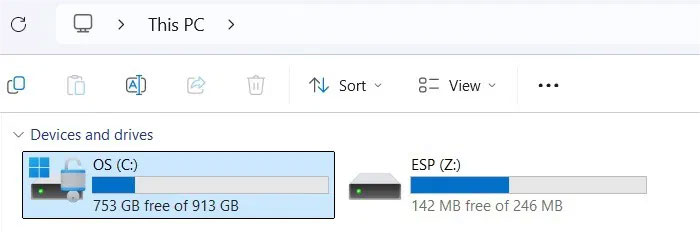
<p style="text-align: justify;">Lý do lớn nhất khiến ổ Windows, đặc biệt là ổ C, hiển thị cảnh báo hình tam giác màu vàng là khi mã hóa BitLocker đã bị vô hiệu hóa, thường là sau khi cập nhật. Biểu tượng ổ khóa trên ổ C cho biết trạng thái của ổ.</p>

<ul>
	<li style="text-align: justify;">Ổ khóa bị khóa: Không thể truy cập volume BitLocker</li>
	<li style="text-align: justify;">Ổ khóa đã mở khóa: BitLocker đang hoạt động, với ổ được mã hóa (xem bên dưới)</li>
	<li style="text-align: justify;">Ổ khóa đã mở khóa có hình tam giác màu vàng: BitLocker bị treo</li>
</ul>

<figure>
<div style="text-align: justify;"><img alt="" data-i="0" data-src="https://st.quantrimang.com/photos/image/2025/06/12/xoa-canh-bao-tam-giac-vang-tren-o-c-1.jpg" data-was-processed="true" height="234" src="https://st.quantrimang.com/photos/image/2025/06/12/xoa-canh-bao-tam-giac-vang-tren-o-c-1.jpg" width="700" /></div>
</figure>

<p style="text-align: justify;">Một nguyên nhân phổ biến khác gây ra lỗi này, không phải là lý do để hoảng sợ, là Windows sử dụng hình tam giác màu vàng để báo hiệu khởi động lại đang chờ xử lý, chủ yếu là để hoàn tất bản cập nhật. Trong một số trường hợp hiếm hoi, điều này có thể chỉ ra bản nâng cấp firmware. Chỉ cần&nbsp;<a data-type="internal" href="https://quantrimang.com/cong-nghe/6-cach-khoi-dong-lai-windows-that-pro-116819" title="6 cách khởi động lại máy tính Windows từ đơn giản đến &#039;Pro&#039;">khởi động lại PC</a>&nbsp;và hình tam giác màu vàng sẽ biến mất. Nếu không, hãy làm theo một số phương pháp sau.</p>

<h2 style="text-align: justify;">Bật mã hóa BitLocker tự động thông qua Control Panel</h2>

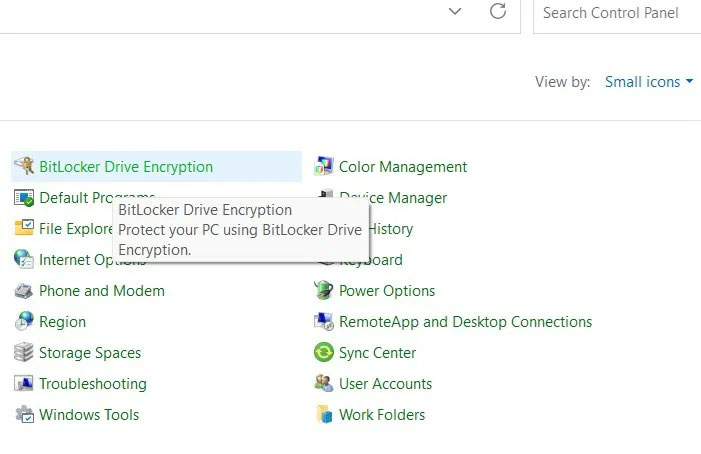
<p style="text-align: justify;">Trên PC Windows 11/10 Pro hoặc Enterprise, hãy vào Control Panel. Nhấp vào&nbsp;<strong>View by</strong>&nbsp;ở trên cùng bên phải và chọn&nbsp;<strong>Small icons</strong>.</p>

<figure>
<div style="text-align: justify;"><img alt="Nhấp vào BitLocker Drive Encryption trong Control Panel bên dưới Small icons" data-i="1" data-src="https://st.quantrimang.com/photos/image/2025/06/12/xoa-canh-bao-tam-giac-vang-tren-o-c-2.jpg" data-was-processed="true" height="454" src="https://st.quantrimang.com/photos/image/2025/06/12/xoa-canh-bao-tam-giac-vang-tren-o-c-2.jpg" width="701" /></div>

<figcaption>
<div style="text-align: justify;">Nhấp vào BitLocker Drive Encryption trong Control Panel bên dưới Small icons</div>
</figcaption>
</figure>

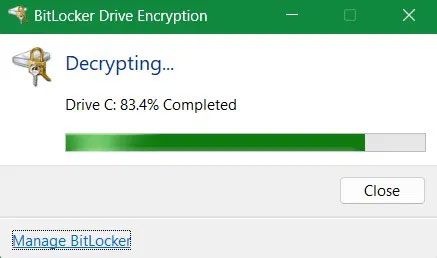
<p style="text-align: justify;">Nếu ổ đang giải mã, hãy đợi quá trình hoàn tất vì có thể mất một thời gian.</p>

<figure>
<div style="text-align: justify;"><img alt="Giải mã volume BitLocker hình tam giác màu vàng" data-i="2" data-src="https://st.quantrimang.com/photos/image/2025/06/12/xoa-canh-bao-tam-giac-vang-tren-o-c-3.jpg" data-was-processed="true" height="258" src="https://st.quantrimang.com/photos/image/2025/06/12/xoa-canh-bao-tam-giac-vang-tren-o-c-3.jpg" width="437" /></div>

<figcaption>
<div style="text-align: justify;">Giải mã volume BitLocker hình tam giác màu vàng</div>
</figcaption>
</figure>

<p style="text-align: justify;">Cuối cùng, nhấp vào&nbsp;<strong>Turn on BitLocker</strong>&nbsp;để bật mã hóa BitLocker cho ổ C nếu ổ này đã tắt. Nhập mật khẩu hoặc mã PIN, làm theo hướng dẫn trên màn hình và khởi động lại hệ thống để kích hoạt bảo vệ BitLocker.</p>

<h2 style="text-align: justify;">Sử dụng lệnh này để xóa cảnh báo hình tam giác màu vàng</h2>

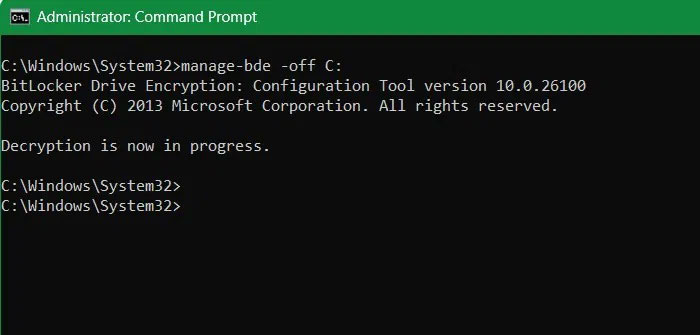
<p style="text-align: justify;">Ngoài Control Panel, bạn cũng có thể sử dụng Command Prompt để xóa cảnh báo hình tam giác màu vàng.</p>

<p style="text-align: justify;">Mở Command Prompt với quyền admin&nbsp;và nhập lệnh sau, lệnh này sẽ tạm thời vô hiệu hóa mã hóa. Quá trình giải mã có thể mất một lúc. Sau đó, bạn có thể bật lại thông qua Control Panel.</p>

<pre id="pre0">
<code>manage-bde -off C:</code></pre>

<figure>
<div style="text-align: justify;"><img alt="" data-i="3" data-src="https://st.quantrimang.com/photos/image/2025/06/12/xoa-canh-bao-tam-giac-vang-tren-o-c-4.jpg" data-was-processed="true" height="335" src="https://st.quantrimang.com/photos/image/2025/06/12/xoa-canh-bao-tam-giac-vang-tren-o-c-4.jpg" width="700" /></div>
</figure>

<h2 style="text-align: justify;">Sửa bất kỳ sự cố nào về Windows Update hoặc nâng cấp firmware</h2>

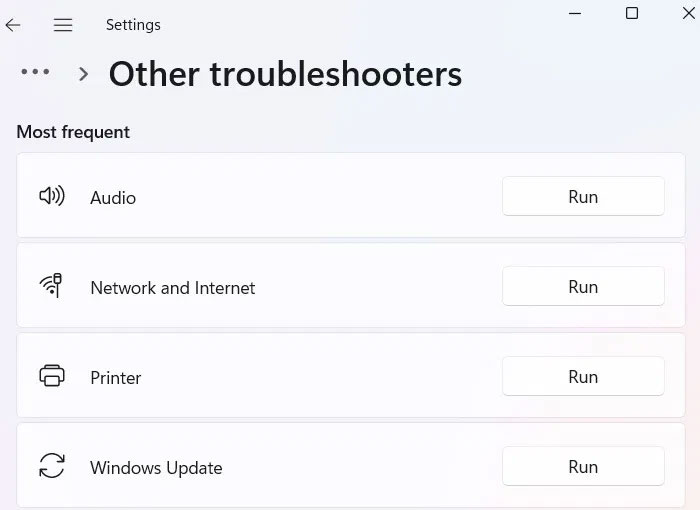
<p style="text-align: justify;">Mặc dù giải mã BitLocker là nguyên nhân chính gây ra cảnh báo tam giác màu vàng trên ổ, nhưng các sự cố nhỏ thường xuất phát từ bản cập nhật chưa hoàn tất hoặc bản nâng cấp firmware bị trì hoãn. Nếu bản cập nhật không hoàn tất hoặc quá trình nâng cấp firmware mất quá nhiều thời gian, hãy thực hiện các thao tác sau.</p>

<p style="text-align: justify;">Đối với bản cập nhật chưa hoàn tất, hãy vào&nbsp;<strong>System</strong>&nbsp;-&gt;&nbsp;<strong>Troubleshoot</strong>&nbsp;-&gt;&nbsp;<strong>Other troubleshooters</strong>. Nhấp vào&nbsp;<strong>Run</strong>&nbsp;bên cạnh&nbsp;<strong>Windows Update</strong>. Nhấp vào&nbsp;<strong>Contact support</strong>&nbsp;bên trong menu. Hỗ trợ nhanh thông qua bộ phận hỗ trợ miễn phí của Microsoft là một trong những cách tốt nhất để hoàn tất các bản cập nhật bị đình trệ.</p>

<figure>
<div style="text-align: justify;"><img alt="Nhấp vào Run bên cạnh Windows Update trong Other troubleshooters." data-i="4" data-src="https://st.quantrimang.com/photos/image/2025/06/12/xoa-canh-bao-tam-giac-vang-tren-o-c-5.jpg" data-was-processed="true" height="510" src="https://st.quantrimang.com/photos/image/2025/06/12/xoa-canh-bao-tam-giac-vang-tren-o-c-5.jpg" width="700" /></div>

<figcaption>
<div style="text-align: justify;">Nhấp vào Run bên cạnh Windows Update trong Other troubleshooters.</div>
</figcaption>
</figure>

<p style="text-align: justify;">Đối với bản nâng cấp firmware, cách tiếp cận tốt nhất là chờ đợi vì chúng có thể mất nhiều thời gian hơn dự kiến. Nếu bạn gặp sự cố, giải pháp cuối cùng bên dưới sẽ giải quyết mọi sự cố đang chờ xử lý.</p>

<h2 style="text-align: justify;">Khôi phục và reset thiết bị</h2>

<p style="text-align: justify;">Từ menu tìm kiếm, hãy chọn&nbsp;<strong>Create a restore point</strong>. Đi tới&nbsp;<strong>System Protection</strong>&nbsp;và chọn&nbsp;<strong>System Restore</strong>. Đưa PC trở lại thời điểm không hiển thị lỗi.</p>

<p style="text-align: justify;">Một phương pháp khác có thể sử dụng là reset thiết bị. Tốt nhất là thực hiện dưới dạng tải xuống đám mây thay vì cài đặt lại cục bộ. Reset không xóa dữ liệu PC hoặc các ứng dụng cốt lõi. Phương pháp tải xuống đám mây có thể dùng để sửa các lỗi Windows cứng đầu nhất.</p>
		</div>
				<div id="author">
						<p>
				<strong>Nguồn tin:</strong>
				Quantrimang.com:
			</p>
		</div>
	</div>
	<div id="footer" class="clearfix">
		<div id="url">
			<strong>URL của bản tin này: </strong><a href="https://www.nguoicodonvn2008.info/vi/news/savefile/kien-thuc-may-tinh/cach-xoa-canh-bao-hinh-tam-giac-mau-vang-tren-o-c-windows-10557.html" title="Cách xóa cảnh báo hình tam giác màu vàng trên ổ C Windows">https://www.nguoicodonvn2008.info/vi/news/savefile/kien-thuc-may-tinh/cach-xoa-canh-bao-hinh-tam-giac-mau-vang-tren-o-c-windows-10557.html</a>

		</div>
		<div class="clear"></div>
		<div class="copyright">
			&copy; .&#x3A; Nguoicodonvn2008.info - Cõi lòng người cô đơn &#x3A;.
		</div>
		<div id="contact">
			<a href="mailto:admin@nguoicodonvn2008.info">admin@nguoicodonvn2008.info</a>
		</div>
	</div>
</div>
        <div id="timeoutsess" class="chromeframe">
            Bạn đã không sử dụng Site, <a onclick="timeoutsesscancel();" href="https://nguoicodonvn2008.info/#">Bấm vào đây để duy trì trạng thái đăng nhập</a>. Thời gian chờ: <span id="secField"> 60 </span> giây
        </div>
        <div id="openidResult" class="nv-alert" style="display:none"></div>
        <div id="openidBt" data-result="" data-redirect=""></div>
		</script>
		<div class="car-top">
  <span><img src="https://nguoicodonvn2008.info/themes/default/images/car.png" alt=""></span>
</div>
<script src="https://nguoicodonvn2008.info/assets/js/jquery/jquery.min.js"></script>
<script>var nv_base_siteurl="/",nv_lang_data="vi",nv_lang_interface="vi",nv_name_variable="nv",nv_fc_variable="op",nv_lang_variable="language",nv_module_name="news",nv_func_name="savefile",nv_is_user=0, nv_my_ofs=-4,nv_my_abbr="EDT",nv_cookie_prefix="nv4c_e856T",nv_check_pass_mstime=1738000,nv_area_admin=0,nv_safemode=0,theme_responsive=0,nv_recaptcha_ver=2,nv_recaptcha_sitekey="",nv_recaptcha_type="image",XSSsanitize=1;</script>
<script src="https://nguoicodonvn2008.info/assets/js/language/vi.js"></script>
<script src="https://nguoicodonvn2008.info/assets/js/DOMPurify/purify3.js"></script>
<script src="https://nguoicodonvn2008.info/assets/js/global.js"></script>
<script src="https://nguoicodonvn2008.info/assets/js/site.js"></script>
<script src="https://nguoicodonvn2008.info/themes/default/js/news.js"></script>
<script src="https://nguoicodonvn2008.info/themes/default/js/main.js"></script>
<script src="https://nguoicodonvn2008.info/themes/default/js/custom.js"></script>
<script type="application/ld+json">
        {
            "@context": "https://schema.org",
            "@type": "Organization",
            "url": "https://nguoicodonvn2008.info",
            "logo": "https://nguoicodonvn2008.info/uploads/angel.gif"
        }
        </script>
<script src="https://nguoicodonvn2008.info/themes/default/js/bootstrap.min.js"></script>
<script type="text/javascript">
var $scrolltop = $('.car-top');
$scrolltop.on('click', function () {
    $('html,body').animate({
        scrollTop: 0
    }, 800);
    $(this).addClass("car-run");
    setTimeout(function(){ $scrolltop.removeClass('car-run');}, 1000);
    return false;
});
$(window).on('scroll', function ()
{ 
    if($(window).scrollTop() >= 200)
    {
        $scrolltop.addClass("show");
        $scrolltop.addClass("car-down");
    }
    else
    {
       $scrolltop.removeClass("show");
       setTimeout(function(){ $scrolltop.removeClass('car-down');}, 300);
    }
});
</script>
</body>
</html>