<!DOCTYPE html>
    <html lang="vi" xmlns="http://www.w3.org/1999/xhtml" prefix="og: http://ogp.me/ns#">
    <head>
<title>Cách xem mã số thẻ tín dụng đã lưu trong Firefox</title>
<meta name="description" content="Cách xem mã số thẻ tín dụng đã lưu trong Firefox - Savefile - Tin Tức -...">
<meta name="author" content=".: Nguoicodonvn2008.info - Cõi lòng người cô đơn :.">
<meta name="copyright" content=".: Nguoicodonvn2008.info - Cõi lòng người cô đơn :. [admin@nguoicodonvn2008.info]">
<meta name="robots" content="index, archive, follow, noodp">
<meta name="googlebot" content="index,archive,follow,noodp">
<meta name="msnbot" content="all,index,follow">
<meta name="generator" content="NukeViet v4.5">
<meta http-equiv="Content-Type" content="text/html; charset=utf-8">
<meta property="og:title" content="Cách xem mã số thẻ tín dụng đã lưu trong Firefox">
<meta property="og:type" content="website">
<meta property="og:description" content="Savefile - Tin Tức - https&#x3A;&#x002F;&#x002F;www.nguoicodonvn2008.info&#x002F;vi&#x002F;news&#x002F;savefile&#x002F;kien-thuc-may-tinh&#x002F;cach-xem-ma-so-the-tin-dung-da-luu-trong-firefox-4167.html">
<meta property="og:site_name" content=".&#x3A; Nguoicodonvn2008.info - Cõi lòng người cô đơn &#x3A;.">
<meta property="og:url" content="https://www.nguoicodonvn2008.info/vi/news/savefile/kien-thuc-may-tinh/cach-xem-ma-so-the-tin-dung-da-luu-trong-firefox-4167.html">
<link rel="shortcut icon" href="https://nguoicodonvn2008.info/favicon.ico">
<link rel="canonical" href="https://www.nguoicodonvn2008.info/vi/news/savefile/kien-thuc-may-tinh/cach-xem-ma-so-the-tin-dung-da-luu-trong-firefox-4167.html">
<link rel="alternate" href="https://nguoicodonvn2008.info/vi/news/rss/" title="Tin Tức" type="application/rss+xml">
<link rel="alternate" href="https://nguoicodonvn2008.info/vi/news/rss/karaoke-dual/" title="Tin Tức - Karaoke Dual" type="application/rss+xml">
<link rel="alternate" href="https://nguoicodonvn2008.info/vi/news/rss/nhac-tre/" title="Tin Tức - Nhạc trẻ" type="application/rss+xml">
<link rel="alternate" href="https://nguoicodonvn2008.info/vi/news/rss/tru-tinh/" title="Tin Tức - Trữ tình" type="application/rss+xml">
<link rel="alternate" href="https://nguoicodonvn2008.info/vi/news/rss/nuoc-ngoai/" title="Tin Tức - Nước ngoài" type="application/rss+xml">
<link rel="alternate" href="https://nguoicodonvn2008.info/vi/news/rss/remix/" title="Tin Tức - Remix" type="application/rss+xml">
<link rel="alternate" href="https://nguoicodonvn2008.info/vi/news/rss/tam-su-tinh-yeu/" title="Tin Tức - Tâm sự tình yêu" type="application/rss+xml">
<link rel="alternate" href="https://nguoicodonvn2008.info/vi/news/rss/tho-suu-tam/" title="Tin Tức - Thơ sưu tầm" type="application/rss+xml">
<link rel="alternate" href="https://nguoicodonvn2008.info/vi/news/rss/cuoc-song/" title="Tin Tức - Cuộc sống" type="application/rss+xml">
<link rel="alternate" href="https://nguoicodonvn2008.info/vi/news/rss/phan-mem/" title="Tin Tức - Phần mềm" type="application/rss+xml">
<link rel="alternate" href="https://nguoicodonvn2008.info/vi/news/rss/kien-thuc-may-tinh/" title="Tin Tức - Kiến thức máy tính" type="application/rss+xml">
<link rel="alternate" href="https://nguoicodonvn2008.info/vi/news/rss/hoc-tap/" title="Tin Tức - Học tập" type="application/rss+xml">
<link rel="alternate" href="https://nguoicodonvn2008.info/vi/news/rss/tai-lieu/" title="Tin Tức - Tài liệu" type="application/rss+xml">
<link rel="alternate" href="https://nguoicodonvn2008.info/vi/news/rss/de-thi/" title="Tin Tức - Đề thi" type="application/rss+xml">
<link rel="preload" as="style" href="https://nguoicodonvn2008.info/assets/css/font-awesome.min.css" type="text/css">
<link rel="preload" as="style" href="https://nguoicodonvn2008.info/themes/default/css/bootstrap.non-responsive.css" type="text/css">
<link rel="preload" as="style" href="https://nguoicodonvn2008.info/themes/default/css/style.css" type="text/css">
<link rel="preload" as="style" href="https://nguoicodonvn2008.info/themes/default/css/style.non-responsive.css" type="text/css">
<link rel="preload" as="style" href="https://nguoicodonvn2008.info/themes/default/css/news.css" type="text/css">
<link rel="preload" as="style" href="https://nguoicodonvn2008.info/themes/default/css/custom.css" type="text/css">
<link rel="preload" as="script" href="https://nguoicodonvn2008.info/assets/js/jquery/jquery.min.js" type="text/javascript">
<link rel="preload" as="script" href="https://nguoicodonvn2008.info/assets/js/language/vi.js" type="text/javascript">
<link rel="preload" as="script" href="https://nguoicodonvn2008.info/assets/js/DOMPurify/purify3.js" type="text/javascript">
<link rel="preload" as="script" href="https://nguoicodonvn2008.info/assets/js/global.js" type="text/javascript">
<link rel="preload" as="script" href="https://nguoicodonvn2008.info/assets/js/site.js" type="text/javascript">
<link rel="preload" as="script" href="https://nguoicodonvn2008.info/themes/default/js/news.js" type="text/javascript">
<link rel="preload" as="script" href="https://nguoicodonvn2008.info/themes/default/js/main.js" type="text/javascript">
<link rel="preload" as="script" href="https://nguoicodonvn2008.info/themes/default/js/custom.js" type="text/javascript">
<link rel="preload" as="script" href="https://nguoicodonvn2008.info/themes/default/js/bootstrap.min.js" type="text/javascript">
<link rel="stylesheet" href="https://nguoicodonvn2008.info/assets/css/font-awesome.min.css">
<link rel="stylesheet" href="https://nguoicodonvn2008.info/themes/default/css/bootstrap.non-responsive.css">
<link rel="stylesheet" href="https://nguoicodonvn2008.info/themes/default/css/style.css">
<link rel="stylesheet" href="https://nguoicodonvn2008.info/themes/default/css/style.non-responsive.css">
<link rel="StyleSheet" href="https://nguoicodonvn2008.info/themes/default/css/news.css">
<link rel="stylesheet" href="https://nguoicodonvn2008.info/themes/default/css/custom.css">
<style type="text/css">
	body{background: #fff;}
</style>
    </head>
    <body>
<div id="print">
	<div id="hd_print">
		<h2 class="pull-left">.&#x3A; Nguoicodonvn2008.info - Cõi lòng người cô đơn &#x3A;.</h2>
		<p class="pull-right"><a title=".&#x3A; Nguoicodonvn2008.info - Cõi lòng người cô đơn &#x3A;." href="https://nguoicodonvn2008.info/">https://nguoicodonvn2008.info</a></p>
	</div>
	<div class="clear"></div>
	<hr />
	<div id="content">
		<h1>Cách xem mã số thẻ tín dụng đã lưu trong Firefox</h1>
		<ul class="list-inline">
			<li>Thứ tư - 02/06/2021 00:18</li>
			<li class="hidden-print txtrequired"><em class="fa fa-print">&nbsp;</em><a title="In ra" href="javascript:;" onclick="window.print()">In ra</a></li>
			<li class="hidden-print txtrequired"><em class="fa fa-power-off">&nbsp;</em><a title="Đóng cửa sổ này" href="javascript:;" onclick="window.close()">Đóng cửa sổ này</a></li>
		</ul>
		<div class="clear"></div>
		<div id="hometext">
		</div>
				<div class="imghome">
			<img alt="Cách xem mã số thẻ tín dụng đã lưu trong Firefox" src="https://st.quantrimang.com/photos/image/2021/05/19/cach-xem-ma-so-the-tin-dung-da-luu-trong-firefox4.jpg" width="460" class="img-thumbnail" />
		</div>
		<div class="clear"></div>
		<div id="bodytext" class="clearfix">
			<p style="text-align: justify;">Nếu đang cần truy vấn thông tin về số thẻ tín dụng cá nhân, nhưng lại quên không mang theo thẻ bên mình, bạn hoàn toàn có thể truy xuất mã số đó từ Mozilla Firefox nếu trước đây bạn đã lưu trữ thông tin thẻ tín dụng của mình trên Firefox thông qua tính năng Autofill. Đây là cách thực hiện.</p>

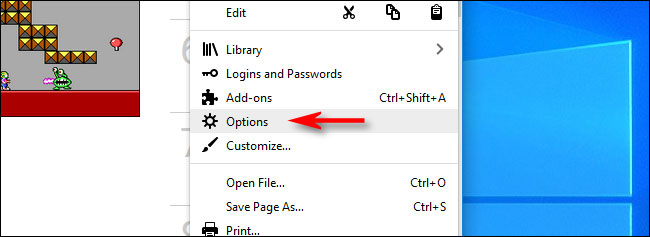
<p style="text-align: justify;">Trước tiên, hãy mở trình duyệt Firefox trên máy Mac, Linux hoặc Windows của bạn. Trong bất kỳ cửa sổ nào, nhấp vào nút menu (biểu tượng ba đường kẻ ngang xếp chồng) ở góc trên bên phải màn hình, sau đó chọn “<strong>Preferences</strong>” (trên Mac) hoặc “<strong>Options</strong>” (trên Windows và Linux).</p>

<p style="text-align: justify;"><img alt="Nhấn vào “Options”" data-i="0" data-src="https://st.quantrimang.com/photos/image/2021/05/19/cach-xem-ma-so-the-tin-dung-da-luu-trong-firefox1.jpg" data-was-processed="true" height="237" src="https://st.quantrimang.com/photos/image/2021/05/19/cach-xem-ma-so-the-tin-dung-da-luu-trong-firefox1.jpg" width="650" /></p>

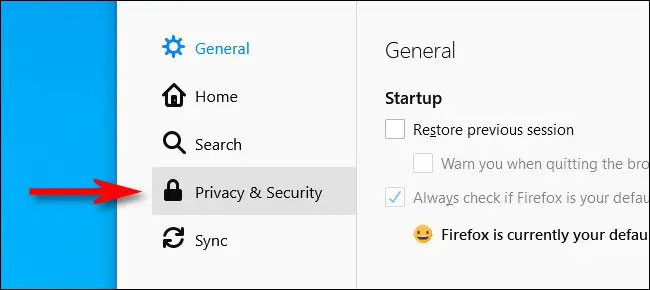
<p style="text-align: justify;">Khi tab “<strong>Preferences</strong>” hoặc “<strong>Options</strong>” hiện ra, bạn tìm và nhấp vào mục “<strong>Privacy &amp; Security</strong>” trong menu bên phải màn hình.</p>

<p style="text-align: justify;"><img alt="Nhấp vào mục “Privacy &amp; Security”" data-i="1" data-src="https://st.quantrimang.com/photos/image/2021/05/19/cach-xem-ma-so-the-tin-dung-da-luu-trong-firefox2.jpg" data-was-processed="true" height="290" src="https://st.quantrimang.com/photos/image/2021/05/19/cach-xem-ma-so-the-tin-dung-da-luu-trong-firefox2.jpg" width="650" /></p>

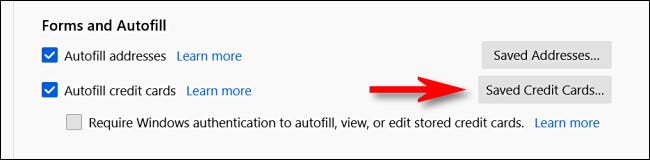
<p style="text-align: justify;">Tiếp theo, bạn cuộn xuống phần “<strong>Forms and Autofill</strong>” và nhấp vào nút “<strong>Saved Credit Cards</strong>” (thẻ tín dụng đã lưu).</p>

<p style="text-align: justify;"><img alt="Nhấp vào nút “Saved Credit Cards”" data-i="2" data-src="https://st.quantrimang.com/photos/image/2021/05/19/cach-xem-ma-so-the-tin-dung-da-luu-trong-firefox3.jpg" data-was-processed="true" height="160" src="https://st.quantrimang.com/photos/image/2021/05/19/cach-xem-ma-so-the-tin-dung-da-luu-trong-firefox3.jpg" width="650" /></p>

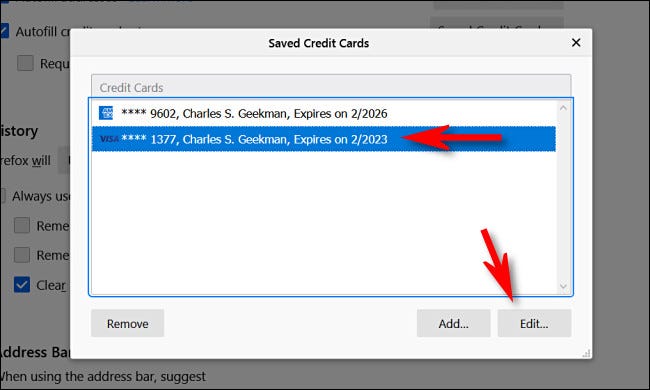
<p style="text-align: justify;">Lập tức, Firefox sẽ hiển thị danh sách tất cả các thẻ tín dụng đã được lưu trong một cửa sổ bật lên. Chọn thẻ bạn muốn xem thông tin và nhấp vào “<strong>Edit</strong>”.</p>

<p style="text-align: justify;"><img alt="Chọn thẻ bạn muốn xem thông tin" data-i="3" data-src="https://st.quantrimang.com/photos/image/2021/05/19/cach-xem-ma-so-the-tin-dung-da-luu-trong-firefox4.jpg" data-was-processed="true" height="390" src="https://st.quantrimang.com/photos/image/2021/05/19/cach-xem-ma-so-the-tin-dung-da-luu-trong-firefox4.jpg" width="650" /></p>

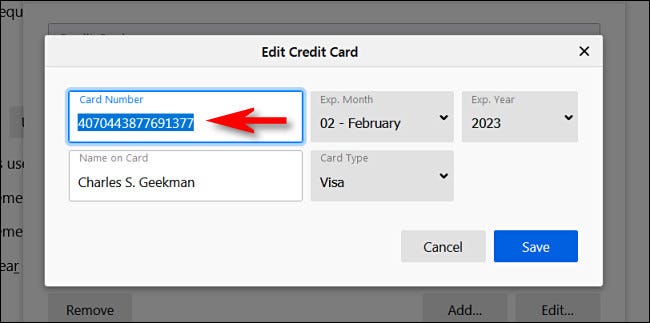
<p style="text-align: justify;">Trong cửa sổ “Edit Credit Card”, bạn sẽ thấy mã số thẻ tín dụng được hiển thị đầy đủ trong mục “<strong>Card Number</strong>”. Nếu ngày hết hạn và tên trên thẻ đã được lưu, chúng cũng sẽ được liệt kê đầy đủ.</p>

<p style="text-align: justify;"><img alt="Mã số thẻ tín dụng" data-i="4" data-src="https://st.quantrimang.com/photos/image/2021/05/19/cach-xem-ma-so-the-tin-dung-da-luu-trong-firefox5.jpg" data-was-processed="true" height="323" src="https://st.quantrimang.com/photos/image/2021/05/19/cach-xem-ma-so-the-tin-dung-da-luu-trong-firefox5.jpg" width="650" /></p>

<p style="text-align: justify;">Lưu ý rằng Firefox sẽ không bao giờ lưu mã bảo mật thẻ (thường gồm ba hoặc bốn chữ số, gọi là “số&nbsp;<strong>CVV</strong>” hoặc “số&nbsp;<strong>CSV</strong>”) được tìm thấy ở mặt trước hoặc mặt sau thẻ tín dụng của bạn.</p>

<p style="text-align: justify;">Trong trường hợp bạn muốn xóa thông tin thẻ tín dụng của mình khỏi Firefox, hãy nhấn “<strong>Cancel</strong>” để quay lại danh sách quản lý thẻ, sau đó bấm chọn một thẻ mà bạn muốn xóa và nhấp vào “<strong>Delete</strong>”. Firefox sẽ ngay lập tức quên toàn bộ thông tin thẻ đã lưu tương ứng. Chúc may mắn!</p>
		</div>
				<div id="author">
						<p>
				<strong>Nguồn tin:</strong>
				Quantrimang.com
			</p>
		</div>
	</div>
	<div id="footer" class="clearfix">
		<div id="url">
			<strong>URL của bản tin này: </strong><a href="https://www.nguoicodonvn2008.info/vi/news/savefile/kien-thuc-may-tinh/cach-xem-ma-so-the-tin-dung-da-luu-trong-firefox-4167.html" title="Cách xem mã số thẻ tín dụng đã lưu trong Firefox">https://www.nguoicodonvn2008.info/vi/news/savefile/kien-thuc-may-tinh/cach-xem-ma-so-the-tin-dung-da-luu-trong-firefox-4167.html</a>

		</div>
		<div class="clear"></div>
		<div class="copyright">
			&copy; .&#x3A; Nguoicodonvn2008.info - Cõi lòng người cô đơn &#x3A;.
		</div>
		<div id="contact">
			<a href="mailto:admin@nguoicodonvn2008.info">admin@nguoicodonvn2008.info</a>
		</div>
	</div>
</div>
        <div id="timeoutsess" class="chromeframe">
            Bạn đã không sử dụng Site, <a onclick="timeoutsesscancel();" href="https://nguoicodonvn2008.info/#">Bấm vào đây để duy trì trạng thái đăng nhập</a>. Thời gian chờ: <span id="secField"> 60 </span> giây
        </div>
        <div id="openidResult" class="nv-alert" style="display:none"></div>
        <div id="openidBt" data-result="" data-redirect=""></div>
		</script>
		<div class="car-top">
  <span><img src="https://nguoicodonvn2008.info/themes/default/images/car.png" alt=""></span>
</div>
<script src="https://nguoicodonvn2008.info/assets/js/jquery/jquery.min.js"></script>
<script>var nv_base_siteurl="/",nv_lang_data="vi",nv_lang_interface="vi",nv_name_variable="nv",nv_fc_variable="op",nv_lang_variable="language",nv_module_name="news",nv_func_name="savefile",nv_is_user=0, nv_my_ofs=-4,nv_my_abbr="EDT",nv_cookie_prefix="nv4c_e856T",nv_check_pass_mstime=1738000,nv_area_admin=0,nv_safemode=0,theme_responsive=0,nv_recaptcha_ver=2,nv_recaptcha_sitekey="",nv_recaptcha_type="image",XSSsanitize=1;</script>
<script src="https://nguoicodonvn2008.info/assets/js/language/vi.js"></script>
<script src="https://nguoicodonvn2008.info/assets/js/DOMPurify/purify3.js"></script>
<script src="https://nguoicodonvn2008.info/assets/js/global.js"></script>
<script src="https://nguoicodonvn2008.info/assets/js/site.js"></script>
<script src="https://nguoicodonvn2008.info/themes/default/js/news.js"></script>
<script src="https://nguoicodonvn2008.info/themes/default/js/main.js"></script>
<script src="https://nguoicodonvn2008.info/themes/default/js/custom.js"></script>
<script type="application/ld+json">
        {
            "@context": "https://schema.org",
            "@type": "Organization",
            "url": "https://nguoicodonvn2008.info",
            "logo": "https://nguoicodonvn2008.info/uploads/angel.gif"
        }
        </script>
<script src="https://nguoicodonvn2008.info/themes/default/js/bootstrap.min.js"></script>
<script type="text/javascript">
var $scrolltop = $('.car-top');
$scrolltop.on('click', function () {
    $('html,body').animate({
        scrollTop: 0
    }, 800);
    $(this).addClass("car-run");
    setTimeout(function(){ $scrolltop.removeClass('car-run');}, 1000);
    return false;
});
$(window).on('scroll', function ()
{ 
    if($(window).scrollTop() >= 200)
    {
        $scrolltop.addClass("show");
        $scrolltop.addClass("car-down");
    }
    else
    {
       $scrolltop.removeClass("show");
       setTimeout(function(){ $scrolltop.removeClass('car-down');}, 300);
    }
});
</script>
</body>
</html>