<!DOCTYPE html>
    <html lang="vi" xmlns="http://www.w3.org/1999/xhtml" prefix="og: http://ogp.me/ns#">
    <head>
<title>Cách xem các file và thư mục ẩn trên Linux</title>
<meta name="description" content="Cách xem các file và thư mục ẩn trên Linux - Savefile - Tin Tức -...">
<meta name="author" content=".: Nguoicodonvn2008.info - Cõi lòng người cô đơn :.">
<meta name="copyright" content=".: Nguoicodonvn2008.info - Cõi lòng người cô đơn :. [admin@nguoicodonvn2008.info]">
<meta name="robots" content="index, archive, follow, noodp">
<meta name="googlebot" content="index,archive,follow,noodp">
<meta name="msnbot" content="all,index,follow">
<meta name="generator" content="NukeViet v4.5">
<meta http-equiv="Content-Type" content="text/html; charset=utf-8">
<meta property="og:title" content="Cách xem các file và thư mục ẩn trên Linux">
<meta property="og:type" content="website">
<meta property="og:description" content="Savefile - Tin Tức - https&#x3A;&#x002F;&#x002F;www.nguoicodonvn2008.info&#x002F;vi&#x002F;news&#x002F;savefile&#x002F;kien-thuc-may-tinh&#x002F;cach-xem-cac-file-va-thu-muc-an-tren-linux-6865.html">
<meta property="og:site_name" content=".&#x3A; Nguoicodonvn2008.info - Cõi lòng người cô đơn &#x3A;.">
<meta property="og:url" content="https://www.nguoicodonvn2008.info/vi/news/savefile/kien-thuc-may-tinh/cach-xem-cac-file-va-thu-muc-an-tren-linux-6865.html">
<link rel="shortcut icon" href="https://nguoicodonvn2008.info/favicon.ico">
<link rel="canonical" href="https://www.nguoicodonvn2008.info/vi/news/savefile/kien-thuc-may-tinh/cach-xem-cac-file-va-thu-muc-an-tren-linux-6865.html">
<link rel="alternate" href="https://nguoicodonvn2008.info/vi/news/rss/" title="Tin Tức" type="application/rss+xml">
<link rel="alternate" href="https://nguoicodonvn2008.info/vi/news/rss/karaoke-dual/" title="Tin Tức - Karaoke Dual" type="application/rss+xml">
<link rel="alternate" href="https://nguoicodonvn2008.info/vi/news/rss/nhac-tre/" title="Tin Tức - Nhạc trẻ" type="application/rss+xml">
<link rel="alternate" href="https://nguoicodonvn2008.info/vi/news/rss/tru-tinh/" title="Tin Tức - Trữ tình" type="application/rss+xml">
<link rel="alternate" href="https://nguoicodonvn2008.info/vi/news/rss/nuoc-ngoai/" title="Tin Tức - Nước ngoài" type="application/rss+xml">
<link rel="alternate" href="https://nguoicodonvn2008.info/vi/news/rss/remix/" title="Tin Tức - Remix" type="application/rss+xml">
<link rel="alternate" href="https://nguoicodonvn2008.info/vi/news/rss/tam-su-tinh-yeu/" title="Tin Tức - Tâm sự tình yêu" type="application/rss+xml">
<link rel="alternate" href="https://nguoicodonvn2008.info/vi/news/rss/tho-suu-tam/" title="Tin Tức - Thơ sưu tầm" type="application/rss+xml">
<link rel="alternate" href="https://nguoicodonvn2008.info/vi/news/rss/cuoc-song/" title="Tin Tức - Cuộc sống" type="application/rss+xml">
<link rel="alternate" href="https://nguoicodonvn2008.info/vi/news/rss/phan-mem/" title="Tin Tức - Phần mềm" type="application/rss+xml">
<link rel="alternate" href="https://nguoicodonvn2008.info/vi/news/rss/kien-thuc-may-tinh/" title="Tin Tức - Kiến thức máy tính" type="application/rss+xml">
<link rel="alternate" href="https://nguoicodonvn2008.info/vi/news/rss/hoc-tap/" title="Tin Tức - Học tập" type="application/rss+xml">
<link rel="alternate" href="https://nguoicodonvn2008.info/vi/news/rss/tai-lieu/" title="Tin Tức - Tài liệu" type="application/rss+xml">
<link rel="alternate" href="https://nguoicodonvn2008.info/vi/news/rss/de-thi/" title="Tin Tức - Đề thi" type="application/rss+xml">
<link rel="preload" as="style" href="https://nguoicodonvn2008.info/assets/css/font-awesome.min.css" type="text/css">
<link rel="preload" as="style" href="https://nguoicodonvn2008.info/themes/default/css/bootstrap.non-responsive.css" type="text/css">
<link rel="preload" as="style" href="https://nguoicodonvn2008.info/themes/default/css/style.css" type="text/css">
<link rel="preload" as="style" href="https://nguoicodonvn2008.info/themes/default/css/style.non-responsive.css" type="text/css">
<link rel="preload" as="style" href="https://nguoicodonvn2008.info/themes/default/css/news.css" type="text/css">
<link rel="preload" as="style" href="https://nguoicodonvn2008.info/themes/default/css/custom.css" type="text/css">
<link rel="preload" as="script" href="https://nguoicodonvn2008.info/assets/js/jquery/jquery.min.js" type="text/javascript">
<link rel="preload" as="script" href="https://nguoicodonvn2008.info/assets/js/language/vi.js" type="text/javascript">
<link rel="preload" as="script" href="https://nguoicodonvn2008.info/assets/js/DOMPurify/purify3.js" type="text/javascript">
<link rel="preload" as="script" href="https://nguoicodonvn2008.info/assets/js/global.js" type="text/javascript">
<link rel="preload" as="script" href="https://nguoicodonvn2008.info/assets/js/site.js" type="text/javascript">
<link rel="preload" as="script" href="https://nguoicodonvn2008.info/themes/default/js/news.js" type="text/javascript">
<link rel="preload" as="script" href="https://nguoicodonvn2008.info/themes/default/js/main.js" type="text/javascript">
<link rel="preload" as="script" href="https://nguoicodonvn2008.info/themes/default/js/custom.js" type="text/javascript">
<link rel="preload" as="script" href="https://nguoicodonvn2008.info/themes/default/js/bootstrap.min.js" type="text/javascript">
<link rel="stylesheet" href="https://nguoicodonvn2008.info/assets/css/font-awesome.min.css">
<link rel="stylesheet" href="https://nguoicodonvn2008.info/themes/default/css/bootstrap.non-responsive.css">
<link rel="stylesheet" href="https://nguoicodonvn2008.info/themes/default/css/style.css">
<link rel="stylesheet" href="https://nguoicodonvn2008.info/themes/default/css/style.non-responsive.css">
<link rel="StyleSheet" href="https://nguoicodonvn2008.info/themes/default/css/news.css">
<link rel="stylesheet" href="https://nguoicodonvn2008.info/themes/default/css/custom.css">
<style type="text/css">
	body{background: #fff;}
</style>
    </head>
    <body>
<div id="print">
	<div id="hd_print">
		<h2 class="pull-left">.&#x3A; Nguoicodonvn2008.info - Cõi lòng người cô đơn &#x3A;.</h2>
		<p class="pull-right"><a title=".&#x3A; Nguoicodonvn2008.info - Cõi lòng người cô đơn &#x3A;." href="https://nguoicodonvn2008.info/">https://nguoicodonvn2008.info</a></p>
	</div>
	<div class="clear"></div>
	<hr />
	<div id="content">
		<h1>Cách xem các file và thư mục ẩn trên Linux</h1>
		<ul class="list-inline">
			<li>Thứ tư - 08/03/2023 23:48</li>
			<li class="hidden-print txtrequired"><em class="fa fa-print">&nbsp;</em><a title="In ra" href="javascript:;" onclick="window.print()">In ra</a></li>
			<li class="hidden-print txtrequired"><em class="fa fa-power-off">&nbsp;</em><a title="Đóng cửa sổ này" href="javascript:;" onclick="window.close()">Đóng cửa sổ này</a></li>
		</ul>
		<div class="clear"></div>
		<div id="hometext">
		</div>
				<div class="imghome">
			<img alt="Cách xem các file và thư mục ẩn trên Linux" src="https://st.quantrimang.com/photos/image/2023/03/08/xem-file-thu-muc-an-tren-linux-1.jpg" width="460" class="img-thumbnail" />
		</div>
		<div class="clear"></div>
		<div id="bodytext" class="clearfix">
			<p style="text-align: justify;">Hệ điều hành Linux bao gồm hàng trăm file và thư mục được ẩn theo mặc định. Những file như vậy được gọi là file ẩn hoặc file dot vì chúng luôn bắt đầu bằng dấu chấm (.).</p>

<p style="text-align: justify;">Hãy khám phá cách bạn có thể xem các file ẩn này trên hệ thống Linux của mình.</p>

<h2 style="text-align: justify;">Tại sao lại có các file ẩn?</h2>

<p style="text-align: justify;">Khái niệm file ẩn tuy đơn giản nhưng lại rất quan trọng trong Linux. Các file ẩn chủ yếu được sử dụng để lưu trữ những file cấu hình hoặc cài đặt người dùng. Thông thường, các service hệ thống, script hoặc những chương trình khác sử dụng các file này để lưu trữ và đọc cấu hình.</p>

<p style="text-align: justify;">Ví dụ, script&nbsp;<strong>.bash_logout</strong>&nbsp;thực thi bất cứ khi nào bạn đăng xuất khỏi phiên Bash của mình. Một ví dụ tuyệt vời khác là file&nbsp;<strong>.gitignore</strong>&nbsp;được Git sử dụng để loại trừ một số file nhất định khỏi bị đẩy vào kho lưu trữ từ xa của bạn.</p>

<p style="text-align: justify;">Bạn cũng có thể sử dụng khái niệm file ẩn để giấu một số file nhất định khỏi con mắt tò mò của hầu hết những người dùng không chuyên sâu. Một ví dụ điển hình là thư mục&nbsp;<strong>~/.ssh</strong>&nbsp;hoặc thư mục được sử dụng để lưu trữ các SSH key và file cấu hình.</p>

<h2 style="text-align: justify;">Xem các file ẩn bằng lệnh ls</h2>

<p style="text-align: justify;">Lệnh ls là một lệnh Linux được sử dụng rộng rãi. Ở dạng đơn giản nhất, lệnh liệt kê các file và folder trong một thư mục. Tuy nhiên, ls không liệt kê các file ẩn theo mặc định.</p>

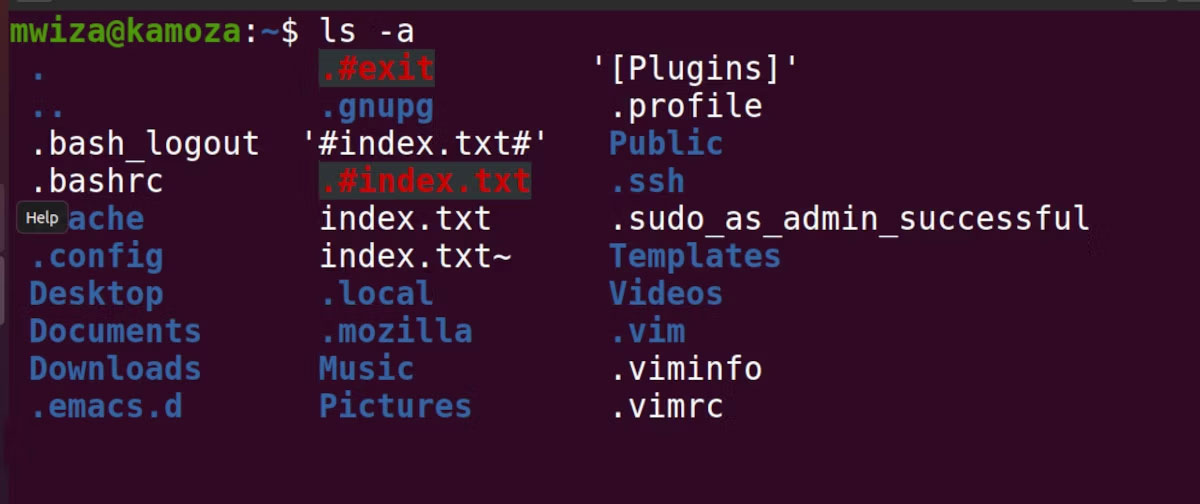
<p style="text-align: justify;">Để hiển thị các file ẩn, bạn phải sử dụng tùy chọn&nbsp;<strong>-a.</strong>&nbsp;Điều này yêu cầu lệnh ls liệt kê &quot;tất cả&quot; các file và thư mục bao gồm cả những file và thư mục bị ẩn, tức là những file bắt đầu bằng dấu chấm (.).</p>

<p style="text-align: justify;">Điều hướng đến thư mục chính của bạn bằng&nbsp;<a href="https://quantrimang.com/cong-nghe/lenh-cd-trong-windows-158704" title="Lệnh cd trong Windows">lệnh cd</a>&nbsp;và kiểm tra các file ẩn bằng cách sử dụng ls như sau:</p>

<pre id="pre0">
<code>ls -a</code></pre>

<p style="text-align: justify;">Đầu ra:</p>

<figure>
<div style="text-align: justify;"><img alt="Lệnh ls hiển thị các file và thư mục ẩn" data-i="0" data-src="https://st.quantrimang.com/photos/image/2023/03/08/xem-file-thu-muc-an-tren-linux-1.jpg" data-was-processed="true" height="504" src="https://st.quantrimang.com/photos/image/2023/03/08/xem-file-thu-muc-an-tren-linux-1.jpg" width="1200" /></div>

<figcaption>
<div style="text-align: justify;">Lệnh ls hiển thị các file và thư mục ẩn</div>
</figcaption>
</figure>

<p style="text-align: justify;">Như bạn có thể thấy, có một số file bắt đầu bằng dấu chấm. Nếu bạn chỉ chạy lệnh ls mà không có tùy chọn -a, đầu ra sẽ bỏ qua các file ẩn.</p>

<p style="text-align: justify;">Nếu bạn không có bất kỳ file ẩn nào trong thư mục chính của mình, bạn có thể tạo một file bằng lệnh touch như sau:</p>

<pre id="pre1">
<code>touch .sample_hidden_file.txt</code></pre>

<p style="text-align: justify;">Bạn cũng có thể tạo các thư mục ẩn bằng lệnh mkdir. Bạn chỉ cần đảm bảo rằng bạn sử dụng dấu chấm ở đầu tên thư mục. Ví dụ, để tạo một thư mục ẩn có tên là&nbsp;<strong>secret</strong>&nbsp;trong thư mục chính của bạn, hãy chạy lệnh:</p>

<pre id="pre2">
<code>mkdir ~/.secrets</code></pre>

<p style="text-align: justify;">Bạn có thể yêu cầu lệnh ls không liệt kê một file hoặc thư mục nhất định. Ví dụ, nếu bạn đang ở trong thư mục chính của mình, bạn có thể chạy lệnh sau để không liệt kê thư mục Desktop trong đầu ra lệnh:</p>

<pre id="pre3">
<code>ls --hide=Desktop</code></pre>

<h2 style="text-align: justify;">Tìm file ẩn trên Linux bằng lệnh find</h2>

<p style="text-align: justify;">Ngoài ls, bạn có thể sử dụng lệnh find như một cách khác để liệt kê hoặc kiểm tra các file và thư mục ẩn trên Linux. Lệnh find tìm kiếm các file trong hệ thống phân cấp thư mục được chỉ định.</p>

<p style="text-align: justify;">Để liệt kê hoặc tìm tất cả các file ẩn, bạn phải yêu cầu lệnh find liệt kê tất cả các file có tên bắt đầu bằng dấu chấm (.).</p>

<pre id="pre4">
<code>find . -name &quot;.*&quot; -maxdepth 1 2&gt; /dev/null</code></pre>

<p style="text-align: justify;">Chạy lệnh sau để tìm và chỉ liệt kê các folder hoặc thư mục ẩn:</p>

<pre id="pre5">
<code>find . -name &quot;.*&quot; -maxdepth 1 -type d 2&gt; /dev/null</code></pre>

<h2 style="text-align: justify;">Xem các file ẩn bằng GUI</h2>

<p style="text-align: justify;">Bạn cũng có thể xem các file ẩn từ GUI bằng trình quản lý file mặc định của mình. GNOME Files là trình quản lý file mặc định trên Ubuntu. Trước đây, chương trình file được gọi là Nautilus.</p>

<p style="text-align: justify;">Bạn có thể khởi chạy file bằng cách nhấn phím&nbsp;<strong>Super</strong>&nbsp;rồi nhập&nbsp;<strong>file</strong>&nbsp;vào đầu vào tìm kiếm xuất hiện. Click vào chương trình&nbsp;<strong>Files</strong>&nbsp;mặc định, các file trong thư mục Home sẽ hiển thị.</p>

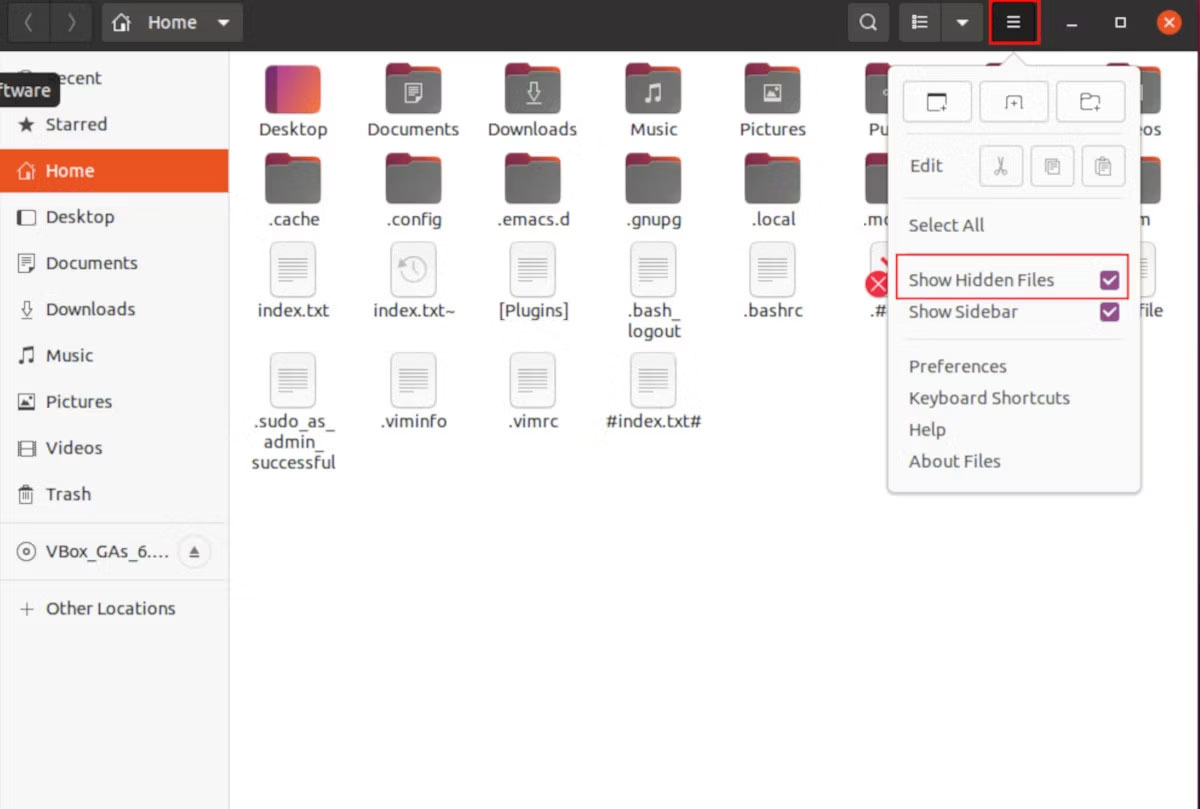
<p style="text-align: justify;">Theo mặc định, trình quản lý file của bạn không hiển thị các file ẩn. Nhấp vào biểu tượng menu nằm ở góc trên bên phải và chọn&nbsp;<strong>Show Hidden Files</strong>. Các file và thư mục ẩn của bạn giờ sẽ hiển thị.</p>

<figure>
<div style="text-align: justify;"><img alt="Xem các file và thư mục ẩn trên Linux" data-i="1" data-src="https://st.quantrimang.com/photos/image/2023/03/08/xem-file-thu-muc-an-tren-linux-2.jpg" data-was-processed="true" height="809" src="https://st.quantrimang.com/photos/image/2023/03/08/xem-file-thu-muc-an-tren-linux-2.jpg" width="1200" /></div>

<figcaption>
<div style="text-align: justify;">Xem các file và thư mục ẩn trên Linux</div>
</figcaption>
</figure>

<p style="text-align: justify;">Bạn cũng có thể sử dụng phím tắt&nbsp;<strong>Ctrl + H</strong>&nbsp;để xem các file ẩn trên Linux.</p>

<p style="text-align: justify;">Mặc dù bạn không thể xem các file và thư mục ẩn theo mặc định nhưng bạn vẫn có thể tương tác với chúng giống như những file bình thường khác. Trên thực tế, tại một số thời điểm, bạn có thể phải thay đổi cấu hình trong một file ẩn.</p>

<p style="text-align: justify;">Biết cách liệt kê và xem tất cả các file, bao gồm các file và thư mục ẩn, sẽ có ích nếu bạn sử dụng Linux hàng ngày. Những file dot đóng một vai trò quan trọng trong hệ điều hành Linux vì chúng thường được sử dụng để lưu trữ cài đặt cấu hình cho các chương trình.</p>

<p style="text-align: justify;">Ngoài các file, lệnh find cũng có thể xác định vị trí các thư mục trên Linux một cách hiệu quả. Nhưng có một số flag và tùy chọn mà bạn sẽ phải học để thực hiện việc này.</p>
		</div>
				<div id="author">
						<p>
				<strong>Nguồn tin:</strong>
				Quantrimang.com
			</p>
		</div>
	</div>
	<div id="footer" class="clearfix">
		<div id="url">
			<strong>URL của bản tin này: </strong><a href="https://www.nguoicodonvn2008.info/vi/news/savefile/kien-thuc-may-tinh/cach-xem-cac-file-va-thu-muc-an-tren-linux-6865.html" title="Cách xem các file và thư mục ẩn trên Linux">https://www.nguoicodonvn2008.info/vi/news/savefile/kien-thuc-may-tinh/cach-xem-cac-file-va-thu-muc-an-tren-linux-6865.html</a>

		</div>
		<div class="clear"></div>
		<div class="copyright">
			&copy; .&#x3A; Nguoicodonvn2008.info - Cõi lòng người cô đơn &#x3A;.
		</div>
		<div id="contact">
			<a href="mailto:admin@nguoicodonvn2008.info">admin@nguoicodonvn2008.info</a>
		</div>
	</div>
</div>
        <div id="timeoutsess" class="chromeframe">
            Bạn đã không sử dụng Site, <a onclick="timeoutsesscancel();" href="https://nguoicodonvn2008.info/#">Bấm vào đây để duy trì trạng thái đăng nhập</a>. Thời gian chờ: <span id="secField"> 60 </span> giây
        </div>
        <div id="openidResult" class="nv-alert" style="display:none"></div>
        <div id="openidBt" data-result="" data-redirect=""></div>
		</script>
		<div class="car-top">
  <span><img src="https://nguoicodonvn2008.info/themes/default/images/car.png" alt=""></span>
</div>
<script src="https://nguoicodonvn2008.info/assets/js/jquery/jquery.min.js"></script>
<script>var nv_base_siteurl="/",nv_lang_data="vi",nv_lang_interface="vi",nv_name_variable="nv",nv_fc_variable="op",nv_lang_variable="language",nv_module_name="news",nv_func_name="savefile",nv_is_user=0, nv_my_ofs=-4,nv_my_abbr="EDT",nv_cookie_prefix="nv4c_e856T",nv_check_pass_mstime=1738000,nv_area_admin=0,nv_safemode=0,theme_responsive=0,nv_recaptcha_ver=2,nv_recaptcha_sitekey="",nv_recaptcha_type="image",XSSsanitize=1;</script>
<script src="https://nguoicodonvn2008.info/assets/js/language/vi.js"></script>
<script src="https://nguoicodonvn2008.info/assets/js/DOMPurify/purify3.js"></script>
<script src="https://nguoicodonvn2008.info/assets/js/global.js"></script>
<script src="https://nguoicodonvn2008.info/assets/js/site.js"></script>
<script src="https://nguoicodonvn2008.info/themes/default/js/news.js"></script>
<script src="https://nguoicodonvn2008.info/themes/default/js/main.js"></script>
<script src="https://nguoicodonvn2008.info/themes/default/js/custom.js"></script>
<script type="application/ld+json">
        {
            "@context": "https://schema.org",
            "@type": "Organization",
            "url": "https://nguoicodonvn2008.info",
            "logo": "https://nguoicodonvn2008.info/uploads/angel.gif"
        }
        </script>
<script src="https://nguoicodonvn2008.info/themes/default/js/bootstrap.min.js"></script>
<script type="text/javascript">
var $scrolltop = $('.car-top');
$scrolltop.on('click', function () {
    $('html,body').animate({
        scrollTop: 0
    }, 800);
    $(this).addClass("car-run");
    setTimeout(function(){ $scrolltop.removeClass('car-run');}, 1000);
    return false;
});
$(window).on('scroll', function ()
{ 
    if($(window).scrollTop() >= 200)
    {
        $scrolltop.addClass("show");
        $scrolltop.addClass("car-down");
    }
    else
    {
       $scrolltop.removeClass("show");
       setTimeout(function(){ $scrolltop.removeClass('car-down');}, 300);
    }
});
</script>
</body>
</html>