<!DOCTYPE html>
    <html lang="vi" xmlns="http://www.w3.org/1999/xhtml" prefix="og: http://ogp.me/ns#">
    <head>
<title>Cách xây dựng app CRUD danh sách cần làm và quản lý trạng thái của nó trong React</title>
<meta name="description" content="Cách xây dựng app CRUD danh sách cần làm và quản lý trạng thái của nó trong React - Savefile - Tin Tức -...">
<meta name="author" content=".: Nguoicodonvn2008.info - Cõi lòng người cô đơn :.">
<meta name="copyright" content=".: Nguoicodonvn2008.info - Cõi lòng người cô đơn :. [admin@nguoicodonvn2008.info]">
<meta name="robots" content="index, archive, follow, noodp">
<meta name="googlebot" content="index,archive,follow,noodp">
<meta name="msnbot" content="all,index,follow">
<meta name="generator" content="NukeViet v4.5">
<meta http-equiv="Content-Type" content="text/html; charset=utf-8">
<meta property="og:title" content="Cách xây dựng app CRUD danh sách cần làm và quản lý trạng thái của nó trong React">
<meta property="og:type" content="website">
<meta property="og:description" content="Savefile - Tin Tức -...">
<meta property="og:site_name" content=".&#x3A; Nguoicodonvn2008.info - Cõi lòng người cô đơn &#x3A;.">
<meta property="og:url" content="https://www.nguoicodonvn2008.info/vi/news/savefile/kien-thuc-may-tinh/cach-xay-dung-app-crud-danh-sach-can-lam-va-quan-ly-trang-thai-cua-no-trong-react-7403.html">
<link rel="shortcut icon" href="https://nguoicodonvn2008.info/favicon.ico">
<link rel="canonical" href="https://www.nguoicodonvn2008.info/vi/news/savefile/kien-thuc-may-tinh/cach-xay-dung-app-crud-danh-sach-can-lam-va-quan-ly-trang-thai-cua-no-trong-react-7403.html">
<link rel="alternate" href="https://nguoicodonvn2008.info/vi/news/rss/" title="Tin Tức" type="application/rss+xml">
<link rel="alternate" href="https://nguoicodonvn2008.info/vi/news/rss/karaoke-dual/" title="Tin Tức - Karaoke Dual" type="application/rss+xml">
<link rel="alternate" href="https://nguoicodonvn2008.info/vi/news/rss/nhac-tre/" title="Tin Tức - Nhạc trẻ" type="application/rss+xml">
<link rel="alternate" href="https://nguoicodonvn2008.info/vi/news/rss/tru-tinh/" title="Tin Tức - Trữ tình" type="application/rss+xml">
<link rel="alternate" href="https://nguoicodonvn2008.info/vi/news/rss/nuoc-ngoai/" title="Tin Tức - Nước ngoài" type="application/rss+xml">
<link rel="alternate" href="https://nguoicodonvn2008.info/vi/news/rss/remix/" title="Tin Tức - Remix" type="application/rss+xml">
<link rel="alternate" href="https://nguoicodonvn2008.info/vi/news/rss/tam-su-tinh-yeu/" title="Tin Tức - Tâm sự tình yêu" type="application/rss+xml">
<link rel="alternate" href="https://nguoicodonvn2008.info/vi/news/rss/tho-suu-tam/" title="Tin Tức - Thơ sưu tầm" type="application/rss+xml">
<link rel="alternate" href="https://nguoicodonvn2008.info/vi/news/rss/cuoc-song/" title="Tin Tức - Cuộc sống" type="application/rss+xml">
<link rel="alternate" href="https://nguoicodonvn2008.info/vi/news/rss/phan-mem/" title="Tin Tức - Phần mềm" type="application/rss+xml">
<link rel="alternate" href="https://nguoicodonvn2008.info/vi/news/rss/kien-thuc-may-tinh/" title="Tin Tức - Kiến thức máy tính" type="application/rss+xml">
<link rel="alternate" href="https://nguoicodonvn2008.info/vi/news/rss/hoc-tap/" title="Tin Tức - Học tập" type="application/rss+xml">
<link rel="alternate" href="https://nguoicodonvn2008.info/vi/news/rss/tai-lieu/" title="Tin Tức - Tài liệu" type="application/rss+xml">
<link rel="alternate" href="https://nguoicodonvn2008.info/vi/news/rss/de-thi/" title="Tin Tức - Đề thi" type="application/rss+xml">
<link rel="preload" as="style" href="https://nguoicodonvn2008.info/assets/css/font-awesome.min.css" type="text/css">
<link rel="preload" as="style" href="https://nguoicodonvn2008.info/themes/default/css/bootstrap.non-responsive.css" type="text/css">
<link rel="preload" as="style" href="https://nguoicodonvn2008.info/themes/default/css/style.css" type="text/css">
<link rel="preload" as="style" href="https://nguoicodonvn2008.info/themes/default/css/style.non-responsive.css" type="text/css">
<link rel="preload" as="style" href="https://nguoicodonvn2008.info/themes/default/css/news.css" type="text/css">
<link rel="preload" as="style" href="https://nguoicodonvn2008.info/themes/default/css/custom.css" type="text/css">
<link rel="preload" as="script" href="https://nguoicodonvn2008.info/assets/js/jquery/jquery.min.js" type="text/javascript">
<link rel="preload" as="script" href="https://nguoicodonvn2008.info/assets/js/language/vi.js" type="text/javascript">
<link rel="preload" as="script" href="https://nguoicodonvn2008.info/assets/js/DOMPurify/purify3.js" type="text/javascript">
<link rel="preload" as="script" href="https://nguoicodonvn2008.info/assets/js/global.js" type="text/javascript">
<link rel="preload" as="script" href="https://nguoicodonvn2008.info/assets/js/site.js" type="text/javascript">
<link rel="preload" as="script" href="https://nguoicodonvn2008.info/themes/default/js/news.js" type="text/javascript">
<link rel="preload" as="script" href="https://nguoicodonvn2008.info/themes/default/js/main.js" type="text/javascript">
<link rel="preload" as="script" href="https://nguoicodonvn2008.info/themes/default/js/custom.js" type="text/javascript">
<link rel="preload" as="script" href="https://nguoicodonvn2008.info/themes/default/js/bootstrap.min.js" type="text/javascript">
<link rel="stylesheet" href="https://nguoicodonvn2008.info/assets/css/font-awesome.min.css">
<link rel="stylesheet" href="https://nguoicodonvn2008.info/themes/default/css/bootstrap.non-responsive.css">
<link rel="stylesheet" href="https://nguoicodonvn2008.info/themes/default/css/style.css">
<link rel="stylesheet" href="https://nguoicodonvn2008.info/themes/default/css/style.non-responsive.css">
<link rel="StyleSheet" href="https://nguoicodonvn2008.info/themes/default/css/news.css">
<link rel="stylesheet" href="https://nguoicodonvn2008.info/themes/default/css/custom.css">
<style type="text/css">
	body{background: #fff;}
</style>
    </head>
    <body>
<div id="print">
	<div id="hd_print">
		<h2 class="pull-left">.&#x3A; Nguoicodonvn2008.info - Cõi lòng người cô đơn &#x3A;.</h2>
		<p class="pull-right"><a title=".&#x3A; Nguoicodonvn2008.info - Cõi lòng người cô đơn &#x3A;." href="https://nguoicodonvn2008.info/">https://nguoicodonvn2008.info</a></p>
	</div>
	<div class="clear"></div>
	<hr />
	<div id="content">
		<h1>Cách xây dựng app CRUD danh sách cần làm và quản lý trạng thái của nó trong React</h1>
		<ul class="list-inline">
			<li>Thứ ba - 15/08/2023 09:43</li>
			<li class="hidden-print txtrequired"><em class="fa fa-print">&nbsp;</em><a title="In ra" href="javascript:;" onclick="window.print()">In ra</a></li>
			<li class="hidden-print txtrequired"><em class="fa fa-power-off">&nbsp;</em><a title="Đóng cửa sổ này" href="javascript:;" onclick="window.close()">Đóng cửa sổ này</a></li>
		</ul>
		<div class="clear"></div>
		<div id="hometext">
		</div>
				<div class="imghome">
			<img alt="Cách xây dựng app CRUD danh sách cần làm và quản lý trạng thái của nó trong React" src="https://st.quantrimang.com/photos/image/2023/07/27/them-nhiem-vu2.jpg" width="460" class="img-thumbnail" />
		</div>
		<div class="clear"></div>
		<div id="bodytext" class="clearfix">
			<p style="text-align: justify;">Khi quản lý trạng thái phức tạp trong app Next, mọi thứ có thể trở nên khó khăn. Tuy nhiên, bạn có thể khắc phục bằng cách tìm hiểu nguyên tắc cơ bản của&nbsp;<strong>React</strong>&nbsp;và quản lý trạng thái qua ứng dụng kinh điển này.</p>

<p style="text-align: justify;"><img alt="Lập trình cùng React" data-i="0" data-src="https://st.quantrimang.com/photos/image/2023/07/27/React-CRUD-7.jpg" data-was-processed="true" height="340" src="https://st.quantrimang.com/photos/image/2023/07/27/React-CRUD-7.jpg" width="650" /></p>

<h2 style="text-align: justify;">Chuẩn bị trước khi bắt đầu</h2>

<p style="text-align: justify;">Trước khi bắt đầu làm app liệt kê việc cần làm, bạn phải chuẩn bị:</p>

<ul>
	<li style="text-align: justify;">Kiến thức cơ bản về các toán tử JavaScript hiện đại và hook useState của React.</li>
	<li style="text-align: justify;">Hiểu cách hủy cấu trúc mảng và đối tượng trong JavaScript.</li>
	<li style="text-align: justify;">Node 16.8 trở lên được cài đặt trên máy cục bộ và biết cách dùng trình quản lý package như npm hoặc yarn.</li>
</ul>

<h2 style="text-align: justify;">Hiểu trạng thái và quản lý ứng dụng</h2>

<p style="text-align: justify;">Trạng thái ứng dụng chỉ điều kiện của app hiện tại ở một thời điểm nhất định, bao gồm thông tin &amp; quản lý app, như input người dùng và tìm nạp dữ liệu từ database hoặc một API (Application Programming Interface).</p>

<p style="text-align: justify;">Để hiểu trạng thái ứng dụng, hãy cân nhắc các trường hợp có thể của một app bộ đếm đơn giản, bao gồm:</p>

<ul>
	<li style="text-align: justify;">Trạng thái mặc định khi bộ đếm ở mức 0.</li>
	<li style="text-align: justify;">Trạng thái tăng lên khi bộ đếm tăng lên 1.</li>
	<li style="text-align: justify;">Trạng thái giảm xuống khi bộ đếm giảm 1.</li>
	<li style="text-align: justify;">Trạng thái reset khi bộ đếm trở về mức mặc định.</li>
</ul>

<p style="text-align: justify;">Một thành phần React có thể đăng ký thay đổi trạng thái. Khi người dùng tương tác với một thành phần như thế, những tác vụ như click nút bấm có thể update trạng thái này.</p>

<p style="text-align: justify;">Đoạn code dưới hiện một ứng dụng bộ đếm đơn giản, ở trạng thái mặc định, được dùng để quản lý trạng thái các tác vụ click:</p>

<pre id="pre0">
<code>const &#91;counter, setCounter&#93; = useState(0);

return (
  &lt;main&gt;
    &lt;h1&gt;{counter}&lt;/h1&gt;
    &lt;button onClick={() =&gt; setCounter(counter + 1)}&gt;increase&lt;/button&gt;
    &lt;button onClick={() =&gt; setCounter(counter - 1)}&gt;decrease&lt;/button&gt;
    &lt;button onClick={() =&gt; setCounter(0)}&gt;reset&lt;/button&gt;
  &lt;/main&gt;
);</code></pre>

<h2 style="text-align: justify;">Thiết lập và cài đặt</h2>

<p style="text-align: justify;">Repository của dự án chứa hai nhánh: starter và context. Bạn có thể dùng nhánh khởi đầu làm cơ sở để xây dựng dự án từ đầu hoặc nhánh ngữ cảnh để xem trước bản demo cuối cùng.</p>

<h3 style="text-align: justify;">Nhân bản ứng dụng Starter</h3>

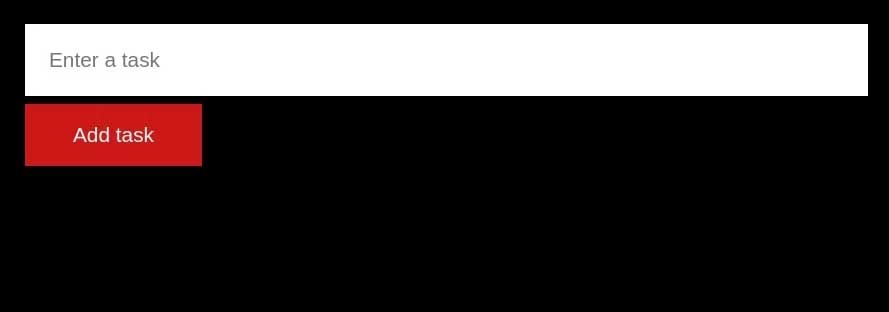
<p style="text-align: justify;">App khởi đầu cung cấp UI bạn cần cho ứng dụng cuối cùng, vì thế, bạn có thể tập trung vào triển khai logic cốt lõi. Mở terminal và chạy lệnh sau để nhân bản nhánh starter của repository vào máy cục bộ:</p>

<pre id="pre1">
<code>git clone -b starter https://github.com/makeuseofcode/Next.js-CRUD-todo-app.git</code></pre>

<p style="text-align: justify;">Chạy lệnh sau, trong thư mục dự án để cài đặt các phần phụ thuộc và khởi chạy server phát triển:</p>

<pre id="pre2">
<code>yarn &amp;&amp; yarn dev</code></pre>

<p style="text-align: justify;">Hoặc:</p>

<pre id="pre3">
<code>npm i &amp;&amp; npm run dev</code></pre>

<p style="text-align: justify;">Nếu tất cả đều chạy tốt, UI sẽ hiện trong trình duyệt của bạn:</p>

<p style="text-align: justify;"><img alt="Thêm nhiệm vụ" data-i="1" data-src="https://st.quantrimang.com/photos/image/2023/07/27/them-nhiem-vu.jpg" data-was-processed="true" height="228" src="https://st.quantrimang.com/photos/image/2023/07/27/them-nhiem-vu.jpg" width="650" /></p>

<h2 style="text-align: justify;">Triển khai logic</h2>

<p style="text-align: justify;">Context API cung cấp một cách để quản lý và chia sẻ dữ liệu trạng thái trên các thành phần mà không cần prop drilling theo cách thủ công.</p>

<h3 style="text-align: justify;">Bước 1: Tạo và xuất ngữ cảnh</h3>

<p style="text-align: justify;">Tạo thư mục<strong>&nbsp;src/app/context&nbsp;</strong>để lưu file ngữ cảnh và giữ thư mục dự án được tổ chức tốt. Trong thư mục này, tạo file<strong>&nbsp;todo.context.jsx&nbsp;</strong>chứa tất cả logic ngữ cảnh cho ứng dụng này.</p>

<p style="text-align: justify;">Nhập hàm&nbsp;<strong>createContext</strong>&nbsp;từ thư viện&nbsp;<strong>react</strong>&nbsp;và gọi nó, lưu trữ kết quả trong một biến:</p>

<pre id="pre4">
<code>import { createContext} from &quot;react&quot;;
const TodoContext = createContext();</code></pre>

<p style="text-align: justify;">Tiếp theo, tạo một hook&nbsp;<strong>useTodoContext</strong>&nbsp;trả về&nbsp;<strong>TodoContext</strong>&nbsp;dưới dạng biểu mẫu khả dụng.</p>

<pre id="pre5">
<code>export const useTodoContext = () =&gt; useContext(TodoContext);</code></pre>

<h3 style="text-align: justify;">Bước 2: Tạo và quản lý trạng thái</h3>

<p style="text-align: justify;">Để thực hiện CRUD (tạo, đọc, update, xóa) của ứng dụng, bạn cần tạo trạng thái và quản lý chúng với thành phần&nbsp;<strong>Provider</strong>.</p>

<pre id="pre6">
<code>const TodoContextProvider = ({ children }) =&gt; {
  const &#91;task, setTask&#93; = useState(&quot;&quot;);
  const &#91;tasks, setTasks&#93; = useState(&#91;&#93;);
  return &lt;TodoContext.Provider value={{}}&gt;{children}&lt;/TodoContext.Provider&gt;;
};

export default TodoContextProvider;</code></pre>

<p style="text-align: justify;">Ngay trước lệnh&nbsp;<strong>return</strong>, tạo hàm&nbsp;<strong>handleTodoInput</strong>&nbsp;chạy khi các kiểu người dùng nằm trong&nbsp;<strong>to-do</strong>. Hàm này sau đó update trạng thái&nbsp;<strong>task</strong>.</p>

<pre id="pre7">
<code>const handleTodoInput = (input) =&gt; setTask(input);</code></pre>

<p style="text-align: justify;">Thêm hàm&nbsp;<strong>createTask</strong>&nbsp;chạy khi người dùng gửi một app<strong>&nbsp;to-do</strong>. Hàm này&nbsp;<strong>update&nbsp;</strong>trạng thái&nbsp;<strong>tasks</strong>&nbsp;và gắn&nbsp;<strong>ID</strong>&nbsp;ngẫu nhiên cho nhiệm vụ mới.</p>

<pre id="pre8">
<code>const createTask = (e) =&gt; {
    e.preventDefault();

    setTasks(&#91;
      {
        id: Math.trunc(Math.random() * 1000 + 1),
        task,
      },
      ...tasks,
    &#93;);
  };</code></pre>

<p style="text-align: justify;">Tạo hàm&nbsp;<strong>updateTask</strong>&nbsp;ánh xạ qua danh sách&nbsp;<strong>tasks</strong>&nbsp;và update nhiệm vụ chứa ID khớp với ID của nhiệm vụ được click.</p>

<pre id="pre9">
<code>const updateTask = (id, updateText) =&gt;
    setTasks(tasks.map((t) =&gt; (t.id === id ? { ...t, task: updateText } : t)));</code></pre>

<p style="text-align: justify;">Tạo hàm&nbsp;<strong>deleteTask&nbsp;</strong>update danh sách&nbsp;<strong>tasks</strong>&nbsp;để nó bao gồm tất cả nhiệm vụ chứa ID không khớp với tham số được cung cấp.</p>

<pre id="pre10">
<code>const deleteTask = (id) =&gt; setTasks(tasks.filter((t) =&gt; t.id !== id));</code></pre>

<h3 style="text-align: justify;">Bước 3: Thêm trạng thái và trình xử lý cho nhà cung cấp</h3>

<p style="text-align: justify;">Giờ bạn đã tạo trạng thái và viết code để quản lý chúng, bạn cần làm những hàm trạng thái và xử lý có sẵn cho&nbsp;<strong>Provider</strong>. Bạn có thể cung cấp chúng dưới dạng một đối tượng, dùng thuộc tính value của thành phần&nbsp;<strong>Provider</strong>.</p>

<pre id="pre11">
<code>return (
  &lt;TodoContext.Provider
    value={{
      task,
      tasks,
      handleTodoInput,
      createTask,
      updateTask,
      deleteTask,
    }}
  &gt;
    {children}
  &lt;/TodoContext.Provider&gt;
);</code></pre>

<h3 style="text-align: justify;">Bước 4: Phạm vi bối cảnh</h3>

<p style="text-align: justify;">Provider đã tạo phải chứa thành phần top-level để tạo ngữ cảnh sẵn có cho toàn bộ ứng dụng. Để làm việc này, chỉnh sửa<strong>&nbsp;src/app/page.jsx&nbsp;</strong>và bao gồm thành phần&nbsp;<strong>Todos</strong>&nbsp;với&nbsp;<strong>TodoContextProvider</strong>:</p>

<pre id="pre12">
<code>&lt;TodoContextProvider&gt;
  &lt;Todos /&gt;;
&lt;/TodoContextProvider&gt;;</code></pre>

<h3 style="text-align: justify;">Bước 5: Dùng ngữ cảnh trong Components</h3>

<p style="text-align: justify;">Chỉnh sửa file&nbsp;<strong>src/app/components/Todos.jsx</strong>&nbsp;và hủy cấu trúc<strong>&nbsp;tasks</strong>,&nbsp;<strong>task</strong>,&nbsp;<strong>handleTodoInput</strong>, và&nbsp;<strong>createTask</strong>&nbsp;qua cuộc gọi tới hàm useTodoContext.</p>

<pre id="pre13">
<code>const { task, tasks, handleTodoInput, createTask } = useTodoContext();</code></pre>

<p style="text-align: justify;">Giờ, update thành phần biểu mẫu để xử lý sự kiện gửi và đổi sang trường đầu vào chính:</p>

<pre id="pre14">
<code>&lt;form onSubmit={(e) =&gt; createTask(e)}&gt;
   &lt;input className=&quot;todo-input&quot; type=&quot;text&quot; placeholder=&quot;Enter a task&quot; required value={task} onChange={(e) =&gt; handleTodoInput(e.target.value)} /&gt;
  &lt;input className=&quot;submit-todo&quot; type=&quot;submit&quot; value=&quot;Add task&quot; /&gt;
&lt;/form&gt;</code></pre>

<h3 style="text-align: justify;">Bước 6: Hiện nhiệm vụ trong UI</h3>

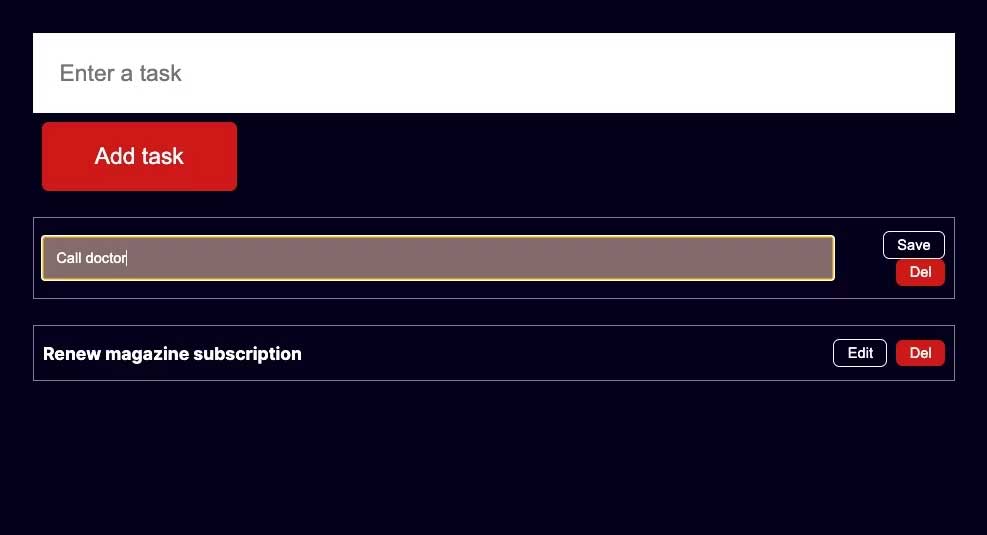
<p style="text-align: justify;">Giờ bạn có thể dùng ứng dụng để tạo và thêm một nhiệm vụ vào list&nbsp;<strong>tasks</strong>. Để update hiển thị, bạn cần ánh xạ qua<strong>&nbsp;tasks</strong>&nbsp;hiện có và hiện chúng trong UI. Đầu tiên, tạo&nbsp;<strong>src/app/components/Todo.jsx&nbsp;</strong>chứa một mục cần làm.</p>

<p style="text-align: justify;">Trong&nbsp;<strong>src/app/components/Todo.jsx</strong>, chỉnh sửa hoặc xóa một nhiệm vụ bằng cách gọi các hàm<strong>&nbsp;updateTask&nbsp;</strong>và&nbsp;<strong>deleteTask</strong>&nbsp;đã tạo trong tệp<strong>&nbsp;src/app/context/todo.context.jsx</strong>.</p>

<pre id="pre15">
<code>import React, { useState } from &quot;react&quot;;
import { useTodoContext } from &quot;../context/todo.context&quot;;

const Todo = ({ task }) =&gt; {
  const { updateTask, deleteTask } = useTodoContext();

  // isEdit state tracks when a task is in edit mode
  const &#91;isEdit, setIsEdit&#93; = useState(false);

  return (
  &lt;table className=&quot;todo-wrapper&quot;&gt;
  &lt;tbody&gt;
    &lt;tr&gt;
      {isEdit ? ( &lt;input type=&quot;text&quot; value={task.task}
      onChange={(e) =&gt; updateTask(task.id, e.target.value)} /&gt; ) :
      (&lt;th className=&quot;task&quot;&gt;{task.task}&lt;/th&gt; )}
      &lt;td className=&quot;actions&quot;&gt;
        &lt;button className=&quot;edit&quot;
          onClick={() =&gt; setIsEdit(!isEdit)}&gt; {isEdit ? &quot;Save&quot; : &quot;Edit&quot;} &lt;/button&gt; 
        &lt;button onClick={() =&gt; deleteTask(task.id)}&gt;Del&lt;/button&gt;
      &lt;/td&gt;
    &lt;/tr&gt;
  &lt;/tbody&gt;
  &lt;/table&gt;
  );
};

export default Todo;</code></pre>

<p style="text-align: justify;">Để hiện&nbsp;<strong>src/app/components/Todo.jsx&nbsp;</strong>cho từng&nbsp;<strong>task</strong>, đi sâu vào file&nbsp;<strong>src/app/components/Todos.jsx&nbsp;</strong>và ánh xạ có điều kiện qua<strong>&nbsp;tasks</strong>&nbsp;ngay sau khi đóng thẻ&nbsp;<strong>header</strong>.</p>

<pre id="pre16">
<code>{tasks &amp;&amp; (
&lt;main&gt;
  {tasks.map((task, i) =&gt; ( &lt;Todo key={i} task={task} /&gt; ))}
&lt;/main&gt;
)}</code></pre>

<p style="text-align: justify;">Kiểm tra ứng dụng trong trình duyệt và xác nhận nó cho kết quả mong đợi.</p>

<p style="text-align: justify;"><img alt="Kiểm tra và chạy thử ứng dụng" data-i="2" data-src="https://st.quantrimang.com/photos/image/2023/07/27/them-nhiem-vu2.jpg" data-was-processed="true" height="352" src="https://st.quantrimang.com/photos/image/2023/07/27/them-nhiem-vu2.jpg" width="650" /></p>

<p style="text-align: justify;">Hi vọng bài viết hữu ích với các bạn.</p>
		</div>
				<div id="author">
						<p>
				<strong>Nguồn tin:</strong>
				Quantrimang.com
			</p>
		</div>
	</div>
	<div id="footer" class="clearfix">
		<div id="url">
			<strong>URL của bản tin này: </strong><a href="https://www.nguoicodonvn2008.info/vi/news/savefile/kien-thuc-may-tinh/cach-xay-dung-app-crud-danh-sach-can-lam-va-quan-ly-trang-thai-cua-no-trong-react-7403.html" title="Cách xây dựng app CRUD danh sách cần làm và quản lý trạng thái của nó trong React">https://www.nguoicodonvn2008.info/vi/news/savefile/kien-thuc-may-tinh/cach-xay-dung-app-crud-danh-sach-can-lam-va-quan-ly-trang-thai-cua-no-trong-react-7403.html</a>

		</div>
		<div class="clear"></div>
		<div class="copyright">
			&copy; .&#x3A; Nguoicodonvn2008.info - Cõi lòng người cô đơn &#x3A;.
		</div>
		<div id="contact">
			<a href="mailto:admin@nguoicodonvn2008.info">admin@nguoicodonvn2008.info</a>
		</div>
	</div>
</div>
        <div id="timeoutsess" class="chromeframe">
            Bạn đã không sử dụng Site, <a onclick="timeoutsesscancel();" href="https://nguoicodonvn2008.info/#">Bấm vào đây để duy trì trạng thái đăng nhập</a>. Thời gian chờ: <span id="secField"> 60 </span> giây
        </div>
        <div id="openidResult" class="nv-alert" style="display:none"></div>
        <div id="openidBt" data-result="" data-redirect=""></div>
		</script>
		<div class="car-top">
  <span><img src="https://nguoicodonvn2008.info/themes/default/images/car.png" alt=""></span>
</div>
<script src="https://nguoicodonvn2008.info/assets/js/jquery/jquery.min.js"></script>
<script>var nv_base_siteurl="/",nv_lang_data="vi",nv_lang_interface="vi",nv_name_variable="nv",nv_fc_variable="op",nv_lang_variable="language",nv_module_name="news",nv_func_name="savefile",nv_is_user=0, nv_my_ofs=-4,nv_my_abbr="EDT",nv_cookie_prefix="nv4c_e856T",nv_check_pass_mstime=1738000,nv_area_admin=0,nv_safemode=0,theme_responsive=0,nv_recaptcha_ver=2,nv_recaptcha_sitekey="",nv_recaptcha_type="image",XSSsanitize=1;</script>
<script src="https://nguoicodonvn2008.info/assets/js/language/vi.js"></script>
<script src="https://nguoicodonvn2008.info/assets/js/DOMPurify/purify3.js"></script>
<script src="https://nguoicodonvn2008.info/assets/js/global.js"></script>
<script src="https://nguoicodonvn2008.info/assets/js/site.js"></script>
<script src="https://nguoicodonvn2008.info/themes/default/js/news.js"></script>
<script src="https://nguoicodonvn2008.info/themes/default/js/main.js"></script>
<script src="https://nguoicodonvn2008.info/themes/default/js/custom.js"></script>
<script type="application/ld+json">
        {
            "@context": "https://schema.org",
            "@type": "Organization",
            "url": "https://nguoicodonvn2008.info",
            "logo": "https://nguoicodonvn2008.info/uploads/angel.gif"
        }
        </script>
<script src="https://nguoicodonvn2008.info/themes/default/js/bootstrap.min.js"></script>
<script type="text/javascript">
var $scrolltop = $('.car-top');
$scrolltop.on('click', function () {
    $('html,body').animate({
        scrollTop: 0
    }, 800);
    $(this).addClass("car-run");
    setTimeout(function(){ $scrolltop.removeClass('car-run');}, 1000);
    return false;
});
$(window).on('scroll', function ()
{ 
    if($(window).scrollTop() >= 200)
    {
        $scrolltop.addClass("show");
        $scrolltop.addClass("car-down");
    }
    else
    {
       $scrolltop.removeClass("show");
       setTimeout(function(){ $scrolltop.removeClass('car-down');}, 300);
    }
});
</script>
</body>
</html>