<!DOCTYPE html>
    <html lang="vi" xmlns="http://www.w3.org/1999/xhtml" prefix="og: http://ogp.me/ns#">
    <head>
<title>Cách vô hiệu hóa Recent Items và Frequent Places</title>
<meta name="description" content="Cách vô hiệu hóa Recent Items và Frequent Places - Savefile - Tin Tức -...">
<meta name="author" content=".: Nguoicodonvn2008.info - Cõi lòng người cô đơn :.">
<meta name="copyright" content=".: Nguoicodonvn2008.info - Cõi lòng người cô đơn :. [admin@nguoicodonvn2008.info]">
<meta name="robots" content="index, archive, follow, noodp">
<meta name="googlebot" content="index,archive,follow,noodp">
<meta name="msnbot" content="all,index,follow">
<meta name="generator" content="NukeViet v4.5">
<meta http-equiv="Content-Type" content="text/html; charset=utf-8">
<meta property="og:title" content="Cách vô hiệu hóa Recent Items và Frequent Places">
<meta property="og:type" content="website">
<meta property="og:description" content="Savefile - Tin Tức - https&#x3A;&#x002F;&#x002F;www.nguoicodonvn2008.info&#x002F;vi&#x002F;news&#x002F;savefile&#x002F;kien-thuc-may-tinh&#x002F;cach-vo-hieu-hoa-recent-items-va-frequent-places-1806.html">
<meta property="og:site_name" content=".&#x3A; Nguoicodonvn2008.info - Cõi lòng người cô đơn &#x3A;.">
<meta property="og:url" content="https://www.nguoicodonvn2008.info/vi/news/savefile/kien-thuc-may-tinh/cach-vo-hieu-hoa-recent-items-va-frequent-places-1806.html">
<link rel="shortcut icon" href="https://nguoicodonvn2008.info/favicon.ico">
<link rel="canonical" href="https://www.nguoicodonvn2008.info/vi/news/savefile/kien-thuc-may-tinh/cach-vo-hieu-hoa-recent-items-va-frequent-places-1806.html">
<link rel="alternate" href="https://nguoicodonvn2008.info/vi/news/rss/" title="Tin Tức" type="application/rss+xml">
<link rel="alternate" href="https://nguoicodonvn2008.info/vi/news/rss/karaoke-dual/" title="Tin Tức - Karaoke Dual" type="application/rss+xml">
<link rel="alternate" href="https://nguoicodonvn2008.info/vi/news/rss/nhac-tre/" title="Tin Tức - Nhạc trẻ" type="application/rss+xml">
<link rel="alternate" href="https://nguoicodonvn2008.info/vi/news/rss/tru-tinh/" title="Tin Tức - Trữ tình" type="application/rss+xml">
<link rel="alternate" href="https://nguoicodonvn2008.info/vi/news/rss/nuoc-ngoai/" title="Tin Tức - Nước ngoài" type="application/rss+xml">
<link rel="alternate" href="https://nguoicodonvn2008.info/vi/news/rss/remix/" title="Tin Tức - Remix" type="application/rss+xml">
<link rel="alternate" href="https://nguoicodonvn2008.info/vi/news/rss/tam-su-tinh-yeu/" title="Tin Tức - Tâm sự tình yêu" type="application/rss+xml">
<link rel="alternate" href="https://nguoicodonvn2008.info/vi/news/rss/tho-suu-tam/" title="Tin Tức - Thơ sưu tầm" type="application/rss+xml">
<link rel="alternate" href="https://nguoicodonvn2008.info/vi/news/rss/cuoc-song/" title="Tin Tức - Cuộc sống" type="application/rss+xml">
<link rel="alternate" href="https://nguoicodonvn2008.info/vi/news/rss/phan-mem/" title="Tin Tức - Phần mềm" type="application/rss+xml">
<link rel="alternate" href="https://nguoicodonvn2008.info/vi/news/rss/kien-thuc-may-tinh/" title="Tin Tức - Kiến thức máy tính" type="application/rss+xml">
<link rel="alternate" href="https://nguoicodonvn2008.info/vi/news/rss/hoc-tap/" title="Tin Tức - Học tập" type="application/rss+xml">
<link rel="alternate" href="https://nguoicodonvn2008.info/vi/news/rss/tai-lieu/" title="Tin Tức - Tài liệu" type="application/rss+xml">
<link rel="alternate" href="https://nguoicodonvn2008.info/vi/news/rss/de-thi/" title="Tin Tức - Đề thi" type="application/rss+xml">
<link rel="preload" as="style" href="https://nguoicodonvn2008.info/assets/css/font-awesome.min.css" type="text/css">
<link rel="preload" as="style" href="https://nguoicodonvn2008.info/themes/default/css/bootstrap.non-responsive.css" type="text/css">
<link rel="preload" as="style" href="https://nguoicodonvn2008.info/themes/default/css/style.css" type="text/css">
<link rel="preload" as="style" href="https://nguoicodonvn2008.info/themes/default/css/style.non-responsive.css" type="text/css">
<link rel="preload" as="style" href="https://nguoicodonvn2008.info/themes/default/css/news.css" type="text/css">
<link rel="preload" as="style" href="https://nguoicodonvn2008.info/themes/default/css/custom.css" type="text/css">
<link rel="preload" as="script" href="https://nguoicodonvn2008.info/assets/js/jquery/jquery.min.js" type="text/javascript">
<link rel="preload" as="script" href="https://nguoicodonvn2008.info/assets/js/language/vi.js" type="text/javascript">
<link rel="preload" as="script" href="https://nguoicodonvn2008.info/assets/js/DOMPurify/purify3.js" type="text/javascript">
<link rel="preload" as="script" href="https://nguoicodonvn2008.info/assets/js/global.js" type="text/javascript">
<link rel="preload" as="script" href="https://nguoicodonvn2008.info/assets/js/site.js" type="text/javascript">
<link rel="preload" as="script" href="https://nguoicodonvn2008.info/themes/default/js/news.js" type="text/javascript">
<link rel="preload" as="script" href="https://nguoicodonvn2008.info/themes/default/js/main.js" type="text/javascript">
<link rel="preload" as="script" href="https://nguoicodonvn2008.info/themes/default/js/custom.js" type="text/javascript">
<link rel="preload" as="script" href="https://nguoicodonvn2008.info/themes/default/js/bootstrap.min.js" type="text/javascript">
<link rel="stylesheet" href="https://nguoicodonvn2008.info/assets/css/font-awesome.min.css">
<link rel="stylesheet" href="https://nguoicodonvn2008.info/themes/default/css/bootstrap.non-responsive.css">
<link rel="stylesheet" href="https://nguoicodonvn2008.info/themes/default/css/style.css">
<link rel="stylesheet" href="https://nguoicodonvn2008.info/themes/default/css/style.non-responsive.css">
<link rel="StyleSheet" href="https://nguoicodonvn2008.info/themes/default/css/news.css">
<link rel="stylesheet" href="https://nguoicodonvn2008.info/themes/default/css/custom.css">
<style type="text/css">
	body{background: #fff;}
</style>
    </head>
    <body>
<div id="print">
	<div id="hd_print">
		<h2 class="pull-left">.&#x3A; Nguoicodonvn2008.info - Cõi lòng người cô đơn &#x3A;.</h2>
		<p class="pull-right"><a title=".&#x3A; Nguoicodonvn2008.info - Cõi lòng người cô đơn &#x3A;." href="https://nguoicodonvn2008.info/">https://nguoicodonvn2008.info</a></p>
	</div>
	<div class="clear"></div>
	<hr />
	<div id="content">
		<h1>Cách vô hiệu hóa Recent Items và Frequent Places</h1>
		<ul class="list-inline">
			<li>Thứ ba - 10/03/2020 01:04</li>
			<li class="hidden-print txtrequired"><em class="fa fa-print">&nbsp;</em><a title="In ra" href="javascript:;" onclick="window.print()">In ra</a></li>
			<li class="hidden-print txtrequired"><em class="fa fa-power-off">&nbsp;</em><a title="Đóng cửa sổ này" href="javascript:;" onclick="window.close()">Đóng cửa sổ này</a></li>
		</ul>
		<div class="clear"></div>
		<div id="hometext">
		</div>
				<div class="imghome">
			<img alt="Cách vô hiệu hóa Recent Items và Frequent Places" src="https://st.quantrimang.com/photos/image/2020/03/09/an-hien-recent-files-va-frequently-folders-2.jpg" width="460" class="img-thumbnail" />
		</div>
		<div class="clear"></div>
		<div id="bodytext" class="clearfix">
			<p style="text-align: justify;">Không thích các file xuất hiện trong&nbsp;<strong>Recent Items</strong>&nbsp;và<strong>&nbsp;Frequent Places</strong>, bạn có thể vô hiệu hóa các mục này. Đây là cách vô hiệu hóa&nbsp;<strong>Recent Items</strong>&nbsp;và<strong>&nbsp;Frequent Places</strong>&nbsp;trong Windows.</p>

<p style="text-align: justify;">Khi bạn mở bất kỳ file nào trong Windows, nó sẽ được lưu trong danh sách&nbsp;<strong>Recent Items.</strong>&nbsp;Điều tương tự cũng được áp dụng cho&nbsp;<strong>Frequent Places.</strong>&nbsp;Sự khác biệt duy nhất là&nbsp;<strong>Frequent Places</strong>&nbsp;cũng sẽ hiển thị những thứ khác như các trang web, thư mục được truy cập gần đây, v.v... Bạn có thể truy cập&nbsp;<strong>Recent Items</strong>&nbsp;trực tiếp từ menu Start, Jump List và File Explorer. Đối với&nbsp;<strong>Frequent Places,</strong>&nbsp;bạn có thể truy cập các vị trí trong Jump List và Quick Access của File Explorer.</p>

<p style="text-align: justify;">Mặc dù các tính năng&nbsp;<strong>Recent Items</strong>&nbsp;và<strong>&nbsp;Frequent Places</strong>&nbsp;cho phép bạn truy cập những file, cũng như vị trí hữu ích nhất một cách nhanh chóng, nhưng rất hiếm khi bạn sử dụng chúng. Không chỉ vậy, nếu bạn đang chia sẻ hệ thống của mình với những người dùng khác, các tính năng này có thể gây ra một vấn đề nhỏ về quyền riêng tư.</p>

<p style="text-align: justify;">Vì vậy, nếu bạn không sử dụng&nbsp;<strong>Recent Items</strong>&nbsp;và<strong>&nbsp;Frequent Places</strong>&nbsp;thường xuyên hoặc không bao giờ dùng đến chúng, hãy làm theo các bước dưới đây để vô hiệu hóa&nbsp;<strong>Recent Items</strong>&nbsp;và<strong>&nbsp;Frequent Places</strong>.</p>

<h2 style="text-align: justify;">Vô hiệu hóa Recent Items và Frequent Places trong Settings</h2>

<p style="text-align: justify;">Ứng dụng&nbsp;<strong>Settings</strong>&nbsp;cung cấp một cách đơn giản để vô hiệu hóa Recent Items và Frequent Places trong&nbsp;Windows 10. Tất cả những gì bạn phải làm là chuyển một nút.</p>

<p style="text-align: justify;">1. Mở ứng dụng&nbsp;<strong>Settings</strong>&nbsp;trên PC bằng cách nhấn phím tắt&nbsp;<code>Win</code>+<code>I</code>&nbsp;hoặc bằng cách tìm kiếm trong menu Start. Bạn cũng có thể mở nó từ menu&nbsp;<code>Win</code>+<code>X</code>.</p>

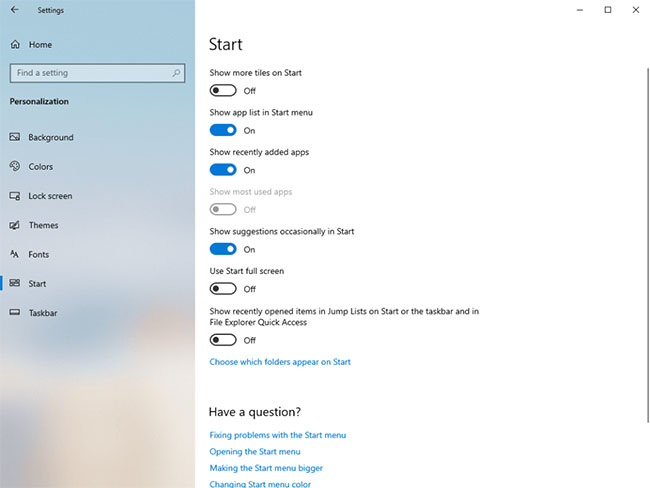
<p style="text-align: justify;">2. Trong ứng dụng&nbsp;<strong>Settings</strong>, đi đến trang&nbsp;<strong>Personalization</strong>&nbsp;<strong>&gt; Start</strong>. Trên trang này, chuyển đổi công tắc&nbsp;<strong>&quot;Show recently opened items in Jump Lists on Start or the taskbar and in File Explorer Quick Access&quot;</strong>&nbsp;sang vị trí&nbsp;<strong>Off.</strong></p>

<figure>
<div style="text-align: justify;"><img alt="Chuyển đổi công tắc &#039;Show recently opened items in Jump Lists on Start or the taskbar and in File Explorer Quick Access&#039; sang vị trí Off" data-i="0" data-src="https://st.quantrimang.com/photos/image/2020/03/09/an-hien-recent-files-va-frequently-folders-1.jpg" data-was-processed="true" height="488" src="https://st.quantrimang.com/photos/image/2020/03/09/an-hien-recent-files-va-frequently-folders-1.jpg" width="650" /></div>

<figcaption>
<div style="text-align: justify;">Chuyển đổi công tắc &quot;Show recently opened items in Jump Lists on Start or the taskbar and in File Explorer Quick Access&quot; sang vị trí Off</div>
</figcaption>
</figure>

<p style="text-align: justify;">3. Đóng ứng dụng&nbsp;<strong>Settings.</strong></p>

<p style="text-align: justify;">Từ giờ trở đi, bạn sẽ không thấy&nbsp;<strong>Recent Items</strong>&nbsp;và<strong>&nbsp;Frequent Places</strong>&nbsp;trong menu Start, thanh tác vụ hoặc File Explorer nữa.</p>

<div style="text-align: justify;">&nbsp;</div>

<h2 style="text-align: justify;">Vô hiệu hóa Recent Items và Frequent Places bằng Registry Editor</h2>

<p style="text-align: justify;">Nếu đang tìm kiếm một phương pháp thay thế, bạn có thể sử dụng Registry Editor để vô hiệu hóa&nbsp;<strong>Recent Items</strong>&nbsp;và<strong>&nbsp;Frequent Places</strong>. Tất cả bạn phải làm là tạo một giá trị (Value) và thay đổi dữ liệu giá trị (Value Data) của nó. Việc này khá dễ dàng. Để an toàn, hãy sao lưu registry trước khi thực hiện bất kỳ thay đổi nào.</p>

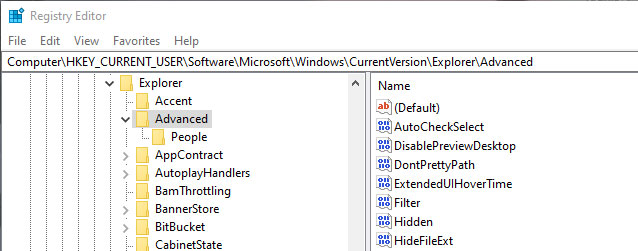
<p style="text-align: justify;">1. Tìm kiếm&nbsp;<strong>&quot;Registry Editor&quot;</strong>&nbsp;trong menu Start và nhấp vào kết quả để mở&nbsp;<strong>Registry Editor.</strong>&nbsp;Trong&nbsp;<strong>Registry Editor</strong>, dán đường dẫn bên dưới vào thanh địa chỉ và nhấn&nbsp;<code>Enter</code>&nbsp;để đến thư mục&nbsp;<strong>Advanced.</strong></p>

<pre id="pre0">
<code>HKEY_CURRENT_USER\Software\Microsoft\Windows\CurrentVersion\Explorer\Advanced</code></pre>

<figure>
<div style="text-align: justify;"><img alt="Đến thư mục Advanced" data-i="1" data-src="https://st.quantrimang.com/photos/image/2020/03/09/an-hien-recent-files-va-frequently-folders-2.jpg" data-was-processed="true" height="251" src="https://st.quantrimang.com/photos/image/2020/03/09/an-hien-recent-files-va-frequently-folders-2.jpg" width="638" /></div>

<figcaption>
<div style="text-align: justify;">Đến thư mục Advanced</div>
</figcaption>
</figure>

<p style="text-align: justify;">2. Bây giờ, nhấp chuột phải vào thư mục&nbsp;<strong>Advanced</strong>&nbsp;và chọn&nbsp;<strong>New &gt; DWORD Value</strong>. Đặt tên cho giá trị mới là&nbsp;<strong>&quot;Start_TrackDocs&quot;.</strong></p>

<p style="text-align: justify;">3. Nhấp đúp vào giá trị&nbsp;<strong>Start_TrackDocs</strong>&nbsp;và đảm bảo dữ liệu giá trị của nó được đặt thành&nbsp;<strong>&quot;0&quot;.</strong></p>

<p style="text-align: justify;">4. Đóng&nbsp;<strong>Registry Editor</strong>&nbsp;và khởi động lại Windows.</p>

<p style="text-align: justify;">Từ thời điểm này trở đi, Windows sẽ không còn theo dõi các file của bạn nữa và bạn đã vô hiệu hóa&nbsp;<strong>Recent Items</strong>&nbsp;và<strong>&nbsp;Frequent Places</strong>&nbsp;thành công. Nếu bạn muốn bật lại các tính năng, hãy thay đổi dữ liệu giá trị thành&nbsp;<strong>&quot;1&quot;</strong>&nbsp;hoặc xóa giá trị.</p>
		</div>
				<div id="author">
						<p>
				<strong>Nguồn tin:</strong>
				Quantrimang.com
			</p>
		</div>
	</div>
	<div id="footer" class="clearfix">
		<div id="url">
			<strong>URL của bản tin này: </strong><a href="https://www.nguoicodonvn2008.info/vi/news/savefile/kien-thuc-may-tinh/cach-vo-hieu-hoa-recent-items-va-frequent-places-1806.html" title="Cách vô hiệu hóa Recent Items và Frequent Places">https://www.nguoicodonvn2008.info/vi/news/savefile/kien-thuc-may-tinh/cach-vo-hieu-hoa-recent-items-va-frequent-places-1806.html</a>

		</div>
		<div class="clear"></div>
		<div class="copyright">
			&copy; .&#x3A; Nguoicodonvn2008.info - Cõi lòng người cô đơn &#x3A;.
		</div>
		<div id="contact">
			<a href="mailto:admin@nguoicodonvn2008.info">admin@nguoicodonvn2008.info</a>
		</div>
	</div>
</div>
        <div id="timeoutsess" class="chromeframe">
            Bạn đã không sử dụng Site, <a onclick="timeoutsesscancel();" href="https://nguoicodonvn2008.info/#">Bấm vào đây để duy trì trạng thái đăng nhập</a>. Thời gian chờ: <span id="secField"> 60 </span> giây
        </div>
        <div id="openidResult" class="nv-alert" style="display:none"></div>
        <div id="openidBt" data-result="" data-redirect=""></div>
		</script>
		<div class="car-top">
  <span><img src="https://nguoicodonvn2008.info/themes/default/images/car.png" alt=""></span>
</div>
<div id="run_cronjobs" style="visibility:hidden;display:none;"><img alt="cron" src="/index.php?second=cronjobs&amp;p=c5Og44r7" width="1" height="1" /></div>
<script src="https://nguoicodonvn2008.info/assets/js/jquery/jquery.min.js"></script>
<script>var nv_base_siteurl="/",nv_lang_data="vi",nv_lang_interface="vi",nv_name_variable="nv",nv_fc_variable="op",nv_lang_variable="language",nv_module_name="news",nv_func_name="savefile",nv_is_user=0, nv_my_ofs=-4,nv_my_abbr="EDT",nv_cookie_prefix="nv4c_e856T",nv_check_pass_mstime=1738000,nv_area_admin=0,nv_safemode=0,theme_responsive=0,nv_recaptcha_ver=2,nv_recaptcha_sitekey="",nv_recaptcha_type="image",XSSsanitize=1;</script>
<script src="https://nguoicodonvn2008.info/assets/js/language/vi.js"></script>
<script src="https://nguoicodonvn2008.info/assets/js/DOMPurify/purify3.js"></script>
<script src="https://nguoicodonvn2008.info/assets/js/global.js"></script>
<script src="https://nguoicodonvn2008.info/assets/js/site.js"></script>
<script src="https://nguoicodonvn2008.info/themes/default/js/news.js"></script>
<script src="https://nguoicodonvn2008.info/themes/default/js/main.js"></script>
<script src="https://nguoicodonvn2008.info/themes/default/js/custom.js"></script>
<script type="application/ld+json">
        {
            "@context": "https://schema.org",
            "@type": "Organization",
            "url": "https://nguoicodonvn2008.info",
            "logo": "https://nguoicodonvn2008.info/uploads/angel.gif"
        }
        </script>
<script src="https://nguoicodonvn2008.info/themes/default/js/bootstrap.min.js"></script>
<script type="text/javascript">
var $scrolltop = $('.car-top');
$scrolltop.on('click', function () {
    $('html,body').animate({
        scrollTop: 0
    }, 800);
    $(this).addClass("car-run");
    setTimeout(function(){ $scrolltop.removeClass('car-run');}, 1000);
    return false;
});
$(window).on('scroll', function ()
{ 
    if($(window).scrollTop() >= 200)
    {
        $scrolltop.addClass("show");
        $scrolltop.addClass("car-down");
    }
    else
    {
       $scrolltop.removeClass("show");
       setTimeout(function(){ $scrolltop.removeClass('car-down');}, 300);
    }
});
</script>
</body>
</html>