<!DOCTYPE html>
    <html lang="vi" xmlns="http://www.w3.org/1999/xhtml" prefix="og: http://ogp.me/ns#">
    <head>
<title>Cách vô hiệu hóa quy tắc IPv6 trong UFW để tăng cường bảo mật tường lửa trên Linux</title>
<meta name="description" content="Cách vô hiệu hóa quy tắc IPv6 trong UFW để tăng cường bảo mật tường lửa trên Linux - Savefile - Tin Tức -...">
<meta name="author" content=".: Nguoicodonvn2008.info - Cõi lòng người cô đơn :.">
<meta name="copyright" content=".: Nguoicodonvn2008.info - Cõi lòng người cô đơn :. [admin@nguoicodonvn2008.info]">
<meta name="robots" content="index, archive, follow, noodp">
<meta name="googlebot" content="index,archive,follow,noodp">
<meta name="msnbot" content="all,index,follow">
<meta name="generator" content="NukeViet v4.5">
<meta http-equiv="Content-Type" content="text/html; charset=utf-8">
<meta property="og:title" content="Cách vô hiệu hóa quy tắc IPv6 trong UFW để tăng cường bảo mật tường lửa trên Linux">
<meta property="og:type" content="website">
<meta property="og:description" content="Savefile - Tin Tức -...">
<meta property="og:site_name" content=".&#x3A; Nguoicodonvn2008.info - Cõi lòng người cô đơn &#x3A;.">
<meta property="og:url" content="https://www.nguoicodonvn2008.info/vi/news/savefile/kien-thuc-may-tinh/cach-vo-hieu-hoa-quy-tac-ipv6-trong-ufw-de-tang-cuong-bao-mat-tuong-lua-tren-linux-7640.html">
<link rel="shortcut icon" href="https://nguoicodonvn2008.info/favicon.ico">
<link rel="canonical" href="https://www.nguoicodonvn2008.info/vi/news/savefile/kien-thuc-may-tinh/cach-vo-hieu-hoa-quy-tac-ipv6-trong-ufw-de-tang-cuong-bao-mat-tuong-lua-tren-linux-7640.html">
<link rel="alternate" href="https://nguoicodonvn2008.info/vi/news/rss/" title="Tin Tức" type="application/rss+xml">
<link rel="alternate" href="https://nguoicodonvn2008.info/vi/news/rss/karaoke-dual/" title="Tin Tức - Karaoke Dual" type="application/rss+xml">
<link rel="alternate" href="https://nguoicodonvn2008.info/vi/news/rss/nhac-tre/" title="Tin Tức - Nhạc trẻ" type="application/rss+xml">
<link rel="alternate" href="https://nguoicodonvn2008.info/vi/news/rss/tru-tinh/" title="Tin Tức - Trữ tình" type="application/rss+xml">
<link rel="alternate" href="https://nguoicodonvn2008.info/vi/news/rss/nuoc-ngoai/" title="Tin Tức - Nước ngoài" type="application/rss+xml">
<link rel="alternate" href="https://nguoicodonvn2008.info/vi/news/rss/remix/" title="Tin Tức - Remix" type="application/rss+xml">
<link rel="alternate" href="https://nguoicodonvn2008.info/vi/news/rss/tam-su-tinh-yeu/" title="Tin Tức - Tâm sự tình yêu" type="application/rss+xml">
<link rel="alternate" href="https://nguoicodonvn2008.info/vi/news/rss/tho-suu-tam/" title="Tin Tức - Thơ sưu tầm" type="application/rss+xml">
<link rel="alternate" href="https://nguoicodonvn2008.info/vi/news/rss/cuoc-song/" title="Tin Tức - Cuộc sống" type="application/rss+xml">
<link rel="alternate" href="https://nguoicodonvn2008.info/vi/news/rss/phan-mem/" title="Tin Tức - Phần mềm" type="application/rss+xml">
<link rel="alternate" href="https://nguoicodonvn2008.info/vi/news/rss/kien-thuc-may-tinh/" title="Tin Tức - Kiến thức máy tính" type="application/rss+xml">
<link rel="alternate" href="https://nguoicodonvn2008.info/vi/news/rss/hoc-tap/" title="Tin Tức - Học tập" type="application/rss+xml">
<link rel="alternate" href="https://nguoicodonvn2008.info/vi/news/rss/tai-lieu/" title="Tin Tức - Tài liệu" type="application/rss+xml">
<link rel="alternate" href="https://nguoicodonvn2008.info/vi/news/rss/de-thi/" title="Tin Tức - Đề thi" type="application/rss+xml">
<link rel="preload" as="style" href="https://nguoicodonvn2008.info/assets/css/font-awesome.min.css" type="text/css">
<link rel="preload" as="style" href="https://nguoicodonvn2008.info/themes/default/css/bootstrap.non-responsive.css" type="text/css">
<link rel="preload" as="style" href="https://nguoicodonvn2008.info/themes/default/css/style.css" type="text/css">
<link rel="preload" as="style" href="https://nguoicodonvn2008.info/themes/default/css/style.non-responsive.css" type="text/css">
<link rel="preload" as="style" href="https://nguoicodonvn2008.info/themes/default/css/news.css" type="text/css">
<link rel="preload" as="style" href="https://nguoicodonvn2008.info/themes/default/css/custom.css" type="text/css">
<link rel="preload" as="script" href="https://nguoicodonvn2008.info/assets/js/jquery/jquery.min.js" type="text/javascript">
<link rel="preload" as="script" href="https://nguoicodonvn2008.info/assets/js/language/vi.js" type="text/javascript">
<link rel="preload" as="script" href="https://nguoicodonvn2008.info/assets/js/DOMPurify/purify3.js" type="text/javascript">
<link rel="preload" as="script" href="https://nguoicodonvn2008.info/assets/js/global.js" type="text/javascript">
<link rel="preload" as="script" href="https://nguoicodonvn2008.info/assets/js/site.js" type="text/javascript">
<link rel="preload" as="script" href="https://nguoicodonvn2008.info/themes/default/js/news.js" type="text/javascript">
<link rel="preload" as="script" href="https://nguoicodonvn2008.info/themes/default/js/main.js" type="text/javascript">
<link rel="preload" as="script" href="https://nguoicodonvn2008.info/themes/default/js/custom.js" type="text/javascript">
<link rel="preload" as="script" href="https://nguoicodonvn2008.info/themes/default/js/bootstrap.min.js" type="text/javascript">
<link rel="stylesheet" href="https://nguoicodonvn2008.info/assets/css/font-awesome.min.css">
<link rel="stylesheet" href="https://nguoicodonvn2008.info/themes/default/css/bootstrap.non-responsive.css">
<link rel="stylesheet" href="https://nguoicodonvn2008.info/themes/default/css/style.css">
<link rel="stylesheet" href="https://nguoicodonvn2008.info/themes/default/css/style.non-responsive.css">
<link rel="StyleSheet" href="https://nguoicodonvn2008.info/themes/default/css/news.css">
<link rel="stylesheet" href="https://nguoicodonvn2008.info/themes/default/css/custom.css">
<style type="text/css">
	body{background: #fff;}
</style>
    </head>
    <body>
<div id="print">
	<div id="hd_print">
		<h2 class="pull-left">.&#x3A; Nguoicodonvn2008.info - Cõi lòng người cô đơn &#x3A;.</h2>
		<p class="pull-right"><a title=".&#x3A; Nguoicodonvn2008.info - Cõi lòng người cô đơn &#x3A;." href="https://nguoicodonvn2008.info/">https://nguoicodonvn2008.info</a></p>
	</div>
	<div class="clear"></div>
	<hr />
	<div id="content">
		<h1>Cách vô hiệu hóa quy tắc IPv6 trong UFW để tăng cường bảo mật tường lửa trên Linux</h1>
		<ul class="list-inline">
			<li>Thứ sáu - 13/10/2023 09:50</li>
			<li class="hidden-print txtrequired"><em class="fa fa-print">&nbsp;</em><a title="In ra" href="javascript:;" onclick="window.print()">In ra</a></li>
			<li class="hidden-print txtrequired"><em class="fa fa-power-off">&nbsp;</em><a title="Đóng cửa sổ này" href="javascript:;" onclick="window.close()">Đóng cửa sổ này</a></li>
		</ul>
		<div class="clear"></div>
		<div id="hometext">
		</div>
				<div class="imghome">
			<img alt="Cách vô hiệu hóa quy tắc IPv6 trong UFW để tăng cường bảo mật tường lửa trên Linux" src="https://st.quantrimang.com/photos/image/2023/10/13/vo-hieu-hoa-quy-tac-ipv6-trong-ufw-2.jpg" width="460" class="img-thumbnail" />
		</div>
		<div class="clear"></div>
		<div id="bodytext" class="clearfix">
			<p style="text-align: justify;">IPv6 (Internet Protocol version 6)&nbsp;là giao thức Internet thế hệ tiếp theo sau thành công của IPv4. Nó giải quyết các thách thức liên quan đến việc có sẵn một&nbsp;địa chỉ IP&nbsp;duy nhất cho mỗi thiết bị hỗ trợ&nbsp;IoT.</p>

<p style="text-align: justify;">Khi bạn thêm quy tắc tường lửa bằng UFW, Uncomplicated Firewall, nó sẽ thêm cả quy tắc IPv4 và IPv6 theo mặc định. Tuy nhiên, trong hầu hết các trường hợp, bạn sẽ chỉ cần các quy tắc IPv4 vì nó được sử dụng nhiều nhất.</p>

<p style="text-align: justify;">Dưới đây là cách bạn có thể tắt quy tắc IPv6 trong UFW để tăng cường bảo mật PC.</p>

<h2 style="text-align: justify;">Xem quy tắc UFW trên Linux</h2>

<p style="text-align: justify;">UFW là một công cụ tường lửa phổ biến trên Linux vì nó tương đối dễ sử dụng và thiết lập. Theo mặc định, nó có trên&nbsp;Ubuntu&nbsp;và&nbsp;các bản phân phối dựa trên Debian&nbsp;khác và bạn có thể dễ dàng cài đặt nó trên tất cả những bản phân phối Linux chính.</p>

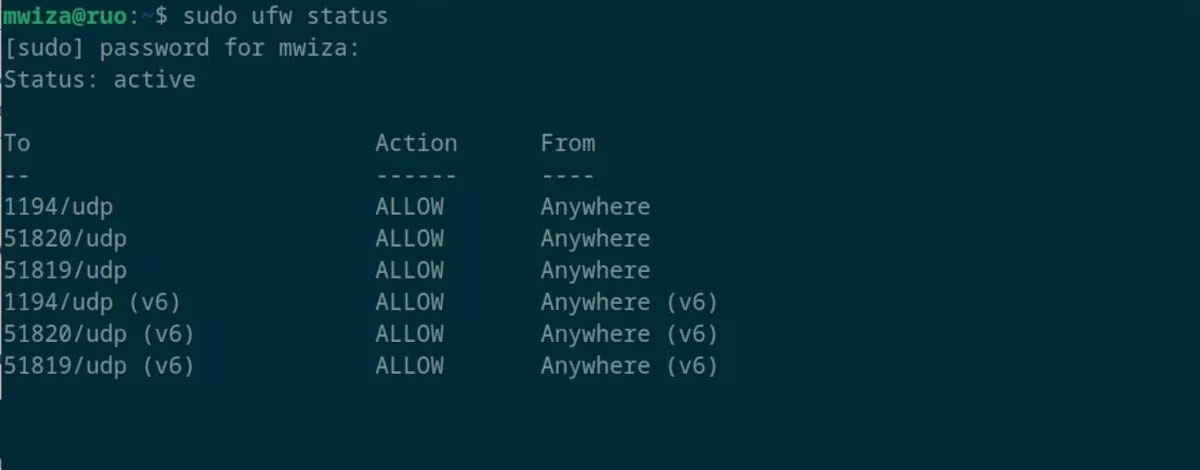
<p style="text-align: justify;">Bạn có thể xem các quy tắc UFW trên PC Linux của mình bằng cách chạy:</p>

<pre id="pre0">
<code>sudo ufw status</code></pre>

<p style="text-align: justify;">Vì mục đích bảo mật, bạn sẽ cần có đặc quyền nâng cao hoặc quản trị để chạy các lệnh UFW.</p>

<figure>
<div style="text-align: justify;"><img alt="Trạng thái quy tắc UFW trên PC Linux" data-i="0" data-src="https://st.quantrimang.com/photos/image/2023/10/13/vo-hieu-hoa-quy-tac-ipv6-trong-ufw-1.jpg" data-was-processed="true" height="470" src="https://st.quantrimang.com/photos/image/2023/10/13/vo-hieu-hoa-quy-tac-ipv6-trong-ufw-1.jpg" width="1200" /></div>

<figcaption>
<div style="text-align: justify;">Trạng thái quy tắc UFW trên PC Linux</div>
</figcaption>
</figure>

<p style="text-align: justify;">Từ kết quả đầu ra trước đó, bạn có thể thấy rằng cả quy tắc IPv4 và IPv6 đều được bật.</p>

<p style="text-align: justify;">Việc kích hoạt các service hoặc kết nối lẽ ra không được kích hoạt là một rủi ro bảo mật vì nó làm tăng bề mặt tấn công và không mang lại bất kỳ lợi ích bảo mật nào.</p>

<h2 style="text-align: justify;">Vô hiệu hóa quy tắc IPv6 bằng UFW trên Linux</h2>

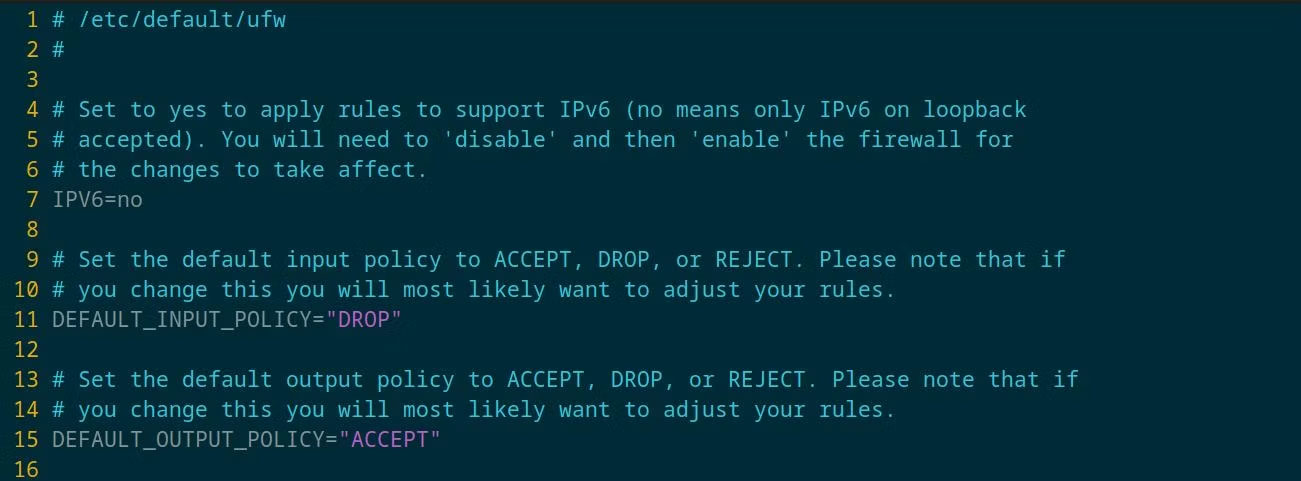
<p style="text-align: justify;">Việc vô hiệu hóa quy tắc IPv6 trong UFW tương đối dễ dàng. Chỉ cần mở file cấu hình UFW sau bằng trình soạn thảo văn bản yêu thích của bạn:</p>

<pre id="pre1">
<code>sudo vim /etc/default/ufw</code></pre>

<p style="text-align: justify;">Hãy nhìn vào dòng&nbsp;<strong>IPv6=yes</strong>, dòng số 7 trong trường hợp này. Thay đổi&nbsp;<strong>yes</strong>&nbsp;thành&nbsp;<strong>no</strong>, sau đó lưu file. File bây giờ trông giống như sau:</p>

<figure>
<div style="text-align: justify;"><img alt="Thiết lập quy tắc UFW trên Linux" data-i="1" data-src="https://st.quantrimang.com/photos/image/2023/10/13/vo-hieu-hoa-quy-tac-ipv6-trong-ufw-2.jpg" data-was-processed="true" height="481" src="https://st.quantrimang.com/photos/image/2023/10/13/vo-hieu-hoa-quy-tac-ipv6-trong-ufw-2.jpg" width="1301" /></div>

<figcaption>
<div style="text-align: justify;">Thiết lập quy tắc UFW trên Linux</div>
</figcaption>
</figure>

<p style="text-align: justify;">Trong một số trường hợp, bạn có thể cần phải khởi động lại tường lửa để các thay đổi có hiệu lực, bạn có thể thực hiện việc này bằng cách sử dụng:</p>

<pre id="pre2">
<code>sudo ufw reload </code></pre>

<p style="text-align: justify;">Bạn có thể xem lại trạng thái tường lửa bằng lệnh&nbsp;<strong>sudo ufw status</strong>. Lần này, sẽ chỉ có các quy tắc IPv4.</p>

<p style="text-align: justify;">Tường lửa đóng vai trò quan trọng trong việc bảo vệ PC của bạn khỏi các mối đe dọa trên mạng. Để nâng cao bảo mật thông tin, tốt nhất bạn nên có nhiều lớp bảo vệ để ngăn chặn bất kỳ kẻ xâm nhập nào có thể muốn tấn công PC của bạn.</p>

<p style="text-align: justify;">Hãy nhớ rằng, chỉ kích hoạt các kết nối hoặc service mà bạn cần trong tường lửa của mình, mọi thứ khác sẽ bị tắt theo mặc định.</p>
		</div>
				<div id="author">
						<p>
				<strong>Nguồn tin:</strong>
				Quantrimang.com
			</p>
		</div>
	</div>
	<div id="footer" class="clearfix">
		<div id="url">
			<strong>URL của bản tin này: </strong><a href="https://www.nguoicodonvn2008.info/vi/news/savefile/kien-thuc-may-tinh/cach-vo-hieu-hoa-quy-tac-ipv6-trong-ufw-de-tang-cuong-bao-mat-tuong-lua-tren-linux-7640.html" title="Cách vô hiệu hóa quy tắc IPv6 trong UFW để tăng cường bảo mật tường lửa trên Linux">https://www.nguoicodonvn2008.info/vi/news/savefile/kien-thuc-may-tinh/cach-vo-hieu-hoa-quy-tac-ipv6-trong-ufw-de-tang-cuong-bao-mat-tuong-lua-tren-linux-7640.html</a>

		</div>
		<div class="clear"></div>
		<div class="copyright">
			&copy; .&#x3A; Nguoicodonvn2008.info - Cõi lòng người cô đơn &#x3A;.
		</div>
		<div id="contact">
			<a href="mailto:admin@nguoicodonvn2008.info">admin@nguoicodonvn2008.info</a>
		</div>
	</div>
</div>
        <div id="timeoutsess" class="chromeframe">
            Bạn đã không sử dụng Site, <a onclick="timeoutsesscancel();" href="https://nguoicodonvn2008.info/#">Bấm vào đây để duy trì trạng thái đăng nhập</a>. Thời gian chờ: <span id="secField"> 60 </span> giây
        </div>
        <div id="openidResult" class="nv-alert" style="display:none"></div>
        <div id="openidBt" data-result="" data-redirect=""></div>
		</script>
		<div class="car-top">
  <span><img src="https://nguoicodonvn2008.info/themes/default/images/car.png" alt=""></span>
</div>
<script src="https://nguoicodonvn2008.info/assets/js/jquery/jquery.min.js"></script>
<script>var nv_base_siteurl="/",nv_lang_data="vi",nv_lang_interface="vi",nv_name_variable="nv",nv_fc_variable="op",nv_lang_variable="language",nv_module_name="news",nv_func_name="savefile",nv_is_user=0, nv_my_ofs=-4,nv_my_abbr="EDT",nv_cookie_prefix="nv4c_e856T",nv_check_pass_mstime=1738000,nv_area_admin=0,nv_safemode=0,theme_responsive=0,nv_recaptcha_ver=2,nv_recaptcha_sitekey="",nv_recaptcha_type="image",XSSsanitize=1;</script>
<script src="https://nguoicodonvn2008.info/assets/js/language/vi.js"></script>
<script src="https://nguoicodonvn2008.info/assets/js/DOMPurify/purify3.js"></script>
<script src="https://nguoicodonvn2008.info/assets/js/global.js"></script>
<script src="https://nguoicodonvn2008.info/assets/js/site.js"></script>
<script src="https://nguoicodonvn2008.info/themes/default/js/news.js"></script>
<script src="https://nguoicodonvn2008.info/themes/default/js/main.js"></script>
<script src="https://nguoicodonvn2008.info/themes/default/js/custom.js"></script>
<script type="application/ld+json">
        {
            "@context": "https://schema.org",
            "@type": "Organization",
            "url": "https://nguoicodonvn2008.info",
            "logo": "https://nguoicodonvn2008.info/uploads/angel.gif"
        }
        </script>
<script src="https://nguoicodonvn2008.info/themes/default/js/bootstrap.min.js"></script>
<script type="text/javascript">
var $scrolltop = $('.car-top');
$scrolltop.on('click', function () {
    $('html,body').animate({
        scrollTop: 0
    }, 800);
    $(this).addClass("car-run");
    setTimeout(function(){ $scrolltop.removeClass('car-run');}, 1000);
    return false;
});
$(window).on('scroll', function ()
{ 
    if($(window).scrollTop() >= 200)
    {
        $scrolltop.addClass("show");
        $scrolltop.addClass("car-down");
    }
    else
    {
       $scrolltop.removeClass("show");
       setTimeout(function(){ $scrolltop.removeClass('car-down');}, 300);
    }
});
</script>
</body>
</html>