<!DOCTYPE html>
    <html lang="vi" xmlns="http://www.w3.org/1999/xhtml" prefix="og: http://ogp.me/ns#">
    <head>
<title>Cách vô hiệu hóa phím Insert trong Windows 10</title>
<meta name="description" content="Cách vô hiệu hóa phím Insert trong Windows 10 - Savefile - Tin Tức -...">
<meta name="author" content=".: Nguoicodonvn2008.info - Cõi lòng người cô đơn :.">
<meta name="copyright" content=".: Nguoicodonvn2008.info - Cõi lòng người cô đơn :. [admin@nguoicodonvn2008.info]">
<meta name="robots" content="index, archive, follow, noodp">
<meta name="googlebot" content="index,archive,follow,noodp">
<meta name="msnbot" content="all,index,follow">
<meta name="generator" content="NukeViet v4.5">
<meta http-equiv="Content-Type" content="text/html; charset=utf-8">
<meta property="og:title" content="Cách vô hiệu hóa phím Insert trong Windows 10">
<meta property="og:type" content="website">
<meta property="og:description" content="Savefile - Tin Tức - https&#x3A;&#x002F;&#x002F;www.nguoicodonvn2008.info&#x002F;vi&#x002F;news&#x002F;savefile&#x002F;kien-thuc-may-tinh&#x002F;cach-vo-hieu-hoa-phim-insert-trong-windows-10-2001.html">
<meta property="og:site_name" content=".&#x3A; Nguoicodonvn2008.info - Cõi lòng người cô đơn &#x3A;.">
<meta property="og:url" content="https://www.nguoicodonvn2008.info/vi/news/savefile/kien-thuc-may-tinh/cach-vo-hieu-hoa-phim-insert-trong-windows-10-2001.html">
<link rel="shortcut icon" href="https://nguoicodonvn2008.info/favicon.ico">
<link rel="canonical" href="https://www.nguoicodonvn2008.info/vi/news/savefile/kien-thuc-may-tinh/cach-vo-hieu-hoa-phim-insert-trong-windows-10-2001.html">
<link rel="alternate" href="https://nguoicodonvn2008.info/vi/news/rss/" title="Tin Tức" type="application/rss+xml">
<link rel="alternate" href="https://nguoicodonvn2008.info/vi/news/rss/karaoke-dual/" title="Tin Tức - Karaoke Dual" type="application/rss+xml">
<link rel="alternate" href="https://nguoicodonvn2008.info/vi/news/rss/nhac-tre/" title="Tin Tức - Nhạc trẻ" type="application/rss+xml">
<link rel="alternate" href="https://nguoicodonvn2008.info/vi/news/rss/tru-tinh/" title="Tin Tức - Trữ tình" type="application/rss+xml">
<link rel="alternate" href="https://nguoicodonvn2008.info/vi/news/rss/nuoc-ngoai/" title="Tin Tức - Nước ngoài" type="application/rss+xml">
<link rel="alternate" href="https://nguoicodonvn2008.info/vi/news/rss/remix/" title="Tin Tức - Remix" type="application/rss+xml">
<link rel="alternate" href="https://nguoicodonvn2008.info/vi/news/rss/tam-su-tinh-yeu/" title="Tin Tức - Tâm sự tình yêu" type="application/rss+xml">
<link rel="alternate" href="https://nguoicodonvn2008.info/vi/news/rss/tho-suu-tam/" title="Tin Tức - Thơ sưu tầm" type="application/rss+xml">
<link rel="alternate" href="https://nguoicodonvn2008.info/vi/news/rss/cuoc-song/" title="Tin Tức - Cuộc sống" type="application/rss+xml">
<link rel="alternate" href="https://nguoicodonvn2008.info/vi/news/rss/phan-mem/" title="Tin Tức - Phần mềm" type="application/rss+xml">
<link rel="alternate" href="https://nguoicodonvn2008.info/vi/news/rss/kien-thuc-may-tinh/" title="Tin Tức - Kiến thức máy tính" type="application/rss+xml">
<link rel="alternate" href="https://nguoicodonvn2008.info/vi/news/rss/hoc-tap/" title="Tin Tức - Học tập" type="application/rss+xml">
<link rel="alternate" href="https://nguoicodonvn2008.info/vi/news/rss/tai-lieu/" title="Tin Tức - Tài liệu" type="application/rss+xml">
<link rel="alternate" href="https://nguoicodonvn2008.info/vi/news/rss/de-thi/" title="Tin Tức - Đề thi" type="application/rss+xml">
<link rel="preload" as="style" href="https://nguoicodonvn2008.info/assets/css/font-awesome.min.css" type="text/css">
<link rel="preload" as="style" href="https://nguoicodonvn2008.info/themes/default/css/bootstrap.non-responsive.css" type="text/css">
<link rel="preload" as="style" href="https://nguoicodonvn2008.info/themes/default/css/style.css" type="text/css">
<link rel="preload" as="style" href="https://nguoicodonvn2008.info/themes/default/css/style.non-responsive.css" type="text/css">
<link rel="preload" as="style" href="https://nguoicodonvn2008.info/themes/default/css/news.css" type="text/css">
<link rel="preload" as="style" href="https://nguoicodonvn2008.info/themes/default/css/custom.css" type="text/css">
<link rel="preload" as="script" href="https://nguoicodonvn2008.info/assets/js/jquery/jquery.min.js" type="text/javascript">
<link rel="preload" as="script" href="https://nguoicodonvn2008.info/assets/js/language/vi.js" type="text/javascript">
<link rel="preload" as="script" href="https://nguoicodonvn2008.info/assets/js/DOMPurify/purify3.js" type="text/javascript">
<link rel="preload" as="script" href="https://nguoicodonvn2008.info/assets/js/global.js" type="text/javascript">
<link rel="preload" as="script" href="https://nguoicodonvn2008.info/assets/js/site.js" type="text/javascript">
<link rel="preload" as="script" href="https://nguoicodonvn2008.info/themes/default/js/news.js" type="text/javascript">
<link rel="preload" as="script" href="https://nguoicodonvn2008.info/themes/default/js/main.js" type="text/javascript">
<link rel="preload" as="script" href="https://nguoicodonvn2008.info/themes/default/js/custom.js" type="text/javascript">
<link rel="preload" as="script" href="https://nguoicodonvn2008.info/themes/default/js/bootstrap.min.js" type="text/javascript">
<link rel="stylesheet" href="https://nguoicodonvn2008.info/assets/css/font-awesome.min.css">
<link rel="stylesheet" href="https://nguoicodonvn2008.info/themes/default/css/bootstrap.non-responsive.css">
<link rel="stylesheet" href="https://nguoicodonvn2008.info/themes/default/css/style.css">
<link rel="stylesheet" href="https://nguoicodonvn2008.info/themes/default/css/style.non-responsive.css">
<link rel="StyleSheet" href="https://nguoicodonvn2008.info/themes/default/css/news.css">
<link rel="stylesheet" href="https://nguoicodonvn2008.info/themes/default/css/custom.css">
<style type="text/css">
	body{background: #fff;}
</style>
    </head>
    <body>
<div id="print">
	<div id="hd_print">
		<h2 class="pull-left">.&#x3A; Nguoicodonvn2008.info - Cõi lòng người cô đơn &#x3A;.</h2>
		<p class="pull-right"><a title=".&#x3A; Nguoicodonvn2008.info - Cõi lòng người cô đơn &#x3A;." href="https://nguoicodonvn2008.info/">https://nguoicodonvn2008.info</a></p>
	</div>
	<div class="clear"></div>
	<hr />
	<div id="content">
		<h1>Cách vô hiệu hóa phím Insert trong Windows 10</h1>
		<ul class="list-inline">
			<li>Thứ hai - 04/05/2020 09:55</li>
			<li class="hidden-print txtrequired"><em class="fa fa-print">&nbsp;</em><a title="In ra" href="javascript:;" onclick="window.print()">In ra</a></li>
			<li class="hidden-print txtrequired"><em class="fa fa-power-off">&nbsp;</em><a title="Đóng cửa sổ này" href="javascript:;" onclick="window.close()">Đóng cửa sổ này</a></li>
		</ul>
		<div class="clear"></div>
		<div id="hometext">
		</div>
				<div class="imghome">
			<img alt="Cách vô hiệu hóa phím Insert trong Windows 10" src="https://st.quantrimang.com/photos/image/2020/05/04/vo-hieu-hoa-phim-insert-3.jpg" width="460" class="img-thumbnail" />
		</div>
		<div class="clear"></div>
		<div id="bodytext" class="clearfix">
			<p style="text-align: justify;">Khi bạn vô tình nhấn&nbsp;<code>Insert</code>&nbsp;trên bàn phím, nó sẽ chuyển sang chế độ&nbsp;<strong>Overtype</strong>&nbsp;(Ghi đè). Điều này có nghĩa là bất cứ điều gì bạn nhập tiếp theo sẽ ghi đè lên phần văn bản phía sau con trỏ. May mắn thay, bạn có thể vô hiệu hóa phím gây phiền nhiễu này trong&nbsp;Windows 10.</p>

<p style="text-align: justify;">Mỗi phím trên bàn phím đều có mã quét phím tương ứng, cho Windows biết cách xử lý từng tổ hợp phím. Mặc dù có khả năng tắt phím&nbsp;<code>Insert</code>&nbsp;theo mặc định, nhưng bạn cũng có thể yêu cầu Windows thay thế nó bằng một ký tự rỗng trong Windows Registry.</p>

<h2 style="text-align: justify;">Vô hiệu hóa phím Insert bằng SharpKeys</h2>

<p style="text-align: justify;">SharpKeys là phần mềm miễn phí bạn có thể sử dụng để chỉnh sửa một mục Registry cụ thể. Nó sử dụng giao diện đồ họa để ánh xạ lại các phím trên bàn phím. Công cụ này giúp bạn dễ dàng thực hiện thay đổi cần thiết cho Registry mà không cần phải thực sự&nbsp;mở Registry Editor.</p>

<p style="text-align: justify;">Để thực hiện việc này, hãy tải xuống bản phát hành gần đây nhất của&nbsp;SharpKeys.:<br  />
<strong><span style="color:rgb(192, 57, 43);">https://download.com.vn/sharpkeys/download</span></strong></p>

<p style="text-align: justify;">Sau khi cài đặt SharpKeys, hãy mở nó từ menu Start, rồi nhấp vào&nbsp;<strong>Add</strong>&nbsp;khi nó mở.</p>

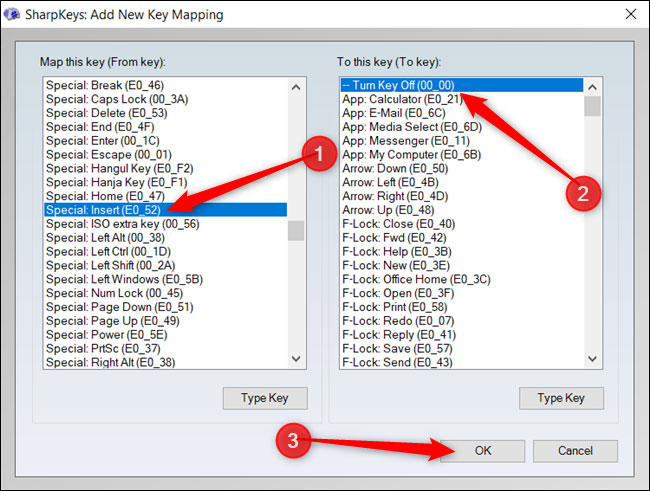
<p style="text-align: justify;">Cuộn qua danh sách bên trái và nhấp vào&nbsp;<strong>Special: Insert (E0_52)</strong>, nhấn&nbsp;<strong>Turn Key Off (00_00)</strong>&nbsp;trong danh sách bên phải, sau đó nhấp&nbsp;<strong>OK</strong>&nbsp;để ánh xạ lại phím.</p>

<figure>
<div style="text-align: justify;"><img alt="Cuộn qua danh sách bên trái và nhấp vào Special: Insert (E0_52)" data-i="0" data-src="https://st.quantrimang.com/photos/image/2020/05/04/vo-hieu-hoa-phim-insert-1.jpg" data-was-processed="true" height="491" src="https://st.quantrimang.com/photos/image/2020/05/04/vo-hieu-hoa-phim-insert-1.jpg" width="650" /></div>

<figcaption>
<div style="text-align: justify;">Cuộn qua danh sách bên trái và nhấp vào Special: Insert (E0_52)</div>
</figcaption>
</figure>

<p style="text-align: justify;">Giá trị trong ngoặc đơn là mã quét phím được liên kết với nó, do đó, mã của phím&nbsp;<code>Insert</code>&nbsp;là&nbsp;<strong>00_52.</strong>&nbsp;Bạn muốn vô hiệu hóa nó, vì vậy hãy thay thế mã này bằng&nbsp;<strong>00_00</strong>&nbsp;không tồn tại.</p>

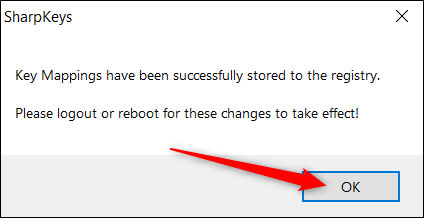
<p style="text-align: justify;">Tiếp theo, nhấp vào&nbsp;<strong>Write to Registry</strong>&nbsp;và SharpKeys sẽ thêm các giá trị vào Windows Registry cho bạn.</p>

<p style="text-align: justify;">Nhấp vào&nbsp;<strong>OK.</strong></p>

<figure>
<div style="text-align: justify;"><img alt="Nhấp vào OK" data-i="1" data-src="https://st.quantrimang.com/photos/image/2020/05/04/vo-hieu-hoa-phim-insert-2.jpg" data-was-processed="true" height="218" src="https://st.quantrimang.com/photos/image/2020/05/04/vo-hieu-hoa-phim-insert-2.jpg" width="424" /></div>

<figcaption>
<div style="text-align: justify;">Nhấp vào OK</div>
</figcaption>
</figure>

<p style="text-align: justify;">Để các thay đổi có hiệu lực, bạn phải đăng xuất hoặc khởi động lại máy tính.</p>

<p style="text-align: justify;">Bạn cũng có thể sử dụng SharpKey để vô hiệu hóa các phím gây phiền nhiễu khác, như&nbsp;<code>Caps Lock</code>.</p>

<div style="text-align: justify;">&nbsp;</div>

<h2 style="text-align: justify;">Vô hiệu hóa phím Insert thông qua Registry Editor</h2>

<p style="text-align: justify;">Nếu có thể thoải mái thực hiện các thay đổi đối với Windows Registry, bạn cũng có thể vô hiệu hóa phím&nbsp;<code>Insert</code>&nbsp;theo cách thủ công trong Registry Editor. Bạn sẽ thực hiện cùng một thay đổi mà SharpKeys đã thực hiện ở trên.</p>

<p style="text-align: justify;">Registry Editor là một công cụ mạnh mẽ. Nhưng nếu bị lạm dụng, nó có thể khiến hệ thống không ổn định hoặc thậm chí ngừng hoạt động. Tuy nhiên, đây là một thủ thuật khá đơn giản. Miễn là bạn làm theo hướng dẫn, sẽ không có bất kỳ vấn đề gì xảy ra.</p>

<p style="text-align: justify;">Nếu trước đây bạn chưa từng làm việc với công cụ này, bạn nên tìm hiểu một chút về&nbsp;cách sử dụng Registry Editor&nbsp;trước khi bắt đầu. Nhớ sao lưu Registry và máy tính của bạn trước khi bạn thực hiện các thay đổi sau.</p>

<p style="text-align: justify;">Để an toàn hơn, bạn có thể&nbsp;tạo điểm khôi phục hệ thống&nbsp;trước khi tiếp tục. Bằng cách này, nếu có sự cố xảy ra, bạn có thể quay lại thời điểm trước khi mọi thứ trở nên tồi tệ.</p>

<p style="text-align: justify;">Khi đã sẵn sàng, hãy mở Registry Editor và điều hướng đến key sau trong thanh bên trái:</p>

<pre id="pre0">
<code>HKEY_LOCAL_MACHINE\SYSTEM\CurrentControlSet\Control\Keyboard Layout</code></pre>

<p style="text-align: justify;">Nhấp chuột phải vào&nbsp;<strong>Keyboard Layout</strong>, chọn&nbsp;<strong>New &gt; Binary Value</strong>.</p>

<p style="text-align: justify;">Mặc dù tên của giá trị có thể đặt tùy ý, nhưng bạn nên chọn một cái gì đó dễ nhớ (đề phòng trường hợp bạn phải tìm lại nó và thực hiện bất kỳ thay đổi nào). Ví dụ, bạn có thể đặt tên cho nó là&nbsp;<strong>Insert Remap.</strong></p>

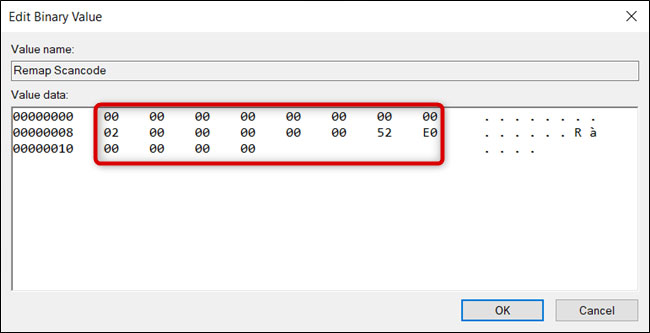
<p style="text-align: justify;">Bấm đúp vào giá trị, rồi đặt dữ liệu giá trị thành:</p>

<pre id="pre1">
<code>00 00 00 00 00 00 00 00 02 00 00 00 00 00 52 E0 00 00 00 00</code></pre>

<figure>
<div style="text-align: justify;"><img alt="Dãy số giá trị dữ liệu" data-i="2" data-src="https://st.quantrimang.com/photos/image/2020/05/04/vo-hieu-hoa-phim-insert-3.jpg" data-was-processed="true" height="333" src="https://st.quantrimang.com/photos/image/2020/05/04/vo-hieu-hoa-phim-insert-3.jpg" width="650" /></div>

<figcaption>
<div style="text-align: justify;">Dãy số giá trị dữ liệu</div>
</figcaption>
</figure>

<p style="text-align: justify;">Thứ tự rất quan trọng ở đây. Nó cho hệ điều hành biết cách xử lý việc ánh xạ và phải làm gì khi bạn nhấn phím.</p>

<ul>
	<li style="text-align: justify;">16 số 0 đầu tiên đóng vai trò là tiêu đề và sẽ vẫn được đặt thành 0. Bạn có thể bỏ qua những số này.</li>
	<li style="text-align: justify;">Số thập lục phân tiếp theo xác định có bao nhiêu lần ánh xạ trong giá trị cộng với 1 - mục nhập rỗng ở cuối cuối cùng - theo sau là 6 số không nữa.</li>
	<li style="text-align: justify;">2 chữ số tiếp theo là mã quét tới phím mà bạn muốn Windows ánh xạ lại phím Insert. Trong trường hợp này, hãy đặt nó thành&nbsp;<strong>00 00.</strong></li>
	<li style="text-align: justify;">Mã quét sau đây là của phím&nbsp;<code>Insert</code>&nbsp;(<strong>52 E0</strong>).</li>
	<li style="text-align: justify;">Cuối cùng, tám số 0 cuối cùng biểu thị mục nhập rỗng và kết thúc.</li>
</ul>

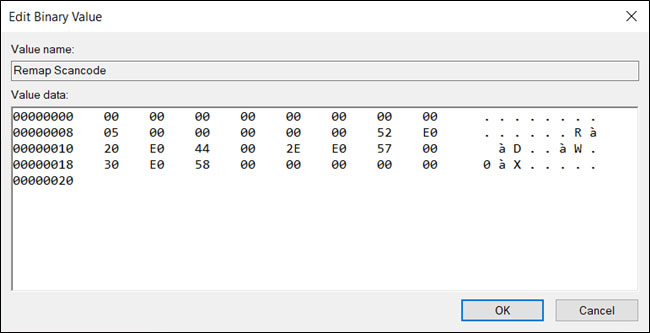
<p style="text-align: justify;">Miễn là bạn làm theo sơ đồ trên, bạn có thể ánh xạ nhiều phím với một giá trị duy nhất. Đầu tiên, hãy tăng số 02. Sau đó, nhập cả mã quét cho phím được ánh xạ lại và phím mặc định trước mục nhập rỗng (tám số 0 cuối cùng).</p>

<figure>
<div style="text-align: justify;"><img alt="Bạn có thể ánh xạ nhiều phím với một giá trị duy nhất" data-i="3" data-src="https://st.quantrimang.com/photos/image/2020/05/04/vo-hieu-hoa-phim-insert-4.jpg" data-was-processed="true" height="333" src="https://st.quantrimang.com/photos/image/2020/05/04/vo-hieu-hoa-phim-insert-4.jpg" width="650" /></div>

<figcaption>
<div style="text-align: justify;">Bạn có thể ánh xạ nhiều phím với một giá trị duy nhất</div>
</figcaption>
</figure>

<p style="text-align: justify;">Ban đầu mọi thứ có vẻ hơi khó hiểu, nhưng một khi bạn đã hiểu tập hợp các giá trị nào sẽ làm nhiệm vụ gì, mọi thứ sẽ trở nên dễ dàng hơn.</p>
		</div>
				<div id="author">
						<p>
				<strong>Nguồn tin:</strong>
				Quantrimang.com
			</p>
		</div>
	</div>
	<div id="footer" class="clearfix">
		<div id="url">
			<strong>URL của bản tin này: </strong><a href="https://www.nguoicodonvn2008.info/vi/news/savefile/kien-thuc-may-tinh/cach-vo-hieu-hoa-phim-insert-trong-windows-10-2001.html" title="Cách vô hiệu hóa phím Insert trong Windows 10">https://www.nguoicodonvn2008.info/vi/news/savefile/kien-thuc-may-tinh/cach-vo-hieu-hoa-phim-insert-trong-windows-10-2001.html</a>

		</div>
		<div class="clear"></div>
		<div class="copyright">
			&copy; .&#x3A; Nguoicodonvn2008.info - Cõi lòng người cô đơn &#x3A;.
		</div>
		<div id="contact">
			<a href="mailto:admin@nguoicodonvn2008.info">admin@nguoicodonvn2008.info</a>
		</div>
	</div>
</div>
        <div id="timeoutsess" class="chromeframe">
            Bạn đã không sử dụng Site, <a onclick="timeoutsesscancel();" href="https://nguoicodonvn2008.info/#">Bấm vào đây để duy trì trạng thái đăng nhập</a>. Thời gian chờ: <span id="secField"> 60 </span> giây
        </div>
        <div id="openidResult" class="nv-alert" style="display:none"></div>
        <div id="openidBt" data-result="" data-redirect=""></div>
		</script>
		<div class="car-top">
  <span><img src="https://nguoicodonvn2008.info/themes/default/images/car.png" alt=""></span>
</div>
<div id="run_cronjobs" style="visibility:hidden;display:none;"><img alt="cron" src="/index.php?second=cronjobs&amp;p=b1k8Es55" width="1" height="1" /></div>
<script src="https://nguoicodonvn2008.info/assets/js/jquery/jquery.min.js"></script>
<script>var nv_base_siteurl="/",nv_lang_data="vi",nv_lang_interface="vi",nv_name_variable="nv",nv_fc_variable="op",nv_lang_variable="language",nv_module_name="news",nv_func_name="savefile",nv_is_user=0, nv_my_ofs=-4,nv_my_abbr="EDT",nv_cookie_prefix="nv4c_e856T",nv_check_pass_mstime=1738000,nv_area_admin=0,nv_safemode=0,theme_responsive=0,nv_recaptcha_ver=2,nv_recaptcha_sitekey="",nv_recaptcha_type="image",XSSsanitize=1;</script>
<script src="https://nguoicodonvn2008.info/assets/js/language/vi.js"></script>
<script src="https://nguoicodonvn2008.info/assets/js/DOMPurify/purify3.js"></script>
<script src="https://nguoicodonvn2008.info/assets/js/global.js"></script>
<script src="https://nguoicodonvn2008.info/assets/js/site.js"></script>
<script src="https://nguoicodonvn2008.info/themes/default/js/news.js"></script>
<script src="https://nguoicodonvn2008.info/themes/default/js/main.js"></script>
<script src="https://nguoicodonvn2008.info/themes/default/js/custom.js"></script>
<script type="application/ld+json">
        {
            "@context": "https://schema.org",
            "@type": "Organization",
            "url": "https://nguoicodonvn2008.info",
            "logo": "https://nguoicodonvn2008.info/uploads/angel.gif"
        }
        </script>
<script src="https://nguoicodonvn2008.info/themes/default/js/bootstrap.min.js"></script>
<script type="text/javascript">
var $scrolltop = $('.car-top');
$scrolltop.on('click', function () {
    $('html,body').animate({
        scrollTop: 0
    }, 800);
    $(this).addClass("car-run");
    setTimeout(function(){ $scrolltop.removeClass('car-run');}, 1000);
    return false;
});
$(window).on('scroll', function ()
{ 
    if($(window).scrollTop() >= 200)
    {
        $scrolltop.addClass("show");
        $scrolltop.addClass("car-down");
    }
    else
    {
       $scrolltop.removeClass("show");
       setTimeout(function(){ $scrolltop.removeClass('car-down');}, 300);
    }
});
</script>
</body>
</html>