<!DOCTYPE html>
    <html lang="vi" xmlns="http://www.w3.org/1999/xhtml" prefix="og: http://ogp.me/ns#">
    <head>
<title>Cách vô hiệu hóa Microsoft Defender cho một ứng dụng cụ thể trong Windows</title>
<meta name="description" content="Cách vô hiệu hóa Microsoft Defender cho một ứng dụng cụ thể trong Windows - Savefile - Tin Tức -...">
<meta name="author" content=".: Nguoicodonvn2008.info - Cõi lòng người cô đơn :.">
<meta name="copyright" content=".: Nguoicodonvn2008.info - Cõi lòng người cô đơn :. [admin@nguoicodonvn2008.info]">
<meta name="robots" content="index, archive, follow, noodp">
<meta name="googlebot" content="index,archive,follow,noodp">
<meta name="msnbot" content="all,index,follow">
<meta name="generator" content="NukeViet v4.5">
<meta http-equiv="Content-Type" content="text/html; charset=utf-8">
<meta property="og:title" content="Cách vô hiệu hóa Microsoft Defender cho một ứng dụng cụ thể trong Windows">
<meta property="og:type" content="website">
<meta property="og:description" content="Savefile - Tin Tức -...">
<meta property="og:site_name" content=".&#x3A; Nguoicodonvn2008.info - Cõi lòng người cô đơn &#x3A;.">
<meta property="og:url" content="https://www.nguoicodonvn2008.info/vi/news/savefile/kien-thuc-may-tinh/cach-vo-hieu-hoa-microsoft-defender-cho-mot-ung-dung-cu-the-trong-windows-10345.html">
<link rel="shortcut icon" href="https://nguoicodonvn2008.info/favicon.ico">
<link rel="canonical" href="https://www.nguoicodonvn2008.info/vi/news/savefile/kien-thuc-may-tinh/cach-vo-hieu-hoa-microsoft-defender-cho-mot-ung-dung-cu-the-trong-windows-10345.html">
<link rel="alternate" href="https://nguoicodonvn2008.info/vi/news/rss/" title="Tin Tức" type="application/rss+xml">
<link rel="alternate" href="https://nguoicodonvn2008.info/vi/news/rss/karaoke-dual/" title="Tin Tức - Karaoke Dual" type="application/rss+xml">
<link rel="alternate" href="https://nguoicodonvn2008.info/vi/news/rss/nhac-tre/" title="Tin Tức - Nhạc trẻ" type="application/rss+xml">
<link rel="alternate" href="https://nguoicodonvn2008.info/vi/news/rss/tru-tinh/" title="Tin Tức - Trữ tình" type="application/rss+xml">
<link rel="alternate" href="https://nguoicodonvn2008.info/vi/news/rss/nuoc-ngoai/" title="Tin Tức - Nước ngoài" type="application/rss+xml">
<link rel="alternate" href="https://nguoicodonvn2008.info/vi/news/rss/remix/" title="Tin Tức - Remix" type="application/rss+xml">
<link rel="alternate" href="https://nguoicodonvn2008.info/vi/news/rss/tam-su-tinh-yeu/" title="Tin Tức - Tâm sự tình yêu" type="application/rss+xml">
<link rel="alternate" href="https://nguoicodonvn2008.info/vi/news/rss/tho-suu-tam/" title="Tin Tức - Thơ sưu tầm" type="application/rss+xml">
<link rel="alternate" href="https://nguoicodonvn2008.info/vi/news/rss/cuoc-song/" title="Tin Tức - Cuộc sống" type="application/rss+xml">
<link rel="alternate" href="https://nguoicodonvn2008.info/vi/news/rss/phan-mem/" title="Tin Tức - Phần mềm" type="application/rss+xml">
<link rel="alternate" href="https://nguoicodonvn2008.info/vi/news/rss/kien-thuc-may-tinh/" title="Tin Tức - Kiến thức máy tính" type="application/rss+xml">
<link rel="alternate" href="https://nguoicodonvn2008.info/vi/news/rss/hoc-tap/" title="Tin Tức - Học tập" type="application/rss+xml">
<link rel="alternate" href="https://nguoicodonvn2008.info/vi/news/rss/tai-lieu/" title="Tin Tức - Tài liệu" type="application/rss+xml">
<link rel="alternate" href="https://nguoicodonvn2008.info/vi/news/rss/de-thi/" title="Tin Tức - Đề thi" type="application/rss+xml">
<link rel="preload" as="style" href="https://nguoicodonvn2008.info/assets/css/font-awesome.min.css" type="text/css">
<link rel="preload" as="style" href="https://nguoicodonvn2008.info/themes/default/css/bootstrap.non-responsive.css" type="text/css">
<link rel="preload" as="style" href="https://nguoicodonvn2008.info/themes/default/css/style.css" type="text/css">
<link rel="preload" as="style" href="https://nguoicodonvn2008.info/themes/default/css/style.non-responsive.css" type="text/css">
<link rel="preload" as="style" href="https://nguoicodonvn2008.info/themes/default/css/news.css" type="text/css">
<link rel="preload" as="style" href="https://nguoicodonvn2008.info/themes/default/css/custom.css" type="text/css">
<link rel="preload" as="script" href="https://nguoicodonvn2008.info/assets/js/jquery/jquery.min.js" type="text/javascript">
<link rel="preload" as="script" href="https://nguoicodonvn2008.info/assets/js/language/vi.js" type="text/javascript">
<link rel="preload" as="script" href="https://nguoicodonvn2008.info/assets/js/DOMPurify/purify3.js" type="text/javascript">
<link rel="preload" as="script" href="https://nguoicodonvn2008.info/assets/js/global.js" type="text/javascript">
<link rel="preload" as="script" href="https://nguoicodonvn2008.info/assets/js/site.js" type="text/javascript">
<link rel="preload" as="script" href="https://nguoicodonvn2008.info/themes/default/js/news.js" type="text/javascript">
<link rel="preload" as="script" href="https://nguoicodonvn2008.info/themes/default/js/main.js" type="text/javascript">
<link rel="preload" as="script" href="https://nguoicodonvn2008.info/themes/default/js/custom.js" type="text/javascript">
<link rel="preload" as="script" href="https://nguoicodonvn2008.info/themes/default/js/bootstrap.min.js" type="text/javascript">
<link rel="stylesheet" href="https://nguoicodonvn2008.info/assets/css/font-awesome.min.css">
<link rel="stylesheet" href="https://nguoicodonvn2008.info/themes/default/css/bootstrap.non-responsive.css">
<link rel="stylesheet" href="https://nguoicodonvn2008.info/themes/default/css/style.css">
<link rel="stylesheet" href="https://nguoicodonvn2008.info/themes/default/css/style.non-responsive.css">
<link rel="StyleSheet" href="https://nguoicodonvn2008.info/themes/default/css/news.css">
<link rel="stylesheet" href="https://nguoicodonvn2008.info/themes/default/css/custom.css">
<style type="text/css">
	body{background: #fff;}
</style>
    </head>
    <body>
<div id="print">
	<div id="hd_print">
		<h2 class="pull-left">.&#x3A; Nguoicodonvn2008.info - Cõi lòng người cô đơn &#x3A;.</h2>
		<p class="pull-right"><a title=".&#x3A; Nguoicodonvn2008.info - Cõi lòng người cô đơn &#x3A;." href="https://nguoicodonvn2008.info/">https://nguoicodonvn2008.info</a></p>
	</div>
	<div class="clear"></div>
	<hr />
	<div id="content">
		<h1>Cách vô hiệu hóa Microsoft Defender cho một ứng dụng cụ thể trong Windows</h1>
		<ul class="list-inline">
			<li>Thứ sáu - 09/05/2025 22:56</li>
			<li class="hidden-print txtrequired"><em class="fa fa-print">&nbsp;</em><a title="In ra" href="javascript:;" onclick="window.print()">In ra</a></li>
			<li class="hidden-print txtrequired"><em class="fa fa-power-off">&nbsp;</em><a title="Đóng cửa sổ này" href="javascript:;" onclick="window.close()">Đóng cửa sổ này</a></li>
		</ul>
		<div class="clear"></div>
		<div id="hometext">
		</div>
				<div class="imghome">
			<img alt="Cách vô hiệu hóa Microsoft Defender cho một ứng dụng cụ thể trong Windows" src="https://st.quantrimang.com/photos/image/2025/05/09/vo-hieu-hoa-microsoft-defender-cho-ung-dung-cu-the.jpg" width="460" class="img-thumbnail" />
		</div>
		<div class="clear"></div>
		<div id="bodytext" class="clearfix">
			<p style="text-align: justify;">&nbsp;Microsoft Defender&nbsp;là ứng dụng bảo mật dễ sử dụng, bảo vệ thiết bị và dữ liệu cá nhân khỏi phần mềm gián điệp, virus hoặc các mối đe dọa trực tuyến khác. Tuy nhiên, đôi khi nó có thể can thiệp vào một số tiến trình nhất định, chẳng hạn như cài đặt phần mềm của bên thứ ba, bằng cách đánh dấu sai chúng là&nbsp;phần mềm độc hại. Trong những tình huống như vậy, bạn có thể muốn tắt Microsoft Defender cho một ứng dụng hoặc file cụ thể.</p>

<h2 style="text-align: justify;">&nbsp;</h2>

<h2 id="mcetoc_1iqqae18efk" style="text-align: justify;">Phương pháp 1: Thêm loại trừ vào&nbsp;&nbsp;Windows&nbsp;Defender</h2>

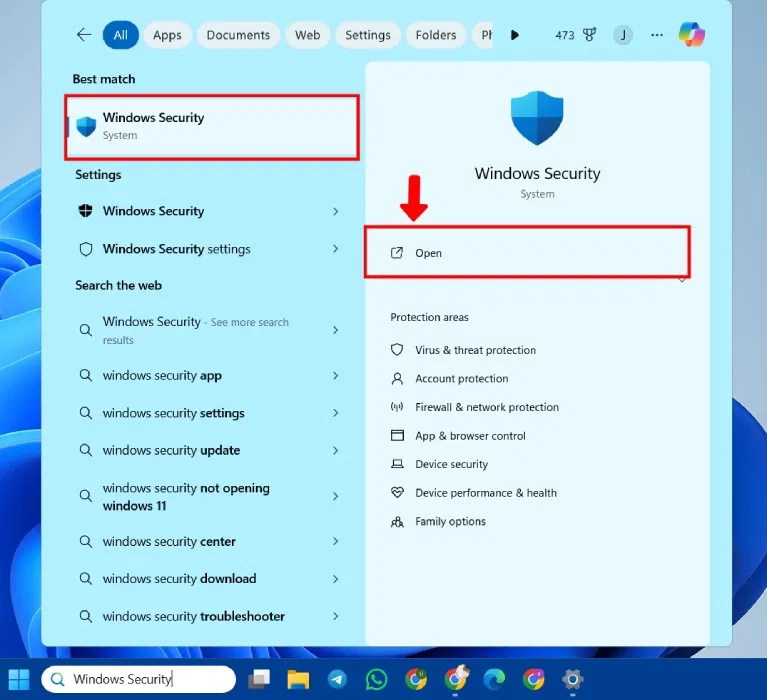
<p style="text-align: justify;">Mở Windows Security, nhấn&nbsp;<strong>Win + S</strong>&nbsp;và tìm kiếm&nbsp;<strong>Windows Security</strong>.</p>

<figure>
<div style="text-align: justify;"><img alt="Mở Windows Security trong Windows" data-i="0" data-src="https://st.quantrimang.com/photos/image/2025/03/07/vo-hieu-hoa-microsoft-defender-cho-ung-dung-cu-the-1.jpg" data-was-processed="true" height="700" src="https://st.quantrimang.com/photos/image/2025/03/07/vo-hieu-hoa-microsoft-defender-cho-ung-dung-cu-the-1.jpg" width="767" /></div>

<figcaption>
<div style="text-align: justify;">Mở Windows Security trong Windows</div>
</figcaption>
</figure>

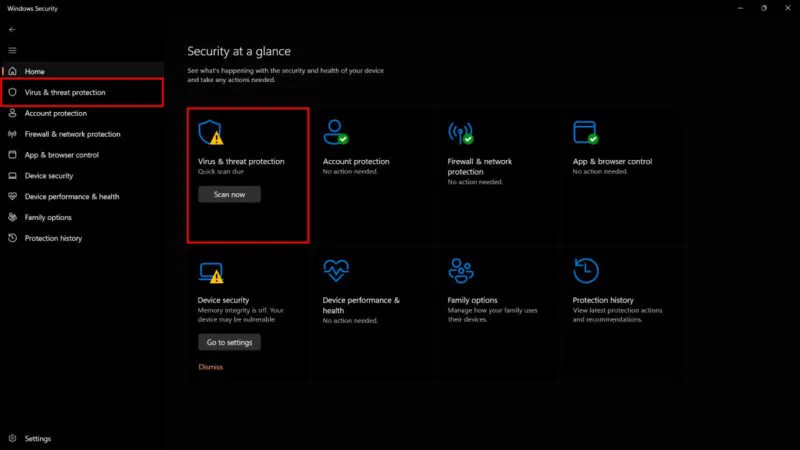
<p style="text-align: justify;">Mở&nbsp;<strong>Virus &amp; threat protection</strong>&nbsp;từ bảng điều khiển bên trái hoặc menu chính&nbsp;<strong>Security at a glance</strong>.</p>

<figure>
<div style="text-align: justify;"><img alt="Mở cài đặt Virus &amp; Threat Protection" data-i="1" data-src="https://st.quantrimang.com/photos/image/2025/03/07/vo-hieu-hoa-microsoft-defender-cho-ung-dung-cu-the-2.jpg" data-was-processed="true" height="450" src="https://st.quantrimang.com/photos/image/2025/03/07/vo-hieu-hoa-microsoft-defender-cho-ung-dung-cu-the-2.jpg" width="800" /></div>

<figcaption>
<div style="text-align: justify;">Mở cài đặt Virus &amp; Threat Protection</div>
</figcaption>
</figure>

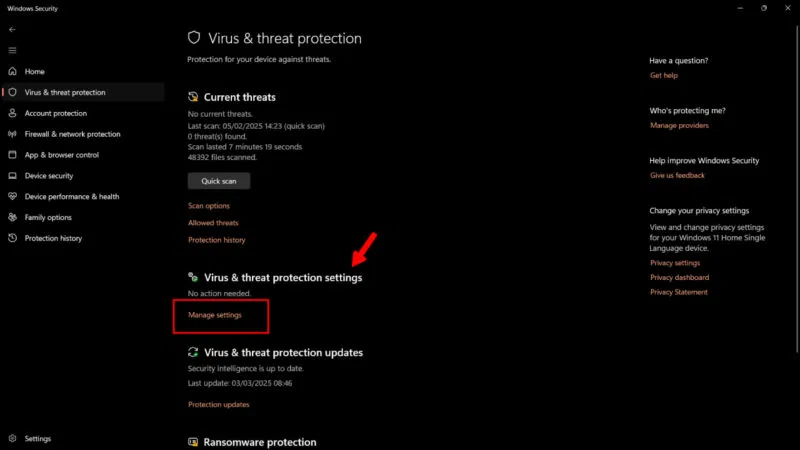
<p style="text-align: justify;">Chọn&nbsp;<strong>Manage settings</strong>.</p>

<figure>
<div style="text-align: justify;"><img alt="Quản lý cài đặt từ Windows Security" data-i="2" data-src="https://st.quantrimang.com/photos/image/2025/03/07/vo-hieu-hoa-microsoft-defender-cho-ung-dung-cu-the-3.jpg" data-was-processed="true" height="450" src="https://st.quantrimang.com/photos/image/2025/03/07/vo-hieu-hoa-microsoft-defender-cho-ung-dung-cu-the-3.jpg" width="800" /></div>

<figcaption>
<div style="text-align: justify;">Quản lý cài đặt từ Windows Security</div>
</figcaption>
</figure>

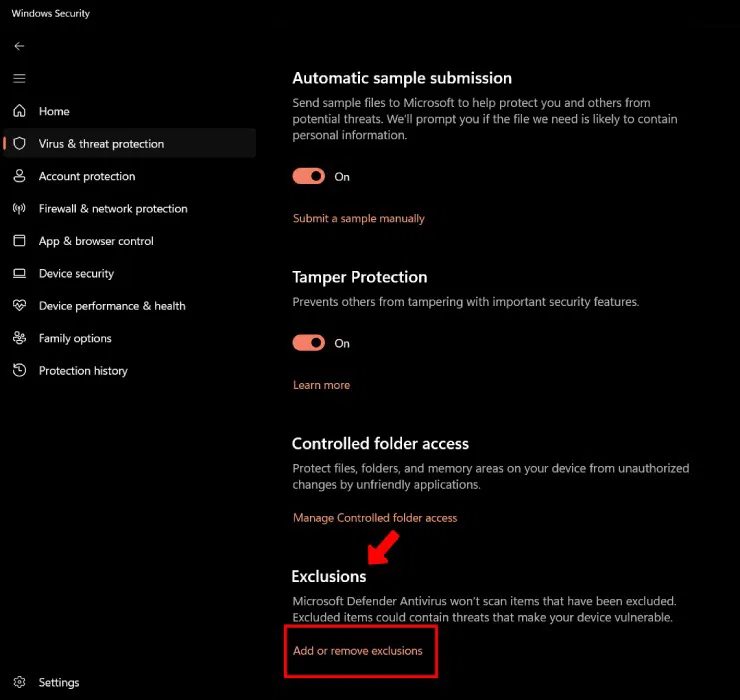
<p style="text-align: justify;">Cuộn xuống phần&nbsp;<strong>Exclusions</strong>&nbsp;và nhấp vào&nbsp;<strong>Add or remove exclusions</strong>.</p>

<figure>
<div style="text-align: justify;"><img alt="Thêm/Xóa loại trừ khỏi Windows Security" data-i="3" data-src="https://st.quantrimang.com/photos/image/2025/03/07/vo-hieu-hoa-microsoft-defender-cho-ung-dung-cu-the-4.jpg" data-was-processed="true" height="700" src="https://st.quantrimang.com/photos/image/2025/03/07/vo-hieu-hoa-microsoft-defender-cho-ung-dung-cu-the-4.jpg" width="740" /></div>

<figcaption>
<div style="text-align: justify;">Thêm/Xóa loại trừ khỏi Windows Security</div>
</figcaption>
</figure>

<p style="text-align: justify;"><strong>Windows User Account Controller</strong>&nbsp;sẽ yêu cầu bạn cấp quyền thực hiện thay đổi cho thiết bị. Nhấp vào&nbsp;<strong>Yes</strong>&nbsp;để tiếp tục.</p>

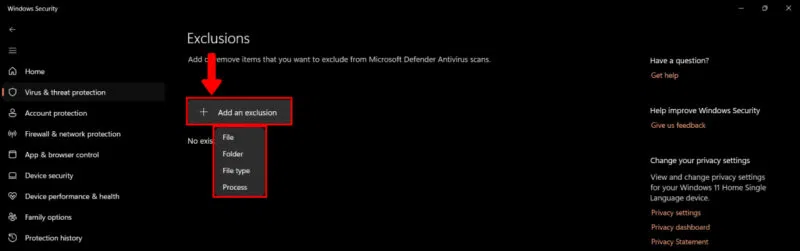
<p style="text-align: justify;">Nhấp vào&nbsp;<strong>Add an exclusion</strong>&nbsp;để thêm các mục để loại trừ khỏi quá trình quét virus. Chọn file, thư mục hoặc thậm chí là tiến trình (tùy theo nhu cầu của bạn). Trong trường hợp cài đặt phần mềm của bên thứ ba, hãy chọn toàn bộ thư mục chứa ứng dụng.</p>

<figure>
<div style="text-align: justify;"><img alt="Loại trừ file, thư mục hoặc tài liệu khỏi Windows Security" data-i="4" data-src="https://st.quantrimang.com/photos/image/2025/03/07/vo-hieu-hoa-microsoft-defender-cho-ung-dung-cu-the-5.jpg" data-was-processed="true" height="251" src="https://st.quantrimang.com/photos/image/2025/03/07/vo-hieu-hoa-microsoft-defender-cho-ung-dung-cu-the-5.jpg" width="800" /></div>

<figcaption>
<div style="text-align: justify;">Loại trừ file, thư mục hoặc tài liệu khỏi Windows Security</div>
</figcaption>
</figure>

<p style="text-align: justify;">Bằng cách thêm các mục vào menu này, Microsoft Windows Defender sẽ loại trừ chúng khỏi những lần quét trong tương lai. Đảm bảo rằng bạn chỉ thêm các file từ các nguồn đáng tin cậy.</p>

<h2 id="mcetoc_1iqqae18efl" style="text-align: justify;">Phương pháp 2: Cung cấp Controlled Folder Access cho ứng dụng</h2>

<p style="text-align: justify;">Cung cấp Controlled Folder Access sẽ bảo vệ các file, thư mục và vùng bộ nhớ trên thiết bị và chặn các ứng dụng (bao gồm cả chương trình diệt virus) thực hiện bất kỳ thay đổi nào đối với chúng. Về cơ bản, bạn đang tạo danh sách các ứng dụng đáng tin cậy.</p>

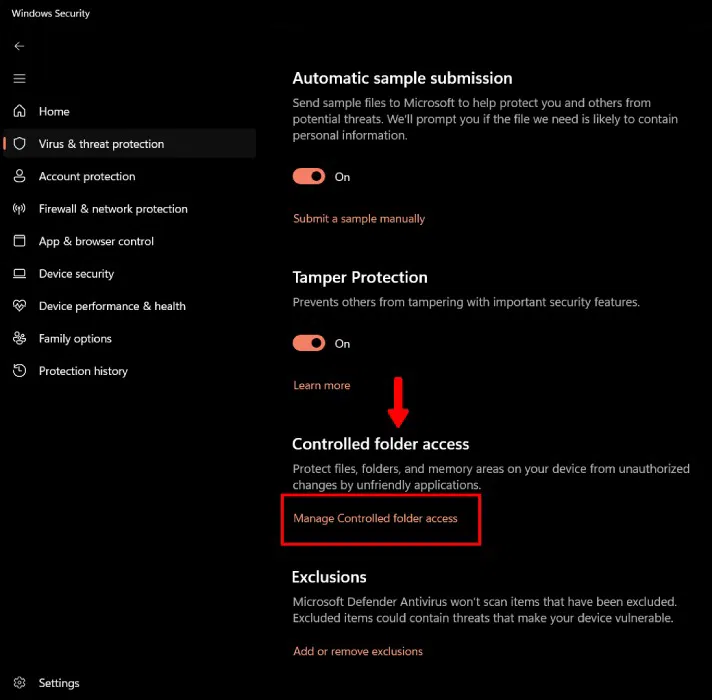
<p style="text-align: justify;">Để cung cấp Controlled Folder Access, hãy mở&nbsp;<strong>Manage Settings</strong>&nbsp;(như đã chỉ định ở trên):&nbsp;<strong>Windows Security</strong>&nbsp;-&gt;&nbsp;<strong>Virus &amp; threat protection</strong>&nbsp;-&gt;&nbsp;<strong>Manage Settings</strong>. Chọn&nbsp;<strong>Manage Controlled folder access</strong>.</p>

<figure>
<div style="text-align: justify;"><img alt="Controlled Folder Access trong Windows Security" data-i="5" data-src="https://st.quantrimang.com/photos/image/2025/03/07/vo-hieu-hoa-microsoft-defender-cho-ung-dung-cu-the-6.jpg" data-was-processed="true" height="700" src="https://st.quantrimang.com/photos/image/2025/03/07/vo-hieu-hoa-microsoft-defender-cho-ung-dung-cu-the-6.jpg" width="712" /></div>

<figcaption>
<div style="text-align: justify;">Controlled Folder Access&nbsp;trong Windows Security</div>
</figcaption>
</figure>

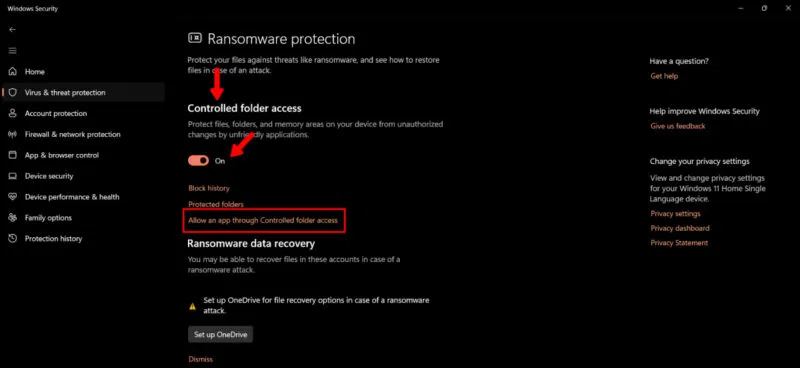
<p style="text-align: justify;">Trong phần Controlled Folder Access, hãy bật nút chuyển đổi và nhấp vào&nbsp;<strong>Allow an app through Controlled folder access</strong>.</p>

<figure>
<div style="text-align: justify;"><img alt="Cho phép ứng dụng trong Controlled Folder Access" data-i="6" data-src="https://st.quantrimang.com/photos/image/2025/03/07/vo-hieu-hoa-microsoft-defender-cho-ung-dung-cu-the-7.jpg" data-was-processed="true" height="368" src="https://st.quantrimang.com/photos/image/2025/03/07/vo-hieu-hoa-microsoft-defender-cho-ung-dung-cu-the-7.jpg" width="800" /></div>

<figcaption>
<div style="text-align: justify;">Cho phép ứng dụng trong Controlled Folder Access</div>
</figcaption>
</figure>

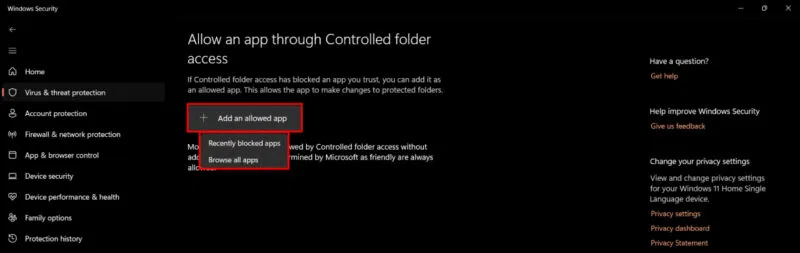
<p style="text-align: justify;">Nhấp vào&nbsp;<strong>Add an allowed app</strong>&nbsp;và chọn một trong các chức năng từ menu drop-down. Nếu ứng dụng bị Windows Security chặn, hãy chọn&nbsp;<strong>Recently blocked apps</strong>. Để chọn một ứng dụng mới, hãy nhấp vào&nbsp;<strong>Browse all apps</strong>.</p>

<figure>
<div style="text-align: justify;"><img alt="Duyệt ứng dụng trong Controlled Folder Access" data-i="7" data-src="https://st.quantrimang.com/photos/image/2025/03/07/vo-hieu-hoa-microsoft-defender-cho-ung-dung-cu-the-8.jpg" data-was-processed="true" height="253" src="https://st.quantrimang.com/photos/image/2025/03/07/vo-hieu-hoa-microsoft-defender-cho-ung-dung-cu-the-8.jpg" width="800" /></div>

<figcaption>
<div style="text-align: justify;">Duyệt ứng dụng trong Controlled Folder Access</div>
</figcaption>
</figure>

<h2 id="mcetoc_1iqqae18efm" style="text-align: justify;">Phương pháp 3: Sử dụng Registry Editor</h2>

<p style="text-align: justify;">Nếu đang sử dụng Windows 11 Home, bạn có thể cấu hình các giá trị của&nbsp;<a data-google-interstitial="false" data-google-vignette="false" href="https://quantrimang.com/cong-nghe/vo-hieu-hoa-microsoft-defender-cho-ung-dung-cu-the-207864#">&nbsp;Registry</a>&nbsp;Editor để loại trừ một ứng dụng khỏi quá trình quét của Microsoft Defender.</p>

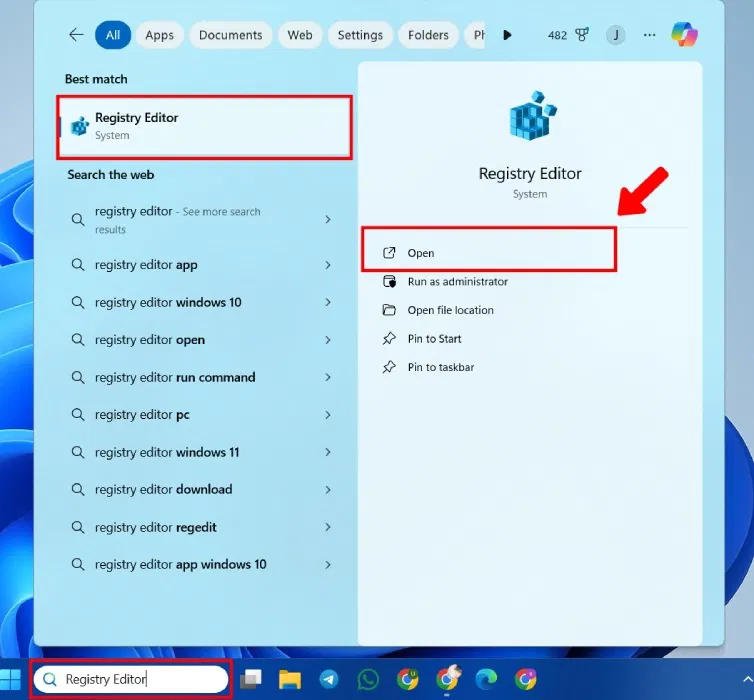
<p style="text-align: justify;"><a data-type="internal" href="https://quantrimang.com/cong-nghe/cach-mo-registry-editor-tren-windows-143522" title="Cách mở Registry Editor trên Windows">Mở Registry Editor</a>&nbsp;bằng cách nhấn&nbsp;<strong>Windows + R</strong>&nbsp;và nhập&nbsp;<strong>regedit.</strong>&nbsp;Hoặc, nhập&nbsp;<strong>Registry Editor</strong>&nbsp;vào menu Start.</p>

<figure>
<div style="text-align: justify;"><img alt="Mở Registry Editor" data-i="8" data-src="https://st.quantrimang.com/photos/image/2025/03/07/vo-hieu-hoa-microsoft-defender-cho-ung-dung-cu-the-9.jpg" data-was-processed="true" height="700" src="https://st.quantrimang.com/photos/image/2025/03/07/vo-hieu-hoa-microsoft-defender-cho-ung-dung-cu-the-9.jpg" width="754" /></div>

<figcaption>
<div style="text-align: justify;">Mở Registry Editor</div>
</figcaption>
</figure>

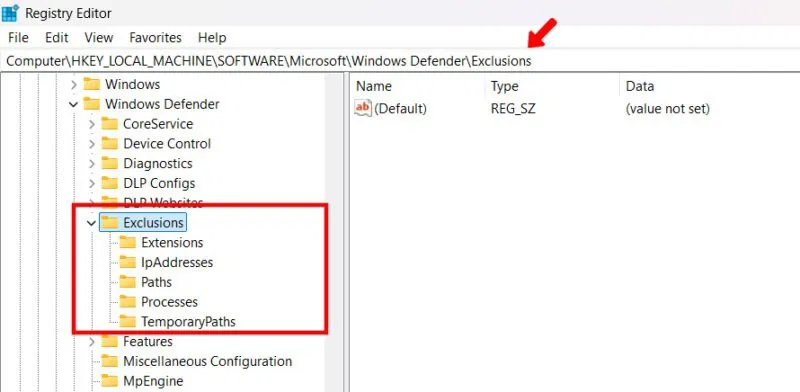
<p style="text-align: justify;">Điều hướng đến vị trí sau:</p>

<pre id="pre0">
<code>HKEY_LOCAL_MACHINE\SOFTWARE\Microsoft\Windows Defender\Exclusions</code></pre>

<figure>
<div style="text-align: justify;"><img alt="" data-i="9" data-src="https://st.quantrimang.com/photos/image/2025/03/07/vo-hieu-hoa-microsoft-defender-cho-ung-dung-cu-the-10.jpg" data-was-processed="true" height="392" src="https://st.quantrimang.com/photos/image/2025/03/07/vo-hieu-hoa-microsoft-defender-cho-ung-dung-cu-the-10.jpg" width="800" /></div>
</figure>

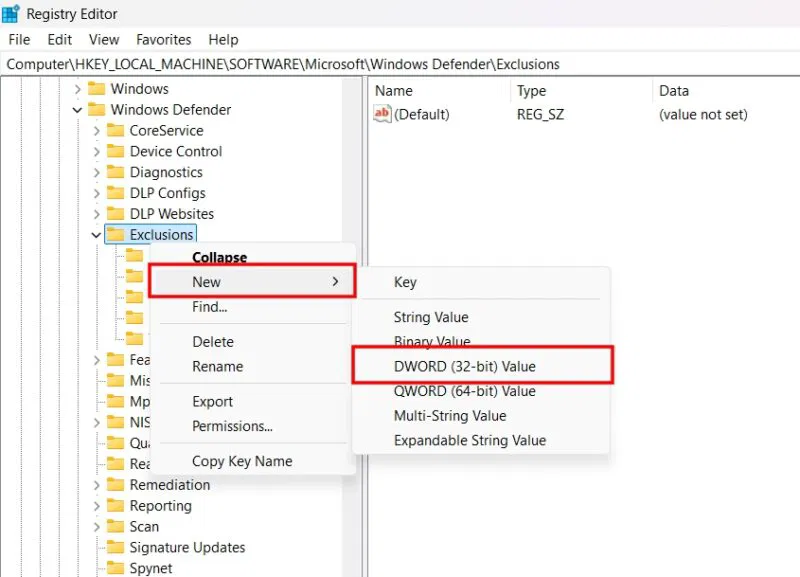
<p style="text-align: justify;">Nhấp chuột phải vào&nbsp;<strong>Exclusions</strong>, nhấp vào&nbsp;<strong>New</strong>&nbsp;và chọn&nbsp;<strong>DWORD (32-bit) Value</strong>&nbsp;từ menu drop-down.</p>

<figure>
<div style="text-align: justify;"><img alt="" data-i="10" data-src="https://st.quantrimang.com/photos/image/2025/03/07/vo-hieu-hoa-microsoft-defender-cho-ung-dung-cu-the-11.jpg" data-was-processed="true" height="577" src="https://st.quantrimang.com/photos/image/2025/03/07/vo-hieu-hoa-microsoft-defender-cho-ung-dung-cu-the-11.jpg" width="800" /></div>
</figure>

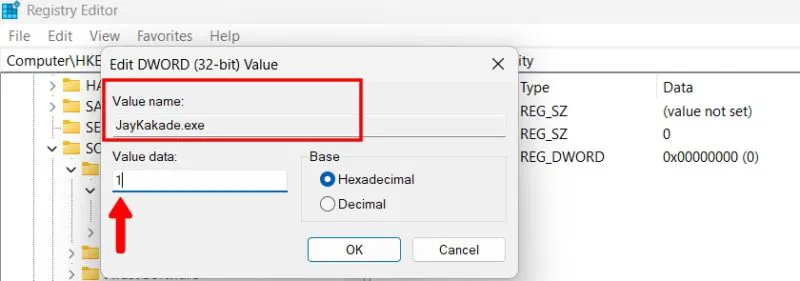
<p style="text-align: justify;">Nhập&nbsp;<strong>Value name</strong>&nbsp;sau ứng dụng của bạn. Ví dụ: JayKakade.exe. Đặt dữ liệu giá trị thành 1 và nhấp vào&nbsp;<strong>OK</strong>.</p>

<figure>
<div style="text-align: justify;"><img alt="Thêm giá trị registry" data-i="11" data-src="https://st.quantrimang.com/photos/image/2025/03/07/vo-hieu-hoa-microsoft-defender-cho-ung-dung-cu-the-12.jpg" data-was-processed="true" height="281" src="https://st.quantrimang.com/photos/image/2025/03/07/vo-hieu-hoa-microsoft-defender-cho-ung-dung-cu-the-12.jpg" width="800" /></div>

<figcaption>
<div style="text-align: justify;">Thêm giá trị registry</div>
</figcaption>
</figure>

<h2 id="mcetoc_1iqqae18efn" style="text-align: justify;">Phương pháp 4: Tắt tạm thời Microsoft Defender</h2>

<p style="text-align: justify;">Một trong những cách dễ nhất để cài đặt phần mềm của bên thứ ba mà không bị&nbsp;&nbsp;Windows&nbsp;Security can thiệp là tắt tạm thời ứng dụng này.</p>

<ul>
	<li style="text-align: justify;">Mở&nbsp;<strong>Windows Security -&gt; Virus &amp; threat protection -&gt; Manage Settings</strong>&nbsp;(xem ở trên).</li>
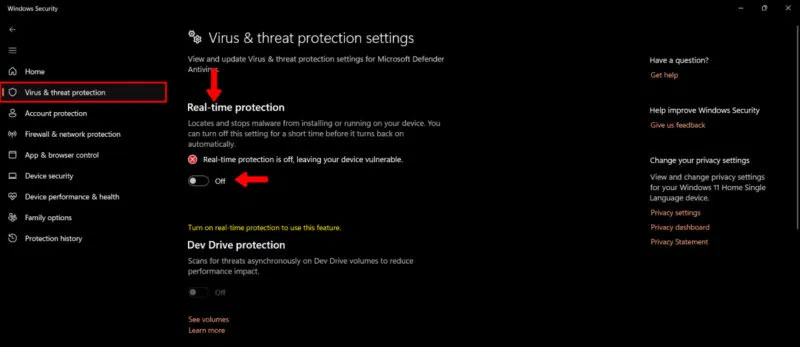
	<li style="text-align: justify;">Trong phần&nbsp;<strong>Real-time protection</strong>, hãy chuyển công tắc chuyển đổi sang chế độ tắt.</li>
</ul>

<figure>
<div style="text-align: justify;"><img alt="Tắt Real Time Protection trong Virus Protection" data-i="12" data-src="https://st.quantrimang.com/photos/image/2025/05/09/vo-hieu-hoa-microsoft-defender-cho-ung-dung-cu-the.jpg" data-was-processed="true" height="347" src="https://st.quantrimang.com/photos/image/2025/05/09/vo-hieu-hoa-microsoft-defender-cho-ung-dung-cu-the.jpg" width="800" /></div>

<figcaption>
<div style="text-align: justify;">Tắt Real Time Protection trong Virus Protection</div>
</figcaption>
</figure>

<p style="text-align: justify;">Biện pháp này chỉ áp dụng trong thời gian ngắn và chế độ bảo vệ theo thời gian thực sẽ tự bật. Tuy nhiên, khoảng thời gian ngắn này đủ để sửa file hoặc phần mềm bị Microsoft Defender gắn cờ không chính xác. Hãy thận trọng khi sử dụng phương pháp này vì nó không chỉ vô hiệu hóa Windows Defender mà còn vô hiệu hóa tạm thời mọi chế độ bảo vệ chống virus trên thiết bị.</p>

<p style="text-align: justify;">Windows Defender được tích hợp sâu vào hệ điều hành Windows và do đó không thể gỡ cài đặt hoàn toàn – nhưng bạn có thể tắt nó. Có thể tắt tạm thời hoặc vĩnh viễn, nhưng việc này không được khuyến khích vì nó khiến hệ thống dễ bị nhiễm phần mềm độc hại.</p>
		</div>
				<div id="author">
						<p>
				<strong>Nguồn tin:</strong>
				Quantrimang.com:
			</p>
		</div>
	</div>
	<div id="footer" class="clearfix">
		<div id="url">
			<strong>URL của bản tin này: </strong><a href="https://www.nguoicodonvn2008.info/vi/news/savefile/kien-thuc-may-tinh/cach-vo-hieu-hoa-microsoft-defender-cho-mot-ung-dung-cu-the-trong-windows-10345.html" title="Cách vô hiệu hóa Microsoft Defender cho một ứng dụng cụ thể trong Windows">https://www.nguoicodonvn2008.info/vi/news/savefile/kien-thuc-may-tinh/cach-vo-hieu-hoa-microsoft-defender-cho-mot-ung-dung-cu-the-trong-windows-10345.html</a>

		</div>
		<div class="clear"></div>
		<div class="copyright">
			&copy; .&#x3A; Nguoicodonvn2008.info - Cõi lòng người cô đơn &#x3A;.
		</div>
		<div id="contact">
			<a href="mailto:admin@nguoicodonvn2008.info">admin@nguoicodonvn2008.info</a>
		</div>
	</div>
</div>
        <div id="timeoutsess" class="chromeframe">
            Bạn đã không sử dụng Site, <a onclick="timeoutsesscancel();" href="https://nguoicodonvn2008.info/#">Bấm vào đây để duy trì trạng thái đăng nhập</a>. Thời gian chờ: <span id="secField"> 60 </span> giây
        </div>
        <div id="openidResult" class="nv-alert" style="display:none"></div>
        <div id="openidBt" data-result="" data-redirect=""></div>
		</script>
		<div class="car-top">
  <span><img src="https://nguoicodonvn2008.info/themes/default/images/car.png" alt=""></span>
</div>
<script src="https://nguoicodonvn2008.info/assets/js/jquery/jquery.min.js"></script>
<script>var nv_base_siteurl="/",nv_lang_data="vi",nv_lang_interface="vi",nv_name_variable="nv",nv_fc_variable="op",nv_lang_variable="language",nv_module_name="news",nv_func_name="savefile",nv_is_user=0, nv_my_ofs=-4,nv_my_abbr="EDT",nv_cookie_prefix="nv4c_e856T",nv_check_pass_mstime=1738000,nv_area_admin=0,nv_safemode=0,theme_responsive=0,nv_recaptcha_ver=2,nv_recaptcha_sitekey="",nv_recaptcha_type="image",XSSsanitize=1;</script>
<script src="https://nguoicodonvn2008.info/assets/js/language/vi.js"></script>
<script src="https://nguoicodonvn2008.info/assets/js/DOMPurify/purify3.js"></script>
<script src="https://nguoicodonvn2008.info/assets/js/global.js"></script>
<script src="https://nguoicodonvn2008.info/assets/js/site.js"></script>
<script src="https://nguoicodonvn2008.info/themes/default/js/news.js"></script>
<script src="https://nguoicodonvn2008.info/themes/default/js/main.js"></script>
<script src="https://nguoicodonvn2008.info/themes/default/js/custom.js"></script>
<script type="application/ld+json">
        {
            "@context": "https://schema.org",
            "@type": "Organization",
            "url": "https://nguoicodonvn2008.info",
            "logo": "https://nguoicodonvn2008.info/uploads/angel.gif"
        }
        </script>
<script src="https://nguoicodonvn2008.info/themes/default/js/bootstrap.min.js"></script>
<script type="text/javascript">
var $scrolltop = $('.car-top');
$scrolltop.on('click', function () {
    $('html,body').animate({
        scrollTop: 0
    }, 800);
    $(this).addClass("car-run");
    setTimeout(function(){ $scrolltop.removeClass('car-run');}, 1000);
    return false;
});
$(window).on('scroll', function ()
{ 
    if($(window).scrollTop() >= 200)
    {
        $scrolltop.addClass("show");
        $scrolltop.addClass("car-down");
    }
    else
    {
       $scrolltop.removeClass("show");
       setTimeout(function(){ $scrolltop.removeClass('car-down');}, 300);
    }
});
</script>
</body>
</html>