<!DOCTYPE html>
    <html lang="vi" xmlns="http://www.w3.org/1999/xhtml" prefix="og: http://ogp.me/ns#">
    <head>
<title>Cách vô hiệu hóa IPv6 trên Linux</title>
<meta name="description" content="Cách vô hiệu hóa IPv6 trên Linux - Savefile - Tin Tức - https&#x3A;&#x002F;&#x002F;www.nguoicodonvn2008.info&#x002F;vi&#x002F;news&#x002F;savefile&#x002F;kien-thuc-may-tinh&#x002F;cach-vo-hieu-hoa-ipv6-tren-linux-8097.html">
<meta name="author" content=".: Nguoicodonvn2008.info - Cõi lòng người cô đơn :.">
<meta name="copyright" content=".: Nguoicodonvn2008.info - Cõi lòng người cô đơn :. [admin@nguoicodonvn2008.info]">
<meta name="robots" content="index, archive, follow, noodp">
<meta name="googlebot" content="index,archive,follow,noodp">
<meta name="msnbot" content="all,index,follow">
<meta name="generator" content="NukeViet v4.5">
<meta http-equiv="Content-Type" content="text/html; charset=utf-8">
<meta property="og:title" content="Cách vô hiệu hóa IPv6 trên Linux">
<meta property="og:type" content="website">
<meta property="og:description" content="Savefile - Tin Tức - https&#x3A;&#x002F;&#x002F;www.nguoicodonvn2008.info&#x002F;vi&#x002F;news&#x002F;savefile&#x002F;kien-thuc-may-tinh&#x002F;cach-vo-hieu-hoa-ipv6-tren-linux-8097.html">
<meta property="og:site_name" content=".&#x3A; Nguoicodonvn2008.info - Cõi lòng người cô đơn &#x3A;.">
<meta property="og:url" content="https://www.nguoicodonvn2008.info/vi/news/savefile/kien-thuc-may-tinh/cach-vo-hieu-hoa-ipv6-tren-linux-8097.html">
<link rel="shortcut icon" href="https://nguoicodonvn2008.info/favicon.ico">
<link rel="canonical" href="https://www.nguoicodonvn2008.info/vi/news/savefile/kien-thuc-may-tinh/cach-vo-hieu-hoa-ipv6-tren-linux-8097.html">
<link rel="alternate" href="https://nguoicodonvn2008.info/vi/news/rss/" title="Tin Tức" type="application/rss+xml">
<link rel="alternate" href="https://nguoicodonvn2008.info/vi/news/rss/karaoke-dual/" title="Tin Tức - Karaoke Dual" type="application/rss+xml">
<link rel="alternate" href="https://nguoicodonvn2008.info/vi/news/rss/nhac-tre/" title="Tin Tức - Nhạc trẻ" type="application/rss+xml">
<link rel="alternate" href="https://nguoicodonvn2008.info/vi/news/rss/tru-tinh/" title="Tin Tức - Trữ tình" type="application/rss+xml">
<link rel="alternate" href="https://nguoicodonvn2008.info/vi/news/rss/nuoc-ngoai/" title="Tin Tức - Nước ngoài" type="application/rss+xml">
<link rel="alternate" href="https://nguoicodonvn2008.info/vi/news/rss/remix/" title="Tin Tức - Remix" type="application/rss+xml">
<link rel="alternate" href="https://nguoicodonvn2008.info/vi/news/rss/tam-su-tinh-yeu/" title="Tin Tức - Tâm sự tình yêu" type="application/rss+xml">
<link rel="alternate" href="https://nguoicodonvn2008.info/vi/news/rss/tho-suu-tam/" title="Tin Tức - Thơ sưu tầm" type="application/rss+xml">
<link rel="alternate" href="https://nguoicodonvn2008.info/vi/news/rss/cuoc-song/" title="Tin Tức - Cuộc sống" type="application/rss+xml">
<link rel="alternate" href="https://nguoicodonvn2008.info/vi/news/rss/phan-mem/" title="Tin Tức - Phần mềm" type="application/rss+xml">
<link rel="alternate" href="https://nguoicodonvn2008.info/vi/news/rss/kien-thuc-may-tinh/" title="Tin Tức - Kiến thức máy tính" type="application/rss+xml">
<link rel="alternate" href="https://nguoicodonvn2008.info/vi/news/rss/hoc-tap/" title="Tin Tức - Học tập" type="application/rss+xml">
<link rel="alternate" href="https://nguoicodonvn2008.info/vi/news/rss/tai-lieu/" title="Tin Tức - Tài liệu" type="application/rss+xml">
<link rel="alternate" href="https://nguoicodonvn2008.info/vi/news/rss/de-thi/" title="Tin Tức - Đề thi" type="application/rss+xml">
<link rel="preload" as="style" href="https://nguoicodonvn2008.info/assets/css/font-awesome.min.css" type="text/css">
<link rel="preload" as="style" href="https://nguoicodonvn2008.info/themes/default/css/bootstrap.non-responsive.css" type="text/css">
<link rel="preload" as="style" href="https://nguoicodonvn2008.info/themes/default/css/style.css" type="text/css">
<link rel="preload" as="style" href="https://nguoicodonvn2008.info/themes/default/css/style.non-responsive.css" type="text/css">
<link rel="preload" as="style" href="https://nguoicodonvn2008.info/themes/default/css/news.css" type="text/css">
<link rel="preload" as="style" href="https://nguoicodonvn2008.info/themes/default/css/custom.css" type="text/css">
<link rel="preload" as="script" href="https://nguoicodonvn2008.info/assets/js/jquery/jquery.min.js" type="text/javascript">
<link rel="preload" as="script" href="https://nguoicodonvn2008.info/assets/js/language/vi.js" type="text/javascript">
<link rel="preload" as="script" href="https://nguoicodonvn2008.info/assets/js/DOMPurify/purify3.js" type="text/javascript">
<link rel="preload" as="script" href="https://nguoicodonvn2008.info/assets/js/global.js" type="text/javascript">
<link rel="preload" as="script" href="https://nguoicodonvn2008.info/assets/js/site.js" type="text/javascript">
<link rel="preload" as="script" href="https://nguoicodonvn2008.info/themes/default/js/news.js" type="text/javascript">
<link rel="preload" as="script" href="https://nguoicodonvn2008.info/themes/default/js/main.js" type="text/javascript">
<link rel="preload" as="script" href="https://nguoicodonvn2008.info/themes/default/js/custom.js" type="text/javascript">
<link rel="preload" as="script" href="https://nguoicodonvn2008.info/themes/default/js/bootstrap.min.js" type="text/javascript">
<link rel="stylesheet" href="https://nguoicodonvn2008.info/assets/css/font-awesome.min.css">
<link rel="stylesheet" href="https://nguoicodonvn2008.info/themes/default/css/bootstrap.non-responsive.css">
<link rel="stylesheet" href="https://nguoicodonvn2008.info/themes/default/css/style.css">
<link rel="stylesheet" href="https://nguoicodonvn2008.info/themes/default/css/style.non-responsive.css">
<link rel="StyleSheet" href="https://nguoicodonvn2008.info/themes/default/css/news.css">
<link rel="stylesheet" href="https://nguoicodonvn2008.info/themes/default/css/custom.css">
<style type="text/css">
	body{background: #fff;}
</style>
    </head>
    <body>
<div id="print">
	<div id="hd_print">
		<h2 class="pull-left">.&#x3A; Nguoicodonvn2008.info - Cõi lòng người cô đơn &#x3A;.</h2>
		<p class="pull-right"><a title=".&#x3A; Nguoicodonvn2008.info - Cõi lòng người cô đơn &#x3A;." href="https://nguoicodonvn2008.info/">https://nguoicodonvn2008.info</a></p>
	</div>
	<div class="clear"></div>
	<hr />
	<div id="content">
		<h1>Cách vô hiệu hóa IPv6 trên Linux</h1>
		<ul class="list-inline">
			<li>Thứ ba - 20/02/2024 22:12</li>
			<li class="hidden-print txtrequired"><em class="fa fa-print">&nbsp;</em><a title="In ra" href="javascript:;" onclick="window.print()">In ra</a></li>
			<li class="hidden-print txtrequired"><em class="fa fa-power-off">&nbsp;</em><a title="Đóng cửa sổ này" href="javascript:;" onclick="window.close()">Đóng cửa sổ này</a></li>
		</ul>
		<div class="clear"></div>
		<div id="hometext">
		</div>
				<div class="imghome">
			<img alt="Cách vô hiệu hóa IPv6 trên Linux" src="https://s.quantrimang.com/photos/image/2023/10/18/vo-hieu-hoa-ipv6-tren-ubuntu-4.jpg" width="460" class="img-thumbnail" />
		</div>
		<div class="clear"></div>
		<div id="bodytext" class="clearfix">
			<p style="text-align: justify;"><a data-type="internal" href="https://quantrimang.com/cong-nghe/gioi-thieu-ve-dia-chi-ipv6-36414" title="Giới thiệu về địa chỉ IPv6">IPv6</a>&nbsp;là một trong những bước phát triển lớn nhất trong mạng máy tính. Nó cung cấp không gian địa chỉ lớn hơn cho&nbsp;Internet&nbsp;cùng với những cải tiến về định tuyến và khả năng tìm địa chỉ toàn cầu. Điều đó cho thấy, việc áp dụng IPv6 vẫn còn ở giai đoạn sơ khai và việc chạy các máy tính có hỗ trợ IPv6 trên mạng chỉ có IPv4 có thể dẫn đến các sự cố kết nối. Bài viết này sẽ chỉ cho bạn cách bạn có thể vô hiệu hóa IPv6 trên máy&nbsp;<a data-type="internal" href="https://quantrimang.com/cong-nghe/linux-os" title="Linux">Linux</a>&nbsp;của mình và sử dụng nó trong mạng chỉ có IPv4.</p>

<h2 style="text-align: justify;">Cách xác minh trạng thái IPv6</h2>

<p style="text-align: justify;">Cách nhanh nhất để kiểm tra trạng thái IPv6 của máy là chạy lệnh<strong>&nbsp;ip addr&nbsp;</strong>trên terminal. Đây là tiện ích sẽ in tất cả các interface mạng có sẵn đang chạy ngăn xếp mạng IPv6:</p>

<pre id="pre0">
<code>ip -6 addr</code></pre>

<p style="text-align: justify;">Bạn cũng có thể kiểm tra nhị phân kernel của máy tính nếu nó đang chạy mô-đun kernel cho IPv6. Lệnh sau sẽ in đường dẫn file “/proc” cho mô-đun IPv6 nếu kernel đang tích cực load nó:</p>

<pre id="pre1">
<code>ls /proc/net/if_inet6</code></pre>

<h2 style="text-align: justify;">Cách vô hiệu hóa IPv6 trong Linux</h2>

<p style="text-align: justify;">Trong hầu hết các trường hợp, việc vô hiệu hóa vĩnh viễn giao thức IPv6 trên Linux sẽ yêu cầu bạn thêm một đối số mới vào bootloader của mình. Để thực hiện việc này, hãy mở file cấu hình GRUB bằng trình soạn thảo văn bản yêu thích của bạn:</p>

<pre id="pre2">
<code>sudo nano /etc/default/grub</code></pre>

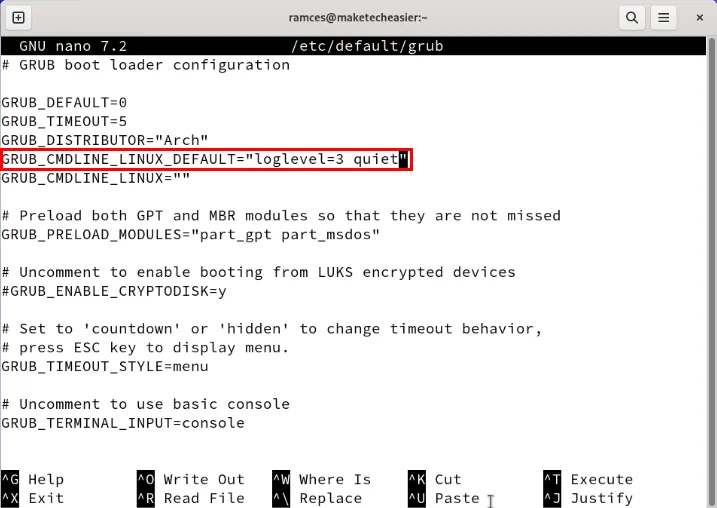
<p style="text-align: justify;">Nhấn&nbsp;<strong>Ctrl + W</strong>, sau đó tìm kiếm&nbsp;<strong>“GRUB_CMDLINE_LINUX_DEFAULT”.</strong></p>

<figure>
<div style="text-align: justify;"><img alt="Terminal highlight dòng đối số Grub." data-i="0" data-src="https://st.quantrimang.com/photos/image/2024/02/20/vo-hieu-hoa-ipv6-1.jpg" data-was-processed="true" height="508" src="https://st.quantrimang.com/photos/image/2024/02/20/vo-hieu-hoa-ipv6-1.jpg" width="717" /></div>

<figcaption>
<div style="text-align: justify;">Terminal highlight dòng đối số Grub.</div>
</figcaption>
</figure>

<div style="text-align: justify;">&nbsp;</div>

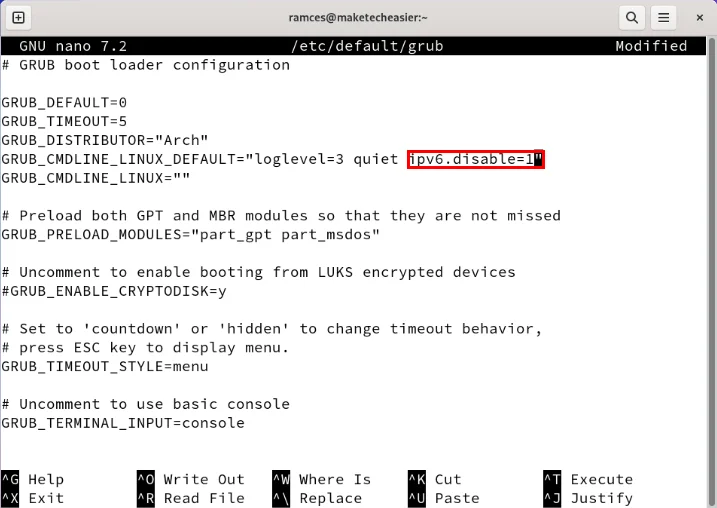
<p style="text-align: justify;">Viết&nbsp;<strong>ipv6.disable=1</strong>&nbsp;vào cuối giá trị của biến.</p>

<figure>
<div style="text-align: justify;"><img alt="Terminal hiển thị đối số IPv6 cho Grub." data-adbro-processed="true" data-i="1" data-src="https://st.quantrimang.com/photos/image/2024/02/20/vo-hieu-hoa-ipv6-2.jpg" data-was-processed="true" height="508" src="https://st.quantrimang.com/photos/image/2024/02/20/vo-hieu-hoa-ipv6-2.jpg" width="717" /></div>

<figcaption>
<div style="text-align: justify;">Terminal hiển thị đối số IPv6 cho Grub.</div>
</figcaption>
</figure>

<p style="text-align: justify;">Lưu (<strong>Ctrl + O</strong>) và thoát (<strong>Ctrl + X</strong>) trình soạn thảo văn bản.</p>

<p style="text-align: justify;">Load lại file cấu hình của bootloader của bạn:</p>

<pre id="pre3">
<code>sudo grub-mkconfig -o /boot/grub/grub.cfg</code></pre>

<p style="text-align: justify;">Khởi động lại hệ thống của bạn, sau đó chạy&nbsp;<strong>ls /proc/net/if_inet6</strong>&nbsp;để kiểm tra xem bạn đã vô hiệu hóa thành công IPv6 trên máy của mình chưa.</p>

<h3 style="text-align: justify;">Vô hiệu hóa IPv6 trên các hệ thống dựa trên Red Hat</h3>

<p style="text-align: justify;">Ngoài việc cấu hình trực tiếp bootloader của máy tính, bạn cũng có thể vô hiệu hóa IPv6 ở cấp độ người dùng. Điều này hữu ích nếu bạn chỉ muốn vô hiệu hóa IPv6 trên một số interface mạng nhất định.</p>

<p style="text-align: justify;">Để vô hiệu hóa IPv6 trên&nbsp;các bản phân phối dựa trên Red Hat, hãy mở phiên terminal mới sau đó liệt kê tất cả các interface mạng có sẵn cho máy của bạn:</p>

<pre id="pre4">
<code>ip -6 addr</code></pre>

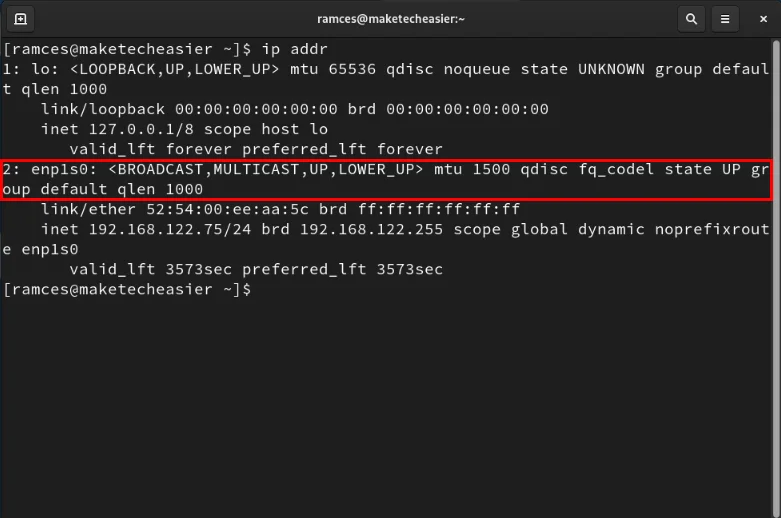
<p style="text-align: justify;">Tìm interface mạng mà bạn muốn vô hiệu hóa ngăn xếp IPv6. Trường hợp ví dụ sẽ tắt nó trên interface Ethernet “enp1s0”.</p>

<figure>
<div style="text-align: justify;"><img alt="Terminal hiển thị interface mạng Ethernet cho máy" data-i="2" data-src="https://st.quantrimang.com/photos/image/2024/02/20/vo-hieu-hoa-ipv6-3.jpg" data-was-processed="true" height="518" src="https://st.quantrimang.com/photos/image/2024/02/20/vo-hieu-hoa-ipv6-3.jpg" width="781" /></div>

<figcaption>
<div style="text-align: justify;">Terminal hiển thị interface mạng Ethernet cho máy</div>
</figcaption>
</figure>

<div style="text-align: justify;">&nbsp;</div>

<p style="text-align: justify;">Tạo một file cấu hình mới cho ngăn xếp IPv6 của bạn trong&nbsp;<strong>“/etc/sysctl.d”.</strong></p>

<pre id="pre5">
<code>sudo nano /etc/sysctl.d/40-ipv6.conf</code></pre>

<p style="text-align: justify;">Dán các dòng code sau vào file cấu hình mới của bạn:</p>

<pre id="pre6">
<code>net.ipv6.conf.all.disable_ipv6 = 1
net.ipv6.conf.YOUR-INTERFACE-NAME.disable_ipv6 = 1</code></pre>

<p style="text-align: justify;">Lưu file cấu hình mới của bạn, sau đó chạy các lệnh sau để load lại cài đặt mới của bạn:</p>

<pre id="pre7">
<code>sudo sysctl -p /etc/sysctl.d/ipv6.conf
sudo systemctl restart systemd-sysctl.service</code></pre>

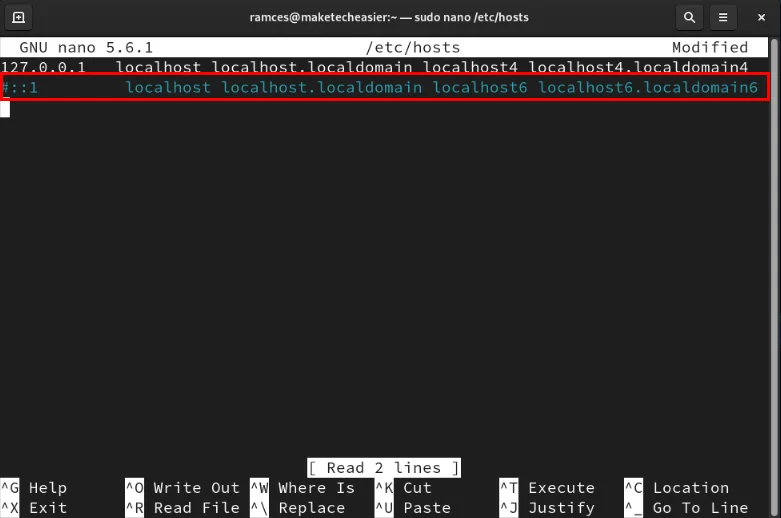
<p style="text-align: justify;">Vào bên trong file hosts của máy, sau đó thêm dấu thăng (#) ở đầu mỗi dòng chứa địa chỉ IPv6.</p>

<figure>
<div style="text-align: justify;"><img alt="Terminal hiển thị địa chỉ IPv6 trong /etc/hosts bị vô hiệu hóa." data-i="3" data-src="https://st.quantrimang.com/photos/image/2024/02/20/vo-hieu-hoa-ipv6-4.jpg" data-was-processed="true" height="518" src="https://st.quantrimang.com/photos/image/2024/02/20/vo-hieu-hoa-ipv6-4.jpg" width="781" /></div>

<figcaption>
<div style="text-align: justify;">Terminal hiển thị địa chỉ IPv6 trong /etc/hosts bị vô hiệu hóa.</div>
</figcaption>
</figure>

<p style="text-align: justify;">Tạo bản sao lưu initramfs ban đầu của máy, sau đó tạo lại nó mà không cần hỗ trợ IPv6:</p>

<pre id="pre8">
<code>sudo cp /boot/initramfs-$(uname -r).img /initramfs-backup.img
sudo dracut -f</code></pre>

<p style="text-align: justify;">Chạy lệnh nmcli và vô hiệu hóa phương thức IPv6 của nó cho interface của bạn. Điều này đảm bảo rằng cài đặt của bạn sẽ tồn tại trong suốt quá trình khởi động lại hệ thống.</p>

<pre id="pre9">
<code>sudo nmcli connection modify YOUR-INTERFACE-NAME ipv6.method &quot;disabled&quot;</code></pre>

<p style="text-align: justify;">Cuối cùng, khởi động lại hệ thống của bạn để áp dụng các cài đặt mới.</p>

<h3 style="text-align: justify;">Vô hiệu hóa IPv6 trên hệ thống dựa trên Debian</h3>

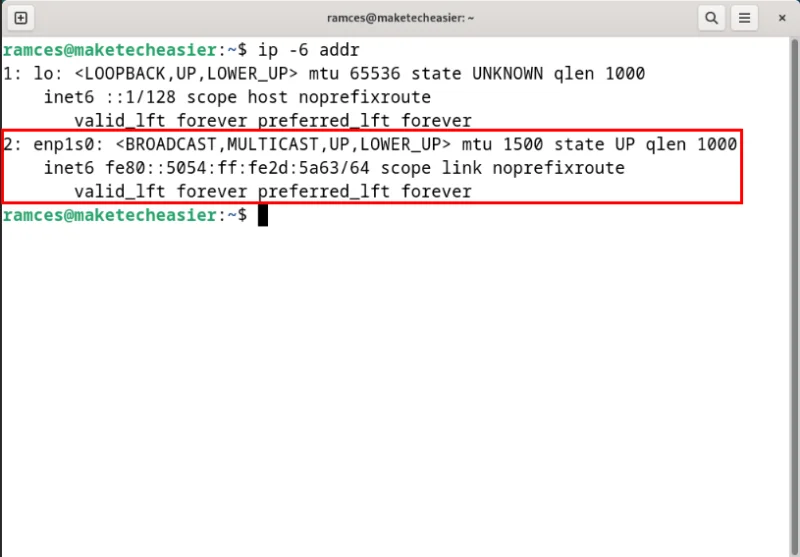
<p style="text-align: justify;">Giống như trong các bản phân phối dựa trên Red Hat, bạn cũng có thể vô hiệu hóa giao thức IPv6 khỏi userland của&nbsp;<a data-type="internal" href="https://quantrimang.com/cong-nghe/top-ban-phan-phoi-linux-dua-tren-debian-tot-nhat-197697" title="11 bản phân phối Linux dựa trên Debian tốt nhất">các hệ thống dựa trên Debian</a>. Để thực hiện việc này, hãy mở một terminal mới sau đó chạy&nbsp;<strong>ip -6 addr</strong>&nbsp;để tìm tên interface mà bạn muốn vô hiệu hóa IPv6 trên đó:</p>

<figure>
<div style="text-align: justify;"><img alt="Terminal highlight interface mạng với ngăn xếp IPv6 đang chạy." data-i="4" data-src="https://st.quantrimang.com/photos/image/2024/02/20/vo-hieu-hoa-ipv6-5.jpg" data-was-processed="true" height="557" src="https://st.quantrimang.com/photos/image/2024/02/20/vo-hieu-hoa-ipv6-5.jpg" width="800" /></div>

<figcaption>
<div style="text-align: justify;">Terminal highlight interface mạng với ngăn xếp IPv6 đang chạy.</div>
</figcaption>
</figure>

<div style="text-align: justify;">&nbsp;</div>

<p style="text-align: justify;">Chạy các lệnh sau để vô hiệu hóa ngăn xếp IPv6 trên một interface cụ thể:</p>

<pre id="pre10">
<code>sudo sysctl -w net.ipv6.conf.all.disable_ipv6=1
sudo sysctl -w net.ipv6.conf.YOUR-INTERFACE-NAME.disable_ipv6=1</code></pre>

<p style="text-align: justify;">Áp dụng các cài đặt mới bằng cách load lại daemon sysctl của bạn và service Systemd của nó:</p>

<pre id="pre11">
<code>sudo sysctl -p
sudo systemctl restart systemd-sysctl.service</code></pre>

<p style="text-align: justify;">Vô hiệu hóa phương thức IPv6 để đảm bảo rằng Systemd sẽ không ghi đè cài đặt tùy chỉnh của bạn:</p>

<pre id="pre12">
<code>sudo nmcli connection modify YOUR-CONNECTION-NAME ipv6.method &quot;disabled&quot;</code></pre>

<p style="text-align: justify;"><strong>Lưu ý</strong>: Bạn có thể tìm thấy tên interface mạng của mình trong nmcli bằng cách chạy&nbsp;<strong>nmcli connnection show</strong>.</p>

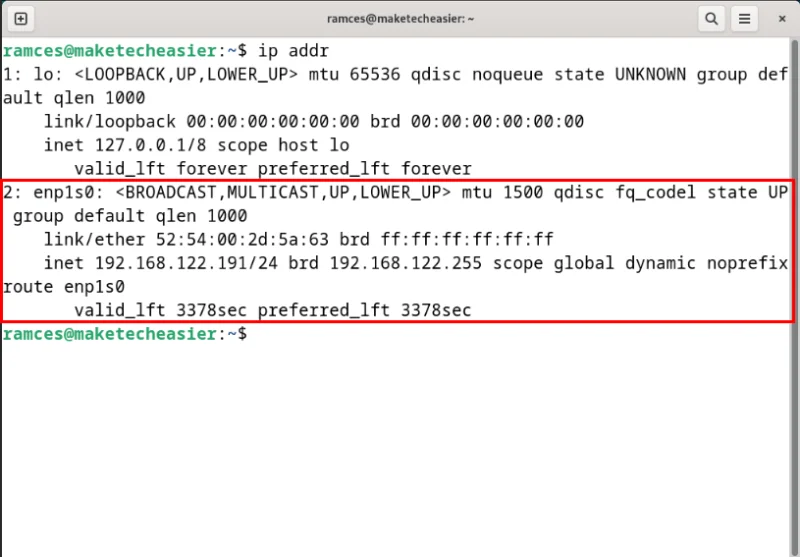
<p style="text-align: justify;">Kiểm tra xem interface mạng của bạn có còn địa chỉ IPv6 hay không bằng cách chạy&nbsp;<strong>ip addr</strong>.</p>

<figure>
<div style="text-align: justify;"><img alt="Terminal hiển thị interface mạng Ethernet mà không chạy ngăn xếp IPv6." data-i="5" data-src="https://st.quantrimang.com/photos/image/2024/02/20/vo-hieu-hoa-ipv6-6.jpg" data-was-processed="true" height="557" src="https://st.quantrimang.com/photos/image/2024/02/20/vo-hieu-hoa-ipv6-6.jpg" width="800" /></div>

<figcaption>
<div style="text-align: justify;">Terminal hiển thị interface mạng Ethernet mà không chạy ngăn xếp IPv6.</div>
</figcaption>
</figure>

<h3 style="text-align: justify;">Vô hiệu hóa IPv6 trên Ubuntu</h3>

<h4 style="text-align: justify;">Vô hiệu hóa IPv6 vĩnh viễn trên Ubuntu</h4>

<p style="text-align: justify;"><strong>Lưu ý</strong>&nbsp;: Theo mặc định, IPv6 được bật và sử dụng song song với IPv4.</p>

<p style="text-align: justify;">Để tắt IPv6 trên hệ thống Ubuntu của bạn, hãy&nbsp;mở terminal&nbsp;bằng cách nhấn&nbsp;<strong>Ctrl + Alt + T</strong>&nbsp;và sử dụng trình chỉnh sửa nano để mở file cấu hình sysctl:</p>

<pre id="pre13">
<code>sudo nano /etc/sysctl.conf</code></pre>

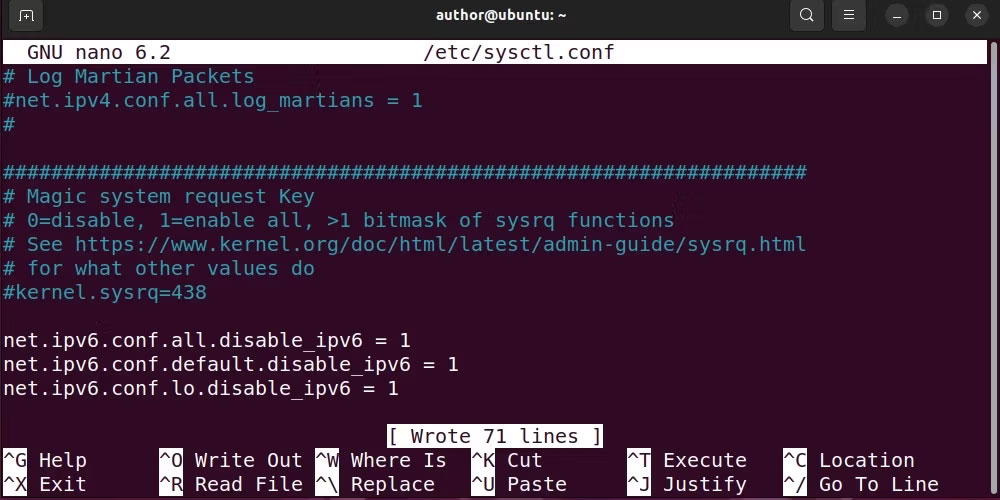
<p style="text-align: justify;">Bây giờ, thêm code sau vào file cấu hình để vô hiệu hóa các service IPv6:</p>

<pre id="pre14">
<code>net.ipv6.conf.all.disable_ipv6 = 1
net.ipv6.conf.default.disable_ipv6 = 1
net.ipv6.conf.lo.disable_ipv6 = 1</code></pre>

<p style="text-align: justify;">Trong đoạn code trên:</p>

<ul>
	<li style="text-align: justify;">Dòng đầu tiên vô hiệu hóa IPv6 cho tất cả các interface mạng trên hệ thống</li>
	<li style="text-align: justify;">Dòng thứ hai nhắm mục tiêu cụ thể vào interface mặc định và vô hiệu hóa nó</li>
	<li style="text-align: justify;">Dòng thứ ba vô hiệu hóa IPv6 trên interface loopback, nghĩa là máy sẽ không sử dụng IPV6 cho giao tiếp nội bộ</li>
</ul>

<figure>
<div style="text-align: justify;"><img alt="Thêm các dòng được chỉ định để tắt các service IPv6 trên Ubuntu" data-i="6" data-src="https://s.quantrimang.com/photos/image/2023/10/18/vo-hieu-hoa-ipv6-tren-ubuntu-1.jpg" data-was-processed="true" height="500" src="https://s.quantrimang.com/photos/image/2023/10/18/vo-hieu-hoa-ipv6-tren-ubuntu-1.jpg" width="1000" /></div>

<figcaption>
<div style="text-align: justify;">Thêm các dòng được chỉ định để tắt các service IPv6 trên Ubuntu</div>
</figcaption>
</figure>

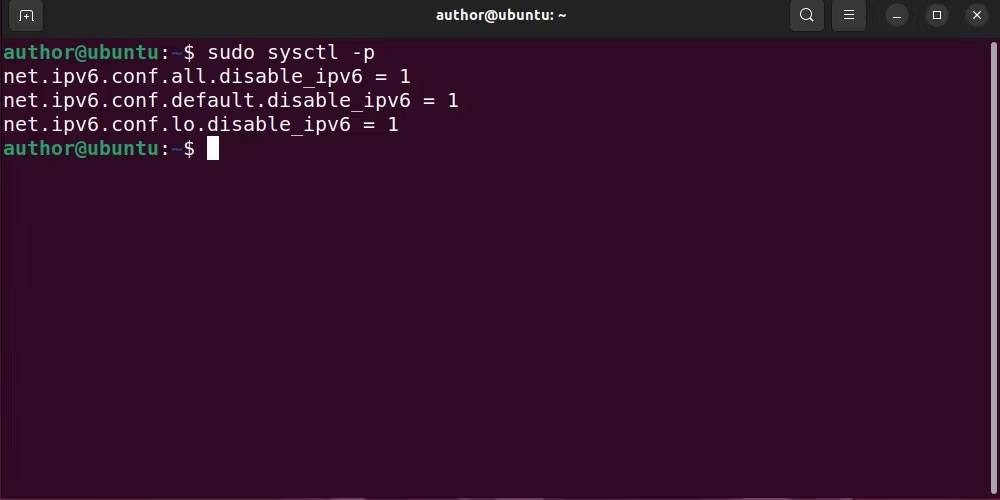
<p style="text-align: justify;">Sau khi thêm code đã cho, nhấn&nbsp;<strong>Ctrl + O</strong>&nbsp;để lưu thay đổi và thoát khỏi trình chỉnh sửa. Bây giờ, áp dụng các thay đổi cho hệ thống với:</p>
<iframe allowtransparency="true" data-google-container-id="a!5" data-google-query-id="CJLuppa7u4QDFZFMDwIdWVsCOg" data-load-complete="true" frameborder="0" height="0" hspace="0" id="aswift_4" marginheight="0" marginwidth="0" name="aswift_4" sandbox="" scrolling="no" vspace="0" width="694"></iframe>

<pre id="pre15">
<code>sudo sysctl -p</code></pre>

<figure>
<div style="text-align: justify;"><img alt="Áp dụng các thay đổi cho hệ thống Ubuntu" data-i="7" data-src="https://s.quantrimang.com/photos/image/2023/10/18/vo-hieu-hoa-ipv6-tren-ubuntu-2.jpg" data-was-processed="true" height="500" src="https://s.quantrimang.com/photos/image/2023/10/18/vo-hieu-hoa-ipv6-tren-ubuntu-2.jpg" width="1000" /></div>

<figcaption>
<div style="text-align: justify;">Áp dụng các thay đổi cho hệ thống Ubuntu</div>
</figcaption>
</figure>

<p style="text-align: justify;">Khởi động lại các service mạng của bạn với:</p>

<pre id="pre16">
<code>sudo systemctl restart systemd-networkd</code></pre>

<p style="text-align: justify;">Xác minh trạng thái của các service IPv6 bị vô hiệu hóa bằng cách chạy:</p>

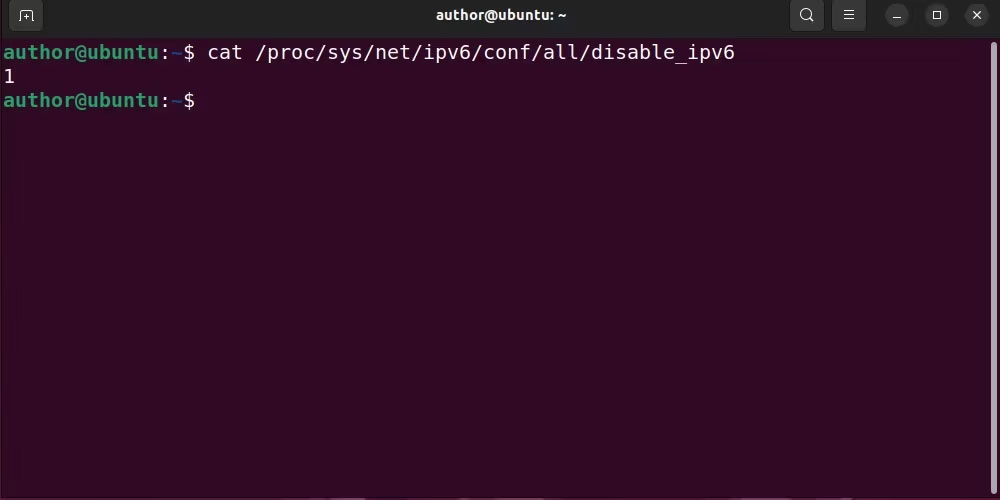
<pre id="pre17">
<code>cat /proc/sys/net/ipv6/conf/all/disable_ipv6</code></pre>

<figure>
<div style="text-align: justify;"><img alt="Kiểm tra trạng thái IPv6 trên Ubuntu" data-i="8" data-src="https://s.quantrimang.com/photos/image/2023/10/18/vo-hieu-hoa-ipv6-tren-ubuntu-3.jpg" data-was-processed="true" height="500" src="https://s.quantrimang.com/photos/image/2023/10/18/vo-hieu-hoa-ipv6-tren-ubuntu-3.jpg" width="1000" /></div>

<figcaption>
<div style="text-align: justify;">Kiểm tra trạng thái IPv6 trên Ubuntu</div>
</figcaption>
</figure>

<p style="text-align: justify;">Nếu đầu ra hiển thị trạng thái là&nbsp;<strong>&quot;1&quot;</strong>, điều đó có nghĩa là IPv6 đã bị vô hiệu hóa thành công trên Ubuntu.</p>

<h4 style="text-align: justify;">Vô hiệu hóa tạm thời IPv6 trên Ubuntu</h4>

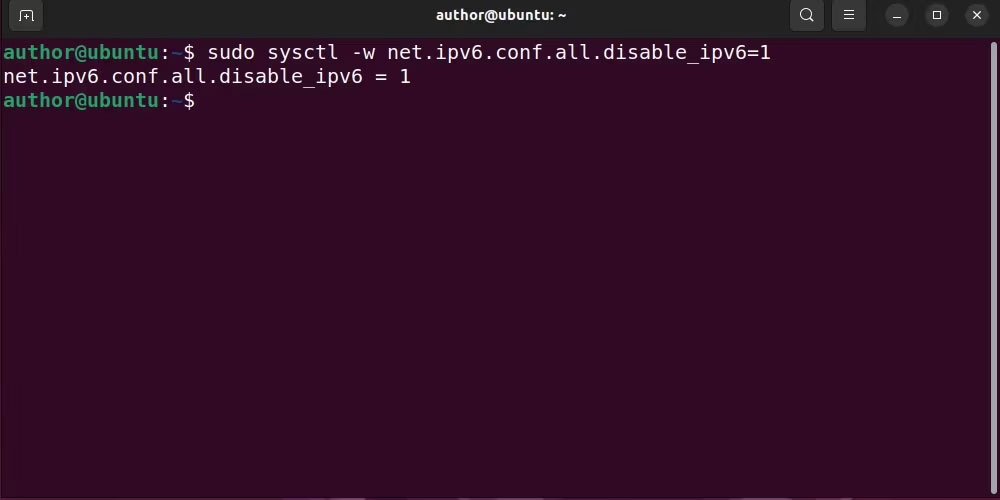
<p style="text-align: justify;">Để tạm thời tắt IPv6 trên Ubuntu, hãy chạy lệnh systemctl sau với tùy chọn&nbsp;<strong>-w</strong>:</p>

<pre id="pre18">
<code>sudo sysctl -w net.ipv6.conf.all.disable_ipv6=1</code></pre>

<figure>
<div style="text-align: justify;"><img alt="Tạm thời vô hiệu hóa IPv6 trên Ubuntu bằng lệnh được chỉ định" data-i="9" data-src="https://s.quantrimang.com/photos/image/2023/10/18/vo-hieu-hoa-ipv6-tren-ubuntu-4.jpg" data-was-processed="true" height="500" src="https://s.quantrimang.com/photos/image/2023/10/18/vo-hieu-hoa-ipv6-tren-ubuntu-4.jpg" width="1000" /></div>

<figcaption>
<div style="text-align: justify;">Tạm thời vô hiệu hóa IPv6 trên Ubuntu bằng lệnh được chỉ định</div>
</figcaption>
</figure>

<p style="text-align: justify;">Bây giờ, khởi động lại các service mạng với:</p>

<pre id="pre19">
<code>sudo systemctl restart systemd-networkd</code></pre>

<p style="text-align: justify;">Do đó, tất cả các dependency sẽ được cấu hình để tạm thời vô hiệu hóa các service IPv6.</p>

<p style="text-align: justify;">Ubuntu giúp việc kiểm soát cài đặt IPv6 tương đối đơn giản, đảm bảo rằng bạn có thể cấu hình hoạt động mạng của hệ thống theo nhu cầu cụ thể của mình. Hãy nhớ sử dụng kiến thức này một cách cẩn thận vì IPv6 sẽ tiếp tục đóng một vai trò quan trọng trong cơ sở hạ tầng Internet toàn cầu.</p>

<div style="text-align: justify;">&nbsp;</div>
		</div>
				<div id="author">
						<p>
				<strong>Nguồn tin:</strong>
				Quantrimang.com
			</p>
		</div>
	</div>
	<div id="footer" class="clearfix">
		<div id="url">
			<strong>URL của bản tin này: </strong><a href="https://www.nguoicodonvn2008.info/vi/news/savefile/kien-thuc-may-tinh/cach-vo-hieu-hoa-ipv6-tren-linux-8097.html" title="Cách vô hiệu hóa IPv6 trên Linux">https://www.nguoicodonvn2008.info/vi/news/savefile/kien-thuc-may-tinh/cach-vo-hieu-hoa-ipv6-tren-linux-8097.html</a>

		</div>
		<div class="clear"></div>
		<div class="copyright">
			&copy; .&#x3A; Nguoicodonvn2008.info - Cõi lòng người cô đơn &#x3A;.
		</div>
		<div id="contact">
			<a href="mailto:admin@nguoicodonvn2008.info">admin@nguoicodonvn2008.info</a>
		</div>
	</div>
</div>
        <div id="timeoutsess" class="chromeframe">
            Bạn đã không sử dụng Site, <a onclick="timeoutsesscancel();" href="https://nguoicodonvn2008.info/#">Bấm vào đây để duy trì trạng thái đăng nhập</a>. Thời gian chờ: <span id="secField"> 60 </span> giây
        </div>
        <div id="openidResult" class="nv-alert" style="display:none"></div>
        <div id="openidBt" data-result="" data-redirect=""></div>
		</script>
		<div class="car-top">
  <span><img src="https://nguoicodonvn2008.info/themes/default/images/car.png" alt=""></span>
</div>
<script src="https://nguoicodonvn2008.info/assets/js/jquery/jquery.min.js"></script>
<script>var nv_base_siteurl="/",nv_lang_data="vi",nv_lang_interface="vi",nv_name_variable="nv",nv_fc_variable="op",nv_lang_variable="language",nv_module_name="news",nv_func_name="savefile",nv_is_user=0, nv_my_ofs=-4,nv_my_abbr="EDT",nv_cookie_prefix="nv4c_e856T",nv_check_pass_mstime=1738000,nv_area_admin=0,nv_safemode=0,theme_responsive=0,nv_recaptcha_ver=2,nv_recaptcha_sitekey="",nv_recaptcha_type="image",XSSsanitize=1;</script>
<script src="https://nguoicodonvn2008.info/assets/js/language/vi.js"></script>
<script src="https://nguoicodonvn2008.info/assets/js/DOMPurify/purify3.js"></script>
<script src="https://nguoicodonvn2008.info/assets/js/global.js"></script>
<script src="https://nguoicodonvn2008.info/assets/js/site.js"></script>
<script src="https://nguoicodonvn2008.info/themes/default/js/news.js"></script>
<script src="https://nguoicodonvn2008.info/themes/default/js/main.js"></script>
<script src="https://nguoicodonvn2008.info/themes/default/js/custom.js"></script>
<script type="application/ld+json">
        {
            "@context": "https://schema.org",
            "@type": "Organization",
            "url": "https://nguoicodonvn2008.info",
            "logo": "https://nguoicodonvn2008.info/uploads/angel.gif"
        }
        </script>
<script src="https://nguoicodonvn2008.info/themes/default/js/bootstrap.min.js"></script>
<script type="text/javascript">
var $scrolltop = $('.car-top');
$scrolltop.on('click', function () {
    $('html,body').animate({
        scrollTop: 0
    }, 800);
    $(this).addClass("car-run");
    setTimeout(function(){ $scrolltop.removeClass('car-run');}, 1000);
    return false;
});
$(window).on('scroll', function ()
{ 
    if($(window).scrollTop() >= 200)
    {
        $scrolltop.addClass("show");
        $scrolltop.addClass("car-down");
    }
    else
    {
       $scrolltop.removeClass("show");
       setTimeout(function(){ $scrolltop.removeClass('car-down');}, 300);
    }
});
</script>
</body>
</html>