<!DOCTYPE html>
    <html lang="vi" xmlns="http://www.w3.org/1999/xhtml" prefix="og: http://ogp.me/ns#">
    <head>
<title>Cách truy cập Recovery Mode trên máy Mac M1</title>
<meta name="description" content="Cách truy cập Recovery Mode trên máy Mac M1 - Savefile - Tin Tức -...">
<meta name="author" content=".: Nguoicodonvn2008.info - Cõi lòng người cô đơn :.">
<meta name="copyright" content=".: Nguoicodonvn2008.info - Cõi lòng người cô đơn :. [admin@nguoicodonvn2008.info]">
<meta name="robots" content="index, archive, follow, noodp">
<meta name="googlebot" content="index,archive,follow,noodp">
<meta name="msnbot" content="all,index,follow">
<meta name="generator" content="NukeViet v4.5">
<meta http-equiv="Content-Type" content="text/html; charset=utf-8">
<meta property="og:title" content="Cách truy cập Recovery Mode trên máy Mac M1">
<meta property="og:type" content="website">
<meta property="og:description" content="Savefile - Tin Tức - https&#x3A;&#x002F;&#x002F;www.nguoicodonvn2008.info&#x002F;vi&#x002F;news&#x002F;savefile&#x002F;kien-thuc-may-tinh&#x002F;cach-truy-cap-recovery-mode-tren-may-mac-m1-3332.html">
<meta property="og:site_name" content=".&#x3A; Nguoicodonvn2008.info - Cõi lòng người cô đơn &#x3A;.">
<meta property="og:url" content="https://www.nguoicodonvn2008.info/vi/news/savefile/kien-thuc-may-tinh/cach-truy-cap-recovery-mode-tren-may-mac-m1-3332.html">
<link rel="shortcut icon" href="https://nguoicodonvn2008.info/favicon.ico">
<link rel="canonical" href="https://www.nguoicodonvn2008.info/vi/news/savefile/kien-thuc-may-tinh/cach-truy-cap-recovery-mode-tren-may-mac-m1-3332.html">
<link rel="alternate" href="https://nguoicodonvn2008.info/vi/news/rss/" title="Tin Tức" type="application/rss+xml">
<link rel="alternate" href="https://nguoicodonvn2008.info/vi/news/rss/karaoke-dual/" title="Tin Tức - Karaoke Dual" type="application/rss+xml">
<link rel="alternate" href="https://nguoicodonvn2008.info/vi/news/rss/nhac-tre/" title="Tin Tức - Nhạc trẻ" type="application/rss+xml">
<link rel="alternate" href="https://nguoicodonvn2008.info/vi/news/rss/tru-tinh/" title="Tin Tức - Trữ tình" type="application/rss+xml">
<link rel="alternate" href="https://nguoicodonvn2008.info/vi/news/rss/nuoc-ngoai/" title="Tin Tức - Nước ngoài" type="application/rss+xml">
<link rel="alternate" href="https://nguoicodonvn2008.info/vi/news/rss/remix/" title="Tin Tức - Remix" type="application/rss+xml">
<link rel="alternate" href="https://nguoicodonvn2008.info/vi/news/rss/tam-su-tinh-yeu/" title="Tin Tức - Tâm sự tình yêu" type="application/rss+xml">
<link rel="alternate" href="https://nguoicodonvn2008.info/vi/news/rss/tho-suu-tam/" title="Tin Tức - Thơ sưu tầm" type="application/rss+xml">
<link rel="alternate" href="https://nguoicodonvn2008.info/vi/news/rss/cuoc-song/" title="Tin Tức - Cuộc sống" type="application/rss+xml">
<link rel="alternate" href="https://nguoicodonvn2008.info/vi/news/rss/phan-mem/" title="Tin Tức - Phần mềm" type="application/rss+xml">
<link rel="alternate" href="https://nguoicodonvn2008.info/vi/news/rss/kien-thuc-may-tinh/" title="Tin Tức - Kiến thức máy tính" type="application/rss+xml">
<link rel="alternate" href="https://nguoicodonvn2008.info/vi/news/rss/hoc-tap/" title="Tin Tức - Học tập" type="application/rss+xml">
<link rel="alternate" href="https://nguoicodonvn2008.info/vi/news/rss/tai-lieu/" title="Tin Tức - Tài liệu" type="application/rss+xml">
<link rel="alternate" href="https://nguoicodonvn2008.info/vi/news/rss/de-thi/" title="Tin Tức - Đề thi" type="application/rss+xml">
<link rel="preload" as="style" href="https://nguoicodonvn2008.info/assets/css/font-awesome.min.css" type="text/css">
<link rel="preload" as="style" href="https://nguoicodonvn2008.info/themes/default/css/bootstrap.non-responsive.css" type="text/css">
<link rel="preload" as="style" href="https://nguoicodonvn2008.info/themes/default/css/style.css" type="text/css">
<link rel="preload" as="style" href="https://nguoicodonvn2008.info/themes/default/css/style.non-responsive.css" type="text/css">
<link rel="preload" as="style" href="https://nguoicodonvn2008.info/themes/default/css/news.css" type="text/css">
<link rel="preload" as="style" href="https://nguoicodonvn2008.info/themes/default/css/custom.css" type="text/css">
<link rel="preload" as="script" href="https://nguoicodonvn2008.info/assets/js/jquery/jquery.min.js" type="text/javascript">
<link rel="preload" as="script" href="https://nguoicodonvn2008.info/assets/js/language/vi.js" type="text/javascript">
<link rel="preload" as="script" href="https://nguoicodonvn2008.info/assets/js/DOMPurify/purify3.js" type="text/javascript">
<link rel="preload" as="script" href="https://nguoicodonvn2008.info/assets/js/global.js" type="text/javascript">
<link rel="preload" as="script" href="https://nguoicodonvn2008.info/assets/js/site.js" type="text/javascript">
<link rel="preload" as="script" href="https://nguoicodonvn2008.info/themes/default/js/news.js" type="text/javascript">
<link rel="preload" as="script" href="https://nguoicodonvn2008.info/themes/default/js/main.js" type="text/javascript">
<link rel="preload" as="script" href="https://nguoicodonvn2008.info/themes/default/js/custom.js" type="text/javascript">
<link rel="preload" as="script" href="https://nguoicodonvn2008.info/themes/default/js/bootstrap.min.js" type="text/javascript">
<link rel="stylesheet" href="https://nguoicodonvn2008.info/assets/css/font-awesome.min.css">
<link rel="stylesheet" href="https://nguoicodonvn2008.info/themes/default/css/bootstrap.non-responsive.css">
<link rel="stylesheet" href="https://nguoicodonvn2008.info/themes/default/css/style.css">
<link rel="stylesheet" href="https://nguoicodonvn2008.info/themes/default/css/style.non-responsive.css">
<link rel="StyleSheet" href="https://nguoicodonvn2008.info/themes/default/css/news.css">
<link rel="stylesheet" href="https://nguoicodonvn2008.info/themes/default/css/custom.css">
<style type="text/css">
	body{background: #fff;}
</style>
    </head>
    <body>
<div id="print">
	<div id="hd_print">
		<h2 class="pull-left">.&#x3A; Nguoicodonvn2008.info - Cõi lòng người cô đơn &#x3A;.</h2>
		<p class="pull-right"><a title=".&#x3A; Nguoicodonvn2008.info - Cõi lòng người cô đơn &#x3A;." href="https://nguoicodonvn2008.info/">https://nguoicodonvn2008.info</a></p>
	</div>
	<div class="clear"></div>
	<hr />
	<div id="content">
		<h1>Cách truy cập Recovery Mode trên máy Mac M1</h1>
		<ul class="list-inline">
			<li>Thứ hai - 28/12/2020 23:50</li>
			<li class="hidden-print txtrequired"><em class="fa fa-print">&nbsp;</em><a title="In ra" href="javascript:;" onclick="window.print()">In ra</a></li>
			<li class="hidden-print txtrequired"><em class="fa fa-power-off">&nbsp;</em><a title="Đóng cửa sổ này" href="javascript:;" onclick="window.close()">Đóng cửa sổ này</a></li>
		</ul>
		<div class="clear"></div>
		<div id="hometext">
		</div>
				<div class="imghome">
			<img alt="Cách truy cập Recovery Mode trên máy Mac M1" src="https://st.quantrimang.com/photos/image/2020/12/27/cach-truy-cap-recovery-mode-tren-may-mac-m11.jpg" width="460" class="img-thumbnail" />
		</div>
		<div class="clear"></div>
		<div id="bodytext" class="clearfix">
			<p>Recovery Mode (Chế độ Khôi phục) trên macOS có thể được coi là phương án duy nhất và triệt để nhất để khắc phục máy Mac gặp lỗi nghiêm trọng, gần như không thể sử dụng tiếp được. Đây là nơi bạn có thể cài đặt lại hệ điều hành hoặc định dạng lại ổ đĩa.</p>

<p>Nếu là người dùng macOS lâu năm, bạn có thể quen thuộc với tổ hợp phím tắt thường được sử dụng để truy cập Recovery Mode trên máy Mac chạy chip Intel thông thường. Đó là giữ phím Command + R khi máy đang trong quá trình khởi động. Tuy nhiên, cách làm này sẽ không hiệu quả nếu bạn đang sử dụng máy Mac sử dụng CPU Apple Silicon (Chip M1 trở lên).</p>

<p>Vậy làm thế nào để truy cập Recovery Mode trên các máy Mac chạy chip M1 ARM vừa ra mắt? Bạn chỉ cần thực hiện theo các bước sau.</p>

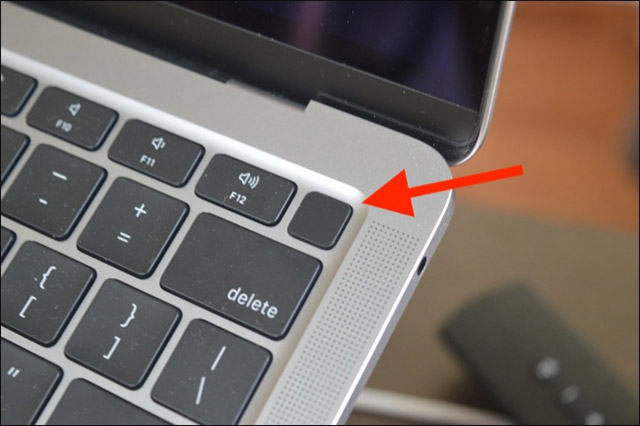
<p>Đầu tiên, nếu máy Mac M1 của bạn đang hoạt động, hay tắt nó đi. Tiếp theo, nhấn và giữ nút Power/Touch ID trên thiết bị để bật lại.</p>

<figure><img alt="Bật lại thiết bị" data-i="0" data-src="https://st.quantrimang.com/photos/image/2020/12/27/cach-truy-cap-recovery-mode-tren-may-mac-m11.jpg" data-was-processed="true" height="426" src="https://st.quantrimang.com/photos/image/2020/12/27/cach-truy-cap-recovery-mode-tren-may-mac-m11.jpg" width="640" />
<figcaption>Bật lại thiết bị</figcaption>
</figure>

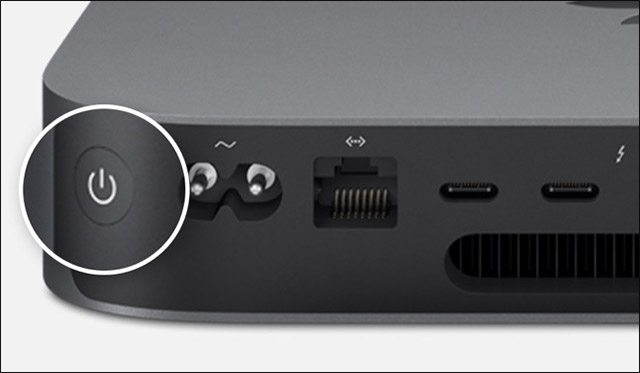
<p>Nếu bạn đang sử dụng một máy Mac độc lập, hãy nhấn và giữ nút Power ở phía sau của máy.</p>

<figure><img alt="Nút Power" data-i="1" data-src="https://st.quantrimang.com/photos/image/2020/12/27/cach-truy-cap-recovery-mode-tren-may-mac-m12.jpg" data-was-processed="true" height="373" src="https://st.quantrimang.com/photos/image/2020/12/27/cach-truy-cap-recovery-mode-tren-may-mac-m12.jpg" width="640" />
<figcaption>Nút Power</figcaption>
</figure>

<p>Tiếp tục giữ nút Power cho đến khi bạn nhìn thấy dòng chữ “<strong>Loading Startup Options</strong>” xuất hiện trên màn hình.</p>

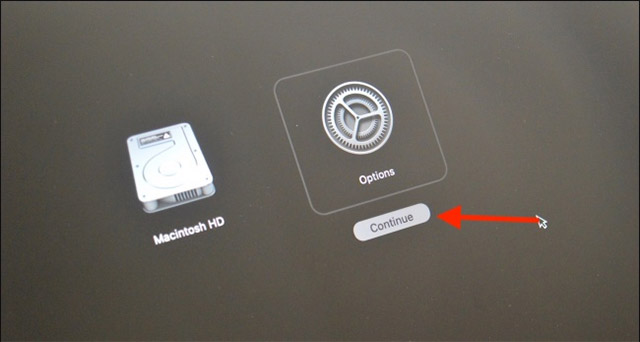
<p>Trong một vài giây, bạn sẽ thấy ổ đĩa khởi động máy Mac và nút “<strong>Options</strong>” hiện ra. Hãy bấm vào nút “<strong>Options</strong>” này, sau đó nhấp vào “<strong>Continue</strong>”.</p>

<figure><img alt="Nhấp vào “Continue”" data-i="2" data-src="https://st.quantrimang.com/photos/image/2020/12/27/cach-truy-cap-recovery-mode-tren-may-mac-m13.jpg" data-was-processed="true" height="342" src="https://st.quantrimang.com/photos/image/2020/12/27/cach-truy-cap-recovery-mode-tren-may-mac-m13.jpg" width="640" />
<figcaption>Nhấp vào “Continue”</figcaption>
</figure>

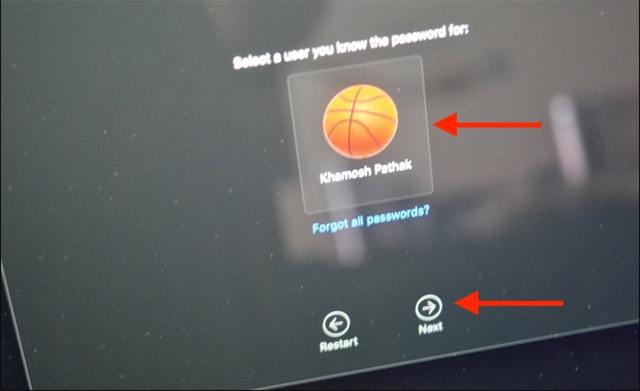
<p>Bây giờ, hệ thống sẽ yêu cầu bạn chọn một tài khoản người dùng. Hãy chọn tài khoản mà bạn muốn đăng nhập và nhấp vào nút “<strong>Next</strong>”.</p>

<figure><img alt="Chọn tài khoản" data-i="3" data-src="https://st.quantrimang.com/photos/image/2020/12/27/cach-truy-cap-recovery-mode-tren-may-mac-m14.jpg" data-was-processed="true" height="391" src="https://st.quantrimang.com/photos/image/2020/12/27/cach-truy-cap-recovery-mode-tren-may-mac-m14.jpg" width="640" />
<figcaption>Chọn tài khoản</figcaption>
</figure>

<p>Tại đây, bạn cần phải nhập mật khẩu cho tài khoản người dùng tương ứng mà mình vừa chọn.</p>

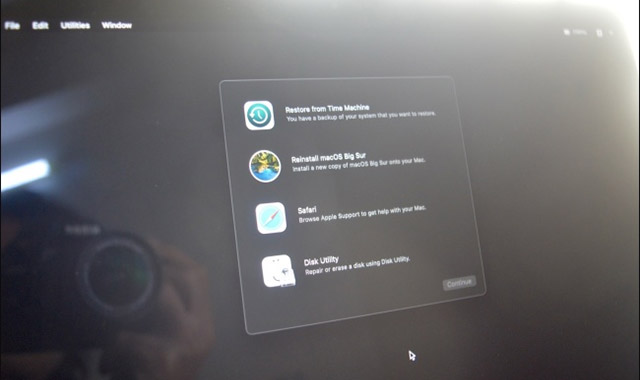
<p>Bây giờ, bạn đang ở trong Recovery Mode.</p>

<figure><img alt="Recovery Mode" data-i="4" data-src="https://st.quantrimang.com/photos/image/2020/12/27/cach-truy-cap-recovery-mode-tren-may-mac-m15.jpg" data-was-processed="true" height="380" src="https://st.quantrimang.com/photos/image/2020/12/27/cach-truy-cap-recovery-mode-tren-may-mac-m15.jpg" width="640" />
<figcaption>Recovery Mode</figcaption>
</figure>

<p>Đến bước này, mọi thao tác sẽ lại trở về bình thường như trên máy Mac sử dụng chip Intel truyền thống. Tại đây, bạn có thể chọn cài đặt lại hệ điều hành, khôi phục từ Time Machine, sử dụng Disk Utility để định dạng lại hệ thống, và tất nhiên bạn cũng có thể sử dụng Safari để duyệt web.</p>

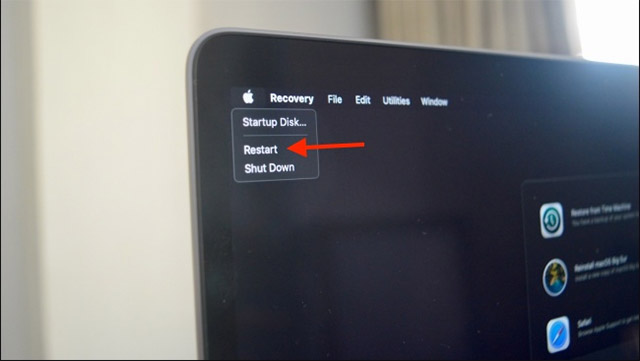
<p>Khi đã hoàn thành công việc, bạn sẽ phải khởi động vào macOS. Để thực hiện điều này, hãy nhấp vào nút Apple từ thanh menu và chọn tùy chọn “<strong>Restart</strong>”.</p>

<figure><img alt="Restart hệ thống khi hoàn thành công việc" data-i="5" data-src="https://st.quantrimang.com/photos/image/2020/12/27/cach-truy-cap-recovery-mode-tren-may-mac-m16.jpg" data-was-processed="true" height="361" src="https://st.quantrimang.com/photos/image/2020/12/27/cach-truy-cap-recovery-mode-tren-may-mac-m16.jpg" width="640" />
<figcaption>Restart hệ thống khi hoàn thành công việc</figcaption>
</figure>

<p>Chỉ trong vài giây, máy Mac sẽ tự khởi động lại, và bạn sẽ thấy màn hình đăng nhập quen thuộc.</p>
		</div>
				<div id="author">
						<p>
				<strong>Nguồn tin:</strong>
				Quantrimang.com
			</p>
		</div>
	</div>
	<div id="footer" class="clearfix">
		<div id="url">
			<strong>URL của bản tin này: </strong><a href="https://www.nguoicodonvn2008.info/vi/news/savefile/kien-thuc-may-tinh/cach-truy-cap-recovery-mode-tren-may-mac-m1-3332.html" title="Cách truy cập Recovery Mode trên máy Mac M1">https://www.nguoicodonvn2008.info/vi/news/savefile/kien-thuc-may-tinh/cach-truy-cap-recovery-mode-tren-may-mac-m1-3332.html</a>

		</div>
		<div class="clear"></div>
		<div class="copyright">
			&copy; .&#x3A; Nguoicodonvn2008.info - Cõi lòng người cô đơn &#x3A;.
		</div>
		<div id="contact">
			<a href="mailto:admin@nguoicodonvn2008.info">admin@nguoicodonvn2008.info</a>
		</div>
	</div>
</div>
        <div id="timeoutsess" class="chromeframe">
            Bạn đã không sử dụng Site, <a onclick="timeoutsesscancel();" href="https://nguoicodonvn2008.info/#">Bấm vào đây để duy trì trạng thái đăng nhập</a>. Thời gian chờ: <span id="secField"> 60 </span> giây
        </div>
        <div id="openidResult" class="nv-alert" style="display:none"></div>
        <div id="openidBt" data-result="" data-redirect=""></div>
		</script>
		<div class="car-top">
  <span><img src="https://nguoicodonvn2008.info/themes/default/images/car.png" alt=""></span>
</div>
<script src="https://nguoicodonvn2008.info/assets/js/jquery/jquery.min.js"></script>
<script>var nv_base_siteurl="/",nv_lang_data="vi",nv_lang_interface="vi",nv_name_variable="nv",nv_fc_variable="op",nv_lang_variable="language",nv_module_name="news",nv_func_name="savefile",nv_is_user=0, nv_my_ofs=-4,nv_my_abbr="EDT",nv_cookie_prefix="nv4c_e856T",nv_check_pass_mstime=1738000,nv_area_admin=0,nv_safemode=0,theme_responsive=0,nv_recaptcha_ver=2,nv_recaptcha_sitekey="",nv_recaptcha_type="image",XSSsanitize=1;</script>
<script src="https://nguoicodonvn2008.info/assets/js/language/vi.js"></script>
<script src="https://nguoicodonvn2008.info/assets/js/DOMPurify/purify3.js"></script>
<script src="https://nguoicodonvn2008.info/assets/js/global.js"></script>
<script src="https://nguoicodonvn2008.info/assets/js/site.js"></script>
<script src="https://nguoicodonvn2008.info/themes/default/js/news.js"></script>
<script src="https://nguoicodonvn2008.info/themes/default/js/main.js"></script>
<script src="https://nguoicodonvn2008.info/themes/default/js/custom.js"></script>
<script type="application/ld+json">
        {
            "@context": "https://schema.org",
            "@type": "Organization",
            "url": "https://nguoicodonvn2008.info",
            "logo": "https://nguoicodonvn2008.info/uploads/angel.gif"
        }
        </script>
<script src="https://nguoicodonvn2008.info/themes/default/js/bootstrap.min.js"></script>
<script type="text/javascript">
var $scrolltop = $('.car-top');
$scrolltop.on('click', function () {
    $('html,body').animate({
        scrollTop: 0
    }, 800);
    $(this).addClass("car-run");
    setTimeout(function(){ $scrolltop.removeClass('car-run');}, 1000);
    return false;
});
$(window).on('scroll', function ()
{ 
    if($(window).scrollTop() >= 200)
    {
        $scrolltop.addClass("show");
        $scrolltop.addClass("car-down");
    }
    else
    {
       $scrolltop.removeClass("show");
       setTimeout(function(){ $scrolltop.removeClass('car-down');}, 300);
    }
});
</script>
</body>
</html>