<!DOCTYPE html>
    <html lang="vi" xmlns="http://www.w3.org/1999/xhtml" prefix="og: http://ogp.me/ns#">
    <head>
<title>Cách trải nghiệm Apple Music trên máy tính Windows</title>
<meta name="description" content="Cách trải nghiệm Apple Music trên máy tính Windows - Savefile - Tin Tức -...">
<meta name="author" content=".: Nguoicodonvn2008.info - Cõi lòng người cô đơn :.">
<meta name="copyright" content=".: Nguoicodonvn2008.info - Cõi lòng người cô đơn :. [admin@nguoicodonvn2008.info]">
<meta name="robots" content="index, archive, follow, noodp">
<meta name="googlebot" content="index,archive,follow,noodp">
<meta name="msnbot" content="all,index,follow">
<meta name="generator" content="NukeViet v4.5">
<meta http-equiv="Content-Type" content="text/html; charset=utf-8">
<meta property="og:title" content="Cách trải nghiệm Apple Music trên máy tính Windows">
<meta property="og:type" content="website">
<meta property="og:description" content="Savefile - Tin Tức - https&#x3A;&#x002F;&#x002F;www.nguoicodonvn2008.info&#x002F;vi&#x002F;news&#x002F;savefile&#x002F;kien-thuc-may-tinh&#x002F;cach-trai-nghiem-apple-music-tren-may-tinh-windows-1767.html">
<meta property="og:site_name" content=".&#x3A; Nguoicodonvn2008.info - Cõi lòng người cô đơn &#x3A;.">
<meta property="og:url" content="https://www.nguoicodonvn2008.info/vi/news/savefile/kien-thuc-may-tinh/cach-trai-nghiem-apple-music-tren-may-tinh-windows-1767.html">
<link rel="shortcut icon" href="https://nguoicodonvn2008.info/favicon.ico">
<link rel="canonical" href="https://www.nguoicodonvn2008.info/vi/news/savefile/kien-thuc-may-tinh/cach-trai-nghiem-apple-music-tren-may-tinh-windows-1767.html">
<link rel="alternate" href="https://nguoicodonvn2008.info/vi/news/rss/" title="Tin Tức" type="application/rss+xml">
<link rel="alternate" href="https://nguoicodonvn2008.info/vi/news/rss/karaoke-dual/" title="Tin Tức - Karaoke Dual" type="application/rss+xml">
<link rel="alternate" href="https://nguoicodonvn2008.info/vi/news/rss/nhac-tre/" title="Tin Tức - Nhạc trẻ" type="application/rss+xml">
<link rel="alternate" href="https://nguoicodonvn2008.info/vi/news/rss/tru-tinh/" title="Tin Tức - Trữ tình" type="application/rss+xml">
<link rel="alternate" href="https://nguoicodonvn2008.info/vi/news/rss/nuoc-ngoai/" title="Tin Tức - Nước ngoài" type="application/rss+xml">
<link rel="alternate" href="https://nguoicodonvn2008.info/vi/news/rss/remix/" title="Tin Tức - Remix" type="application/rss+xml">
<link rel="alternate" href="https://nguoicodonvn2008.info/vi/news/rss/tam-su-tinh-yeu/" title="Tin Tức - Tâm sự tình yêu" type="application/rss+xml">
<link rel="alternate" href="https://nguoicodonvn2008.info/vi/news/rss/tho-suu-tam/" title="Tin Tức - Thơ sưu tầm" type="application/rss+xml">
<link rel="alternate" href="https://nguoicodonvn2008.info/vi/news/rss/cuoc-song/" title="Tin Tức - Cuộc sống" type="application/rss+xml">
<link rel="alternate" href="https://nguoicodonvn2008.info/vi/news/rss/phan-mem/" title="Tin Tức - Phần mềm" type="application/rss+xml">
<link rel="alternate" href="https://nguoicodonvn2008.info/vi/news/rss/kien-thuc-may-tinh/" title="Tin Tức - Kiến thức máy tính" type="application/rss+xml">
<link rel="alternate" href="https://nguoicodonvn2008.info/vi/news/rss/hoc-tap/" title="Tin Tức - Học tập" type="application/rss+xml">
<link rel="alternate" href="https://nguoicodonvn2008.info/vi/news/rss/tai-lieu/" title="Tin Tức - Tài liệu" type="application/rss+xml">
<link rel="alternate" href="https://nguoicodonvn2008.info/vi/news/rss/de-thi/" title="Tin Tức - Đề thi" type="application/rss+xml">
<link rel="preload" as="style" href="https://nguoicodonvn2008.info/assets/css/font-awesome.min.css" type="text/css">
<link rel="preload" as="style" href="https://nguoicodonvn2008.info/themes/default/css/bootstrap.non-responsive.css" type="text/css">
<link rel="preload" as="style" href="https://nguoicodonvn2008.info/themes/default/css/style.css" type="text/css">
<link rel="preload" as="style" href="https://nguoicodonvn2008.info/themes/default/css/style.non-responsive.css" type="text/css">
<link rel="preload" as="style" href="https://nguoicodonvn2008.info/themes/default/css/news.css" type="text/css">
<link rel="preload" as="style" href="https://nguoicodonvn2008.info/themes/default/css/custom.css" type="text/css">
<link rel="preload" as="script" href="https://nguoicodonvn2008.info/assets/js/jquery/jquery.min.js" type="text/javascript">
<link rel="preload" as="script" href="https://nguoicodonvn2008.info/assets/js/language/vi.js" type="text/javascript">
<link rel="preload" as="script" href="https://nguoicodonvn2008.info/assets/js/DOMPurify/purify3.js" type="text/javascript">
<link rel="preload" as="script" href="https://nguoicodonvn2008.info/assets/js/global.js" type="text/javascript">
<link rel="preload" as="script" href="https://nguoicodonvn2008.info/assets/js/site.js" type="text/javascript">
<link rel="preload" as="script" href="https://nguoicodonvn2008.info/themes/default/js/news.js" type="text/javascript">
<link rel="preload" as="script" href="https://nguoicodonvn2008.info/themes/default/js/main.js" type="text/javascript">
<link rel="preload" as="script" href="https://nguoicodonvn2008.info/themes/default/js/custom.js" type="text/javascript">
<link rel="preload" as="script" href="https://nguoicodonvn2008.info/themes/default/js/bootstrap.min.js" type="text/javascript">
<link rel="stylesheet" href="https://nguoicodonvn2008.info/assets/css/font-awesome.min.css">
<link rel="stylesheet" href="https://nguoicodonvn2008.info/themes/default/css/bootstrap.non-responsive.css">
<link rel="stylesheet" href="https://nguoicodonvn2008.info/themes/default/css/style.css">
<link rel="stylesheet" href="https://nguoicodonvn2008.info/themes/default/css/style.non-responsive.css">
<link rel="StyleSheet" href="https://nguoicodonvn2008.info/themes/default/css/news.css">
<link rel="stylesheet" href="https://nguoicodonvn2008.info/themes/default/css/custom.css">
<style type="text/css">
	body{background: #fff;}
</style>
    </head>
    <body>
<div id="print">
	<div id="hd_print">
		<h2 class="pull-left">.&#x3A; Nguoicodonvn2008.info - Cõi lòng người cô đơn &#x3A;.</h2>
		<p class="pull-right"><a title=".&#x3A; Nguoicodonvn2008.info - Cõi lòng người cô đơn &#x3A;." href="https://nguoicodonvn2008.info/">https://nguoicodonvn2008.info</a></p>
	</div>
	<div class="clear"></div>
	<hr />
	<div id="content">
		<h1>Cách trải nghiệm Apple Music trên máy tính Windows</h1>
		<ul class="list-inline">
			<li>Thứ tư - 04/03/2020 00:02</li>
			<li class="hidden-print txtrequired"><em class="fa fa-print">&nbsp;</em><a title="In ra" href="javascript:;" onclick="window.print()">In ra</a></li>
			<li class="hidden-print txtrequired"><em class="fa fa-power-off">&nbsp;</em><a title="Đóng cửa sổ này" href="javascript:;" onclick="window.close()">Đóng cửa sổ này</a></li>
		</ul>
		<div class="clear"></div>
		<div id="hometext">
		</div>
				<div class="imghome">
			<img alt="Cách trải nghiệm Apple Music trên máy tính Windows" src="https://st.quantrimang.com/photos/image/072015/07/itunes3.jpg" width="460" class="img-thumbnail" />
		</div>
		<div class="clear"></div>
		<div id="bodytext" class="clearfix">
			<p style="text-align: justify;">Kho âm nhạc Apple Music mang tới người dùng những bản nhạc mới, album mới hay những bài hát thuộc nhiều thể loại của nhiều nghệ sỹ khác nhau. Và để có thể nghe được những bài hát từ kho Apple Music này thì bạn cần có thiết bị iOS để trải nghiệm. Tuy nhiên có nhiều cách khác nhau để chúng ta có thể nghe, tìm kiếm các bài hát khác trên Apple Music ngay tại máy tính Windows mà không cần đăng nhập trực tiếp vào trang chủ. Bạn có thể sử dụng phần mềm iTunes để nghe nhạc 3 tháng miễn phí, hoặc dùng tiện ích cài đặt để nghe thử các bài hát. Bài viết dưới đây sẽ hướng dẫn bạn đọc một số cách trải nghiệm, nghe nhạc trên Apple Music.</p>

<h2 style="text-align: justify;">1. Nghe thử nhạc Apple Music bằng Apple Music Search</h2>

<p style="text-align: justify;">Tiện ích Apple Music Search giúp chúng ta tìm kiếm nhanh bài hát, hoặc xem ngay những album mới của Apple Music. Nếu người dùng không muốn cài đặt iTunes thì có thể sử dụng tiện ích này.</p>

<p style="text-align: justify;">Chúng ta cài đặt tiện ích Apple Music Search cho Chrome theo link dưới đây.</p>

<ul>
	<li style="text-align: justify;">Tải tiện ích Apple Music Search Chrome</li>
</ul>

<div style="text-align: justify;"><strong><span style="color:rgb(192, 57, 43);">https://chrome.google.com/webstore/detail/apple-music-search-with-p/lfeicfckigdniefgokfpmejgflpaldld</span></strong></div>

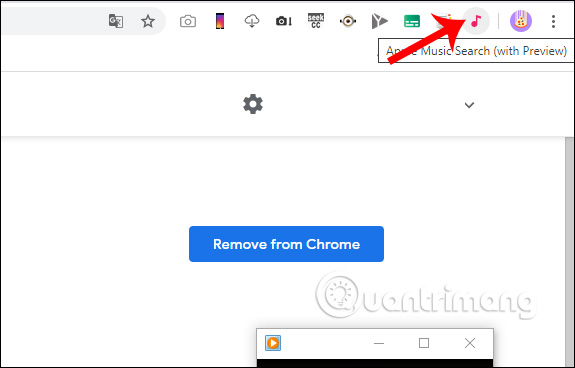
<p style="text-align: justify;">Sau khi cài đặt xong nhấn vào<strong>&nbsp;biểu tượng tiện ích</strong>&nbsp;ở thanh truy cập địa chỉ, ngay lập tức chúng ta sẽ được chuyển sang giao diện tiện ích ở tab mới.</p>

<p style="text-align: justify;"><img alt="Biểu tượng tiện ích " data-i="0" data-src="https://st.quantrimang.com/photos/image/2020/03/02/Apple-Music-Search-Windows-1.jpg" data-was-processed="true" height="368" src="https://st.quantrimang.com/photos/image/2020/03/02/Apple-Music-Search-Windows-1.jpg" width="575" /></p>

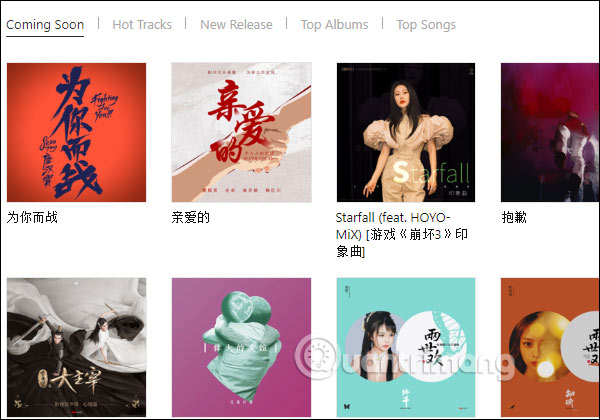
<p style="text-align: justify;">Tại đây bạn sẽ nhìn thấy giao diện được chia thành một số mục khác nhau:</p>

<ul>
	<li style="text-align: justify;">Coming Soon: Các list, album nhạc sắp ra mắt.</li>
	<li style="text-align: justify;">Hot Tracks: Các bài hát đang được nghe nhiều.</li>
	<li style="text-align: justify;">New Release: Các album mới phát hành.</li>
	<li style="text-align: justify;">To Albums: Các album nhạc dẫn đầu.</li>
	<li style="text-align: justify;">Top Songs: Các bài nhạc dẫn đầu.</li>
</ul>

<p style="text-align: justify;"><img alt="Giao diện tìm nhạc " data-i="1" data-src="https://st.quantrimang.com/photos/image/2020/03/02/Apple-Music-Search-Windows-2.jpg" data-was-processed="true" height="385" src="https://st.quantrimang.com/photos/image/2020/03/02/Apple-Music-Search-Windows-2.jpg" width="550" /></p>

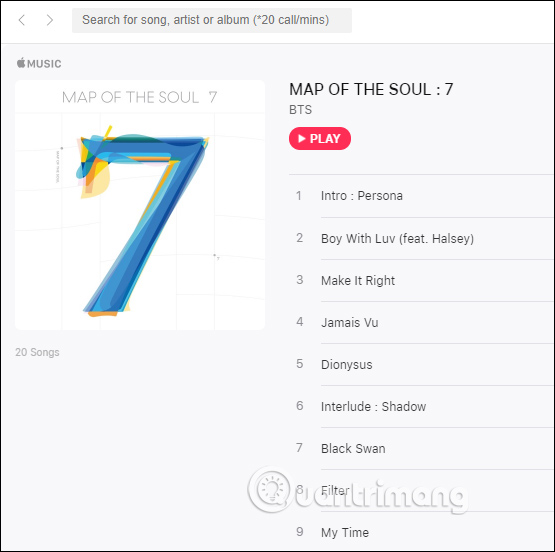
<p style="text-align: justify;">Để nghe thử bài hát hay album thì bạn chỉ cần&nbsp;<strong>nhấn Play</strong>&nbsp;hay nhấn vào bài hát đó.</p>

<p style="text-align: justify;"><img alt="Nghe album " data-i="2" data-src="https://st.quantrimang.com/photos/image/2020/03/02/Apple-Music-Search-Windows-3.jpg" data-was-processed="true" height="552" src="https://st.quantrimang.com/photos/image/2020/03/02/Apple-Music-Search-Windows-3.jpg" width="555" /></p>

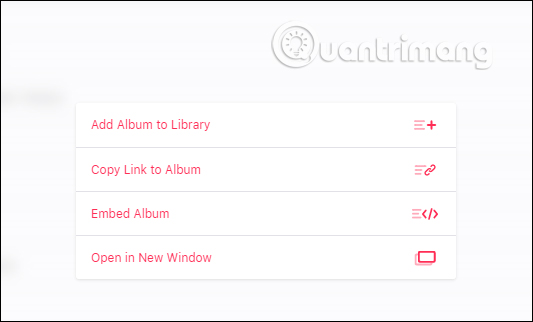
<p style="text-align: justify;">Tiện ích có hỗ trợ người dùng&nbsp;<strong>liên kết với tài khoản Apple Music</strong>&nbsp;bằng cách<strong>&nbsp;nhấn Sign In</strong>&nbsp;ở góc phải giao diện. Khi đã đăng nhập nhấn&nbsp;<strong>biểu tượng 3 dấu chấm</strong>&nbsp;sẽ hiển thị thêm một số tùy chọn, như thêm album vào thư viện nhạc, link nhúng album,...</p>

<p style="text-align: justify;"><img alt="Tùy chọn album " data-i="3" data-src="https://st.quantrimang.com/photos/image/2020/03/02/Apple-Music-Search-Windows-4.jpg" data-was-processed="true" height="322" src="https://st.quantrimang.com/photos/image/2020/03/02/Apple-Music-Search-Windows-4.jpg" width="533" /></p>

<p style="text-align: justify;">Trong trường hợp bạn có cài iTunes trên máy tính thì có thể trải nghiệm chương trình dùng thử 3 tháng miễn phí theo nội dung dưới đây.</p>

<div style="text-align: justify;">&nbsp;</div>

<h2 style="text-align: justify;">2. Nghe nhạc Apple Music trên iTunes</h2>

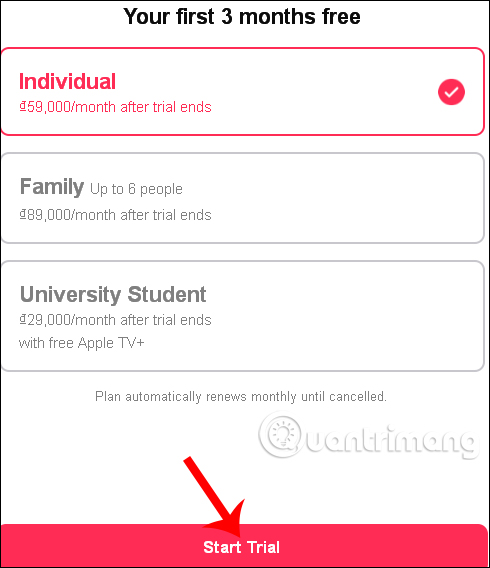
<p style="text-align: justify;">Trước tiên bạn sẽ cần tải về&nbsp;<strong>iTunes&nbsp;:&nbsp;<span style="color:rgb(192, 57, 43);">https://download.com.vn/apple-music/download&nbsp;</span></strong>cho Windows (<em>64-bit</em>). Sau đó bạn mở ứng dụng iTunes lên, chọn thẻ&nbsp;<strong>For You</strong>&nbsp;và click vào nút&nbsp;<strong>Start Trial</strong>&nbsp;để bắt đầu trải nghiệm miễn phí Apple Music.</p>

<p style="text-align: justify;">Lưu ý, mặc dù Apple Music cho phép dùng thử miễn phí trong 3 tháng đầu, nhưng bạn sẽ phải nhập thông tin thẻ tín dụng của mình để hoàn tất cài đặt.</p>

<p style="text-align: justify;"><img alt="Dùng thử 3 tháng " data-i="4" data-src="https://st.quantrimang.com/photos/image/2020/03/03/Apple-Music-1.jpg" data-was-processed="true" height="464" src="https://st.quantrimang.com/photos/image/2020/03/03/Apple-Music-1.jpg" width="400" /></p>

<p style="text-align: justify;">Apple cũng sẽ tự động tính phí sau khi thời gian dùng thử kết thúc. Do đó, nếu không muốn bỏ tiền để dùng Apple Music từ tháng thứ tư trở đi, bạn cần vô hiệu hóa tính năng Automatic Renewal (<em>bên dưới mục Account Info &gt; Settings &gt; Subscription &gt; Manage</em>).</p>

<p style="text-align: justify;"><img alt="Giao diện Apple Music trên Windows" data-i="5" data-src="https://st.quantrimang.com/photos/image/072015/07/itunes3.jpg" data-was-processed="true" height="332" src="https://st.quantrimang.com/photos/image/072015/07/itunes3.jpg" title="Hướng dẫn trải nghiệm Apple Music ngay trên máy tính Windows" width="500" /></p>

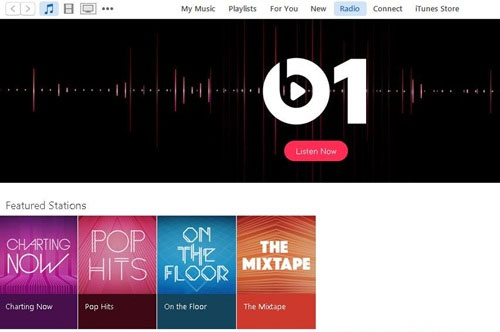
<p style="text-align: justify;">Nếu bạn không muốn dùng Apple Music mà muốn nghe radio, bạn có thể chọn thẻ radio trong iTunes để nghe dịch vụ radio Beats 1 hoàn toàn miễn phí.</p>
		</div>
				<div id="author">
						<p>
				<strong>Nguồn tin:</strong>
				Quantrimang.com
			</p>
		</div>
	</div>
	<div id="footer" class="clearfix">
		<div id="url">
			<strong>URL của bản tin này: </strong><a href="https://www.nguoicodonvn2008.info/vi/news/savefile/kien-thuc-may-tinh/cach-trai-nghiem-apple-music-tren-may-tinh-windows-1767.html" title="Cách trải nghiệm Apple Music trên máy tính Windows">https://www.nguoicodonvn2008.info/vi/news/savefile/kien-thuc-may-tinh/cach-trai-nghiem-apple-music-tren-may-tinh-windows-1767.html</a>

		</div>
		<div class="clear"></div>
		<div class="copyright">
			&copy; .&#x3A; Nguoicodonvn2008.info - Cõi lòng người cô đơn &#x3A;.
		</div>
		<div id="contact">
			<a href="mailto:admin@nguoicodonvn2008.info">admin@nguoicodonvn2008.info</a>
		</div>
	</div>
</div>
        <div id="timeoutsess" class="chromeframe">
            Bạn đã không sử dụng Site, <a onclick="timeoutsesscancel();" href="https://nguoicodonvn2008.info/#">Bấm vào đây để duy trì trạng thái đăng nhập</a>. Thời gian chờ: <span id="secField"> 60 </span> giây
        </div>
        <div id="openidResult" class="nv-alert" style="display:none"></div>
        <div id="openidBt" data-result="" data-redirect=""></div>
		</script>
		<div class="car-top">
  <span><img src="https://nguoicodonvn2008.info/themes/default/images/car.png" alt=""></span>
</div>
<script src="https://nguoicodonvn2008.info/assets/js/jquery/jquery.min.js"></script>
<script>var nv_base_siteurl="/",nv_lang_data="vi",nv_lang_interface="vi",nv_name_variable="nv",nv_fc_variable="op",nv_lang_variable="language",nv_module_name="news",nv_func_name="savefile",nv_is_user=0, nv_my_ofs=-4,nv_my_abbr="EDT",nv_cookie_prefix="nv4c_e856T",nv_check_pass_mstime=1738000,nv_area_admin=0,nv_safemode=0,theme_responsive=0,nv_recaptcha_ver=2,nv_recaptcha_sitekey="",nv_recaptcha_type="image",XSSsanitize=1;</script>
<script src="https://nguoicodonvn2008.info/assets/js/language/vi.js"></script>
<script src="https://nguoicodonvn2008.info/assets/js/DOMPurify/purify3.js"></script>
<script src="https://nguoicodonvn2008.info/assets/js/global.js"></script>
<script src="https://nguoicodonvn2008.info/assets/js/site.js"></script>
<script src="https://nguoicodonvn2008.info/themes/default/js/news.js"></script>
<script src="https://nguoicodonvn2008.info/themes/default/js/main.js"></script>
<script src="https://nguoicodonvn2008.info/themes/default/js/custom.js"></script>
<script type="application/ld+json">
        {
            "@context": "https://schema.org",
            "@type": "Organization",
            "url": "https://nguoicodonvn2008.info",
            "logo": "https://nguoicodonvn2008.info/uploads/angel.gif"
        }
        </script>
<script src="https://nguoicodonvn2008.info/themes/default/js/bootstrap.min.js"></script>
<script type="text/javascript">
var $scrolltop = $('.car-top');
$scrolltop.on('click', function () {
    $('html,body').animate({
        scrollTop: 0
    }, 800);
    $(this).addClass("car-run");
    setTimeout(function(){ $scrolltop.removeClass('car-run');}, 1000);
    return false;
});
$(window).on('scroll', function ()
{ 
    if($(window).scrollTop() >= 200)
    {
        $scrolltop.addClass("show");
        $scrolltop.addClass("car-down");
    }
    else
    {
       $scrolltop.removeClass("show");
       setTimeout(function(){ $scrolltop.removeClass('car-down');}, 300);
    }
});
</script>
</body>
</html>