<!DOCTYPE html>
    <html lang="vi" xmlns="http://www.w3.org/1999/xhtml" prefix="og: http://ogp.me/ns#">
    <head>
<title>Cách thiết lập và chạy Qwen 3 cục bộ với Ollama</title>
<meta name="description" content="Cách thiết lập và chạy Qwen 3 cục bộ với Ollama - Savefile - Tin Tức -...">
<meta name="author" content=".: Nguoicodonvn2008.info - Cõi lòng người cô đơn :.">
<meta name="copyright" content=".: Nguoicodonvn2008.info - Cõi lòng người cô đơn :. [admin@nguoicodonvn2008.info]">
<meta name="robots" content="index, archive, follow, noodp">
<meta name="googlebot" content="index,archive,follow,noodp">
<meta name="msnbot" content="all,index,follow">
<meta name="generator" content="NukeViet v4.5">
<meta http-equiv="Content-Type" content="text/html; charset=utf-8">
<meta property="og:title" content="Cách thiết lập và chạy Qwen 3 cục bộ với Ollama">
<meta property="og:type" content="website">
<meta property="og:description" content="Savefile - Tin Tức - https&#x3A;&#x002F;&#x002F;www.nguoicodonvn2008.info&#x002F;vi&#x002F;news&#x002F;savefile&#x002F;kien-thuc-may-tinh&#x002F;cach-thiet-lap-va-chay-qwen-3-cuc-bo-voi-ollama-10754.html">
<meta property="og:site_name" content=".&#x3A; Nguoicodonvn2008.info - Cõi lòng người cô đơn &#x3A;.">
<meta property="og:url" content="https://www.nguoicodonvn2008.info/vi/news/savefile/kien-thuc-may-tinh/cach-thiet-lap-va-chay-qwen-3-cuc-bo-voi-ollama-10754.html">
<link rel="shortcut icon" href="https://nguoicodonvn2008.info/favicon.ico">
<link rel="canonical" href="https://www.nguoicodonvn2008.info/vi/news/savefile/kien-thuc-may-tinh/cach-thiet-lap-va-chay-qwen-3-cuc-bo-voi-ollama-10754.html">
<link rel="alternate" href="https://nguoicodonvn2008.info/vi/news/rss/" title="Tin Tức" type="application/rss+xml">
<link rel="alternate" href="https://nguoicodonvn2008.info/vi/news/rss/karaoke-dual/" title="Tin Tức - Karaoke Dual" type="application/rss+xml">
<link rel="alternate" href="https://nguoicodonvn2008.info/vi/news/rss/nhac-tre/" title="Tin Tức - Nhạc trẻ" type="application/rss+xml">
<link rel="alternate" href="https://nguoicodonvn2008.info/vi/news/rss/tru-tinh/" title="Tin Tức - Trữ tình" type="application/rss+xml">
<link rel="alternate" href="https://nguoicodonvn2008.info/vi/news/rss/nuoc-ngoai/" title="Tin Tức - Nước ngoài" type="application/rss+xml">
<link rel="alternate" href="https://nguoicodonvn2008.info/vi/news/rss/remix/" title="Tin Tức - Remix" type="application/rss+xml">
<link rel="alternate" href="https://nguoicodonvn2008.info/vi/news/rss/tam-su-tinh-yeu/" title="Tin Tức - Tâm sự tình yêu" type="application/rss+xml">
<link rel="alternate" href="https://nguoicodonvn2008.info/vi/news/rss/tho-suu-tam/" title="Tin Tức - Thơ sưu tầm" type="application/rss+xml">
<link rel="alternate" href="https://nguoicodonvn2008.info/vi/news/rss/cuoc-song/" title="Tin Tức - Cuộc sống" type="application/rss+xml">
<link rel="alternate" href="https://nguoicodonvn2008.info/vi/news/rss/phan-mem/" title="Tin Tức - Phần mềm" type="application/rss+xml">
<link rel="alternate" href="https://nguoicodonvn2008.info/vi/news/rss/kien-thuc-may-tinh/" title="Tin Tức - Kiến thức máy tính" type="application/rss+xml">
<link rel="alternate" href="https://nguoicodonvn2008.info/vi/news/rss/hoc-tap/" title="Tin Tức - Học tập" type="application/rss+xml">
<link rel="alternate" href="https://nguoicodonvn2008.info/vi/news/rss/tai-lieu/" title="Tin Tức - Tài liệu" type="application/rss+xml">
<link rel="alternate" href="https://nguoicodonvn2008.info/vi/news/rss/de-thi/" title="Tin Tức - Đề thi" type="application/rss+xml">
<link rel="preload" as="style" href="https://nguoicodonvn2008.info/assets/css/font-awesome.min.css" type="text/css">
<link rel="preload" as="style" href="https://nguoicodonvn2008.info/themes/default/css/bootstrap.non-responsive.css" type="text/css">
<link rel="preload" as="style" href="https://nguoicodonvn2008.info/themes/default/css/style.css" type="text/css">
<link rel="preload" as="style" href="https://nguoicodonvn2008.info/themes/default/css/style.non-responsive.css" type="text/css">
<link rel="preload" as="style" href="https://nguoicodonvn2008.info/themes/default/css/news.css" type="text/css">
<link rel="preload" as="style" href="https://nguoicodonvn2008.info/themes/default/css/custom.css" type="text/css">
<link rel="preload" as="script" href="https://nguoicodonvn2008.info/assets/js/jquery/jquery.min.js" type="text/javascript">
<link rel="preload" as="script" href="https://nguoicodonvn2008.info/assets/js/language/vi.js" type="text/javascript">
<link rel="preload" as="script" href="https://nguoicodonvn2008.info/assets/js/DOMPurify/purify3.js" type="text/javascript">
<link rel="preload" as="script" href="https://nguoicodonvn2008.info/assets/js/global.js" type="text/javascript">
<link rel="preload" as="script" href="https://nguoicodonvn2008.info/assets/js/site.js" type="text/javascript">
<link rel="preload" as="script" href="https://nguoicodonvn2008.info/themes/default/js/news.js" type="text/javascript">
<link rel="preload" as="script" href="https://nguoicodonvn2008.info/themes/default/js/main.js" type="text/javascript">
<link rel="preload" as="script" href="https://nguoicodonvn2008.info/themes/default/js/custom.js" type="text/javascript">
<link rel="preload" as="script" href="https://nguoicodonvn2008.info/themes/default/js/bootstrap.min.js" type="text/javascript">
<link rel="stylesheet" href="https://nguoicodonvn2008.info/assets/css/font-awesome.min.css">
<link rel="stylesheet" href="https://nguoicodonvn2008.info/themes/default/css/bootstrap.non-responsive.css">
<link rel="stylesheet" href="https://nguoicodonvn2008.info/themes/default/css/style.css">
<link rel="stylesheet" href="https://nguoicodonvn2008.info/themes/default/css/style.non-responsive.css">
<link rel="StyleSheet" href="https://nguoicodonvn2008.info/themes/default/css/news.css">
<link rel="stylesheet" href="https://nguoicodonvn2008.info/themes/default/css/custom.css">
<style type="text/css">
	body{background: #fff;}
</style>
    </head>
    <body>
<div id="print">
	<div id="hd_print">
		<h2 class="pull-left">.&#x3A; Nguoicodonvn2008.info - Cõi lòng người cô đơn &#x3A;.</h2>
		<p class="pull-right"><a title=".&#x3A; Nguoicodonvn2008.info - Cõi lòng người cô đơn &#x3A;." href="https://nguoicodonvn2008.info/">https://nguoicodonvn2008.info</a></p>
	</div>
	<div class="clear"></div>
	<hr />
	<div id="content">
		<h1>Cách thiết lập và chạy Qwen 3 cục bộ với Ollama</h1>
		<ul class="list-inline">
			<li>Thứ sáu - 11/07/2025 04:24</li>
			<li class="hidden-print txtrequired"><em class="fa fa-print">&nbsp;</em><a title="In ra" href="javascript:;" onclick="window.print()">In ra</a></li>
			<li class="hidden-print txtrequired"><em class="fa fa-power-off">&nbsp;</em><a title="Đóng cửa sổ này" href="javascript:;" onclick="window.close()">Đóng cửa sổ này</a></li>
		</ul>
		<div class="clear"></div>
		<div id="hometext">
		</div>
				<div class="imghome">
			<img alt="Cách thiết lập và chạy Qwen 3 cục bộ với Ollama" src="https://st.quantrimang.com/photos/image/2025/07/11/thiet-lap-chay-qwen-3-cuc-bo-voi-ollama-2.jpg" width="460" class="img-thumbnail" />
		</div>
		<div class="clear"></div>
		<div id="bodytext" class="clearfix">
			<p style="text-align: justify;">Qwen3 là thế hệ mô hình ngôn ngữ lớn mới nhất của Alibaba. Với khả năng hỗ trợ hơn 100 ngôn ngữ và hiệu suất mạnh mẽ trên các tác vụ lý luận, viết code và dịch thuật, Qwen3 có thể sánh ngang với nhiều mô hình hàng đầu hiện nay, bao gồm DeepSeek-R1,&nbsp;o3-mini&nbsp;và&nbsp;Gemini 2.5.</p>

<div style="text-align: justify;">&nbsp;</div>

<p style="text-align: justify;">Hướng dẫn này sẽ giải thích từng bước cách chạy Qwen3 cục bộ bằng Ollama. Hướng dẫn cũng sẽ xây dựng một ứng dụng nhẹ cục bộ bằng Qwen 3. Ứng dụng này sẽ cho phép bạn chuyển đổi giữa các chế độ lý luận của Qwen3 và dịch giữa nhiều ngôn ngữ khác nhau.</p>

<h2 style="text-align: justify;">&nbsp;</h2>

<h2 id="mcetoc_1ivru08c3294" style="text-align: justify;">Tại sao nên chạy Qwen3 cục bộ?</h2>

<p style="text-align: justify;">Chạy Qwen3 cục bộ mang lại một số lợi ích chính:</p>

<ul>
	<li style="text-align: justify;"><strong>Quyền riêng tư</strong>: Dữ liệu không bao giờ rời khỏi máy của bạn.</li>
	<li style="text-align: justify;"><strong>Độ trễ</strong>: Suy luận cục bộ nhanh hơn mà không cần API khứ hồi.</li>
	<li style="text-align: justify;"><strong>Tiết kiệm chi phí</strong>: Không tính phí token hoặc hóa đơn đám mây.</li>
	<li style="text-align: justify;"><strong>Kiểm soát</strong>: Bạn có thể điều chỉnh prompt, chọn mô hình và cấu hình chế độ suy nghĩ.</li>
	<li style="text-align: justify;"><strong>Truy cập ngoại tuyến</strong>: Bạn có thể làm việc mà không cần kết nối Internet sau khi tải xuống mô hình.</li>
</ul>

<p style="text-align: justify;">Qwen3 được tối ưu hóa cho cả lý luận sâu (chế độ suy nghĩ) và phản hồi nhanh (chế độ không suy nghĩ) và hỗ trợ hơn 100 ngôn ngữ.</p>

<div style="text-align: justify;">&nbsp;</div>

<h2 id="mcetoc_1ivru08c3295" style="text-align: justify;">Thiết lập Qwen3 cục bộ bằng Ollama</h2>

<p style="text-align: justify;">Ollama là một công cụ cho phép bạn chạy các mô hình ngôn ngữ như Llama hoặc Qwen cục bộ trên&nbsp;&nbsp;máy tính&nbsp;của mình bằng giao diện dòng lệnh đơn giản.</p>

<h3 id="mcetoc_1ivru08c3296" style="text-align: justify;">Bước 1: Cài đặt Ollama</h3>

<p style="text-align: justify;">Tải xuống Ollama cho macOS,&nbsp;&nbsp;Windows&nbsp;hoặc Linux từ:&nbsp;<em>https://ollama.com/download.</em></p>

<p style="text-align: justify;">Thực hiện theo hướng dẫn cài đặt và sau khi cài đặt, hãy xác minh bằng cách chạy lệnh này trong terminal:</p>

<pre id="pre0">
<code>ollama --version</code></pre>

<h3 id="mcetoc_1ivru08c3297" style="text-align: justify;">Bước 2: Tải xuống và chạy Qwen3</h3>

<p style="text-align: justify;">Ollama cung cấp nhiều mô hình Qwen3 được thiết kế để phù hợp với nhiều cấu hình phần cứng khác nhau, từ laptop nhẹ đến máy chủ cao cấp.</p>

<pre id="pre1">
<code>ollama run qwen3</code></pre>

<p style="text-align: justify;">Chạy lệnh trên sẽ khởi chạy mô hình Qwen3 mặc định trong Ollama, hiện tại mặc định là qwen3:8b. Nếu đang làm việc với tài nguyên hạn chế hoặc muốn thời gian khởi động nhanh hơn, bạn có thể chạy rõ ràng các biến thể nhỏ hơn như mô hình 4B:</p>

<pre id="pre2">
<code>ollama run qwen3:4b</code></pre>

<p style="text-align: justify;">Qwen3 hiện có sẵn ở một số biến thể, bắt đầu từ mô hình tham số nhỏ nhất 0,6b (523MB) đến mô hình tham số lớn nhất 235b (142GB). Các biến thể nhỏ hơn này cung cấp hiệu suất ấn tượng cho lý luận, biên dịch và tạo code, đặc biệt là khi sử dụng ở chế độ suy nghĩ.</p>

<p style="text-align: justify;">Các mô hình MoE (30b-a3b, 235b-a22b) đặc biệt thú vị vì chúng chỉ kích hoạt một tập hợp con những chuyên gia cho mỗi bước suy luận, cho phép đếm tổng tham số lớn trong khi vẫn giữ chi phí runtime hiệu quả.</p>

<p style="text-align: justify;">Nhìn chung, hãy sử dụng mô hình lớn nhất mà phần cứng của bạn có thể xử lý và quay lại các mô hình 8B hoặc 4B để thực hiện những thử nghiệm cục bộ phản hồi trên máy của người tiêu dùng.</p>

<p style="text-align: justify;">Sau đây là bản tóm tắt nhanh về tất cả các mô hình Qwen3 mà bạn có thể chạy:</p>

<table border="1">
	<tbody>
		<tr>
			<td>
			<p dir="ltr" style="text-align: justify;"><strong>Mô hình</strong></p>
			</td>
			<td>
			<p dir="ltr" style="text-align: justify;"><strong>Lệnh Ollama</strong></p>
			</td>
			<td>
			<p dir="ltr" style="text-align: justify;"><strong>Phù hợp nhất cho</strong></p>
			</td>
		</tr>
		<tr>
			<td>
			<p dir="ltr" style="text-align: justify;"><strong>Qwen3-0.6B</strong></p>
			</td>
			<td>
			<p dir="ltr" style="text-align: justify;"><code>ollama run qwen3:0.6b</code></p>
			</td>
			<td>
			<p dir="ltr" style="text-align: justify;">Các tác vụ nhẹ, ứng dụng di động và thiết bị biên</p>
			</td>
		</tr>
		<tr>
			<td>
			<p dir="ltr" style="text-align: justify;"><strong>Qwen3-1.7B</strong></p>
			</td>
			<td>
			<p dir="ltr" style="text-align: justify;"><code>ollama run qwen3:1.7b</code></p>
			</td>
			<td>
			<p dir="ltr" style="text-align: justify;">Chatbot, trợ lý và các ứng dụng có độ trễ thấp</p>
			</td>
		</tr>
		<tr>
			<td>
			<p dir="ltr" style="text-align: justify;"><strong>Qwen3-4B</strong></p>
			</td>
			<td>
			<p dir="ltr" style="text-align: justify;"><code>ollama run qwen3:4b</code></p>
			</td>
			<td>
			<p dir="ltr" style="text-align: justify;">Nhiệm vụ mục đích chung với hiệu suất cân bằng và sử dụng tài nguyên</p>
			</td>
		</tr>
		<tr>
			<td>
			<p dir="ltr" style="text-align: justify;"><strong>Qwen3-8B</strong></p>
			</td>
			<td>
			<p dir="ltr" style="text-align: justify;"><code>ollama run qwen3:8b</code></p>
			</td>
			<td>
			<p dir="ltr" style="text-align: justify;">Hỗ trợ đa ngôn ngữ và khả năng lý luận vừa phải</p>
			</td>
		</tr>
		<tr>
			<td>
			<p dir="ltr" style="text-align: justify;"><strong>Qwen3-14B</strong></p>
			</td>
			<td>
			<p dir="ltr" style="text-align: justify;"><code>ollama run qwen3:14b</code></p>
			</td>
			<td>
			<p dir="ltr" style="text-align: justify;">Lý luận nâng cao, sáng tạo nội dung và giải quyết vấn đề phức tạp</p>
			</td>
		</tr>
		<tr>
			<td>
			<p dir="ltr" style="text-align: justify;"><strong>Qwen3-32B</strong></p>
			</td>
			<td>
			<p dir="ltr" style="text-align: justify;"><code>ollama run qwen3:32b</code></p>
			</td>
			<td>
			<p dir="ltr" style="text-align: justify;">Các nhiệm vụ cao cấp đòi hỏi khả năng suy luận mạnh mẽ và xử lý ngữ cảnh mở rộng</p>
			</td>
		</tr>
		<tr>
			<td>
			<p dir="ltr" style="text-align: justify;"><strong>Qwen3-30B-A3B (MoE)</strong></p>
			</td>
			<td>
			<p dir="ltr" style="text-align: justify;"><code>ollama run qwen3:30b-a3b</code></p>
			</td>
			<td>
			<p dir="ltr" style="text-align: justify;">Hiệu suất hiệu quả với 3 tham số hoạt động, phù hợp cho các tác vụ mã hóa</p>
			</td>
		</tr>
		<tr>
			<td>
			<p dir="ltr" style="text-align: justify;"><strong>Qwen3-235B-A22B (MoE)</strong></p>
			</td>
			<td>
			<p dir="ltr" style="text-align: justify;"><code>ollama run qwen3:235b-a22b</code></p>
			</td>
			<td>
			<p dir="ltr" style="text-align: justify;">Các ứng dụng quy mô lớn, lý luận sâu sắc và những giải pháp cấp doanh nghiệp</p>
			</td>
		</tr>
	</tbody>
</table>

<div style="text-align: justify;">&nbsp;</div>

<h3 id="mcetoc_1ivru08c3298" style="text-align: justify;">Bước 3: Chạy Qwen3 ở chế độ nền (tùy chọn)</h3>

<p style="text-align: justify;">Để phục vụ mô hình thông qua API, hãy chạy lệnh này trong Terminal:</p>

<pre id="pre3">
<code>ollama serve</code></pre>

<p style="text-align: justify;">Điều này sẽ làm cho mô hình có sẵn để tích hợp với các ứng dụng khác tại&nbsp;<em>http://localhost:11434.</em></p>

<h2 id="mcetoc_1ivru08c3299" style="text-align: justify;">Sử dụng Qwen3 cục bộ</h2>

<p style="text-align: justify;">Phần này sẽ hướng dẫn bạn một số cách có thể sử dụng Qwen3 cục bộ, từ tương tác CLI cơ bản đến tích hợp mô hình với Python.</p>

<h3 id="mcetoc_1ivru08c329a" style="text-align: justify;">Tùy chọn 1: Chạy suy luận thông qua CLI</h3>

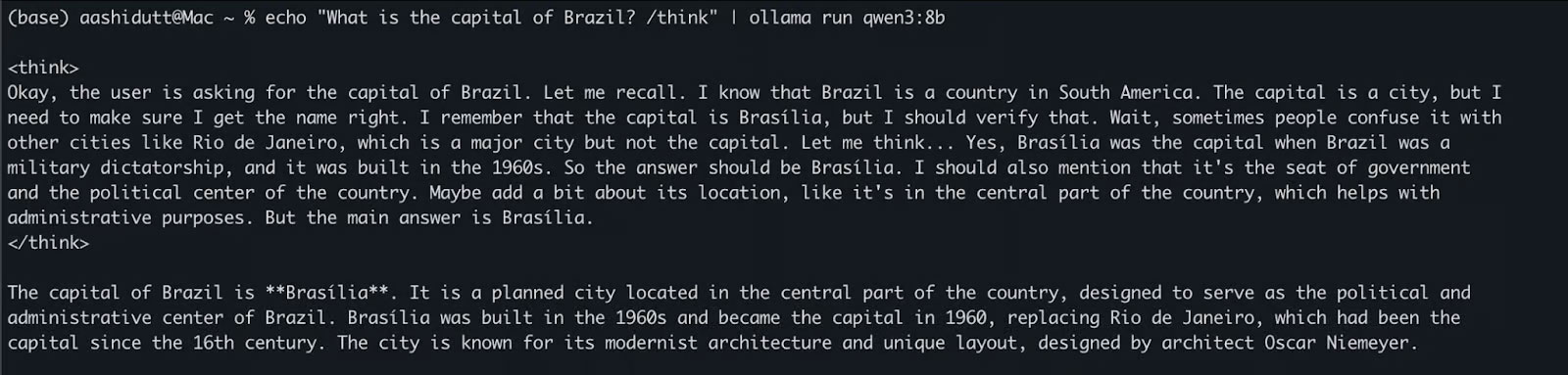
<p style="text-align: justify;">Sau khi mô hình được tải xuống, bạn có thể tương tác trực tiếp với Qwen3 trong Terminal. Chạy lệnh sau trong Terminal:</p>

<pre id="pre4">
<code>echo &quot;What is the capital of Brazil? /think&quot; | ollama run qwen3:8b</code></pre>

<p style="text-align: justify;">Điều này hữu ích cho các bài kiểm tra nhanh hoặc tương tác nhẹ mà không cần viết bất kỳ code nào. Tag /think ở cuối prompt hướng dẫn mô hình tham gia vào lý luận sâu hơn, từng bước. Bạn có thể thay thế điều này bằng /no_think để có phản hồi nhanh, nông hơn hoặc bỏ qua hoàn toàn để sử dụng chế độ suy luận mặc định của mô hình.</p>

<figure>
<div style="text-align: justify;"><img alt="Chạy Qwen3 cục bộ với Ollama (suy luận)" data-i="0" data-src="https://st.quantrimang.com/photos/image/2025/05/29/thiet-lap-chay-qwen-3-cuc-bo-voi-ollama-1.jpg" data-was-processed="true" height="383" src="https://st.quantrimang.com/photos/image/2025/05/29/thiet-lap-chay-qwen-3-cuc-bo-voi-ollama-1.jpg" width="1600" /></div>

<figcaption>
<div style="text-align: justify;">Chạy Qwen3 cục bộ với Ollama (suy luận)</div>
</figcaption>
</figure>

<h3 id="mcetoc_1ivru08c329b" style="text-align: justify;">Tùy chọn 2: Truy cập Qwen3 qua API</h3>

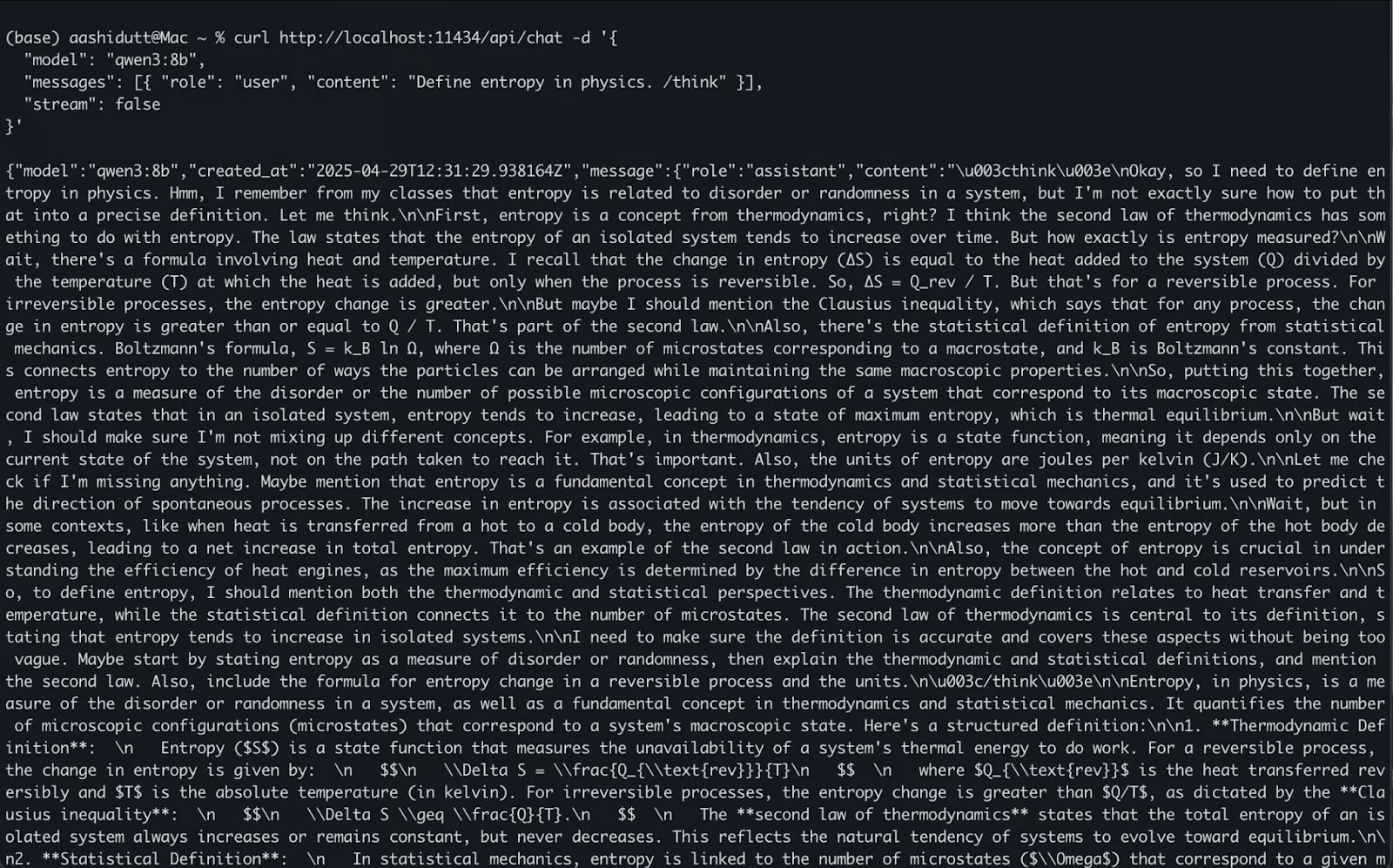
<p style="text-align: justify;">Khi ollama serve chạy ở chế độ nền, bạn có thể tương tác với Qwen3 theo chương trình bằng API HTTP, hoàn hảo cho tích hợp backend, tự động hóa hoặc thử nghiệm REST client.</p>

<pre id="pre5">
<code>curl http://localhost:11434/api/chat -d &#039;{
  &quot;model&quot;: &quot;qwen3:8b&quot;,
  &quot;messages&quot;: &#91;{ &quot;role&quot;: &quot;user&quot;, &quot;content&quot;: &quot;Define entropy in physics. /think&quot; }&#93;,
  &quot;stream&quot;: false
}&#039;</code></pre>

<p style="text-align: justify;">Đây là cách thức hoạt động:</p>

<ul>
	<li style="text-align: justify;">curl thực hiện yêu cầu POST (cách chúng ta gọi API) tới máy chủ Ollama cục bộ đang chạy tại localhost:11434.</li>
	<li style="text-align: justify;">Payload là một đối tượng JSON có:
	<ul>
		<li>&quot;model&quot;: Chỉ định mô hình sẽ sử dụng (ở đây là: qwen3:8b).</li>
		<li>&quot;messages&quot;: Danh sách các tin nhắn trò chuyện có chứa vai trò và nội dung.</li>
		<li>&quot;stream&quot;: false: Đảm bảo phản hồi được trả về cùng một lúc, không phải từng token.</li>
	</ul>
	</li>
</ul>

<figure>
<div style="text-align: justify;"><img alt="Truy cập Qwen3 cục bộ qua API" data-i="1" data-src="https://st.quantrimang.com/photos/image/2025/05/29/thiet-lap-chay-qwen-3-cuc-bo-voi-ollama-2.jpg" data-was-processed="true" height="997" src="https://st.quantrimang.com/photos/image/2025/05/29/thiet-lap-chay-qwen-3-cuc-bo-voi-ollama-2.jpg" width="1600" /></div>

<figcaption>
<div style="text-align: justify;">Truy cập Qwen3 cục bộ qua API</div>
</figcaption>
</figure>

<h3 id="mcetoc_1ivru08c329c" style="text-align: justify;">Tùy chọn 3: Truy cập Qwen3 qua Python</h3>

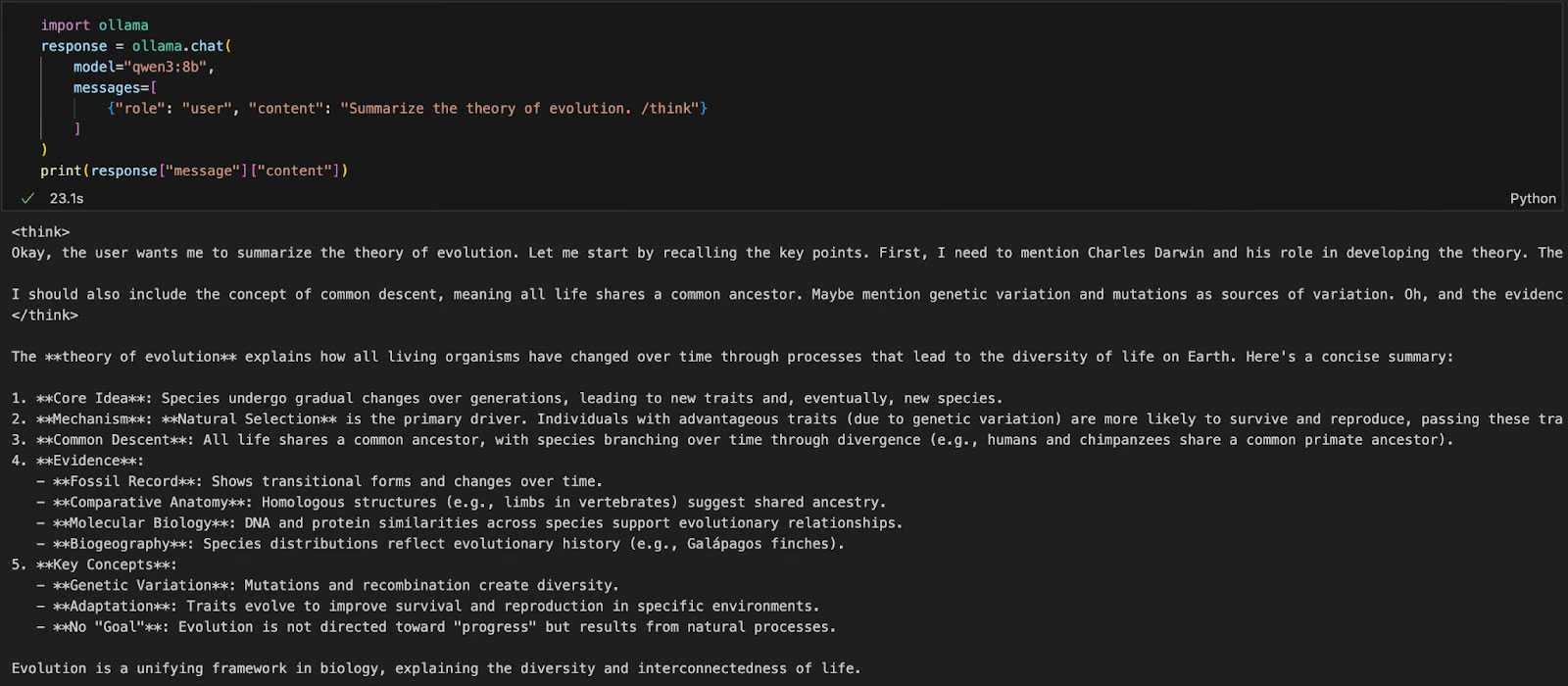
<p style="text-align: justify;">Nếu bạn đang làm việc trong môi trường Python (như Jupyter, VSCode hoặc script), cách dễ nhất để tương tác với Qwen3 là thông qua Ollama Python SDK. Bắt đầu bằng cách cài đặt ollama:</p>

<pre id="pre6">
<code>pip install ollama</code></pre>

<p style="text-align: justify;">Sau đó, chạy mô hình Qwen3 của bạn bằng script này (ví dụ đang sử dụng qwen3:8b bên dưới):</p>

<pre id="pre7">
<code>import ollama
response = ollama.chat(
    model=&quot;qwen3:8b&quot;,
    messages=&#91;
        {&quot;role&quot;: &quot;user&quot;, &quot;content&quot;: &quot;Summarize the theory of evolution. /think&quot;}
    &#93;
)
print(response&#91;&quot;message&quot;&#93;&#91;&quot;content&quot;&#93;)</code></pre>

<p style="text-align: justify;">Trong code trên:</p>

<ul>
	<li style="text-align: justify;">ollama.chat(...) gửi yêu cầu theo kiểu trò chuyện đến máy chủ Ollama cục bộ.</li>
	<li style="text-align: justify;">Bạn chỉ định mô hình (qwen3:8b) và danh sách các tin nhắn theo định dạng tương tự như API của OpenAI.</li>
	<li style="text-align: justify;">Tag /think yêu cầu mô hình lý giải từng bước.</li>
	<li style="text-align: justify;">Cuối cùng, phản hồi được trả về dưới dạng từ điển và bạn có thể truy cập câu trả lời của mô hình bằng cách sử dụng &#91;&quot;message&quot;&#93;&#91;&quot;content&quot;&#93;.</li>
</ul>

<p style="text-align: justify;">Cách tiếp cận này lý tưởng cho thử nghiệm cục bộ, tạo mẫu hoặc xây dựng các ứng dụng được LLM hỗ trợ mà không cần dựa vào API đám mây.</p>

<figure>
<div style="text-align: justify;"><img alt="Truy cập Qwen3 cục bộ qua Python" data-adbro-processed="true" data-i="2" data-src="https://st.quantrimang.com/photos/image/2025/05/29/thiet-lap-chay-qwen-3-cuc-bo-voi-ollama-3.jpg" data-was-processed="true" height="700" src="https://st.quantrimang.com/photos/image/2025/05/29/thiet-lap-chay-qwen-3-cuc-bo-voi-ollama-3.jpg" width="1600" /></div>

<figcaption>
<div style="text-align: justify;">Truy cập Qwen3 cục bộ qua Python</div>
</figcaption>
</figure>

<h2 id="mcetoc_1ivru08c329d" style="text-align: justify;">Xây dựng ứng dụng suy luận cục bộ với Qwen3</h2>

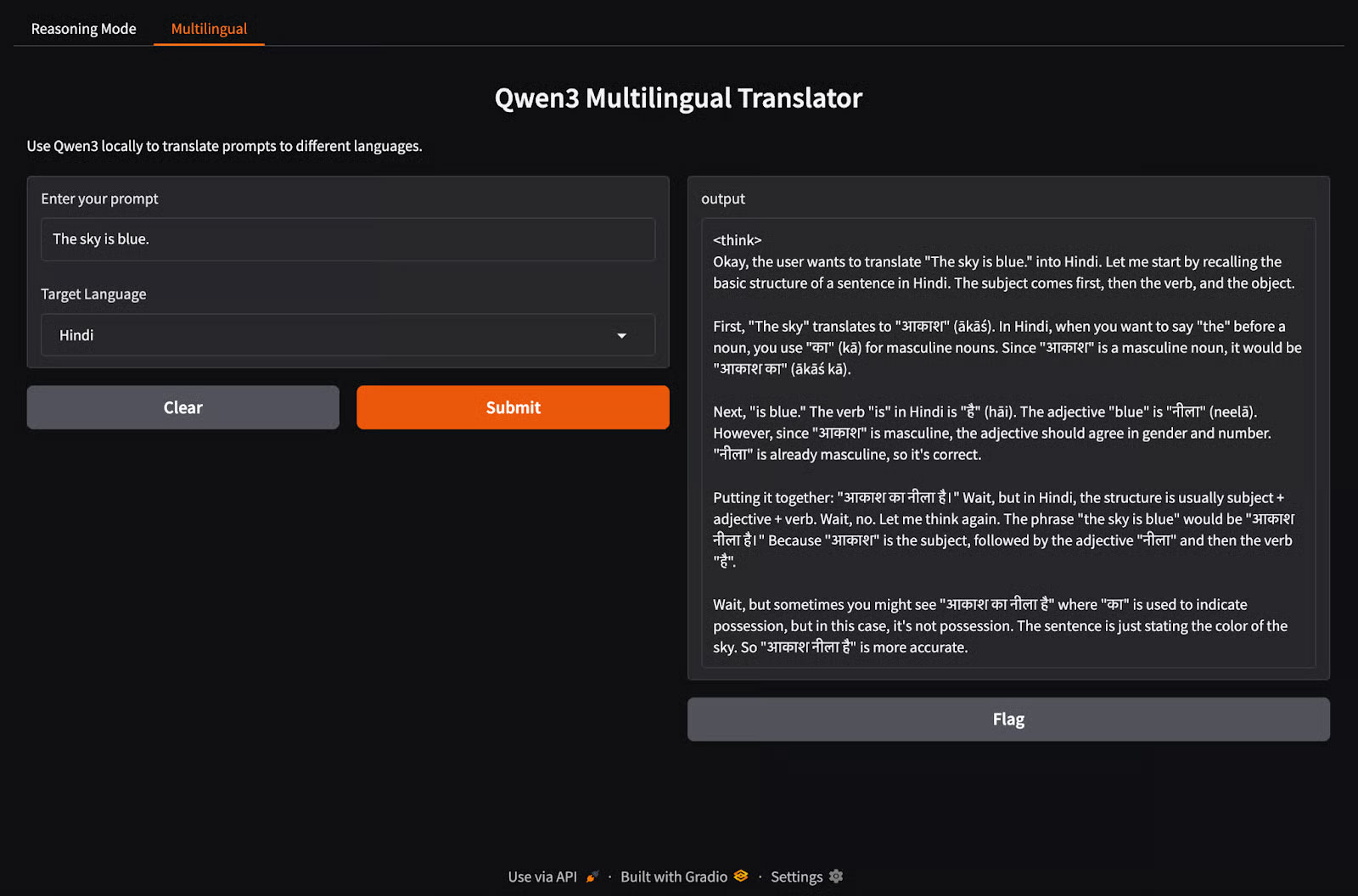
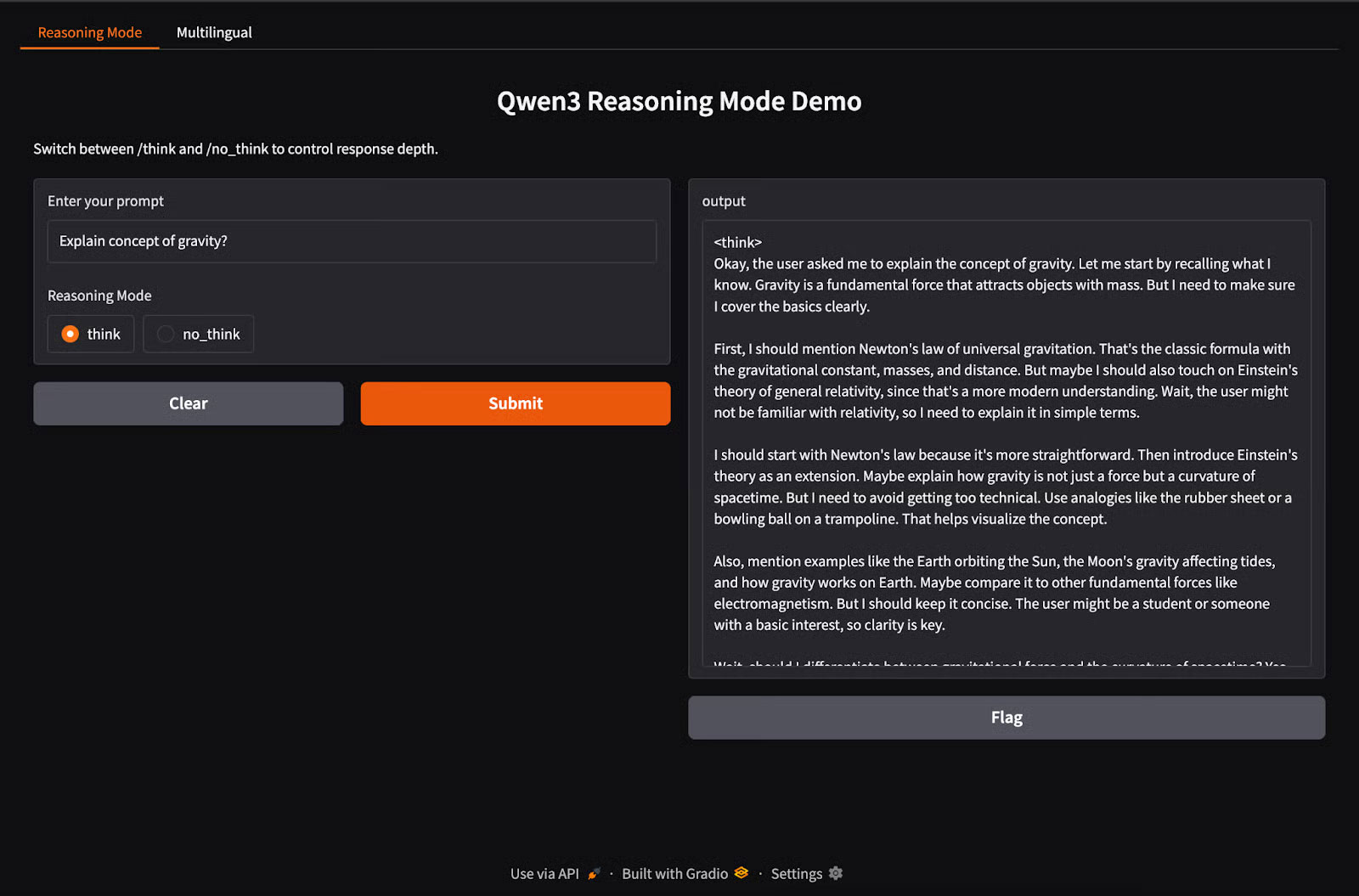
<p style="text-align: justify;">Qwen3 hỗ trợ hành vi Hybrid reasoning sử dụng tag&nbsp;<em>/think</em>&nbsp;(suy luận sâu) và tag&nbsp;<em>/no_think</em>&nbsp;(phản hồi nhanh). Trong phần này, chúng ta sẽ sử dụng Gradio để tạo một ứng dụng web cục bộ tương tác với hai tab riêng biệt:</p>

<ul>
	<li style="text-align: justify;">Giao diện suy luận để chuyển đổi giữa các chế độ suy luận.</li>
	<li style="text-align: justify;">Giao diện đa ngôn ngữ để dịch hoặc xử lý văn bản bằng nhiều ngôn ngữ khác nhau.</li>
</ul>

<h3 id="mcetoc_1ivru08c329e" style="text-align: justify;">Bước 1: Bản demo Hybrid reasoning (Tư Duy Kép)</h3>

<p style="text-align: justify;">Trong bước này, chúng ta sẽ xây dựng tab Hybrid reasoning với tag&nbsp;<em>/think</em>&nbsp;và tag&nbsp;<em>/no_think.</em></p>

<pre id="pre8">
<code>import gradio as gr
import subprocess
def reasoning_qwen3(prompt, mode):
    prompt_with_mode = f&quot;{prompt} /{mode}&quot;
    result = subprocess.run(
        &#91;&quot;ollama&quot;, &quot;run&quot;, &quot;qwen3:8b&quot;&#93;,
        input=prompt_with_mode.encode(),
        stdout=subprocess.PIPE
    )
    return result.stdout.decode()
reasoning_ui = gr.Interface(
    fn=reasoning_qwen3,
    inputs=&#91;
        gr.Textbox(label=&quot;Enter your prompt&quot;),
        gr.Radio(&#91;&quot;think&quot;, &quot;no_think&quot;&#93;, label=&quot;Reasoning Mode&quot;, value=&quot;think&quot;)
    &#93;,
    outputs=&quot;text&quot;,
    title=&quot;Qwen3 Reasoning Mode Demo&quot;,
    description=&quot;Switch between /think and /no_think to control response depth.&quot;
)</code></pre>

<p style="text-align: justify;">Trong đoạn code trên:</p>

<ul>
	<li style="text-align: justify;">Hàm reasoning_qwen3() nhận một prompt người dùng và một chế độ suy luận (&quot;think&quot; hoặc &quot;no_think&quot;).</li>
	<li style="text-align: justify;">Hàm này thêm chế độ đã chọn làm hậu tố cho prompt.</li>
	<li style="text-align: justify;">Sau đó, phương thức subprocess.run() chạy lệnh ollama run qwen3:8b, đưa prompt vào làm đầu vào chuẩn.</li>
	<li style="text-align: justify;">Cuối cùng, đầu ra (phản hồi từ Qwen3) được ghi lại và trả về dưới dạng một chuỗi đã giải mã.</li>
</ul>

<p style="text-align: justify;">Sau khi hàm tạo đầu ra được định nghĩa, hàm gr.Interface() sẽ gói nó vào một giao diện người dùng web tương tác bằng cách chỉ định các thành phần đầu vào - một Textbox cho prompt và một nút Radio để chọn chế độ suy luận - và ánh xạ chúng với những đầu vào của hàm.</p>

<h3 id="mcetoc_1ivru08c329f" style="text-align: justify;">Bước 2: Bản demo ứng dụng đa ngôn ngữ</h3>

<p style="text-align: justify;">Bây giờ, hãy thiết lập tab ứng dụng đa ngôn ngữ.</p>

<pre id="pre9">
<code>import gradio as gr
import subprocess
def multilingual_qwen3(prompt, lang):
    if lang != &quot;English&quot;:
        prompt = f&quot;Translate to {lang}: {prompt}&quot;
    result = subprocess.run(
        &#91;&quot;ollama&quot;, &quot;run&quot;, &quot;qwen3:8b&quot;&#93;,
        input=prompt.encode(),
        stdout=subprocess.PIPE
    )
    return result.stdout.decode()
multilingual_ui = gr.Interface(
    fn=multilingual_qwen3,
    inputs=&#91;
        gr.Textbox(label=&quot;Enter your prompt&quot;),
        gr.Dropdown(&#91;&quot;English&quot;, &quot;French&quot;, &quot;Hindi&quot;, &quot;Chinese&quot;&#93;, label=&quot;Target Language&quot;, value=&quot;English&quot;)
    &#93;,
    outputs=&quot;text&quot;,
    title=&quot;Qwen3 Multilingual Translator&quot;,
    description=&quot;Use Qwen3 locally to translate prompts to different languages.&quot;
)</code></pre>

<p style="text-align: justify;">Tương tự như bước trước, code này hoạt động như sau:</p>

<ul>
	<li style="text-align: justify;">Hàm multilingual_qwen3() nhận một prompt và một ngôn ngữ đích.</li>
	<li style="text-align: justify;">Nếu ngôn ngữ đích không phải là tiếng Anh, nó sẽ thêm lệnh &quot;Translate to {lang}:&quot; để hướng dẫn mô hình.</li>
	<li style="text-align: justify;">Một lần nữa, mô hình chạy cục bộ thông qua tiến trình con sử dụng Ollama.</li>
	<li style="text-align: justify;">Kết quả được trả về dưới dạng plain text.</li>
</ul>

<h3 id="mcetoc_1ivru08c329g" style="text-align: justify;">Bước 3: Khởi chạy cả hai tab trong Gradio</h3>

<p style="text-align: justify;">Hãy cùng gộp cả hai tab lại với nhau trong một ứng dụng Gradio.</p>

<pre id="pre10">
<code>demo = gr.TabbedInterface(
    &#91;reasoning_ui, multilingual_ui&#93;,
    tab_names=&#91;&quot;Reasoning Mode&quot;, &quot;Multilingual&quot;&#93;
)
demo.launch(debug = True)</code></pre>

<p style="text-align: justify;">Sau đây là những gì chúng ta đang làm trong đoạn code trên:</p>

<ul>
	<li style="text-align: justify;">Hàm gr.TabbedInterface() tạo một giao diện người dùng với hai tab:
	<ul>
		<li>Một tab để kiểm soát độ sâu suy luận.</li>
		<li>Một tab để dịch prompt đa ngôn ngữ.</li>
	</ul>
	</li>
	<li style="text-align: justify;">Hàm demo.launch(debug=True) chạy ứng dụng cục bộ và mở ứng dụng trong trình duyệt với chế độ gỡ lỗi được bật.</li>
</ul>

<figure>
<div style="text-align: justify;"><img alt="" data-i="3" data-src="https://st.quantrimang.com/photos/image/2025/07/11/thiet-lap-chay-qwen-3-cuc-bo-voi-ollama-1.jpg" data-was-processed="true" height="1055" src="https://st.quantrimang.com/photos/image/2025/07/11/thiet-lap-chay-qwen-3-cuc-bo-voi-ollama-1.jpg" width="1600" /></div>
</figure>

<figure>
<div style="text-align: justify;"><img alt="" data-i="4" data-src="https://st.quantrimang.com/photos/image/2025/07/11/thiet-lap-chay-qwen-3-cuc-bo-voi-ollama-2.jpg" data-was-processed="true" height="1056" src="https://st.quantrimang.com/photos/image/2025/07/11/thiet-lap-chay-qwen-3-cuc-bo-voi-ollama-2.jpg" width="1600" /></div>
</figure>

<p style="text-align: justify;">Qwen3 mang đến khả năng suy luận nâng cao, giải mã nhanh và hỗ trợ đa ngôn ngữ cho máy cục bộ bằng Ollama.</p>

<p style="text-align: justify;">Với thiết lập tối thiểu, bạn có thể:</p>

<ul>
	<li style="text-align: justify;">Chạy suy luận LLM cục bộ mà không phụ thuộc vào đám mây</li>
	<li style="text-align: justify;">Chuyển đổi giữa các phản hồi nhanh và chu đáo</li>
	<li style="text-align: justify;">Sử dụng API hoặc Python để xây dựng các ứng dụng thông minh</li>
</ul>
		</div>
				<div id="author">
						<p>
				<strong>Nguồn tin:</strong>
				Quantrimang.com:
			</p>
		</div>
	</div>
	<div id="footer" class="clearfix">
		<div id="url">
			<strong>URL của bản tin này: </strong><a href="https://www.nguoicodonvn2008.info/vi/news/savefile/kien-thuc-may-tinh/cach-thiet-lap-va-chay-qwen-3-cuc-bo-voi-ollama-10754.html" title="Cách thiết lập và chạy Qwen 3 cục bộ với Ollama">https://www.nguoicodonvn2008.info/vi/news/savefile/kien-thuc-may-tinh/cach-thiet-lap-va-chay-qwen-3-cuc-bo-voi-ollama-10754.html</a>

		</div>
		<div class="clear"></div>
		<div class="copyright">
			&copy; .&#x3A; Nguoicodonvn2008.info - Cõi lòng người cô đơn &#x3A;.
		</div>
		<div id="contact">
			<a href="mailto:admin@nguoicodonvn2008.info">admin@nguoicodonvn2008.info</a>
		</div>
	</div>
</div>
        <div id="timeoutsess" class="chromeframe">
            Bạn đã không sử dụng Site, <a onclick="timeoutsesscancel();" href="https://nguoicodonvn2008.info/#">Bấm vào đây để duy trì trạng thái đăng nhập</a>. Thời gian chờ: <span id="secField"> 60 </span> giây
        </div>
        <div id="openidResult" class="nv-alert" style="display:none"></div>
        <div id="openidBt" data-result="" data-redirect=""></div>
		</script>
		<div class="car-top">
  <span><img src="https://nguoicodonvn2008.info/themes/default/images/car.png" alt=""></span>
</div>
<div id="run_cronjobs" style="visibility:hidden;display:none;"><img alt="cron" src="/index.php?second=cronjobs&amp;p=r67lnmxo" width="1" height="1" /></div>
<script src="https://nguoicodonvn2008.info/assets/js/jquery/jquery.min.js"></script>
<script>var nv_base_siteurl="/",nv_lang_data="vi",nv_lang_interface="vi",nv_name_variable="nv",nv_fc_variable="op",nv_lang_variable="language",nv_module_name="news",nv_func_name="savefile",nv_is_user=0, nv_my_ofs=-4,nv_my_abbr="EDT",nv_cookie_prefix="nv4c_e856T",nv_check_pass_mstime=1738000,nv_area_admin=0,nv_safemode=0,theme_responsive=0,nv_recaptcha_ver=2,nv_recaptcha_sitekey="",nv_recaptcha_type="image",XSSsanitize=1;</script>
<script src="https://nguoicodonvn2008.info/assets/js/language/vi.js"></script>
<script src="https://nguoicodonvn2008.info/assets/js/DOMPurify/purify3.js"></script>
<script src="https://nguoicodonvn2008.info/assets/js/global.js"></script>
<script src="https://nguoicodonvn2008.info/assets/js/site.js"></script>
<script src="https://nguoicodonvn2008.info/themes/default/js/news.js"></script>
<script src="https://nguoicodonvn2008.info/themes/default/js/main.js"></script>
<script src="https://nguoicodonvn2008.info/themes/default/js/custom.js"></script>
<script type="application/ld+json">
        {
            "@context": "https://schema.org",
            "@type": "Organization",
            "url": "https://nguoicodonvn2008.info",
            "logo": "https://nguoicodonvn2008.info/uploads/angel.gif"
        }
        </script>
<script src="https://nguoicodonvn2008.info/themes/default/js/bootstrap.min.js"></script>
<script type="text/javascript">
var $scrolltop = $('.car-top');
$scrolltop.on('click', function () {
    $('html,body').animate({
        scrollTop: 0
    }, 800);
    $(this).addClass("car-run");
    setTimeout(function(){ $scrolltop.removeClass('car-run');}, 1000);
    return false;
});
$(window).on('scroll', function ()
{ 
    if($(window).scrollTop() >= 200)
    {
        $scrolltop.addClass("show");
        $scrolltop.addClass("car-down");
    }
    else
    {
       $scrolltop.removeClass("show");
       setTimeout(function(){ $scrolltop.removeClass('car-down');}, 300);
    }
});
</script>
</body>
</html>