<!DOCTYPE html>
    <html lang="vi" xmlns="http://www.w3.org/1999/xhtml" prefix="og: http://ogp.me/ns#">
    <head>
<title>Cách thiết lập và cấu hình DDNS trên router Draytek</title>
<meta name="description" content="Cách thiết lập và cấu hình DDNS trên router Draytek - Savefile - Tin Tức -...">
<meta name="author" content=".: Nguoicodonvn2008.info - Cõi lòng người cô đơn :.">
<meta name="copyright" content=".: Nguoicodonvn2008.info - Cõi lòng người cô đơn :. [admin@nguoicodonvn2008.info]">
<meta name="robots" content="index, archive, follow, noodp">
<meta name="googlebot" content="index,archive,follow,noodp">
<meta name="msnbot" content="all,index,follow">
<meta name="generator" content="NukeViet v4.5">
<meta http-equiv="Content-Type" content="text/html; charset=utf-8">
<meta property="og:title" content="Cách thiết lập và cấu hình DDNS trên router Draytek">
<meta property="og:type" content="website">
<meta property="og:description" content="Savefile - Tin Tức - https&#x3A;&#x002F;&#x002F;www.nguoicodonvn2008.info&#x002F;vi&#x002F;news&#x002F;savefile&#x002F;kien-thuc-may-tinh&#x002F;cach-thiet-lap-va-cau-hinh-ddns-tren-router-draytek-2020.html">
<meta property="og:site_name" content=".&#x3A; Nguoicodonvn2008.info - Cõi lòng người cô đơn &#x3A;.">
<meta property="og:url" content="https://www.nguoicodonvn2008.info/vi/news/savefile/kien-thuc-may-tinh/cach-thiet-lap-va-cau-hinh-ddns-tren-router-draytek-2020.html">
<link rel="shortcut icon" href="https://nguoicodonvn2008.info/favicon.ico">
<link rel="canonical" href="https://www.nguoicodonvn2008.info/vi/news/savefile/kien-thuc-may-tinh/cach-thiet-lap-va-cau-hinh-ddns-tren-router-draytek-2020.html">
<link rel="alternate" href="https://nguoicodonvn2008.info/vi/news/rss/" title="Tin Tức" type="application/rss+xml">
<link rel="alternate" href="https://nguoicodonvn2008.info/vi/news/rss/karaoke-dual/" title="Tin Tức - Karaoke Dual" type="application/rss+xml">
<link rel="alternate" href="https://nguoicodonvn2008.info/vi/news/rss/nhac-tre/" title="Tin Tức - Nhạc trẻ" type="application/rss+xml">
<link rel="alternate" href="https://nguoicodonvn2008.info/vi/news/rss/tru-tinh/" title="Tin Tức - Trữ tình" type="application/rss+xml">
<link rel="alternate" href="https://nguoicodonvn2008.info/vi/news/rss/nuoc-ngoai/" title="Tin Tức - Nước ngoài" type="application/rss+xml">
<link rel="alternate" href="https://nguoicodonvn2008.info/vi/news/rss/remix/" title="Tin Tức - Remix" type="application/rss+xml">
<link rel="alternate" href="https://nguoicodonvn2008.info/vi/news/rss/tam-su-tinh-yeu/" title="Tin Tức - Tâm sự tình yêu" type="application/rss+xml">
<link rel="alternate" href="https://nguoicodonvn2008.info/vi/news/rss/tho-suu-tam/" title="Tin Tức - Thơ sưu tầm" type="application/rss+xml">
<link rel="alternate" href="https://nguoicodonvn2008.info/vi/news/rss/cuoc-song/" title="Tin Tức - Cuộc sống" type="application/rss+xml">
<link rel="alternate" href="https://nguoicodonvn2008.info/vi/news/rss/phan-mem/" title="Tin Tức - Phần mềm" type="application/rss+xml">
<link rel="alternate" href="https://nguoicodonvn2008.info/vi/news/rss/kien-thuc-may-tinh/" title="Tin Tức - Kiến thức máy tính" type="application/rss+xml">
<link rel="alternate" href="https://nguoicodonvn2008.info/vi/news/rss/hoc-tap/" title="Tin Tức - Học tập" type="application/rss+xml">
<link rel="alternate" href="https://nguoicodonvn2008.info/vi/news/rss/tai-lieu/" title="Tin Tức - Tài liệu" type="application/rss+xml">
<link rel="alternate" href="https://nguoicodonvn2008.info/vi/news/rss/de-thi/" title="Tin Tức - Đề thi" type="application/rss+xml">
<link rel="preload" as="style" href="https://nguoicodonvn2008.info/assets/css/font-awesome.min.css" type="text/css">
<link rel="preload" as="style" href="https://nguoicodonvn2008.info/themes/default/css/bootstrap.non-responsive.css" type="text/css">
<link rel="preload" as="style" href="https://nguoicodonvn2008.info/themes/default/css/style.css" type="text/css">
<link rel="preload" as="style" href="https://nguoicodonvn2008.info/themes/default/css/style.non-responsive.css" type="text/css">
<link rel="preload" as="style" href="https://nguoicodonvn2008.info/themes/default/css/news.css" type="text/css">
<link rel="preload" as="style" href="https://nguoicodonvn2008.info/themes/default/css/custom.css" type="text/css">
<link rel="preload" as="script" href="https://nguoicodonvn2008.info/assets/js/jquery/jquery.min.js" type="text/javascript">
<link rel="preload" as="script" href="https://nguoicodonvn2008.info/assets/js/language/vi.js" type="text/javascript">
<link rel="preload" as="script" href="https://nguoicodonvn2008.info/assets/js/DOMPurify/purify3.js" type="text/javascript">
<link rel="preload" as="script" href="https://nguoicodonvn2008.info/assets/js/global.js" type="text/javascript">
<link rel="preload" as="script" href="https://nguoicodonvn2008.info/assets/js/site.js" type="text/javascript">
<link rel="preload" as="script" href="https://nguoicodonvn2008.info/themes/default/js/news.js" type="text/javascript">
<link rel="preload" as="script" href="https://nguoicodonvn2008.info/themes/default/js/main.js" type="text/javascript">
<link rel="preload" as="script" href="https://nguoicodonvn2008.info/themes/default/js/custom.js" type="text/javascript">
<link rel="preload" as="script" href="https://nguoicodonvn2008.info/themes/default/js/bootstrap.min.js" type="text/javascript">
<link rel="stylesheet" href="https://nguoicodonvn2008.info/assets/css/font-awesome.min.css">
<link rel="stylesheet" href="https://nguoicodonvn2008.info/themes/default/css/bootstrap.non-responsive.css">
<link rel="stylesheet" href="https://nguoicodonvn2008.info/themes/default/css/style.css">
<link rel="stylesheet" href="https://nguoicodonvn2008.info/themes/default/css/style.non-responsive.css">
<link rel="StyleSheet" href="https://nguoicodonvn2008.info/themes/default/css/news.css">
<link rel="stylesheet" href="https://nguoicodonvn2008.info/themes/default/css/custom.css">
<style type="text/css">
	body{background: #fff;}
</style>
    </head>
    <body>
<div id="print">
	<div id="hd_print">
		<h2 class="pull-left">.&#x3A; Nguoicodonvn2008.info - Cõi lòng người cô đơn &#x3A;.</h2>
		<p class="pull-right"><a title=".&#x3A; Nguoicodonvn2008.info - Cõi lòng người cô đơn &#x3A;." href="https://nguoicodonvn2008.info/">https://nguoicodonvn2008.info</a></p>
	</div>
	<div class="clear"></div>
	<hr />
	<div id="content">
		<h1>Cách thiết lập và cấu hình DDNS trên router Draytek</h1>
		<ul class="list-inline">
			<li>Thứ hai - 11/05/2020 01:03</li>
			<li class="hidden-print txtrequired"><em class="fa fa-print">&nbsp;</em><a title="In ra" href="javascript:;" onclick="window.print()">In ra</a></li>
			<li class="hidden-print txtrequired"><em class="fa fa-power-off">&nbsp;</em><a title="Đóng cửa sổ này" href="javascript:;" onclick="window.close()">Đóng cửa sổ này</a></li>
		</ul>
		<div class="clear"></div>
		<div id="hometext">
		</div>
				<div class="imghome">
			<img alt="Cách thiết lập và cấu hình DDNS trên router Draytek" src="https://st.quantrimang.com/photos/image/2020/05/11/cau-hinh-ddns-tren-router-draytek-7.jpg" width="460" class="img-thumbnail" />
		</div>
		<div class="clear"></div>
		<div id="bodytext" class="clearfix">
			<p style="text-align: justify;">Dịch vụ Dynamic DNS (DDNS) là giải pháp khi bạn muốn truy cập router từ Internet, nhưng nó có&nbsp;địa chỉ IP động. Bạn có thể đăng ký dịch vụ Dynamic DNS và đăng ký hostname cho router. Với thiết lập Dynamic DNS, router sẽ cập nhật địa chỉ IP WAN hiện tại của server lên Dynamic DNS server theo định kỳ hoặc, nếu router nằm trên mạng riêng, nó có thể cập nhật địa chỉ IP của cổng Internet lên máy chủ.</p>

<p style="text-align: justify;">Router kích hoạt cập nhật khi:</p>

<ul>
	<li style="text-align: justify;">Được bật hoặc khởi động lại</li>
	<li style="text-align: justify;">Địa chỉ IP của interface WAN thay đổi</li>
	<li style="text-align: justify;">Trạng thái trực tuyến của interface WAN thay đổi</li>
	<li style="text-align: justify;">Chức năng DDNS được bật</li>
	<li style="text-align: justify;">Thiết lập DDNS đã kích hoạt được sửa đổi</li>
	<li style="text-align: justify;">Auto-Update Interval (Khoảng thời gian diễn ra việc tự động cập nhật) đã qua</li>
</ul>

<p style="text-align: justify;">Bài viết sau đây sẽ cho bạn biết cách thiết lập Dynamic DNS với các nhà cung cấp dịch vụ được xác định trước và với API do người dùng xác định.</p>

<h2 style="text-align: justify;">Thiết lập DDNS với nhà cung cấp dịch vụ được xác định trước</h2>

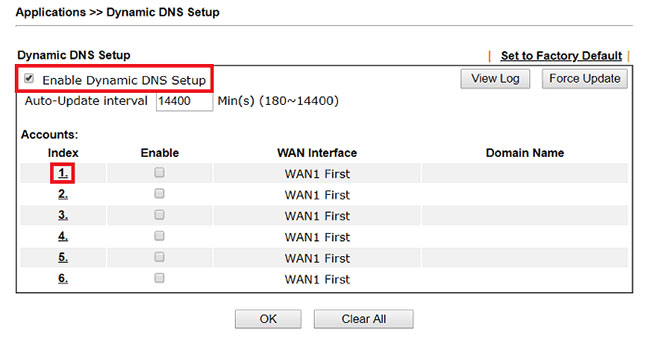
<p style="text-align: justify;">1. Sau khi đăng ký tài khoản và hostname, hãy truy cập&nbsp;<strong>Applications &gt; Dynamic DNS</strong>, kích hoạt&nbsp;<strong>Dynamic DNS Setup</strong>&nbsp;và nhấp vào số chỉ mục (index) khả dụng</p>

<figure>
<div style="text-align: justify;"><img alt="Kích hoạt Dynamic DNS Setup" data-i="0" data-src="https://st.quantrimang.com/photos/image/2020/05/11/cau-hinh-ddns-tren-router-draytek-1.jpg" data-was-processed="true" height="349" src="https://st.quantrimang.com/photos/image/2020/05/11/cau-hinh-ddns-tren-router-draytek-1.jpg" width="650" /></div>

<figcaption>
<div style="text-align: justify;">Kích hoạt Dynamic DNS Setup</div>
</figcaption>
</figure>

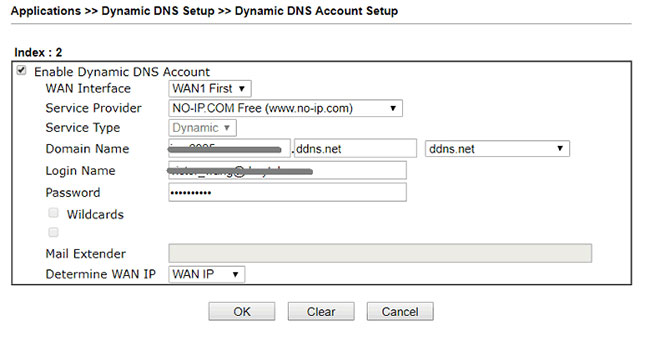
<p style="text-align: justify;">2. Thiết lập tài khoản Dynamic DNS như sau:</p>

<ul>
	<li style="text-align: justify;">Tích vào&nbsp;<strong>Enable Dynamic DNS Account</strong>.</li>
	<li style="text-align: justify;">Chọn&nbsp;<strong>WAN Interface</strong>&nbsp;là interface mà tên miền sẽ được ánh xạ.</li>
	<li style="text-align: justify;">Chọn nhà cung cấp dịch vụ Dynamic DNS mà bạn đang sử dụng trong&nbsp;<strong>Dynamic DNS Service Provider</strong>.</li>
	<li style="text-align: justify;">Nhập tên miền mà bạn đã đăng ký trong&nbsp;<strong>Domain Name.</strong></li>
	<li style="text-align: justify;">Nhập tên đăng nhập và mật khẩu của dịch vụ Dynamic DNS.</li>
	<li style="text-align: justify;">Sử dụng&nbsp;<strong>&quot;WAN IP&quot;</strong>&nbsp;cho&nbsp;<strong>Determine Real WAN IP</strong>&nbsp;nếu mạng WAN của router đang kết nối trực tiếp với Internet. Nếu Vigor Router dùng ký thuật&nbsp;<a href="https://quantrimang.com/network-address-translation-nat-hoat-dong-nhu-the-nao-phan-1-118495" title="Tìm hiểu cơ chế hoạt động của NAT (Network Address Translation)">NAT</a>, thay vào đó hãy sử dụng&nbsp;<strong>&quot;Internet IP&quot;.</strong></li>
	<li style="text-align: justify;">Nhấn&nbsp;<strong>OK</strong>&nbsp;để lưu lại.</li>
</ul>

<figure>
<div style="text-align: justify;"><img alt="Thiết lập tài khoản Dynamic DNS" data-i="1" data-src="https://st.quantrimang.com/photos/image/2020/05/11/cau-hinh-ddns-tren-router-draytek-2.jpg" data-was-processed="true" height="341" src="https://st.quantrimang.com/photos/image/2020/05/11/cau-hinh-ddns-tren-router-draytek-2.jpg" width="650" /></div>

<figcaption>
<div style="text-align: justify;">Thiết lập tài khoản Dynamic DNS</div>
</figcaption>
</figure>

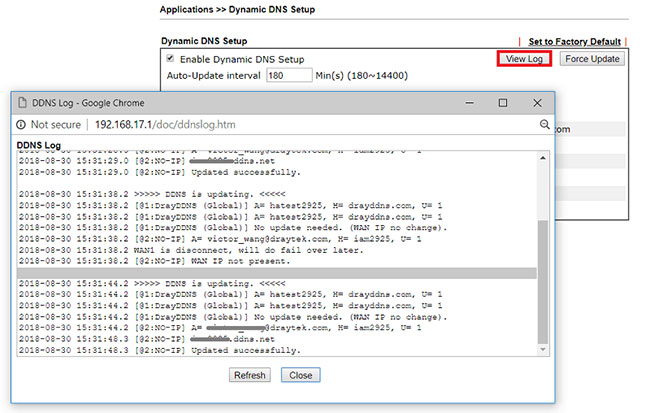
<p style="text-align: justify;">3. Sau khi nhấp&nbsp;<strong>OK</strong>, router sẽ cố gắng cập nhật WAN IP lên Dynamic DNS Server, bạn có thể nhấp vào&nbsp;<strong>View Log</strong>&nbsp;để kiểm tra xem bản cập nhật có thành công hay không.</p>

<figure>
<div style="text-align: justify;"><img alt="Nhấp vào View Log để kiểm tra xem bản cập nhật có thành công hay không" data-i="2" data-src="https://st.quantrimang.com/photos/image/2020/05/11/cau-hinh-ddns-tren-router-draytek-3.jpg" data-was-processed="true" height="413" src="https://st.quantrimang.com/photos/image/2020/05/11/cau-hinh-ddns-tren-router-draytek-3.jpg" width="650" /></div>

<figcaption>
<div style="text-align: justify;">Nhấp vào View Log để kiểm tra xem bản cập nhật có thành công hay không</div>
</figcaption>
</figure>

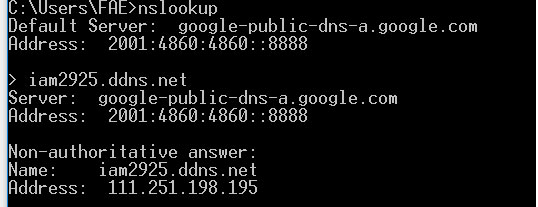
<p style="text-align: justify;">4. Bây giờ, các Internet client sẽ có thể tìm thấy WAN IP của router khi truy vấn tên miền.</p>

<figure>
<div style="text-align: justify;"><img alt="Các Internet client sẽ có thể tìm thấy WAN IP của router" data-i="3" data-src="https://st.quantrimang.com/photos/image/2020/05/11/cau-hinh-ddns-tren-router-draytek-4.jpg" data-was-processed="true" height="207" src="https://st.quantrimang.com/photos/image/2020/05/11/cau-hinh-ddns-tren-router-draytek-4.jpg" width="538" /></div>

<figcaption>
<div style="text-align: justify;">Các Internet client sẽ có thể tìm thấy WAN IP của router</div>
</figcaption>
</figure>

<div style="text-align: justify;">&nbsp;</div>

<h2 style="text-align: justify;">Thiết lập DDNS với API do người dùng xác định</h2>

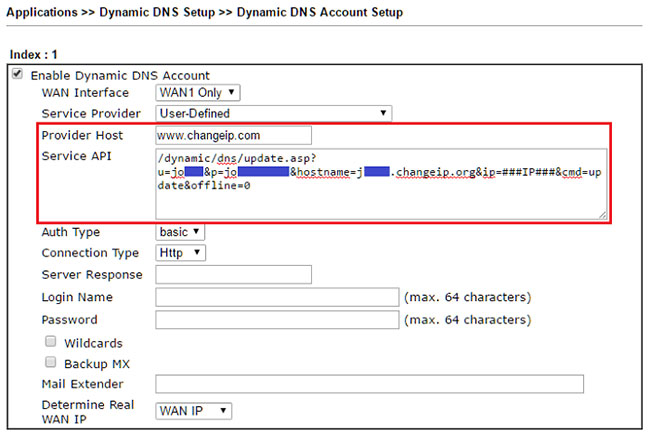
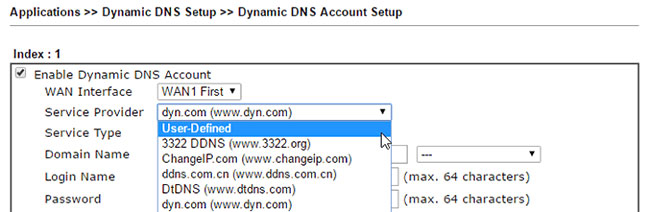
<p style="text-align: justify;">Nếu nhà cung cấp dịch vụ của bạn không được liệt kê, bạn có thể sử dụng API bằng cách chọn&nbsp;<strong>&quot;User-Defined&quot;</strong>&nbsp;trong&nbsp;<strong>Service Provider.</strong></p>

<figure>
<div style="text-align: justify;"><img alt="Bạn có thể sử dụng API bằng cách chọn &#039;User-Defined&#039; trong Service Provider" data-i="4" data-src="https://st.quantrimang.com/photos/image/2020/05/11/cau-hinh-ddns-tren-router-draytek-5.jpg" data-was-processed="true" height="212" src="https://st.quantrimang.com/photos/image/2020/05/11/cau-hinh-ddns-tren-router-draytek-5.jpg" width="650" /></div>

<figcaption>
<div style="text-align: justify;">Bạn có thể sử dụng API bằng cách chọn &quot;User-Defined&quot; trong Service Provider</div>
</figcaption>
</figure>

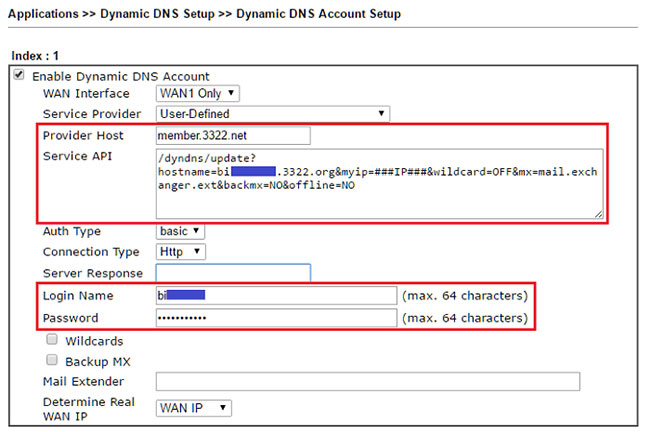
<p style="text-align: justify;">Sau đó, nhập tên miền của máy chủ cập nhật vào&nbsp;<strong>Provider Host</strong>&nbsp;và nhập phần còn lại của URL trong&nbsp;<strong>Service API.</strong>&nbsp;Thông thường, các bản cập nhật được gửi qua HTTP hoặc yêu cầu HTTP chứa thông tin sau: Tên người dùng, mật khẩu, tên máy chủ và địa chỉ IP. Một URL cập nhật sẽ tương tự như sau:</p>

<pre id="pre0">
<code>http://updateddns.example.com/ddns/update?username=&#91;user name&#93;&amp;password=&#91;password&#93;&amp;hostname=&#91;hostname&#93;&amp;myip=&#91;IP&#93;</code></pre>

<p style="text-align: justify;">Trong đó&nbsp;<strong>&#91;username&#93;, &#91;password&#93;</strong>&nbsp;và<strong>&nbsp;&#91;hostname&#93;</strong>&nbsp;cần được thay thế bằng tên người dùng, mật khẩu và hostname đã đăng ký tại nhà cung cấp dịch vụ,&nbsp;<strong>&#91;IP&#93;</strong>&nbsp;cần được thay thế bằng WAN IP của router. Đối với&nbsp;<strong>&#91;IP&#93;</strong>, thay vào đó, bạn có thể nhập&nbsp;<strong>###IP###</strong>, sau đó router sẽ thay thế&nbsp;<strong>###IP###</strong>&nbsp;bằng IP interface hiện tại khi gửi yêu cầu HTTP.</p>

<figure>
<div style="text-align: justify;"><img alt="Đối với &#91;IP&#93;, bạn có thể nhập ###IP###" data-i="5" data-src="https://st.quantrimang.com/photos/image/2020/05/11/cau-hinh-ddns-tren-router-draytek-6.jpg" data-was-processed="true" height="326" src="https://st.quantrimang.com/photos/image/2020/05/11/cau-hinh-ddns-tren-router-draytek-6.jpg" width="650" /></div>

<figcaption>
<div style="text-align: justify;">Đối với &#91;IP&#93;, bạn có thể nhập ###IP###</div>
</figcaption>
</figure>

<p style="text-align: justify;">Cú pháp của URL cập nhật sẽ khác nhau giữa các nhà cung cấp, vui lòng tham khảo hướng dẫn API để biết đúng cú pháp cần sử dụng. Dưới đây là một số ví dụ.</p>

<p style="text-align: justify;">Nhà cung cấp dịch vụ: ChangeIP.org</p>

<figure>
<div style="text-align: justify;"><img alt="Nhà cung cấp dịch vụ: ChangeIP.org" data-i="6" data-src="https://st.quantrimang.com/photos/image/2020/05/11/cau-hinh-ddns-tren-router-draytek-7.jpg" data-was-processed="true" height="436" src="https://st.quantrimang.com/photos/image/2020/05/11/cau-hinh-ddns-tren-router-draytek-7.jpg" width="650" /></div>

<figcaption>
<div style="text-align: justify;">Nhà cung cấp dịch vụ: ChangeIP.org</div>
</figcaption>
</figure>

<p style="text-align: justify;">Nhà cung cấp dịch vụ: 3322.net</p>

<figure>
<div style="text-align: justify;"><img alt="Nhà cung cấp dịch vụ: 3322.net" data-i="7" data-src="https://st.quantrimang.com/photos/image/2020/05/11/cau-hinh-ddns-tren-router-draytek-8.jpg" data-was-processed="true" height="432" src="https://st.quantrimang.com/photos/image/2020/05/11/cau-hinh-ddns-tren-router-draytek-8.jpg" width="650" /></div>

<figcaption>
<div style="text-align: justify;">Nhà cung cấp dịch vụ: 3322.net</div>
</figcaption>
</figure>
		</div>
				<div id="author">
						<p>
				<strong>Nguồn tin:</strong>
				Quantrimang.com
			</p>
		</div>
	</div>
	<div id="footer" class="clearfix">
		<div id="url">
			<strong>URL của bản tin này: </strong><a href="https://www.nguoicodonvn2008.info/vi/news/savefile/kien-thuc-may-tinh/cach-thiet-lap-va-cau-hinh-ddns-tren-router-draytek-2020.html" title="Cách thiết lập và cấu hình DDNS trên router Draytek">https://www.nguoicodonvn2008.info/vi/news/savefile/kien-thuc-may-tinh/cach-thiet-lap-va-cau-hinh-ddns-tren-router-draytek-2020.html</a>

		</div>
		<div class="clear"></div>
		<div class="copyright">
			&copy; .&#x3A; Nguoicodonvn2008.info - Cõi lòng người cô đơn &#x3A;.
		</div>
		<div id="contact">
			<a href="mailto:admin@nguoicodonvn2008.info">admin@nguoicodonvn2008.info</a>
		</div>
	</div>
</div>
        <div id="timeoutsess" class="chromeframe">
            Bạn đã không sử dụng Site, <a onclick="timeoutsesscancel();" href="https://nguoicodonvn2008.info/#">Bấm vào đây để duy trì trạng thái đăng nhập</a>. Thời gian chờ: <span id="secField"> 60 </span> giây
        </div>
        <div id="openidResult" class="nv-alert" style="display:none"></div>
        <div id="openidBt" data-result="" data-redirect=""></div>
		</script>
		<div class="car-top">
  <span><img src="https://nguoicodonvn2008.info/themes/default/images/car.png" alt=""></span>
</div>
<script src="https://nguoicodonvn2008.info/assets/js/jquery/jquery.min.js"></script>
<script>var nv_base_siteurl="/",nv_lang_data="vi",nv_lang_interface="vi",nv_name_variable="nv",nv_fc_variable="op",nv_lang_variable="language",nv_module_name="news",nv_func_name="savefile",nv_is_user=0, nv_my_ofs=-4,nv_my_abbr="EDT",nv_cookie_prefix="nv4c_e856T",nv_check_pass_mstime=1738000,nv_area_admin=0,nv_safemode=0,theme_responsive=0,nv_recaptcha_ver=2,nv_recaptcha_sitekey="",nv_recaptcha_type="image",XSSsanitize=1;</script>
<script src="https://nguoicodonvn2008.info/assets/js/language/vi.js"></script>
<script src="https://nguoicodonvn2008.info/assets/js/DOMPurify/purify3.js"></script>
<script src="https://nguoicodonvn2008.info/assets/js/global.js"></script>
<script src="https://nguoicodonvn2008.info/assets/js/site.js"></script>
<script src="https://nguoicodonvn2008.info/themes/default/js/news.js"></script>
<script src="https://nguoicodonvn2008.info/themes/default/js/main.js"></script>
<script src="https://nguoicodonvn2008.info/themes/default/js/custom.js"></script>
<script type="application/ld+json">
        {
            "@context": "https://schema.org",
            "@type": "Organization",
            "url": "https://nguoicodonvn2008.info",
            "logo": "https://nguoicodonvn2008.info/uploads/angel.gif"
        }
        </script>
<script src="https://nguoicodonvn2008.info/themes/default/js/bootstrap.min.js"></script>
<script type="text/javascript">
var $scrolltop = $('.car-top');
$scrolltop.on('click', function () {
    $('html,body').animate({
        scrollTop: 0
    }, 800);
    $(this).addClass("car-run");
    setTimeout(function(){ $scrolltop.removeClass('car-run');}, 1000);
    return false;
});
$(window).on('scroll', function ()
{ 
    if($(window).scrollTop() >= 200)
    {
        $scrolltop.addClass("show");
        $scrolltop.addClass("car-down");
    }
    else
    {
       $scrolltop.removeClass("show");
       setTimeout(function(){ $scrolltop.removeClass('car-down');}, 300);
    }
});
</script>
</body>
</html>