<!DOCTYPE html>
    <html lang="vi" xmlns="http://www.w3.org/1999/xhtml" prefix="og: http://ogp.me/ns#">
    <head>
<title>Cách thiết lập Notebook Navigator để tìm ghi chú dễ dàng hơn</title>
<meta name="description" content="Cách thiết lập Notebook Navigator để tìm ghi chú dễ dàng hơn - Savefile - Tin Tức -...">
<meta name="author" content=".: Nguoicodonvn2008.info - Cõi lòng người cô đơn :.">
<meta name="copyright" content=".: Nguoicodonvn2008.info - Cõi lòng người cô đơn :. [admin@nguoicodonvn2008.info]">
<meta name="robots" content="index, archive, follow, noodp">
<meta name="googlebot" content="index,archive,follow,noodp">
<meta name="msnbot" content="all,index,follow">
<meta name="generator" content="NukeViet v4.5">
<meta http-equiv="Content-Type" content="text/html; charset=utf-8">
<meta property="og:title" content="Cách thiết lập Notebook Navigator để tìm ghi chú dễ dàng hơn">
<meta property="og:type" content="website">
<meta property="og:description" content="Savefile - Tin Tức - https&#x3A;&#x002F;&#x002F;www.nguoicodonvn2008.info&#x002F;vi&#x002F;news&#x002F;savefile&#x002F;kien-thuc-may-tinh&#x002F;cach-thiet-lap-notebook-navigator-de-tim-ghi-chu-de-dang-hon-11453.html">
<meta property="og:site_name" content=".&#x3A; Nguoicodonvn2008.info - Cõi lòng người cô đơn &#x3A;.">
<meta property="og:url" content="https://www.nguoicodonvn2008.info/vi/news/savefile/kien-thuc-may-tinh/cach-thiet-lap-notebook-navigator-de-tim-ghi-chu-de-dang-hon-11453.html">
<link rel="shortcut icon" href="https://nguoicodonvn2008.info/favicon.ico">
<link rel="canonical" href="https://www.nguoicodonvn2008.info/vi/news/savefile/kien-thuc-may-tinh/cach-thiet-lap-notebook-navigator-de-tim-ghi-chu-de-dang-hon-11453.html">
<link rel="alternate" href="https://nguoicodonvn2008.info/vi/news/rss/" title="Tin Tức" type="application/rss+xml">
<link rel="alternate" href="https://nguoicodonvn2008.info/vi/news/rss/karaoke-dual/" title="Tin Tức - Karaoke Dual" type="application/rss+xml">
<link rel="alternate" href="https://nguoicodonvn2008.info/vi/news/rss/nhac-tre/" title="Tin Tức - Nhạc trẻ" type="application/rss+xml">
<link rel="alternate" href="https://nguoicodonvn2008.info/vi/news/rss/tru-tinh/" title="Tin Tức - Trữ tình" type="application/rss+xml">
<link rel="alternate" href="https://nguoicodonvn2008.info/vi/news/rss/nuoc-ngoai/" title="Tin Tức - Nước ngoài" type="application/rss+xml">
<link rel="alternate" href="https://nguoicodonvn2008.info/vi/news/rss/remix/" title="Tin Tức - Remix" type="application/rss+xml">
<link rel="alternate" href="https://nguoicodonvn2008.info/vi/news/rss/tam-su-tinh-yeu/" title="Tin Tức - Tâm sự tình yêu" type="application/rss+xml">
<link rel="alternate" href="https://nguoicodonvn2008.info/vi/news/rss/tho-suu-tam/" title="Tin Tức - Thơ sưu tầm" type="application/rss+xml">
<link rel="alternate" href="https://nguoicodonvn2008.info/vi/news/rss/cuoc-song/" title="Tin Tức - Cuộc sống" type="application/rss+xml">
<link rel="alternate" href="https://nguoicodonvn2008.info/vi/news/rss/phan-mem/" title="Tin Tức - Phần mềm" type="application/rss+xml">
<link rel="alternate" href="https://nguoicodonvn2008.info/vi/news/rss/kien-thuc-may-tinh/" title="Tin Tức - Kiến thức máy tính" type="application/rss+xml">
<link rel="alternate" href="https://nguoicodonvn2008.info/vi/news/rss/hoc-tap/" title="Tin Tức - Học tập" type="application/rss+xml">
<link rel="alternate" href="https://nguoicodonvn2008.info/vi/news/rss/tai-lieu/" title="Tin Tức - Tài liệu" type="application/rss+xml">
<link rel="alternate" href="https://nguoicodonvn2008.info/vi/news/rss/de-thi/" title="Tin Tức - Đề thi" type="application/rss+xml">
<link rel="preload" as="style" href="https://nguoicodonvn2008.info/assets/css/font-awesome.min.css" type="text/css">
<link rel="preload" as="style" href="https://nguoicodonvn2008.info/themes/default/css/bootstrap.non-responsive.css" type="text/css">
<link rel="preload" as="style" href="https://nguoicodonvn2008.info/themes/default/css/style.css" type="text/css">
<link rel="preload" as="style" href="https://nguoicodonvn2008.info/themes/default/css/style.non-responsive.css" type="text/css">
<link rel="preload" as="style" href="https://nguoicodonvn2008.info/themes/default/css/news.css" type="text/css">
<link rel="preload" as="style" href="https://nguoicodonvn2008.info/themes/default/css/custom.css" type="text/css">
<link rel="preload" as="script" href="https://nguoicodonvn2008.info/assets/js/jquery/jquery.min.js" type="text/javascript">
<link rel="preload" as="script" href="https://nguoicodonvn2008.info/assets/js/language/vi.js" type="text/javascript">
<link rel="preload" as="script" href="https://nguoicodonvn2008.info/assets/js/DOMPurify/purify3.js" type="text/javascript">
<link rel="preload" as="script" href="https://nguoicodonvn2008.info/assets/js/global.js" type="text/javascript">
<link rel="preload" as="script" href="https://nguoicodonvn2008.info/assets/js/site.js" type="text/javascript">
<link rel="preload" as="script" href="https://nguoicodonvn2008.info/themes/default/js/news.js" type="text/javascript">
<link rel="preload" as="script" href="https://nguoicodonvn2008.info/themes/default/js/main.js" type="text/javascript">
<link rel="preload" as="script" href="https://nguoicodonvn2008.info/themes/default/js/custom.js" type="text/javascript">
<link rel="preload" as="script" href="https://nguoicodonvn2008.info/themes/default/js/bootstrap.min.js" type="text/javascript">
<link rel="stylesheet" href="https://nguoicodonvn2008.info/assets/css/font-awesome.min.css">
<link rel="stylesheet" href="https://nguoicodonvn2008.info/themes/default/css/bootstrap.non-responsive.css">
<link rel="stylesheet" href="https://nguoicodonvn2008.info/themes/default/css/style.css">
<link rel="stylesheet" href="https://nguoicodonvn2008.info/themes/default/css/style.non-responsive.css">
<link rel="StyleSheet" href="https://nguoicodonvn2008.info/themes/default/css/news.css">
<link rel="stylesheet" href="https://nguoicodonvn2008.info/themes/default/css/custom.css">
<style type="text/css">
	body{background: #fff;}
</style>
    </head>
    <body>
<div id="print">
	<div id="hd_print">
		<h2 class="pull-left">.&#x3A; Nguoicodonvn2008.info - Cõi lòng người cô đơn &#x3A;.</h2>
		<p class="pull-right"><a title=".&#x3A; Nguoicodonvn2008.info - Cõi lòng người cô đơn &#x3A;." href="https://nguoicodonvn2008.info/">https://nguoicodonvn2008.info</a></p>
	</div>
	<div class="clear"></div>
	<hr />
	<div id="content">
		<h1>Cách thiết lập Notebook Navigator để tìm ghi chú dễ dàng hơn</h1>
		<ul class="list-inline">
			<li>Thứ sáu - 24/10/2025 22:44</li>
			<li class="hidden-print txtrequired"><em class="fa fa-print">&nbsp;</em><a title="In ra" href="javascript:;" onclick="window.print()">In ra</a></li>
			<li class="hidden-print txtrequired"><em class="fa fa-power-off">&nbsp;</em><a title="Đóng cửa sổ này" href="javascript:;" onclick="window.close()">Đóng cửa sổ này</a></li>
		</ul>
		<div class="clear"></div>
		<div id="hometext">
		</div>
				<div class="imghome">
			<img alt="Cách thiết lập Notebook Navigator để tìm ghi chú dễ dàng hơn" src="https://st.quantrimang.com/photos/image/2025/10/23/thiet-lap-notebook-navigator-tim-ghi-chu-de-dang-1.jpg" width="460" class="img-thumbnail" />
		</div>
		<div class="clear"></div>
		<div id="bodytext" class="clearfix">
			<p style="text-align: justify;">Mỗi tuần, kho lưu trữ Obsidian của bạn lại phình to hơn một chút, và thử thách theo dõi mọi thứ trong đó cũng vậy. Tag, liên kết và bộ lọc giúp bạn tìm ghi chú nhanh hơn, nhưng chúng chỉ hiệu quả khi mọi thứ được sắp xếp hoàn hảo. Kho lưu trữ thường chứa hỗn hợp nhật ký hàng ngày, hướng dẫn công nghệ, phác thảo dự án và suy nghĩ cá nhân. Ngay cả khi được sắp xếp cẩn thận, việc có hơn một nghìn mục nhập cũng khiến việc tìm kiếm các ghi chú cụ thể trở nên khó khăn, và đôi khi thậm chí toàn bộ thư mục bị lạc trong quá trình xáo trộn.</p>

<p style="text-align: justify;">Mặc dù&nbsp;Obsidian&nbsp;cung cấp một giao diện gọn gàng với các công cụ tổ chức mạnh mẽ, nhưng nó lại thiếu sự phân biệt trực quan. Khi quét tìm file, tất cả những gì bạn thấy chỉ là những dòng văn bản được sắp xếp gọn gàng. Điều này làm mắt bạn căng thẳng và gần như không thể phân biệt bất cứ thứ gì chỉ bằng cái nhìn thoáng qua.</p>

<p style="text-align: justify;">Gần đây, một số người dùng đã phát hiện ra&nbsp;Notebook Navigator. Plugin này đã thay đổi giao diện Obsidian bằng cách thêm màu sắc, biểu tượng và hệ thống phân cấp trực quan giúp việc điều hướng trở nên nhanh chóng. Thay vì đọc qua các danh sách văn bản đơn điệu, giờ đây bạn chỉ cần nhìn là có thể nhận dạng thư mục và tag. Kho lưu trữ sẽ chuyển từ một bức tường chứa đầy những từ giống hệt nhau thành một không gian làm việc trực quan, thực sự hoạt động với cách não bộ xử lý thông tin.</p>

<h2 style="text-align: justify;">Cách thiết lập Notebook Navigator để tìm kiếm ghi chú dễ dàng hơn</h2>

<h3 style="text-align: justify;">Thiết lập để kho lưu trữ Obsidian gọn gàng và dễ tìm kiếm hơn</h3>

<figure>
<div style="text-align: justify;"><img alt="Plugin Notebook Navigator" data-adbro-processed="true" data-i="0" data-src="https://st.quantrimang.com/photos/image/2025/10/23/thiet-lap-notebook-navigator-tim-ghi-chu-de-dang-1.jpg" data-was-processed="true" height="876" src="https://st.quantrimang.com/photos/image/2025/10/23/thiet-lap-notebook-navigator-tim-ghi-chu-de-dang-1.jpg" width="1650" /></div>

<figcaption>
<div style="text-align: justify;">Plugin Notebook Navigator</div>
</figcaption>
</figure>

<div style="text-align: justify;">&nbsp;</div>

<p style="text-align: justify;">Sau khi cài đặt và kích hoạt Notebook Navigator của Johan Sanneblad, kho lưu trữ của bạn sẽ ngay lập tức cải thiện trải nghiệm duyệt web. Không cần cấu hình gì cả, giao diện sẽ bao gồm bảng điều hướng hai khung, cây tag và bản xem trước, giúp kho lưu trữ có nhiều ngữ cảnh hơn, giúp việc tìm kiếm các mục dễ dàng hơn. Điều này đã rất tuyệt rồi, nhưng bạn vẫn có thể làm tốt hơn.</p>

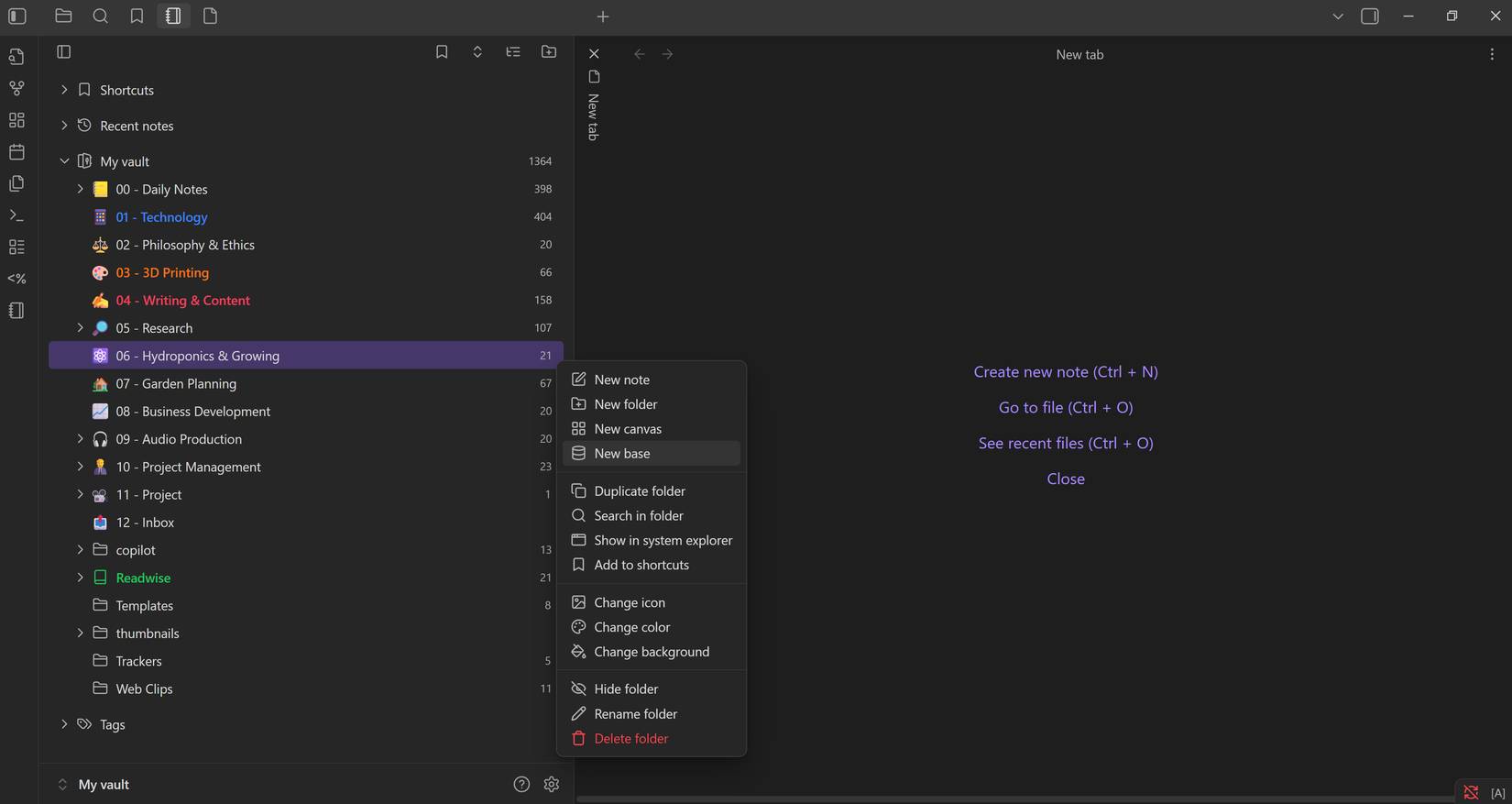
<p style="text-align: justify;">Các thư mục được sắp xếp tốt, nhưng bạn có thể thêm một số ngữ cảnh và hình ảnh trực quan để dễ dàng tìm thấy các thư mục quan trọng chỉ trong nháy mắt. Vì vậy, hãy bắt đầu thêm các biểu tượng đánh dấu bằng cách nhấp chuột phải vào từng thư mục và chọn&nbsp;<strong>Change icon</strong>. Hãy chọn biểu tượng cảm xúc nhiều màu sắc cho các biểu tượng vì chúng dễ nhận biết hơn.</p>

<figure>
<div style="text-align: justify;"><img alt="Thêm biểu tượng thư mục" data-i="1" data-src="https://st.quantrimang.com/photos/image/2025/10/23/thiet-lap-notebook-navigator-tim-ghi-chu-de-dang-2.jpg" data-was-processed="true" height="877" src="https://st.quantrimang.com/photos/image/2025/10/23/thiet-lap-notebook-navigator-tim-ghi-chu-de-dang-2.jpg" width="1650" /></div>

<figcaption>
<div style="text-align: justify;">Thêm biểu tượng thư mục</div>
</figcaption>
</figure>

<p style="text-align: justify;">Sau khi thêm biểu tượng, bạn cũng có thể làm nổi bật các thư mục quan trọng nhất trong khung điều hướng bằng cách thay đổi màu phông chữ. Bên cạnh việc làm nổi bật, bạn cũng có thể thay đổi màu nền cho từng thư mục để làm cho chúng nổi bật hơn. Sử dụng màu phông chữ dễ nhìn hơn, nên bạn có thể bỏ qua việc thêm màu nền.</p>

<figure>
<div style="text-align: justify;"><img alt="Làm nổi bật các thư mục quan trọng" data-i="2" data-src="https://st.quantrimang.com/photos/image/2025/10/23/thiet-lap-notebook-navigator-tim-ghi-chu-de-dang-3.jpg" data-was-processed="true" height="877" src="https://st.quantrimang.com/photos/image/2025/10/23/thiet-lap-notebook-navigator-tim-ghi-chu-de-dang-3.jpg" width="1650" /></div>

<figcaption>
<div style="text-align: justify;">Làm nổi bật các thư mục quan trọng</div>
</figcaption>
</figure>

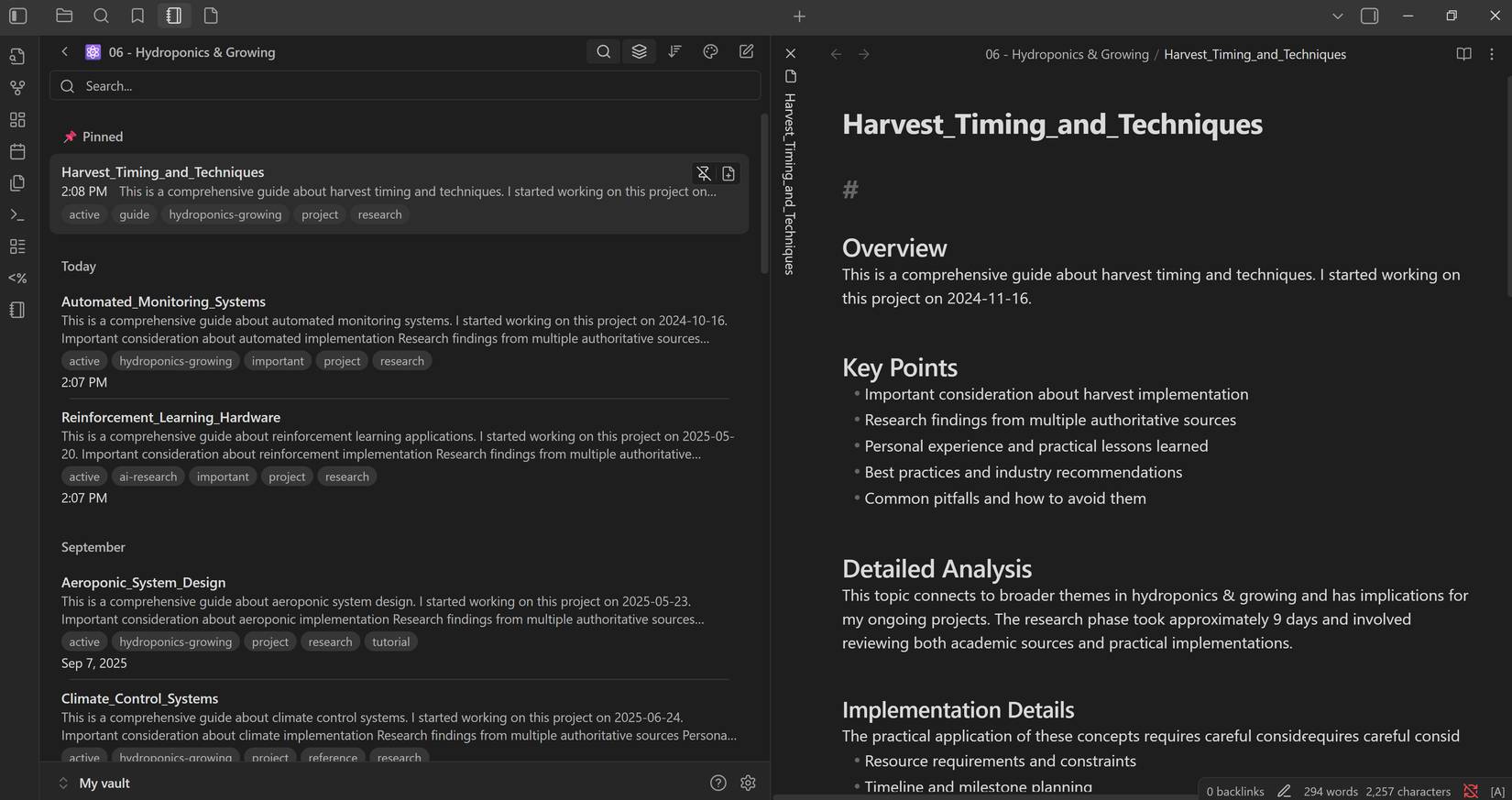
<p style="text-align: justify;">Giờ đây, khi đã dễ dàng nhận diện các thư mục hơn, hãy sắp xếp kho lưu trữ bằng cách ghim các ghi chú quan trọng và thêm shortcut vào thư mục. Để ghim ghi chú, chỉ cần di chuột qua mục đó để hiển thị biểu tượng&nbsp;<strong>Pin note</strong>&nbsp;trước khi nhấp. Bạn có thể thêm thư mục vào shortcut bằng cách nhấp chuột phải vào thư mục và chọn&nbsp;<strong>Add to shortcuts</strong>.</p>

<figure>
<div style="text-align: justify;"><img alt="Ghim ghi chú chính và thêm shortcut thư mục" data-i="3" data-src="https://st.quantrimang.com/photos/image/2025/10/23/thiet-lap-notebook-navigator-tim-ghi-chu-de-dang-4.jpg" data-was-processed="true" height="873" src="https://st.quantrimang.com/photos/image/2025/10/23/thiet-lap-notebook-navigator-tim-ghi-chu-de-dang-4.jpg" width="1650" /></div>

<figcaption>
<div style="text-align: justify;">Ghim ghi chú chính và thêm shortcut thư mục</div>
</figcaption>
</figure>

<p style="text-align: justify;">Và đó là tất cả những gì có thể tùy chỉnh với Notebook Navigator. Nó không phải là kiểu thiết lập bắt mắt như các giao diện Obsidian có thể tùy chỉnh hoàn toàn, nhưng Notebook Navigator làm tốt việc cung cấp đủ tín hiệu trực quan để giúp người dùng dễ dàng tìm thấy các ghi chú và thư mục trong kho lưu trữ.</p>

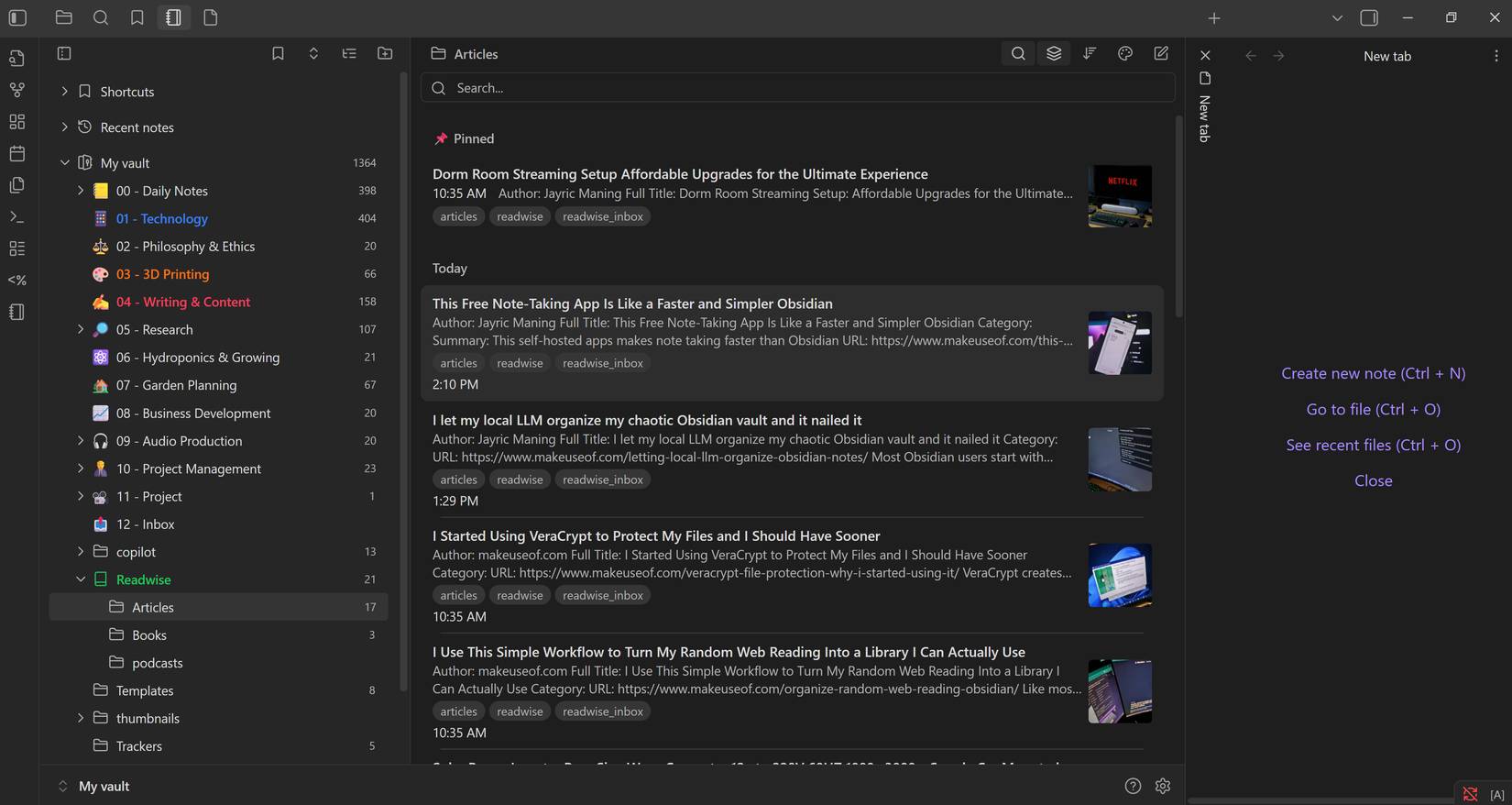
<p style="text-align: justify;">Có thể kết hợp Notebook Navigator với&nbsp;Featured Image. Plugin bổ sung này cho phép bạn thêm hình thu nhỏ vào mỗi ghi chú, cung cấp thêm tín hiệu trực quan để giúp tìm kiếm các ghi chú cụ thể dễ dàng hơn. Cả hai plugin đều do Johan Sanneblad phát triển và chúng hoạt động hoàn hảo cùng nhau. Featured Image cũng không cần bất kỳ cấu hình bổ sung nào. Chỉ cần cài đặt plugin và bạn sẽ thấy hình thu nhỏ ngay lập tức.</p>

<figure>
<div style="text-align: justify;"><img alt="Thêm hình thu nhỏ vào ghi chú bằng plugin Featured Image" data-i="4" data-src="https://st.quantrimang.com/photos/image/2025/10/23/thiet-lap-notebook-navigator-tim-ghi-chu-de-dang-5.jpg" data-was-processed="true" height="878" src="https://st.quantrimang.com/photos/image/2025/10/23/thiet-lap-notebook-navigator-tim-ghi-chu-de-dang-5.jpg" width="1650" /></div>

<figcaption>
<div style="text-align: justify;">Thêm hình thu nhỏ vào ghi chú bằng plugin Featured Image</div>
</figcaption>
</figure>

<p style="text-align: justify;">Đối với các kho lưu trữ chứa nhiều nội dung trực quan như mô hình thiết kế, bộ sưu tập ảnh hoặc hướng dẫn minh họa, việc có thêm plugin này sẽ giúp duyệt và tìm kiếm ghi chú dễ dàng hơn rất nhiều.</p>

<h2 style="text-align: justify;">Việc tìm kiếm ghi chú trở nên dễ dàng hơn rất nhiều với Notebook Navigator</h2>

<p style="text-align: justify;">Notebook Navigator đã tạo ra sự khác biệt lớn trong quy trình ghi chú. Cuối cùng, bạn cũng có thể di chuyển nhanh chóng qua kho lưu trữ của mình, với hình ảnh, bản xem trước và cấu trúc kết hợp hài hòa giúp bạn làm việc hiệu quả. Dù kho lưu trữ lớn hay phức tạp đến đâu, việc chuyển đổi điều hướng có thể giúp bạn lấy lại nội dung và sử dụng Obsidian theo cách bạn muốn. Cho dù bạn đang xây dựng cơ sở kiến ​​thức hay theo dõi các tác vụ hàng ngày, đừng bằng lòng với những tùy chọn mặc định. Hãy thử mở rộng thiết lập và bạn sẽ thấy kết quả ngay lập tức.</p>

<div style="text-align: justify;">&nbsp;</div>
		</div>
				<div id="author">
						<p>
				<strong>Nguồn tin:</strong>
				Quantrimang.com:
			</p>
		</div>
	</div>
	<div id="footer" class="clearfix">
		<div id="url">
			<strong>URL của bản tin này: </strong><a href="https://www.nguoicodonvn2008.info/vi/news/savefile/kien-thuc-may-tinh/cach-thiet-lap-notebook-navigator-de-tim-ghi-chu-de-dang-hon-11453.html" title="Cách thiết lập Notebook Navigator để tìm ghi chú dễ dàng hơn">https://www.nguoicodonvn2008.info/vi/news/savefile/kien-thuc-may-tinh/cach-thiet-lap-notebook-navigator-de-tim-ghi-chu-de-dang-hon-11453.html</a>

		</div>
		<div class="clear"></div>
		<div class="copyright">
			&copy; .&#x3A; Nguoicodonvn2008.info - Cõi lòng người cô đơn &#x3A;.
		</div>
		<div id="contact">
			<a href="mailto:admin@nguoicodonvn2008.info">admin@nguoicodonvn2008.info</a>
		</div>
	</div>
</div>
        <div id="timeoutsess" class="chromeframe">
            Bạn đã không sử dụng Site, <a onclick="timeoutsesscancel();" href="https://nguoicodonvn2008.info/#">Bấm vào đây để duy trì trạng thái đăng nhập</a>. Thời gian chờ: <span id="secField"> 60 </span> giây
        </div>
        <div id="openidResult" class="nv-alert" style="display:none"></div>
        <div id="openidBt" data-result="" data-redirect=""></div>
		</script>
		<div class="car-top">
  <span><img src="https://nguoicodonvn2008.info/themes/default/images/car.png" alt=""></span>
</div>
<script src="https://nguoicodonvn2008.info/assets/js/jquery/jquery.min.js"></script>
<script>var nv_base_siteurl="/",nv_lang_data="vi",nv_lang_interface="vi",nv_name_variable="nv",nv_fc_variable="op",nv_lang_variable="language",nv_module_name="news",nv_func_name="savefile",nv_is_user=0, nv_my_ofs=-4,nv_my_abbr="EDT",nv_cookie_prefix="nv4c_e856T",nv_check_pass_mstime=1738000,nv_area_admin=0,nv_safemode=0,theme_responsive=0,nv_recaptcha_ver=2,nv_recaptcha_sitekey="",nv_recaptcha_type="image",XSSsanitize=1;</script>
<script src="https://nguoicodonvn2008.info/assets/js/language/vi.js"></script>
<script src="https://nguoicodonvn2008.info/assets/js/DOMPurify/purify3.js"></script>
<script src="https://nguoicodonvn2008.info/assets/js/global.js"></script>
<script src="https://nguoicodonvn2008.info/assets/js/site.js"></script>
<script src="https://nguoicodonvn2008.info/themes/default/js/news.js"></script>
<script src="https://nguoicodonvn2008.info/themes/default/js/main.js"></script>
<script src="https://nguoicodonvn2008.info/themes/default/js/custom.js"></script>
<script type="application/ld+json">
        {
            "@context": "https://schema.org",
            "@type": "Organization",
            "url": "https://nguoicodonvn2008.info",
            "logo": "https://nguoicodonvn2008.info/uploads/angel.gif"
        }
        </script>
<script src="https://nguoicodonvn2008.info/themes/default/js/bootstrap.min.js"></script>
<script type="text/javascript">
var $scrolltop = $('.car-top');
$scrolltop.on('click', function () {
    $('html,body').animate({
        scrollTop: 0
    }, 800);
    $(this).addClass("car-run");
    setTimeout(function(){ $scrolltop.removeClass('car-run');}, 1000);
    return false;
});
$(window).on('scroll', function ()
{ 
    if($(window).scrollTop() >= 200)
    {
        $scrolltop.addClass("show");
        $scrolltop.addClass("car-down");
    }
    else
    {
       $scrolltop.removeClass("show");
       setTimeout(function(){ $scrolltop.removeClass('car-down');}, 300);
    }
});
</script>
</body>
</html>