<!DOCTYPE html>
    <html lang="vi" xmlns="http://www.w3.org/1999/xhtml" prefix="og: http://ogp.me/ns#">
    <head>
<title>Cách thiết lập laptop vẫn hoạt động bình thường ngay cả khi gập màn hình trên Windows 11</title>
<meta name="description" content="Cách thiết lập laptop vẫn hoạt động bình thường ngay cả khi gập màn hình trên Windows 11 - Savefile - Tin Tức -...">
<meta name="author" content=".: Nguoicodonvn2008.info - Cõi lòng người cô đơn :.">
<meta name="copyright" content=".: Nguoicodonvn2008.info - Cõi lòng người cô đơn :. [admin@nguoicodonvn2008.info]">
<meta name="robots" content="index, archive, follow, noodp">
<meta name="googlebot" content="index,archive,follow,noodp">
<meta name="msnbot" content="all,index,follow">
<meta name="generator" content="NukeViet v4.5">
<meta http-equiv="Content-Type" content="text/html; charset=utf-8">
<meta property="og:title" content="Cách thiết lập laptop vẫn hoạt động bình thường ngay cả khi gập màn hình trên Windows 11">
<meta property="og:type" content="website">
<meta property="og:description" content="Savefile - Tin Tức -...">
<meta property="og:site_name" content=".&#x3A; Nguoicodonvn2008.info - Cõi lòng người cô đơn &#x3A;.">
<meta property="og:url" content="https://www.nguoicodonvn2008.info/vi/news/savefile/kien-thuc-may-tinh/cach-thiet-lap-laptop-van-hoat-dong-binh-thuong-ngay-ca-khi-gap-man-hinh-tren-windows-11-5380.html">
<link rel="shortcut icon" href="https://nguoicodonvn2008.info/favicon.ico">
<link rel="canonical" href="https://www.nguoicodonvn2008.info/vi/news/savefile/kien-thuc-may-tinh/cach-thiet-lap-laptop-van-hoat-dong-binh-thuong-ngay-ca-khi-gap-man-hinh-tren-windows-11-5380.html">
<link rel="alternate" href="https://nguoicodonvn2008.info/vi/news/rss/" title="Tin Tức" type="application/rss+xml">
<link rel="alternate" href="https://nguoicodonvn2008.info/vi/news/rss/karaoke-dual/" title="Tin Tức - Karaoke Dual" type="application/rss+xml">
<link rel="alternate" href="https://nguoicodonvn2008.info/vi/news/rss/nhac-tre/" title="Tin Tức - Nhạc trẻ" type="application/rss+xml">
<link rel="alternate" href="https://nguoicodonvn2008.info/vi/news/rss/tru-tinh/" title="Tin Tức - Trữ tình" type="application/rss+xml">
<link rel="alternate" href="https://nguoicodonvn2008.info/vi/news/rss/nuoc-ngoai/" title="Tin Tức - Nước ngoài" type="application/rss+xml">
<link rel="alternate" href="https://nguoicodonvn2008.info/vi/news/rss/remix/" title="Tin Tức - Remix" type="application/rss+xml">
<link rel="alternate" href="https://nguoicodonvn2008.info/vi/news/rss/tam-su-tinh-yeu/" title="Tin Tức - Tâm sự tình yêu" type="application/rss+xml">
<link rel="alternate" href="https://nguoicodonvn2008.info/vi/news/rss/tho-suu-tam/" title="Tin Tức - Thơ sưu tầm" type="application/rss+xml">
<link rel="alternate" href="https://nguoicodonvn2008.info/vi/news/rss/cuoc-song/" title="Tin Tức - Cuộc sống" type="application/rss+xml">
<link rel="alternate" href="https://nguoicodonvn2008.info/vi/news/rss/phan-mem/" title="Tin Tức - Phần mềm" type="application/rss+xml">
<link rel="alternate" href="https://nguoicodonvn2008.info/vi/news/rss/kien-thuc-may-tinh/" title="Tin Tức - Kiến thức máy tính" type="application/rss+xml">
<link rel="alternate" href="https://nguoicodonvn2008.info/vi/news/rss/hoc-tap/" title="Tin Tức - Học tập" type="application/rss+xml">
<link rel="alternate" href="https://nguoicodonvn2008.info/vi/news/rss/tai-lieu/" title="Tin Tức - Tài liệu" type="application/rss+xml">
<link rel="alternate" href="https://nguoicodonvn2008.info/vi/news/rss/de-thi/" title="Tin Tức - Đề thi" type="application/rss+xml">
<link rel="preload" as="style" href="https://nguoicodonvn2008.info/assets/css/font-awesome.min.css" type="text/css">
<link rel="preload" as="style" href="https://nguoicodonvn2008.info/themes/default/css/bootstrap.non-responsive.css" type="text/css">
<link rel="preload" as="style" href="https://nguoicodonvn2008.info/themes/default/css/style.css" type="text/css">
<link rel="preload" as="style" href="https://nguoicodonvn2008.info/themes/default/css/style.non-responsive.css" type="text/css">
<link rel="preload" as="style" href="https://nguoicodonvn2008.info/themes/default/css/news.css" type="text/css">
<link rel="preload" as="style" href="https://nguoicodonvn2008.info/themes/default/css/custom.css" type="text/css">
<link rel="preload" as="script" href="https://nguoicodonvn2008.info/assets/js/jquery/jquery.min.js" type="text/javascript">
<link rel="preload" as="script" href="https://nguoicodonvn2008.info/assets/js/language/vi.js" type="text/javascript">
<link rel="preload" as="script" href="https://nguoicodonvn2008.info/assets/js/DOMPurify/purify3.js" type="text/javascript">
<link rel="preload" as="script" href="https://nguoicodonvn2008.info/assets/js/global.js" type="text/javascript">
<link rel="preload" as="script" href="https://nguoicodonvn2008.info/assets/js/site.js" type="text/javascript">
<link rel="preload" as="script" href="https://nguoicodonvn2008.info/themes/default/js/news.js" type="text/javascript">
<link rel="preload" as="script" href="https://nguoicodonvn2008.info/themes/default/js/main.js" type="text/javascript">
<link rel="preload" as="script" href="https://nguoicodonvn2008.info/themes/default/js/custom.js" type="text/javascript">
<link rel="preload" as="script" href="https://nguoicodonvn2008.info/themes/default/js/bootstrap.min.js" type="text/javascript">
<link rel="stylesheet" href="https://nguoicodonvn2008.info/assets/css/font-awesome.min.css">
<link rel="stylesheet" href="https://nguoicodonvn2008.info/themes/default/css/bootstrap.non-responsive.css">
<link rel="stylesheet" href="https://nguoicodonvn2008.info/themes/default/css/style.css">
<link rel="stylesheet" href="https://nguoicodonvn2008.info/themes/default/css/style.non-responsive.css">
<link rel="StyleSheet" href="https://nguoicodonvn2008.info/themes/default/css/news.css">
<link rel="stylesheet" href="https://nguoicodonvn2008.info/themes/default/css/custom.css">
<style type="text/css">
	body{background: #fff;}
</style>
    </head>
    <body>
<div id="print">
	<div id="hd_print">
		<h2 class="pull-left">.&#x3A; Nguoicodonvn2008.info - Cõi lòng người cô đơn &#x3A;.</h2>
		<p class="pull-right"><a title=".&#x3A; Nguoicodonvn2008.info - Cõi lòng người cô đơn &#x3A;." href="https://nguoicodonvn2008.info/">https://nguoicodonvn2008.info</a></p>
	</div>
	<div class="clear"></div>
	<hr />
	<div id="content">
		<h1>Cách thiết lập laptop vẫn hoạt động bình thường ngay cả khi gập màn hình trên Windows 11</h1>
		<ul class="list-inline">
			<li>Thứ hai - 04/04/2022 00:48</li>
			<li class="hidden-print txtrequired"><em class="fa fa-print">&nbsp;</em><a title="In ra" href="javascript:;" onclick="window.print()">In ra</a></li>
			<li class="hidden-print txtrequired"><em class="fa fa-power-off">&nbsp;</em><a title="Đóng cửa sổ này" href="javascript:;" onclick="window.close()">Đóng cửa sổ này</a></li>
		</ul>
		<div class="clear"></div>
		<div id="hometext">
		</div>
				<div class="imghome">
			<img alt="Cách thiết lập laptop vẫn hoạt động bình thường ngay cả khi gập màn hình trên Windows 11" src="https://st.quantrimang.com/photos/image/2022/03/27/cach-thiet-lap-laptop-van-hoat-dong-binh-thuong-ngay-ca-khi-gap-man-hinh-tren-windows-111.jpg" width="460" class="img-thumbnail" />
		</div>
		<div class="clear"></div>
		<div id="bodytext" class="clearfix">
			<p style="text-align: justify;">Theo mặc định, bất cứ khi nào bạn đóng gập màn hình chiếc máy tính xách tay Windows của mình, hệ thống sẽ tự động chuyển sang chế độ ngủ (sleep). Chức năng tuy hữu ích nhưng cũng khiến bạn không thể sử dụng máy tính xách tay của mình như một chiếc PC thích hợp. Trong trường hợp bạn muốn biến laptop thành máy tính để bàn, cần đảm bảo rằng PC vẫn hoạt động ngay cả khi bạn gập màn hình hoàn toàn.</p>

<p style="text-align: justify;">Cùng tìm hiểu cách thiết lập ngay sau đây.</p>

<h2 style="text-align: justify;">Giữ máy tính xách tay ở trạng thái hoạt động khi gập màn hình</h2>

<p style="text-align: justify;">Quá trình này rất đơn giản và bạn có thể nhanh chóng thực hiện bằng Control Panel. Chỉ cần làm theo các hướng dẫn dưới đây:</p>

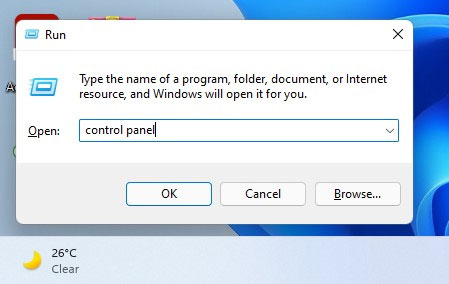
<p style="text-align: justify;"><strong>Bước 1:</strong>&nbsp;Mở hộp Run bằng cách nhấn phím tắt&nbsp;<strong>Win + R</strong>.</p>

<p style="text-align: justify;"><strong>Bước 2:</strong>&nbsp;Nhập từ khóa&nbsp;<strong>Control Panel</strong>&nbsp;và nhấn&nbsp;<strong>Enter</strong>.</p>

<p style="text-align: justify;"><img alt="Nhập từ khóa Control Panel" data-i="0" data-src="https://st.quantrimang.com/photos/image/2022/03/27/cach-thiet-lap-laptop-van-hoat-dong-binh-thuong-ngay-ca-khi-gap-man-hinh-tren-windows-111.jpg" data-was-processed="true" height="284" src="https://st.quantrimang.com/photos/image/2022/03/27/cach-thiet-lap-laptop-van-hoat-dong-binh-thuong-ngay-ca-khi-gap-man-hinh-tren-windows-111.jpg" width="449" /></p>

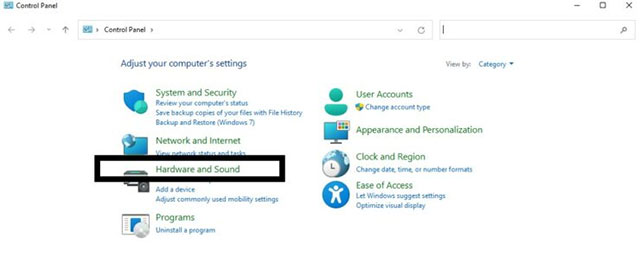
<p style="text-align: justify;"><strong>Bước 3:</strong>&nbsp;Trên cửa sổ&nbsp;<strong>Control Panel&nbsp;</strong>hiện ra, bấm chọn mục&nbsp;<strong>Hardware and Sound</strong>.</p>

<p style="text-align: justify;"><img alt="Bấm chọn mục Hardware and Sound" data-i="1" data-src="https://st.quantrimang.com/photos/image/2022/03/27/cach-thiet-lap-laptop-van-hoat-dong-binh-thuong-ngay-ca-khi-gap-man-hinh-tren-windows-112.jpg" data-was-processed="true" height="257" src="https://st.quantrimang.com/photos/image/2022/03/27/cach-thiet-lap-laptop-van-hoat-dong-binh-thuong-ngay-ca-khi-gap-man-hinh-tren-windows-112.jpg" width="640" /></p>

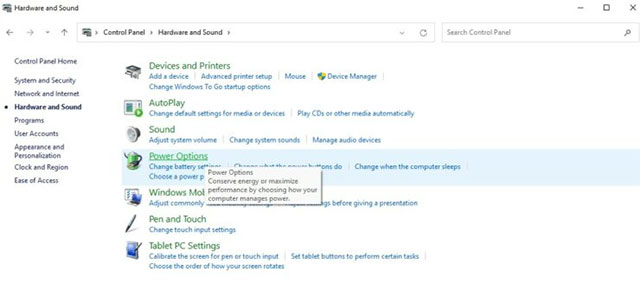
<p style="text-align: justify;"><strong>Bước 4:</strong>&nbsp;Nhấn vào mục&nbsp;<strong>Power Options</strong>.</p>

<p style="text-align: justify;"><img alt="Nhấn vào mục Power Options" data-i="2" data-src="https://st.quantrimang.com/photos/image/2022/03/27/cach-thiet-lap-laptop-van-hoat-dong-binh-thuong-ngay-ca-khi-gap-man-hinh-tren-windows-113.jpg" data-was-processed="true" height="290" src="https://st.quantrimang.com/photos/image/2022/03/27/cach-thiet-lap-laptop-van-hoat-dong-binh-thuong-ngay-ca-khi-gap-man-hinh-tren-windows-113.jpg" width="640" /></p>

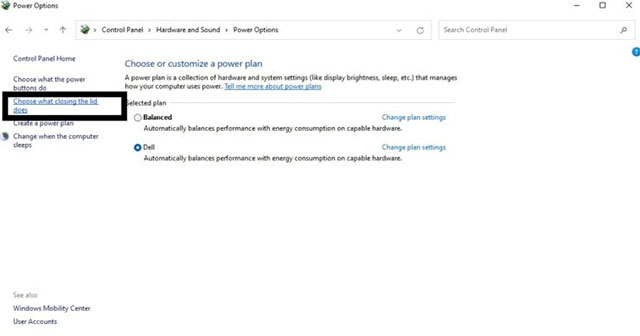
<p style="text-align: justify;"><strong>Bước 5:</strong>&nbsp;Trên ngăn bên trái, bấm chọn “<strong>Choose what closing the lid does</strong>”.</p>

<p style="text-align: justify;"><img alt="Chọn “Choose what closing the lid does”" data-i="3" data-src="https://st.quantrimang.com/photos/image/2022/03/27/cach-thiet-lap-laptop-van-hoat-dong-binh-thuong-ngay-ca-khi-gap-man-hinh-tren-windows-114.jpg" data-was-processed="true" height="336" src="https://st.quantrimang.com/photos/image/2022/03/27/cach-thiet-lap-laptop-van-hoat-dong-binh-thuong-ngay-ca-khi-gap-man-hinh-tren-windows-114.jpg" width="640" /></p>

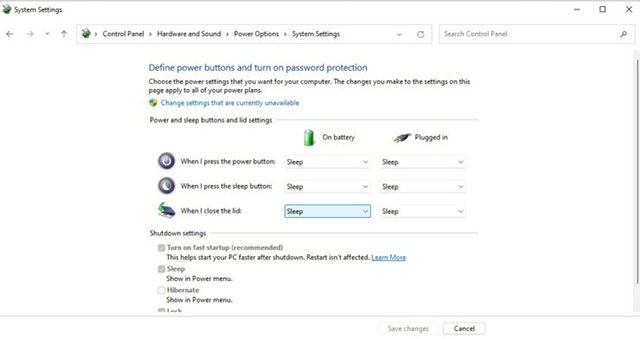
<p style="text-align: justify;"><strong>Bước 6:</strong>&nbsp;Trong menu thả xuống bên cạnh tùy chọn “<strong>When I close the lid</strong>”, hãy nhấp vào “<strong>Do nothing</strong>”.</p>

<p style="text-align: justify;"><img alt="Nhấp vào “Do nothing”" data-i="4" data-src="https://st.quantrimang.com/photos/image/2022/03/27/cach-thiet-lap-laptop-van-hoat-dong-binh-thuong-ngay-ca-khi-gap-man-hinh-tren-windows-115.jpg" data-was-processed="true" height="339" src="https://st.quantrimang.com/photos/image/2022/03/27/cach-thiet-lap-laptop-van-hoat-dong-binh-thuong-ngay-ca-khi-gap-man-hinh-tren-windows-115.jpg" width="640" /></p>

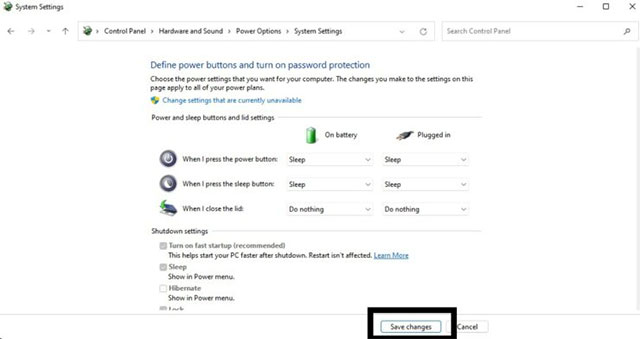
<p style="text-align: justify;"><strong>Bước 7:&nbsp;</strong>Bấm vào&nbsp;<strong>Save changes</strong>&nbsp;để lưu mọi thay đổi.</p>

<p style="text-align: justify;"><img alt=" Bấm vào Save changes " data-i="5" data-src="https://st.quantrimang.com/photos/image/2022/03/27/cach-thiet-lap-laptop-van-hoat-dong-binh-thuong-ngay-ca-khi-gap-man-hinh-tren-windows-116.jpg" data-was-processed="true" height="339" src="https://st.quantrimang.com/photos/image/2022/03/27/cach-thiet-lap-laptop-van-hoat-dong-binh-thuong-ngay-ca-khi-gap-man-hinh-tren-windows-116.jpg" width="640" /></p>

<p style="text-align: justify;">Kể từ bây giờ, bất cứ khi nào bạn đóng chiếc máy tính xách tay của mình lại, hệ thống sẽ vẫn hoạt động như một máy tính để bàn. Tuy nhiên, hãy nhớ rằng điều này có thể khiến thiết bị nóng lên rất nhanh. Vì vậy, đừng quên tắt hệ thống đúng cách khi không sử dụng để tránh quá nhiệt và hao mòn linh kiện nhanh chóng theo thời gian.</p>
		</div>
				<div id="author">
						<p>
				<strong>Nguồn tin:</strong>
				Quantrimang.com
			</p>
		</div>
	</div>
	<div id="footer" class="clearfix">
		<div id="url">
			<strong>URL của bản tin này: </strong><a href="https://www.nguoicodonvn2008.info/vi/news/savefile/kien-thuc-may-tinh/cach-thiet-lap-laptop-van-hoat-dong-binh-thuong-ngay-ca-khi-gap-man-hinh-tren-windows-11-5380.html" title="Cách thiết lập laptop vẫn hoạt động bình thường ngay cả khi gập màn hình trên Windows 11">https://www.nguoicodonvn2008.info/vi/news/savefile/kien-thuc-may-tinh/cach-thiet-lap-laptop-van-hoat-dong-binh-thuong-ngay-ca-khi-gap-man-hinh-tren-windows-11-5380.html</a>

		</div>
		<div class="clear"></div>
		<div class="copyright">
			&copy; .&#x3A; Nguoicodonvn2008.info - Cõi lòng người cô đơn &#x3A;.
		</div>
		<div id="contact">
			<a href="mailto:admin@nguoicodonvn2008.info">admin@nguoicodonvn2008.info</a>
		</div>
	</div>
</div>
        <div id="timeoutsess" class="chromeframe">
            Bạn đã không sử dụng Site, <a onclick="timeoutsesscancel();" href="https://nguoicodonvn2008.info/#">Bấm vào đây để duy trì trạng thái đăng nhập</a>. Thời gian chờ: <span id="secField"> 60 </span> giây
        </div>
        <div id="openidResult" class="nv-alert" style="display:none"></div>
        <div id="openidBt" data-result="" data-redirect=""></div>
		</script>
		<div class="car-top">
  <span><img src="https://nguoicodonvn2008.info/themes/default/images/car.png" alt=""></span>
</div>
<script src="https://nguoicodonvn2008.info/assets/js/jquery/jquery.min.js"></script>
<script>var nv_base_siteurl="/",nv_lang_data="vi",nv_lang_interface="vi",nv_name_variable="nv",nv_fc_variable="op",nv_lang_variable="language",nv_module_name="news",nv_func_name="savefile",nv_is_user=0, nv_my_ofs=-4,nv_my_abbr="EDT",nv_cookie_prefix="nv4c_e856T",nv_check_pass_mstime=1738000,nv_area_admin=0,nv_safemode=0,theme_responsive=0,nv_recaptcha_ver=2,nv_recaptcha_sitekey="",nv_recaptcha_type="image",XSSsanitize=1;</script>
<script src="https://nguoicodonvn2008.info/assets/js/language/vi.js"></script>
<script src="https://nguoicodonvn2008.info/assets/js/DOMPurify/purify3.js"></script>
<script src="https://nguoicodonvn2008.info/assets/js/global.js"></script>
<script src="https://nguoicodonvn2008.info/assets/js/site.js"></script>
<script src="https://nguoicodonvn2008.info/themes/default/js/news.js"></script>
<script src="https://nguoicodonvn2008.info/themes/default/js/main.js"></script>
<script src="https://nguoicodonvn2008.info/themes/default/js/custom.js"></script>
<script type="application/ld+json">
        {
            "@context": "https://schema.org",
            "@type": "Organization",
            "url": "https://nguoicodonvn2008.info",
            "logo": "https://nguoicodonvn2008.info/uploads/angel.gif"
        }
        </script>
<script src="https://nguoicodonvn2008.info/themes/default/js/bootstrap.min.js"></script>
<script type="text/javascript">
var $scrolltop = $('.car-top');
$scrolltop.on('click', function () {
    $('html,body').animate({
        scrollTop: 0
    }, 800);
    $(this).addClass("car-run");
    setTimeout(function(){ $scrolltop.removeClass('car-run');}, 1000);
    return false;
});
$(window).on('scroll', function ()
{ 
    if($(window).scrollTop() >= 200)
    {
        $scrolltop.addClass("show");
        $scrolltop.addClass("car-down");
    }
    else
    {
       $scrolltop.removeClass("show");
       setTimeout(function(){ $scrolltop.removeClass('car-down');}, 300);
    }
});
</script>
</body>
</html>